TrailSnap
TrailSnap (行影集) | AI-Powered open-source photo album for travel & life memories.(AI赋能的开源相册工具,珍藏旅行与生活点滴)
Safety scan
A static text scan, not a guarantee. Select the badge to see what was scanned and every finding.
Check it deeper on your machine
It has changed since its scan on 11 Nov 2026.
As a Claude Code plugin, install it and then ask Claude Code:
/plugin marketplace add keithmackay/mackayi/plugin install scanskillsafety@mackayiDo a deep scan of https://github.com/LC044/TrailSnap with scanskillsafety
Or from a terminal, clone it and run it:
git clone https://github.com/keithmackay/scanskillsafety-skill ~/.claude/skills/scanskillsafetynode ~/.claude/skills/scanskillsafety/cli.cjs --deep 'https://github.com/LC044/TrailSnap'
It checks the exact commit: every file, its packages against OSV (api.osv.dev), how it compares with this page's scan (findsafeskills.com receives the repository's address), and, if you agree, Claude reading every file with your own Claude subscription. It never runs the code.
Badge for your README

Markdown
[](/listings/lc044--trailsnap)HTML
<a href="/listings/lc044--trailsnap"><img src="/api/listings/lc044--trailsnap/badge.svg" alt="findsafeskills safety rating" /></a>Install
What was scanned
The files the safety scan read, as written by the repository's author and shown as plain text. Lines with a finding are marked.
README.md · README · 258 lines
View this file on GitHub (read at the repository's current version: the scan did not record which commit it read)
This file has changed since it was scanned, so this is not exactly the text that was scanned, and no line is marked. The findings are listed with the safety scan above.
- <div align="center">
- <a href="https://github.com/LC044/TrailSnap/stargazers">
- <img src="https://img.shields.io/github/stars/LC044/TrailSnap.svg" />
- </a>
- <a href="https://trailsnap.cn/" target="_blank">
- <img alt="GitHub forks" src="https://img.shields.io/github/forks/LC044/TrailSnap?color=eb6ea5">
- </a>
- <a href="https://atomgit.com/LC044/TrailSnap" target="_blank">
- <img alt="Docker Pulls" src="https://atomgit.com/LC044/TrailSnap/star/badge.svg">
- </a>
- <!-- <a href="https://trailsnap.cn/" target="_blank">
- <img src="https://img.shields.io/badge/TrailSnap-行影集-blue.svg">
- </a> -->
- <a target="_blank" href="https://trailsnap.cn/">
- <img alt="Hits" src="https://hits.b3log.org/LC044/trailsnap.svg">
- </a>
- <a href="https://trailsnap.cn/" target="_blank">
- <img src="https://img.shields.io/github/license/LC044/TrailSnap" />
- </a>
- <a href="https://github.com/LC044/TrailSnap/releases" target="_blank">
- <img alt="GitHub release (with filter)" src="https://img.shields.io/github/v/release/LC044/TrailSnap">
- </a>
- <a href="https://trailsnap.cn/" target="_blank">
- <img alt="Docker Pulls" src="https://img.shields.io/docker/pulls/siyuan044/trailsnap-frontend?color=3eb370">
- </a>
- <!-- 下载量 -->
- <a href="https://github.com/LC044/TrailSnap/releases" target="_blank">
- <img alt="Downloads" src="https://img.shields.io/github/downloads/LC044/TrailSnap/total.svg">
- </a>
- [English](doc/README_en.md) | **中文**
- </div>
- > TrailSnap 是一个智能化的 AI 相册应用,致力于帮助用户轻松记录、整理和回顾自己的出行经历。通过强大的 AI 处理能力,让每一张照片和每一段旅程都成为**值得珍藏的记忆**。
- >
- > 未来每个人(至少每个家庭)都有一个属于自己的 AI 数据中心,而相册是数据中心的一个重要数据来源,它留存了你生活中的很多瞬间,TrailSnap 致力于将这些瞬间转化为有**价值的记忆**,它可以帮你默默地记录下相册里的车票、景点门票,可以帮你**记录旅行中的所见所闻**,可以帮你自动整理出可以发朋友圈的照片(甚至帮你准备好文案),可以帮你剪一段15s的短视频······。
- >
- > 把旅行从"拍过"变成"可留念、可展示、可分享"。TrailSnap 做的,是让每一段出行都值得珍藏。
- >
- > 所以,我给这个项目命名为 **《行影集》**,在这里你的数据才 "真正属于你"。
- <br/>
- <a href="https://trailsnap.cn">
- <img src="doc/image/demo.png" title="Main Screenshot">
- </a>
- <br/>
- > 🎉 **在线体验**:不想自己部署?可以直接访问演示站体验完整功能 👉 **[https://demo.siyuan.ink](https://demo.siyuan.ink)**(账号 / 密码均为 `trailsnap`)
- ## ✨ 核心特色
- 需求共创平台已独立开源至 [TrailSnap-Feedback](https://github.com/LC044/TrailSnap-Feedback),其部署、数据库迁移、AI 对话和镜像构建在独立仓库维护。[提交反馈](https://feedback.trailsnap.cn/)。
- - **📷 智能相册**: 足迹地图、人物识别、智能分类、OCR识别、智能搜索。
- - **🚆 行程记录**: 特有的火车票、行程、景区/演唱会门票管理功能,自动识别票据信息。
- - **🤖 AI 赋能**: 一句话让AI帮你生成旅行日记。
- - AI自动剪视频生成VLOG(待开发)
- - AI修图,自动识别高质量照片(待开发)
- 
- ## 🧭 功能概览
- | 功能 | 实现情况 | 描述 |
- | --- | --- |-------------------------------------------------------------------|
- | **Agent**| √ | 与AI大模型进行对话,一键生成旅行日记 |
- | **cli** | √ | 提供命令行界面,方便AI操作 |
- | **SKILL** | √ | 支持接入OpenClaw、Claude Code等平台,实现自动任务执行 |
- | **车票识别** | √ | 支持识别照片中的火车票和行程单,自动提取行程信息 |
- | **年度报告** | √ | 自动生成2025年的出行统计报告,包括照片墙、出行城市、出行景点、行程时间轴、线路里程等 |
- | **AI分析** | √ | 使用大模型分析照片内容,生成描述和评分,做成电子画廊 |
- | **那年今日** | √ | 查看往年今天的照片,按图片评分排序、自动播放往年值得回忆的照片 |
- | **旅行日志** | √ | 支持用户手动输入或 AI 识别出的行程信息,生成旅行日志 |
- | **点亮的城市** | √ | 查看所有上传的照片中出现的城市,点击城市可以查看该城市的所有照片 |
- | **去过的景区** | √ | 统计去过的5A级景区,点击景区可以查看该景区的所有照片,也可以自定义景区位置,自动筛选在景区范围内的照片 |
- | 添加外部文件夹 | √ | 可以添加外部文件夹作为数据源,TrailSnap 会自动扫描并索引其中的照片和视频 |
- | live photo | √ | 支持iphone、vivo、oppo、小米等手机型号 |
- | **时间轴** | √ | 丝滑的时间轴滚动效果 |
- | 足迹相册 | √ | 可以在地图上查看所有上传的照片,点击照片可以查看详情,也可以按省、市、区单独查看(支持列表视图、地图视图、时间轴视图、轨迹视图) |
- | 人脸识别 | √ | 支持识别照片中的人物,自动添加人物标签 |
- | 场景智能分类 | √ | 支持根据照片中的场景自动分类,例如:夜景、宠物、美食、自拍等 |
- | 智能搜索 | √ | 支持根据照片中的人物、画面内容、时间等进行搜索 |
- | 标签 | √ | 支持手动添加和删除标签,也可以根据 AI 识别结果自动添加标签 |
- | 条件相册 | √ | 支持根据标签、场景、人物、地点等条件筛选照片,生成自定义相册 |
- | 智能相册 | √ | 支持根据照片中的内容自动生成相册,例如:"我和女朋友在海边的自拍"等 |
- ### Todo List
- - [x] 支持回收站功能,用户可以恢复已删除的照片。
- - [x] 支持MCP协议,用户可以通过MCP协议与TrailSnap进行通信。
- - [x] 支持skills,可以接入OpenClaw、Claude Code等平台。
- - [ ] 更丰富的行程管理功能,例如:支持演唱会门票、景区门票、酒店订单、电影票等。
- - [ ] 更全面的AI能力,例如:支持AI自动剪视频生成VLOG、支持AI修图,AI生成旅行日记等。
- ## 2025 年度报告
- 2025 相册年度报告
- [查看预览版](https://siyuan.ink/annual-report)
- 
- ## 🚀 快速开始
- 其他问题请查看软件官网:[https://trailsnap.cn](https://trailsnap.cn/)
- ### 桌面端安装包(最简单)
- 前往 [Releases](https://github.com/LC044/TrailSnap/releases) 页面,下载对应平台的安装包并安装即可。
- ### Docker部署一键安装脚本
- TrailSnap 提供一键安装脚本,自动完成 Docker 安装、镜像加速配置和服务部署。
- **Linux / macOS / WSL2:**
- ```bash
- curl -fsSL https://trailsnap.cn/install.sh | bash
- ```
- **Windows PowerShell:**
- ```powershell
- irm https://trailsnap.cn/install.ps1 | iex
- ```
- 更多用法(非交互模式、GPU 加速、自定义端口等)请参考 [安装文档](https://trailsnap.cn/docs/guide/install.html)。
- ### Docker 手动部署(推荐)
- 1. 确保已安装 Docker 和 Docker Compose。
- 2. docker-compose
- docker-compose.yml 配置文件(注意修改挂载路径为本地路径,不然无法扫描本地照片目录),具体可以参考 [TrailSnap 文档](https://trailsnap.cn/docs/guide/install.html) :
- ```yml
- services:
- postgres:
- image: crpi-d7wuvvdylhqugyu2.cn-hangzhou.personal.cr.aliyuncs.com/siyuan044/pgvector:pg18-trixie
- restart: always
- environment:
- POSTGRES_DB: trailsnap
- POSTGRES_USER: trailsnap
- POSTGRES_PASSWORD: trailsnap
- POSTGRES_INITDB_ARGS: "--encoding=UTF8 --lc-collate=C --lc-ctype=C"
- PGDATA: /var/lib/postgresql/data/pgdata
- networks: [ app-network ]
- volumes:
- - ./pg_data:/var/lib/postgresql/data
- healthcheck:
- test: ["CMD-SHELL", "pg_isready -U trailsnap -d trailsnap -p 5432"]
- interval: 5s
- timeout: 5s
- retries: 5
- start_period: 10s
- server:
- image: crpi-d7wuvvdylhqugyu2.cn-hangzhou.personal.cr.aliyuncs.com/siyuan044/trailsnap-server:latest
- restart: always
- expose: [ "8000" ]
- networks: [ app-network ]
- volumes:
- - ./data:/app/data
- - /path/to/your/photos:/app/Photos
- environment:
- - TZ=Asia/Shanghai
- - DB_URL=postgresql://trailsnap:trailsnap@postgres:5432/trailsnap
- - RAILWAY_DB_URL=postgresql://trailsnap:trailsnap@postgres:5432/railway
- - AI_API_URL=http://ai:8001
- - TRAILSNAP_ROOT_PATH=/api
- # 请替换为这台主机的局域网 IP,供 App 自动发现
- - TRAILSNAP_PUBLIC_URL=http://192.168.1.10:3180
- depends_on:
- postgres:
- condition: service_healthy
- ai:
- image: crpi-d7wuvvdylhqugyu2.cn-hangzhou.personal.cr.aliyuncs.com/siyuan044/trailsnap-ai:latest
- restart: always
- stop_grace_period: 15s
- expose: [ "8001" ]
- networks: [ app-network ]
- volumes:
- - ./data:/app/data
- environment:
- - TZ=Asia/Shanghai
- healthcheck:
- test: ["CMD", "python", "-c", "import urllib.request; urllib.request.urlopen('http://127.0.0.1:8001/health-check', timeout=3)"]
- interval: 30s
- timeout: 5s
- retries: 3
- start_period: 30s
- frontend:
- image: crpi-d7wuvvdylhqugyu2.cn-hangzhou.personal.cr.aliyuncs.com/siyuan044/trailsnap-frontend:latest
- restart: always
- ports: [ "3180:80" ]
- depends_on: [ server ]
- networks: [ app-network ]
- networks:
- app-network:
- driver: bridge
- ```
- 3. 启动服务
- ```bash
- docker-compose up -d
- ```
- ### 源码部署
- [源码部署](https://trailsnap.cn/docs/dev/guide.html)
- ## 📚 文档
- 更多详细文档请参阅 [TrailSnap 文档](https://trailsnap.cn/docs/guide/install.html)
- ## 🔍 其他
- ### QQ交流群
- <img src="./doc/image/QQ1.jpg" alt="QQ交流群" width="200px">
- ### 微信交流群
- 扫码关注公众号回复“行影集”获取入群二维码
- <a href="https://blog.siyuan.ink/static/img/46f6ef1506ec8bdc019a796c0aba368b.clipboard-2026-10-18.webp" target="_blank">
- <img src="https://trailsnap.cn/qrcodes/wechat_official_account_qr.webp" alt="微信交流群" width="200px">
- </a>
- ### 致谢
- 本项目90%以上的代码由AI生成
- - [TRAE](https://www.trae.ai/) 本来不打算做完整的相册,奈何AI太强了,于是开了10$套餐年卡,从此告别手写代码.如果你的AI写代码能力一般,可以参考一下我的[提示词](https://trailsnap.cn/docs/dev/prompt/2025-12-25.html)
- - [Claude Code](https://www.claude.ai/) 没钱用官方模型,用它来帮我提交代码,写写文档啥的
- - [豆包](https://www.doubao.com/) 满嘴胡话,但还是能提出建设性意见的
- - [ChatGPT](https://chat.openai.com/) 用于教豆包做AI
- - [InkTime](https://github.com/dai-hongtao/InkTime) InkTime 是一个可自托管的墨水屏电子相框。它用AI分析你的照片库,按值得回忆度打分,并按"历史上的今天"自动生成每日最具回忆价值的照片,让沉睡的记忆重新被看见
- ## 🌟 Star History
- [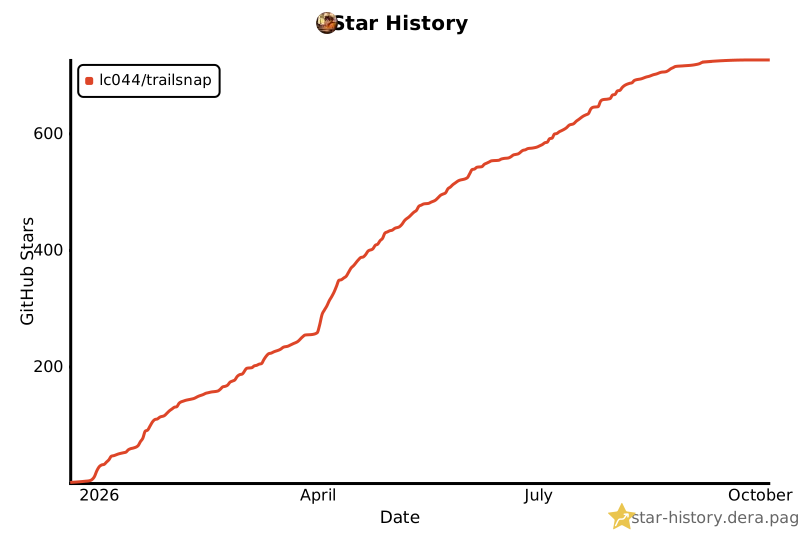](https://star-history.dera.page/#LC044/TrailSnap&Date)
- ## 🤝 贡献者
- <a href="https://github.com/lc044/TrailSnap/graphs/contributors">
- <img src="https://contrib.rocks/image?repo=lc044/TrailSnap" />
- </a>
- ## 📖 贡献指南
- 欢迎提交 Pull Request!请阅读 [贡献指南](CONTRIBUTING.md) 了解开发环境设置、代码规范和提交流程。
Ratings and comments
Sign in to rate this skill.
Sign inFree to use. If it’s helped, pass it on.