laradashboard
⚡ Lara Dashboard - CMS by Laravel - All In One solution to start your Laravel Application from Basic to Enterprise. Manages Users, Roles, Permissions, Modules, Settings, Translations, Contents, Monitoring and every actions of your Laravel application. Complete solution for Laravel application with Tailwind, Livewire, Rest API, Unit-Tests and more.
Safety scan
A static text scan, not a guarantee. Select the badge to see what was scanned and every finding.
Check it deeper on your machine
It has changed since its scan on 11 Nov 2026.
As a Claude Code plugin, install it and then ask Claude Code:
/plugin marketplace add keithmackay/mackayi/plugin install scanskillsafety@mackayiDo a deep scan of https://github.com/laradashboard/laradashboard with scanskillsafety
Or from a terminal, clone it and run it:
git clone https://github.com/keithmackay/scanskillsafety-skill ~/.claude/skills/scanskillsafetynode ~/.claude/skills/scanskillsafety/cli.cjs --deep 'https://github.com/laradashboard/laradashboard'
It checks the exact commit: every file, its packages against OSV (api.osv.dev), how it compares with this page's scan (findsafeskills.com receives the repository's address), and, if you agree, Claude reading every file with your own Claude subscription. It never runs the code.
Badge for your README

Markdown
[](/listings/laradashboard--laradashboard)HTML
<a href="/listings/laradashboard--laradashboard"><img src="/api/listings/laradashboard--laradashboard/badge.svg" alt="findsafeskills safety rating" /></a>Install
Install instructions from the README
As written by the repo's author. findsafeskills has not verified these steps.
**Clone and Go Project**
git clone git@github.com:laradashboard/laradashboard.git
cd laradashboard
**Database & env creation**
- Create database called - `laradashboard` - Create `.env` file by copying `.env.example` file
cp .env.example .env
**Install Composer & Node Dependencies**
composer install
npm install
**Generate Artisan key**
php artisan key:generate
**Link storage for file upload processing**
php artisan storage:link
**Migrate Database with seeder**
php artisan migrate:fresh --seed
**Run Project**
composer run dev
So, You've got the project of Lara Dashboard on your local machine - http://localhost:8000
[Note]: For hot reloading to work, you must need node js version >= 20.19
<p align="right">(<a href="#readme-top">back to top</a>)</p>
What was scanned
The files the safety scan read, as written by the repository's author and shown as plain text. Lines with a finding are marked.
README.md · README · 1,089 lines
View this file on GitHub (read at the repository's current version: the scan did not record which commit it read)
This file has changed since it was scanned, so this is not exactly the text that was scanned, and no line is marked. The findings are listed with the safety scan above.
- <a id="readme-top"></a>
- <div align="center">
- <img width="100%" alt="Lara Dashboard — open-source Laravel 13 admin panel, CMS and modular starter kit — dashboard preview with charts, user activity and modules" src="demo-screenshots/03-Dashboard-Page-lite-Mode.png" />
- # ⚡ Lara Dashboard
- ### Open-source Laravel Admin Panel, CMS & Modular Starter Kit — powered by Laravel 13, Livewire 3, Tailwind CSS v4, built-in MCP for AI agents, and inline AI content tools.
- [![Latest Release][release-shield]][release-url]
- [![PHP Version][php-shield]][php-url]
- [![Laravel][laravel-shield]][laravel-url]
- [![Tailwind CSS][tailwind-shield]][tailwind-url]
- [![Livewire][livewire-shield]][livewire-url]
- [![License][license-shield]][license-url]
- [![Stargazers][stars-shield]][stars-url]
- [![Forks][forks-shield]][forks-url]
- [![Contributors][contributors-shield]][contributors-url]
- [![Issues][issues-shield]][issues-url]
- **[🌐 Website](https://laradashboard.com) • [🚀 Live Demo](https://laradashboard.com/try-demo/) • [📖 Documentation](https://laradashboard.com/docs/) • [🧩 Marketplace](https://laradashboard.com) • [💬 Community](https://www.facebook.com/groups/laradashboard)**
- </div>
- ---
- **Lara Dashboard** is a **production-ready Laravel admin panel and headless CMS** — a batteries-included **Laravel boilerplate / starter kit** with Users, Roles, Permissions (RBAC via Spatie), Modules, Settings, Translations, Posts & Pages, Media Library, **REST API**, **MCP server for AI agents** (Cursor, Claude Desktop, Claude Code), AI content generation, and a **WordPress-style hooks system** (via [eventy](https://github.com/tormjens/eventy)) for extensibility.
- Built for Laravel developers who want to ship admin dashboards, SaaS apps, CRMs and internal tools in **hours, not weeks** — without trading away Laravel idioms, testability or type-safety.
- > **Try the live demo:** <https://laradashboard.com/try-demo/>
- > **Credentials:** `superadmin@example.com` / `12345678`
- ## ✨ Why Lara Dashboard?
- - 🔐 **Complete RBAC** — Users, Roles, Permissions via Spatie, admin impersonation, social auth (Socialite), and 2FA-ready flows.
- - 🧩 **Modular Architecture** — Self-contained modules via [nwidart/laravel-modules](https://laravelmodules.com/). Install, enable, disable, zip and distribute with a single command.
- - ⚡ **CRUD Generator** — `php artisan module:make-crud` scaffolds Model, Migration, Service, FormRequest, Controller, Datatable, Views, Routes, Menu and Tests in one pass.
- - 📝 **Full CMS** — Posts, Pages, Categories, Tags, Media Library, visual block-based editor with drag-and-drop.
- - 🤖 **Develop & manage with AI (MCP)** — Connect **Cursor**, **Claude Desktop**, or **Claude Code** to your site. Create posts, review CRM leads, send emails, search docs, clear cache, and run daily briefings from natural language — with token-based, permission-scoped access from **Settings → MCP**.
- - ✍️ **Inline AI content** — Configure OpenAI, Anthropic, Gemini and more via filter hooks. Generate and refine content inside the admin and builder.
- - 📧 **Email System** — Inbound/outbound SMTP connections, visual email template builder, campaign tracking, notifications.
- - 🌐 **i18n Out-of-the-box** — 21 languages preloaded, chunked translation management, one-click language adds.
- - 🔌 **REST API** — Auto-documented with [Scramble](https://github.com/dedoc/scramble), Sanctum-auth, ready for mobile apps and SPAs.
- - 🎨 **Beautiful UI** — Tailwind CSS v4, Alpine.js, dark/light mode, 60+ components, responsive on every breakpoint.
- - 🪝 **WordPress-style Hooks** — Actions and filters everywhere so you can extend without forking.
- - 🧪 **Tests & Static Analysis** — Pest, PHPStan (Larastan), Rector, Pint — all wired up out of the box.
- - 📦 **Zero-friction Deploy** — cPanel/shared-hosting ready, ZIP distribution with vendor folder, one-click core upgrades with backup/restore.
- ## 🤖 Develop & Manage Your Site with AI (MCP)
- Lara Dashboard ships a **built-in [Model Context Protocol (MCP)](https://modelcontextprotocol.io/) server** so AI coding assistants can operate your site like a power user — not just write code about it.
- Connect **Cursor** (Desktop or CLI), **Claude Desktop**, or **Claude Code**, generate an MCP agent token in **Settings → MCP**, and ask your assistant to manage day-to-day work: draft and publish posts, triage form submissions, update CRM records, send templated email, inspect logs, and more. Installed modules can expose their own tools through the **`McpFilterHook`** registry.
- **What you can do from Cursor, Claude, or similar clients**
- | Area | Examples |
- | --- | --- |
- | **Content** | List, create, and update posts; generate SEO meta |
- | **CRM** | Contacts, deals, tickets, and activities *(CRM module)* |
- | **Forms** | Review new submissions and mark them viewed *(Forms module)* |
- | **Email** | List templates and send mail to users or contacts |
- | **Operations** | Daily briefing, clear cache, list storage log files |
- | **Docs** | Search and read LaraDashboard guides *(DocForge module)* |
- **Quick start**
- 1. Open **Settings → MCP**, enable the MCP server, and save.
- 2. Click **Generate MCP token** and copy the token (shown once).
- 3. Add the server config to your AI client — the admin UI includes ready-made JSON for Cursor, Claude Desktop, and Claude Code.
- Example config for **Cursor** (`~/.cursor/mcp.json` or project `.cursor/mcp.json`):
- ```json
- {
- "mcpServers": {
- "laradashboard": {
- "url": "https://your-site.test/mcp",
- "headers": {
- "Authorization": "Bearer YOUR_MCP_AGENT_TOKEN"
- }
- }
- }
- }
- ```
- For local development, you can store the token in an env var (`LARADASHBOARD_MCP_TOKEN`) and reference it from the config snippet in **Settings → MCP**.
- > **Note:** The MCP endpoint returns 404 until MCP is enabled in settings. Regular API login tokens do not work — use a dedicated MCP agent token with the abilities you choose.
- ## 📚 Table of Contents
- - [Develop & Manage with AI (MCP)](#-develop--manage-your-site-with-ai-mcp)
- - [Requirements](#-requirements)
- - [Built With](#️-built-with)
- - [Project Setup](#-project-setup)
- - [Build Commands](#-build-commands)
- - [Features — How it Works](#️-how-it-works)
- - [Module Development](#-module-development)
- - [CRUD Generator](#crud-generator)
- - [REST API](#-rest-api-documentation)
- - [Tests & Code Quality](#tests)
- - [Distribution Package](#-distribution-package-zip-build)
- - [Screenshots](#-screenshots)
- - [Premium Modules](#-premium-features)
- - [Changelog](#-changelog)
- - [Contributing](#-contributing)
- ## 📋 Requirements:
- - Spatie role permission package `^6.4`
- - Pest test package `^4.x`
- - Tailwind CSS >= 4.x
- - Laravel Modules - https://laravelmodules.com/docs/12/getting-started/introduction
- - Laravel Events (A WordPress like action/filter hooks) - https://github.com/tormjens/eventy
- - PHP 8.3 or 8.4
- - Node.js >= 20.19 - https://nodejs.org/en/download/
- <p align="right">(<a href="#readme-top">back to top</a>)</p>
- ### 🛠️ Built With
- - [![PHP][PHP.com]][PHP-url]
- - [![Laravel][Laravel.com]][Laravel-url]
- - [![Tailwind CSS][TailwindCSS.com]][TailwindCSS-url]
- - [![JavaScript][JavaScript.com]][JavaScript-url]
- - [![Alpine JS][AlpineJS.com]][AlpineJS-url]
- - [![React][React.js]][React-url]
- - [![MySQL][MySQL.com]][MySQL-url]
- - <a href="https://penguinui.com/">
- <img src="https://res.cloudinary.com/ds8pgw1pf/image/upload/v1721401292/penguinui/main-assets/Logo.png" alt="Penguin UI" style="height: 30px;">
- </a>
- - <a href="https://tailadmin.com" style="display: flex; align-items: center; text-decoration: none; color: #3d51e0;">
- <img src="https://avatars.githubusercontent.com/u/95587422?v=4" alt="Tail Admin" style="height: 20px;"> <span style="color:#3d51e0; margin-left: 5px;">Tail Admin</span>
- </a>
- <p align="right">(<a href="#readme-top">back to top</a>)</p>
- ## 📝 Changelog
- > **Latest release:** [v1.5.4](https://github.com/laradashboard/laradashboard/releases/tag/v1.5.4) • [Full changelog →](CHANGELOG.md) • [All GitHub releases](https://github.com/laradashboard/laradashboard/releases)
- **[v1.5.4] — 2026-11-17**
- - **Feature:** Scheduled posts and pages publish automatically (`posts:publish-scheduled`, every minute; needs the scheduler cron).
- - **Feature:** LaraBuilder columns stack on phones, and large headings scale down on small screens; the editor previews match.
- - **Fix (Security):** Settings and Theme image uploads only accept real image files, closing remote code execution through an uploaded `.php` logo (GHSA-r9ch-j892-qrh2).
- - **Fix (Security):** Media file names and post list titles/categories are escaped, closing XSS through crafted file names.
- - **Fix:** Excerpts from LaraBuilder content are no longer empty; email template previews fill variables with sample data and load in an isolated frame.
- - **Fix:** Editor role defaults include post and media permissions; post view counts work on MySQL/MariaDB.
- - **Fix:** Builder blocks with empty spacing, slash-menu Enter, module upload conflict queue, sticky table header beside side forms, and media thumbnails.
- **[v1.5.3] — 2026-11-15**
- - **Fix (Security):** Custom menu item links only accept `http`, `https`, `mailto`, `tel`, `sms` or relative URLs, closing a stored XSS in the public navigation (GHSA-883p-xm36-3p99).
- - **Fix (Security):** Social login sign-ups count toward the per-IP daily registration limit and pass the spam-name and email checks (GHSA-w29c-wmgq-hfrc).
- - **Fix (Security):** The Ollama base URL check blocks cloud metadata addresses written in any IPv6 notation, e.g. `::ffff:a9fe:a9fe` (GHSA-7447-x4w9-pc4p).
- - **Fix:** Core upgrades and module installs pick a command-line PHP that matches the site's PHP version; override with `PHP_CLI_BINARY`.
- - **Chore:** Laravel 13.40.0.
- **[v1.5.2] — 2026-11-08**
- - **Fix (Security):** Ollama base URL is validated and Superadmin-only, closing an SSRF via `generate-seo` (GHSA-47pj-m4xp-74g5).
- - **Fix (Security):** Secret settings (API keys, passwords, client secrets) are masked in the action log, including existing entries (GHSA-29v7-6x3j-r97q). Rotate secrets saved before this release.
- - **Fix (Security):** Dashboard Quick Draft requires `post.create` (GHSA-p4mj-68rh-c24q).
- - **Fix:** AI image generation works again after DALL-E 3's retirement; defaults to `gpt-image-2.5-flare`.
- - **Fix:** Older datatable `render()` overrides no longer throw `Undefined variable $visibleHeaders`.
- - **Fix:** LaraBuilder video block embeds YouTube, Vimeo and Dailymotion players on published pages.
- **[v1.5.1] — 2026-11-05**
- - **Fix (Security):** Passwords are capped at 72 characters (bcrypt's limit) on registration, reset, profile and user forms; login accepts up to 255 so existing accounts still work.
- - **Fix:** Deploy migrations no longer fail when a module loads its own `vendor/autoload.php`; module autoloaders are pre-included after core.
- - **Tests:** The core test suite no longer boots installed modules or rewrites `modules_statuses.json`.
- **[v1.5.0] — 2026-11-04**
- - **New:** OAuth 2.1 for the MCP server, so OAuth-only clients like Claude.ai custom connectors can connect with just the `/mcp` URL (PKCE, rotating refresh tokens).
- - **Fix (Security):** Module installs can no longer write outside `modules/` via crafted folder names (GHSA-75q6-qrv2-96rx).
- - **Fix:** Module `vendor/` autoloaders no longer override core framework classes.
- - **Change:** OpenAI defaults to `gpt-6-luna`; `gpt-6-sol` replaces the retired GPT-4o/GPT-4/GPT-3.5 models.
- **[v1.4.9] — 2026-11-02**
- - **Fix (Security):** Social login no longer links an existing account to an unverified provider email; the OAuth callback is rate-limited (GHSA-c5x3-wvxj-7cgr).
- - **Fix (Security):** LaraBuilder content is sanitized on save and load, closing stored XSS in the builder, admin previews, and rendered pages (GHSA-rf5h-55h2-jmf8, GHSA-9gg9-jh9p-fw37).
- - **Fix (Security):** MCP `send-email` requires `email_template.edit` (GHSA-gjfv-h634-pxpv).
- - **Chore:** Livewire 4.4.8, Laravel 13.39, CommonMark 2.10.4, svg-sanitize 1.0.0, Vite 7.3.7, and other dependency security updates.
- **[v1.4.8] — 2026-10-03**
- - **Fix (Security):** Fixed some security improvements.
- - **Fix:** Fixed some mobile responsive issues.
- **[v1.4.7] — 2026-10-02**
- - **Fix (Security):** Settings secrets stay hidden from `settings.view`; registration IP limits, Superadmin role changes, post publish status, email-builder redirects, and MCP base64 uploads are locked down.
- - **Fix (Security):** Public translation JSON can only be read from `resources/lang` (GHSA-43jp-66c9-7cgh).
- - **Fix:** Datatable horizontal scroll, small-screen toolbar, and sticky header stacking.
- - **Chore:** `phpseclib` 3.0.57 and `js-yaml` 5.4.2.
- **[v1.4.5] — 2026-09-23**
- - **New:** Datatable column visibility on every list, and unified page scroll with sticky headers and pagination.
- - **New:** View counts on Posts and Pages admin lists.
- - **New:** MCP multipart hero uploads with `serve_ok` checks; base64 uploads capped at ~100KB (#327).
- - **New:** Multi-turn AI chat completion across OpenAI, Claude, Gemini, and Ollama.
- - **Fix (Security):** Core upgrades and Livewire module enable, disable, delete, and update actions are authorized (Superadmin / `ModulePolicy`).
- - **Fix:** Text editor autoresize for embedded media; MCP media serve checks and signed uploads.
- **[v1.4.2] — 2026-09-14**
- - **New:** Public-form spam protection — honeypot, reCAPTCHA v3, disposable/typo/domain email validation, and reusable Blade components for Livewire forms.
- - **New:** MCP `UploadMediaTool` for AI agents to upload files to the media library.
- - **Improve:** Datatable shift-click bulk selection and sticky headers.
- - **Improve:** Module replace UX (auto-activate + **Replaced & active** badge), MCP settings UI, and auth email guard settings.
- - **Fix:** MCP media URLs, bulk actions dropdown, Pulse storage on fresh installs.
- **[v1.4.0] — 2026-09-07**
- - **New:** MCP server for AI agents — token-based access from **Settings → MCP** with tools for content, CRM, forms, email, docs, cache, and logs.
- - **New:** Module MCP registry (`McpFilterHook`) so installed modules can expose tools and briefing providers.
- **[v1.3.2] — 2026-09-06**
- - **New:** Dashboard widget customization — per-user show/hide for stat cards and sections.
- - **Improve:** Lara Builder drag preview, save reliability, and list block UX.
- - **Fix:** `ModuleStyles` asset scoping and module installation activation edge cases.
- - **Fix (Security):** Superadmin-only marketplace install and manual core upgrade upload; post builder upload authorization; markdown fetch SSRF hardening.
- - **Chore:** Dependency updates (`livewire`, `league/commonmark`, `browserslist`, `fast-uri`).
- **[v1.3.1] — 2026-08-31**
- - **Fix:** Password visibility toggle accessibility — `aria-label`, `aria-pressed`, and hide tooltip (#296).
- - **Fix:** Mobile sidebar toggle icon and `aria-label` / `aria-expanded` on small screens (#295).
- - **Fix:** Fresh install migration failure when `posts.design_json` is missing; guarded canvas padding migration.
- - **Improve:** Core upgrade supports `UPGRADE_ZIP_PATH`; release workflow demo upgrade uses built artifact ZIP.
- - **Chore:** Synced new accessibility strings across 31 locales.
- **[v1.3.0] — 2026-08-30**
- - **Fix:** Hardened media uploads — SVG sanitization, MIME validation, and `.htaccess` hardening on public storage.
- - **Fix:** License API authorization and backup path traversal protection.
- - **Fix:** Media library upload modal Alpine.js quoting; restored header upload button.
- - **New:** GitHub Actions release pipeline — demo deploy, auto-release, marketplace publish, `/api/health`.
- - **New:** Headless upgrade commands, Hostinger deploy scripts, and `module:publish-images`.
- - **Change:** Demo refresh moved to hourly; module menu logos fixed after deploy.
- - **Chore:** Dependency updates (`league/commonmark`, `guzzlehttp/guzzle`, npm packages).
- **[v1.2.2] — 2026-07-17**
- - **Fix:** Core upgrade hardening — vendor staging/validation, CLI subprocess migrations, and vendor included in pre-upgrade backups (fixes shared-hosting upgrade failures).
- - **Fix:** `protect-local-files` Composer script runs via PHP for Windows compatibility.
- **[v1.2.1] — 2026-07-15**
- - **Fix:** Text Editor block lifecycle and list markers in the canvas; list blocks keep content when changing type.
- - **New:** Native Ctrl+Z / Cmd+Z undo in Lara Builder; `ModuleStyles` component for safe module Vite CSS.
- - **Fix:** `module:make-crud` command and stubs; bumped `spatie/laravel-medialibrary` to 11.23.0.
- **[v1.2.0] — 2026-06-21**
- - **New:** Lara Builder SEO drawer with live score, checklist, SERP preview, and AI-generated meta fields.
- - **New:** Auto-save for draft posts, text ↔ heading block conversion, and unified content typography tokens (inherit-by-default colors + section text color).
- - **Fix:** Media library featured image duplicates, broken thumbnails/URLs, and publish/save “Unsaved” false-positive state.
- - **Improve:** Media upload auto-select, post list thumbnails, builder header/actions, and AI content modal UX.
- **[v1.1.5] — 2026-05-18**
- - **Fix:** Migration is now idempotent — safe to re-run on databases that half-applied the v1.1.4 release.
- **[v1.1.4] — 2026-05-18**
- - **New:** Daily error digest email notifications for admins with error details.
- - **Improve:** Improved module generator command to support custom stub templates and better error handling.
- - **Fix:** Fixed switch toggle component styling.
- **[v1.1.3] — 2026-05-04**
- - **Improve:** Improved file upload component with close button and better error handling.
- - **Fix:** Fixed minor upgrade issue for demo mode.
- **[v1.1.2] — 2026-04-19**
- - **Fix:** Module generator command improvement for Windows OS.
- - **Fix:** CRUD generator command improvement for Windows OS.
- - **Improve:** Added more extendibility support for email templates.
- - **Improve:** Added more extendibility support for authentication pages.
- **[v1.1.1] — 2026-04-10**
- - **Feat:** Scheduled queue worker — runs every minute via `schedule:run` to process queued jobs (workflow actions, emails) without requiring a long-running worker.
- - **Improve:** Sidebar submenu supports deeper (3rd and 4th level) nesting with proper indentation.
- - **Improve:** Sidebar submenu expands without an inner scrollbar; the sidebar wrapper handles overflow when nav is long.
- - **Fix:** Cleaned up user dropdown styling in the admin header.
- 👉 **[See the full changelog for all versions (v0.9.x – v2.x) →](CHANGELOG.md)**
- <p align="right">(<a href="#readme-top">back to top</a>)</p>
- ## 🚀 Project Setup
- **Clone and Go Project**
- ```console
- git clone git@github.com:laradashboard/laradashboard.git
- cd laradashboard
- ```
- **Database & env creation**
- - Create database called - `laradashboard`
- - Create `.env` file by copying `.env.example` file
- ```bash
- cp .env.example .env
- ```
- **Install Composer & Node Dependencies**
- ```console
- composer install
- npm install
- ```
- **Generate Artisan key**
- ```console
- php artisan key:generate
- ```
- **Link storage for file upload processing**
- ```console
- php artisan storage:link
- ```
- **Migrate Database with seeder**
- ```console
- php artisan migrate:fresh --seed
- ```
- **Run Project**
- ```php
- composer run dev
- ```
- So, You've got the project of Lara Dashboard on your local machine - http://localhost:8000
- [Note]: For hot reloading to work, you must need node js version >= 20.19
- <p align="right">(<a href="#readme-top">back to top</a>)</p>
- ## 🔨 Build Commands
- | Command | Description |
- |---------|-------------|
- | `npm run build` | Build core only |
- | `npm run build:all` | Build core + all enabled modules |
- | `npm run build:modules` | Build all enabled modules |
- | `npm run build:modules -- --modules=crm` | Build specific module |
- | `npm run build:modules -- --modules=crm,customform` | Build multiple modules |
- | `npm run dev` | Dev server (core + modules) |
- | `npm run dev:core` | Dev server (core only) |
- <p align="right">(<a href="#readme-top">back to top</a>)</p>
- ## 📦 Distribution Package (Zip Build)
- Create a production-ready zip package for distribution or manual upgrades. This package includes the vendor folder so users don't need Composer installed.
- **Using the Admin Panel:**
- 1. For production distribution, first run: `composer install --no-dev --optimize-autoloader`
- 2. Go to **Settings → Core Upgrades**
- 3. Click **Create Backup**
- 4. Select backup type (Core + Modules recommended)
- 5. Check **Include vendor folder** for production deployment
- 6. Download the generated zip file
- 7. Restore dev dependencies: `composer install`
- **Manual Zip Creation:**
- ```bash
- # Build all assets first
- npm run build:all
- # Install production-only dependencies (removes dev packages like Pest, PHPUnit, etc.)
- composer install --no-dev --optimize-autoloader
- # Create distribution zip (excludes node_modules, .git, tests, uploads, etc.)
- zip -r laradashboard-v$(cat version.json | grep -o '"version": "[^"]*' | cut -d'"' -f4).zip \
- app bootstrap config database resources routes vendor Modules \
- public/.htaccess public/index.php public/favicon.ico public/robots.txt \
- public/asset public/backend public/build public/build-* public/css public/js public/images/logo \
- storage/app/.gitignore storage/app/public/.gitignore \
- storage/framework/.gitignore storage/framework/cache/.gitignore \
- storage/framework/sessions/.gitignore storage/framework/views/.gitignore \
- storage/logs/.gitignore \
- artisan composer.json composer.lock package.json version.json index.php \
- .env.example .htaccess vite.config.js tailwind.config.js postcss.config.js \
- -x "*.git*" -x "node_modules/*" -x "tests/*" -x "storage/logs/*" -x "public/images/uploads/*" -x "public/uploads/*"
- # Restore dev dependencies for local development
- composer install
- ```
- > **Note:** Running `composer install --no-dev` before creating the zip ensures the vendor folder only contains production dependencies, significantly reducing the package size.
- **What's included in the distribution package:**
- - `app/` - Application code
- - `bootstrap/` - Bootstrap files
- - `config/` - Configuration files
- - `database/` - Migrations, seeders, factories
- - `public/` - Public assets (build, css, js, images)
- - `resources/` - Views, JS, CSS, lang files
- - `routes/` - Route definitions
- - `vendor/` - Composer dependencies (optional, for production)
- - `index.php` - Root entry point for shared hosting (cPanel)
- - `.htaccess` - Apache rewrite rules
- - `.env.example` - Environment template
- - Core config files (composer.json, package.json, etc.)
- **Shared Hosting (cPanel) Deployment:**
- The package includes `index.php` and `.htaccess` in the root directory, so it works out-of-the-box on shared hosting without changing document root:
- ```bash
- # Upload all files to public_html/
- # No need to change document root - just upload and configure .env
- ```
- If you prefer the standard Laravel setup (recommended for VPS/dedicated servers):
- 1. Point your domain's document root to the `public/` directory
- 2. Or create a symlink: `ln -s /path/to/laradashboard/public /home/user/public_html`
- **Fresh Installation from Zip:**
- ```bash
- # Extract the zip
- unzip laradashboard-vX.X.X.zip -d laradashboard
- cd laradashboard
- # Configure environment
- cp .env.example .env
- php artisan key:generate
- # Update .env with your database credentials
- # DB_DATABASE=your_database
- # DB_USERNAME=your_user
- # DB_PASSWORD=your_password
- # Run migrations
- php artisan migrate --seed
- php artisan storage:link
- # If vendor was not included, run:
- composer install --no-dev --optimize-autoloader
- ```
- <p align="right">(<a href="#readme-top">back to top</a>)</p>
- ## 🔄 Previously From laravel-role
- We were previously at https://github.com/ManiruzzamanAkash/laravel-role, so you need to change the URL if you moved from there
- ```console
- git remote set-url origin git@github.com:laradashboard/laradashboard.git
- ```
- <p align="right">(<a href="#readme-top">back to top</a>)</p>
- ## ⚙️ How it works
- 1. Login using Super Admin Credential -
- 1. Email - `superadmin@example.com`
- 1. Password - `12345678`
- 1. Forget password - Password forget and reset will work if email is set up properly
- 1. Create User
- 1. Create Role
- 1. Assign Permission to Roles
- 1. Assign Multiple Role to an User
- 1. Check by login with the new credentials.
- 1. If you've not enough permission to do any task, you'll get a warning message.
- 1. Dashboard with Beautiful chart integrated
- 1. Module Based Development - Custom Module Add/Enable/Disable/Delete with detail view
- 1. Monitoring - Logging of every action of your application
- 1. Monitoring - Laravel Pulse
- 1. Translation Management - Add/Edit/Delete Language, Add/Edit/Delete Translation
- 1. Settings - General, Site Appearance, Content, Integration, Security settings
- 1. Admin Menu - Add/Edit/Delete Menu, Submenu, Link
- 1. Admin Impersonation - Login as another user and switch back to your original account
- 1. Custom Error Pages - 404, 500, 503, 403
- 1. Content Management System - Add/Edit/Delete Content, Content Category, Content Tag
- 1. AI Content Generation - Configure AI providers (OpenAI, Anthropic, etc.) for content generation
- 1. MCP Server - Connect Cursor, Claude Desktop, or Claude Code; manage content, CRM, forms, email, cache, and logs from AI agents (**Settings → MCP**)
- 1. Email Management - Email connections, email templates with visual builder, notifications
- 1. Detail Pages - User, Role, Permission, Module detail views with comprehensive information
- 1. REST API — auto-documented REST endpoints for Users, Roles, Permissions, Settings, Translations, and Content (Post / Page / Category / Tag).
- <p align="right">(<a href="#readme-top">back to top</a>)</p>
- ## 📧 Email setup
- You can use Mailpit to test emails easily - https://mailpit.axllent.org/
- Installation link - https://mailpit.axllent.org/docs/install/
- ```bash
- MAIL_MAILER=smtp
- MAIL_HOST=127.0.0.1
- MAIL_PORT=1025
- MAIL_USERNAME=null
- MAIL_PASSWORD=null
- MAIL_ENCRYPTION=null
- MAIL_FROM_ADDRESS=dev@example.com
- MAIL_FROM_NAME="${APP_NAME}"
- ```
- Browse Emails - http://localhost:8025
- >[!NOTE] You can also create custom Email connection from Email Connections page.
- <p align="right">(<a href="#readme-top">back to top</a>)</p>
- ## 📚 Documentation
- https://laradashboard.com/docs/
- ## 🔗 Rest API Documentation
- We've used [Scramble](https://github.com/dedoc/scramble) to automatically generate the Rest API documentation for Lara Dashboard. You can find the API documentation at:
- http://localhost:8000/docs/api
- <p align="right">(<a href="#readme-top">back to top</a>)</p>
- ## Tests
- We've used Laravel Pint, Rector, Larastan(PHPstan) - static analysis and Pest for unit tests, e2e (browser) tests.
- ```bash
- composer run test
- ```
- ```bash
- composer run test
- ```
- **Format:** To format the code, we've used `pint`. You can run the following command to format the code:
- ```bash
- composer run format
- ```
- **Type Safety:** To improve type safety, we've used `rector`. You can run the following command to add type hints:
- ```bash
- composer run type-check
- ```
- You can also run individual commands for each tool (optional):
- ```bash
- composer run pint
- composer run phpstan
- composer run pest
- ```
- ## 🛠️ Troubleshooting
- <details>
- <summary><strong>Laragon/Windows: ext-sockets missing</strong></summary>
- If you get this error during `composer install`:
- ```
- pestphp/pest-plugin-browser requires ext-sockets * -> it is missing from your system
- ```
- **Fix:** Enable the sockets extension in `php.ini`:
- ```ini
- extension=sockets
- ```
- Or via Laragon UI: Right-click tray → **PHP** → **Extensions** → check **sockets**
- **Quick workaround:**
- ```bash
- composer install --ignore-platform-req=ext-sockets
- ```
- </details>
- <p align="right">(<a href="#readme-top">back to top</a>)</p>
- ## 🚀 Laravel Boost
- Laravel Boost is already installed in this project to provide enhanced development and debugging tools for Lara Dashboard.
- **How to use Boost:**
- Visit the [Laravel Boost documentation](https://github.com/laravel/boost).
- <p align="right">(<a href="#readme-top">back to top</a>)</p>
- ## 📸 Screenshots
- ### 🔐 Login & Authentication
- <table>
- <tr>
- <td width="50%">
- <strong>Login Page</strong><br/>
- <img width="100%" alt="Login Page" src="/demo-screenshots/00-Login-Page-Lite-Mode.png"/>
- </td>
- <td width="50%">
- <strong>Forget Password Page (Dark Mode)</strong><br/>
- <img width="100%" alt="Forget Password Page" src="/demo-screenshots/01-Forget-password.png"/>
- </td>
- </tr>
- </table>
- ### 📊 Dashboard
- <table>
- <tr>
- <td width="50%">
- <strong>Dashboard (Light Mode)</strong><br/>
- <img width="100%" alt="Dashboard Light Mode" src="/demo-screenshots/03-Dashboard-Page-lite-Mode.png"/>
- </td>
- <td width="50%">
- <strong>Dashboard (Dark Mode)</strong><br/>
- <img width="100%" alt="Dashboard Dark Mode" src="/demo-screenshots/04-Dashboard-Page-Dark-Mode.png"/>
- </td>
- </tr>
- <tr>
- <td width="50%">
- <strong>Dashboard Collapsed Sidebar</strong><br/>
- <img width="100%" alt="Dashboard Collapsed Sidebar" src="/demo-screenshots/04_1-Dashboard-Collapsed-Sidebar.png"/>
- </td>
- </tr>
- </table>
- ### 🔑 Role Management
- <table>
- <tr>
- <td width="50%">
- <strong>Role List (Light Mode)</strong><br/>
- <img width="100%" alt="Role List" src="/demo-screenshots/05-Role-List-Lite.png"/>
- </td>
- <td width="50%">
- <strong>Role List (Dark Mode)</strong><br/>
- <img width="100%" alt="Role List Dark" src="/demo-screenshots/06-Role-List-Dark.png"/>
- </td>
- </tr>
- <tr>
- <td width="50%">
- <strong>Role Create</strong><br/>
- <img width="100%" alt="Role Create" src="/demo-screenshots/07-Role-Create.png"/>
- </td>
- <td width="50%">
- <strong>Role Edit</strong><br/>
- <img width="100%" alt="Role Edit" src="/demo-screenshots/08-Role-Edit.png"/>
- </td>
- </tr>
- <tr>
- <td width="50%">
- <strong>Role Detail</strong><br/>
- <img width="100%" alt="Role Detail" src="/demo-screenshots/08_1-Role-Detail-Lite-Mode.png"/>
- </td>
- <td width="50%">
- <strong>Permission List</strong><br/>
- <img width="100%" alt="Permission List" src="/demo-screenshots/09-Permissions-List-Lite-Mode.png"/>
- </td>
- </tr>
- <tr>
- <td width="50%">
- <strong>Permission Detail</strong><br/>
- <img width="100%" alt="Permission Detail" src="/demo-screenshots/09_1-Permission-Detail-Lite-Mode.png"/>
- </td>
- <td width="50%">
- <!-- Reserved for future screenshot -->
- </td>
- </tr>
- </table>
- ### 👥 User Management
- <table>
- <tr>
- <td width="50%">
- <strong>Users List (Light mode)</strong><br/>
- <img width="100%" alt="Users List (Light mode)" src="/demo-screenshots/10-User-List-Lite-Mode.png"/>
- </td>
- <td width="50%">
- <strong>User Create (Dark mode)</strong><br/>
- <img width="100%" alt="User Create" src="/demo-screenshots/11-User-Create-Dark-Mode.png"/>
- </td>
- </tr>
- <tr>
- <td width="50%">
- <strong>User Detail</strong><br/>
- <img width="100%" alt="User Detail" src="/demo-screenshots/12_1-User-Detail-Lite-Mode.png"/>
- </td>
- <td width="50%">
- <strong>Profile Edit</strong><br/>
- <img width="100%" alt="Profile Edit" src="/demo-screenshots/12-Profile-Edit-Lite-Mode.png"/>
- </td>
- </tr>
- <tr>
- <td width="50%">
- <strong>User Delete</strong><br/>
- <img width="100%" alt="User Delete" src="/demo-screenshots/13-User-Delete-Lite-Mode.png" />
- </td>
- <td width="50%">
- <!-- Reserved for future screenshot -->
- </td>
- </tr>
- </table>
- ### 📝 Content Management - CMS
- <table>
- <tr>
- <td width="50%">
- <strong>Posts List</strong><br/>
- <img width="100%" alt="Users List (Light mode)" src="/demo-screenshots/31-Post-List-Lite-Mode.png"/>
- </td>
- <td width="50%">
- <strong>Post Create</strong><br/>
- <img width="100%" alt="Users List (Dark mode)" src="/demo-screenshots/30-Post-List-Dark-Mode.png" />
- </td>
- </tr>
- <tr>
- <td width="50%">
- <strong>Pages List</strong><br/>
- <img width="100%" alt="Users List (Light mode)" src="/demo-screenshots/38-Pages-List-Lite-Mode.png"/>
- </td>
- <td width="50%">
- <strong>Page Edit</strong><br/>
- <img width="100%" alt="Users List (Dark mode)" src="/demo-screenshots/39-Pages-Edit-Dark-Mode.png" />
- </td>
- </tr>
- <tr>
- <td width="50%">
- <strong>Category List & Create</strong><br/>
- <img width="100%" alt="Category List & Create" src="/demo-screenshots/34-Category-List-Lite-Mode.png"/>
- </td>
- <td width="50%">
- <strong>Category Edit</strong><br/>
- <img width="100%" alt="Category Edit" src="/demo-screenshots/35-Category-Edit-Dark-Mode.png" />
- </td>
- </tr>
- <tr>
- <td width="50%">
- <strong>Tag List & Create</strong><br/>
- <img width="100%" alt="Tag Create" src="/demo-screenshots/36-Tags-List-Lite-Mode.png"/>
- </td>
- <td width="50%">
- <strong>Tag Edit</strong><br/>
- <img width="100%" alt="Tag Delete" src="/demo-screenshots/37-Tags-Edit-Dark-Mode.png" />
- </td>
- </tr>
- </table>
- ### 📁 Media Management
- <table>
- <tr>
- <td width="50%">
- <strong>Media List (Light Mode)</strong><br/>
- <img width="100%" alt="Media List" src="/demo-screenshots/60-Media-List-Lite-Mode.png"/>
- </td>
- <td width="50%">
- <strong>Media List (Dark Mode)</strong><br/>
- <img width="100%" alt="Media List Dark" src="/demo-screenshots/61-Media-List-Dark-Mode.png"/>
- </td>
- </tr>
- </table>
- ### 🤖 AI Content Generation
- <table>
- <tr>
- <td width="50%">
- <strong>AI Providers Settings</strong><br/>
- <img width="100%" alt="AI Content Generation" src="/demo-screenshots/70-AI-Providers-Lite-Mode-Post.png"/>
- </td>
- <td width="50%">
- <strong>AI Providers Settings</strong><br/>
- <img width="100%" alt="Inline AI" src="/demo-screenshots/71-Inline-AI-Editor.png"/>
- </td>
- </tr>
- </table>
- Use inline AI inside the admin for drafting and editing. For full site management from **Cursor**, **Claude Desktop**, or **Claude Code**, enable the MCP server under **Settings → MCP** — see [Develop & Manage with AI (MCP)](#-develop--manage-your-site-with-ai-mcp) above.
- ### 📧 Email Management
- <table>
- <tr>
- <td width="50%">
- <strong>Email Connections</strong><br/>
- <img width="100%" alt="Email Connections" src="/demo-screenshots/72-Email-Connections-Lite-Mode.png"/>
- </td>
- <td width="50%">
- <strong>Email Templates</strong><br/>
- <img width="100%" alt="Email Templates" src="/demo-screenshots/73-Email-Templates-Lite-Mode.png"/>
- </td>
- </tr>
- <tr>
- <td width="50%">
- <strong>Email Template Create</strong><br/>
- <img width="100%" alt="Email Template Create" src="/demo-screenshots/74-Email-Templates-Create-Dark-Mode.png"/>
- </td>
- <td width="50%">
- <strong>Notifications Settings</strong><br/>
- <img width="100%" alt="Notifications Settings" src="/demo-screenshots/75-Notifications-Lite-Mode.png"/>
- </td>
- </tr>
- </table>
- ### 🧩 Module Management
- <table>
- <tr>
- <td width="50%">
- <strong>Module List</strong><br/>
- <img width="100%" alt="Module List" src="/demo-screenshots/14-Module-List.png"/>
- </td>
- <td width="50%">
- <strong>Install Module</strong><br/>
- <img width="100%" alt="Install Module" src="/demo-screenshots/15-Module-Install.png"/>
- </td>
- </tr>
- <tr>
- <td width="50%">
- <strong>Module Detail</strong><br/>
- <img width="100%" alt="Module Detail" src="/demo-screenshots/16-Module-Detail-Lite-Mode.png"/>
- </td>
- <td width="50%">
- <!-- Reserved for future module screenshot -->
- </td>
- </tr>
- </table>
- ### ⚙️ Settings Pages
- <table>
- <tr>
- <td width="50%">
- <strong>General Settings</strong><br/>
- <img width="100%" alt="General Settings" src="/demo-screenshots/40-Settings-General.png"/>
- </td>
- <td width="50%">
- <strong>Site Appearance</strong><br/>
- <img width="100%" alt="Site Appearance" src="/demo-screenshots/41-Settings-Site-Appearance-Dark-Mode.png"/>
- </td>
- </tr>
- <tr>
- <td width="50%">
- <strong>Content Settings</strong><br/>
- <img width="100%" alt="Content Settings" src="/demo-screenshots/42-Settings-Content.png"/>
- </td>
- <td width="50%">
- <strong>Integration Settings</strong><br/>
- <img width="100%" alt="Integration Settings" src="/demo-screenshots/43-Settings-Integration.png"/>
- </td>
- </tr>
- <tr>
- <td width="50%">
- <strong>Security Settings</strong><br/>
- <img width="100%" alt="Security Settings" src="/demo-screenshots/44-Settings-Performance-Security.png"/>
- </td>
- </tr>
- </table>
- ### 🌐 Translations Pages
- <table>
- <tr>
- <td width="50%">
- <strong>Translations List (Light Mode)</strong><br/>
- <img width="100%" alt="Translations List" src="/demo-screenshots/50-Translation-List-Lite-Mode.png" />
- </td>
- <td width="50%">
- <strong>Translations List (Dark Mode)</strong><br/>
- <img width="100%" alt="Translations List Dark" src="/demo-screenshots/51-Translation-List-Dark-Mode.png" />
- </td>
- </tr>
- </table>
- ### 📊 Monitoring
- <table>
- <tr>
- <td width="50%">
- <strong>Action Logs</strong><br/>
- <img width="100%" alt="Action Logs" src="/demo-screenshots/20-Action-Log-List.png"/>
- </td>
- <td width="50%">
- <strong>Laravel Pulse</strong><br/>
- <img width="100%" alt="Laravel Pulse" src="/demo-screenshots/91-Laravel-Pulse-Dashboard-for-Monitoring.png"/>
- </td>
- </tr>
- </table>
- ### 🧩 Rest API Management
- <table>
- <tr>
- <td width="50%">
- <strong>Rest API</strong><br/>
- <img width="100%" alt="Rest API" src="/demo-screenshots/120-Rest-API-Documentation.png"/>
- </td>
- <td width="50%">
- <strong>Rest API Login</strong><br/>
- <img width="100%" alt="Rest API Login" src="/demo-screenshots/121-Rest-API-Login.png"/>
- </td>
- </tr>
- </table>
- ### 🔧 Other Pages / Sections / Tests
- <table>
- <tr>
- <td width="50%">
- <strong>Custom Error Pages</strong><br/>
- <img width="100%" alt="Custom Error Pages" src="/demo-screenshots/100-Custom-Error-Pages.png"/>
- </td>
- <td width="50%">
- <strong>Post activity Chart</strong><br/>
- <img width="100%" alt="Post activity Chart" src="/demo-screenshots/102-Post-activity-Chart.png"/>
- </td>
- </tr>
- <tr>
- <td width="50%">
- <strong>Pest, Pint, Rector, PHPstan tests</strong><br/>
- <img width="100%" alt="Pest, Pint, Rector, PHPstan tests" src="/demo-screenshots/103-Unit-Tests-Demo.png"/>
- </td>
- </tr>
- </table>
- <p align="right">(<a href="#readme-top">back to top</a>)</p>
- ## 🔗 Live Demo
- https://laradashboard.com/try-demo/
- <p align="right">(<a href="#readme-top">back to top</a>)</p>
- ## ✨ Premium Features
- Visit [laradashboard.com](https://laradashboard.com) for premium modules — **CRM**, **HRM**, **Course Management**, **Project Management** and more. Each premium module ships with the same CRUD generator, hooks, and test scaffolding as the core.
- <p align="right">(<a href="#readme-top">back to top</a>)</p>
- ## 🧩 Core modules
- - **Task Manager** - https://github.com/laradashboard/TaskManager - Basic Task Manager module for Lara Dashboard | Standard Starter Module for Lara Dashboard.
- - **User Avatar** - https://github.com/laradashboard/UserAvatar - A very simple module create an avatar for a user. Handle migration, entries/updates in user forms and so on.
- <p align="right">(<a href="#readme-top">back to top</a>)</p>
- ## 📦 Module Development
- Lara Dashboard uses [nwidart/laravel-modules](https://laravelmodules.com/) for modular architecture. Modules are self-contained packages with pre-compiled assets - no npm required on the server.
- ### Quick Start
- ```bash
- # Create a new module
- php artisan module:make Blog
- # Build and package for distribution
- php artisan module:zip Blog
- # Output: Blog-v1.0.0.zip
- ```
- [Learn module development documentation](https://laradashboard.com/docs/main/developer-guide/module-development)
- ### CRUD Generator
- Rapidly scaffold complete CRUD operations with a single command.
- ```bash
- php artisan module:make-crud Blog --model=Article --fields="title:string,author:string,content:text,is_published:boolean"
- ```
- **What gets generated:**
- - ✅ Model with fillable fields and casts
- - ✅ Datatable with sorting, searching, pagination
- - ✅ Index, Show, Create, Edit Livewire components
- - ✅ Blade views with breadcrumb navigation
- - ✅ Routes (index, create, show, edit)
- - ✅ Sidebar menu item
- [Learn more CRUD generator documentation](https://laradashboard.com/docs/main/developer-guide/crud-generator)
- ### Installing Modules
- **Via Web UI:** Upload ZIP at **Modules → Install Module** (assets publish automatically)
- **Via CLI:**
- ```bash
- unzip Blog-v1.0.0.zip -d modules/
- php artisan module:enable Blog
- ```
- **[📖 Full Module Development Guide](https://laradashboard.com/docs/main/developer-guide/module-development)** - Covers module structure, Tailwind CSS setup, building, packaging, and best practices.
- <p align="right">(<a href="#readme-top">back to top</a>)</p>
- ## 👥 Contributing
- Want to contribute? Fork the project, make your changes, and submit a pull request. Even small improvements to documentation are appreciated!
- Please be sure to read our [Contribution Guide](CONTRIBUTING.md) before submitting your PR.
- <p align="right">(<a href="#readme-top">back to top</a>)</p>
- ## ➶ Coding Standards
- ✨ Following a consistent coding standard ensures code quality, readability, and easier collaboration for everyone.
- 📏 Please be sure to read our [Contribution Guide](Coding-Standard.md) before submitting your PR.
- <p align="right">(<a href="#readme-top">back to top</a>)</p>
- ### 🌟 Top contributors:
- <a href="https://github.com/laradashboard/laradashboard/graphs/contributors">
- <img src="https://contrib.rocks/image?repo=laradashboard/laradashboard" alt="contrib.rocks image" />
- </a>
- ### ✩ Growth Story
- [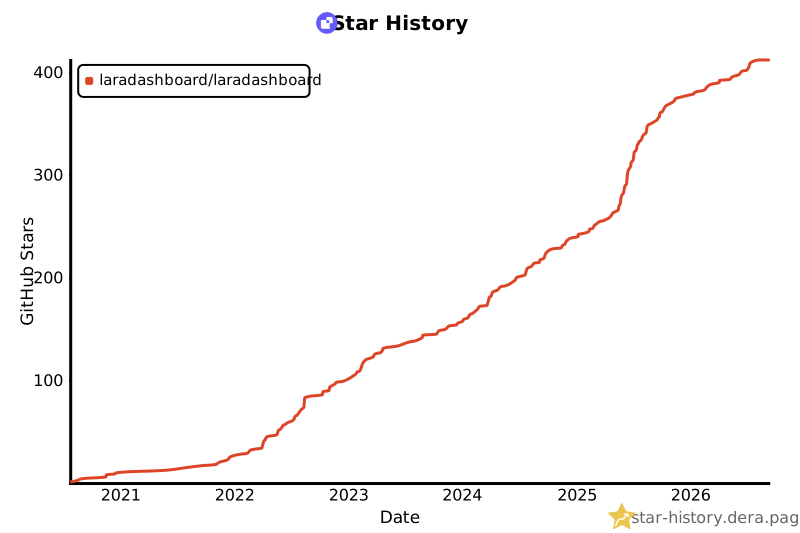](https://star-history.dera.page/#laradashboard/laradashboard&Date)
- ## 💖 Support
- If you like my work you may consider buying me a ☕ / 🍕
- <a href="https://www.patreon.com/maniruzzaman" target="_blank" title="Buy Me A Coffee">
- Go to Patreon
- </a>
- <p align="right">(<a href="#readme-top">back to top</a>)</p>
- ## 📞 Connect
- - Join Facebook Community (For any questions, latest updates) - https://www.facebook.com/groups/laradashboard
- - Linkedin Community - https://www.linkedin.com/groups/14690156
- - Youtube channel (For tutorials) - https://www.youtube.com/@laradashboard
- - Maniruzzaman Akash - [@LinkedIn](https://www.linkedin.com/in/maniruzzamanakash) | manirujjamanakash@gmail.com
- <p align="right">(<a href="#readme-top">back to top</a>)</p>
- <!-- https://www.markdownguide.org/basic-syntax/#reference-style-links -->
- [contributors-shield]: https://img.shields.io/github/contributors/laradashboard/laradashboard.svg?style=for-the-badge
- [contributors-url]: https://github.com/laradashboard/laradashboard/graphs/contributors
- [forks-shield]: https://img.shields.io/github/forks/laradashboard/laradashboard.svg?style=for-the-badge
- [forks-url]: https://github.com/laradashboard/laradashboard/network/members
- [stars-shield]: https://img.shields.io/github/stars/laradashboard/laradashboard.svg?style=for-the-badge
- [stars-url]: https://github.com/laradashboard/laradashboard/stargazers
- [issues-shield]: https://img.shields.io/github/issues/laradashboard/laradashboard.svg?style=for-the-badge
- [issues-url]: https://github.com/laradashboard/laradashboard/issues
- [license-shield]: https://img.shields.io/github/license/laradashboard/laradashboard.svg?style=for-the-badge
- [license-url]: https://github.com/laradashboard/laradashboard/blob/master/LICENSE.txt
- [linkedin-shield]: https://img.shields.io/badge/-LinkedIn-black.svg?style=for-the-badge&logo=linkedin&colorB=555
- [linkedin-url]: https://linkedin.com/in/maniruzzamanakash
- [release-shield]: https://img.shields.io/github/v/release/laradashboard/laradashboard?style=for-the-badge&color=success
- [release-url]: https://github.com/laradashboard/laradashboard/releases/latest
- [php-shield]: https://img.shields.io/badge/PHP-8.3%20%7C%208.4-777BB4?style=for-the-badge&logo=php&logoColor=white
- [php-url]: https://www.php.net
- [laravel-shield]: https://img.shields.io/badge/Laravel-12.x-FF2D20?style=for-the-badge&logo=laravel&logoColor=white
- [laravel-url]: https://laravel.com
- [tailwind-shield]: https://img.shields.io/badge/Tailwind_CSS-v4-38B2AC?style=for-the-badge&logo=tailwind-css&logoColor=white
- [tailwind-url]: https://tailwindcss.com
- [livewire-shield]: https://img.shields.io/badge/Livewire-3.x-FB70A9?style=for-the-badge&logo=laravel&logoColor=white
- [livewire-url]: https://livewire.laravel.com
- [product-screenshot]: images/screenshot.png
- [Next.js]: https://img.shields.io/badge/next.js-000000?style=for-the-badge&logo=nextdotjs&logoColor=white
- [Next-url]: https://nextjs.org/
- [React.js]: https://img.shields.io/badge/React-20232A?style=for-the-badge&logo=react&logoColor=61DAFB
- [React-url]: https://reactjs.org/
- [Vue.js]: https://img.shields.io/badge/Vue.js-35495E?style=for-the-badge&logo=vuedotjs&logoColor=4FC08D
- [Vue-url]: https://vuejs.org/
- [Angular.io]: https://img.shields.io/badge/Angular-DD0031?style=for-the-badge&logo=angular&logoColor=white
- [Angular-url]: https://angular.io/
- [Svelte.dev]: https://img.shields.io/badge/Svelte-4A4A55?style=for-the-badge&logo=svelte&logoColor=FF3E00
- [Svelte-url]: https://svelte.dev/
- [Laravel.com]: https://img.shields.io/badge/Laravel-FF2D20?style=for-the-badge&logo=laravel&logoColor=white
- [Laravel-url]: https://laravel.com
- [Bootstrap.com]: https://img.shields.io/badge/Bootstrap-563D7C?style=for-the-badge&logo=bootstrap&logoColor=white
- [Bootstrap-url]: https://getbootstrap.com
- [JQuery.com]: https://img.shields.io/badge/jQuery-0769AD?style=for-the-badge&logo=jquery&logoColor=white
- [JQuery-url]: https://jquery.com
- [PHP.com]: https://img.shields.io/badge/PHP-777BB4?style=for-the-badge&logo=php&logoColor=white
- [PHP-url]: https://www.php.net
- [JavaScript.com]: https://img.shields.io/badge/JavaScript-F7DF1E?style=for-the-badge&logo=javascript&logoColor=black
- [JavaScript-url]: https://developer.mozilla.org/en-US/docs/Web/JavaScript
- [MySQL.com]: https://img.shields.io/badge/MySQL-4479A1?style=for-the-badge&logo=mysql&logoColor=white
- [MySQL-url]: https://www.mysql.com
- [TailwindCSS.com]: https://img.shields.io/badge/Tailwind_CSS-38B2AC?style=for-the-badge&logo=tailwind-css&logoColor=white
- [TailwindCSS-url]: https://tailwindcss.com
- [AlpineJS.com]: https://img.shields.io/badge/Alpine.js-8BC0D0?style=for-the-badge&logo=alpine.js&logoColor=black
- [AlpineJS-url]: https://alpinejs.dev
Ratings and comments
Sign in to rate this skill.
Sign inFree to use. If it’s helped, pass it on.