dify
Build Agentic workflows, RAG pipelines, with rich AI model and tool support on one collaborative workspace. Deploy on cloud, VPC, or self-hosted, so teams move from prototype to production without rebuilding the stack.
Safety scan
A static text scan, not a guarantee. Select the badge to see what was scanned and every finding.
Check it deeper on your machine
It has changed since its scan on 11 Nov 2026.
As a Claude Code plugin, install it and then ask Claude Code:
/plugin marketplace add keithmackay/mackayi/plugin install scanskillsafety@mackayiDo a deep scan of https://github.com/langgenius/dify with scanskillsafety
Or from a terminal, clone it and run it:
git clone https://github.com/keithmackay/scanskillsafety-skill ~/.claude/skills/scanskillsafetynode ~/.claude/skills/scanskillsafety/cli.cjs --deep 'https://github.com/langgenius/dify'
It checks the exact commit: every file, its packages against OSV (api.osv.dev), how it compares with this page's scan (findsafeskills.com receives the repository's address), and, if you agree, Claude reading every file with your own Claude subscription. It never runs the code.
Badge for your README

Markdown
[](/listings/langgenius-dify)HTML
<a href="/listings/langgenius-dify"><img src="/api/listings/langgenius-dify/badge.svg" alt="findsafeskills safety rating" /></a>Install
Install instructions from the README
As written by the repo's author. findsafeskills has not verified these steps.
> Before installing Dify, make sure your machine meets the following minimum system requirements: > > - CPU >= 2 Core > - RAM >= 4 GiB
<br/>
The easiest way to start the Dify server is through [Docker Compose](docker/docker-compose.yaml). Before running Dify with the following commands, make sure that [Docker](https://docs.docker.com/get-docker/) and Docker Compose v2.24.0 or later are installed on your machine:
cd dify
cd docker
cp .env.example .env
docker compose up -d
After running, you can access the Dify dashboard in your browser at [http://localhost/install](http://localhost/install) and start the initialization process.
Seeking help
Please refer to our [FAQ](https://docs.dify.ai/getting-started/install-self-hosted/faqs) if you encounter problems setting up Dify. Reach out to [the community and us](#community--contact) if you are still having issues.
> If you'd like to contribute to Dify or do additional development, refer to our [guide to deploying from source code](https://docs.dify.ai/getting-started/install-self-hosted/local-source-code)
What was scanned
The files the safety scan read, as written by the repository's author and shown as plain text. Lines with a finding are marked.
README.md · README · 184 lines
View this file on GitHub (read at the repository's current version: the scan did not record which commit it read)
This file has changed since it was scanned, so this is not exactly the text that was scanned, and no line is marked. The findings are listed with the safety scan above.
- 
- <p align="center">
- <a href="https://cloud.dify.ai">Dify Cloud</a> ·
- <a href="https://docs.dify.ai/getting-started/install-self-hosted">Self-hosting</a> ·
- <a href="https://docs.dify.ai">Documentation</a> ·
- <a href="https://dify.ai/pricing">Dify edition overview</a>
- </p>
- <p align="center">
- <a href="https://dify.ai" target="_blank">
- <img alt="Static Badge" src="https://img.shields.io/badge/Product-F04438"></a>
- <a href="https://dify.ai/pricing" target="_blank">
- <img alt="Static Badge" src="https://img.shields.io/badge/free-pricing?logo=free&color=%20%23155EEF&label=pricing&labelColor=%20%23528bff"></a>
- <a href="https://discord.gg/FngNHpbcY7" target="_blank">
- <img src="https://img.shields.io/discord/1082486657678311454?logo=discord&labelColor=%20%235462eb&logoColor=%20%23f5f5f5&color=%20%235462eb"
- alt="chat on Discord"></a>
- <a href="https://reddit.com/r/difyai" target="_blank">
- <img src="https://img.shields.io/reddit/subreddit-subscribers/difyai?style=plastic&logo=reddit&label=r%2Fdifyai&labelColor=white"
- alt="join Reddit"></a>
- <a href="https://twitter.com/intent/follow?screen_name=dify_ai" target="_blank">
- <img src="https://img.shields.io/twitter/follow/dify_ai?logo=X&color=%20%23f5f5f5"
- alt="follow on X(Twitter)"></a>
- <a href="https://www.linkedin.com/company/langgenius/" target="_blank">
- <img src="https://custom-icon-badges.demolab.com/badge/LinkedIn-0A66C2?logo=linkedin-white&logoColor=fff"
- alt="follow on LinkedIn"></a>
- <a href="https://hub.docker.com/u/langgenius" target="_blank">
- <img alt="Docker Pulls" src="https://img.shields.io/docker/pulls/langgenius/dify-web?labelColor=%20%23FDB062&color=%20%23f79009"></a>
- <a href="https://github.com/langgenius/dify/graphs/commit-activity" target="_blank">
- <img alt="Commits last month" src="https://img.shields.io/github/commit-activity/m/langgenius/dify?labelColor=%20%2332b583&color=%20%2312b76a"></a>
- <a href="https://github.com/langgenius/dify/" target="_blank">
- <img alt="Issues closed" src="https://img.shields.io/github/issues-search?query=repo%3Alanggenius%2Fdify%20is%3Aclosed&label=issues%20closed&labelColor=%20%237d89b0&color=%20%235d6b98"></a>
- <a href="https://github.com/langgenius/dify/discussions/" target="_blank">
- <img alt="Discussion posts" src="https://img.shields.io/github/discussions/langgenius/dify?labelColor=%20%239b8afb&color=%20%237a5af8"></a>
- <a href="https://insights.linuxfoundation.org/project/langgenius-dify" target="_blank">
- <img alt="LFX Health Score" src="https://insights.linuxfoundation.org/api/badge/health-score?project=langgenius-dify"></a>
- <a href="https://insights.linuxfoundation.org/project/langgenius-dify" target="_blank">
- <img alt="LFX Contributors" src="https://insights.linuxfoundation.org/api/badge/contributors?project=langgenius-dify"></a>
- <a href="https://insights.linuxfoundation.org/project/langgenius-dify" target="_blank">
- <img alt="LFX Active Contributors" src="https://insights.linuxfoundation.org/api/badge/active-contributors?project=langgenius-dify"></a>
- </p>
- <p align="center">
- <a href="./README.md"><img alt="README in English" src="https://img.shields.io/badge/English-d9d9d9"></a>
- <a href="./docs/zh-TW/README.md"><img alt="繁體中文文件" src="https://img.shields.io/badge/繁體中文-d9d9d9"></a>
- <a href="./docs/zh-CN/README.md"><img alt="简体中文文件" src="https://img.shields.io/badge/简体中文-d9d9d9"></a>
- <a href="./docs/ja-JP/README.md"><img alt="日本語のREADME" src="https://img.shields.io/badge/日本語-d9d9d9"></a>
- <a href="./docs/es-ES/README.md"><img alt="README en Español" src="https://img.shields.io/badge/Español-d9d9d9"></a>
- <a href="./docs/fr-FR/README.md"><img alt="README en Français" src="https://img.shields.io/badge/Français-d9d9d9"></a>
- <a href="./docs/tlh/README.md"><img alt="README tlhIngan Hol" src="https://img.shields.io/badge/Klingon-d9d9d9"></a>
- <a href="./docs/ko-KR/README.md"><img alt="README in Korean" src="https://img.shields.io/badge/한국어-d9d9d9"></a>
- <a href="./docs/ar-SA/README.md"><img alt="README بالعربية" src="https://img.shields.io/badge/العربية-d9d9d9"></a>
- <a href="./docs/tr-TR/README.md"><img alt="Türkçe README" src="https://img.shields.io/badge/Türkçe-d9d9d9"></a>
- <a href="./docs/vi-VN/README.md"><img alt="README Tiếng Việt" src="https://img.shields.io/badge/Ti%E1%BA%BFng%20Vi%E1%BB%87t-d9d9d9"></a>
- <a href="./docs/de-DE/README.md"><img alt="README in Deutsch" src="https://img.shields.io/badge/German-d9d9d9"></a>
- <a href="./docs/it-IT/README.md"><img alt="README in Italiano" src="https://img.shields.io/badge/Italiano-d9d9d9"></a>
- <a href="./docs/pt-BR/README.md"><img alt="README em Português do Brasil" src="https://img.shields.io/badge/Portugu%C3%AAs%20do%20Brasil-d9d9d9"></a>
- <a href="./docs/sl-SI/README.md"><img alt="README Slovenščina" src="https://img.shields.io/badge/Sloven%C5%A1%C4%8Dina-d9d9d9"></a>
- <a href="./docs/bn-BD/README.md"><img alt="README in বাংলা" src="https://img.shields.io/badge/বাংলা-d9d9d9"></a>
- <a href="./docs/hi-IN/README.md"><img alt="README in हिन्दी" src="https://img.shields.io/badge/Hindi-d9d9d9"></a>
- <a href="./docs/id-ID/README.md"><img alt="README dalam Bahasa Indonesia" src="https://img.shields.io/badge/Bahasa%20Indonesia-d9d9d9"></a>
- </p>
- Dify is an open-source LLM app development platform. Its intuitive interface combines AI workflow, RAG pipeline, agent capabilities, model management, observability features (including [Opik](https://www.comet.com/docs/opik/integrations/dify), [Langfuse](https://docs.langfuse.com), and [Arize Phoenix](https://docs.arize.com/phoenix)) and more, letting you quickly go from prototype to production. Here's a list of the core features:
- ## Quick start
- > Before installing Dify, make sure your machine meets the following minimum system requirements:
- >
- > - CPU >= 2 Core
- > - RAM >= 4 GiB
- <br/>
- The easiest way to start the Dify server is through [Docker Compose](docker/docker-compose.yaml). Install [Docker](https://docs.docker.com/get-docker/) with a running daemon, Docker Compose v2.35.0 or later, and OpenSSL.
- For a new deployment, run the following commands from the repository root. For an existing deployment, preserve your `.env` and follow the [upgrade guidance](docker/README.md#review-configuration-after-an-upgrade).
- ```bash
- cd docker
- cp .env.example .env
- openssl rand -hex 32
- ```
- Open `.env` and set `DIFY_AGENT_LOCAL_SANDBOX_AUTH_TOKEN` to the generated value. Keep the default `COMPOSE_PROFILES` value for the bundled services. Service defaults load automatically; no additional configuration files are required.
- From the same `docker` directory, start the services:
- ```bash
- docker compose up -d
- docker compose ps --all
- ```
- Once the services are running, open [http://localhost/install](http://localhost/install) to complete the initial setup. The one-time `init_permissions` service is expected to exit with code `0`.
- For optional settings and service overrides, see the [Docker deployment guide](docker/README.md#configure-dify).
- ### Seeking help
- Please refer to our [FAQ](https://docs.dify.ai/getting-started/install-self-hosted/faqs) if you encounter problems setting up Dify. Reach out to [the community and us](#community--contact) if you are still having issues.
- > If you'd like to contribute to Dify or do additional development, refer to our [guide to deploying from source code](https://docs.dify.ai/getting-started/install-self-hosted/local-source-code)
- ## Key features
- **1. Workflow**:
- Build and test powerful AI workflows on a visual canvas, leveraging all the following features and beyond.
- **2. Comprehensive model support**:
- Seamless integration with hundreds of proprietary / open-source LLMs from dozens of inference providers and self-hosted solutions, covering GPT, Mistral, Llama3, and any OpenAI API-compatible models. A full list of supported model providers can be found [here](https://docs.dify.ai/getting-started/readme/model-providers).
- 
- **3. Prompt IDE**:
- Intuitive interface for crafting prompts, comparing model performance, and adding additional features such as text-to-speech to a chat-based app.
- **4. RAG Pipeline**:
- Extensive RAG capabilities that cover everything from document ingestion to retrieval, with out-of-box support for text extraction from PDFs, PPTs, and other common document formats.
- **5. Agent**: Autonomous agents with a sandbox of their own: they run commands, install software, and handle files to get open-ended tasks done. Describe the agent you want and it builds itself. Give it skills, connect tools from [Dify Marketplace](https://marketplace.dify.ai/?category=tool), MCP servers, or your own APIs, and put it to work as a chat app or as a step in any workflow.
- **6. LLMOps**:
- Monitor and analyze application logs and performance over time. You could continuously improve prompts, datasets, and models based on production data and annotations.
- **7. Backend-as-a-Service**:
- All of Dify's offerings come with corresponding APIs, so you could effortlessly integrate Dify into your own business logic.
- ## Using Dify
- - **Cloud <br/>**
- We host [Dify Cloud](https://cloud.dify.ai) so you can try Dify without managing a server. See the [pricing page](https://dify.ai/pricing) for current plans and usage allowances. If you run into issues, [contact our Cloud support team](mailto:cloud@dify.ai?subject=%5BGitHub%5DDify%20Cloud%20Support).
- - **Self-hosting Dify Community Edition<br/>**
- Quickly get Dify running in your environment with this [starter guide](#quick-start).
- Use our [documentation](https://docs.dify.ai) for further references and more in-depth instructions.
- - **[Dify Enterprise](https://dify.ai/dify-enterprise)<br/>**
- For organizations requiring self-hosting, SSO, RBAC Security and Enterprise Support SLAs, please fill out [this form](https://share-na2.hsforms.com/14-09ff5HS92Sh4m3f4yrcw40s9fk) to speak to a solution representative. <br/>
- ## Staying ahead
- Star Dify on GitHub and be instantly notified of new releases.
- <img width="1344" height="720" alt="star" src="https://github.com/user-attachments/assets/dcd086d1-af0f-471b-ae52-1ad2fa040595" />
- ## Advanced Setup
- For custom configuration, observability, and deployment options, see [Advanced Setup](docs/ADVANCED_SETUP.md).
- ## Contributing
- Dify welcomes contributions of all kinds:
- - **Code**: Read the [Contribution Guide](CONTRIBUTING.md), then browse [good first issues](https://github.com/langgenius/dify/issues?q=is%3Aissue%20state%3Aopen%20label%3A%22good%20first%20issue%22).
- - **Ideas and feedback**: Start or join a [GitHub Discussion](https://github.com/langgenius/dify/discussions).
- - **Translations**: Follow the [internationalization guide](web/i18n/README.md) to add or update a locale.
- - **Community**: Share the apps you build, help other users, and spread the word about Dify.
- ### Contributors
- <a href="https://github.com/langgenius/dify/graphs/contributors">
- <img alt="Dify contributors" src="https://contrib.rocks/image?repo=langgenius/dify" />
- </a>
- ## Community & contact
- Choose the channel that best fits your question:
- - [GitHub Discussions](https://github.com/langgenius/dify/discussions): Get help, share feedback, and propose ideas.
- - [GitHub Issues](https://github.com/langgenius/dify/issues): Report reproducible bugs and track engineering work. Read the [Contribution Guide](CONTRIBUTING.md) before opening one.
- - [Discord](https://discord.gg/FngNHpbcY7): Chat in real time, share your apps, and connect with other Dify users.
- - [X](https://x.com/dify_ai): Follow Dify for release news and project updates.
- ## Star History
- [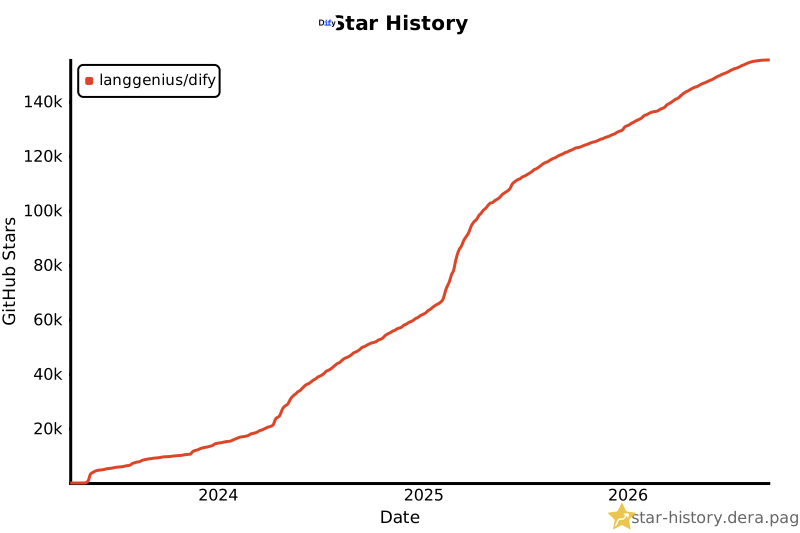](https://star-history.dera.page/langgenius/dify?type=date&legend=top-left#gh-light-mode-only) [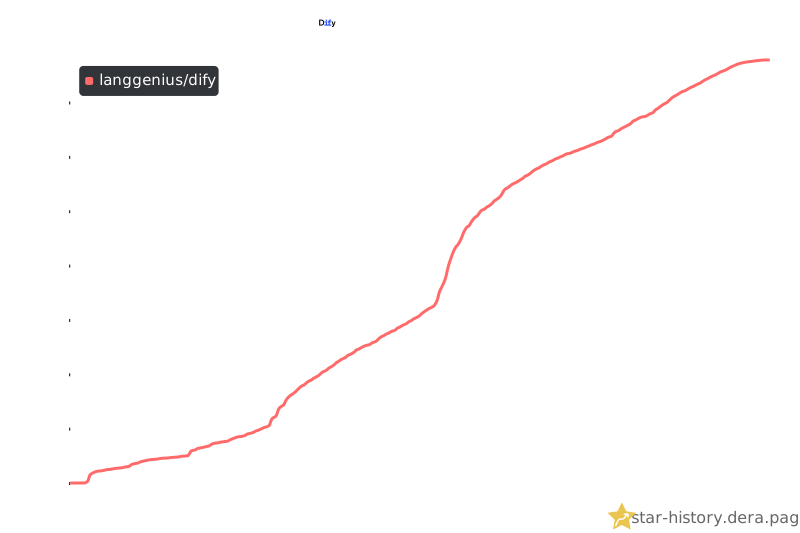](https://star-history.dera.page/langgenius/dify?type=date&legend=top-left#gh-dark-mode-only)
- ## Security disclosure
- Report vulnerabilities privately through GitHub Security Advisories, following our [security policy](SECURITY.md). Do not disclose them in public issues, discussions, or pull requests.
- ## License
- This repository is licensed under the [Dify Open Source License](LICENSE), based on Apache 2.0 with additional conditions.
Ratings and comments
Sign in to rate this skill.
Sign inFree to use. If it’s helped, pass it on.