langsmith-mcp-server
A production-ready Model Context Protocol (MCP) server that provides seamless integration with the LangSmith observability platform. This server enables language models to fetch conversation history,…
Safety scan
A static text scan, not a guarantee. Select the badge to see what was scanned and every finding.
Badge for your README

Markdown
[](/listings/langchain-ai--langsmith-mcp-server)HTML
<a href="/listings/langchain-ai--langsmith-mcp-server"><img src="/api/listings/langchain-ai--langsmith-mcp-server/badge.svg" alt="findsafeskills safety rating" /></a>Install
Install instructions from the README
As written by the repo's author. findsafeskills has not verified these steps.
A **hosted version** of the LangSmith MCP Server is available over HTTP-streamable transport, so you can connect without running the server yourself:
- **URL:** `https://langsmith-mcp-server.onrender.com/mcp` - **Hosting:** [Render](https://render.com), built from this public repo using the project's Dockerfile.
Use it like any HTTP-streamable MCP server: point your client at the URL and send your LangSmith API key in the `LANGSMITH-API-KEY` header. No local install or Docker required.
**Example (Cursor `mcp.json`):**
{
  "mcpServers": {
    "LangSmith MCP (Hosted)": {
      "url": "https://langsmith-mcp-server.onrender.com/mcp",
      "headers": {
        "LANGSMITH-API-KEY": "lsv2_pt_your_api_key_here"
      }
    }
  }
}Optional headers: `LANGSMITH-WORKSPACE-ID`, `LANGSMITH-ENDPOINT` (same as in the [Docker Deployment](#-docker-deployment-http-streamable) section below).
> **Note:** This deployed instance is intended for [LangSmith Cloud](https://smith.langchain.com). If you use a **self-hosted** LangSmith instance, run the server yourself and point it at your endpoint—see the [Docker Deployment](#-docker-deployment-http-streamable) section below.
What was scanned
The files the safety scan read, as written by the repository's author and shown as plain text. Lines with a finding are marked.
README.md · README · 448 lines · 1 finding marked
View this file on GitHub (read at the repository's current version: the scan did not record which commit it read)
- # 🦜🛠️ LangSmith MCP Server
- 
- [](https://opensource.org/licenses/MIT)
- [](https://www.python.org/downloads/release/python-3100/)
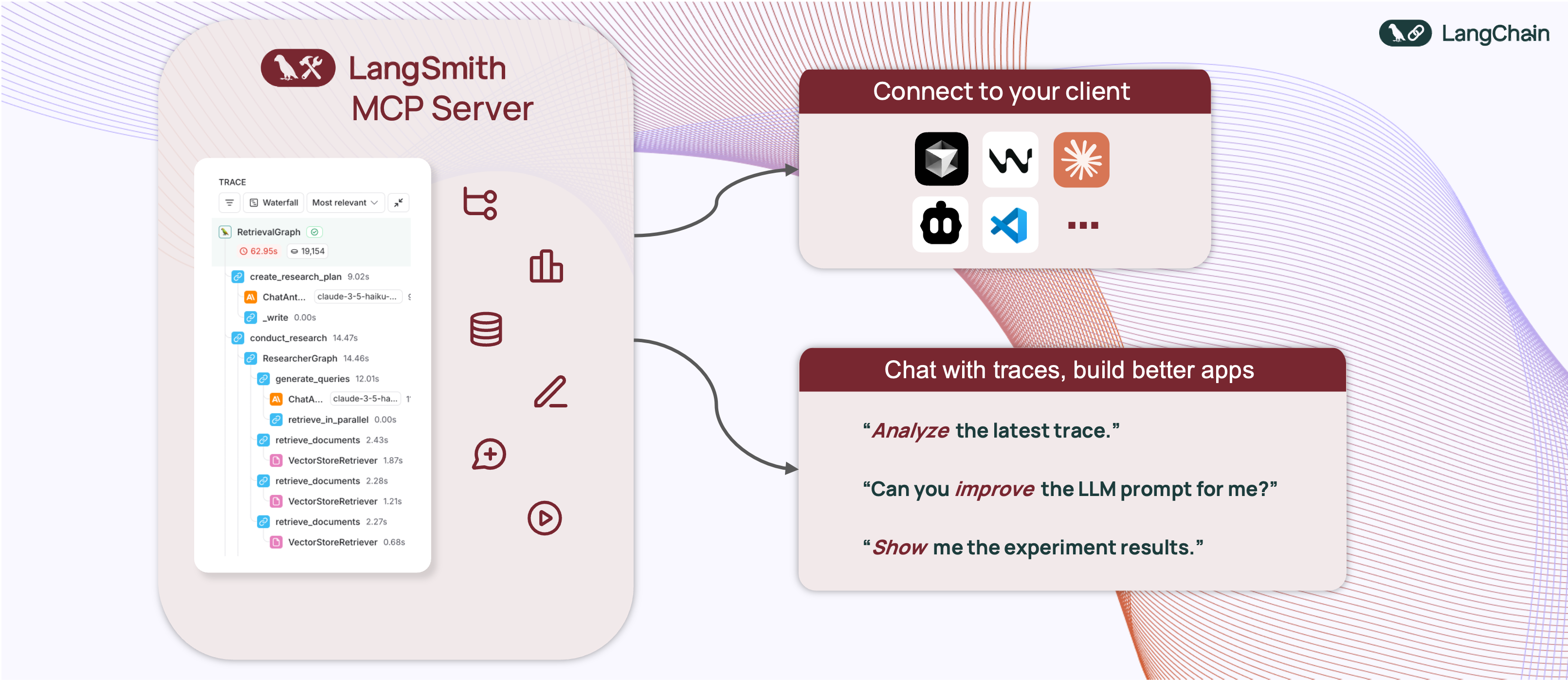
- A production-ready [Model Context Protocol](https://modelcontextprotocol.io/introduction) (MCP) server that provides seamless integration with the [LangSmith](https://smith.langchain.com) observability platform. This server enables language models to fetch conversation history, prompts, runs and traces, datasets, experiments, and billing usage from LangSmith.
- ## 📋 Example Use Cases
- The server enables powerful capabilities including:
- - 💬 **Conversation History**: "Fetch the history of my conversation from thread 'thread-123' in project 'my-chatbot'" (paginated by character budget)
- - 📚 **Prompt Management**: "Get all public prompts in my workspace" / "Pull the template for the 'legal-case-summarizer' prompt"
- - 🔍 **Traces & Runs**: "Fetch the latest 10 root runs from project 'alpha'" / "Get all runs for trace <uuid> (page 2 of 5)"
- - 📊 **Datasets**: "List datasets of type chat" / "Read examples from dataset 'customer-support-qa'"
- - 🧪 **Experiments**: "List experiments for dataset 'my-eval-set' with latency and cost metrics"
- - 📈 **Billing**: "Get billing usage for September 2025"
- ## 🚀 Quickstart
- A **hosted version** of the LangSmith MCP Server is available over HTTP-streamable transport, so you can connect without running the server yourself:
- - **URL:** `https://langsmith-mcp-server.onrender.com/mcp`
- - **Hosting:** [Render](https://render.com), built from this public repo using the project's Dockerfile.
- Use it like any HTTP-streamable MCP server: point your client at the URL and send your LangSmith API key in the `LANGSMITH-API-KEY` header. No local install or Docker required.
- **Example (Cursor `mcp.json`):**
- ```json
- {
- "mcpServers": {
- "LangSmith MCP (Hosted)": {
- "url": "https://langsmith-mcp-server.onrender.com/mcp",
- "headers": {
- "LANGSMITH-API-KEY": "lsv2_pt_your_api_key_here"
- }
- }
- }
- }
- ```
- Optional headers: `LANGSMITH-WORKSPACE-ID`, `LANGSMITH-ENDPOINT` (same as in the [Docker Deployment](#-docker-deployment-http-streamable) section below).
- > **Note:** This deployed instance is intended for [LangSmith Cloud](https://smith.langchain.com). If you use a **self-hosted** LangSmith instance, run the server yourself and point it at your endpoint—see the [Docker Deployment](#-docker-deployment-http-streamable) section below.
- ## 🛠️ Available Tools
- The LangSmith MCP Server provides the following tools for integration with LangSmith.
- ### 💬 Conversation & Threads
- | Tool Name | Description |
- |-----------|-------------|
- | `get_thread_history` | Retrieve message history for a conversation thread. Uses **char-based pagination**: pass `page_number` (1-based), and use returned `total_pages` to request more pages. Optional `max_chars_per_page` and `preview_chars` control page size and long-string truncation. |
- ### 📚 Prompt Management
- | Tool Name | Description |
- |-----------|-------------|
- | `list_prompts` | Fetch prompts from LangSmith with optional filtering by visibility (public/private) and limit. |
- | `get_prompt_by_name` | Get a specific prompt by its exact name, returning the prompt details and template. |
- | `push_prompt` | Documentation-only: how to create and push prompts to LangSmith. |
- ### 🔍 Traces & Runs
- | Tool Name | Description |
- |-----------|-------------|
- | `fetch_runs` | Fetch LangSmith runs (traces, tools, chains, etc.) from one or more projects. Supports filters (run_type, error, is_root), FQL (`filter`, `trace_filter`, `tree_filter`), and ordering. When `trace_id` is set, returns **char-based paginated** pages; otherwise returns one batch up to `limit`. Always pass `limit` and `page_number`. |
- | `list_projects` | List LangSmith projects with optional filtering by name, dataset, and detail level (simplified vs full). |
- ### 📊 Datasets & Examples
- | Tool Name | Description |
- |-----------|-------------|
- | `list_datasets` | Fetch datasets with filtering by ID, type, name, name substring, or metadata. |
- | `list_examples` | Fetch examples from a dataset by dataset ID/name or example IDs, with filter, metadata, splits, and optional `as_of` version. |
- | `read_dataset` | Read a single dataset by ID or name. |
- | `read_example` | Read a single example by ID, with optional `as_of` version. |
- | `create_dataset` | Documentation-only: how to create datasets in LangSmith. |
- | `update_examples` | Documentation-only: how to update dataset examples in LangSmith. |
- ### 🧪 Experiments & Evaluations
- | Tool Name | Description |
- |-----------|-------------|
- | `list_experiments` | List experiment projects (reference projects) for a dataset. Requires `reference_dataset_id` or `reference_dataset_name`. Returns key metrics (latency, cost, feedback stats). |
- | `run_experiment` | Documentation-only: how to run experiments and evaluations in LangSmith. |
- ### 📈 Usage & Billing
- | Tool Name | Description |
- |-----------|-------------|
- | `get_billing_usage` | Fetch organization billing usage (e.g. trace counts) for a date range. Optional workspace filter; returns metrics with workspace names inline. |
- ### 📄 Pagination (char-based)
- Several tools use **stateless, character-budget pagination** so responses stay within a size limit and work well with LLM clients:
- - **Where it’s used:** `get_thread_history` and `fetch_runs` (when `trace_id` is set).
- - **Parameters:** You send `page_number` (1-based) on every request. Optional: `max_chars_per_page` (default 25000, cap 30000) and `preview_chars` (truncate long strings with "… (+N chars)").
- - **Response:** Each response includes `page_number`, `total_pages`, and the page payload (`result` for messages, `runs` for runs). To get more, call again with `page_number = 2`, then `3`, up to `total_pages`.
- - **Why it’s useful:** Pages are built by JSON character count, not item count, so each page fits within a fixed size. No cursor or server-side state—just integer page numbers.
- ## 🛠️ Installation Options
- ### 📝 General Prerequisites
- 1. Install [uv](https://github.com/astral-sh/uv) (a fast Python package installer and resolver):
- ```bash
- curl -LsSf https://astral.sh/uv/install.sh | sh
- ```
- 2. Clone this repository and navigate to the project directory:
- ```bash
- git clone https://github.com/langchain-ai/langsmith-mcp-server.git
- cd langsmith-mcp-server
- ```
- ### 🔌 MCP Client Integration
- Once you have the LangSmith MCP Server, you can integrate it with various MCP-compatible clients. You have two installation options:
- #### 📦 From PyPI
- 1. Install the package:
- ```bash
- uv run pip install --upgrade langsmith-mcp-server
- ```
- 2. Add to your client MCP config:
- ```json
- {
- "mcpServers": {
- "LangSmith API MCP Server": {
- "command": "/path/to/uvx",
- "args": [
- "langsmith-mcp-server"
- ],
- "env": {
- "LANGSMITH_API_KEY": "your_langsmith_api_key",
- "LANGSMITH_WORKSPACE_ID": "your_workspace_id",
- "LANGSMITH_ENDPOINT": "https://api.smith.langchain.com"
- }
- }
- }
- }
- ```
- #### ⚙️ From Source
- Add the following configuration to your MCP client settings (run from the **project root** so the package is found):
- ```json
- {
- "mcpServers": {
- "LangSmith API MCP Server": {
- "command": "/path/to/uv",
- "args": [
- "--directory",
- "/path/to/langsmith-mcp-server",
- "run",
- "langsmith_mcp_server/server.py"
- ],
- "env": {
- "LANGSMITH_API_KEY": "your_langsmith_api_key",
- "LANGSMITH_WORKSPACE_ID": "your_workspace_id",
- "LANGSMITH_ENDPOINT": "https://api.smith.langchain.com"
- }
- }
- }
- }
- ```
- Replace the following placeholders:
- - `/path/to/uv`: The absolute path to your uv installation (e.g., `/Users/username/.local/bin/uv`). You can find it with `which uv`.
- - `/path/to/langsmith-mcp-server`: The absolute path to the **project root** (the directory containing `pyproject.toml` and `langsmith_mcp_server/`).
- - `your_langsmith_api_key`: Your LangSmith API key (required).
- - `your_workspace_id`: Your LangSmith workspace ID (optional, for API keys scoped to multiple workspaces).
- - `https://api.smith.langchain.com`: The LangSmith API endpoint (optional, defaults to the standard endpoint).
- Example configuration (PyPI/uvx):
- ```json
- {
- "mcpServers": {
- "LangSmith API MCP Server": {
- "command": "/path/to/uvx",
- "args": ["langsmith-mcp-server"],
- "env": {
- "LANGSMITH_API_KEY": "lsv2_pt_your_key_here",
- "LANGSMITH_WORKSPACE_ID": "your_workspace_id",
- "LANGSMITH_ENDPOINT": "https://api.smith.langchain.com"
- }
- }
- }
- }
- ```
- Copy this configuration into Cursor → MCP Settings (replace `/path/to/uvx` with the output of `which uvx`).
- 
- ### 🔧 Headers (tool invocation)
- When connecting over **HTTP** (e.g. streamable HTTP or a hosted MCP endpoint), the server uses **headers** for authentication and configuration. Your MCP client must send these with each request; no environment variables are required for tool invocation.
- | Header | Required | Description |
- |--------|----------|-------------|
- | `LANGSMITH-API-KEY` | ✅ Yes | Your LangSmith API key for tool calls (list prompts, fetch runs, etc.) |
- | `LANGSMITH-WORKSPACE-ID` | ❌ No | Workspace ID for API keys scoped to multiple workspaces |
- | `LANGSMITH-ENDPOINT` | ❌ No | Custom API endpoint URL (for self-hosted or EU region) |
- Optional headers used only when [server monitoring](#optional-tool-call-monitoring-to-a-second-langsmith-instance) is enabled (for grouping traces by session):
- | Header | Description |
- |--------|-------------|
- | `mcp-session-id` | Session or thread id; stored in trace metadata as `session_id` |
- | `x-session-id` | Fallback if `mcp-session-id` is not set |
- | `x-request-id` | Fallback for request-scoped grouping |
- **Stdio transport:** When running the server over stdio (e.g. `uvx langsmith-mcp-server`), there are no headers. The server falls back to the **environment variables** `LANGSMITH_API_KEY`, `LANGSMITH_WORKSPACE_ID`, and `LANGSMITH_ENDPOINT` in the process environment so that tool invocation still works.
- ---
- ### 🔧 Environment variables
- Environment variables are **not** used for tool invocation when using HTTP (headers are). They are used for:
- 1. **Stdio transport** – fallback for credentials when no headers exist (see above).
- 2. **Load tests** – e.g. `tests/load_test_sessions.py` reads `LANGSMITH_API_KEY` from the environment (or a `.env` file at the project root).
- 3. **Optional server monitoring** – tracing tool calls to a second LangSmith instance (see below).
- | Variable | Used for | Description |
- |----------|----------|-------------|
- | `LANGSMITH_API_KEY` | Stdio fallback, load tests | LangSmith API key (when not provided via headers) |
- | `LANGSMITH_WORKSPACE_ID` | Stdio fallback | Workspace ID (optional) |
- | `LANGSMITH_ENDPOINT` | Stdio fallback | Custom endpoint URL (optional) |
- #### Optional: Tool-call monitoring to a second LangSmith instance
- You can log every MCP tool call (with inputs and outputs) to a **separate** LangSmith project for monitoring and analytics. Set these in your environment (e.g. in a `.env` file at the project root; the server loads `.env` via `python-dotenv`):
- | Variable | Required | Description |
- |----------|----------|-------------|
- | `LANGSMITH_MONITORING_API_KEY` | Yes (to enable) | API key for the LangSmith instance used for monitoring |
- | `LANGSMITH_MONITORING_ENDPOINT` | No | Endpoint URL (default: cloud) |
- | `LANGSMITH_MONITORING_WORKSPACE_ID` | No | Workspace ID for the monitoring instance |
- | `LANGSMITH_MONITORING_PROJECT` | No | Project name for monitoring traces (default: `mcp-server-monitoring`) |
- | `LANGSMITH_TRACING` | Yes (to send traces) | Set to `true` so traces are sent to LangSmith ([custom instrumentation](https://docs.smith.langchain.com)) |
- Each tool run is traced with `run_type="tool"` and a **session_id** in metadata (from the `mcp-session-id`, `x-session-id`, or `x-request-id` header when using HTTP, or generated per request).
- If you use the **hosted** LangSmith MCP Server, anonymous usage data is sent to a separate LangSmith project so we can iterate and improve the product.
- ## 🐳 Docker Deployment (HTTP-Streamable)
- The LangSmith MCP Server can be deployed as an HTTP server using Docker, enabling remote access via the HTTP-streamable protocol.
- ### Building the Docker Image
- ```bash
- docker build -t langsmith-mcp-server .
- ```
- ### Running with Docker
- ```bash
- docker run -p 8000:8000 langsmith-mcp-server
- ```
- The API key is provided via the `LANGSMITH-API-KEY` header when connecting, so no environment variables are required for HTTP-streamable protocol.
- ### Connecting with HTTP-Streamable Protocol
- Once the Docker container is running, you can connect to it using the HTTP-streamable transport. The server accepts authentication via headers:
- **Required header:**
- - `LANGSMITH-API-KEY`: Your LangSmith API key
- **Optional headers:**
- - `LANGSMITH-WORKSPACE-ID`: Workspace ID for API keys scoped to multiple workspaces
- - `LANGSMITH-ENDPOINT`: Custom endpoint URL (for self-hosted or EU region)
- **Example client configuration:**
- ```python
- from mcp import ClientSession
- from mcp.client.streamable_http import streamablehttp_client
- headers = {
- "LANGSMITH-API-KEY": "lsv2_pt_your_api_key_here",
- # Optional:
- # "LANGSMITH-WORKSPACE-ID": "your_workspace_id",
- # "LANGSMITH-ENDPOINT": "https://api.smith.langchain.com",
- }
- async with streamablehttp_client("http://localhost:8000/mcp", headers=headers) as (read, write, _):
- async with ClientSession(read, write) as session:
- await session.initialize()
- # Use the session to call tools, list prompts, etc.
- ```
- ### Cursor Integration
- To add the LangSmith MCP Server to Cursor using HTTP-streamable protocol, add the following to your `mcp.json` configuration file:
- ```json
- {
- "mcpServers": {
- "HTTP-Streamable LangSmith MCP Server": {
- "url": "http://localhost:8000/mcp",
- "headers": {
- "LANGSMITH-API-KEY": "lsv2_pt_your_api_key_here"
- }
- }
- }
- }
- ```
- **Optional headers:**
- ```json
- {
- "mcpServers": {
- "HTTP-Streamable LangSmith MCP Server": {
- "url": "http://localhost:8000/mcp",
- "headers": {
- "LANGSMITH-API-KEY": "lsv2_pt_your_api_key_here",
- "LANGSMITH-WORKSPACE-ID": "your_workspace_id",
- "LANGSMITH-ENDPOINT": "https://api.smith.langchain.com"
- }
- }
- }
- }
- ```
- Make sure the server is running before connecting Cursor to it.
- ### Health Check
- The server provides a health check endpoint:
- ```bash
- curl http://localhost:8000/health
- ```
- This endpoint does not require authentication and returns `"LangSmith MCP server is running"` when the server is healthy.
- ## 🧪 Development and Contributing
- ### Prerequisites
- - **Python** 3.10+ (3.11+ recommended)
- - **[uv](https://docs.astral.sh/uv/)** – install with `curl -LsSf https://astral.sh/uv/install.sh | sh`
- Note: Pipes a downloaded script directly into a shell (curl | sh / wget | bash)
- Line 354 on GitHub
- - **LangSmith API key** – from [smith.langchain.com](https://smith.langchain.com)
- - **Node.js** (optional) – only if you want to use [MCP Inspector](https://github.com/modelcontextprotocol/inspector) to test the server (stdio or streamable-http)
- ### Setup
- ```bash
- git clone https://github.com/langchain-ai/langsmith-mcp-server.git
- cd langsmith-mcp-server
- uv sync # Install dependencies
- uv sync --group test # Include test dependencies (pytest, ruff, mypy)
- uvx langsmith-mcp-server # Verify CLI runs (stdio)
- ```
- ### Development workflow
- 1. **Edit code** in `langsmith_mcp_server/` or `tests/`.
- 2. **Format and lint** (required before committing):
- ```bash
- make format
- make lint
- ```
- 3. **Run tests**:
- ```bash
- make test
- # Or a single file:
- make test TEST_FILE=tests/tools/test_dataset_tools.py
- ```
- 4. **Type-check** (optional): `uv run mypy langsmith_mcp_server/`
- ### Testing with MCP Inspector
- You can test the server with [MCP Inspector](https://github.com/modelcontextprotocol/inspector) using either **stdio** or **streamable-http**.
- 1. **Start MCP Inspector:**
- ```bash
- npx @modelcontextprotocol/inspector@latest
- ```
- Open **http://localhost:6274** in your browser.
- 2. **Connect** in the Inspector:
- - **Stdio:** Choose stdio transport and configure the server command (e.g. `uv run langsmith-mcp-server`) and set `LANGSMITH_API_KEY` in the environment.
- - **Streamable HTTP:** Start the server first (`uv run uvicorn langsmith_mcp_server.server:app --host 0.0.0.0 --port 8000` or Docker), then choose streamable-http, URL **`http://localhost:8000/mcp`**, and add header **`LANGSMITH-API-KEY`** = your API key.
- ### Load testing
- A **session-based** load test opens many MCP sessions and calls the `list_prompts` tool in each, using [langchain-mcp-adapters](https://github.com/langchain-ai/langchain-mcp-adapters). Run from the CLI (no UI). The server must be running first.
- ```bash
- uv sync --group load
- # Terminal 1: start the server
- uv run uvicorn langsmith_mcp_server.server:app --host 0.0.0.0 --port 8000
- # Terminal 2: run the load test
- uv run python tests/load_test_sessions.py --sessions 20 --calls-per-session 3
- ```
- **Options**
- | Option | Default | Description |
- |--------|---------|-------------|
- | `--url` | `http://localhost:8000/mcp` | MCP endpoint URL |
- | `--api-key` | from `.env` | `LANGSMITH_API_KEY` (or set in project root `.env`) |
- | `--sessions` | 10 | Number of concurrent sessions |
- | `--calls-per-session` | 3 | `list_prompts` calls per session |
- | `--debug` | off | Print step-by-step logs and first error traceback |
- | `--report` PATH | — | Write a report after the run (see below) |
- **Report**
- Use `--report PATH` to write a JSON report after the test (e.g. `--report load_test_report` creates `load_test_report.json` with config, summary, per-session results, and first error).
- ```bash
- uv run python tests/load_test_sessions.py --sessions 5 --report load_test_report
- # Creates: load_test_report.json (in current directory)
- ```
- ### Contributing checklist
- Before opening a PR:
- - [ ] `make format` and `make lint` pass
- - [ ] `make test` passes
- - [ ] New tools or behavior are documented (e.g. in [CLAUDE.md](CLAUDE.md) if you change architecture or tools)
- - [ ] Error handling in tools returns `{"error": "..."}` rather than raising
- For more detail (adding tools, code standards, troubleshooting), see **[CLAUDE.md](CLAUDE.md)**.
- ## 📄 License
- This project is distributed under the MIT License. For detailed terms and conditions, please refer to the LICENSE file.
- Made with ❤️ by the [LangChain](https://langchain.com) Team
Ratings and comments
Sign in to rate this skill.
Sign inFree to use. If it’s helped, pass it on.