cli-faq-shortcuts
Turn repeated Claude Code, Codex, and Cursor prompts into reusable slash commands. Local Python history extractor + Agent Skill.
Safety scan
A static text scan, not a guarantee. Select the badge to see what was scanned and every finding.
Badge for your README

Markdown
[](/listings/kishormorol--cli-faq-shortcuts)HTML
<a href="/listings/kishormorol--cli-faq-shortcuts"><img src="/api/listings/kishormorol--cli-faq-shortcuts/badge.svg" alt="findsafeskills safety rating" /></a>Install
Install instructions from the README
As written by the repo's author. findsafeskills has not verified these steps.
**1. Install** (macOS / Linux, needs `git` and Python 3.9+; on Windows see [Windows](#windows)):
git clone https://github.com/kishormorol/cli-faq-shortcuts ~/.agents/skills/faq-shortcuts
mkdir -p ~/.claude/skills && ln -sfn ~/.agents/skills/faq-shortcuts ~/.claude/skills/faq-shortcuts
**2. Open your project** in Claude Code, Codex or Cursor, in a new session.
**3. Ask** *"what do I keep asking in this project?"*, or type `/faq-shortcuts` in Claude Code.
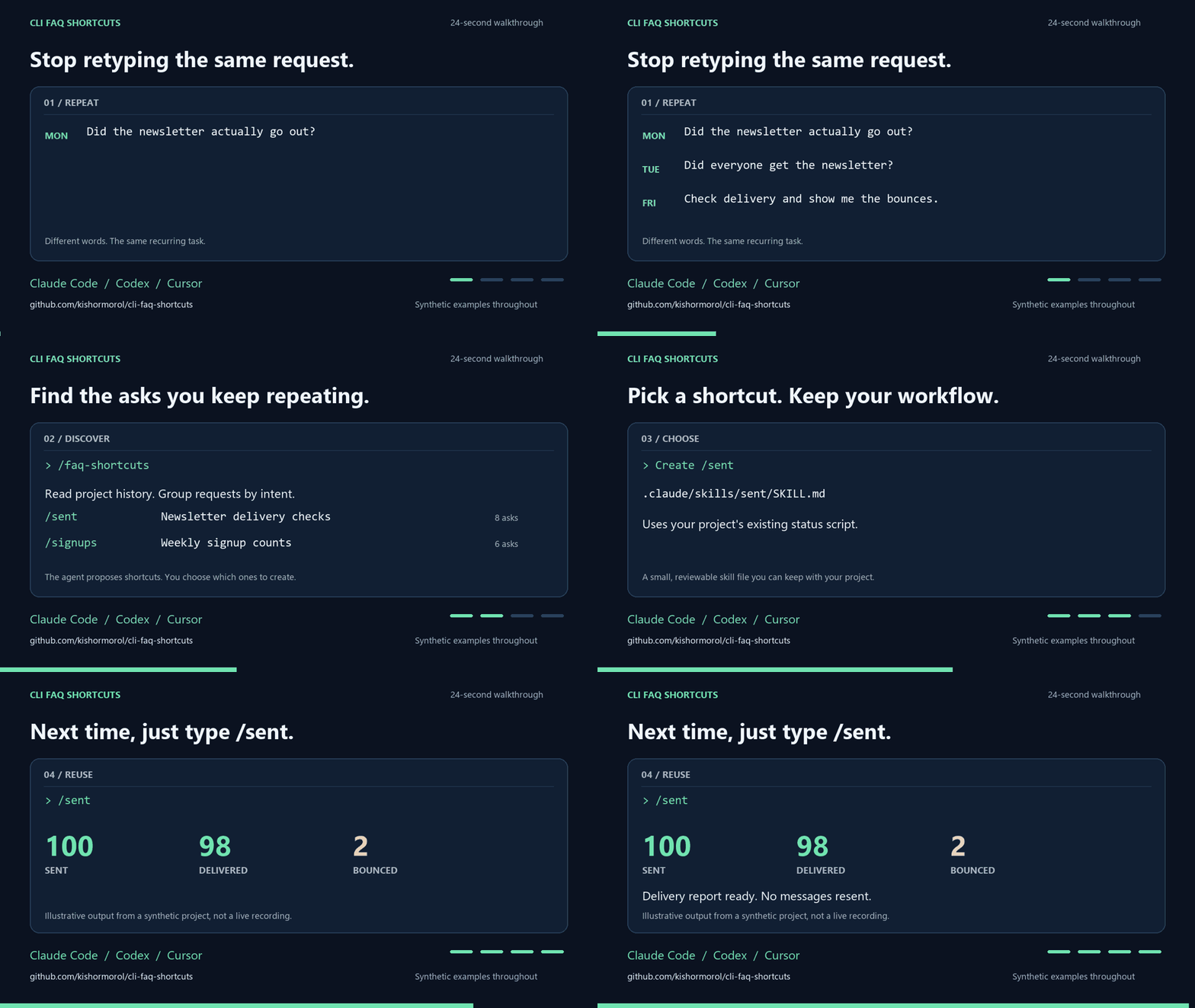
You'll get a table of your most repeated asks with how often you typed each. Pick the ones you want and they become shortcuts in that project.
> The repo is `cli-faq-shortcuts`; the skill it installs is called **`faq-shortcuts`**.
**If it saves you typing, please ⭐ star the repo.** Stars are how other people find it.
What was scanned
The files the safety scan read, as written by the repository's author and shown as plain text. Lines with a finding are marked.
.claude-plugin/marketplace.json · Manifest · 15 lines
View this file on GitHub (read at the repository's current version: the scan did not record which commit it read)
This file has changed since it was scanned, so this is not exactly the text that was scanned, and no line is marked. The findings are listed with the safety scan above.
- {
- "name": "cli-faq-shortcuts",
- "description": "The faq-shortcuts skill as a Claude Code plugin.",
- "owner": {
- "name": "Md. Kishor Morol",
- "url": "https://github.com/kishormorol"
- },
- "plugins": [
- {
- "name": "faq-shortcuts",
- "source": "./",
- "description": "Turns the asks you keep typing into short slash commands, mined from your own Claude Code, Codex and Cursor history."
- }
- ]
- }
README.md · README · 274 lines
View this file on GitHub (read at the repository's current version: the scan did not record which commit it read)
This file has changed since it was scanned, so this is not exactly the text that was scanned, and no line is marked. The findings are listed with the safety scan above.
- # cli-faq-shortcuts
- [](LICENSE)
- [](https://github.com/kishormorol/cli-faq-shortcuts/releases)
- [](https://github.com/kishormorol/cli-faq-shortcuts/actions/workflows/test.yml)
- [](#install)
- [](https://github.com/kishormorol/cli-faq-shortcuts/stargazers)
- **Stop typing the same long request to your coding agent every day.** This
- [Agent Skill](https://agentskills.io) reads your own history, finds the asks you keep
- repeating, and turns each one into a short command, like `/sent` or `/project billing`.
- It works in Claude Code, Codex and Cursor.
- - **Built from what you actually typed.** On one real project, a single ask had been
- typed 230 times in different words. You see the counts and pick which become shortcuts.
- - **Secrets stay out.** API keys, tokens, and passwords you pasted into old prompts are
- replaced with `[REDACTED]` before your agent reads the list.
- - **Nothing to install but the skill.** The extractor is standard-library Python: no
- packages, API keys, or network calls. Intent grouping happens in your coding agent.
- 
- [Watch or download the 24-second video](https://github.com/kishormorol/cli-faq-shortcuts/releases/download/v1.2.0/faq-shortcuts-demo.mp4)
- · [What's new in v1.3.0](https://github.com/kishormorol/cli-faq-shortcuts/releases/tag/v1.3.0)
- The demo illustrates the workflow with synthetic data; it is not a live agent recording.
- ## Quick start
- **1. Install** (macOS / Linux, needs `git` and Python 3.9+; on Windows see [Windows](#windows)):
- ```bash
- git clone https://github.com/kishormorol/cli-faq-shortcuts ~/.agents/skills/faq-shortcuts
- mkdir -p ~/.claude/skills && ln -sfn ~/.agents/skills/faq-shortcuts ~/.claude/skills/faq-shortcuts
- ```
- **2. Open your project** in Claude Code, Codex or Cursor, in a new session.
- **3. Ask** *"what do I keep asking in this project?"*, or type `/faq-shortcuts` in Claude Code.
- You'll get a table of your most repeated asks with how often you typed each. Pick the
- ones you want and they become shortcuts in that project.
- > The repo is `cli-faq-shortcuts`; the skill it installs is called **`faq-shortcuts`**.
- **If it saves you typing, please ⭐ star the repo.** Stars are how other people find it.
- ## Commands
- ```bash
- # inside your project, in Claude Code
- /faq-shortcuts # find your repeated asks and propose shortcuts
- /faq-shortcuts --since 2026-06-01 # only look at recent history
- /faq-shortcuts --source codex # only what you asked Codex
- # the extractor on its own: no agent, nothing leaves your machine
- E=~/.agents/skills/faq-shortcuts/scripts/extract_asks.py
- python3 "$E" . # matching prompts, oldest first
- python3 "$E" . --since 2026-09-01 | wc -l # how many since September
- python3 "$E" . --format jsonl # structured records for your own scripts
- python3 "$E" . | awk -F'\t' 'split($3,w," ")>=4 {print tolower($3)}' \
- | sort | uniq -c | sort -rn | head # your most repeated exact requests
- ```
- The last one counts exact repeats only, and it undercounts. On one real project, the most
- repeated exact request appeared 14 times. Grouped by intent, however it was worded, the top
- ask had been typed **230 times**. That grouping is the agent's job in `/faq-shortcuts`.
- ## What you get
- | You kept typing | You type now |
- |---|---|
- | "how many people signed up this week, not counting test accounts?" | `/signups` |
- | "did the newsletter actually go out? did it reach everyone?" | `/sent` |
- | "any update on the billing migration? what's blocked?" | `/project billing` |
- | "add this CSV of new customers, skip the ones we already have" | `/import new.csv` |
- Each shortcut is a small file in your project, `.claude/skills/<name>/SKILL.md`, for example:
- ```markdown
- ---
- name: sent
- description: Check whether a batch email actually reached people. Use for "did the
- newsletter go out?", "did it reach everyone?", "did X get the email?".
- ---
- # Did it go out
- Report only. Never re-send from this shortcut.
- ## Query
- scripts/email-status.js --batch <name> ← the script your project already has
- ## Traps
- - A "delivered" status to a shared inbox proves nobody read it (happened 3 May).
- ## Report
- Sent / delivered / bounced counts, then the bounced addresses. Then ask.
- ```
- The shortcuts point at the scripts and queries **your** project already uses, and they
- record the mistakes already made on that path. `/sent` checks the send record, not the
- earlier message where the agent said it sent it. So a shortcut is shorter to type, and it
- verifies the outcome instead of trusting a previous claim. Anything that writes or sends
- does a dry run first and waits for your yes, so a typo stops at the preview.
- ## How it works
- 1. **Collect.** `scripts/extract_asks.py` prints every prompt you typed in the project,
- from Claude Code and Codex history. It skips subagent turns and scripted runs, because
- you didn't type those.
- 2. **Cluster.** The agent groups prompts by intent, whatever the wording, and counts them.
- 3. **Check.** It looks for shortcuts you already have and the tools your project already has.
- 4. **Propose.** You get a table of shortcut, the ask it replaces, and how often you asked.
- You pick.
- 5. **Write.** Each chosen shortcut becomes a `SKILL.md` in `.claude/skills/`, linked into
- `.agents/skills/` so all three agents load it, committed so your team gets it too.
- 6. **List.** A table in `CLAUDE.md` / `AGENTS.md` maps each shortcut to the sentence it replaces.
- ## Install
- The quick start above is the whole install. It puts the skill where each agent looks:
- | Agent | Reads skills from |
- |---|---|
- | Codex | `~/.agents/skills/` |
- | Claude Code | `~/.claude/skills/` (the link) |
- | Cursor | both |
- **Update:** `git -C ~/.agents/skills/faq-shortcuts pull --ff-only`, then start a new agent session.
- **Uninstall:** `rm ~/.claude/skills/faq-shortcuts && rm -rf ~/.agents/skills/faq-shortcuts`
- ### As a Claude Code plugin
- If you only use Claude Code, you can install it as a plugin instead, inside Claude Code:
- ```
- /plugin marketplace add kishormorol/cli-faq-shortcuts
- /plugin install faq-shortcuts@cli-faq-shortcuts
- ```
- The command is then `/faq-shortcuts:faq-shortcuts`, or just ask *"what do I keep asking
- in this project?"*. Codex and Cursor don't read Claude Code plugins, so use the quick
- start for those.
- ### Windows
- In PowerShell, with `git` and Python 3.9+ installed. A directory junction links the skill
- into `~/.claude/skills` and, unlike a symlink, needs no admin rights or Developer Mode:
- ```powershell
- git clone https://github.com/kishormorol/cli-faq-shortcuts "$env:USERPROFILE\.agents\skills\faq-shortcuts"
- New-Item -ItemType Directory -Force "$env:USERPROFILE\.claude\skills" | Out-Null
- New-Item -ItemType Junction -Path "$env:USERPROFILE\.claude\skills\faq-shortcuts" -Target "$env:USERPROFILE\.agents\skills\faq-shortcuts"
- ```
- Run the extractor with `python` (or `py`), not `python3`:
- ```powershell
- python "$env:USERPROFILE\.agents\skills\faq-shortcuts\scripts\extract_asks.py" . | Select-Object -First 10
- ```
- **Update:** `git -C "$env:USERPROFILE\.agents\skills\faq-shortcuts" pull --ff-only`, then start a new agent session.
- **Uninstall:** remove the junction with `rmdir`, which leaves its target alone, then the clone:
- ```powershell
- cmd /c rmdir "$env:USERPROFILE\.claude\skills\faq-shortcuts"
- Remove-Item -Recurse -Force "$env:USERPROFILE\.agents\skills\faq-shortcuts"
- ```
- ## What it reads
- | Agent | History | Read? |
- |---|---|---|
- | Claude Code | `~/.claude/projects/<project>/*.jsonl` (the last 30 days) and `~/.claude/history.jsonl` (older prompts) | yes |
- | Codex | `~/.codex/sessions/` (or `$CODEX_HOME`), matched by the folder each session ran in | yes |
- | Cursor | `Cursor/User/globalStorage/state.vscdb` under `~/Library/Application Support` (macOS), `%APPDATA%` (Windows) or `~/.config` (Linux), matched by the folder each chat ran in | yes, except chats opened without a folder |
- To see what it finds without the agent:
- ```bash
- python3 ~/.agents/skills/faq-shortcuts/scripts/extract_asks.py ~/my-project | head
- ```
- This prints `date<TAB>source<TAB>prompt`. Add `--source claude`, `--source codex`, or `--source cursor`
- to read one tool only, and `--since 2026-01-01` to skip older prompts.
- ### Extractor reference
- ```text
- python scripts/extract_asks.py [project_dir] [--source all|claude|codex|cursor]
- [--since YYYY-MM-DD] [--max-len N] [--min-words N]
- [--format tsv|jsonl] [--no-redact]
- ```
- | Option | Default | Behavior |
- |---|---|---|
- | `project_dir` | Current directory | Match the exact project folder recorded in history. |
- | `--source` | `all` | Read one supported tool or all three. |
- | `--since` | No cutoff | Include the given UTC date and later; exclude prompts with unknown dates. |
- | `--max-len` | `400` | Skip prompts longer than this positive character limit, before whitespace cleanup. |
- | `--min-words` | `1` | Skip prompts with fewer words. `3` drops replies like "ok", "yes" and "push"; the skill uses it. |
- | `--no-redact` | off | Print pasted secrets as typed. By default they become `[REDACTED]`. |
- | `--format` | `tsv` | Emit tab-separated lines or one JSON object per line. |
- JSONL records have `date`, `source`, and `prompt` fields. Both formats collapse prompt
- whitespace to single spaces. Dates are `YYYY-MM-DD`, or an empty string when unavailable;
- undated records sort first. Counts and diagnostics go to stderr, keeping stdout usable
- in a pipeline. Exit codes: `0` when a source is available (even if filters match nothing),
- `1` when no source is available, and `2` for invalid arguments.
- ### Limits
- - This is a view of the history still stored on your machine, not a complete activity log.
- - Prompts longer than 400 characters, injected context, and non-interactive runs are
- filtered out. Increase `--max-len` if your usual requests are longer.
- - Projects are matched by folder, without recursively including child folders or other
- worktrees. Moving a project does not move the paths recorded in old history.
- - Cursor's storage format is undocumented and can change. Chats without a recorded
- workspace or repository cannot be attributed to a project.
- - Malformed records are skipped. An invalid timestamp becomes an unknown date.
- ## Troubleshooting
- | You see | Do this |
- |---|---|
- | The agent doesn't know `/faq-shortcuts` | Start a new session. Skills load when a session starts. Check that `ls ~/.claude/skills/faq-shortcuts/SKILL.md` finds the file. |
- | `checked, nothing for this folder (…)` | Run it from the project folder you actually worked in. History is stored per folder, so a subfolder counts as a different project. |
- | Claude Code asks to allow `python3 …extract_asks.py` | Allow it. The script reads your history under `~/.claude` (and Codex, Cursor) and makes no network calls. In headless runs (`claude -p`) nobody can answer that prompt, so pass `--add-dir ~/.claude --allowedTools "Bash(python3:*)"`. |
- | Very few prompts found | History is read only for the project folder you actually worked in. Cursor chats opened without a folder aren't tied to any project, so they're skipped. |
- | `fatal: destination path … already exists` | It's already installed. Run the update command instead. |
- | No output after `--since` | Check the date and project folder. No matching prompts is a successful empty result; try without the date filter. |
- | `could not read session history` | Check file permissions and try `--source` with another tool. Available sources can still produce results. |
- | Requests you remember are missing | Try `--max-len 2000`; long prompts are filtered by default. |
- ## Contributing
- Issues and pull requests are welcome. See [CONTRIBUTING.md](CONTRIBUTING.md) for local
- checks and guidance on creating a safe reproduction. Good first contributions:
- - **History compatibility fixes** backed by small synthetic fixtures.
- - **Install and troubleshooting improvements** for the tools and platforms you use.
- - **A bug report** with your OS, Python version, command, and sanitized error message.
- Windows installation and extraction are supported and covered by CI, alongside Linux
- and macOS. See the [changelog](CHANGELOG.md) for unreleased improvements.
- Everyone whose pull request is merged appears here:
- [](https://github.com/kishormorol/cli-faq-shortcuts/graphs/contributors)
- Built and maintained with help from [Claude Code](https://claude.com/claude-code)
- and [OpenAI Codex](https://openai.com/codex/).
- ## Privacy
- The extractor only reads local files and makes no network calls. Before it prints
- anything, it replaces secrets pasted into prompts with `[REDACTED]`: API keys
- (Anthropic, OpenAI, GitHub, Slack, AWS, Google, Hugging Face, Stripe, Resend, Supabase,
- Kaggle), JWTs, bearer tokens, `password=`-style values, passwords in URLs such as
- `postgresql://user:pass@host`, Discord and Slack webhooks, and any other bare token of 30+
- mixed-case letters and digits. Matching is by pattern, so treat it as a safety net, not a
- guarantee. Your prompts can still contain names and emails, so the skill writes the list
- to a scratch folder, never into your repo. Your agent then reads that list the same way it reads any file you show it.
- That agent may send the prompts to its configured model provider. Review your agent's
- settings before using sensitive history. Do not attach raw history, extractor output,
- or Cursor databases to public issues. Use invented prompts in bug reproductions and
- review generated shortcuts before committing them.
- ## License
- [Apache-2.0](LICENSE).
Ratings and comments
Sign in to rate this skill.
Sign inFree to use. If it’s helped, pass it on.