claude-spellbook
A curated collection of skills, prompts, and workflows that extend Claude's capabilities — your personal grimoire for AI-powered development.
Safety scan
A static text scan, not a guarantee. Select the badge to see what was scanned and every finding.
Badge for your README

Markdown
[](/listings/kid-sid--claude-spellbook)HTML
<a href="/listings/kid-sid--claude-spellbook"><img src="/api/listings/kid-sid--claude-spellbook/badge.svg" alt="findsafeskills safety rating" /></a>Install
Install instructions from the README
As written by the repo's author. findsafeskills has not verified these steps.
1. Install skills into Claude Code
Copy the skills you want into your Claude skills directory:
# Install a single skill
cp -r skills/security ~/.claude/skills/

# Install everything
cp -r skills/* ~/.claude/skills/
Claude Code picks them up automatically on the next session — no restart needed.
2. Install agents
Copy the `.claude/agents/` folder into any project:
cp -r .claude/agents /path/to/your-project/.claude/agents
Or install globally so they're available in every project:
cp -r .claude/agents/* ~/.claude/agents/
3. Install slash commands
Copy the `.claude/commands/` folder into any project you work on:
cp -r .claude/commands /path/to/your-project/.claude/commands
Or install globally into your home Claude directory:
cp -r .claude/commands ~/.claude/commands
4. Install tool configs into a project
Use the installer script to drop configs into any project:
# Single language
bash tools/install.sh node --target /path/to/your-project
bash tools/install.sh python --target /path/to/your-project

# All languages at once
bash tools/install.sh all --target /path/to/your-project
Or use the Makefile shorthand:
make setup TARGET=/path/to/your-project LANG=typescript
---
What was scanned
The files the safety scan read, as written by the repository's author and shown as plain text. Lines with a finding are marked.
README.md · README · 707 lines
View this file on GitHub (read at the repository's current version: the scan did not record which commit it read)
- <div align="center">
- <img src="assets/logo.png" alt="claude-spellbook logo" width="120" />
- # claude-spellbook
- **Ship faster. Review smarter. Build with intent.**
- A curated library of skills, slash commands, and agents that transform Claude Code
- into a precision engineering assistant — one spell at a time.
- [](https://github.com/kid-sid/claude-spellbook/actions/workflows/ci.yml)
- 
- 
- 
- *Each skill is a spell. Cast wisely.*
- </div>
- ---
- ## What's in the box
- | Layer | What | Count |
- |---|---|---|
- | **Skills** | Structured instruction sets loaded contextually by Claude | 65 |
- | **Slash Commands** | One-shot `/commands` for common engineering tasks | 18 |
- | **Agents** | Autonomous subprocesses for multi-file, long-running tasks | 7 |
- | **Tool Configs** | Drop-in linter/formatter configs for 6 languages | 6 |
- | **Templates** | Scaffold starters for Node, TypeScript, Python, Svelte | 4 |
- ---
- ## Quick Start
- ### 1. Install skills into Claude Code
- Copy the skills you want into your Claude skills directory:
- ```bash
- # Install a single skill
- cp -r skills/security ~/.claude/skills/
- # Install everything
- cp -r skills/* ~/.claude/skills/
- ```
- Claude Code picks them up automatically on the next session — no restart needed.
- ### 2. Install agents
- Copy the `.claude/agents/` folder into any project:
- ```bash
- cp -r .claude/agents /path/to/your-project/.claude/agents
- ```
- Or install globally so they're available in every project:
- ```bash
- cp -r .claude/agents/* ~/.claude/agents/
- ```
- ### 3. Install slash commands
- Copy the `.claude/commands/` folder into any project you work on:
- ```bash
- cp -r .claude/commands /path/to/your-project/.claude/commands
- ```
- Or install globally into your home Claude directory:
- ```bash
- cp -r .claude/commands ~/.claude/commands
- ```
- ### 4. Install tool configs into a project
- Use the installer script to drop configs into any project:
- ```bash
- # Single language
- bash tools/install.sh node --target /path/to/your-project
- bash tools/install.sh python --target /path/to/your-project
- # All languages at once
- bash tools/install.sh all --target /path/to/your-project
- ```
- Or use the Makefile shorthand:
- ```bash
- make setup TARGET=/path/to/your-project LANG=typescript
- ```
- ---
- ## Skills
- Skills are markdown files that Claude loads when a relevant task is triggered. They encode judgment, checklists, and domain knowledge — turning Claude from a general assistant into a specialist for a specific phase of your workflow.
- ### How skills activate
- When you describe a task, Claude matches it against the **"When to Activate"** section in each skill. You don't invoke them manually — they're loaded automatically based on context.
- > Example: start a conversation about "designing a REST API for user authentication" and the `api-design` skill loads. Ask Claude to "write a Dockerfile for this service" and `containerization` loads.
- ### Skill inventory
- #### AI & Agents
- | Skill | Activates when… |
- |---|---|
- | `agentex` | Building ACP agents (sync/async/Temporal), working with manifests, ADK modules, or agent types |
- | `temporal` | Writing Temporal workflows, activities, signals, or debugging determinism and failure handling |
- | `general-temporal` | Building or debugging Temporal workflows in Python using the standard temporalio SDK — determinism, retries, signals, state, versioning |
- | `langgraph` | Building StateGraph pipelines, conditional routing, tool calling, checkpointers, or interrupts |
- | `openai-agents` | Defining agents, `@function_tool`, handoffs, streaming, guardrails, or Agentex ADK integration |
- #### Languages & Frameworks
- | Skill | Activates when… |
- |---|---|
- | `go` | Error handling patterns, goroutines/channels, context propagation, interface composition, generics, or table-driven tests |
- | `python` | Advanced type hints, async pitfalls, decorators, generators, or pattern matching |
- | `typescript` | Utility types, conditional/mapped types, discriminated unions, branded types, or `satisfies` |
- | `fastapi` | Structuring FastAPI apps, Depends injection, Pydantic v2 schemas, error handling, or testing routes |
- | `pydantic` | Deep `field_validator`/`model_validator`, `Annotated` constraints, serialization, generic models, or `pydantic-settings` |
- | `sqlalchemy` | Async SQLAlchemy 2.0 `Mapped` models, session management, joins, relationships, or Alembic migrations |
- | `mongodb` | Motor async CRUD, aggregation pipelines, index design, transactions, or `adk.state` patterns |
- | `postgresql` | Window functions, CTEs, JSONB queries, index design, `EXPLAIN ANALYZE`, or schema migrations |
- | `redis` | Choosing data structures, caching strategies, pub/sub, Redis Streams, or distributed locks |
- | `websockets-sse` | Real-time server push, LLM token streaming, WebSocket connection management, or Redis broadcast |
- #### Requirements & Design
- | Skill | Activates when… |
- |---|---|
- | `requirements-planning` | Writing user stories, PRDs, or acceptance criteria |
- | `system-design` | Designing systems, estimating capacity, drawing architecture |
- | `api-design` | Designing or reviewing REST endpoints |
- | `graphql` | Designing schemas, resolvers, mutations, DataLoader, subscriptions, or securing a GraphQL API |
- | `database-design` | Designing schemas, indexes, or migrations |
- | `microservices` | Decomposing services, designing async comms, circuit breakers, CQRS |
- #### Security & Identity
- | Skill | Activates when… |
- |---|---|
- | `auth` | Implementing login flows, JWTs, OAuth2/OIDC, RBAC/ABAC, or token refresh and revocation |
- #### Development
- | Skill | Activates when… |
- |---|---|
- | `coding-standards` | Writing or reviewing code for quality/style |
- | `development-workflow` | Branching, PRs, commits, or code review |
- | `error-handling` | Designing error hierarchies, retry/backoff logic, structured API errors, or propagating errors across service boundaries |
- | `writing-plans` | Creating an implementation plan for a non-trivial task spanning multiple files, migrations, specific sequencing, or subagent handoff |
- | `frontend` | Building React components, managing state, data fetching, forms, or optimizing rendering |
- | `react` | Advanced hooks, compound components, error boundaries, or TypeScript + React patterns |
- | `nextjs` | App Router pages, server/client components, data fetching, layouts, middleware, or deployment |
- | `angular` | Signals, standalone components, inject(), NgRx, RxJS patterns, or Angular 17+ control flow |
- | `tailwind` | Composing utilities, responsive design, dark mode, cva variants, or custom theme config |
- | `event-driven` | Designing Kafka topics, producers/consumers, outbox pattern, DLQs, or event sourcing |
- | `webhooks` | Designing webhook delivery, HMAC verification, retry handling, idempotent consumers, or local testing |
- | `caching` | Adding Redis, choosing a caching strategy, designing TTLs, or configuring HTTP cache headers |
- | `claude-code` | Setting up skills, slash commands, agents, hooks, permissions, MCP servers, or CLAUDE.md |
- | `spellbook-setup` | Installing claude-spellbook — global vs project-level, memory_map MCP, hooks, tool configs |
- | `memory-map` | Installing memory_map MCP server, session-start CLAUDE.md, memory/history tools, cross-project recall |
- | `feature-flags` | Adding feature flag support, designing rollouts or A/B experiments, choosing a flag platform, testing flag-gated code, or managing flag lifecycle |
- | `data-pipelines` | Building Airflow DAGs, writing dbt models or tests, designing incremental loads, implementing idempotent ETL/ELT, or validating data quality |
- | `github-issues` | Filing bug reports, feature requests, or tasks on GitHub; triaging severity; using the gh CLI; handling regressions, flaky tests, or security vulnerabilities |
- | `ui-ux-pro-max` | Designing interfaces, choosing styles, palettes, fonts, or auditing UI/UX design code |
- #### Testing
- | Skill | Activates when… |
- |---|---|
- | `unit-testing` | Writing or fixing unit tests |
- | `integration-testing` | Testing APIs, databases, or service boundaries |
- | `solution-testing` | Writing E2E or BDD tests with Playwright/Gherkin |
- | `smoke-testing` | Verifying deployments, gating CI pipelines, or building health-check suites |
- | `test-strategy` | Planning test coverage or choosing a testing model |
- | `performance-testing` | Load testing with k6 or Locust |
- #### Security & Quality
- | Skill | Activates when… |
- |---|---|
- | `security` | Security reviews, threat modeling, auth/secrets |
- | `accessibility` | Building or auditing UI for WCAG conformance, ARIA, keyboard nav |
- | `claude-api` | Building with the Anthropic SDK or Agent SDK |
- | `azure` | Azure SDK auth, Blob Storage, AI Search, Document Intelligence, Key Vault |
- | `azure-service-bus` | Queues vs topics/subscriptions, peek-lock, DLQ, sessions, subscription filters, scheduled messages |
- | `aws` | boto3/SDK v3 auth, S3, DynamoDB, Lambda, SQS batch, Secrets Manager, IAM least privilege |
- | `ai-engineer` | Building RAG systems, LLM agents, vector search, or AI safety patterns |
- | `complex-doc-rag` | Ingesting PDFs, Excel, CSV, or images into a RAG pipeline; debugging extraction gaps |
- | `promptbase` | Writing, reviewing, or adapting a skill for PromptBase sale — scope, audience, rejection risk, listing copy, examples, setup |
- #### CI/CD & Infrastructure
- | Skill | Activates when… |
- |---|---|
- | `ci-cd` | Writing GitHub Actions workflows or quality gates |
- | `containerization` | Writing Dockerfiles, Compose, or Kubernetes configs |
- | `docker` | Writing Dockerfiles, multi-stage builds, Compose networking, health checks, or debugging containers |
- | `infrastructure-as-code` | Working with Terraform modules or environments |
- #### Deployment & Operations
- | Skill | Activates when… |
- |---|---|
- | `deployment-strategies` | Planning rollouts, canary deploys, or rollbacks |
- | `observability` | Adding logging, metrics, or distributed tracing |
- | `performance` | Profiling, caching, or fixing N+1 queries |
- | `incident-response` | Responding to, documenting, or learning from incidents |
- | `technical-documentation` | Writing READMEs, OpenAPI specs, or tech specs |
- ---
- ## Agents
- Agents are autonomous subprocesses that run in their own context window with their own tool permissions. Unlike slash commands (which run inline and can pollute the main conversation), agents are isolated — ideal for tasks that span many files, run in parallel, or need a fresh context.
- Agents live in `.claude/agents/` and are invoked automatically when Claude decides to delegate based on the agent's `description`.
- ### When agents beat slash commands
- | Use case | Use `/command` | Use agent |
- |---|---|---|
- | Review current git diff | `/review` | — |
- | Audit an entire service (40+ files) | — | `security-auditor` |
- | Generate tests for one function | `/test-gen` | — |
- | Generate tests for a whole module | — | `test-coverage-agent` |
- | Explain a single file | `/explain` | — |
- | Check one manifest for outdated deps | manual `npm audit` | — |
- | Audit deps across a multi-stack repo | — | `dependency-auditor` |
- | Write a new-joiner guide | — | `onboarding-agent` |
- | Full PR review (spec + quality) | — | `code-reviewer` |
- | Verify spec only, defer quality | — | `code-reviewer-spec` |
- | Quality pass after spec confirmed | — | `code-reviewer-quality` |
- ### Available agents
- #### `security-auditor`
- Scans a full codebase for OWASP Top 10 vulnerabilities: hardcoded secrets, injection flaws, broken auth, weak crypto, security misconfiguration, vulnerable dependencies, and data exposure.
- **Tools:** `Read`, `Grep`, `Glob`, `Bash` · **Model:** Sonnet · **Color:** Red
- ```
- Audit the src/ directory for security vulnerabilities
- Do a full security review of this codebase
- Security scan everything under services/payments
- ```
- > Reads context around every match before reporting — grep false positives are discarded silently.
- #### `code-reviewer`
- Performs a deep pull request review covering logic correctness, code quality, security, test coverage, and performance. Reads full files (not just diff hunks) and follows symbols cross-file to catch invariant breaks, missing migrations, and unhandled callers.
- **Tools:** `Read`, `Grep`, `Glob`, `Bash` · **Model:** Sonnet · **Color:** Blue
- ```
- Review this PR in depth
- Do a thorough review of the changes in src/payments/
- Review PR 84 — it touches the auth layer
- ```
- #### `code-reviewer-spec`
- Stage 1 review only — verifies a change fully implements its stated requirements. Checks for missing pieces, scope creep, and gaps between the stated intent and the actual diff. Use before a quality pass.
- **Tools:** `Read`, `Grep`, `Glob`, `Bash` · **Model:** Sonnet · **Color:** Blue
- ```
- Check if this change actually implements what was asked
- Verify the spec is fully covered before we merge
- Does this PR match the requirements in the ticket?
- ```
- #### `code-reviewer-quality`
- Stage 2 review only — evaluates code quality, security, performance, and test coverage after spec compliance has been confirmed. Use after `code-reviewer-spec` gives the green light.
- **Tools:** `Read`, `Grep`, `Glob`, `Bash` · **Model:** Sonnet · **Color:** Blue
- ```
- Quality review of this PR — spec is already confirmed
- Check for code smells, security issues, and missing tests
- Performance and coverage review on src/payments/
- ```
- #### `dependency-auditor`
- Scans all dependency manifests across a repository (`package.json`, `requirements.txt`, `go.mod`, `Cargo.toml`, and more), runs ecosystem audit tools (`npm audit`, `pip-audit`, `cargo audit`, `govulncheck`), and produces a unified report covering vulnerabilities, unpinned versions, missing lock files, and abandoned packages.
- **Tools:** `Read`, `Grep`, `Glob`, `Bash` · **Model:** Sonnet · **Color:** Orange
- ```
- Audit all dependencies in this monorepo
- Check for vulnerable packages across the whole project
- Find outdated and unpinned dependencies
- ```
- #### `test-coverage-agent`
- Analyses source files across a module, maps them against existing tests to find untested code paths, then writes the missing tests — following the project's existing framework, assertion library, and file naming conventions. Runs the new tests to verify they pass before finishing.
- **Tools:** `Read`, `Grep`, `Glob`, `Bash`, `Write` · **Model:** Sonnet · **Color:** Green
- ```
- Generate tests for everything under src/payments/
- Find and fill coverage gaps in the auth module
- Add missing tests across the whole services/ directory
- ```
- #### `onboarding-agent`
- Reads the entire repository — structure, stack, routes, schemas, CI config, Makefile, environment variables, and git history — then writes an `ONBOARDING.md` covering what the service does, local setup, architecture overview, key files, env var reference, gotchas, and who to ask for what.
- **Tools:** `Read`, `Grep`, `Glob`, `Bash`, `Write` · **Model:** Sonnet · **Color:** Purple
- ```
- Write an onboarding guide for this repo
- Generate a new-joiner doc for a backend engineer joining next week
- Create an ONBOARDING.md for this service
- ```
- ---
- ## Slash Commands
- Slash commands are one-shot prompts you run with `/command-name` in Claude Code. They're stored in `.claude/commands/` and show up in the `/` menu automatically once installed.
- | Command | What it does |
- |---|---|
- | `/review` | Reviews staged/unstaged changes or a PR for quality and security issues |
- | `/changelog` | Generates a changelog from git history since the last release tag |
- | `/security-scan` | Audits code against OWASP Top 10 and the security skill checklist |
- | `/test-gen` | Generates unit and integration tests for a file or function |
- | `/explain` | Explains a file, function, or architectural pattern in depth |
- | `/refactor` | Analyzes code smells and suggests or applies refactoring |
- | `/scaffold` | Scaffolds a new service with production-ready boilerplate |
- | `/deploy-check` | Runs a pre-deployment verification checklist |
- | `/adr` | Generates an Architecture Decision Record from a discussion |
- | `/postmortem` | Generates a postmortem document from an incident description |
- | `/prd` | Generates a Product Requirements Document pre-filled from context |
- | `/mem_save` | Manually checkpoints the current conversation to `.mcp_history.json` |
- | `/skill-validate` | Runs all CI format checks locally — skills, agents, badge sync, inventory |
- | `/create-issue` | Creates one or more GitHub issues from a natural language description |
- | `/resolve-issue` | Fetches a GitHub issue, applies the fix, comments what changed, and closes it |
- | `/update-skill` | Reviews pending findings (web discoveries, bugs, gaps) and applies approved changes to the relevant skill file |
- | `/roast-repo` | Delivers a brutally honest, technically sharp roast of the current repo — real bugs, smells, security holes, each with a fix |
- ### Usage examples
- ```
- # Review your current git diff
- /review
- # Review a specific pull request
- /review 42
- # Generate tests for a specific file
- /test-gen src/auth/middleware.ts
- # Scaffold a new Python API service
- /scaffold python-api payments-service
- # Generate a changelog since the last release tag
- /changelog
- # Generate a changelog for a specific new version
- /changelog v2.1.0
- # Create an ADR for a recent decision
- /adr We chose Postgres over MongoDB because our data is highly relational
- ```
- ---
- ## Tool Configs
- Drop-in configuration files for linters and formatters. Consistent settings across all your projects, managed from one place.
- | Language | Tools included |
- |---|---|
- | `node` | prettier, eslint, markdownlint |
- | `typescript` | tsc (strict), prettier, eslint |
- | `svelte` | SvelteKit, vite, prettier-plugin-svelte, eslint-plugin-svelte |
- | `python` | black, ruff |
- | `go` | golangci-lint (gofmt ships with Go) |
- | `rust` | rustfmt, clippy, rust-toolchain |
- ### Installing into a project
- ```bash
- # Node project
- bash tools/install.sh node --target ~/projects/my-app
- # TypeScript project
- bash tools/install.sh typescript --target ~/projects/my-api
- # Python project
- bash tools/install.sh python --target ~/projects/my-service
- # Rust project
- bash tools/install.sh rust --target ~/projects/my-crate
- # Everything
- bash tools/install.sh all --target ~/projects/monorepo
- ```
- > Files that already exist (e.g. `pyproject.toml`) are skipped with a warning pointing to the source — so you can manually merge without losing your customizations.
- ### Development commands (for working on the spellbook itself)
- ```bash
- make install # Install Node + Python tools locally
- make check # Check which tools are available on your PATH
- make format # Run prettier over all skill markdown files
- make lint # Run markdownlint over all skill markdown files
- make help # List all available make targets
- ```
- ---
- ## Hooks
- The project ships a `settings.local.json` with Claude Code hooks that run automatically on every file write, edit, or bash command. Install them by copying into your project's `.claude/` directory.
- ### PostToolUse — skill finding capture
- When Claude uses `WebSearch` or `WebFetch`, a hook appends the query/URL and a result snippet to `.claude/findings.jsonl`. Run `/update-skill` to review and apply findings back to skill files. Claude also writes `bug` and `gap` entries inline when it spots incorrect or missing content in an active skill.
- | Trigger | Hook |
- |---|---|
- | `WebSearch` / `WebFetch` | Appends `{source:"web", ...}` entry to `.claude/findings.jsonl` |
- ### PostToolUse — auto-format on write/edit
- | Trigger | Hook |
- |---|---|
- | Write `**/*.ts`, `**/*.svelte` | `prettier --write` |
- | Write `**/*.py` | `black` |
- | Write `**/*.go` | `gofmt -w` |
- | Write `**/*.rs` | `rustfmt` |
- | Edit `**/*.ts`, `**/*.svelte` | `eslint --fix` |
- | Edit `**/*.py` | `ruff check --fix` |
- | Edit `**/*.go` | `golangci-lint run` |
- | Edit `**/*.rs` | `cargo clippy --fix` |
- | Edit `**/*.md` | `markdownlint --fix` |
- | Edit `skills/*/skill.md` | Skill format validator (frontmatter, sections, checklist) |
- ### PostToolUse — bash command log
- Every bash command is logged to `.claude/command.log` asynchronously — useful for auditing what Claude ran during a session.
- ### PreToolUse — safety guards
- | Guard | What it blocks |
- |---|---|
- | `git push --force` (without `--force-with-lease`) | Blocked with an error |
- | `rm -rf` | Allowed but prints a warning with the command |
- ### Session lifecycle hooks
- | Event | Hook |
- |---|---|
- | `SessionStart` | Runs `git status` at the start of every session |
- | `UserPromptSubmit` | Runs `memory-map-hook` every message — saves conversation history |
- | `PreCompact` | Runs `memory-map-hook --force` before context compaction |
- | `Stop` | Runs `memory-map-hook --force` async on session end — final checkpoint |
- > These hooks live in `~/.claude/settings.json` (global) so they fire in every project. See the MCP Server section for the full config.
- ---
- ## MCP Server
- Persistent memory and conversation history are provided by the standalone [memory_map](https://github.com/kid-sid/memory_map) repo. It gives Claude a key-value memory store and rolling conversation history that persist across sessions.
- ### Tools exposed
- | Tool | What it does |
- |---|---|
- | `load_memory` / `save_memory` / `delete_memory` | Per-project key-value context store |
- | `suggest_history` | Primary session-start tool — hybrid retrieval (vector + BM25 + RRF + MMR) within a token budget |
- | `save_history` / `load_history` / `get_history_chunks` | Save chunks (auto-called by hooks); inspect tag index; fetch full dialogue by ID |
- | `load_global_memory` / `save_global_memory` | User-level facts shared across all projects |
- | `get_local_structure` | Local directory tree (gitignore-aware) |
- | `get_github_structure` | GitHub repo file tree |
- | `get_git_history` | Recent commits |
- | `set_compression` | Output compression level (0=raw, 1=compact, 2=dense) |
- ### Setup (one-time)
- **Step 1 — Install**
- ```bash
- # Recommended — bundles the OpenAI client for semantic history search
- pip install "memory-map-mcp[embed-openai]"
- # Base install — works fine if you stick with local embeddings or BM25 only
- pip install memory-map-mcp
- ```
- > The `[embed-openai]` extra pulls in the OpenAI SDK so `MEMORY_MAP_EMBED_PROVIDER=openai` works without manual installs. It does **not** make `OPENAI_API_KEY` mandatory at install time — only when you actually use the OpenAI provider.
- **Step 2 — Set up MongoDB** (required for conversation history)
- You need a MongoDB instance. Two options:
- - **Free Atlas cluster** (recommended — no install): [mongodb.com/cloud/atlas/register](https://www.mongodb.com/cloud/atlas/register) → create a free M0 cluster → get the connection string from "Connect → Drivers"
- - **Local MongoDB**: [mongodb.com/try/download/community](https://www.mongodb.com/try/download/community) → install → URI is `mongodb://localhost:27017`
- > Key-value memory (`save_memory` / `load_memory`) works **without** MongoDB and falls back to a local file. Only conversation history requires a live connection.
- **Step 2b — Configure environment variables**
- The most reliable way is to export from your shell profile so the vars are available everywhere:
- **Mac/Linux** — add to `~/.zshrc` or `~/.bashrc`:
- ```bash
- export MEMORY_MAP_MONGO_URI="mongodb+srv://<user>:<password>@<cluster>.mongodb.net"
- # Optional: OpenAI vector search (semantic similarity in history retrieval)
- # export MEMORY_MAP_EMBED_PROVIDER=openai
- # export OPENAI_API_KEY=sk-...
- # Optional: local CPU vector search (no API key needed)
- # export MEMORY_MAP_EMBED_PROVIDER=local
- ```
- **Windows** — add to your PowerShell profile (`$PROFILE`):
- ```powershell
- $env:MEMORY_MAP_MONGO_URI = "mongodb+srv://<user>:<password>@<cluster>.mongodb.net"
- ```
- Or use System Properties → Environment Variables for a permanent GUI-based setting.
- Alternatively, create a `.env` file in **each project root** — `memory-map-mcp` picks it up automatically when Claude Code opens that project:
- ```bash
- MEMORY_MAP_MONGO_URI=mongodb+srv://<user>:<password>@<cluster>.mongodb.net
- ```
- **Step 3 — Register globally** (available in all projects, not just one)
- ```bash
- claude mcp add -s user memory_map -- memory-map-mcp
- ```
- **Step 4 — Add hooks to `~/.claude/settings.json`** so history saves in every project automatically
- ```json
- {
- "hooks": {
- "UserPromptSubmit": [{ "matcher": "", "hooks": [{ "type": "command", "command": "memory-map-hook", "timeout": 10 }] }],
- "PreCompact": [{ "matcher": "", "hooks": [{ "type": "command", "command": "memory-map-hook --force", "timeout": 15 }] }],
- "Stop": [{ "matcher": "", "hooks": [{ "type": "command", "command": "memory-map-hook --force", "timeout": 15, "async": true }] }]
- }
- }
- ```
- **Step 5 — Enable memory for a project**
- Add this to the `CLAUDE.md` in any project you want Claude to remember:
- ```markdown
- ## Session Start (Required)
- At the start of every session, before doing anything else:
- 1. Call `load_memory` with the current working directory
- 2. Call `suggest_history` with the current working directory and the user's first message
- 3. Read both outputs before exploring files or asking questions
- ```
- Claude reads `CLAUDE.md` at session start and loads memory and history automatically.
- ### Usage
- Use `/mem_save` at any time to manually checkpoint the current conversation. Memory is stored in MongoDB (primary) or `.mcp_memory.json` per project (fallback). History is stored in the `memory_map.history` MongoDB collection.
- Full documentation: [github.com/kid-sid/memory_map](https://github.com/kid-sid/memory_map)
- ---
- ## CI / Workflows
- Two GitHub Actions workflows keep the spellbook healthy:
- ### `ci.yml` — runs on every push and PR to `main`
- | Job | What it checks |
- |---|---|
- | **Validate Skill Format** | Every `skills/*/skill.md` has frontmatter (`name`, `description`), a `## When to Activate` section, a `## Checklist` section, and at least one `- [ ]` item |
- | **Lint Markdown** | All `.md` files pass markdownlint |
- | **Validate Tool Configs** | `tools/install.sh` parses cleanly; all 6 language tool directories and key config files are present |
- | **Validate Slash Commands** | Every `.claude/commands/*.md` is non-empty |
- | **Check Cross-References** | Logs how many other skills reference each skill (informational) |
- ### `release.yml` — runs on version tags (`v*`)
- Creates a GitHub Release with an auto-generated changelog and a summary of how many skills, agents, commands, and tool configs are in the release.
- ```bash
- # Create a release
- git tag v1.2.0
- git push origin v1.2.0
- ```
- ---
- ## Repository Structure
- ```
- claude-spellbook/
- ├── skills/<name>/skill.md — skill reference files
- ├── .claude/agents/ — autonomous subagents
- ├── .claude/commands/ — slash command definitions
- ├── .claude/settings.local.json
- ├── tools/ — linter/formatter configs + install.sh
- ├── templates/ — scaffold starters
- ├── .github/workflows/ — CI + release
- ├── CLAUDE.md
- └── Makefile
- ```
- ---
- ## Writing a New Skill
- Every skill follows a strict format enforced by CI. Read `CLAUDE.md` for the full spec, or use `api-design` and `claude-api` as canonical examples.
- ```markdown
- ---
- name: kebab-case-name
- description: One dense keyword-rich sentence.
- ---
- # Title
- One-sentence intro.
- ## When to Activate
- - Verb-leading trigger condition
- - ...
- ## Content sections...
- ## Checklist
- - [ ] At least 8 items
- ```
- To add a new skill:
- 1. Create `skills/<name>/skill.md` following the format above
- 2. Add an entry to the skill inventory table in `CLAUDE.md` and `README.md`
- 3. Open a PR — CI will validate the format automatically
- To propose a skill without writing it, open an issue using the **New Skill Request** template.
- ---
- ## Writing a New Agent
- Agents live at `.claude/agents/<name>.md`. The file body is a system prompt — write it in second person.
- ```markdown
- ---
- name: kebab-case-name
- description: One sentence — when to delegate to this agent vs. a slash command.
- tools: Read, Grep, Glob, Bash # minimum required
- model: sonnet # sonnet | opus | haiku | inherit
- color: red # red | blue | green | yellow | purple | orange
- ---
- You are a … agent. Your job is to …
- ## Methodology
- …
- ## Output Format
- …
- ```
- Restrict `tools` to the minimum needed — a read-only agent must not have `Write` or `Edit`. After adding, update the Agent Inventory in `CLAUDE.md` and `README.md`.
- ---
- ## Contributing
- See [`CONTRIBUTING.md`](CONTRIBUTING.md) for the full guide — branch naming, commit conventions, skill/agent format rules, and the PR process.
- Quick reference:
- 1. Fork and branch: `feat/skill-<name>`, `feat/agent-<name>`, or `fix/<issue>`
- 2. Follow the format — CI catches errors automatically
- 3. Fill in the PR template
- 4. Conventional commits: `feat:`, `fix:`, `docs:`, `chore:`
- ---
- ## Star History
- [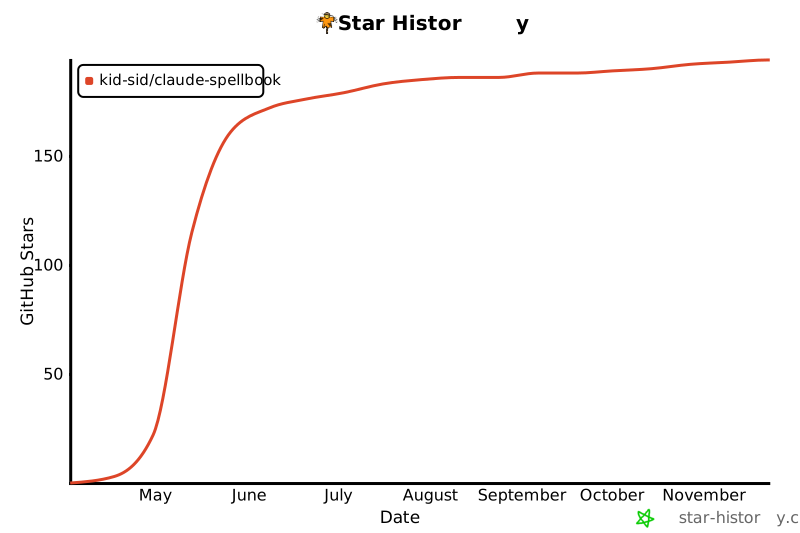](https://star-history.com/#kid-sid/claude-spellbook&Date)
- ---
- ## License
- MIT
Ratings and comments
Sign in to rate this skill.
Sign inFree to use. If it’s helped, pass it on.