kdeldycke-dotfiles
Claude Code plugins maintained by Kevin Deldycke, sourced from his dotfiles
Safety scan
A static text scan, not a guarantee. Select the badge to see what was scanned and every finding.
Check it deeper on your machine
It has changed since its scan on 11 Nov 2026.
As a Claude Code plugin, install it and then ask Claude Code:
/plugin marketplace add keithmackay/mackayi/plugin install scanskillsafety@mackayiDo a deep scan of https://github.com/kdeldycke/dotfiles with scanskillsafety
Or from a terminal, clone it and run it:
git clone https://github.com/keithmackay/scanskillsafety-skill ~/.claude/skills/scanskillsafetynode ~/.claude/skills/scanskillsafety/cli.cjs --deep 'https://github.com/kdeldycke/dotfiles'
It checks the exact commit: every file, its packages against OSV (api.osv.dev), how it compares with this page's scan (findsafeskills.com receives the repository's address), and, if you agree, Claude reading every file with your own Claude subscription. It never runs the code.
Badge for your README

Markdown
[](/listings/kdeldycke--dotfiles)HTML
<a href="/listings/kdeldycke--dotfiles"><img src="/api/listings/kdeldycke--dotfiles/badge.svg" alt="findsafeskills safety rating" /></a>Install
Install instructions from the README
As written by the repo's author. findsafeskills has not verified these steps.
1. First, you need a local copy of this project.
If you're lucky and have `git` already installed on your machine, do:
   $ cd ~
   $ git clone --recursive https://github.com/kdeldycke/dotfiles.git
If you don't have `git` yet, fetch an archive of the repository:
   $ mkdir ~/dotfiles
   $ cd ~/dotfiles
   $ curl -fsSL https://github.com/kdeldycke/dotfiles/tarball/main | tar --strip-components 1 -xvzf -
2. Now you can install the dotfiles on your system:
$ cd ~/dotfiles
$ /bin/zsh ./install.sh 2>&1 | tee ./install.log
Stages
The install procedure is decomposed into stages, executed in this order on a full run:
| Stage | What it does | | :--------- | :------------------------------------------------------------------------------------------------- | | `links` | Symlink the dotfiles into the home folder. | | `packages` | macOS updates, Homebrew bootstrap, and full package restore from `packages.toml` via `mpm`. | | `shell` | Zsh plugins (zinit) and shell completions. | | `apps` | Mac App Store packages and per-application setup (QuickLook, SwiftBar, Tor Browser, IINA, Neovim). | | `cleanup` | Package caches and orphans, Trash, DNS cache. | | `snapshot` | Record the versions of installed packages into `packages.toml`. | | `config` | Apply the whole `macos-config.sh`. Kills `Terminal.app` at the end. |
Each stage can be run on its own, or combined with others in the order given:
$ ./install.sh links
$ ./install.sh cleanup snapshot
`./install.sh --list` prints the available stage names.
What was scanned
The files the safety scan read, as written by the repository's author and shown as plain text. Lines with a finding are marked.
.claude-plugin/marketplace.json · Manifest · 30 lines
View this file on GitHub (read at the repository's current version: the scan did not record which commit it read)
This file has changed since it was scanned, so this is not exactly the text that was scanned, and no line is marked. The findings are listed with the safety scan above.
- {
- "$schema": "https://json.schemastore.org/claude-code-marketplace.json",
- "description": "Claude Code plugins maintained by Kevin Deldycke, sourced from his dotfiles",
- "name": "kdeldycke-dotfiles",
- "owner": {
- "email": "kevin@deldycke.com",
- "name": "Kevin Deldycke",
- "url": "https://github.com/kdeldycke"
- },
- "plugins": [
- {
- "category": "productivity",
- "description": "Personal skills for document wrangling, web form filling, multi-repo triage and Claude Code upkeep",
- "name": "dotfiles",
- "source": {
- "repo": "kdeldycke/dotfiles",
- "source": "github"
- },
- "tags": [
- "claude-code",
- "documents",
- "file-renaming",
- "github",
- "pull-requests",
- "web-automation"
- ],
- "version": "1.0.0"
- }
- ]
- }
readme.md · README · 317 lines
View this file on GitHub (read at the repository's current version: the scan did not record which commit it read)
This file has changed since it was scanned, so this is not exactly the text that was scanned, and no line is marked. The findings are listed with the safety scan above.
- # Kevin's dotfiles
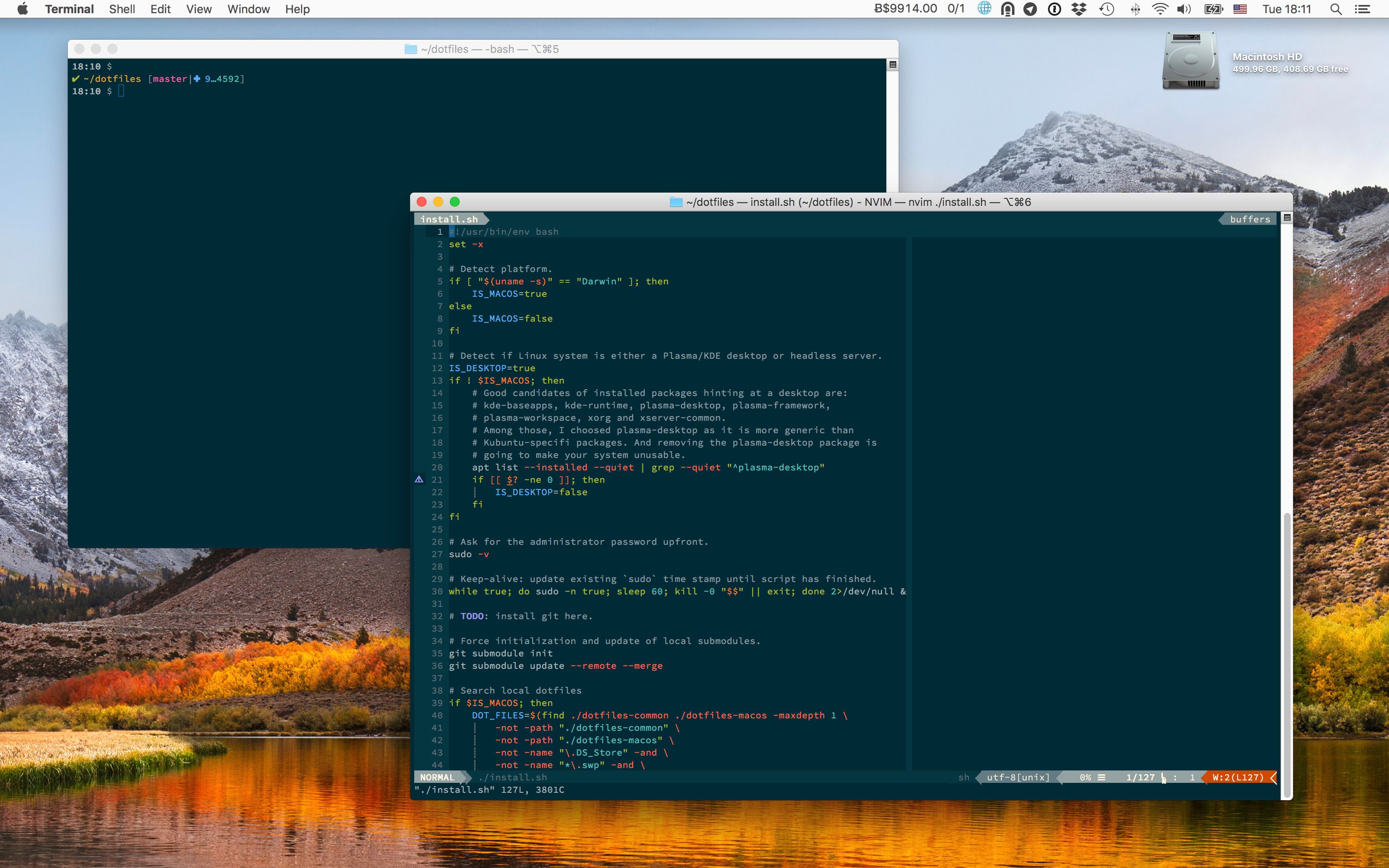
- Dot-files and system configuration for Python developers on **macOS** with Apple Silicon hardware.
- 
- ## Features
- - Aimed at Python programmers using `Neovim` and `VisualStudio Code`.
- - Targets `ZSH` shell (now the [default since Catalina](https://support.apple.com/en-gb/HT208050)).
- - Produce colored output for most of shell commands.
- - All color schemes are based on [Monokai](https://web.archive.org/web/20161107090516/http://www.monokai.nl/blog/2006/07/). The terminal uses the [Monokai Soda](https://github.com/lysyi3m/macos-terminal-themes#monokai-soda-download) variant instead of the [official Monokai Pro terminal themes](https://monokai.pro/terminal): all Pro variants [map orange to the ANSI blue slot](https://github.com/monokai-pro/sublime-text/issues/45), which breaks any tool relying on blue semantically (`ls` directory listings, `git diff` headers, `man` highlights, `dircolors`). Monokai Soda keeps purple in the blue slot and has higher contrast on dark backgrounds.
- - Terminal and coding font is [Source Code Pro](https://en.wikipedia.org/wiki/Source_Code_Pro).
- - Keeps macOS fast, lean and secure.
- ## Pre-installation
- We will reinstall macOS from scratch.
- 1. Download macOS from the `App Store.app`.
- 2. Plug a USB drive to your machine, format it with the Disk Utility app, double-check it is mounted at `/Volumes/Untitled`, and finally [flash it with the macOS image](https://support.apple.com/en-us/HT201372):
- ```shell-session
- $ sudo /Applications/Install\ macOS\ 27\ Golden\ Gate.app/Contents/Resources/createinstallmedia --volume /Volumes/Untitled --nointeraction
- ```
- 3. Reboot your machine, reinstall macOS, create a user.
- 4. Login to your new user, and launch `System Preferences.app`.
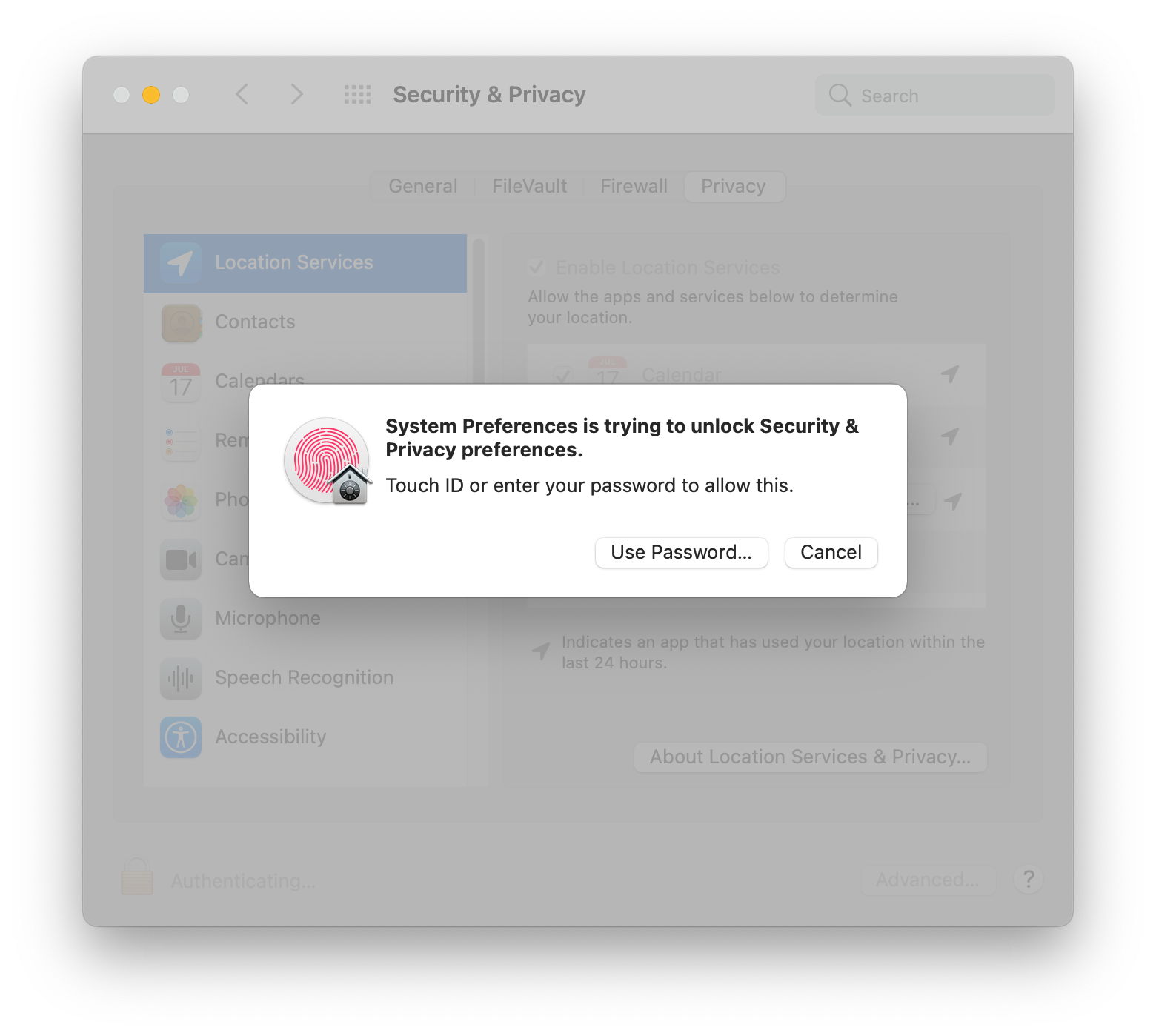
- 5. Go to `Security & Privacy` → `Privacy` → `Click the lock to make changes`, and then unlock with touch ID or password:
- 
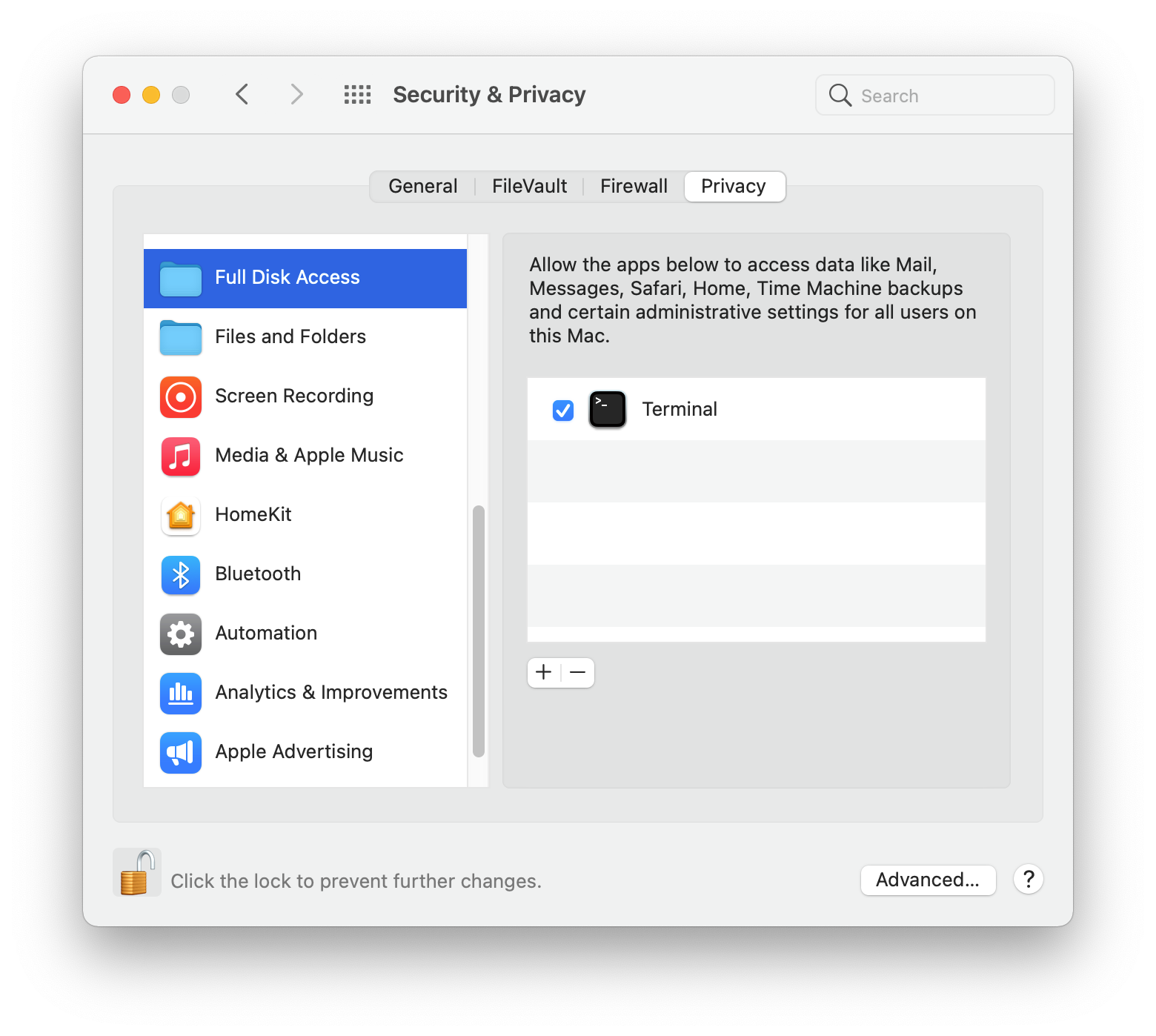
- 6. Go to `Full Disk Access`, click the `+` button, go to `Applications` → `Utilities`, and choose `Terminal.app`:
- 
- ## Install
- 1. First, you need a local copy of this project.
- If you're lucky and have `git` already installed on your machine, do:
- ```shell-session
- $ cd ~
- $ git clone --recursive https://github.com/kdeldycke/dotfiles.git
- ```
- If you don't have `git` yet, fetch an archive of the repository:
- ```shell-session
- $ mkdir ~/dotfiles
- $ cd ~/dotfiles
- $ curl -fsSL https://github.com/kdeldycke/dotfiles/tarball/main | tar --strip-components 1 -xvzf -
- ```
- 2. Now you can install the dotfiles on your system:
- ```shell-session
- $ cd ~/dotfiles
- $ /bin/zsh ./install.sh 2>&1 | tee ./install.log
- ```
- ### Stages
- The install procedure is decomposed into stages, executed in this order on a full run:
- | Stage | What it does |
- | :--------- | :------------------------------------------------------------------------------------------------- |
- | `links` | Symlink the dotfiles into the home folder. |
- | `packages` | macOS updates, Homebrew bootstrap, and full package restore from `packages.toml` via `mpm`. |
- | `shell` | Zsh plugins (zinit) and shell completions. |
- | `apps` | Mac App Store packages and per-application setup (QuickLook, SwiftBar, Tor Browser, IINA, Neovim). |
- | `cleanup` | Package caches and orphans, Trash, DNS cache. |
- | `snapshot` | Record the versions of installed packages into `packages.toml`. |
- | `config` | Apply the whole `macos-config.sh`. Kills `Terminal.app` at the end. |
- Each stage can be run on its own, or combined with others in the order given:
- ```shell-session
- $ ./install.sh links
- $ ./install.sh cleanup snapshot
- ```
- `./install.sh --list` prints the available stage names.
- ## Post-installation
- Manual setup required to finish up the perfect configuration.
- This is a list of manual post-installation steps required to fully configure the system. Haven't found any way to automate them all.
- ### `System Preferences.app`
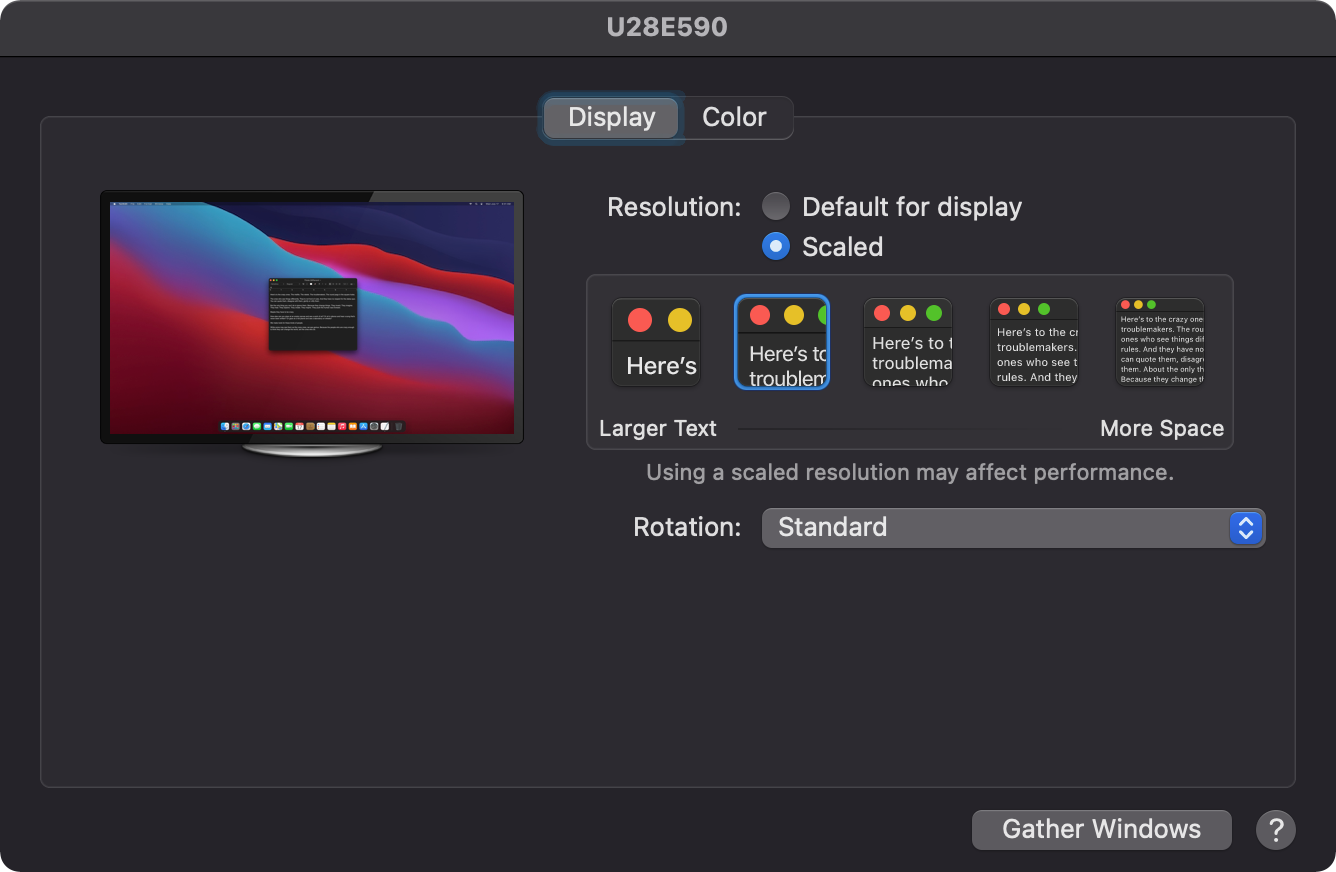
- 1. In `Displays`, set external monitor scale:
- 
- 2. In `Touch ID` → `Add other fingerprints`.
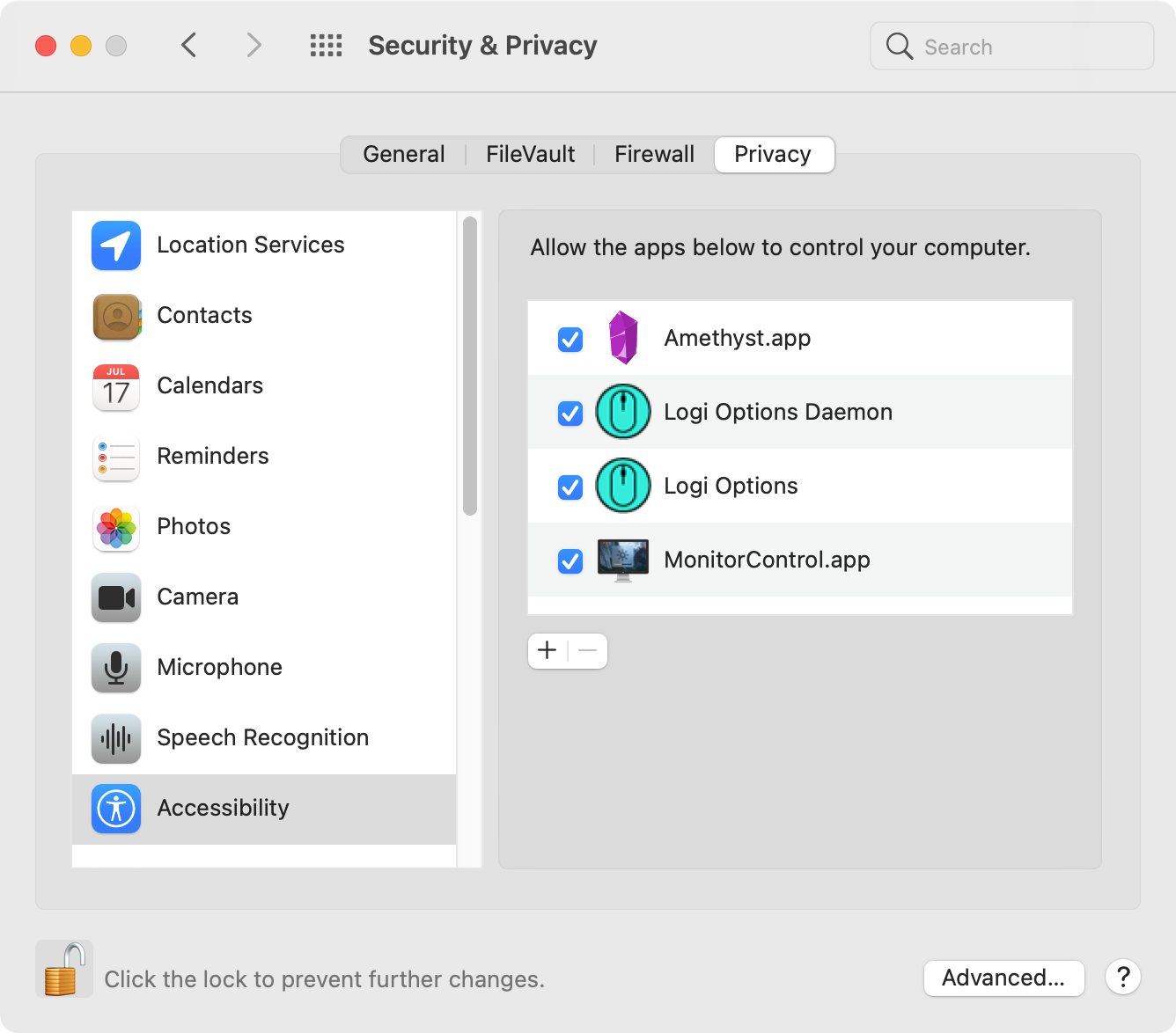
- 3. In `Security & Privacy` → `Privacy` → `Accessibility`, activate:
- - `Amethyst.app`
- - `LogiMgrDaemon`, found at `Logi Options.app/Contents/Support/LogiMgrDaemon.app`
- - `MonitorControl.app`
- 
- 4. In `Security & Privacy` → `Privacy` → `Full Disk Access`, click the `+` button. Then go to `Applications` → `Utilities`, to add:
- - `BlockBlock.app`
- - `KnockKnock.app`
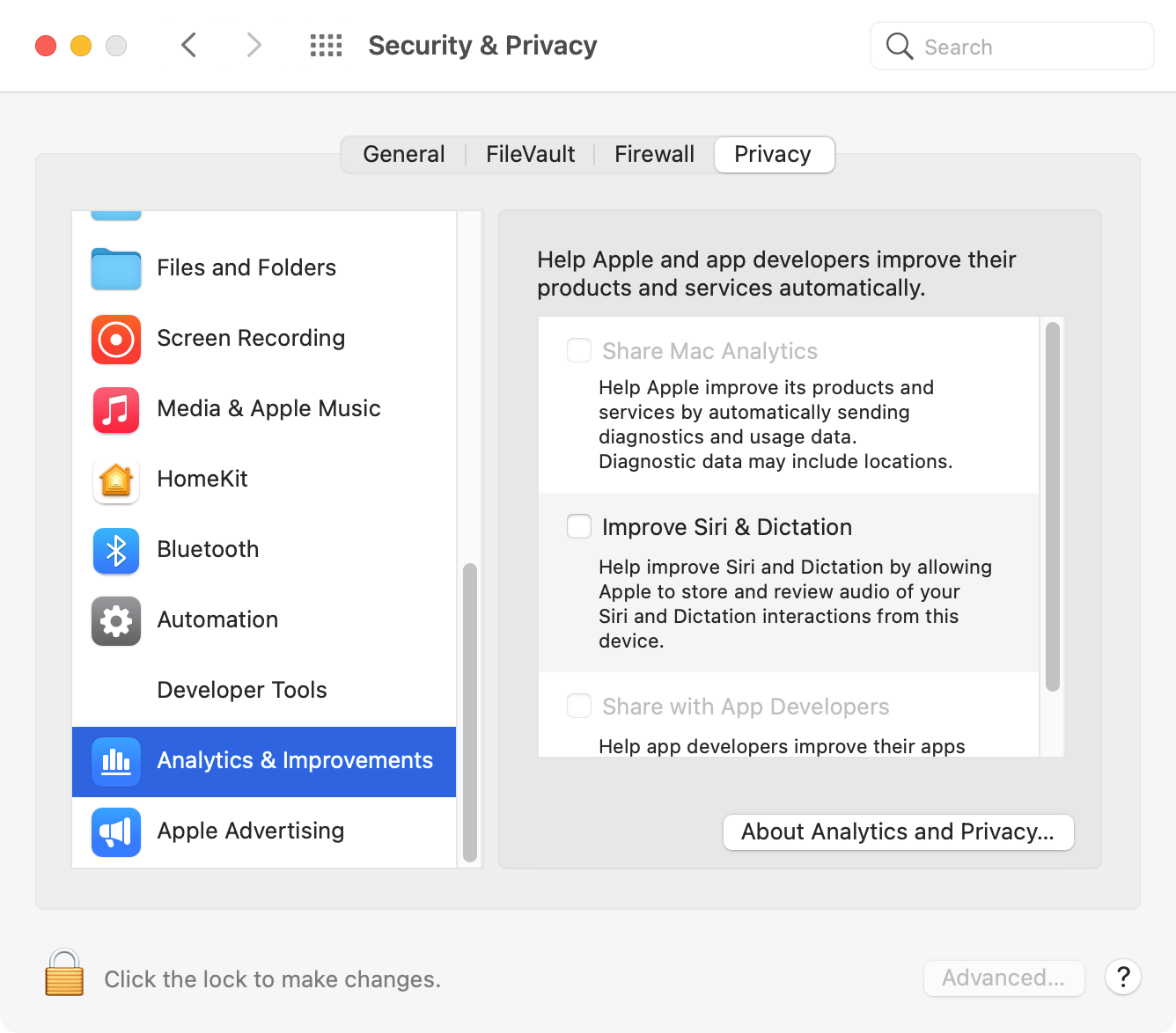
- 5. In `Security & Privacy` → `Privacy` → `Analytics & Improvements`: uncheck all options to disallow analytics sharing.
- 
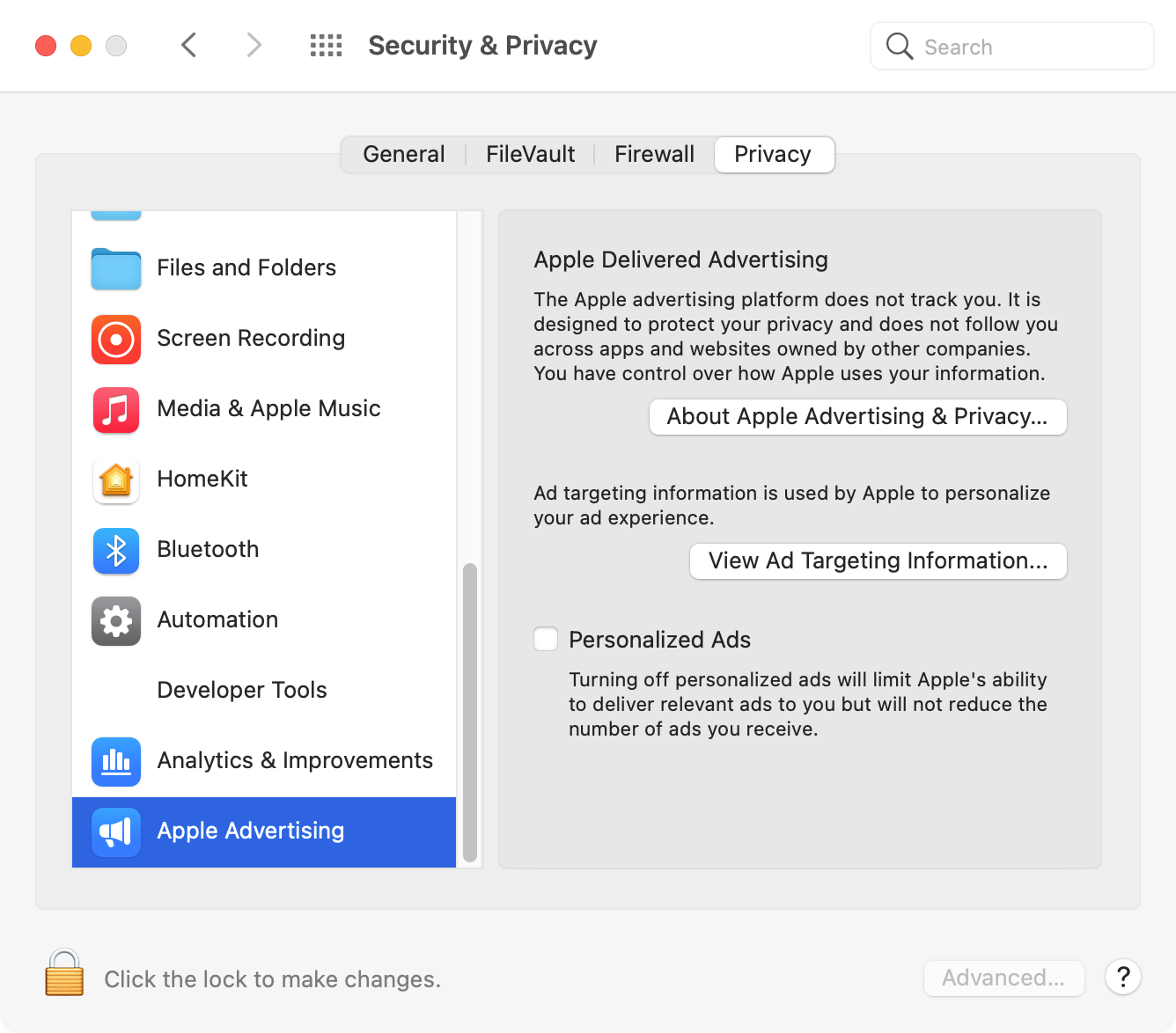
- 6. In `Security & Privacy` → `Privacy` → `Apple Advertising`: uncheck `Personalized Ads` option.
- 
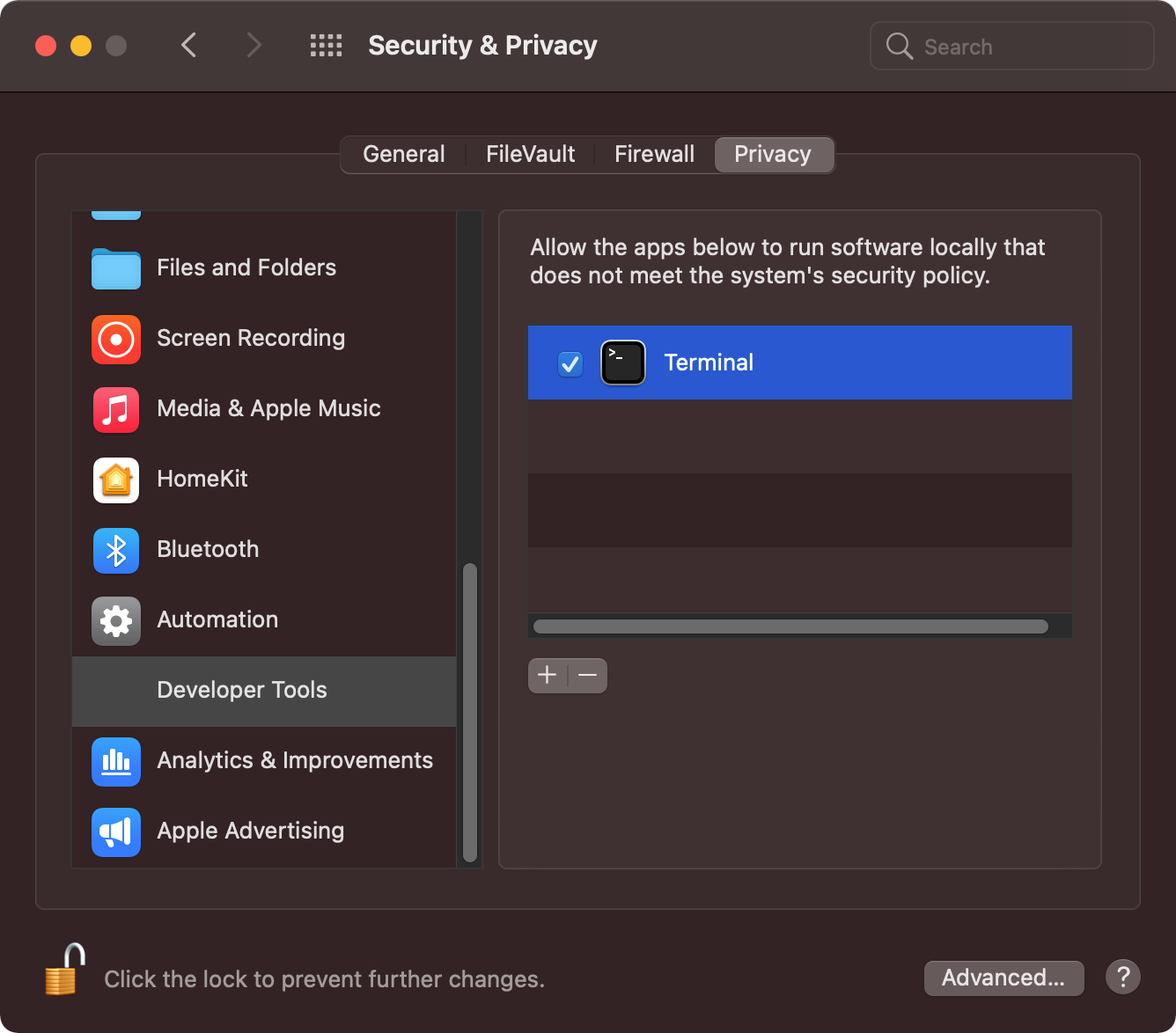
- 7. In `Security & Privacy` → `Privacy` → `Developer Tools`, activate `Terminal`:
- 
- ### SSH
- Copy the SSH folder (`~/.ssh/`) from Time Machine backups. It holds the keys, which stay out of this repository: `./install.sh links` only links the shared config files into it. It also holds `config.d/`, the private host blocks that the shared `config` includes. After restoring, add the public key to GitHub as both an "Authentication key" and a "Signing key" at https://github.com/settings/keys.
- ### Safari
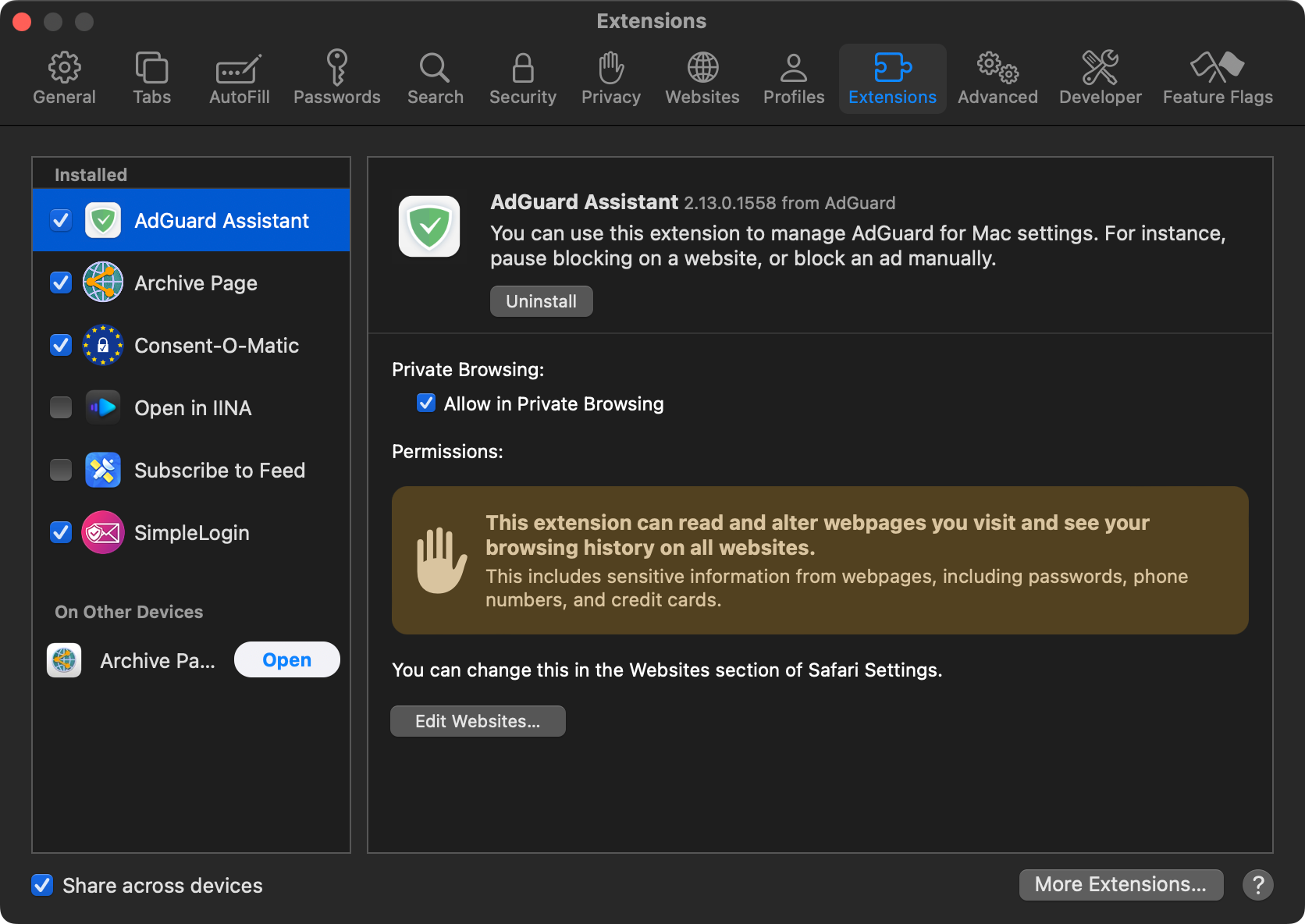
- In `Preferences...` → `Extensions`, activate:
- - `AdGuard Assistant`
- - `Archive Page`
- - `Consent-O-Matic`
- - `SimpleLogin`
- 
- ### AdGuard
- In `Preferences...` → `Filters`, click the `+` button and subscribe to all filter lists:
- 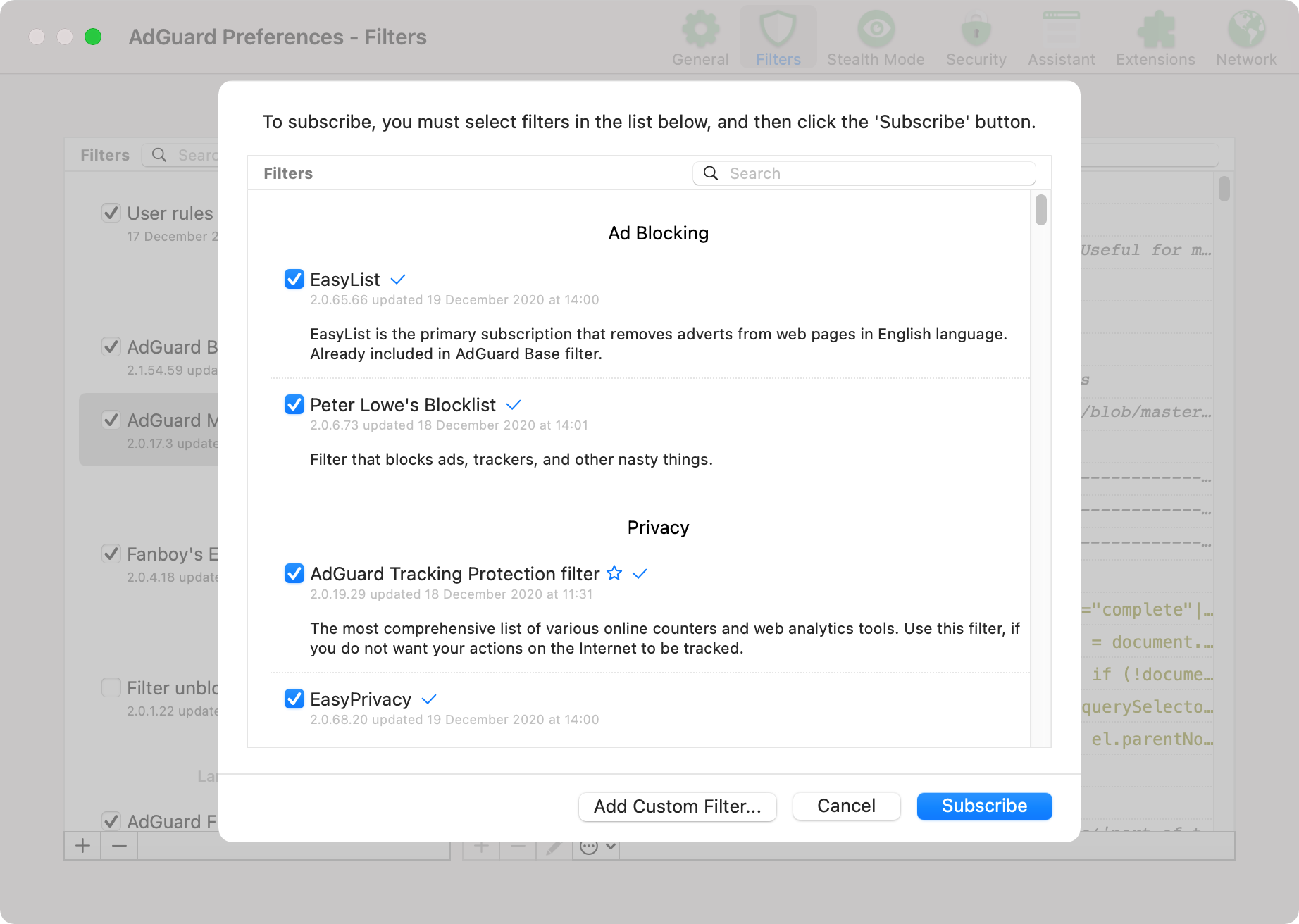
- That first pass is the only manual one. The six custom lists the registry does not offer subscribe themselves: `macos-config.sh` opens an `abp://subscribe` URL for each, which are the only steps of that script asking for a click. They are [`adguard-user-rules.txt`](adguard-user-rules.txt), the AdGuard Annoyances and DNS filters, and the three [`i5heu/ublock-hide-yt-shorts`](https://github.com/i5heu/ublock-hide-yt-shorts) lists stripping YouTube shorts, comments and playables. Each one already subscribed is skipped, so re-running the script asks only for the dialogs that were missed.
- AdGuard keeps its filter state in a SQLite database rather than a file, so `install.sh` cannot symlink `adguard-user-rules.txt` the way it does every other dotfile, and a subscription is the only path that updates itself: a push to `main` deploys each later edit on the next refresh. Never paste the file into the `User rules` screen: that import replaces the whole list, and the two lists have different jobs.
- The `User rules` screen holds the private half, and this repository carries none of it. It fills itself during ordinary browsing: the Safari AdGuard extension writes an entry there each time I switch AdGuard off for a site. So the list is disposable. A macOS reinstall starts it empty and rebuilds it site by site over a few sessions, which is why nothing here backs it up. `adguard-user-rules.txt` carries only the rules worth moving between machines, and only the ones safe to publish.
- Stealth Mode drops QUIC, because AdGuard cannot rewrite the SNI of a handshake it does not proxy. A host advertising `alpn=h3` in its HTTPS DNS record then stalls on UDP 443 until the browser retries over TCP, and Safari can report that stall as `This website does not support connecting securely over HTTPS`. Exempt such a host with a `$stealth` rule: an allowlist entry alone never reaches Stealth Mode. `Filtering log` names the cause, showing `Stealth mode` in the `Filter` column of a red `quic://` row.
- ### Claude Code
- `~/.claude/settings.json` is symlinked to this repo and committed. There is no global `settings.local.json`: `~/.claude/settings.local.json` is [not a supported file](https://github.com/anthropics/claude-code/issues/35703#issuecomment-4138622633).
- `enableWeakerNetworkIsolation: true` is set in the sandbox config to work around a macOS sandbox limitation: the sandbox blocks `Security.framework` IPC to `trustd`, breaking TLS certificate verification for all CGO-compiled Go binaries (`gh`, `terraform`, `tofu`, etc.) and Keychain access. `SSL_CERT_FILE` does not help because these binaries use `Security.framework` directly and ignore file-based certs ([anthropics/claude-code#34876](https://github.com/anthropics/claude-code/issues/34876)).
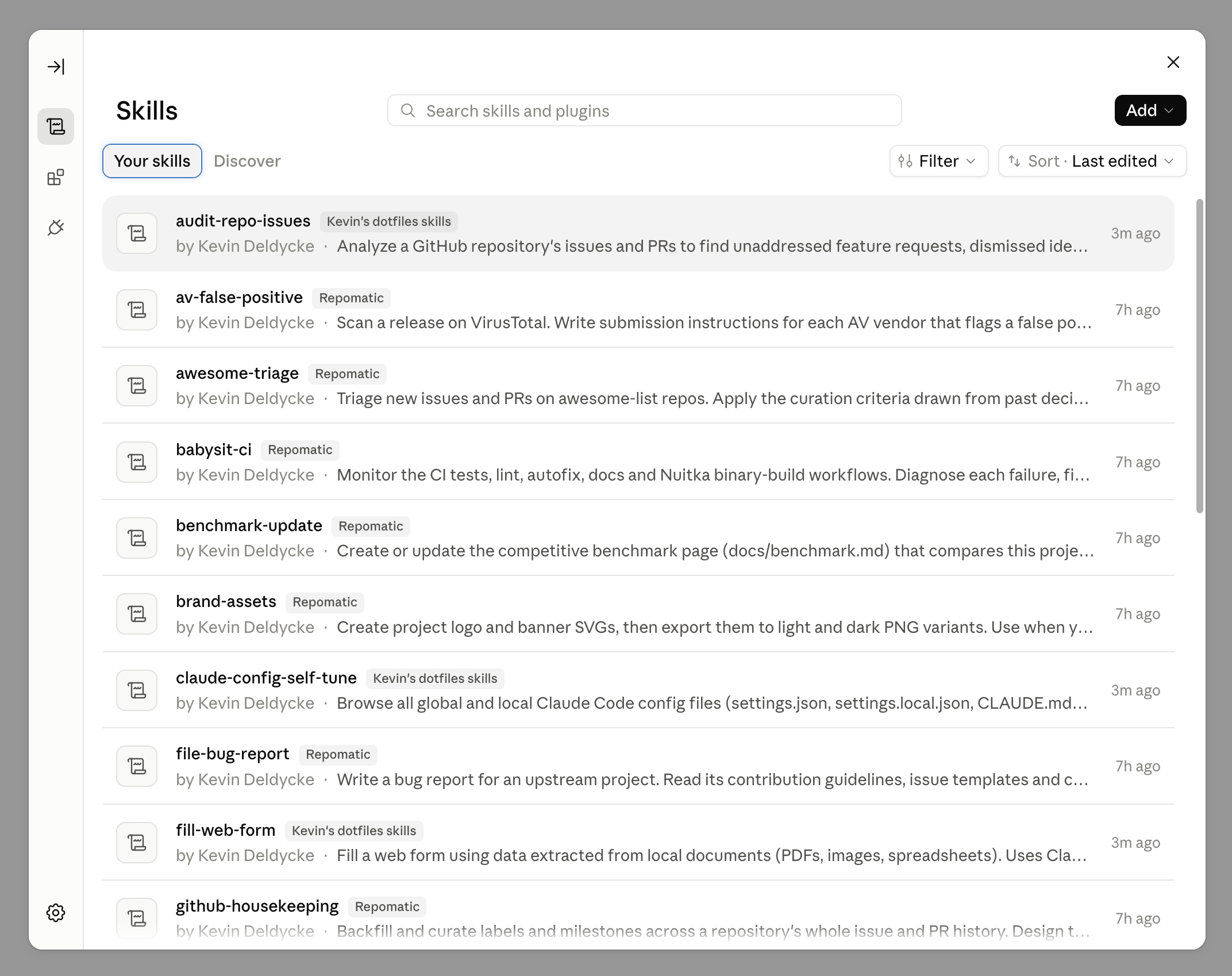
- Claude Code reads skills and agents from the filesystem (`~/.claude/skills/` and `~/.claude/agents/`, symlinked to this repo), but Cowork and the Desktop chat resolve them from the account-level deployment store and cannot read local files ([anthropics/claude-code#76724](https://github.com/anthropics/claude-code/issues/76724), [anthropics/claude-code#84611](https://github.com/anthropics/claude-code/issues/84611)). A plugin is what reaches those surfaces, and two catalogs cover my skills:
- - `kdeldycke/repomatic` carries the 19 skills and 3 agents that repository owns, which is their canonical source.
- - `kdeldycke/dotfiles` carries the 10 that live only here: `agent-config-self-tune`, `audit-repo-issues`, `fill-web-form`, `memory-review`, `pr-triage`, `rename-with-dates`, `session-title`, `shared-tree-commit`, `transcribe-recording` and `wrapup-session`.
- Add each in the Claude Desktop app under **Settings** → **Customize** → **Plugins**, through **Add** → **Add marketplace** → **Add from a repository**, then install its plugin from the **Discover** tab. Both verified on 2026-08-29 against Claude Code `2.1.236` and Desktop `1.37937.3`. Every skill then appears once, tagged with the catalog it came from:
- 
- This repository's own plugin declares its ten skills by path, and its root is the repository itself, so an install carries every other file here too: more than 100 of them, assets and workflows included. Scoping that payload would mean moving the plugin root down to `dotfiles/.agents`, where `skills/` sits at the location the spec scans and all 28 skills would likely be discovered, including the repomatic ones this catalog must not republish. The wasted files are the cheaper of the two.
- Keeping a catalog current on every push needs the GitHub App, which grants read and write on code, workflows, issues and pull requests, so it is worth a thought before installing. Without it a plugin still updates on request, and the app polls every 20 minutes anyway.
- Uploading a release archive by hand still works offline and stays the fallback: download the `repomatic-claude-plugin.zip` asset of the [latest `kdeldycke/repomatic` release](https://github.com/kdeldycke/repomatic/releases/latest) and use **Add** → **Upload plugin**. It costs an upload per release, since such a plugin reports its source as `Uploaded from file` and offers no update check. Its page shows the version from the plugin manifest (Desktop `5.1231.2`). Keep that filename version-free: the app derives the plugin name from it, and a versioned name installs a duplicate instead of updating ([anthropics/claude-code#20697](https://github.com/anthropics/claude-code/issues/20697)).
- Diagnose any of this from `~/Library/Logs/Claude/main.log`, never the dialog, which reports a bare "Marketplace sync failed" naming no cause. Findings are tracked in [kdeldycke/repomatic#2540](https://github.com/kdeldycke/repomatic/issues/2540).
- `/wrapup-session` (the shared [skill](dotfiles/.agents/skills/wrapup-session/SKILL.md)) closes out a session: loose ends, then lessons worth persisting. Claude Code cannot quit after a turn, so run it by hand before exiting; a [`SessionEnd` hook](dotfiles/.claude/hooks/wrapup-session-nudge.py) prints a reminder when an interactive exit skipped it.
- ### Pi
- `~/.pi/agent/settings.json` is symlinked to this repo and committed. Session logs, auth tokens and model caches stay local to the machine.
- pi has no permission layer, so the [`shell-deny.ts` extension](dotfiles/.pi/agent/extensions/shell-deny.ts) applies the `Bash(...)` deny rules of the Claude Code `settings.json` to pi's `bash` tool. One list then stops both agents.
- `/bye` (from the [`bye.ts` extension](dotfiles/.pi/agent/extensions/bye.ts)) runs the shared [`wrapup-session` skill](dotfiles/.agents/skills/wrapup-session/SKILL.md) as a final turn, then quits once it settles. A plain `/quit` or Ctrl+D prints a one-line reminder instead.
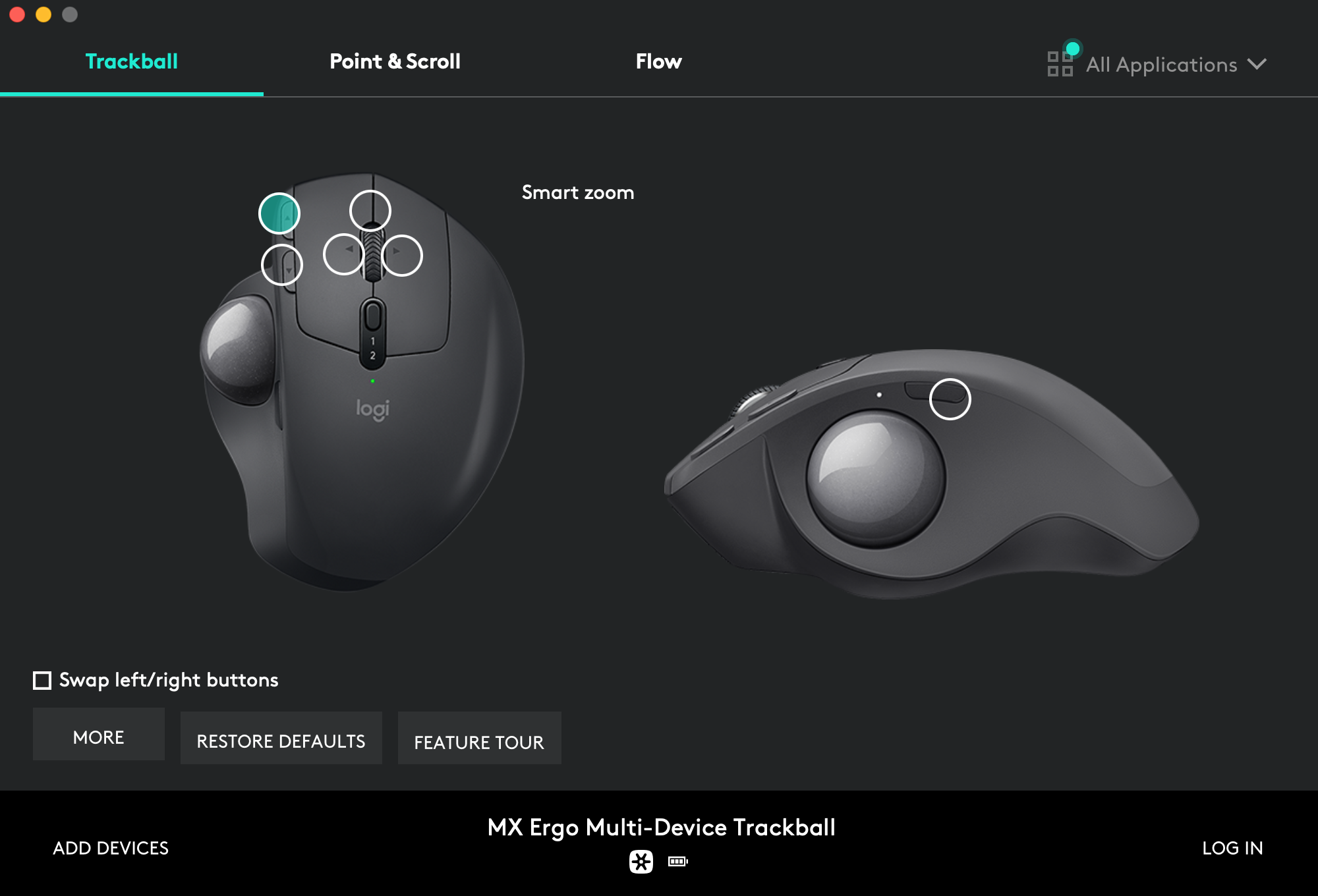
- ### Logi Options
- For productivity, setup custom trackball shortcuts with macOS desktop management tools and Amethyst windows commands.
- Page-up button assignment → `Smart zoom`:
- 
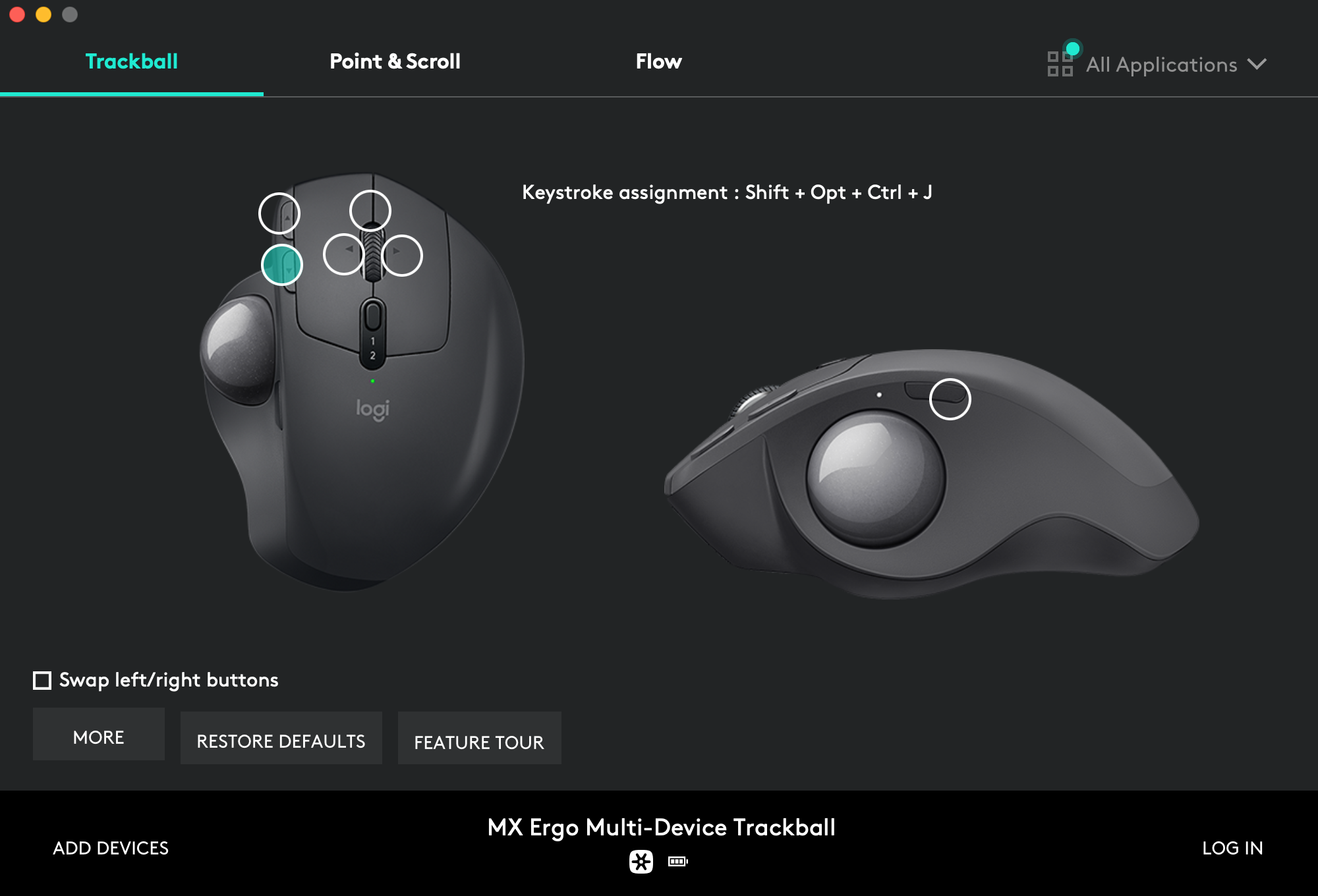
- Page-down button assignment → `Shift` + `Opt` + `Ctrl` + `J`:
- 
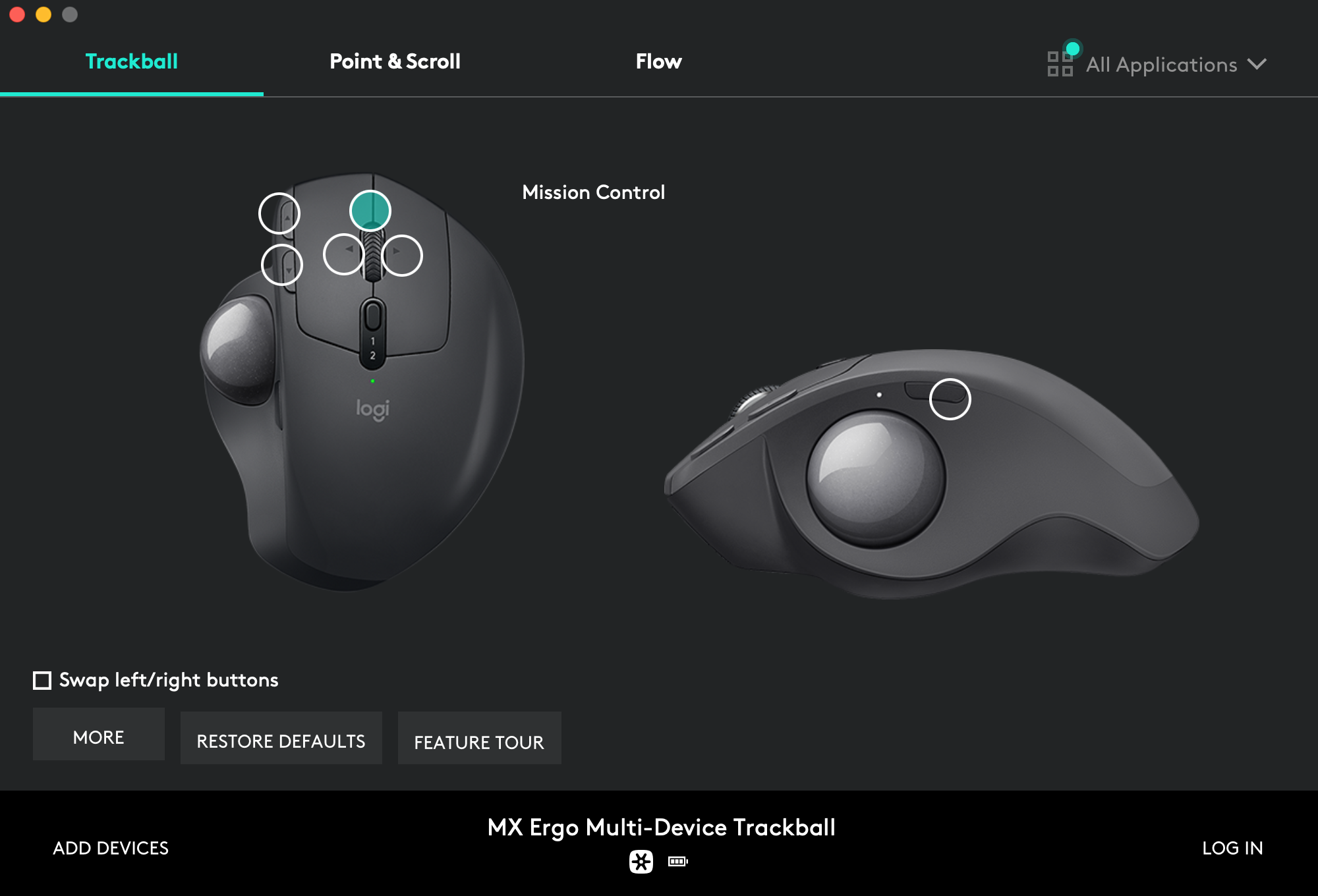
- Wheel click button assignment → `Mission Control`:
- 
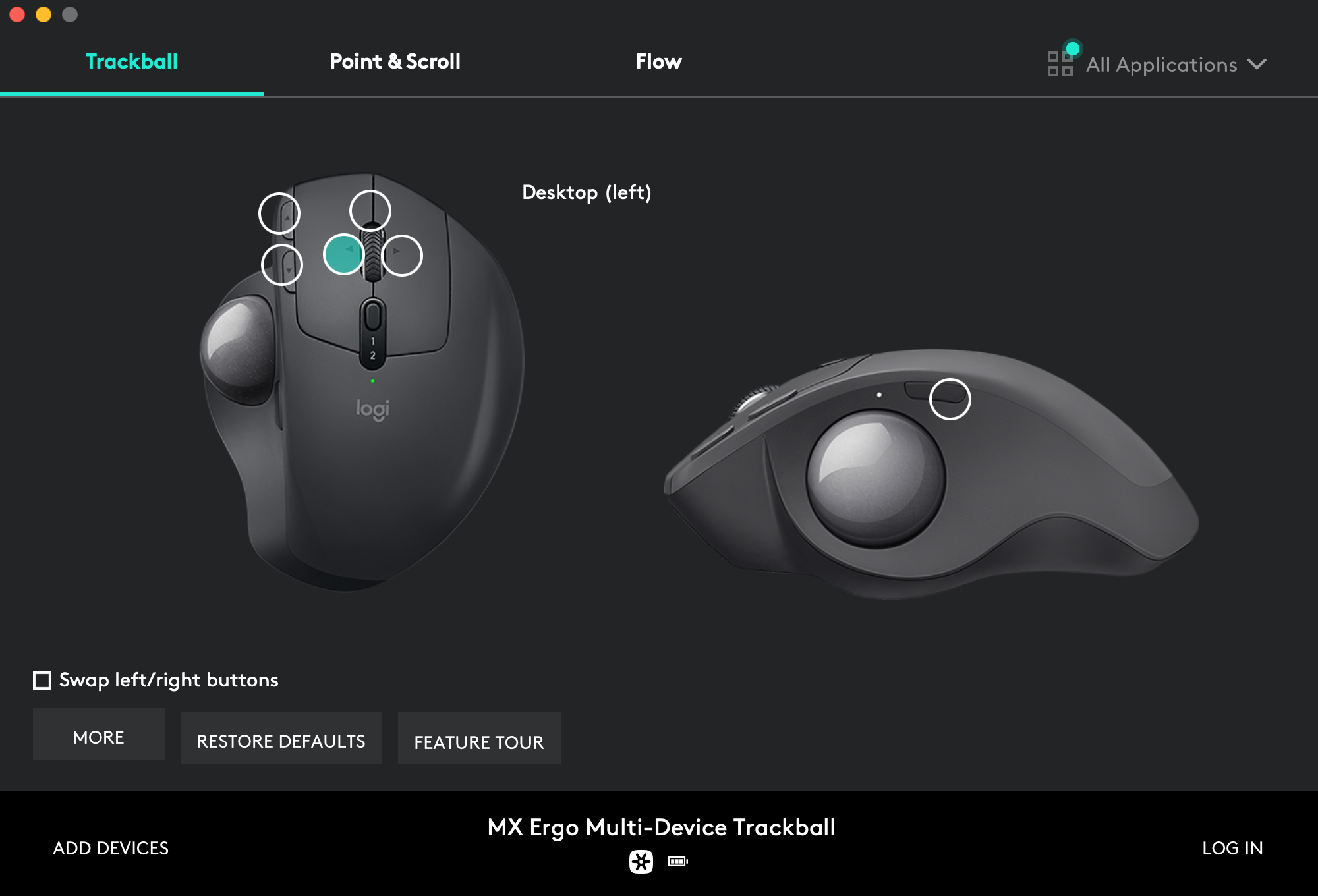
- Wheel left click assignment → `Desktop (left)`:
- 
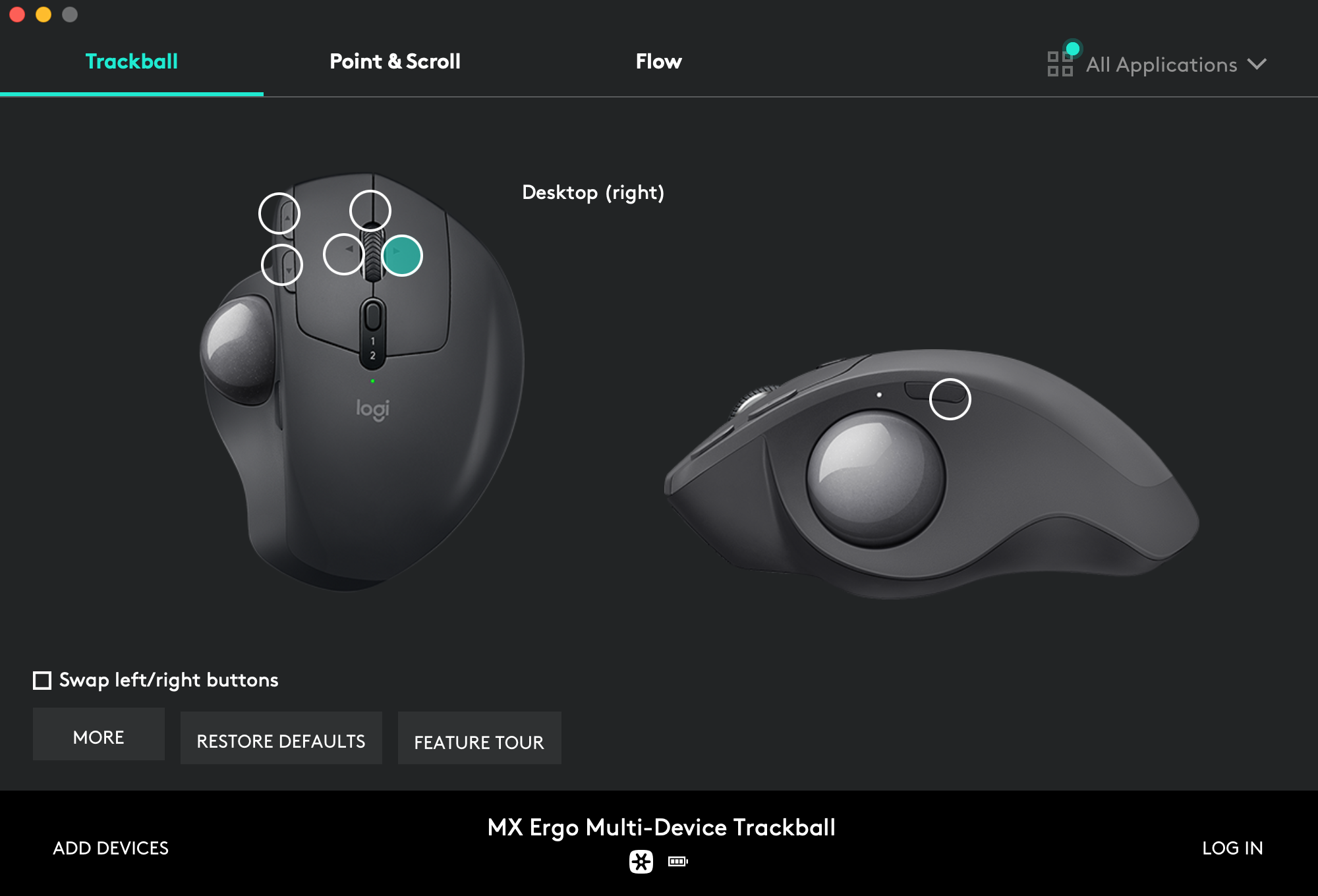
- Wheel right click assignment → `Desktop (right)`:
- 
- Side button assignment → `Shift` + `Opt` + `Space`:
- 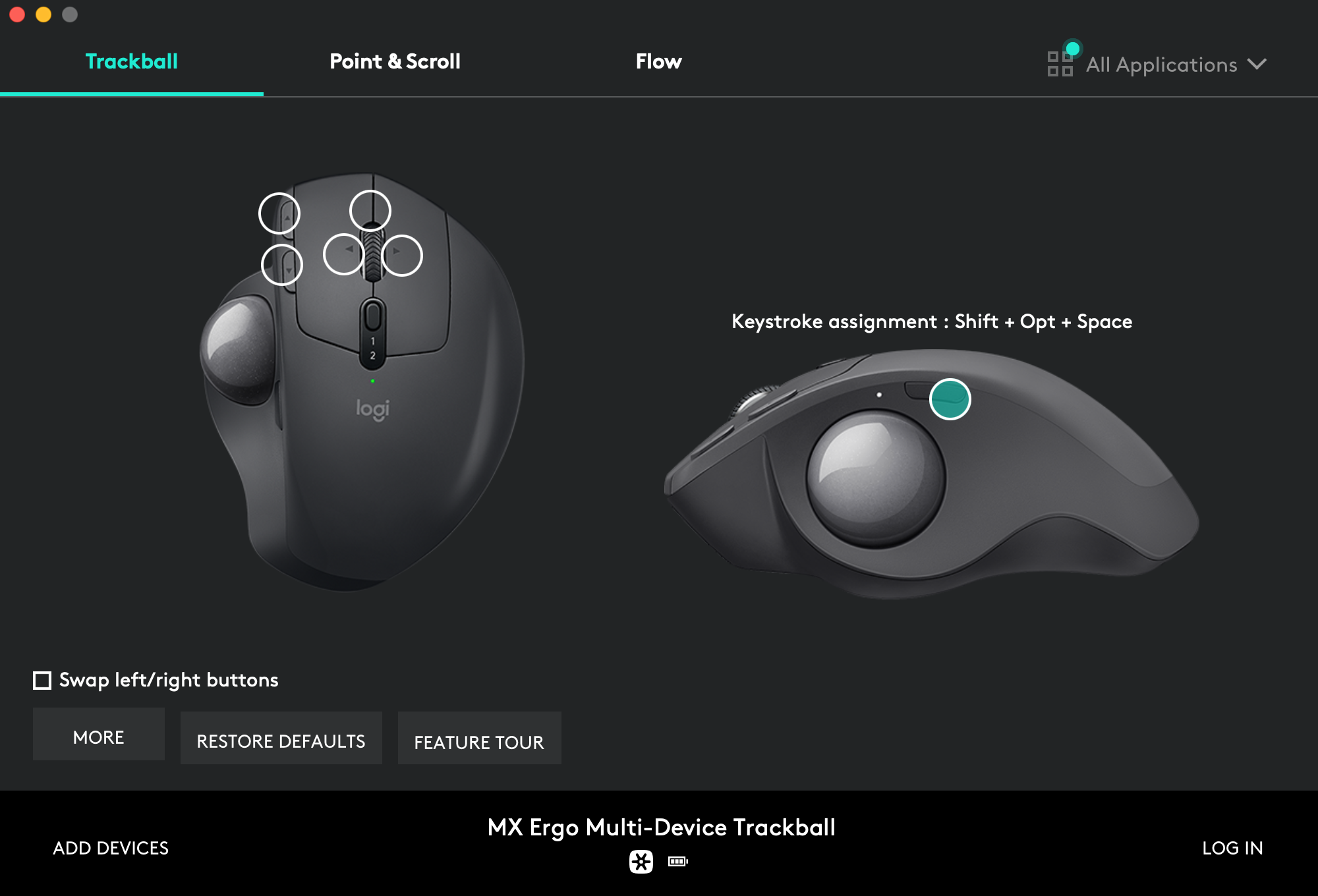
- Side button assignment → `Shift` + `Opt` + `Space`:
- 
- ## Upgrade
- I'm trying to make the install procedure idempotent so you'll just have to call the script again to upgrade your system:
- ```shell-session
- $ ./install.sh 2>&1 | tee ./install.log
- ```
- To refresh only a part of the system, call the corresponding [stage](#stages), like `./install.sh packages` to upgrade packages without touching the rest.
- ## Maintenance
- It mainly consist in refreshing some assets at every macOS major release:
- - Regenerate [`Monokai Soda.terminal` profile](https://github.com/kdeldycke/dotfiles/blob/main/assets/Monokai%20Soda.terminal).
- - Keep list of packages up-to-date:
- ```shell-session
- $ ./install.sh snapshot
- ```
- - Update screenshots. 😖
- - Run the [security audit](#security-audit) below.
- ### Security audit
- At every macOS major release, I audit `macos-config.sh` against the [NIST macOS Security Compliance Project](https://github.com/usnistgov/macos_security) (mSCP) to catch security settings that the new release moved, renamed or retired. Security-related lines in the script are tagged with their stable mSCP rule id (like `system_settings_firewall_enable`) so a failing rule maps straight back to the line to update.
- 1. Clone the mSCP guidance for the macOS release. macOS 27 has no release branch: its guidance is in the `release_27.0` tag. Older releases have a branch named after the release (`tahoe` for macOS 26, `sequoia` for macOS 15, and so on):
- ```shell-session
- $ git clone --branch release_27.0 --depth 1 https://github.com/usnistgov/macos_security.git
- $ cd macos_security
- ```
- 2. Build a tailored CIS level 1 baseline. The interactive prompts let me exclude the deliberate exemptions listed below and set my own organization-defined values (like the 600 seconds screen saver timeout, the 30 days audit retention, or `time.euro.apple.com` as time server):
- ```shell-session
- $ uv run --with-requirements requirements.txt scripts/generate_baseline.py --keyword cis_lvl1 --tailor
- ```
- 3. Generate the compliance script from the tailored baseline and run it in check-only mode:
- ```shell-session
- $ uv run --with-requirements requirements.txt scripts/generate_guidance.py --script custom/baselines/cis_lvl1_macos_27.0.yaml
- $ sudo zsh build/cis_lvl1_macos_27.0/cis_lvl1_macos_27.0_compliance.sh --check
- $ sudo zsh build/cis_lvl1_macos_27.0/cis_lvl1_macos_27.0_compliance.sh --stats
- ```
- 4. Reconcile every failing rule: port the rule's `fix` command into `macos-config.sh` (tagged with its mSCP rule id), or add the rule to the exemption list below. Then re-run `macos-config.sh` and check again: macOS upgrades silently reset some settings (launchd service overrides and `pmset` values in particular), and re-running the script is the intended remedy. Rules marked "implemented by a Configuration Profile" have no CLI equivalent: generate the profiles with `--profiles` (or `--consolidated-profile`) and import them via `System Settings.app` → `Privacy & Security` → `Profiles`.
- Deliberate exemptions, to exclude when tailoring the baseline:
- - `os_airdrop_disable`: AirDrop stays enabled, on all interfaces.
- - `os_gatekeeper_enable`: Gatekeeper assessments stay on, but I disable the `LSQuarantine` prompt, and the `SIP_DISABLED` branch of the script adds a Developer Tools bypass for Terminal.
- - `os_handoff_disable`: Handoff between my devices stays enabled.
- - `os_loginwindow_adminhostinfo_disabled`: I show the hostname at the login window on purpose.
- - `pwpolicy_*`: no password lockout, history or rotation policy on a personal machine.
- - `system_settings_firewall_enable` and `system_settings_firewall_stealth_mode_enable`: enforced with `socketfilterfw` instead of a configuration profile, so the check (which reads the managed preference) can report a false failure while the firewall is actually on.
- Rules that stay check-only without an MDM, to carry into the generated configuration profile instead of `macos-config.sh`: `os_mail_summary_disable`, `os_notes_transcription_disable`, `os_notes_transcription_summary_disable`, `os_on_device_dictation_enforce`, `os_software_update_deferral`, `os_writing_tools_disable`, `system_settings_external_intelligence_disable` and `system_settings_external_intelligence_sign_in_disable`. A few others (Siri, AirPlay receiver, Internet Sharing) are set by `macos-config.sh` through their real preference keys, but only the corresponding profile payload prevents re-enablement. `system_settings_time_machine_encrypted_configure` stays manual: encryption is picked when selecting the backup disk.
- ## Versions
- Only the current default `main` branch is supported and actively maintained. Older branches are available for archive.
- - [macOS 27 (Golden Gate)](https://github.com/kdeldycke/dotfiles/tree/main) (current)
- - [macOS 26 (Tahoe)](https://github.com/kdeldycke/dotfiles/tree/macos-26)
- - [macOS 15 (Sequoia)](https://github.com/kdeldycke/dotfiles/tree/macos-15)
- - [macOS 14 (Sonoma)](https://github.com/kdeldycke/dotfiles/tree/macos-14)
- - [macOS 13 (Ventura)](https://github.com/kdeldycke/dotfiles/tree/macos-13)
- - [macOS 12 (Monterey)](https://github.com/kdeldycke/dotfiles/tree/macos-12)
- - [macOS 11 (Big Sur)](https://github.com/kdeldycke/dotfiles/tree/macos-11)
- - [macOS 10.15 (Catalina)](https://github.com/kdeldycke/dotfiles/tree/macos-10.15)
- - [macOS 10.14 (Mojave)](https://github.com/kdeldycke/dotfiles/tree/macos-10.14)
- - [macOS 10.13 (High Sierra)](https://github.com/kdeldycke/dotfiles/tree/macos-10.13)
- - [macOS 10.12 (Sierra)](https://github.com/kdeldycke/dotfiles/tree/macos-10.12)
- Former [support of Kubuntu and Ubuntu Server Linux distributions has been dropped](https://github.com/kdeldycke/dotfiles/commit/e667245f6a4c90c6d41907e392adb74c5acfcf13). You can still find these as dedicated branches, but all are quite ancient (2016).
- ## Resources
- - [`ingrino`'s dotfiles](https://github.com/lingrino/dotfiles)
- - [Mathias Bynens `.macos`](https://github.com/mathiasbynens/dotfiles/blob/master/.macos)
- ## License
- For convenience, some third party code and assets are hard-copied in place. These particular items have their own license and copyright:
- - [Monokai Soda](https://github.com/lysyi3m/macos-terminal-themes#monokai-soda-download).
- The rest of the content is configuration and code I accumulated over years. Some was heavily inspired by other dotfiles repositories. But each time I borrow something, I try to credit the author and/or point to the source. You should be able to trace back the origin of things by looking at the commit history.
- If you can't find any clue about an external source, then assume it is original content I produced, which I released under the [BSD 2-Clause License](LICENSE.md).
install.sh · Bundled script · 543 lines · 1 finding marked
- #!/usr/bin/env zsh
- set -Eeuxo pipefail
- ######### Survey mode #########
- # `set -e` stops at the first failing command, so a CI run reports exactly one
- # problem however many it holds. That is affordable for a short script and not
- # for this one: macos-config.sh alone is over 2200 lines, had never executed
- # past its first few hundred on a runner, and every macOS deprecation hiding in
- # the rest costs a full 30-to-50-minute workflow to reach. `lsregister -kill`
- # and `systemsetup -setremoteappleevents` each burned one that way.
- #
- # With SURVEY=1 the run keeps going and records every command that would have
- # aborted it, so one pass enumerates the lot. Nothing is forgiven: the report
- # at the end returns non-zero while any failure was recorded, and the run stays
- # red. Off by default, since a real install must still stop at the first sign
- # of trouble rather than plough on through a broken state.
- # Record the file and line of the command that just failed, given the `LINENO`
- # the trap read. That number restarts at 1 inside a function, and every stage
- # is a function, so it is added to the line where the function starts.
- # `funcsourcetrace` holds that start as `file:line`, and as `file:0` for a
- # sourced file, which keeps a failure in macos-config.sh on its own line there.
- # Entry 1 is this function, so entry 2 is the code that failed.
- survey_record() {
- local frame="${funcsourcetrace[2]:-}"
- # A file, not an array: the trap fires inside loops and command
- # substitutions, and a subshell's array append dies with the subshell.
- if [[ -n "${frame}" ]]; then
- print -r -- "${frame%:*}:$(( ${frame##*:} + $1 ))" >> "${SURVEY_LOG}"
- else
- # No calling frame: the command is at the top level of this script.
- print -r -- "${(%):-%x}:$1" >> "${SURVEY_LOG}"
- fi
- }
- if (( ${SURVEY:-0} )); then
- set +e
- : ${SURVEY_LOG:="${TMPDIR:-/tmp}/dotfiles-survey.log"}
- export SURVEY_LOG
- : > "${SURVEY_LOG}"
- trap 'survey_record "${LINENO}"' ERR
- fi
- # Print every command the survey caught, then fail if there was any.
- survey_report() {
- (( ${SURVEY:-0} )) || return 0
- # Stop recording first. This function ends on a deliberate non-zero return,
- # which the trap would otherwise append to the very log it just printed.
- trap - ERR
- if [[ ! -s "${SURVEY_LOG}" ]]; then
- echo "=== Survey: no command failed ==="
- return 0
- fi
- echo "=== Survey: commands that would have aborted the run ==="
- local count entry file line
- # Collapsed by line: a failure inside a loop fires once per iteration, and
- # the same line listed forty times is still one thing to fix.
- sort "${SURVEY_LOG}" | uniq -c | sort -k2,2 | while read -r count entry; do
- file="${entry%:*}"
- line="${entry##*:}"
- printf '%s:%s (x%s)\n %s\n' \
- "${file:t}" "${line}" "${count}" "$(sed -n "${line}p" "${file}")"
- done
- echo "=== $(sort -u "${SURVEY_LOG}" | wc -l | tr -d ' ') distinct failures ==="
- return 1
- }
- ######### Stage selection #########
- # The install procedure is decomposed into stages, each runnable on its own:
- # ./install.sh Full run: every stage, in the order below.
- # ./install.sh links A single stage.
- # ./install.sh cleanup snapshot Several stages, in the order given.
- # ./install.sh --list Print available stage names.
- STAGES=(links packages shell apps cleanup snapshot config)
- if [[ "${1:-}" == "--list" ]]; then
- print -l "${STAGES[@]}"
- exit 0
- fi
- # Reject unknown stage names before any check or side effect below.
- for stage ("$@"); do
- if (( ! ${STAGES[(Ie)${stage}]} )); then
- echo "Unknown stage: ${stage}. Available stages: ${STAGES[*]}" >&2
- exit 2
- fi
- done
- run_stages=("$@")
- (( ${#run_stages} )) || run_stages=("${STAGES[@]}")
- ######### Pre-checks #########
- # Detect platform.
- if [ "$(uname -s)" != "Darwin" ]; then
- echo "These dotfiles only targets macOS."
- exit 1
- fi
- # Check current shell interpreter. A standalone pipeline + $? check would be
- # aborted by set -e before reaching the test: keep the pipeline in the condition.
- if ! ps -p $$ | grep --quiet "zsh"; then
- echo "These dotfiles were tested with Zsh shell only."
- exit 1
- fi
- # Check if SIP is going to let us mess with some part of the system.
- if csrutil status 2>/dev/null | grep --quiet "enabled"; then
- SIP_DISABLED=0
- echo "System Integrity Protection (SIP) is enabled."
- else
- SIP_DISABLED=1
- echo "System Integrity Protection (SIP) is disabled."
- fi
- # Use system, BSD find command. Shared by the links and apps stages.
- FIND_CLI="/usr/bin/find"
- ######### Sudo keep-alive #########
- # Source: https://gist.github.com/cowboy/3118588
- # Ask for the administrator password upfront.
- # Ignore the following error returns within GitHub actions workflows:
- # sudo: a terminal is required to read the password; either use the -S option to
- # read from standard input or configure an askpass helper
- sudo --validate || true
- # Update existing `sudo` time stamp until script has finished.
- while true; do sleep 60; sudo --non-interactive true; kill -0 "$$" || exit; done 2> /dev/null &
- ######### Stage: links #########
- # Symlink dotfiles in user's home.
- stage_links() {
- # Collect all entries within the "dotfiles" sub-folder, but the "Library",
- # ".config", ".pi", ".claude", ".agents", ".gnupg" and ".ssh".
- #
- # ".claude" and ".agents" are excluded for the same reason as LaunchAgents
- # below: ~/.claude is a real directory Claude Code writes its own runtime
- # state into (sessions, history.jsonl, projects, telemetry). Linking the
- # folder would move all of that aside into a backup and drop the live state
- # inside this git repository, so its contents are linked entry by entry.
- #
- # ".gnupg" and ".ssh" are excluded for the same reason, and the stakes are
- # higher: both hold private keys. gpg writes its keys into
- # ~/.gnupg/private-keys-v1.d and opens its agent sockets there, and ssh
- # keeps its id_* keys, known_hosts files and agent sockets in ~/.ssh.
- # Linking either folder puts that material inside this git working tree,
- # where only ignore rules keep it out of a commit, and where an agent
- # sandbox that opens ~/code can read and overwrite it. Only their tracked
- # files are linked, by name, below.
- DOT_FILES=$($FIND_CLI dotfiles -depth 1 -not -name '\.DS_Store' -not -name 'Library' -not -name '.config' -not -name '.pi' -not -name '.claude' -not -name '.agents' -not -name '.gnupg' -not -name '.ssh')
- # Collect all ".config" content .
- DOT_FILES+="
- $($FIND_CLI dotfiles/.config -depth 1 -not -name '\.DS_Store')"
- # Collect all "Library" subfolders but "Application Support", "Preferences"
- # and "LaunchAgents" folders. LaunchAgents is excluded for the same reason
- # as the others: ~/Library/LaunchAgents is a real directory holding agents
- # this repository does not own (Google Updater, anything
- # `brew services` installs). Linking the folder would move all of them
- # aside into a backup and silently stop them, so its contents are linked
- # file by file below.
- DOT_FILES+="
- $($FIND_CLI dotfiles/Library -depth 1 -not -name '\.DS_Store' -not -name 'Application Support' -not -name 'Preferences' -not -name 'LaunchAgents')"
- # Collect all "Preferences" subfolders.
- DOT_FILES+="
- $($FIND_CLI dotfiles/Library/Preferences -depth 1 -not -name '\.DS_Store')"
- # Collect all "Application Support" subfolders but "Code" folder.
- DOT_FILES+="
- $($FIND_CLI 'dotfiles/Library/Application Support' -depth 1 -not -name '\.DS_Store' -not -name 'Code')"
- # Manually add Code, Pi, LaunchAgents, agent-tooling, GnuPG and SSH files.
- #
- # The ".claude" and ".agents" entries are what keeps ~/.claude a real
- # directory: each lands beside the state Claude Code owns instead of
- # replacing the folder holding it. The loop always names a link after its
- # source, so it leaves out the links named otherwise: ~/.claude/CLAUDE.md
- # and ~/.pi/agent/AGENTS.md, created after the loop, and ~/.claude/skills (a
- # second link to .agents/skills, already linked into ~/.agents/skills
- # below), which stays hand-maintained.
- #
- # .pi/agent/APPEND_SYSTEM.md is a link inside this repository, to
- # .claude/tropes.md. pi expands no "@" import in AGENTS.md, so the tropes
- # reach it as an appended system prompt instead.
- DOT_FILES+="
- dotfiles/Library/Application Support/Code/User/settings.json
- dotfiles/Library/LaunchAgents/com.kdeldycke.clamdscan.plist
- dotfiles/.pi/agent/APPEND_SYSTEM.md
- dotfiles/.pi/agent/models.json
- dotfiles/.pi/agent/settings.json
- dotfiles/.pi/agent/extensions
- dotfiles/.pi/agent/themes
- dotfiles/.agents/skills
- dotfiles/.claude/agents
- dotfiles/.claude/output-styles
- dotfiles/.claude/settings.json
- dotfiles/.claude/tropes.md
- dotfiles/.gnupg/dirmngr.conf
- dotfiles/.gnupg/gpg-agent.conf
- dotfiles/.ssh/allowed_signers
- dotfiles/.ssh/config
- dotfiles/.ssh/ssh-keygen-secretive
- dotfiles/.ssh/utm-host.py"
- echo "Collected dotfiles:"
- echo "${DOT_FILES}" | sort
- for FILEPATH (${(f)DOT_FILES}); do
- DESTINATION="${PWD}/${FILEPATH}"
- LINK="${HOME}/${FILEPATH#*/}"
- CURRENT_LINK="$(readlink "${LINK}" || true)"
- if [[ "${CURRENT_LINK}" != "${DESTINATION}" ]]; then
- # When the parent folder links into this repository, ${LINK} is
- # the source file itself: the backup below would move it aside and
- # ln would link it onto itself. Stop instead of converting the
- # folder here, since it can hold private keys to move by hand.
- if [[ "${LINK:h:A}" == "${DESTINATION:h:A}" ]]; then
- echo "${LINK:h} links into this repository: replace it with a real directory holding its untracked files, then re-run." >&2
- exit 1
- fi
- # Something (a link, a file, a directory...) already exists. Back it up.
- if [[ -e "${LINK}" ]]; then
- EXT=".dotfiles.bak"
- INC=0
- BACKUP="${LINK}${EXT}${INC}"
- # -e, not -f: backed-up entries can be directories (~/.gnupg,
- # ~/.claude, ...). -f never matches a directory, so the counter
- # would stall and mv would drop the next backup inside the previous
- # one instead of beside it.
- while [ -e "${BACKUP}" ]; do
- # += instead of ++: a post-increment from 0 evaluates to 0,
- # whose non-zero exit status trips set -e.
- (( INC += 1 ))
- BACKUP="${LINK}${EXT}${INC}"
- done
- echo "Backup: ${LINK} -> ${BACKUP}"
- mv "${LINK}" "${BACKUP}"
- fi
- echo "Create link: ${LINK} -> ${DESTINATION}"
- # Create missing directory structure if missing.
- LINK_FOLDER="$(dirname "${LINK}")"
- mkdir -p "${LINK_FOLDER}"
- # Force symbolic link (re-)creation. It either doesn't exist or point to the wrong place.
- ln -sf "${DESTINATION}" "${LINK_FOLDER}"
- fi
- done
- # The global instructions, which the loop above cannot link: Claude Code
- # reads them as ~/.claude/CLAUDE.md and pi as ~/.pi/agent/AGENTS.md, and
- # neither name is the source's. A link that already resolves to the source
- # stays as it is, relative or absolute. A regular file is never replaced: an
- # editor writing through the home path forks the file that way, and the
- # fork may hold edits the source lacks.
- GLOBAL_INSTRUCTION="${PWD}/dotfiles/.agents/global-instruction.md"
- if [[ ! -f "${GLOBAL_INSTRUCTION}" ]]; then
- echo "Missing source: ${GLOBAL_INSTRUCTION}" >&2
- exit 1
- fi
- for LINK in "${HOME}/.claude/CLAUDE.md" "${HOME}/.pi/agent/AGENTS.md"; do
- if [[ -L "${LINK}" && "${LINK:A}" == "${GLOBAL_INSTRUCTION:A}" ]]; then
- continue
- fi
- if [[ -e "${LINK}" && ! -L "${LINK}" ]]; then
- echo "${LINK} is a regular file: merge it into ${GLOBAL_INSTRUCTION}, remove it, then re-run." >&2
- exit 1
- fi
- echo "Create link: ${LINK} -> ${GLOBAL_INSTRUCTION}"
- mkdir -p "${LINK:h}"
- ln -sfn "${GLOBAL_INSTRUCTION}" "${LINK}"
- done
- # On a machine with no ~/.gnupg or ~/.ssh yet, the loop above creates them
- # with the default umask while linking files into them. gpg then
- # warns on every run that its home directory is readable by others, and
- # both hold private keys, so tighten them here rather than leaving each new
- # machine to be fixed by hand.
- chmod 700 "${HOME}/.gnupg" "${HOME}/.ssh"
- }
- ######### Stage: packages #########
- # OS updates, Homebrew bootstrap and the full package restore via mpm.
- stage_packages() {
- # Command line tools provides a copy of git.
- xcode-select --install || true
- # Install recommended macOS updates only: --all can also stage a
- # reboot-wanting OS upgrade in the middle of the bootstrap.
- #
- # Skipped on GitHub runners. The image is discarded at the end of the job,
- # so patching it buys nothing, and --recommended still pulls whole
- # multi-gigabyte point releases ("Downloading macOS Tahoe 26.6.1"): that
- # download was both the longest step of the run and, since softwareupdate
- # has no verbosity flag and prints one line per progress tick off a TTY,
- # the bulk of the log.
- if (( ! ${+GITHUB_WORKFLOW} )); then
- sudo softwareupdate --install --recommended
- fi
- # Check if homebrew is already installed. See: https://unhexium.net/zsh/how-to-check-variables-in-zsh/
- # This also install xcode command line tools.
- if (( ! ${+commands[brew]} )); then
- # Install Homebrew without prompting for user confirmation.
- NONINTERACTIVE=1 /bin/bash -c "$(curl -fsSL https://raw.githubusercontent.com/Homebrew/install/HEAD/install.sh)"
- fi
- # Activate brew analytics in GitHub actions, to prevent overzealous maintainers for
- # removing perfectly working packages on the pretense nobody uses them.
- if (( ! ${+GITHUB_WORKFLOW} )); then
- brew analytics on
- else
- brew analytics off
- fi
- # Refresh our local copy of package index.
- brew update
- # Fetch latest packages.
- brew upgrade
- # Add taps.
- brew tap smudge/smudge
- brew tap jorgelbg/tap
- # Trust the specific third-party formulae I install from untrusted taps.
- brew trust --formula smudge/smudge/nightlight
- # pinentry-touchid is not in homebrew-core: it clears the notability bar on
- # stars but not the "actively maintained upstream" one, its last release
- # being v0.0.3 in 2022. It is what releases the GPG passphrase behind Touch
- # ID, so signing falls back to typing it by hand without this.
- brew trust --formula jorgelbg/tap/pinentry-touchid
- brew install "python@3.14"
- # Install mpm.
- brew install meta-package-manager
- # Refresh all package managers.
- mpm --verbosity INFO sync
- # Install all my packages but skip [mas] section (there is a circular
- # dependency as mas needs to be install by brew first).
- # XXX This edge-case should be taken care of upstream by mpm.
- mpm --verbosity INFO --no-mas restore ./packages.toml
- }
- ######### Stage: shell #########
- # Zsh plugins and completions.
- stage_shell() {
- # Install zinit
- sh -c "$(curl -fsSL https://raw.githubusercontent.com/zdharma-continuum/zinit/HEAD/scripts/install.sh)"
- # Fix "zsh compinit: insecure directories" error.
- sudo chown -R $(whoami) "$(brew --prefix)/share/zsh" "$(brew --prefix)/share/zsh/site-functions"
- chmod u+w "$(brew --prefix)/share/zsh" "$(brew --prefix)/share/zsh/site-functions"
- # Generate pip and mpm completion. macOS ships no unversioned python binary.
- python3 -m pip completion --zsh > ~/.zfunc/_pip
- _MPM_COMPLETE=zsh_source mpm > ~/.zfunc/_mpm
- # Force zinit self-upgrade. Run in an interactive child shell, where .zshrc
- # defines the zinit function.
- zsh -ic "zinit self-update && zinit delete --clean --yes && zinit update"
- }
- ######### Stage: apps #########
- # Mac App Store packages and per-application setup.
- stage_apps() {
- # htop-osx requires root privileges to correctly display all running processes.
- sudo chown root:wheel "$(brew --prefix)/bin/htop"
- sudo chmod u+s "$(brew --prefix)/bin/htop"
- Note: Sets the setuid bit, so the program runs with its owner's rights
- Line 381 on GitHub
- # Upgrade all desktop apps. Skipped on GitHub runners: mas needs an Apple ID
- # interactively signed into the App Store app, which hosted runners don't
- # have, so every install hangs until mpm's per-package timeout and fails.
- if (( ! ${+GITHUB_WORKFLOW} )); then
- mpm --mas --verbosity INFO restore ./packages.toml
- fi
- # Remove unused apps. Two things make this fail quietly, and the `|| true`
- # that covers an already-removed app swallows both:
- # - `mas uninstall` needs root to delete a bundle out of /Applications.
- # The sudo keep-alive above keeps this non-interactive.
- # - mas resolves installed apps through Spotlight, so a bundle that is
- # present but unindexed fails as "No installed apps with ADAM ID". That
- # is how GarageBand survived every pass. mas indexes what it finds as it
- # runs, but the index lands too late for that same invocation.
- sudo mas uninstall 682658836 || true # GarageBand
- sudo mas uninstall 409201541 || true # Pages
- # Open apps so I'll not forget to login. Skipped on GitHub runners: there is
- # nobody there to log in, and an app that stops on a first-launch system
- # prompt (ProtonVPN asks to approve its VPN configuration) never finishes
- # launching, so `open -a` blocks until the job hits its timeout. The
- # trailing `|| true` only covers a missing app, not a hang.
- if (( ! ${+GITHUB_WORKFLOW} )); then
- APP_NAMES="
- adguard
- ProtonVPN
- "
- for APP_NAME (${(f)APP_NAMES})
- do
- # Do not fail on missing app
- open -a "${APP_NAME}" || true
- done
- fi
- # Clear plugin cache
- qlmanage -r
- qlmanage -r cache
- # Configure SwiftBar. The plugin folder is kept out of ~/Library/Application
- # Support/SwiftBar, which is SwiftBar's own data directory: it writes its
- # diagnostics reports there and gives every plugin a state folder under
- # Plugins/. Scanning that tree makes SwiftBar load its own output as
- # plugins, which is how a system report ended up in the menu bar.
- # ~/.swiftbar is the alternative SwiftBar itself looks for, and it keeps the
- # app's state out of this repository.
- BAR_PLUGINS_FOLDER="${HOME}/.swiftbar"
- mkdir -p "${BAR_PLUGINS_FOLDER}"
- ln -sf "$(mpm --bar-plugin-path)" "${BAR_PLUGINS_FOLDER}/meta_package_manager.7h.py"
- chmod +x "${BAR_PLUGINS_FOLDER}/"*.(sh|py|rb)
- # A running app rewrites its preferences from memory when it quits, so the
- # write below has to land while SwiftBar is stopped. The `open -a` further
- # down brings it back. `|| true` covers a SwiftBar that was never started,
- # which is the case on a fresh machine and on a GitHub runner.
- killall SwiftBar || true
- defaults write com.ameba.SwiftBar PluginDirectory -string "${BAR_PLUGINS_FOLDER}"
- # The rest of this stage seeds an app's profile by launching it, so it needs
- # a real login session and is skipped on GitHub runners. Without a session
- # the apps never come up and every step below takes the script down with it
- # under `set -e`: `killall` exits non-zero when its target never started,
- # and the `find` for the Tor profile exits non-zero when the directory that
- # launch was supposed to create is missing, which also leaves TB_CONFIG_DIR
- # empty and points the writes below at the filesystem root.
- if (( ! ${+GITHUB_WORKFLOW} )); then
- open -a SwiftBar
- # Open Tor Browser at least once in the background to create a default profile.
- # Then close it after a while to not block script execution.
- open --wait-apps -g -a "Tor Browser" & sleep 20s; killall "firefox"
- # Show TorBrowser bookmark toolbar.
- TB_CONFIG_DIR=$($FIND_CLI "${HOME}/Library/Application Support/TorBrowser-Data/Browser" -maxdepth 1 -iname "*.default")
- # Heredoc body and its EOF stay unindented: `<<-` strips leading tabs
- # only, so an indented terminator would never close the document.
- tee -a "$TB_CONFIG_DIR/xulstore.json" <<-EOF
- {"chrome://browser/content/browser.xhtml": {
- "PersonalToolbar": {"collapsed": "false"}
- }}
- EOF
- # Set TorBrowser bookmarks in toolbar.
- # Source: https://yro.slashdot.org/story/16/06/08/151245/kickasstorrents-enters-the-dark-web-adds-official-tor-address
- # Entries stay unindented: leading blanks would end up in the values.
- BOOKMARKS="
- https://protonmailrmez3lotccipshtkleegetolb73fuirgj7r4o4vfu7ozyd.onion,ProtonMail,ehmwyurmkort,eqeiuuEyivna
- http://piratebayo3klnzokct3wt5yyxb2vpebbuyjl7m623iaxmqhsd52coid.onion,PirateBay,nnypemktnpya,dvzeeooowsgx
- "
- TB_BOOKMARK_DB="$TB_CONFIG_DIR/places.sqlite"
- # Remove all bookmarks from the toolbar.
- sqlite3 -echo -header -column "$TB_BOOKMARK_DB" "DELETE FROM moz_bookmarks WHERE parent=(SELECT id FROM moz_bookmarks WHERE guid='toolbar_____'); SELECT * FROM moz_bookmarks;"
- # Add bookmarks one by one.
- for BM_INFO (${(f)BOOKMARKS})
- do
- BM_URL=$(echo $BM_INFO | cut -d',' -f1)
- BM_TITLE=$(echo $BM_INFO | cut -d',' -f2)
- BM_GUID1=$(echo $BM_INFO | cut -d',' -f3)
- BM_GUID2=$(echo $BM_INFO | cut -d',' -f4)
- sqlite3 -echo -header -column "$TB_BOOKMARK_DB" "INSERT OR REPLACE INTO moz_places(url, hidden, guid, foreign_count) VALUES('$BM_URL', 0, '$BM_GUID1', 1); INSERT OR REPLACE INTO moz_bookmarks(type, fk, parent, title, guid) VALUES(1, (SELECT id FROM moz_places WHERE guid='$BM_GUID1'), (SELECT id FROM moz_bookmarks WHERE guid='toolbar_____'), '$BM_TITLE', '$BM_GUID2');"
- done
- sqlite3 -echo -header -column "$TB_BOOKMARK_DB" "SELECT * FROM moz_bookmarks; SELECT * FROM moz_places;"
- # Force installation of Firefox plugins.
- # For privacy extensions, see: https://github.com/arkenfox/user.js/wiki/4.1-Extensions
- wget https://addons.mozilla.org/firefox/downloads/latest/ublock-origin/addon-607454-latest.xpi -O "$TB_CONFIG_DIR/extensions/uBlock0@raymondhill.net.xpi"
- # Open IINA at least once in the background to let it register its Safari extension.
- # Then close it after a while to not block script execution.
- # This also pop-up a persistent, but non-blocking dialog:
- # "XXX.app is an app downloaded from the Internet. Are you sure you want to open it?"
- open --wait-apps -g -a "IINA" & sleep 20s; killall "IINA"
- fi
- # Force Neovim plugin upgrades. vim.pack.update() opens a confirmation
- # buffer for review, so force=true is required to apply them unattended.
- nvim --headless -c "lua vim.pack.update(nil, { force = true })" -c "qall!"
- }
- ######### Stage: cleanup #########
- # Package caches, orphans, trash and DNS cache.
- stage_cleanup() {
- mpm --verbosity INFO cleanup
- brew services cleanup
- # Empty the Trash on the startup disk and all mounted volumes.
- trash=(~/.Trash/*(N) /Volumes/*/.Trashes/*(N))
- (( ${#trash} )) && rm -rf "${trash[@]}" || true
- # Flush the DNS resolver cache.
- sudo dscacheutil -flushcache
- sudo killall -HUP mDNSResponder
- }
- ######### Stage: snapshot #########
- # Record the versions of currently installed packages into packages.toml.
- stage_snapshot() {
- mpm --verbosity INFO snapshot --update-version ./packages.toml
- }
- ######### Stage: config #########
- # Apply the full macOS configuration. Warning: kills Terminal at the end.
- stage_config() {
- export SIP_DISABLED
- source ./macos-config.sh
- unset SIP_DISABLED
- }
- ######### Stage driver #########
- for stage ("${run_stages[@]}"); do
- echo "=== Stage: ${stage} ==="
- "stage_${stage}"
- done
- # Last command on purpose: its status becomes the script's, so a survey run
- # that recorded anything exits non-zero. A no-op outside survey mode.
- survey_report
Ratings and comments
Sign in to rate this skill.
Sign inFree to use. If it’s helped, pass it on.