Back to search
mcp-sqlite
MCP serverGitHub
🐇 Model Context Protocol (MCP) server that provides comprehensive SQLite database interaction capabilities
Safety scan
A static text scan, not a guarantee. Select the badge to see what was scanned and every finding.
Checked today
Badge for your README
Markdown
[](/listings/jparkerweb--mcp-sqlite)HTML
<a href="/listings/jparkerweb--mcp-sqlite"><img src="/api/listings/jparkerweb--mcp-sqlite/badge.svg" alt="findsafeskills safety rating" /></a>Install
i
Install instructions from the README
As written by the repo's author. findsafeskills has not verified these steps.
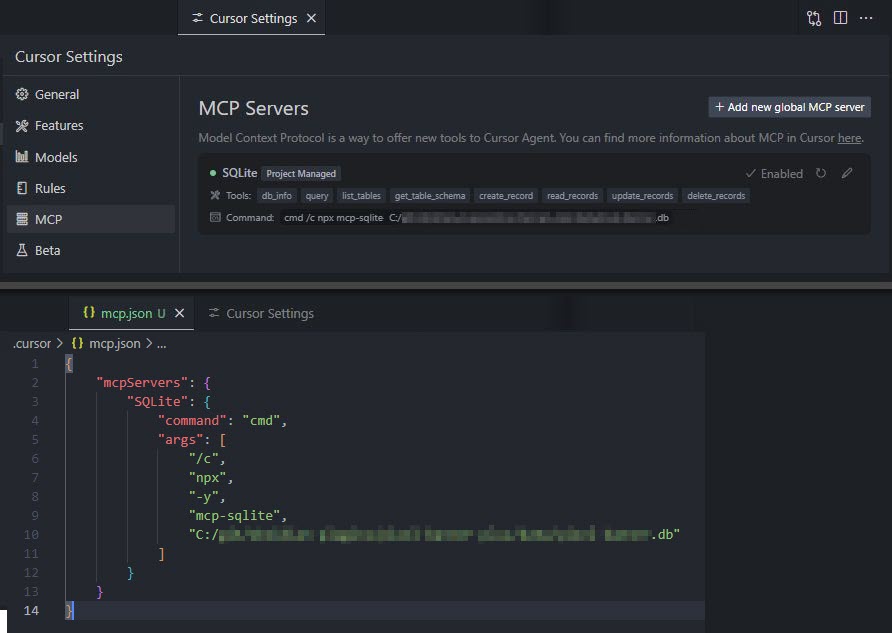
Define the command in your IDE's MCP Server settings:
e.g. `Cursor`:
{
    "mcpServers": {
        "MCP SQLite Server": {
            "command": "npx",
            "args": [
                "-y",
                "mcp-sqlite",
                "<path-to-your-sqlite-database.db>"
            ]
        }
    }
}e.g. `VSCode`:
{
    "servers": {
        "MCP SQLite Server": {
            "type": "stdio",
            "command": "npx",
            "args": [
                "-y",
                "mcp-sqlite",
                "<path-to-your-sqlite-database.db>"
            ]
        }
    }
}Your database path must be provided as an argument.
What was scanned
The files the safety scan read, as written by the repository's author and shown as plain text. Lines with a finding are marked.
README.md · README · 252 lines
View this file on GitHub (read at the repository's current version: the scan did not record which commit it read)
- # 🐇 MCP SQLite Server
- This is a Model Context Protocol (MCP) server that provides comprehensive SQLite database interaction capabilities.
- 
- #### Maintained by
- <a href="https://www.equilllabs.com">
- <img src="https://raw.githubusercontent.com/jparkerweb/eQuill-Labs/refs/heads/main/src/static/images/logo-text-outline.png" alt="eQuill Labs" height="32">
- </a>
- ## Features
- - Complete CRUD operations (Create, Read, Update, Delete)
- - Database exploration and introspection
- - Execute custom SQL queries
- ## Setup
- Define the command in your IDE's MCP Server settings:
- e.g. `Cursor`:
- ```json
- {
- "mcpServers": {
- "MCP SQLite Server": {
- "command": "npx",
- "args": [
- "-y",
- "mcp-sqlite",
- "<path-to-your-sqlite-database.db>"
- ]
- }
- }
- }
- ```
- e.g. `VSCode`:
- ```json
- {
- "servers": {
- "MCP SQLite Server": {
- "type": "stdio",
- "command": "npx",
- "args": [
- "-y",
- "mcp-sqlite",
- "<path-to-your-sqlite-database.db>"
- ]
- }
- }
- }
- ```
- 
- Your database path must be provided as an argument.
- ## Available Tools
- ### Database Information
- #### db_info
- Get detailed information about the connected database.
- Example:
- ```json
- {
- "method": "tools/call",
- "params": {
- "name": "db_info",
- "arguments": {}
- }
- }
- ```
- #### list_tables
- List all tables in the database.
- Example:
- ```json
- {
- "method": "tools/call",
- "params": {
- "name": "list_tables",
- "arguments": {}
- }
- }
- ```
- #### get_table_schema
- Get detailed information about a table's schema.
- Parameters:
- - `tableName` (string): Name of the table
- Example:
- ```json
- {
- "method": "tools/call",
- "params": {
- "name": "get_table_schema",
- "arguments": {
- "tableName": "users"
- }
- }
- }
- ```
- ### CRUD Operations
- #### create_record
- Insert a new record into a table.
- Parameters:
- - `table` (string): Name of the table
- - `data` (object): Record data as key-value pairs
- Example:
- ```json
- {
- "method": "tools/call",
- "params": {
- "name": "create_record",
- "arguments": {
- "table": "users",
- "data": {
- "name": "John Doe",
- "email": "john@example.com",
- "age": 30
- }
- }
- }
- }
- ```
- #### read_records
- Query records from a table with optional filtering.
- Parameters:
- - `table` (string): Name of the table
- - `conditions` (object, optional): Filter conditions as key-value pairs
- - `limit` (number, optional): Maximum number of records to return
- - `offset` (number, optional): Number of records to skip
- Example:
- ```json
- {
- "method": "tools/call",
- "params": {
- "name": "read_records",
- "arguments": {
- "table": "users",
- "conditions": {
- "age": 30
- },
- "limit": 10,
- "offset": 0
- }
- }
- }
- ```
- #### update_records
- Update records in a table that match specified conditions.
- Parameters:
- - `table` (string): Name of the table
- - `data` (object): New values as key-value pairs
- - `conditions` (object): Filter conditions as key-value pairs
- Example:
- ```json
- {
- "method": "tools/call",
- "params": {
- "name": "update_records",
- "arguments": {
- "table": "users",
- "data": {
- "email": "john.updated@example.com"
- },
- "conditions": {
- "id": 1
- }
- }
- }
- }
- ```
- #### delete_records
- Delete records from a table that match specified conditions.
- Parameters:
- - `table` (string): Name of the table
- - `conditions` (object): Filter conditions as key-value pairs
- Example:
- ```json
- {
- "method": "tools/call",
- "params": {
- "name": "delete_records",
- "arguments": {
- "table": "users",
- "conditions": {
- "id": 1
- }
- }
- }
- }
- ```
- ### Custom Queries
- #### query
- Execute a custom SQL query against the connected SQLite database.
- Parameters:
- - `sql` (string): The SQL query to execute
- - `values` (array, optional): Array of parameter values to use in the query
- Example:
- ```json
- {
- "method": "tools/call",
- "params": {
- "name": "query",
- "arguments": {
- "sql": "SELECT * FROM users WHERE id = ?",
- "values": [1]
- }
- }
- }
- ```
- ## Built with
- - [Model Context Protocol SDK](https://github.com/modelcontextprotocol/typescript-sdk)
- - [sqlite3](https://github.com/TryGhost/node-sqlite3)
- ---
- ## Appreciation
- If you enjoy this library please consider sending me a tip to support my work 😀
- ### [🍵 tip me here](https://ko-fi.com/jparkerweb)
Ratings and comments
Sign in to rate this skill.
Sign inFree to use. If it’s helped, pass it on.