Back to search
simple-modern-uv
SkillGitHub
A powerful, minimal agent skill and template for modern Python projects with uv
Safety scan
A static text scan, not a guarantee. Select the badge to see what was scanned and every finding.
Checked today
Badge for your README
Markdown
[](/listings/jlevy--simple-modern-uv)HTML
<a href="/listings/jlevy--simple-modern-uv"><img src="/api/listings/jlevy--simple-modern-uv/badge.svg" alt="findsafeskills safety rating" /></a>Install
i
What was scanned
The files the safety scan read, as written by the repository's author and shown as plain text. Lines with a finding are marked.
README.md · README · 480 lines
View this file on GitHub (read at the repository's current version: the scan did not record which commit it read)
- [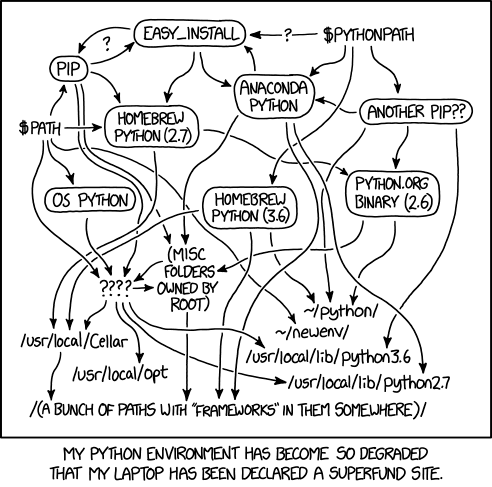](https://xkcd.com/1987/)
- (As usual, XKCD has a comic for this.
- Appropriately enough, the comic is out of date.)
- # simple-modern-uv
- [](https://x.com/ojoshe)
- [](https://www.python.org/downloads/)
- [](https://github.com/astral-sh/uv)
- [](https://github.com/copier-org/copier)
- ## What Is This?
- **simple-modern-uv** is a minimal, modern **Python project template** for new projects
- (Python 3.11–3.14) based on [**uv**](https://docs.astral.sh/uv/). This template aims to
- be a good base for serious work but also simple so it’s an easy option for any small
- project, like an open source library or tool.
- It can also upgrade an existing project to a modern setup: uv, ruff, BasedPyright, and
- GitHub Actions, or add only the practices that fit without forcing a full migration.
- The [agent skill](#use-with-any-coding-agent) handles each adoption path.
- ## Use with Any Coding Agent
- Install the [simple-modern-uv skill bundle](skills/simple-modern-uv/SKILL.md) with the
- [skills CLI](https://github.com/vercel-labs/skills), then appoint your coding agent to
- do the work. The bundle follows the [Agent Skills](https://agentskills.io) open format;
- the installer supports Claude Code, Codex, Cursor, Gemini CLI, and other compatible
- agents:
- ```shell
- NPM_CONFIG_IGNORE_SCRIPTS=true NPM_CONFIG_BEFORE=2026-07-31T18:59:05Z \
- npx --yes skills@1.5.18 add jlevy/simple-modern-uv \
- --skill simple-modern-uv --yes
- ```
- Then describe the outcome rather than translating it into template commands:
- | Goal | Example prompt | Result |
- | --- | --- | --- |
- | Start fresh | “Start a new Python project called `my-package` using simple-modern-uv.” | A complete, template-managed project |
- | Add features ad hoc | “Add simple-modern-uv’s uv lock policy and CI to this repo, but keep its build backend.” | Only the selected, compatible feature bundles |
- | Upgrade a project | “Migrate this package from Poetry to simple-modern-uv and preserve its public behavior.” | A full migration with future Copier updates |
- | Update later | “Update this project to the latest simple-modern-uv template.” | Upstream changes reconciled with local adaptations |
- No installer handy? Tell the agent to fetch the
- [`SKILL.md`](skills/simple-modern-uv/SKILL.md) and the directly linked reference for the
- selected workflow from the same Git revision, then follow them.
- ### Adopt Only What Fits
- The skill treats conformance as a design choice, not a pass/fail label:
- - **Selective adoption** adds named capabilities without changing unrelated project
- choices or claiming Copier ownership.
- - **Core toolchain adoption** adds uv, reproducible locking, linting, typing, tests, CI,
- and agent guidance while preserving packaging or layout where appropriate.
- - **Full template-managed adoption** uses the rendered structure and
- `.copier-answers.yml` so future `copier update` runs work.
- The agent first audits the repository, then reports what it will adopt unchanged, adapt
- to local constraints, preserve, or defer.
- Changes to supported Python versions, package layout, build backend, versioning,
- licensing, publishing, or CI remain explicit user decisions.
- See the procedures for
- [selective adoption](skills/simple-modern-uv/references/adopt-selectively.md),
- [full migration](skills/simple-modern-uv/references/adopt-existing.md),
- [new projects](skills/simple-modern-uv/references/start-new-project.md), and
- [template updates](skills/simple-modern-uv/references/update-templated-project.md).
- Generated projects are agent-ready too: each includes an
- [`AGENTS.md`](template/AGENTS.md.jinja) following the [AGENTS.md](https://agents.md)
- standard, with the project’s build, test, and development conventions, plus a
- [`CLAUDE.md`](template/CLAUDE.md) that imports it for Claude Code.
- To work without an agent, see [How to Use This Template](#how-to-use-this-template).
- ## Why a New Python Project Template?
- > **The Story So Far**
- >
- > In the beginning, there was a hack called
- > [`setup.py`](https://github.com/pypa/setuptools) for packaging (1990s–2000s) and it
- > was not good.
- >
- > Then there arose [`virtualenv`](https://github.com/pypa/virtualenv),
- > [`pip`](https://github.com/pypa/pip), and `requirements.txt` for isolated environments
- > (2008–2011). Yet confusion still reigned.
- >
- > Meanwhile, [`conda`](https://github.com/conda/conda),
- > [`pyenv`](https://github.com/pyenv/pyenv), [`brew`](https://github.com/Homebrew/brew),
- > and [`PyInstaller`](https://github.com/pyinstaller/pyinstaller) vied to rule the
- > system installations (2010s).
- >
- > Years of dissatisfaction led to the spread of a new religion,
- > [`pyproject.toml`](https://github.com/pypa/pyproject.toml).
- > Adherents of [`poetry`](https://github.com/python-poetry/poetry),
- > [`pipenv`](https://github.com/pypa/pipenv), and [`pipx`](https://github.com/pypa/pipx)
- > promised peace and prosperity (2020s) yet somehow, life felt mostly the same.
- >
- > Then AI robots began to invade.
- > Rebel forces [`uv`](https://github.com/astral-sh/uv) and
- > [`pixi`](https://github.com/prefix-dev/pixi) aligned with Rust gathered strength …
- Apologies for the digression.
- The point is that unfortunately, the accidents of history make it quite confusing to
- learn best practices for setting up Python projects and dependencies.
- But it shouldn’t have to be this difficult, especially since uv has now significantly
- simplified Python dev tooling.
- If you haven’t switched to uv, I can say I too was a little hesitant.
- It’s often possible to switch dev tooling prematurely because the new tool is shiny and
- exciting. But the advantages of uv have become too numerous to ignore.
- [This article](https://www.bitecode.dev/p/a-year-of-uv-pros-cons-and-should) (Feb 2025)
- has a good overview.
- This is the template I now use myself as I have been migrating from Poetry to uv for
- several projects. It’s new but it’s working well.
- ## But I Don’t Like Templates
- A lot of more senior engineers have justified hesitancy about templates.
- Templates can be a real problem if they add mindless, unexamined complexity.
- But if done carefully, I think they are better than official docs (they show real-world
- code you can adapt, instead of leaving you to figure out each tool choice and setting)
- or blog posts (that are typically not maintained or updated).
- I think a good project template should be **3 Ms: minimalist, modern, and maintained**.
- I looked at [other templates](#alternatives) but wanted one that was modern and “done
- right” but *absolutely as simple as possible*. Few existing templates seem to be both
- simple and use the newest generation of tools and best practices.
- The template is short enough to read and understand in about 10 minutes.
- It’s **only ~300 lines of code** so you can just look at it, use it, and change what you
- want without fuss.
- Because this template is minimal, you can always start with it and then pull in other
- tools and features if you want them.
- (In fact, even if you don’t like this template, you might want to use it as inspiration
- for your *own* Copier template, to take advantage of the Copier update workflow
- discussed next.)
- ## Why Use Copier?
- One other benefit of this template is it uses
- [**copier**](https://github.com/copier-org/copier).
- Unlike many previous project template tools, Copier lets you
- [pull future template changes](#updating-your-project-template) back into your
- instantiated copy at any time.
- You can start a project now, then if this template improves or is updated with other
- tools, you can pull those improvements back into your project, much like a git merge.
- You could even fork this repo yourself, then build your own forked template, and
- maintain it yourself.
- If you’re not familiar with Copier, take a moment to understand the
- [update feature](#updating-your-project-template).
- Then the options below will make sense.
- I put a few more thoughts on why a workflow like this is underrated in
- [a Twitter thread](https://x.com/ojoshe/status/1896696860297019733).
- ## What Tools Are in This Template?
- simple-modern-uv uses the tools I’ve come to think are best for new projects:
- - [**uv**](https://github.com/astral-sh/uv) for project setup and dependencies.
- There is also a simple makefile for dev workflows, but it simply is a convenience for
- running uv commands.
- - [**ruff**](https://github.com/charliermarsh/ruff) for modern linting and formatting.
- Previously, [black](https://github.com/psf/black) was the definitive formatting tool,
- but ruff now handles linting and fast, black-compatible formatting.
- - [**GitHub Actions**](https://github.com/actions/setup-python) for CI and publishing
- workflows.
- - [**Dynamic versioning**](https://github.com/ninoseki/uv-dynamic-versioning/) so
- release and package publication is as simple as creating a tag/release on GitHub (no
- machinery needed to manually bump versions and commit files every release).
- - Workflows for **packaging and publishing to PyPI** with uv.
- This has always been more confusing than it should be.
- The
- [official docs](https://packaging.python.org/en/latest/tutorials/packaging-projects/)
- about packaging are several pages long, and then even
- [toy tutorials](https://realpython.com/pypi-publish-python-package/) about publishing
- are even longer. This template makes all of that basically automatic with uv, GitHub
- Actions, and dynamic versioning.
- - Type checking with [**BasedPyright**](https://github.com/detachhead/basedpyright).
- (See below for more on this.)
- - [**Pytest**](https://github.com/pytest-dev/pytest) for tests (with the excellent
- plugin [**pytest-sugar**](https://github.com/Teemu/pytest-sugar) for faster errors and
- nicer output).
- - [**codespell**](https://github.com/codespell-project/codespell) for drop-in spell
- checking.
- ## Starter Docs
- The template includes a few **starter docs** for you, collaborators, and users:
- - [README.md](https://github.com/jlevy/simple-modern-uv/blob/main/template/README.md.jinja)
- is a placeholder for your project readme.
- - [installation.md](https://github.com/jlevy/simple-modern-uv/blob/main/template/docs/installation.md)
- has brief reminders on the modern ways to install uv and Python.
- - [development.md](https://github.com/jlevy/simple-modern-uv/blob/main/template/docs/development.md.jinja)
- covers basic developer workflows.
- - [publishing.md](https://github.com/jlevy/simple-modern-uv/blob/main/template/docs/publishing.md)
- covers how to publish your project to PyPI.
- If you haven’t done it before, publishing a package to PyPI can be a bit confusing,
- especially because the
- [official Python docs](https://packaging.python.org/en/latest/guides/section-build-and-publish/)
- cover older and more complex workflows.
- Be sure to check `publishing.md` for a modern and simple way that uses uv and GitHub
- actions.
- You can edit or delete these, but typically it’s sufficient to just edit the README.md.
- It helps to have the others in separate files so they get updated whenever you update
- the template.
- ## What’s the Best Python Type Checker?
- The choice of what tool to use for type checking deserves some explanation.
- This seems to be a confusing area.
- Like many, I’d previously been using [Mypy](https://github.com/python/mypy), the OG type
- checker for Python. Mypy has since been enhanced with
- [BasedMypy](https://github.com/KotlinIsland/basedmypy).
- The other popular alternative is Microsoft’s
- [Pyright](https://github.com/microsoft/pyright).
- And it has a newer extension and fork called
- [BasedPyright](https://github.com/DetachHead/basedpyright).
- All of these work in build systems.
- But this is a choice not just of build tooling: it is far preferable to have your type
- checker warnings align with your IDE warnings.
- With the rises of AI-powered IDEs like Cursor and Windsurf that are VSCode extensions,
- it seems like type checking support as a VSCode-compatible extension is essential.
- However, Microsoft’s popular
- [Mypy VSCode extension](https://marketplace.visualstudio.com/items?itemName=ms-python.mypy-type-checker)
- is licensed only for use in VSCode (not other IDEs) and
- [sometimes](https://forum.cursor.com/t/pylance-server-fails-to-initialize-due-to-licensing-restriction/48548)
- [refuses](https://forum.cursor.com/t/does-pylance-just-not-work-with-cursor-how-to-get-imports-in-quick-fix-menu/5747)
- to work in Cursor. [Cursor’s docs](https://docs.cursor.com/guides/languages/python)
- suggest Mypy but don’t suggest a VSCode extension.
- After some experimentation, I found
- [BasedPyright](https://github.com/detachhead/basedpyright) to be a credible improvement
- on [Pyright](https://github.com/microsoft/pyright).
- BasedPyright is well maintained, is faster than Mypy, and has a good
- [VSCode extension](https://marketplace.visualstudio.com/items?itemName=detachhead.basedpyright)
- that works with Cursor and other VSCode forks.
- So I have now switched this template to use BasedPyright.
- (But please file an issue if you have better suggestions.)
- One newer option worth watching is [**ty**](https://github.com/astral-sh/ty), Astral’s
- own type checker (from the makers of uv and ruff), written in Rust.
- It’s extremely fast, often 10–60x faster than Mypy or Pyright, and ships a language
- server with extensions for VSCode, PyCharm, Neovim, and other editors.
- As of mid-2026 it’s still in [beta](https://astral.sh/blog/ty) and on `0.0.x`
- versioning, so its API and diagnostics can change between releases.
- It also doesn’t yet match BasedPyright on
- [typing-spec coverage](https://pydevtools.com/handbook/explanation/how-do-mypy-pyright-and-ty-compare/)
- or strictness: Astral is still filling in the long tail of typing features and
- first-class support for libraries like Pydantic and Django.
- For now this template stays on BasedPyright for its maturity and more complete checks.
- But ty is a strong contender that fits naturally with uv, and this recommendation may
- change once ty reaches comparable coverage.
- For the full comparison and the objective conformance data behind this, see the
- [type-checker research doc](docs/project/research/research-python-type-checkers.md).
- ## What Does This Template Not Include?
- The template doesn’t have lots of options or try to use every bell and whistle.
- It just adds the above essentials.
- This template **does not** handle:
- - Using Docker
- - Private or enterprise package repositories (but you can add this; see
- [uv’s docs on alternative indexes](https://docs.astral.sh/uv/guides/integration/alternative-indexes/))
- - Building websites or docs, e.g. with [mkdocs](https://github.com/mkdocs/mkdocs)
- - Using [Conda](https://github.com/conda/conda) for dependencies (but note many deep
- learning libraries like PyTorch now support pip so this isn’t as necessary as often as
- it used to be)
- - Using a code repo or build system that isn’t GitHub and GitHub Actions
- - Boilerplate docs or project management of any kind, like issue templates, contributing
- guidelines, code of conduct, etc.
- Docker and private repo use can be added by you manually to the project after you get
- started. Similarly, you can change CI/CD workflows if you are not using GitHub or GitHub
- Actions or PyPI.
- Also see [below](#alternatives) for other templates you can look at or use as
- references.
- ## How to Use This Template
- License and publishing are template questions, not hand edits: `package_license`
- (default MIT; also Apache-2.0, BSD-3-Clause, AGPL-3.0-or-later, Proprietary, or None to
- decide later) and `publish_to_pypi` (answer no for a private package; the publish
- workflow and docs are then omitted).
- Answer them at render time or change them later with
- `uvx --exclude-newer "14 days" copier@9.17.0 update --data package_license=…`; see the
- skill’s [customize guide](skills/simple-modern-uv/references/customize.md) for details.
- Prefer re-answering over hand-deleting generated files like `publish.yml`, so future
- `copier update` runs stay consistent.
- The template can be used in three ways.
- Option 1 is the quickest: your AI coding agent gathers the project details and does the
- setup. Option 2 is the normal way to use a Copier template by hand.
- Option 3 is handy if you prefer a GitHub template.
- ### Option 1: Use Your Agent (Recommended)
- Install the [agent skill](skills/simple-modern-uv/SKILL.md) and ask your agent.
- [Use with Any Coding Agent](#use-with-any-coding-agent) has the exact installation
- command, four workflow prompts, and adoption boundaries.
- The agent inspects the repo, confirms only material choices, performs the work
- non-interactively, and reports the resulting adoption level and validation.
- ### Option 2: Use `copier` and `git` Yourself
- This template uses [Copier](https://github.com/copier-org/copier), which seems like the
- best tool nowadays for project templates.
- Using Copier is the recommended approach since it then lets you instantiate the template
- variables and makes future updates possible.
- But it requires a few more commands.
- To create a new project repo with the reviewed Copier version:
- ```shell
- # Change dirs to the place you want the new GitHub repo to be.
- cd ~/projects/github # Wherever you do your project work.
- # Clone this template under the supply-chain cool-off. This does everything!
- # It will fetch from this GitHub repo and create a new directory
- # with whatever name you put below:
- uvx --exclude-newer "14 days" copier@9.17.0 copy \
- gh:jlevy/simple-modern-uv YOURNEWREPO
- # Then follow the instructions.
- ```
- You can enter names for the project, description, etc., or just press enter and later
- look for `changeme` in the code.
- Once you have the template set up, you will need to check the code into Git for uv to
- work.
- [Create a new GitHub repo](https://docs.github.com/en/repositories/creating-and-managing-repositories/creating-a-new-repository),
- making sure to create it as an **empty repo** (don’t add a README, .gitignore, or
- license, since the template already provides these), and add your initial code:
- ```shell
- cd PROJECT
- git init --initial-branch=main
- git add .
- git commit -m "Initial commit from simple-modern-uv."
- # Sync after the first commit so dynamic versioning gives the editable install
- # a real version (not 0.0.0). This creates uv.lock; commit it so CI installs
- # reproducibly with --locked and verifies the lockfile is current.
- make install
- git add uv.lock
- git commit -m "Add uv.lock."
- # Create repo on GitHub.
- git remote add origin git@github.com:OWNER/PROJECT.git # or https://github.com/...
- git push -u origin main
- ```
- ### Option 3: Use the GitHub Template
- If you prefer you can click the **use this template** on
- [**this repository**](https://github.com/jlevy/simple-modern-uv-template), which is the
- current output of this template.
- Go there and hit the “Use this template” button.
- Once you have the code, search for **`changeme`** for all field names like project name,
- author, etc. You want to do this to the `.copier-answers.yml` file as well.
- You will also want to check the license/copyright.
- ## Updating Your Project Template
- If you use Option 1 or Option 2 or if you pick Option 3 and correctly fill in your
- `.copier-answers.yml` file, you have the option to update your project with any future
- updates to this template at any time.
- When `.copier-answers.yml` records your project values, you can
- [update your project](https://copier.readthedocs.io/en/latest/updating/) to reflect any
- changes to this template by running `copier update`.
- ## Alternatives
- There are a couple other good uv templates, especially
- [**cookiecutter-uv**](https://github.com/fpgmaas/cookiecutter-uv) and
- [**copier-uv**](https://github.com/pawamoy/copier-uv) you may wish to consider.
- This template takes a somewhat different philosophy.
- I found existing templates to have machinery or files you often don’t need.
- And it’s hard to maintain a complex template repo.
- This is intended instead to be a very simple template.
- You can always add to it if you want.
- There is also [**uv-migrator**](https://github.com/stvnksslr/uv-migrator) to help you
- migrate projects to uv.
- Previously, [Poetry](https://python-poetry.org/docs/basic-usage/) was probably the best
- modern tool for managing dependencies.
- It is not as new as uv and arguably more mature (it just hit version 2.0). In fact, this
- template is based on my earlier Poetry template,
- [simple-modern-poetry](https://github.com/jlevy/simple-modern-poetry).
- Another great resource to check is
- [**python-blueprint**](https://github.com/johnthagen/python-blueprint), which is a more
- established template with an excellent overview of other standard Python project best
- practices. It uses [Poetry](https://python-poetry.org/docs/basic-usage/),
- [nox](https://github.com/wntrblm/nox),
- [Material for Mkdocs](https://github.com/squidfunk/mkdocs-material), and Docker.
- For [Conda](https://github.com/conda/conda) dependencies, also consider the newer
- [**pixi**](https://github.com/prefix-dev/pixi/) package manager.
- ## Supply Chain Hardening
- Dependencies are an attack surface.
- The best resource on this is
- [**supply-chain-hardening**](https://github.com/jlevy/supply-chain-hardening), a concise
- guidebook of concrete recipes for npm, PyPI, and other ecosystems.
- **If you use this template, follow it.** Its key defaults, which this template also
- follows:
- - **Cooling-off period:** Don’t install or upgrade to a release less than 14 days old
- (most malicious publishes are caught within days).
- uv supports a relative
- [dependency cooldown](https://docs.astral.sh/uv/concepts/resolution/#dependency-cooldowns)
- such as `"14 days"`; this template sets it in generated `uv.toml`, CI, and the
- Makefile. Standard workflows select that checked-in file explicitly so ambient user
- settings cannot make `uv.lock` nonportable.
- - **Vet what you add:** Only add dependencies you can verify upstream, and prefer a
- little first-party code over pulling in a new dependency.
- - **Pin and lock:** Commit your `uv.lock` and pin GitHub Actions to full commit SHAs.
- Treat a version tag as immutable only after verifying that release state through the
- GitHub API.
- See [updating.md](updating.md#supply-chain-hygiene) for how this template applies these.
- ## Maintaining and Releasing This Template
- If you’re contributing to this template or forking it for your own use, see
- [**updating.md**](updating.md) for the full process to check for new versions, update
- the template, verify changes in a downstream project, and publish a GitHub Release.
- The GitHub Release creates the version tag only after the downstream gate passes; do not
- create a bare tag immediately after merging the template PR. Maintainer research, frozen
- supply-chain evidence, and implementation records are indexed in the
- [project documentation](docs/project/README.md).
- ## Contributing
- Please [file an issue](https://github.com/jlevy/simple-modern-uv/issues) with any bugs,
- suggestions, or other ideas.
- PRs welcome on [this repository](https://github.com/jlevy/simple-modern-uv) (not on the
- GitHub template repo, which mirrors this one).
- <!-- This document follows common-doc-guidelines.md.
- See github.com/jlevy/practical-prose and review guidelines before editing.
- -->
Ratings and comments
Sign in to rate this skill.
Sign inFree to use. If it’s helped, pass it on.