FinanceDatabase
This is a database of 300.000+ symbols containing Equities, ETFs, Funds, Indices, Currencies, Cryptocurrencies and Money Markets.
Safety scan
A static text scan, not a guarantee. Select the badge to see what was scanned and every finding.
Check it deeper on your machine
It has changed since its scan on 11 Nov 2026.
As a Claude Code plugin, install it and then ask Claude Code:
/plugin marketplace add keithmackay/mackayi/plugin install scanskillsafety@mackayiDo a deep scan of https://github.com/JerBouma/FinanceDatabase with scanskillsafety
Or from a terminal, clone it and run it:
git clone https://github.com/keithmackay/scanskillsafety-skill ~/.claude/skills/scanskillsafetynode ~/.claude/skills/scanskillsafety/cli.cjs --deep 'https://github.com/JerBouma/FinanceDatabase'
It checks the exact commit: every file, its packages against OSV (api.osv.dev), how it compares with this page's scan (findsafeskills.com receives the repository's address), and, if you agree, Claude reading every file with your own Claude subscription. It never runs the code.
Badge for your README

Markdown
[](/listings/jerbouma--financedatabase)HTML
<a href="/listings/jerbouma--financedatabase"><img src="/api/listings/jerbouma--financedatabase/badge.svg" alt="findsafeskills safety rating" /></a>Install
Install instructions from the README
As written by the repo's author. findsafeskills has not verified these steps.
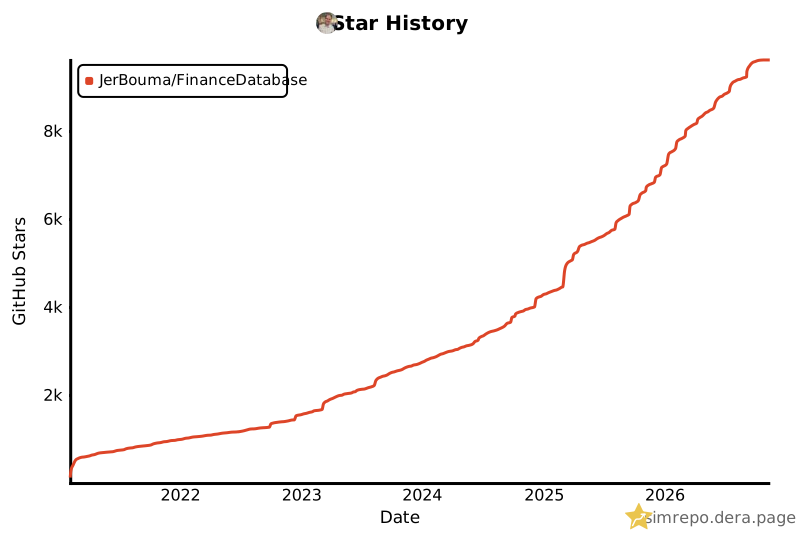
Before installation, consider starring the project on GitHub which helps others find the project as well.
To install the FinanceDatabase it simply requires the following:
pip install financedatabase -U
Then within Python use:
import financedatabase as fd

equities = fd.Equities()
No API key is needed. Each asset class is downloaded once and cached locally, see [Questions & Answers](#questions--answers) for how the cache works.
What was scanned
The files the safety scan read, as written by the repository's author and shown as plain text. Lines with a finding are marked.
README.md · README · 496 lines
View this file on GitHub (read at the repository's current version: the scan did not record which commit it read)
This file has changed since it was scanned, so this is not exactly the text that was scanned, and no line is marked. The findings are listed with the safety scan above.
- <!-- mcp-name: io.github.JerBouma/financedatabase -->
- [](https://github.com/JerBouma/FinanceDatabase)
- [](https://github.com/sponsors/JerBouma)
- [](https://www.buymeacoffee.com/jerbouma)
- [](https://www.linkedin.com/in/boumajeroen/)
- [](https://www.jeroenbouma.com/projects/financedatabase/mcp)
- [](https://github.com/JerBouma/FinanceDatabase/releases/latest/download/financedatabase.mcpb)
- [](https://www.jeroenbouma.com/projects/financedatabase)
- [](https://www.jeroenbouma.com/projects/financedatabase/explorer)
- [](https://pypi.org/project/financedatabase/)
- [](https://pypi.org/project/financedatabase/)
- [](https://pepy.tech/project/financedatabase)
- As a private investor, the sheer amount of information that can be found on the internet is rather daunting. Trying to understand what types of companies or ETFs are available is incredibly challenging, with millions of companies and derivatives available on the market. Sure, the most traded companies and ETFs can quickly be found simply because they are known to the public (for example, Microsoft, Tesla, S&P 500 ETF, or an All-World ETF). However, what else is out there is often unknown.
- **This is why I created the FinanceDatabase**, a database featuring 300,000+ symbols containing Equities, ETFs, Funds, Indices, Currencies, Cryptocurrencies and Money Markets. It allows you to obtain a broad overview of sectors, industries, types of investments and much more, entirely for free. Everything is stored in CSV files that anyone can read and edit, so the database grows and improves through the community.
- The aim of this database is explicitly _not_ to provide up-to-date fundamentals or stock data, as those can be obtained with ease (with the help of this database) by using the [Finance Toolkit 🛠️](https://github.com/JerBouma/FinanceToolkit). Instead, it gives insights into the products that exist in each country, industry and sector and provides the most essential information about each product. With this information, you can analyze specific areas of the financial world and/or find a product that is hard to find. By utilising both, it is possible to do a fully-fledged competitive analysis with the tickers found from the FinanceDatabase inputted into the FinanceToolkit.
- Some key statistics of the database:
- <!-- STATISTICS:START (generated weekly by scripts/update_readme_stats.py from database/; edits between these markers are overwritten) -->
- | | Asset class | Symbols | Exchanges | Coverage |
- | :-: | :-- | --: | --: | :-- |
- | 🏢 | **Equities** | 121,603 | 87 | 11 sectors · 75 industries · 118 countries |
- | 📦 | **ETFs** | 32,172 | 63 | 637 issuers · 32 categories |
- | 💼 | **Funds** | 57,761 | 29 | 1,534 fund families · 70 categories |
- | 📈 | **Indices** | 82,396 | 64 | 42 categories |
- | 💱 | **Currencies** | 2,516 | – | 177 currencies |
- | 🪙 | **Cryptocurrencies** | 5,898 | – | 688 coins · 12 quote currencies |
- | 🏦 | **Money Markets** | 1,225 | 4 | 131 fund families |
- | | **Total** | **303,571** | | |
- <!-- STATISTICS:END -->
- ___
- **🔌 The Finance Database is also available as an [MCP Server](https://www.jeroenbouma.com/projects/financedatabase/mcp)**
- Explore all 300,000+ symbols from Claude, Copilot, Cursor, Windsurf or any MCP-compatible client without writing code. No API key needed.
- - **Hosted:** connect to `https://financedatabase.jeroenbouma.com/mcp` — nothing to install and no API key.
- - **Local:** `uvx --from "financedatabase[mcp]" financedatabase-mcp-setup` — sets up your client config automatically. See [MCP Server Documentation](https://www.jeroenbouma.com/projects/financedatabase/mcp#local-clients) for manual setup.
- ___
- # Table of Contents
- 1. [Installation](#installation)
- 2. [Functionality](#functionality)
- 3. [MCP Server](#mcp-server)
- 4. [Questions & Answers](#questions--answers)
- 5. [Contributing](#contributing)
- 6. [Contact](#contact)
- # Installation
- Before installation, consider starring the project on GitHub which helps others find the project as well.
- <a href="https://github.com/JerBouma/FinanceDatabase" target="_blank"><img width="1353" alt="image" src="https://github.com/JerBouma/FinanceDatabase/assets/46355364/4132edde-72f9-4e32-adfe-8872207f46ff"></a>
- To install the FinanceDatabase it simply requires the following:
- ```
- pip install financedatabase -U
- ```
- Then within Python use:
- ```python
- import financedatabase as fd
- equities = fd.Equities()
- ```
- No API key is needed. Each asset class is downloaded once and cached locally, see [Questions & Answers](#questions--answers) for how the cache works.
- # Functionality
- This section is an introduction to the FinanceDatabase. Search and filter the database in your browser, and copy any selection as Python code, with the Database Explorer.
- ___
- <b><div align="center">Open the Database Explorer <a href="https://www.jeroenbouma.com/projects/financedatabase/explorer">here</a>.</div></b>
- ___
- A basic example of how to use the FinanceDatabase is shown below. Every code snippet in the sections that follow builds on this same `equities` instance. Initialization of each asset class is only required <u>once</u>, so save it to a variable to query the database much more quickly.
- ```python
- import financedatabase as fd
- # Initialize the Equities database
- equities = fd.Equities()
- # Select all equities
- equities.select()
- ```
- A portion of the output is shown below. The tables in this section are cut off to five entries and a selection of the columns due to the sheer size of the database.
- | symbol | name | currency | sector | industry | exchange | market | country | market_cap | isin |
- |:---------|:-------------------------|:-----------|:-----------------------|:-------------------------------------------|:-----------|:---------------------|:--------------|:-------------|:-------------|
- | AAPL | Apple Inc. | USD | Information Technology | Computers & Hardware | NMS | NASDAQ Global Select | United States | Mega Cap | US0378331005 |
- | ASML.AS | ASML Holding N.V. | EUR | Information Technology | Semiconductors & Chip Equipment | AMS | Euronext Amsterdam | Netherlands | Mega Cap | NL0010273215 |
- | 7203.T | Toyota Motor Corporation | JPY | Consumer Discretionary | Automobiles | JPX | Tokyo Stock Exchange | Japan | Mega Cap | JP3633400001 |
- | NESN.SW | Nestle S.A. | CHF | Consumer Staples | Food Products | EBS | SIX Swiss Exchange | Switzerland | Mega Cap | CH0038863350 |
- | SAP.DE | SAP SE | EUR | Information Technology | Software | GER | XETRA | Germany | Mega Cap | DE0007164600 |
- And below the actively listed equities are counted per sector.
- <picture>
- <source media="(prefers-color-scheme: dark)" srcset="https://raw.githubusercontent.com/JerBouma/FinanceDatabase/main/assets/readme/sectors-dark.png">
- <img alt="Sectors" src="https://raw.githubusercontent.com/JerBouma/FinanceDatabase/main/assets/readme/sectors-light.png">
- </picture>
- Each asset class has the same three functions: `select` to filter on the database's categories, `search` to look for any text in any column and `show_options` to see which values a category can take. The asset classes are `fd.Equities()`, `fd.ETFs()`, `fd.Indices()`, `fd.Currencies()` and `fd.Cryptos()`, which are updated weekly from official exchange and market sources.
- Three capabilities cut across all of them:
- - **Lists of values.** Every filter accepts a single value or a list, e.g. `country=['Netherlands', 'Belgium']`, returning the entries that match any of them.
- - **`only_primary_listing` and `exclude_delisted`.** A company is often listed on many exchanges. `only_primary_listing=True` keeps only its primary listing, and delisted symbols are left out by default (`exclude_delisted=False` to include them).
- - **pandas or Polars.** Queries run lazily with [Polars](https://pola.rs/) and return a pandas DataFrame by default, or a Polars DataFrame with `as_pandas=False`.
- ### Exploring the Options
- With `show_options`, all possible options are given per column. **This is useful as it doesn't require loading the larger data files.**
- ```python
- # Show the options of every column of the equities
- options = fd.show_options("equities")
- # Select the sectors
- options["sector"]
- ```
- This returns the eleven sectors used for equities:
- ```text
- ['Communication Services', 'Consumer Discretionary', 'Consumer Staples',
- 'Energy', 'Financials', 'Health Care', 'Industrials',
- 'Information Technology', 'Materials', 'Real Estate', 'Utilities']
- ```
- Once an asset class is loaded, `show_options` is also available on the class itself, where it shows the options that remain after filtering. For example, the industries of the financial companies in the Netherlands:
- ```python
- # Show the industries of financial companies in the Netherlands
- equities.show_options(
- selection="industry",
- sector="Financials",
- country="Netherlands",
- )
- ```
- Which returns:
- ```text
- ['Banks', 'Capital Markets', 'Consumer Lending', 'Insurance',
- 'Payments & Specialty Finance']
- ```
- And below the number of companies in each of these industries is shown. Each company is counted once, however many exchanges it is listed on: listings that share an ISIN, share class FIGI, website or the first word of their name (such as ING Groep's listings in Amsterdam, Frankfurt, New York and São Paulo) are combined.
- <picture>
- <source media="(prefers-color-scheme: dark)" srcset="https://raw.githubusercontent.com/JerBouma/FinanceDatabase/main/assets/readme/options-dark.png">
- <img alt="Options" src="https://raw.githubusercontent.com/JerBouma/FinanceDatabase/main/assets/readme/options-light.png">
- </picture>
- The options of every column can be shown this way, including `currency`, `exchange`, `market`, `country` and `market_cap` (Mega, Large, Mid, Small, Micro and Nano Cap). **Try it in the Database Explorer [here](https://www.jeroenbouma.com/projects/financedatabase/explorer).**
- ### Selecting Equities
- Given these options, it becomes possible to filter the database on the categories you are interested in. For example, the 'Insurance' companies in the 'United States', one row per company. The `sector` can be omitted here since the industry already implies 'Financials'.
- ```python
- # Select the primary listings of insurance companies in the United States
- equities.select(
- country="United States",
- industry="Insurance",
- only_primary_listing=True,
- )
- ```
- This returns 194 companies, of which a few of the larger ones are shown below.
- | symbol | name | currency | sector | industry | exchange | market | country | market_cap |
- |:---------|:---------------------------------|:-----------|:-----------|:-----------|:-----------|:------------------------|:--------------|:-------------|
- | AFL | Aflac Incorporated | USD | Financials | Insurance | NYQ | New York Stock Exchange | United States | Large Cap |
- | AJG | Arthur J. Gallagher & Co. | USD | Financials | Insurance | NYQ | New York Stock Exchange | United States | Large Cap |
- | BRO | Brown & Brown, Inc. | USD | Financials | Insurance | NYQ | New York Stock Exchange | United States | Large Cap |
- | CINF | Cincinnati Financial Corporation | USD | Financials | Insurance | NMS | NASDAQ Global Select | United States | Large Cap |
- | PGR | Progressive Corporation | USD | Financials | Insurance | NYQ | New York Stock Exchange | United States | Large Cap |
- Without `only_primary_listing=True`, the same query returns 455 listings on 23 exchanges, because every exchange a company trades on is shown by default. Progressive, for example, also appears as `PGV.F` (Frankfurt), `PGV.SG` (Stuttgart), `PGR.MX` (Mexico) and `P1GR34.SA` (B3). The primary listing of a company is its listing on the main exchange of its home market, or without one its listing on the largest main exchange abroad. It is worked out from the data itself, so it works for companies anywhere: for ASML it is `ASML.AS` on Euronext Amsterdam, not `ASML` on NASDAQ or `ASMLF` over the counter. To get the listings in a particular country instead, such as the US listings of ASML, filter on the `exchange`, `market` or `currency`.
- For the Netherlands, it makes sense to select the market "Euronext Amsterdam" (exchange "AMS"), here for the semiconductor companies:
- ```python
- # Select the semiconductor companies on Euronext Amsterdam
- equities.select(
- country="Netherlands",
- industry="Semiconductors & Chip Equipment",
- market="Euronext Amsterdam",
- )
- ```
- This gives the following three companies:
- | symbol | name | currency | sector | industry | exchange | market | country | market_cap | isin |
- |:---------|:---------------------------------|:-----------|:-----------------------|:--------------------------------|:-----------|:-------------------|:------------|:-------------|:-------------|
- | ASM.AS | ASM International N.V. | EUR | Information Technology | Semiconductors & Chip Equipment | AMS | Euronext Amsterdam | Netherlands | Large Cap | NL0000334118 |
- | ASML.AS | ASML Holding N.V. | EUR | Information Technology | Semiconductors & Chip Equipment | AMS | Euronext Amsterdam | Netherlands | Mega Cap | NL0010273215 |
- | BESI.AS | BE Semiconductor Industries N.V. | EUR | Information Technology | Semiconductors & Chip Equipment | AMS | Euronext Amsterdam | Netherlands | Large Cap | NL0012866412 |
- Every filter also accepts a list, so both queries can be combined into one with `country=["Netherlands", "United States"]` and `market=["Euronext Amsterdam", "New York Stock Exchange", "NASDAQ Global Select"]`. Equities can be selected on `country`, `sector`, `industry_group`, `industry`, `currency`, `exchange`, `mic`, `market` and `market_cap`. **Try it in the Database Explorer [here](https://www.jeroenbouma.com/projects/financedatabase/explorer).**
- ### Searching the Database
- If the categorization doesn't lead to the results you are looking for, `search` filters on any column via a custom string. If the text is found anywhere in the column, the entry is returned. Searches are not case sensitive unless `case_sensitive=True` is set, `index` searches the symbol and, just like `select`, every argument accepts a list.
- ```python
- # Search for robotics or education companies with equipment on the Frankfurt Stock Exchange
- equities.search(
- summary=["Robotics", "Education"],
- industry="Equipment",
- market="Frankfurt",
- index=".F",
- )
- ```
- This returns the instruments listed on the Frankfurt Stock Exchange in an industry containing "Equipment" and with "Robotics" or "Education" in their summary. Filtering on `index=".F"` is an alternative way to find the exchange or market you are looking for.
- | symbol | name | currency | sector | industry | exchange | market | country | market_cap |
- |:-------|:------------------------------------------------------------|:---------|:-----------------------|:--------------------------------------|:---------|:-------------------------|:---------------|:-----------|
- | 1YO.F | Yangtze Optical Fibre And Cable Joint Stock Limited Company | EUR | Information Technology | Networking & Communications Equipment | FRA | Frankfurt Stock Exchange | China | Large Cap |
- | 2IU.F | Boxlight Corporation | EUR | Information Technology | Networking & Communications Equipment | FRA | Frankfurt Stock Exchange | United States | Nano Cap |
- | 49V.F | Vertiv Holdings Co | EUR | Industrials | Electrical Equipment | FRA | Frankfurt Stock Exchange | United States | Large Cap |
- | A1Z1.F | eEnergy Group Plc | EUR | Industrials | Electrical Equipment | FRA | Frankfurt Stock Exchange | United Kingdom | Nano Cap |
- | A8B.F | Ambarella, Inc. | EUR | Information Technology | Semiconductors & Chip Equipment | FRA | Frankfurt Stock Exchange | United States | Mid Cap |
- And below the results are counted per industry.
- <picture>
- <source media="(prefers-color-scheme: dark)" srcset="https://raw.githubusercontent.com/JerBouma/FinanceDatabase/main/assets/readme/search-dark.png">
- <img alt="Search" src="https://raw.githubusercontent.com/JerBouma/FinanceDatabase/main/assets/readme/search-light.png">
- </picture>
- The `search` function works on every column of every asset class, including `name`, `isin`, `cusip` and `figi`. **Try it in the Database Explorer [here](https://www.jeroenbouma.com/projects/financedatabase/explorer).**
- ### Exploring other Asset Classes
- All of these functions are also available for the other asset classes. The only difference is the class name and the columns. For example, ETFs use `fd.ETFs()` and are selected on `category_group`, `category` and `family` instead.
- ```python
- # Initialize the ETFs database
- etfs = fd.ETFs()
- # Select the Fixed Income ETFs of Vanguard
- etfs.select(
- category_group="Fixed Income",
- family="Vanguard Asset Management",
- )
- ```
- For example, see some of the Vanguard bond ETFs listed in Berlin below:
- | symbol | name | currency | category_group | category | family | exchange |
- |:---------|:-----------------------------------------------------------------|:-----------|:-----------------|:-----------------------|:--------------------------|:-----------|
- | 0250.BE | Vanguard Intermediate-Term Corporate Bond Index Fund ETF Shares | EUR | Fixed Income | Corporate Bonds | Vanguard Asset Management | BER |
- | 0251.BE | Vanguard Short-Term Corporate Bond Index Fund ETF Shares | EUR | Fixed Income | Corporate Bonds | Vanguard Asset Management | BER |
- | 0252.BE | Vanguard Total World Bond ETF | EUR | Fixed Income | Investment Grade Bonds | Vanguard Asset Management | BER |
- | 025L.BE | Vanguard Total International Bond Index Fund ETF Shares | EUR | Fixed Income | Investment Grade Bonds | Vanguard Asset Management | BER |
- | 025N.BE | Vanguard Long-Term Corporate Bond Index Fund ETF Shares | EUR | Fixed Income | Corporate Bonds | Vanguard Asset Management | BER |
- The same applies to `search`, for example to find semiconductor indices across providers and countries:
- ```python
- # Initialize the Indices database
- indices = fd.Indices()
- # Search for indices with "Semiconductor" in their name
- indices.search(name="Semiconductor")
- ```
- Which returns semiconductor indices from the US, South Korea and Taiwan, including their price, net and total return variants, of which a few are shown below:
- | symbol | name | currency | category_group | category | exchange |
- |:---------|:------------------------------------|:---------|:-----------------------|:-----------|:---------|
- | ^SOX | PHLX Semiconductor | USD | Information Technology | Technology | NIM |
- | ^ICESEMI | ICE Semiconductor Index | USD | Information Technology | Technology | NYS |
- | ^NQSSSE | Nasdaq US Smart Semiconductor Index | USD | Information Technology | Technology | NIM |
- | ^KQ47 | Kosdaq Semiconductors Index | KRW | Information Technology | Technology | KOE |
- | SEC.TW | TSEC semiconductor subindex | TWD | Information Technology | Technology | TAI |
- And below all actively listed ETFs are divided over their category groups.
- <picture>
- <source media="(prefers-color-scheme: dark)" srcset="https://raw.githubusercontent.com/JerBouma/FinanceDatabase/main/assets/readme/etfs-dark.png">
- <img alt="ETFs" src="https://raw.githubusercontent.com/JerBouma/FinanceDatabase/main/assets/readme/etfs-light.png">
- </picture>
- The categories of each asset class can again be found with `show_options`, e.g. `fd.Indices().show_options(selection="category")` returns the 42 index categories, from 'Corporate Bonds' and 'Emerging Markets' to 'Small Cap' and 'Value'. Cryptocurrencies are selected on `cryptocurrency` and `currency` and currencies on `base_currency` and `quote_currency`. **Try it in the Database Explorer [here](https://www.jeroenbouma.com/projects/financedatabase/explorer).**
- ### Combining with the Finance Toolkit
- The FinanceDatabase has a direct integration with the [Finance Toolkit](https://github.com/JerBouma/FinanceToolkit), making it possible to do financial analysis on the instruments you've found. Any selection can be loaded into the Finance Toolkit with `to_toolkit`.
- To be able to get started, you need to obtain an API Key from FinancialModelingPrep. This is used to gain access to 30+ years of financial statements, both annually and quarterly. Note that the Free plan is limited to 250 requests each day, 5 years of data, and only features companies listed on US exchanges.
- ___
- <b><div align="center">Obtain an API Key from FinancialModelingPrep <a href="https://www.jeroenbouma.com/fmp" target="_blank">here</a>.</div></b>
- ___
- Returning to the three semiconductor companies in the Netherlands:
- ```python
- # Select the semiconductor companies on Euronext Amsterdam
- dutch_semiconductor_companies = equities.select(
- country="Netherlands",
- industry="Semiconductors & Chip Equipment",
- market="Euronext Amsterdam",
- )
- # Load them into the Finance Toolkit
- toolkit = dutch_semiconductor_companies.to_toolkit(api_key="FINANCIAL_MODELING_PREP_KEY")
- # Obtain historical market data for all tickers
- historical_data = toolkit.get_historical_data()
- # Select the results for ASML
- historical_data.xs("ASML.AS", axis=1, level=1)
- ```
- For example, a portion of the historical data for ASML is shown below.
- | date | Open | High | Low | Close | Adj Close | Volume | Dividends | Return | Cumulative Return |
- |:-----------|-------:|-------:|-------:|--------:|------------:|---------:|------------:|---------:|--------------------:|
- | 2026-11-10 | 1348 | 1382.4 | 1330.6 | 1361 | 1361 | 719569 | 0 | 0.0128 | 1.8496 |
- | 2026-11-11 | 1390 | 1411.8 | 1368.6 | 1403.8 | 1403.8 | 664165 | 0 | 0.0314 | 1.9077 |
- | 2026-11-12 | 1369.2 | 1384.8 | 1351 | 1376.8 | 1376.8 | 766995 | 0 | -0.0192 | 1.871 |
- | 2026-11-13 | 1360 | 1373.4 | 1325.2 | 1338.8 | 1338.8 | 699967 | 0 | -0.0276 | 1.8194 |
- | 2026-11-16 | 1325 | 1332 | 1289.4 | 1306.6 | 1306.6 | 704121 | 0 | -0.0241 | 1.7756 |
- And below the cumulative returns of ASM International, ASML and BE Semiconductor Industries are plotted, including the S&P 500 as benchmark.
- <picture>
- <source media="(prefers-color-scheme: dark)" srcset="https://raw.githubusercontent.com/JerBouma/FinanceDatabase/main/assets/readme/toolkit-dark.png">
- <img alt="FinanceToolkit" src="https://raw.githubusercontent.com/JerBouma/FinanceDatabase/main/assets/readme/toolkit-light.png">
- </picture>
- Now let's make it more advanced by calculating the profitability ratios for each company:
- ```python
- # Collect all Profitability Ratios for all tickers
- profitability_ratios = toolkit.ratios.collect_profitability_ratios()
- # Select the results for ASML
- profitability_ratios.loc["ASML.AS"]
- ```
- For example, see some of the profitability ratios of ASML below.
- | | 2021 | 2022 | 2023 | 2024 | 2025 |
- |:--------------------------------|-------:|-------:|-------:|-------:|-------:|
- | Net Profit Margin | 0.3161 | 0.2656 | 0.2844 | 0.2679 | 0.2942 |
- | Income Before Tax Profit Margin | 0.371 | 0.3114 | 0.3365 | 0.3274 | 0.3558 |
- | Effective Tax Rate | 0.1479 | 0.1471 | 0.1548 | 0.1816 | 0.1732 |
- | Return on Assets | 0.2046 | 0.1691 | 0.2056 | 0.171 | 0.1938 |
- | Return on Equity | 0.4901 | 0.5935 | 0.7042 | 0.4743 | 0.5046 |
- And below these and other profitability ratios of ASML, each with its latest value, the change over the period and its trend.
- <picture>
- <source media="(prefers-color-scheme: dark)" srcset="https://raw.githubusercontent.com/JerBouma/FinanceDatabase/main/assets/readme/ratios-dark.png">
- <img alt="Ratios" src="https://raw.githubusercontent.com/JerBouma/FinanceDatabase/main/assets/readme/ratios-light.png">
- </picture>
- This works for the other asset classes too. For example, Ethereum quoted in BTC, CAD, EUR, GBP and USD can be loaded with `fd.Cryptos().select(cryptocurrency="ETH").to_toolkit(api_key=...)`, after which `get_historical_data(period="quarterly")` returns its quarterly returns in each currency. **This is just a small snippet of what is available within the Finance Toolkit, see the GitHub page of the Finance Toolkit [here](https://github.com/JerBouma/FinanceToolkit) or the example Notebook [here](https://www.jeroenbouma.com/projects/financetoolkit/getting-started) for more information.**
- # MCP Server
- The Finance Database MCP Server gives any AI assistant that supports the [Model Context Protocol](https://modelcontextprotocol.io) (MCP) direct access to the database. Ask in plain English for, say, every mid cap semiconductor company in Taiwan or the bond ETFs of a given issuer, and the assistant queries the database on your behalf. No API key is needed. Find the tools, example prompts and how to host the server yourself in the [MCP Server Documentation](https://www.jeroenbouma.com/projects/financedatabase/mcp).
- ### Remote server
- Connect directly to the hosted server at `https://financedatabase.jeroenbouma.com/mcp`. Nothing needs to be installed locally and no API key or sign-in is required. See the [privacy policy](PRIVACY.md) for what the hosted server processes.
- | Client | Steps |
- |:---|:---|
- | **Claude Desktop** | Customize → Connectors → Add custom connector → paste the URL |
- | **Claude.ai** | Customize → Connectors → Add custom connector → paste the URL |
- | **Claude Code** | `claude mcp add --transport http finance-database https://financedatabase.jeroenbouma.com/mcp` |
- | **VS Code** | Command Palette → MCP: Add Server → HTTP → paste the URL |
- | **Cursor** | Settings → Features → MCP Servers → Add new → http → paste the URL |
- | **Windsurf** | Settings → MCP Servers → Add Server → Remote/HTTP → paste the URL |
- ### Local installation
- Run the setup wizard — it locates your client's config file and writes the MCP entry automatically:
- ```bash
- uvx --from "financedatabase[mcp]" financedatabase-mcp-setup
- ```
- For manual config, add the following to your client's MCP config file (e.g. `claude_desktop_config.json` or `.cursor/mcp.json`; VS Code's `.vscode/mcp.json` uses `servers` instead of `mcpServers`):
- ```json
- {
- "mcpServers": {
- "finance-database": {
- "command": "uvx",
- "args": ["--from", "financedatabase[mcp]", "financedatabase-mcp"]
- }
- }
- }
- ```
- Alternatively, download the [Finance Database MCPB bundle](https://github.com/JerBouma/FinanceDatabase/releases/latest/download/financedatabase.mcpb) and open it with Claude Desktop.
- # Questions & Answers
- This section includes frequently asked questions. If you have any questions that are not answered here, consider creating an [Issue](https://github.com/JerBouma/FinanceDatabase/issues) or reach out to me via the contact details below.
- > **How is the data obtained?**
- The data is an aggregation of publicly available sources: the official listing directories that exchanges publish (such as Nasdaq Trader, HKEX, NSE, the Japan Exchange Group, ASX, TSX, Deutsche Börse Xetra, Euronext and SIX Swiss Exchange), open reference data (OpenFIGI, SEC EDGAR, the ISO 4217 currency lists, CoinGecko) and contributions from the community. I strictly maintain the rule that all data in this database must be freely accessible to everyone. Data requiring paid subscriptions is never included. Information that companies charge for is typically owned and maintained by those companies, making public sharing of such data a violation of their Terms of Service (ToS). However, publicly available data can be freely shared (read more about the legality of web scraping [here](https://techcrunch.com/2022/04/18/web-scraping-legal-court/)). This database will always remain <u>completely free</u>.
- > **What categorization method is used?**
- Equities are classified in this database's own three levels: 11 sectors, which are divided into industry groups and then industries. Every valid combination is listed in [`scripts/categories.json`](https://github.com/JerBouma/FinanceDatabase/blob/main/scripts/categories.json). The categories are curated by hand and from public sources, and the weekly update classifies new companies the same way. All categorizations in the database are independently developed and can be freely modified.
- > **How can I find out which countries, sectors and/or industries exist within the database without needing to check the database manually?**
- For this you can use the `show_options` function, either for an asset class as a whole (`fd.show_options("equities")`), which doesn't require any data to be loaded, or on a loaded asset class to see the options that remain after filtering. See [Exploring the Options](#exploring-the-options) for more information.
- > **When I try to collect data I notice that not all tickers return output, why is that?**
- Some tickers are merely holdings of companies and therefore do not really have any data attached to them. Therefore, it makes sense that not all tickers return data. If you are still in doubt, search the ticker on Google to see if there is really no data available. If you can't find anything about the ticker, consider updating the database by visiting the [Contributing Guidelines](https://github.com/JerBouma/FinanceDatabase/blob/main/CONTRIBUTING.md).
- > **How is the database kept up to date?**
- Every Sunday (and after every change to the database) an automated update runs on GitHub Actions:
- | Asset class | What the weekly update does | Source |
- |:--|:--|:--|
- | **Equities** | Adds new listings on NASDAQ, NYSE and NYSE American and refreshes their market cap tiers; adds new equities in Hong Kong, India, Japan, Australia and Canada. A ticker that is replaced by a new one is marked delisted. Bonds, notes, warrants and other papers that are not company shares are kept out. | [US-Stock-Symbols](https://github.com/rreichel3/US-Stock-Symbols), HKEX, NSE, JPX, ASX, TSX/TSXV |
- | **ETFs** | Adds new ETFs in the United States, Hong Kong, India, Japan, Canada, Germany (Xetra), Euronext (Amsterdam, Paris, Brussels, Lisbon, Oslo) and Switzerland. A new line of an existing fund takes its name and categories; blank categories are filled from the fund's other listings or, where clearly decisive, from its name. | Nasdaq Trader, HKEX, NSE, JPX, TSX, Deutsche Börse, Euronext, SIX, Börse Frankfurt |
- | **Cryptocurrencies** | Adds the coins in the top 500 by market cap against the usual quote currencies and removes coins that are no longer listed anywhere. | CoinGecko |
- | **Currencies** | Adds new currencies (such as SLE or ZWG) with their usual pairs and removes withdrawn ones (such as HRK after Croatia adopted the euro). | ISO 4217 (SIX) |
- | **Indices** | Adds the indices Euronext publishes and keeps the categories of ETF iNAVs in line with the index they track. | Euronext |
- Each source is applied on its own, so a source that is unavailable or changes its format is skipped for that week without affecting the others, and implausible changes (such as a large share of market cap tiers changing at once) are not applied. Before anything is committed, the update is checked against the previous version of the database and undone if it would introduce duplicate symbols, symbols in two asset classes, changed columns or a large loss of rows. Delisted tickers are kept on purpose, marked as delisted, for historical research. The scripts and their rules are described in [scripts/README.md](https://github.com/JerBouma/FinanceDatabase/blob/main/scripts/README.md).
- Not everything can be automated. Classifications of existing companies, corporate events outside the automated sources (mergers, renames, migrations) and exchanges without a public listing directory still rely on the community. If you notice outdated information, please consider contributing through the [Contributing Guidelines](https://github.com/JerBouma/FinanceDatabase/blob/main/CONTRIBUTING.md).
- > **What happened to Funds and Money Markets?**
- Since October 2026, funds and money markets are no longer maintained. Unlike exchange-listed instruments, mutual and money market funds have no public source that keeps them current worldwide, and the data had become outdated (many funds closed or merged, many new ones missing). `fd.Funds()` and `fd.MoneyMarkets()` remain available in the Python package as they are, with a warning when loaded, but they are no longer part of the MCP server. Funds that trade on a stock exchange under a regular ticker, such as listed open-ended funds in China or listed funds on Euronext Amsterdam, were moved to the ETFs so they stay maintained and searchable.
- > **Is the data downloaded every time I use the package?**
- No. Each dataset is downloaded once and cached in your user cache folder (or the folder set in `FINANCEDATABASE_CACHE_DIR`). Once a day the package checks for a newer version and only downloads it when it changed; offline, the cached copy is used. Queries run lazily with [Polars](https://pola.rs/) and return pandas by default, or Polars with `as_pandas=False`, e.g. `equities.select(country="Canada", as_pandas=False)`.
- # Contributing
- First of all, thank you for taking the time to contribute (or at least read the Contributing Guidelines)! 🚀
- ___
- <b><div align="center">Find the Contributing Guidelines <a href="/CONTRIBUTING.md">here</a>.</div></b>
- ___
- The FinanceDatabase serves the role of providing anyone with any type of financial product categorization entirely for free. To achieve this, it relies on community involvement to add, edit and remove tickers over time. This is made easy enough that anyone, even those with a lack of coding experience, can contribute because of the use of CSV files that can be manually edited with ease.
- Below are those that made significant contributions to the project. Thank you!
- | User | Contribution |
- | ----------------- | ------------ |
- | [dokson](https://github.com/dokson) | Made very significant contributions to the quality of the database in #138, #139, #140, #141, #142, #143, #144, #145, #146 and #147, added the MIC column (#149), enriched the FIGIs and added 709 missing tickers (#150, #151) and fixed the CI workflows (#154). |
- | [JonArnfred](https://github.com/JonArnfred) | Built the identifier validation that now checks every pull request (#159), filled missing share class FIGIs (#158), made the database workflow preserve CSV values exactly as written (#166) and fixed the test suite (#160). |
- | [AlfaStake](https://github.com/AlfaStake) | Added ISIN codes for ETFs (#124) and corrected and enriched 229 equity ISINs (#126). |
- | [pettijohn](https://github.com/pettijohn) | Added missing currencies and company names from SEC data (#135, #136). |
- | [desaijimmy](https://github.com/desaijimmy) | Made changes to Equities dataset including the Split of Daimler to Mercedes-Benz and Daimler Trucks |
- | [nindogo](https://github.com/nindogo) | Introduced a variety of new equities from the Nairobi Securities Exchange and introduced the country Kenya into the dataset. |
- | [colin99d](https://github.com/colin99d) | Helped in the conversion of the Finance Database package to Object-Oriented, making the code much more efficient. |
- # Contact
- If you have any questions about the FinanceDatabase or would like to share with me what you have been working on, feel free to reach out to me via:
- - **Website**: https://jeroenbouma.com/
- - **LinkedIn:** https://www.linkedin.com/in/boumajeroen/
- - **Email:** jer.bouma@gmail.com
- If you'd like to support my efforts, either help me out via the [Contributing Guidelines](https://github.com/JerBouma/FinanceDatabase/blob/main/CONTRIBUTING.md) or [Sponsor Me](https://github.com/sponsors/JerBouma).
- [](https://star-history.dera.page/#JerBouma/FinanceDatabase&Date)
Ratings and comments
Sign in to rate this skill.
Sign inFree to use. If it’s helped, pass it on.