interview-analyzer-skill
Generate project-based guidance and interview Q&A docs with STAR speaking scripts. 基于真实项目生成导学与面经(含第一人称 STAR 法则口播答案)
Safety scan
A static text scan, not a guarantee. Select the badge to see what was scanned and every finding.
Check it deeper on your machine
It has changed since its scan on 11 Nov 2026.
As a Claude Code plugin, install it and then ask Claude Code:
/plugin marketplace add keithmackay/mackayi/plugin install scanskillsafety@mackayiDo a deep scan of https://github.com/Jaxon1216/interview-analyzer-skill with scanskillsafety
Or from a terminal, clone it and run it:
git clone https://github.com/keithmackay/scanskillsafety-skill ~/.claude/skills/scanskillsafetynode ~/.claude/skills/scanskillsafety/cli.cjs --deep 'https://github.com/Jaxon1216/interview-analyzer-skill'
It checks the exact commit: every file, its packages against OSV (api.osv.dev), how it compares with this page's scan (findsafeskills.com receives the repository's address), and, if you agree, Claude reading every file with your own Claude subscription. It never runs the code.
Badge for your README

Markdown
[](/listings/jaxon1216--interview-analyzer-skill)HTML
<a href="/listings/jaxon1216--interview-analyzer-skill"><img src="/api/listings/jaxon1216--interview-analyzer-skill/badge.svg" alt="findsafeskills safety rating" /></a>Install
Install instructions from the README
As written by the repo's author. findsafeskills has not verified these steps.
不会。当前设计刻意收敛:默认只装到通用 `.agents/skills`,分产品安装必须显式指定 `--trae`、`--cursor`、`--vscode`、`--claude-code` 或 `--codex`。`doctor` 只展示路径,不安装。
What was scanned
The files the safety scan read, as written by the repository's author and shown as plain text. Lines with a finding are marked.
README.md · README · 95 lines
View this file on GitHub (read at the repository's current version: the scan did not record which commit it read)
This file has changed since it was scanned, so this is not exactly the text that was scanned, and no line is marked. The findings are listed with the safety scan above.
- # Project Interview Skill · 项目源码导学与面试准备
- **简体中文** · [English](README_EN.md) · [npm](https://www.npmjs.com/package/project-interview-skill) · [预览 HTML 课程和简历要点](#deerflow-example)
- 把项目仓库交给 Codex 等 AI 编程助手,生成项目导学、源码课程、简历要点和面试问答。顺着一条简历要点,你能看到面试官可能怎么追问,再沿课程链接找到支撑回答的代码。
- ## 安装:跨项目使用,还是只给当前项目用?
- 安装器需要 **Node.js 18 或更高版本**。选下面一种即可:
- **跨项目使用(默认,适用于 Codex 和读取 `.agents/skills/` 的助手)**。在任意目录运行:
- ```bash
- npx project-interview-skill@latest install
- ```
- 安装到 `~/.agents/skills/project-interview-skill/`。这里的 `~` 是你的用户主目录;使用 Codex 不需要另加参数。
- **仅当前项目使用**。在你要分析的**项目根目录**运行:
- ```bash
- npx project-interview-skill@latest install --project
- ```
- 安装到该项目的 `.agents/skills/project-interview-skill/`。如果想和队友共用,可以把这个目录提交到项目仓库。
- <details>
- <summary>Claude Code、Cursor、Trae、VS Code Copilot 装到哪里?</summary>
- 在安装命令末尾加对应参数,例如 `npx project-interview-skill@latest install --claude-code`。下表列出**父目录**;安装器会在其下创建 `project-interview-skill/`。
- | 助手 | 参数 | 用户级父目录 | 加 `--project` 后的父目录 |
- | --- | --- | --- | --- |
- | Claude Code | `--claude-code` | `~/.claude/skills/` | `.claude/skills/` |
- | Cursor | `--cursor` | `~/.cursor/rules/` | `.cursor/rules/` |
- | Trae | `--trae` | `~/.trae/skills/` | `.trae/rules/` |
- | VS Code Copilot | `--vscode` | `~/.copilot/instructions/` | `.github/instructions/` |
- VS Code Copilot 还会在同一父目录生成 `project-interview-skill.instructions.md`。想先看实际路径,可在安装命令后加 `--dry-run`。若要使用 GitHub 当前源码,克隆本仓库后在仓库根目录运行 [`./install.sh --agents`](install.sh)。
- </details>
- ## 如何更新到最新版?
- **重跑最初的安装命令**,保留 `@latest`、客户端参数和安装范围。默认安装的用户,在任意目录运行:
- ```bash
- npx project-interview-skill@latest install
- ```
- 如果当初只为某个项目的 Claude Code 安装,则回到那个项目根目录运行 `npx project-interview-skill@latest install --project --claude-code`。安装器会替换目标 skill 目录;已经生成的 `interview-prep/` 不会随之改写。安装或更新后,重启助手并开启新对话。
- ## 第一次使用:从导学开始
- 用助手打开目标仓库,把这句话发给它:
- ```text
- 使用 project-interview-skill 分析当前仓库。我准备面试后端研发岗位,
- 请把项目导学、核心源码课程和面经写到 interview-prep/,给适合演示的难点配上 HTML 专题。
- ```
- 只有项目描述时也可以直接粘贴材料;缺少源码的部分会标明。生成后,从 `interview-prep/<项目简称>/导学.md` 开始:
- | 想做什么 | 打开哪里 |
- | --- | --- |
- | 先弄清项目怎么跑 | **导学.md**:看模块、调用链和推荐学习顺序。 |
- | 读懂一个机制 | **核心课程 Markdown**:沿场景读源码,看正常路径、异常分支和设计取舍。 |
- | 跟着操作理解一个难点 | **HTML 短课**:从导学或对应课程进入,沿同一个实例逐步观察原因与结果,再改变条件比较。主会话通常选 1~3 个难点;支持子 agent 时按专题分工,没有合适题材时保留 Markdown 即可。 |
- | 准备面试 | **面经.md**:从简历要点练主问、追问和第一人称回答。若只想写本人做过的工作,说明参与范围并要求“仅整理实际贡献”。 |
- HTML 默认在后台验证渲染和交互,交付文件链接;需要查看时再让助手打开预览。开发与回归入口见[测试说明](tests/README.md)。
- <a name="deerflow-example"></a>
- ## DeerFlow 样课与简历要点
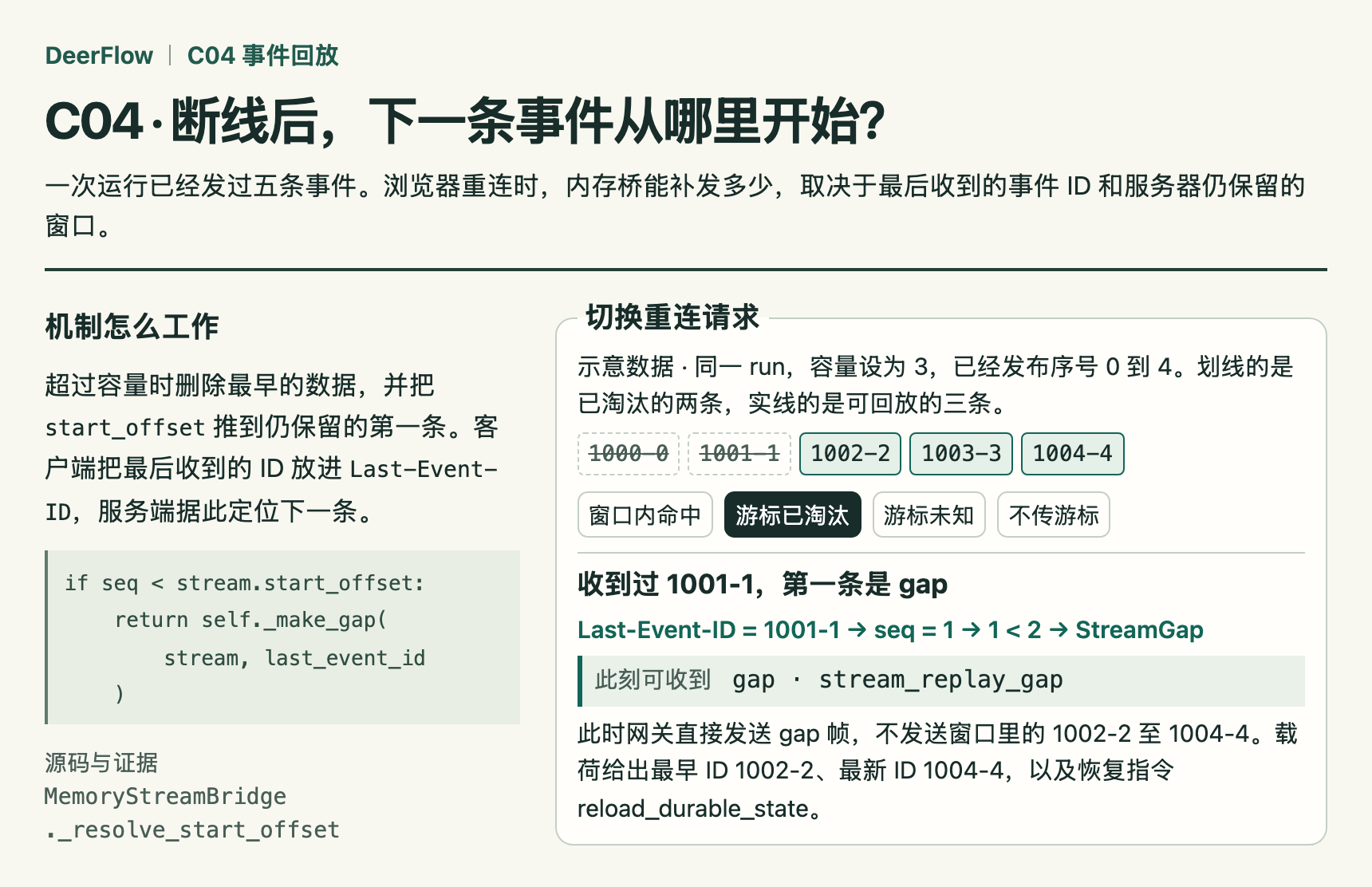
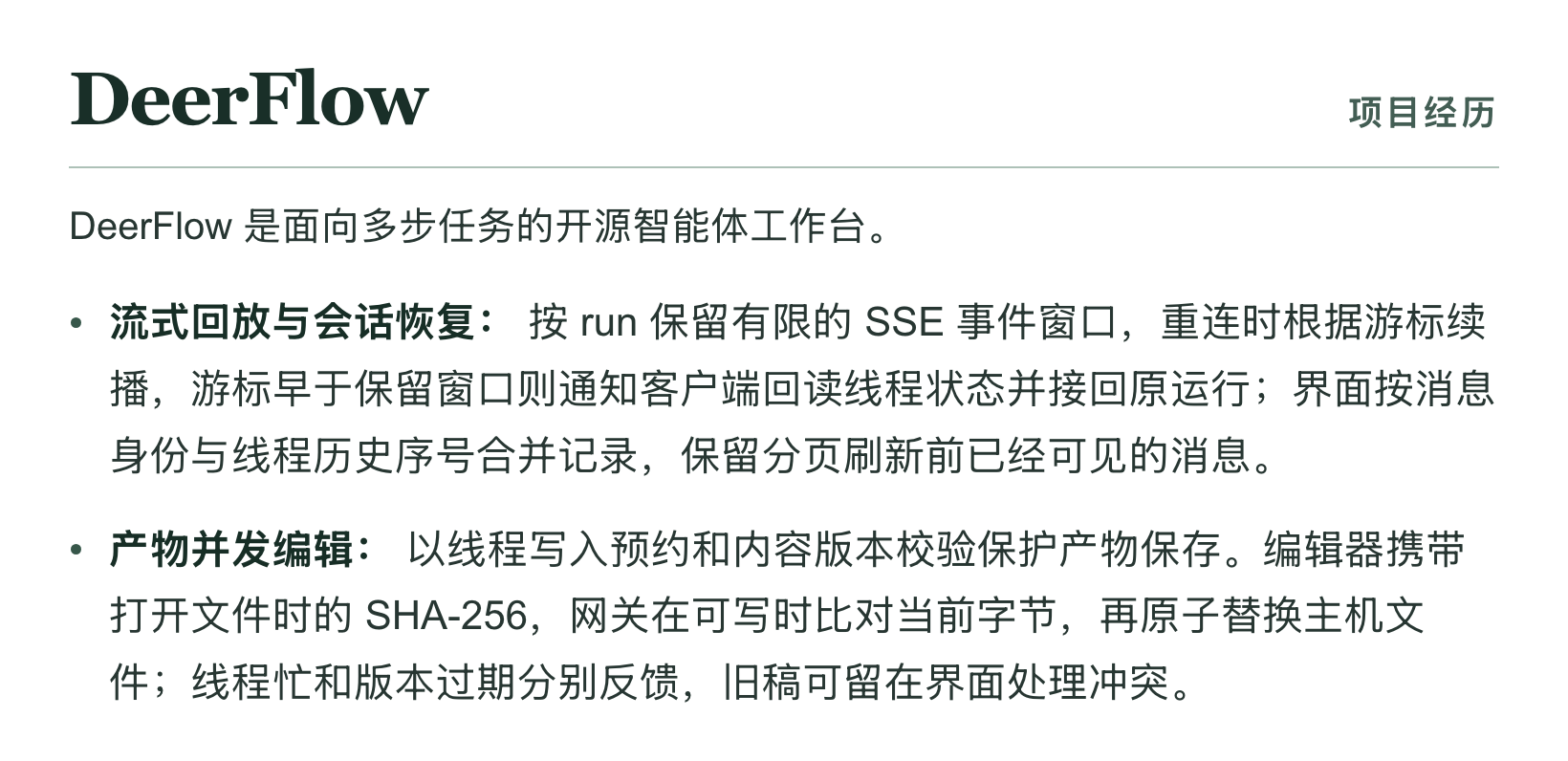
- 分析 DeerFlow 仓库后,skill 写出了 8 节源码课、2 个 HTML 专题和 6 条简历要点。下面节选一页 HTML 课和两条简历原文。
- ### HTML 源码课
- 这节课讲浏览器断线后怎么接上原来的任务。切换“窗口内命中”和“游标已淘汰”,可以看到服务器还能补发哪些事件,什么时候需要重新读取线程状态。下图节选了课程正文和交互演示。
- 
- [下载离线 HTML 课程包](https://raw.githubusercontent.com/Jaxon1216/interview-analyzer-skill/main/docs/examples/deerflow/deerflow-c04.zip) · [阅读配套导学](docs/examples/deerflow/导学.md)。解压课程包后,用浏览器打开其中的 HTML 文件即可切换游标。
- ### 简历要点
- 同一个断线重连机制,在面经里写成了“流式回放与会话恢复”。下面是这份项目简历的两条原文。
- 
- [复制全部 6 条简历要点](docs/examples/deerflow/resume-bullets.md)
- [测试与验证](tests/README.md) · [反馈问题](https://github.com/Jaxon1216/interview-analyzer-skill/issues) · [联系维护者](mailto:jiangxu05@outlook.com) · [MIT 许可证](LICENSE)
Ratings and comments
Sign in to rate this skill.
Sign inFree to use. If it’s helped, pass it on.