jarrodwatts-claude-stt
Speech-to-text input for Claude Code with live streaming dictation
Safety scan
A static text scan, not a guarantee. Select the badge to see what was scanned and every finding.
Badge for your README

Markdown
[](/listings/jarrodwatts-claude-stt)HTML
<a href="/listings/jarrodwatts-claude-stt"><img src="/api/listings/jarrodwatts-claude-stt/badge.svg" alt="findsafeskills safety rating" /></a>Install
Install instructions from the README
As written by the repo's author. findsafeskills has not verified these steps.
Inside a Claude Code instance, run the following commands:
**Step 1: Add the marketplace**
/plugin marketplace add jarrodwatts/claude-stt
**Step 2: Install the plugin**
/plugin install claude-stt
**Step 3: Run setup**
/claude-stt:setup
Done! Press **Ctrl+Shift+Space** to start recording, press again to stop and transcribe.
> **Note**: Setup installs dependencies (uv if available, otherwise a local `.venv`), > downloads the Moonshine model (~200MB), and checks microphone permissions.
---
What was scanned
The files the safety scan read, as written by the repository's author and shown as plain text. Lines with a finding are marked.
.claude-plugin/marketplace.json · Manifest · 31 lines
View this file on GitHub (read at the repository's current version: the scan did not record which commit it read)
- {
- "name": "jarrodwatts-claude-stt",
- "owner": {
- "name": "Jarrod Watts",
- "url": "https://github.com/jarrodwatts"
- },
- "plugins": [
- {
- "name": "claude-stt",
- "source": "./",
- "description": "Speech-to-text input for Claude Code with live streaming dictation. Hold a hotkey, speak, and your words appear in the input field.",
- "version": "0.1.0",
- "author": {
- "name": "Jarrod Watts",
- "url": "https://github.com/jarrodwatts"
- },
- "homepage": "https://github.com/jarrodwatts/claude-stt",
- "repository": "https://github.com/jarrodwatts/claude-stt",
- "license": "MIT",
- "keywords": [
- "speech-to-text",
- "stt",
- "voice",
- "dictation",
- "moonshine",
- "audio",
- "accessibility"
- ]
- }
- ]
- }
README.md · README · 198 lines
View this file on GitHub (read at the repository's current version: the scan did not record which commit it read)
- # 🚨 This project is archived
- Native voice/STT support has been officially added to Claude Code via the `/voice` command — use that instead. This repo is no longer maintained.
- ---
- # Claude STT
- Speech-to-text input for Claude Code. Hold a hotkey, speak, and your words appear in the input field — all processed locally.
- [](LICENSE)
- [](https://github.com/jarrodwatts/claude-stt/stargazers)
- 
- ## Install
- Inside a Claude Code instance, run the following commands:
- **Step 1: Add the marketplace**
- ```
- /plugin marketplace add jarrodwatts/claude-stt
- ```
- **Step 2: Install the plugin**
- ```
- /plugin install claude-stt
- ```
- **Step 3: Run setup**
- ```
- /claude-stt:setup
- ```
- Done! Press **Ctrl+Shift+Space** to start recording, press again to stop and transcribe.
- > **Note**: Setup installs dependencies (uv if available, otherwise a local `.venv`),
- > downloads the Moonshine model (~200MB), and checks microphone permissions.
- ---
- ## What is Claude STT?
- Claude STT gives you voice input directly into Claude Code. No typing required — just speak naturally.
- | What You Get | Why It Matters |
- |--------------|----------------|
- | **Local processing** | All audio processed on-device using Moonshine STT |
- | **Low latency** | ~400ms transcription time |
- | **Push-to-talk** | Hold hotkey to record, release to transcribe |
- | **Cross-platform** | macOS, Linux, Windows |
- | **Privacy first** | No audio or text sent to external services |
- ### How It Works
- ```
- Press Ctrl+Shift+Space → start recording
- ↓
- Audio captured from microphone
- ↓
- Press Ctrl+Shift+Space → stop recording
- ↓
- Moonshine STT processes locally (~400ms)
- ↓
- Text inserted into Claude Code input
- ```
- **Key details:**
- - Audio is processed in memory and immediately discarded
- - Uses Moonshine ONNX for fast local inference
- - Keyboard injection or clipboard fallback
- - Native system sounds for audio feedback
- ---
- ## Configuration
- Customize your settings anytime:
- ```
- /claude-stt:config
- ```
- ### Options
- | Option | Values | Default | Description |
- |--------|--------|---------|-------------|
- | `hotkey` | Key combo | `ctrl+shift+space` | Trigger recording |
- | `mode` | `toggle`, `push-to-talk` | `toggle` | Press to toggle vs hold to record |
- | `engine` | `moonshine`, `whisper` | `moonshine` | STT engine |
- | `moonshine_model` | `moonshine/tiny`, `moonshine/base`, other Moonshine model IDs | `moonshine/base` | Model size |
- | `output_mode` | `auto`, `injection`, `clipboard` | `auto` | How text is inserted |
- | `sound_effects` | `true`, `false` | `true` | Play audio feedback |
- | `max_recording_seconds` | 1-600 | 300 | Maximum recording duration |
- Settings stored in `~/.claude/plugins/claude-stt/config.toml`.
- ---
- ## Requirements
- - **Python 3.10-3.13**
- - **~200MB disk space** for STT model
- - **Microphone access**
- ### Platform-Specific
- | Platform | Additional Requirements |
- |----------|------------------------|
- | **macOS** | Accessibility permissions (System Settings > Privacy & Security) |
- | **Linux** | xdotool for window management; X11 recommended (Wayland has limitations); WSL not supported |
- | **Windows** | pywin32 for window tracking |
- ---
- ## Commands
- | Command | Description |
- |---------|-------------|
- | `/claude-stt:setup` | First-time setup: check environment, install deps, download model |
- | `/claude-stt:start` | Start the STT daemon |
- | `/claude-stt:stop` | Stop the STT daemon |
- | `/claude-stt:status` | Show daemon status and readiness checks |
- | `/claude-stt:config` | Change settings |
- You can also use the CLI directly:
- ```
- claude-stt setup
- claude-stt start --background
- ```
- ---
- ## Troubleshooting
- | Issue | Solution |
- |-------|----------|
- | No audio input | Check microphone permissions in system settings |
- | Keyboard injection not working | **macOS**: Grant Accessibility permissions. **Linux**: Ensure xdotool installed |
- | Model not loading | Run `/claude-stt:setup` to download. Check disk space (~200MB) |
- | Hotkey test fails during setup | Fix permissions or rerun `/claude-stt:setup --skip-hotkey-test` to continue setup |
- | Whisper dependencies missing | Run `/claude-stt:setup --with-whisper`, or `uv sync --directory $CLAUDE_PLUGIN_ROOT --extra whisper`, or `python $CLAUDE_PLUGIN_ROOT/scripts/exec.py -m pip install .[whisper]` |
- | Hotkey not triggering | Check for conflicts with other apps. Try `/claude-stt:config` to change hotkey |
- | Text going to wrong window | Plugin tracks original window — ensure Claude Code was focused when recording started |
- | Running under WSL | Not supported; use native Windows or Linux |
- ### Logging
- Set `CLAUDE_STT_LOG_LEVEL=DEBUG` to get verbose logs when starting the daemon.
- ---
- ## Privacy
- **All processing is local:**
- - Audio captured from your microphone is processed entirely on-device
- - Moonshine runs locally — no cloud API calls
- - Audio is never sent anywhere, never stored (processed in memory, discarded)
- - Transcribed text only goes to Claude Code input or clipboard
- **No telemetry or analytics.**
- ---
- ## Development
- ```bash
- git clone https://github.com/jarrodwatts/claude-stt
- cd claude-stt
- # Install dependencies (uv preferred, falls back to local venv)
- python scripts/setup.py --dev --skip-audio-test --skip-model-download --no-start
- # Test locally without installing
- claude --plugin-dir /path/to/claude-stt
- ```
- See [CONTRIBUTING.md](CONTRIBUTING.md) for guidelines.
- ### Release Checklist
- - Bump versions in `pyproject.toml`, `.claude-plugin/plugin.json`, `.claude-plugin/marketplace.json`
- - Update `CHANGELOG.md`
- - Run tests: `uv run python -m unittest discover -s tests`
- - Verify onboarding in Claude Code (`/plugin install`, `/claude-stt:setup`)
- ---
- ## License
- MIT — see [LICENSE](LICENSE)
- ---
- ## Star History
- [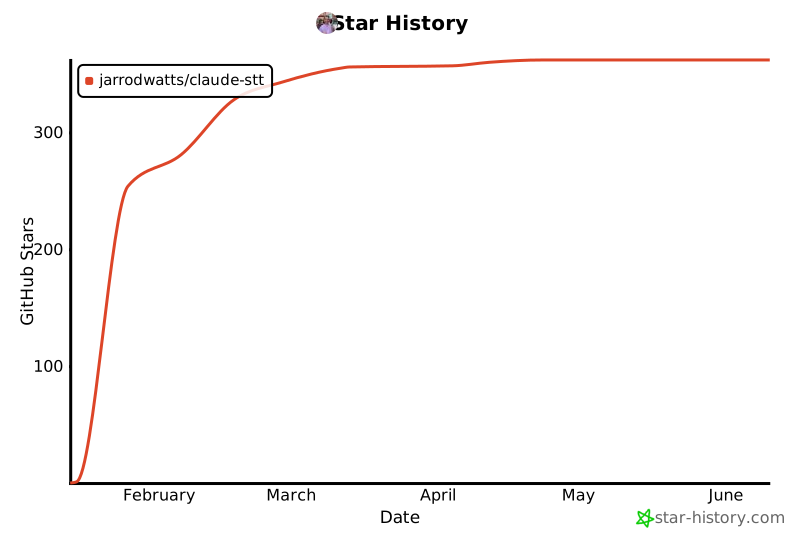](https://star-history.com/#jarrodwatts/claude-stt&Date)
Ratings and comments
Sign in to rate this skill.
Sign inFree to use. If it’s helped, pass it on.