claude-image-view
See the images you paste into Claude Code: thumbnails above the prompt instead of bare [Image #1] tags
Safety scan
A static text scan, not a guarantee. Select the badge to see what was scanned and every finding.
Badge for your README

Markdown
[](/listings/jarrodwatts--claude-image-view)HTML
<a href="/listings/jarrodwatts--claude-image-view"><img src="/api/listings/jarrodwatts--claude-image-view/badge.svg" alt="findsafeskills safety rating" /></a>Install
Install instructions from the README
As written by the repo's author. findsafeskills has not verified these steps.
Inside Claude Code, run:
/plugin marketplace add jarrodwatts/claude-image-view
/plugin install image-view
/reload-plugins
That's it. Paste an image into the prompt and its thumbnail appears above the input.
<details> <summary><strong>Prefer the terminal?</strong></summary>
claude plugin marketplace add jarrodwatts/claude-image-view
claude plugin install image-view@claude-image-view
Then run `/reload-plugins` inside a session, or start a new one.
</details>
What was scanned
The files the safety scan read, as written by the repository's author and shown as plain text. Lines with a finding are marked.
.claude-plugin/marketplace.json · Manifest · 26 lines
View this file on GitHub (read at the repository's current version: the scan did not record which commit it read)
This file has changed since it was scanned, so this is not exactly the text that was scanned, and no line is marked. The findings are listed with the safety scan above.
- {
- "name": "claude-image-view",
- "owner": {
- "name": "Jarrod Watts",
- "url": "https://github.com/jarrodwatts"
- },
- "plugins": [
- {
- "name": "image-view",
- "source": "./",
- "description": "See the images you paste into Claude Code: thumbnails above the prompt instead of bare [Image #1] tags",
- "category": "productivity",
- "tags": [
- "images",
- "paste",
- "preview",
- "thumbnails",
- "mod",
- "terminal"
- ]
- }
- ],
- "metadata": {
- "description": "See the images you paste into Claude Code"
- }
- }
README.md · README · 131 lines
View this file on GitHub (read at the repository's current version: the scan did not record which commit it read)
This file has changed since it was scanned, so this is not exactly the text that was scanned, and no line is marked. The findings are listed with the safety scan above.
- # Claude Image View
- A Claude Code mod that shows the images you paste, so you see thumbnails above your prompt instead of bare `[Image #1]` tags.
- [](LICENSE)
- [](https://github.com/jarrodwatts/claude-image-view/stargazers)
- 
- ## Install
- Inside Claude Code, run:
- ```
- /plugin marketplace add jarrodwatts/claude-image-view
- /plugin install image-view
- /reload-plugins
- ```
- That's it. Paste an image into the prompt and its thumbnail appears above the input.
- <details>
- <summary><strong>Prefer the terminal?</strong></summary>
- ```bash
- claude plugin marketplace add jarrodwatts/claude-image-view
- claude plugin install image-view@claude-image-view
- ```
- Then run `/reload-plugins` inside a session, or start a new one.
- </details>
- ## What You See
- Paste one or more images and a row of thumbnails sits above the prompt, each labelled with the number of its tag:
- ```
- ╭────────────────────────╮ ╭────────────╮
- │ │ │ │
- │ (screenshot) │ │ (photo) │
- │ │ │ │
- │ #1 │ │ #2 │
- ╰────────────────────────╯ ╰────────────╯
- ❯ why is the header misaligned here [Image #1] vs [Image #2]
- ```
- - **Thumbnails appear as soon as you paste.** You don't have to type another key first.
- - **Thumbnails keep their shape.** Wide screenshots stay wide and phone shots stay tall.
- - **Always fits on screen.** Tiles shrink to fit the space above the prompt, so the row never scrolls or gets cut off. If there are too many, the row ends with `+N` for the rest.
- - **Clears on send.** Once the prompt is sent (or the tags are deleted), the row goes away.
- ## How It Works
- Claude Code saves every pasted image to a cache folder for the session, as `<tmp>/<project>/<session>/images/<n>.<ext>` in the format it was pasted (`.png`, `.webp`, `.jpg`, ...), and puts an `[Image #n]` tag in the prompt. Claude Image View is a [mod](https://code.claude.com/docs/en/plugins/mods/overview):
- 1. Every 200ms it reads the prompt box and looks for `[Image #n]` tags. It checks on a timer because pasting an image doesn't raise an edit event.
- 2. For each tag it finds the cached file. Kitty graphics only draws PNG from a file, so on macOS anything else (WebP, JPEG, HEIC, GIF, TIFF) is converted once with `sips` to `<session>/image-view-<n>.png`. It reads the size from the PNG header.
- 3. It draws the thumbnails in the band above the prompt. Where Claude Code draws pictures (see [Terminal Support](#terminal-support)) it uses Claude Code's `Image` element, and the terminal reads the file itself, so the image data never passes through the mod.
- 4. Anywhere else it decodes the PNG itself, averages it down to a small thumbnail, and draws it in colored half blocks (`▀`) with Claude Code's `Raster` element. It's lower resolution than a real picture, but it's the picture.
- ## Terminal Support
- Claude Code, not the mod, decides whether a terminal gets real pictures. It draws them in kitty (0.28+) and Ghostty, and turns them off inside tmux and screen and in background sessions. Every other terminal gets half-block thumbnails.
- | Terminal | Thumbnail |
- |---|---|
- | Ghostty, kitty | Real picture |
- | iTerm2, Terminal.app, WezTerm, VS Code, Windows Terminal, Orca, most others | Half blocks |
- | Inside tmux or screen, even in Ghostty or kitty | Half blocks |
- | Agent view and background sessions | Half blocks, or real pictures with `CLAUDE_CODE_FORCE_TERMINAL_IMAGES` (below) |
- Some terminals speak the kitty graphics protocol but still get half blocks, because Claude Code trusts terminals by name ([anthropics/claude-code#99566](https://github.com/anthropics/claude-code/issues/99566)), or because it doesn't wrap images for tmux passthrough yet ([anthropics/claude-code#100146](https://github.com/anthropics/claude-code/issues/100146)). Those are Claude Code limits, so a fix there brings real pictures to the mod with no change here.
- `CLAUDE_CODE_FORCE_TERMINAL_IMAGES=1` makes Claude Code draw pictures in any terminal. Only set it if your terminal supports the kitty protocol's Unicode placeholders. VS Code's terminal, for one, doesn't yet, and shows a grid of colored squares instead ([xtermjs/xterm.js#5711](https://github.com/xtermjs/xterm.js/issues/5711)).
- ## Security
- Claude Image View is local-only. It makes no network requests. It reads the prompt box, lists Claude Code's temp folder to find the current session's image cache, and reads each pasted image (up to Claude Code's 4 MiB read limit). For a non-PNG paste it runs `sips` and writes one PNG thumbnail into that session's temp folder. On macOS and Linux it runs `id -u` once to find that temp folder. It also reads a few terminal variables (`TERM`, `TERM_PROGRAM`, `TMUX` and similar) to tell which kind of thumbnail Claude Code can draw.
- Run `claude plugin validate` on the repo to see every event it hooks and every call it makes.
- ## Requirements
- - Claude Code v2.1.287 or later (mods support)
- - macOS or Linux. Windows finds pastes too, but it's less tested and only previews PNG pastes.
- - For full-resolution thumbnails, [Ghostty](https://ghostty.org) or [kitty](https://sw.kovidgoyal.net/kitty/). Any other terminal gets half-block thumbnails (best with truecolor).
- The Claude Desktop app already previews pasted images, so the mod draws nothing there.
- ## Troubleshooting
- **Nothing appears when I paste.** Run `/plugin` and check the dim line under the tabs lists `image-view` as an active mod. If it isn't listed, run `/reload-plugins`. If it still isn't, look for an `image-view: hooks module did not load` line above the first prompt of a new session: that means your Claude Code is too old for the mod, so update it.
- **The tile says "no preview".** The mod couldn't find the cached file, or the paste isn't a PNG and you're not on macOS, where `sips` converts it. Claude Code may have moved where it stores pasted images. Please [open an issue](https://github.com/jarrodwatts/claude-image-view/issues) with your Claude Code version.
- **The tile is blocky.** Claude Code doesn't draw pictures in your terminal, so the mod draws the picture in colored half blocks. See [Terminal Support](#terminal-support).
- **The tile shows `[Image #1]` text instead of the picture.** The mod expected Claude Code to draw a picture, but it didn't. That happens in terminals that look like Ghostty or kitty but aren't, such as Herdr ([anthropics/claude-code#101306](https://github.com/anthropics/claude-code/issues/101306)), or in kitty older than 0.28. Set `CLAUDE_IMAGE_VIEW_RENDERER=blocks` in the environment you start Claude Code from. `CLAUDE_IMAGE_VIEW_RENDERER=image` forces real pictures the other way.
- **The tile is a grid of colored squares.** `CLAUDE_CODE_FORCE_TERMINAL_IMAGES` is set in a terminal that can't draw Unicode placeholders, such as VS Code's. Unset it to get half-block thumbnails.
- **I want real pictures in agent view or a background session.** Claude Code turns terminal images off there. If you attach from Ghostty or kitty, turn them back on in the `env` block of `~/.claude/settings.json`, then start a new session:
- ```json
- "env": { "CLAUDE_CODE_FORCE_TERMINAL_IMAGES": "1" }
- ```
- ## Development
- ```bash
- git clone https://github.com/jarrodwatts/claude-image-view
- cd claude-image-view
- # Load it for one session without installing
- claude --plugin-dir .
- # Check it and run the tests
- claude plugin validate .
- claude plugin test .
- ```
- Claude Code writes the API types into `.claude-plugin/types/` the first time it loads the mod, and `tsc -p .` type-checks it from then on.
- ## License
- MIT. See [LICENSE](LICENSE).
- ## Star History
- [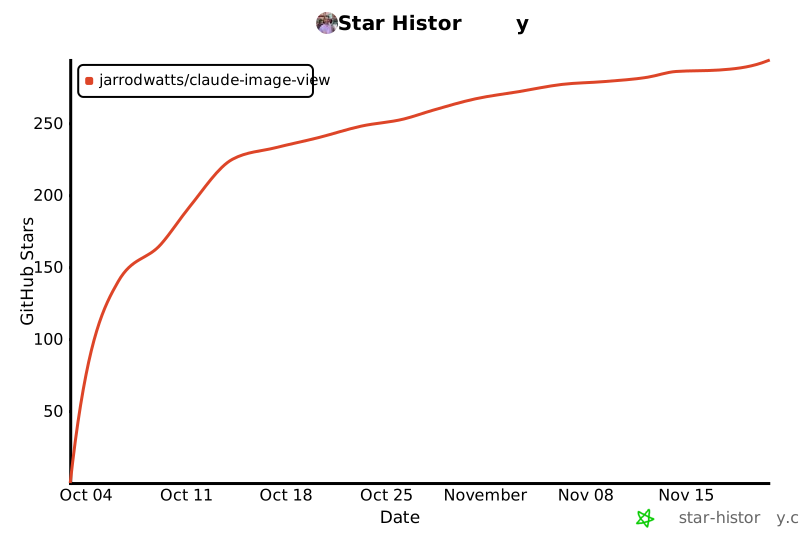](https://star-history.com/#jarrodwatts/claude-image-view&Date)
Ratings and comments
Sign in to rate this skill.
Sign inFree to use. If it’s helped, pass it on.