project-butler
"Project memory workflow for init/upgrade, profile-aware setup, end session, normal/full close, file organization, document archiving, language switching, versioned update logs, rule review, status, wiki sync, and context recovery. Use for /project-butler, setup/初始化, foundation setup, profile setup, end session/收工, normal close, full close, foundation repair, organize files/整理文件, change language/切换语言, continue/接着上次, continue full context/全面回顾, review claude, sync wiki, status. Maintains project memory files. Runs version freshness check before trigger routing."
Safety scan
A static text scan, not a guarantee. Select the badge to see what was scanned and every finding.
Badge for your README

Markdown
[](/listings/jamesshi96--project-butler)HTML
<a href="/listings/jamesshi96--project-butler"><img src="/api/listings/jamesshi96--project-butler/badge.svg" alt="findsafeskills safety rating" /></a>Install
Install instructions from the README
As written by the repo's author. findsafeskills has not verified these steps.
Install as a Claude Code skill:
git clone https://github.com/JamesShi96/project-butler.git ~/.claude/skills/project-butler
Open any project and set up project memory:
/project-butler
Work normally. At the end of a work session:
end session
Next time, resume without re-explaining the project:
continue
That is enough for daily use. For Cursor, Codex, and other assistants, see [Tool Compatibility](docs/compatibility.md).
What was scanned
The files the safety scan read, as written by the repository's author and shown as plain text. Lines with a finding are marked.
SKILL.md · Manifest · 341 lines
View this file on GitHub (read at the repository's current version: the scan did not record which commit it read)
- ---
- name: project-butler
- description: "Project memory workflow for init/upgrade, profile-aware setup, end session, normal/full close, file organization, document archiving, language switching, versioned update logs, rule review, status, wiki sync, and context recovery. Use for /project-butler, setup/初始化, foundation setup, profile setup, end session/收工, normal close, full close, foundation repair, organize files/整理文件, change language/切换语言, continue/接着上次, continue full context/全面回顾, review claude, sync wiki, status. Maintains project memory files. Runs version freshness check before trigger routing."
- ---
- # Project Butler — Project Memory Stack
- Initialize standardized project memory:
- ```
- 上层(稳定原则)
- ┌─────────────────────────────────────┐
- │ CLAUDE.md(项目宪法)← 人工确认 │
- │ ↑ candidates(AI 自动收集候选) │
- └─────────────────────────────────────┘
- ↑ 抽象沉淀
- 中层(当前快照)
- ┌─────────────────────────────────────┐
- │ PROJECT.md(项目 Wiki)← AI 自动同步 │
- │ 概览 / 结构 / 模块状态 / 文件索引 │
- │ STRUCTURE.md(文件管理规则)← AI 自动│
- │ 目录规则 / 匹配条件 / 整理历史 │
- │ UPDATE_LOG.md(里程碑变化)← AI 自动 │
- │ DOCS.md(文档索引 + 元数据)← AI 自动 │
- │ .claude/project-profile.json(画像配置)│
- │ .claude/profile-pending.json(画像待处理)│
- └─────────────────────────────────────┘
- ↑ 状态汇总
- 下层(事实流水)
- ┌────────────────────┐ ┌────────────────────┐
- │ log/(会话日志) │ │ TODO.md(执行清单)│
- │ raw + summaries │ │ owner/deadline/ │
- │ + archive(分级) │ │ deps │
- └────────────────────┘ └────────────────────┘
- ↓
- session-handoff.md(下次接手点)
- ```
- Core idea: bottom feeds top, top constrains bottom. Logs and TODOs are raw facts. Handoff marks the next resume point. Wiki is the current snapshot. Structure manages file organization. Docs index manages document output. Update Log records versioned milestone changes. Constitution is stable principles.
- Supports 3 language modes: English (`en`), Chinese (`zh`), or bilingual. All content adapts to the selected language.
- ---
- ## Step -1: Version Freshness Check (always run first)
- <EXTREMELY_IMPORTANT>
- Before any other step, read `references/update-check.md` and execute
- the version freshness check described there.
- - If the check prints nothing → continue to Step 0 silently.
- - If the check prints a `VERSION_NOTICE:` block → do NOT print it
- verbatim. Instead present ONE interactive update prompt with
- AskUserQuestion, worded in the project's CLAUDE.md language:
- - Question: "project-butler is N commits behind upstream. Update now?"
- (read N from the `VERSION_NOTICE:` line).
- - Option "Update now" → run
- `bash "<SKILL_DIR>/scripts/check-update.sh" --pull "<SKILL_DIR>"`
- as a single Bash call, then report its `UPDATE_OK` / `UPDATE_FAILED`
- output to the user.
- - Option "Remind me later" → do nothing; the script throttles the
- prompt to at most once per 24h, so it will not ask again today.
- - Option "Stop reminding" → tell the user to set
- `PROJECT_BUTLER_NO_UPDATE_CHECK=1` to silence permanently.
- Present this prompt once, before the triggered work. The script already
- limits it to once per 24h, so do not add your own suppression.
- - Never run `git pull` on the skill directory yourself EXCEPT as the
- "Update now" action the user explicitly selected (which runs the
- `--pull` subcommand above).
- - If you cannot find the "Base directory for this skill: <path>" line
- in the current skill loading prompt, skip the check silently and
- continue to Step 0.
- </EXTREMELY_IMPORTANT>
- ---
- ## Step 0: Trigger Routing
- Determine how this skill was triggered:
- **A. "整理文件" / "organize files":**
- 1. Read `references/file-reorganization.md`
- 2. Execute **Mode A: Four-Phase Organize** (Discover → Ask or Plan → Plan → Execute)
- 3. Report and stop
- **B. "收工" / "end session" / "结束会话" / "we're done" / "wrap up" / "done for today" / "normal close" / "full close":**
- 1. Execute the **End Session Flow** below (inline)
- 2. Report and stop
- **C. Initialization (/project-butler, 初始化项目, setup project, etc.):**
- → Continue to **Init Flow** below
- **D. "切换语言" / "change language":**
- 1. Read `references/language-change.md` + `references/language-adaptation.md`
- 2. Execute the Language Change Protocol
- 3. Report and stop
- **E. "continue" / "接着上次" / "上次做到哪了":**
- 1. Read `references/continue.md`
- 2. Execute the Continue process (recover last session context)
- 3. Report and stop
- **F. "continue full context" / "全面回顾" / "项目全景" / "full context":**
- 1. Read `references/continue-full-context.md`
- 2. Execute the Continue Full Context process (full project trajectory recovery)
- 3. Report and stop
- **G. "review claude" / "审查规则" / "更新宪法" / "check the rules":**
- 1. Read `.claude/candidates.md`
- 2. Present pending candidates one by one for accept / reject / rewrite
- 3. For accepted or rewritten candidates, append to CLAUDE.md only after explicit user confirmation
- 4. Move processed candidates to adopted or rejected sections in `.claude/candidates.md`
- 5. Report and stop
- **H. "sync wiki" / "同步项目" / "update overview" / "refresh overview":**
- 1. Read PROJECT.md, STRUCTURE.md, UPDATE_LOG.md, DOCS.md, TODO.md, and session-handoff.md if present
- 2. Rescan current project files and update PROJECT.md current snapshot, module map, file structure, key file index, links, and progress sections
- 3. Preserve user-authored content where possible
- 4. Report and stop
- **I. "status" / "项目现状" / "where are we":**
- 1. Read PROJECT.md and session-handoff.md
- 2. Also read TODO.md and latest UPDATE_LOG.md entry if present
- 3. If `.claude/project-profile.json` or `.claude/profile-pending.json` exists, read `references/project-profile-system.md` and include profile debt / review queue in the dashboard
- 4. Present a compact project dashboard in the configured language: Project, Active Work, Recent Change, Profile, Next Best Step
- 5. Report and stop
- **J. "foundation setup" / "profile setup" / "foundation repair" / "profile repair" / "profile sync":**
- 1. Read `references/project-profile-system.md`
- 2. Execute the matching Profile System flow
- 3. Report and stop
- ---
- ## End Session Flow
- When triggered by "end session" / "结束会话" / "收工" / "we're done" / "wrap up" / "done for today" / "normal close" / "full close", execute in order:
- 1. **Write session log** → `log/session-YYYY-MM-DD-{slug}.md`
- - Same-day multiple sessions: use slug to distinguish (e.g., `session-2026-04-21-prd-draft.md`)
- - Format: see Session Log Format below
- 2. **Log Compaction** → if unarchived raw logs ≥ threshold (default 10, configured in CLAUDE.md):
- read `references/log-compaction.md` and execute
- 3. **Update session-handoff.md** → refresh "current progress" and "next steps"
- 4. **Update PROJECT.md** → if structure/module status changed
- 5. **Update TODO.md** → mark completed tasks
- 6. **Collect constitution candidates** → append to `.claude/candidates.md` (see rules below)
- 7. **Profile impact scan** → if `.claude/project-profile.json` exists, `.claude/profile-pending.json` exists, or the user explicitly requested Normal Close / Full Close / profile sync:
- - Read `references/project-profile-system.md`
- - Run the Profile-Aware End Session flow
- - For Normal Close: record profile-impacting changes in `.claude/profile-pending.json`
- - For Full Close: produce a Scope Plan before changing profile docs
- - Do not rewrite protected sections, document policies, or stable baselines without explicit confirmation
- 8. **File reorganization (incremental)** → read `references/file-reorganization.md`, execute Mode B
- - If STRUCTURE.md missing: execute Mode A first to establish baseline
- - Update `.claude/.file-snapshot.json`
- 9. **Document archiving** → read `references/document-archiving.md`, scan and archive document output
- - Identify documents created/modified this session
- - Classify by type, archive to `docs/` subdirectories
- - Update `DOCS.md` index and metadata
- - If DOCS.md missing: create it (upgrade compatibility)
- 10. **Evaluate & write update log** → read `references/update-log.md`
- - Evaluate session significance
- - If significant: determine bump level (major/minor/patch), calculate new version from UPDATE_LOG.md metadata, prepend versioned entry
- - Optionally offer GitHub Release creation
- - If not significant, skip silently
- 11. **Output summary** → result-focused summary in the configured language (check CLAUDE.md Language setting)
- ### User-Facing Output Style
- After `end session`, summarize outcomes instead of listing internal protocol steps:
- ```text
- Session saved.
- Updated:
- - Handoff refreshed
- - TODO updated: {done count} done, {active count} active
- - Project wiki synced
- - Profile: {normal close / full close / no profile impact / profile pending count}
- - Documents archived: {count}
- - Update log: {version added or skipped}
- Next:
- - {next action}
- - {next action}
- ```
- Omit lines that do not apply. For `status`, answer as a compact dashboard:
- ```text
- Current Status
- Project:
- - Stage: {stage}
- - Focus: {current focus}
- Active Work:
- - {active item}
- Recent Change:
- - {latest update log entry or "No milestone update yet"}
- Profile:
- - {profile shape / pending debt / review needed, only when profile files exist}
- Next Best Step:
- - {single recommended next step}
- ```
- ### Session Log Format
- Session log headers adapt to the configured language (read `references/language-adaptation.md` for glossary).
- ```markdown
- # Session YYYY-MM-DD — {topic}
- ## Session Goal
- ## Key Actions (Chronological)
- ## Decisions & Rationale
- ## Output Files
- ## Unfinished Items / Next Session Pickup
- ## CLAUDE.md Candidates (if any)
- ```
- ### Constitution Candidate Rules
- AI automatically appends to `.claude/candidates.md` when:
- - User explicitly says "always do this" / "this is a rule" / "don't ever..."
- - Same decision appears across multiple sessions
- - Decision involves naming conventions, file structure, collaboration flow
- - Decision involves tech stack or architecture constraints
- **Never promote candidates into CLAUDE.md automatically.** All candidates require explicit user review via "review claude" before CLAUDE.md is changed.
- ### TODO Format
- Each task in TODO.md must include:
- ```
- - [ ] {task description}
- Owner: {name} | Deadline: {date} | Dependencies: {prerequisite}
- ```
- If user provides a task missing required fields, ask them to fill in. Completed tasks are checked and kept (not deleted).
- ---
- ## Init Flow
- ### Step 1: Detect Mode
- Scan project root for: CLAUDE.md, PROJECT.md, session-handoff.md, TODO.md, log/, STRUCTURE.md, UPDATE_LOG.md, DOCS.md, docs/, .claude/.file-snapshot.json, .claude/candidates.md, .claude/project-profile.json, .claude/profile-pending.json
- - **Fresh**: None exist → read `references/project-profile-system.md` and run Foundation Setup as the default setup path. Create the base 7-component memory stack, `.claude/project-profile.json`, `.claude/profile-pending.json`, and only the user-confirmed baseline docs. For lightweight projects, use `maintenance.preference = "lightweight"` and keep Required docs minimal instead of skipping profile state.
- - **Upgrade**: Some exist → read `references/upgrade-mode.md`; if profile files are missing, also read `references/project-profile-system.md` and offer profile-aware upgrade using the latest Foundation Setup model
- - **Profile files present**: profile files exist → preserve existing profile state and patch only schema-compatible missing fields
- ### Step 2: Ask Questions
- For Fresh initialization, follow Foundation Setup in `references/project-profile-system.md`: ask for the required setup basics, ask for a natural project description, infer the project shape, generate project-specific foundation areas, ask only targeted follow-up questions, and propose Required / Recommended / Optional documents before file creation.
- AskUserQuestion should still keep setup lightweight. Make clear that the user can press Enter for recommended defaults.
- Required:
- 1. **项目名称** — e.g., "达人营销AI", "Data Pipeline"
- 2. **一句话定义** — e.g., "AI-powered influencer marketing platform for US/EU markets"
- 3. **当前阶段** — e.g., "v1 MVP", "规划中", "已上线"
- Recommended defaults:
- 4. **GitHub 仓库** — optional, e.g., "org/repo-name" (default empty)
- 5. **是否创建 Cursor 规则文件** — yes/no (default yes)
- 6. **是否创建 Codex AGENTS.md** — yes/no (default no)
- 7. **语言 / Language** — `en` / `zh` / `bilingual` (default bilingual)
- 8. **版本命名方式** — choose one (default AI recommendation, fallback Semantic)
- 预设选项:Semantic (v0.1.0) / Codename ({project name} 0.1) / Patch (Patch 1) / Date (2026.06.1)
- AI 根据项目类型推荐:产品/品牌类→Codename / 游戏/内容类→Patch / 日志/研究类→Date / 默认→Semantic
- ### Step 3: Create Files
- Read `references/file-templates.md` + `references/language-adaptation.md` + `references/document-archiving.md` + `references/project-profile-system.md`.
- Create each file using templates, replacing `{{VARIABLES}}` with user answers. For UPDATE_LOG.md, calculate the initial version based on the version style selection and current date (e.g., semantic → `v0.1.0`, date → `2026.06.1`). Apply language adaptation rules and glossary from the reference.
- Create `log/.gitkeep` (empty file) alongside `log/` directory so git tracks it when empty.
- Create `.claude/.file-snapshot.json` with empty content: `{"lastScan":"","files":{}}`.
- Create `.claude/project-profile.json`, `.claude/profile-pending.json`, and confirmed Required profile baseline docs from the approved Foundation Setup proposal.
- If the user enabled Cursor support, create `.cursor/rules/project-system.mdc` from Template 6.
- If the user enabled Codex support, create `AGENTS.md` from Template 6b. If `AGENTS.md` already exists, do not overwrite it; offer to append the project-butler section after confirmation.
- ### Step 4: Output Report
- Adapt this report to the configured language:
- ```
- Project memory is ready.
- Daily commands:
- - end session — save progress and next steps
- - continue — resume next time
- - status — check current state
- Advanced:
- - review claude — approve long-term rules when needed
- Created:
- - Project memory and handoff notes
- - TODO tracking
- - Document index
- - Update log
- - Profile config and pending queue: created
- - File organization rules
- - Cursor rules: created / skipped
- - Codex AGENTS.md: created / skipped
- Settings:
- - Language: {{LANGUAGE}}
- - Version style: {{VERSION_STYLE}} (starting: {{VERSION_INITIAL}})
- ```
- ---
- ## Reference Loading
- | Trigger | Read these files |
- |---------|-----------------|
- | Init (fresh) | `references/file-templates.md` + `references/language-adaptation.md` + `references/document-archiving.md` + `references/project-profile-system.md` |
- | Init (upgrade) | above + `references/upgrade-mode.md`; include `references/project-profile-system.md` when creating, repairing, or preserving profile files |
- | End session | `references/file-reorganization.md` + `references/document-archiving.md` + `references/update-log.md` + `references/log-compaction.md` (if logs ≥ threshold); include `references/project-profile-system.md` when profile files exist or Normal/Full Close is requested |
- | 整理文件 / organize files | `references/file-reorganization.md` |
- | 切换语言 / change language | `references/language-change.md` + `references/language-adaptation.md` |
- | continue / 接着上次 | `references/continue.md` |
- | continue full context / 全面回顾 | `references/continue-full-context.md` |
- | review claude / 审查规则 | Inline workflow in Step 0 |
- | sync wiki / 同步项目 | Inline workflow in Step 0 |
- | status / 项目现状 | Inline workflow in Step 0; include `references/project-profile-system.md` when profile files exist |
- | profile setup / full close / foundation repair | `references/project-profile-system.md` |
README.md · README · 349 lines
View this file on GitHub (read at the repository's current version: the scan did not record which commit it read)
- # project-butler
- **[English](README.md)** | [中文](README_zh.md)
- [](https://github.com/JamesShi96/project-butler/stargazers)
- [](https://github.com/JamesShi96/project-butler/releases)
- [](LICENSE)
- [](docs/compatibility.md)
- > Make AI coding agents remember your project between sessions.
- project-butler helps Claude Code, Cursor, Codex, and similar AI coding assistants behave like long-term project teammates instead of starting from scratch every session.
- For normal use, you only need four actions:
- ```text
- /project-butler Set up project memory
- end session Save progress and next steps
- continue Resume next time
- status Check where the project stands
- ```
- For projects that need stronger product, architecture, roadmap, research, or eval alignment, project-butler can also create a Project Profile during setup and offer profile-aware Normal Close / Full Close behavior.
- ## Quick Start
- Install as a Claude Code skill:
- ```bash
- git clone https://github.com/JamesShi96/project-butler.git ~/.claude/skills/project-butler
- ```
- Open any project and set up project memory:
- ```text
- /project-butler
- ```
- Work normally. At the end of a work session:
- ```text
- end session
- ```
- Next time, resume without re-explaining the project:
- ```text
- continue
- ```
- That is enough for daily use. For Cursor, Codex, and other assistants, see [Tool Compatibility](docs/compatibility.md).
- ## Updating project-butler
- The skill auto-checks for updates on every invocation. Once per day per
- machine, it runs `git fetch` against its own repo and compares local
- `HEAD` to `origin/main`. If behind, Claude Code asks you once — and at
- most once every 24 hours:
- ```
- project-butler is 3 commits behind upstream. Update now?
- › Update now — pull the latest version right here
- › Remind me later — ask again tomorrow
- › Stop reminding — turn the check off
- ```
- Picking **Update now** runs a fast-forward-only `git pull` for you and
- reports the result. If it fails (local changes, offline, SSH blocked),
- you get the manual command plus an HTTPS fallback. Nothing is ever
- pulled without you choosing it.
- The prompt is worded in your project's CLAUDE.md `Language:` setting
- (English / Chinese / bilingual), and stops appearing once you are up to
- date — the cache is keyed on commit SHA, not just time.
- **Side effect on `git status`**: after the auto-fetch, `git status`
- inside the skill directory may show "behind origin/main by N commits".
- This is expected and harmless — the skill never modifies the working
- tree unless you pick "Update now".
- **Silencing**: `export PROJECT_BUTLER_NO_UPDATE_CHECK=1`. Only the
- literal value `"1"` silences — `=0`, `=false`, or empty does **not**
- silence (counter-intuitive but intentional).
- **Note**: the check runs as a skill instruction, so it is best-effort —
- it may occasionally not fire. Run the script manually any time you want
- a definitive answer.
- **Debugging a missing prompt**: from an external shell only, run the
- shared update-check script with
- `PROJECT_BUTLER_UPDATE_CHECK_DEBUG=1`. Never enable debug inside
- Claude Code — CC captures stderr into the LLM context and debug output
- will leak into responses.
- **Cursor / Codex**: these tools do not have Claude Code's skill
- lifecycle, so update checks are manual/on-demand:
- ```bash
- bash "${PROJECT_BUTLER_SKILL_DIR:-$HOME/.claude/skills/project-butler}/scripts/check-update.sh"
- ```
- Outside Claude Code there is no prompt — the script just prints a
- `VERSION_NOTICE:` block with the update command when you are behind, and
- nothing when you are current.
- **Reach limitation**: if you installed project-butler before v1.7.0,
- you do not have this auto-check feature yet. Pull once manually:
- ```bash
- cd ~/.claude/skills/project-butler && git pull
- ```
- After that, future updates are announced automatically.
- ## Why It Exists
- AI coding assistants are powerful in one session and forgetful across sessions. If any of these sound familiar, project-butler is for you:
- - **"I had to re-explain the architecture again."** Each new session starts with missing context.
- - **"What did we decide about naming conventions last week?"** Decisions disappear into chat history.
- - **"The README and TODOs keep drifting from reality."** Project state stops matching the files.
- - **"The AI keeps violating rules I already explained."** Rules live in your head instead of in project memory.
- - **"I switch between Claude Code, Cursor, and Codex."** Different tools need one shared source of truth.
- project-butler turns a project folder into that source of truth, so the next AI session can pick up where the last one stopped.
- ## Main Commands
- All triggers are natural language. Use slash commands only for first-time setup.
- | Command | Use it when |
- |---|---|
- | `/project-butler` | Set up or upgrade project memory. |
- | `end session` / `we're done` | Save progress, refresh next steps, and record important changes. |
- | `continue` / `continue from last time` | Resume the previous session without re-explaining context. |
- | `status` / `where are we` | Get the current project state and the next best step. |
- ## Advanced Commands
- | Command | Use it when |
- |---|---|
- | `continue full context` | Rebuild the full project trajectory after a long break or assistant switch. |
- | `review claude` / `check the rules` | Review candidate project rules before they become long-term rules. |
- | `sync wiki` / `update overview` | Force-refresh `PROJECT.md`. |
- | `organize files` | Clean up new files according to `STRUCTURE.md`. |
- | `change language` | Switch project management files between English, Chinese, and bilingual mode. |
- | `normal close` | Save the session and defer profile-impacting updates into the pending queue. |
- | `full close` | Align affected profile docs now with a bounded Scope Plan. |
- | `profile setup` / `foundation repair` | Create or repair the project profile and baseline reference docs after confirmation. |
- Session recovery (`continue` / `continue full context`) is routed through project-butler internally. There is no separate `/continue` command to install.
- ## What It Maintains
- Run `/project-butler` once. It maintains these plain Markdown files in your project:
- ```text
- project-root/
- ├── CLAUDE.md <- Project rules / constitution
- ├── PROJECT.md <- Current project wiki
- ├── STRUCTURE.md <- File organization rules
- ├── UPDATE_LOG.md <- Milestone-level changelog
- ├── DOCS.md <- Document index and metadata
- ├── session-handoff.md <- Cross-session handoff
- ├── TODO.md <- Execution checklist
- ├── docs/ <- Archived project documents
- ├── log/ <- Session logs
- └── .claude/
- ├── candidates.md <- Candidate rules for review
- ├── project-profile.json <- Project profile config
- ├── profile-pending.json <- Profile pending/debt queue
- └── .file-snapshot.json <- File organization snapshot
- ```
- The core files are plain Markdown, so other tools can read them even when they do not run the skill natively.
- What that means in practice:
- - Keeps the current project state readable.
- - Keeps next steps clear between sessions.
- - Keeps project documents indexed and findable.
- - Records milestone changes so the project has a clear history.
- - Keeps new files from drifting into random folders.
- - Preserves long-term rules only after user review.
- Project Butler also keeps a small machine-readable profile so the assistant can understand which long-lived docs matter, which sections are protected, and which profile updates have been deferred.
- ## Tool Support
- | Tool | Status | How it works |
- |---|---|---|
- | Claude Code | Native skill | Install this repo under `~/.claude/skills/project-butler` and run `/project-butler`. |
- | Cursor | Project rules, best-effort | project-butler can generate `.cursor/rules/project-system.mdc`, which points Cursor at the same project memory files and mirrors the main triggers. |
- | Codex | `AGENTS.md`, best-effort | project-butler can generate `AGENTS.md`, which points Codex at the same project memory files and mirrors the main triggers. |
- | Other AI assistants | File-based | Any assistant that can read project files can use the project memory as shared context. |
- See [docs/compatibility.md](docs/compatibility.md) for details and caveats.
- ## How It Works
- ### Internals: The Memory Stack
- project-butler uses a 7-component memory stack internally, organized by stability:
- ```text
- Stable rules
- ┌─────────────────────────────────────┐
- │ CLAUDE.md / project rules │ <- Human-reviewed principles
- │ ↑ candidates collected by AI │
- └─────────────────────────────────────┘
- ↑ distilled from work
- Current state
- ┌─────────────────────────────────────┐
- │ PROJECT.md │ <- What the project is now
- │ STRUCTURE.md │ <- Where files belong
- │ UPDATE_LOG.md │ <- Milestone-level changes
- │ DOCS.md │ <- Document index
- │ .claude/project-profile.json │ <- Profile config
- │ .claude/profile-pending.json │ <- Profile debt queue
- └─────────────────────────────────────┘
- ↑ summarized from facts
- Raw facts
- ┌──────────────────────┐ ┌───────────────────────┐
- │ log/ │ │ TODO.md │
- │ What happened │ │ What needs doing │
- └──────────────────────┘ └───────────────────────┘
- ↓
- session-handoff.md <- Where the next session should resume
- ```
- Bottom feeds top. Top constrains bottom.
- - **Session logs** capture what happened.
- - **Handoff** tells the next assistant where to resume.
- - **Project wiki** summarizes the current state.
- - **TODOs** keep execution visible.
- - **Rules / constitution** preserve decisions that should keep guiding the project.
- - **Update log** records significant changes at milestone level.
- - **Structure rules** keep files from drifting into chaos.
- - **Document index** keeps project documents organized under `docs/`.
- - **Project profile** tracks project shape, document tiers, document policies, pending profile updates, and review queue items.
- ### Project Profiles
- Project Profile System is internal profile-aware behavior for setup and close. Fresh setup stays conversational and can remain lightweight by creating only minimal confirmed docs.
- During setup, project-butler asks what you are trying to do in natural language, infers the project shape, asks a few targeted follow-up questions, and proposes Required / Recommended / Optional reference docs. It does not force you to pick a fixed project type or expose Profile System as a setup switch.
- During close, profile-aware projects can use:
- | Mode | Behavior |
- |---|---|
- | Normal Close | Save the session and record profile-impacting changes in `.claude/profile-pending.json`. |
- | Full Close | Read only affected profile docs, present a Scope Plan, and apply safe updates inside that boundary. |
- Full Close confirms boundaries, not every small edit. It still requires explicit confirmation before changing protected sections, document policies, stable baselines, or whole-document rewrites.
- ### Language Support
- project-butler supports three language modes:
- | Mode | Content language | User file naming |
- |---|---|---|
- | `en` | English | English naming (`kebab-case`) |
- | `zh` | Chinese | Chinese naming allowed |
- | `bilingual` | Chinese with English annotations | English preferred, Chinese acceptable |
- You choose the mode during setup, and can later say `change language`.
- ### Version Naming
- During setup, project-butler asks which version style the project should use:
- | Style | Example | Best for |
- |---|---|---|
- | Semantic | `v0.1.0` | Engineering projects and libraries |
- | Codename | `Project Name 0.1` | Products, brands, and creative projects |
- | Patch | `Patch 1` | Games and iterative content releases |
- | Date | `2026.06.1` | Research logs, operations, and document-heavy work |
- `end session` uses this style when a significant update deserves an `UPDATE_LOG.md` entry.
- ### Upgrade Mode
- If a project already has some management files, project-butler creates only the missing ones. It does not replace existing files; when a system section needs an update, it asks before making a small targeted patch. It also detects legacy `.claude/memory/` layouts and suggests migration.
- During upgrade, project-butler preserves existing files and offers to bring the project into the current profile-aware setup model. It infers profile state from existing project docs and asks for confirmation before writing profile files or changing existing document policies.
- ## Examples
- See [docs/examples.md](docs/examples.md) for a complete session flow:
- 1. initialize a project,
- 2. work normally,
- 3. end the session,
- 4. resume the next day,
- 5. review accumulated rules.
- ## Requirements
- - [Claude Code](https://docs.anthropic.com/en/docs/claude-code) CLI for native skill execution
- - [jq](https://jqlang.github.io/jq/) for `continue` / `continue full context` session recovery
- - Optional: [Cursor](https://cursor.sh) for generated project rules
- - Optional: Codex or other AI coding assistants that can read project Markdown files and `AGENTS.md`
- ## Update Log
- ### v1.7.1 (2026-06-21) - Multi-Tool Compatibility Foundation
- - Extract version freshness detection into `scripts/check-update.sh` so Claude Code can keep automatic Step -1 checks while Cursor/Codex can run manual checks on demand.
- - Add Codex `AGENTS.md` project-instruction template and update Cursor rules with manual update-check coverage.
- - Document best-effort Cursor/Codex support and add an adapter coverage matrix.
- ### v1.6.0 (2026-06-10) - Project Profile System Runtime Wiring
- - Add `references/project-profile-system.md` and route profile setup, Normal Close, Full Close, Foundation Repair, and profile-aware status through the main skill.
- - Teach generated project rules, continue, full context recovery, and upgrade mode to read and preserve profile files.
- - Document Project Profile System as internal profile-aware runtime behavior on top of the base 7-component memory stack.
- ### v1.5.1 (2026-06-03) - Product Noise Reduction
- - Reframe the README around four primary actions: `/project-butler`, `end session`, `continue`, and `status`.
- - Move internals behind "How it works" and make examples result-focused.
- - Update generated CLAUDE/Cursor rules to separate daily workflow from advanced commands.
- ### v1.5.0 (2026-06-03) - Versioned Update Log System
- - Add version style selection during setup: Semantic, Codename, Patch, and Date.
- - Teach end-session update logging to calculate the next version from the selected style.
- - Sync README, examples, compatibility docs, generated rules, continue recovery, document archiving, upgrade mode, and trigger routing with the current memory stack.
- ### v1.4.1 (2026-06-02) - Cross-Reference + Flow Consistency
- - Fix DOCS.md, file snapshot, language switching, continue recovery, and template consistency gaps found through six review rounds.
- - Align document archiving, file reorganization, and Cursor rule templates.
- ### v1.3.0 (2026-06-01) - Four-Phase File Reorganization
- - Replace template-based file organization with Discover, Ask or Plan, Plan, and Execute phases.
- - Add confidence routing, safe move planning, and a never-delete cleanup policy.
- ### v1.2.1 (2026-05-09) - Skill Loader Compatibility
- - Move `continue` reference workflows under `references/` instead of nested `SKILL.md` files.
- - Shorten skill metadata to satisfy loader limits.
- - Keep session recovery routed through the main project-butler skill.
- Full update log: [UPDATE_LOG.md](UPDATE_LOG.md) | Releases: [GitHub Releases](https://github.com/JamesShi96/project-butler/releases)
- ## Star History
- [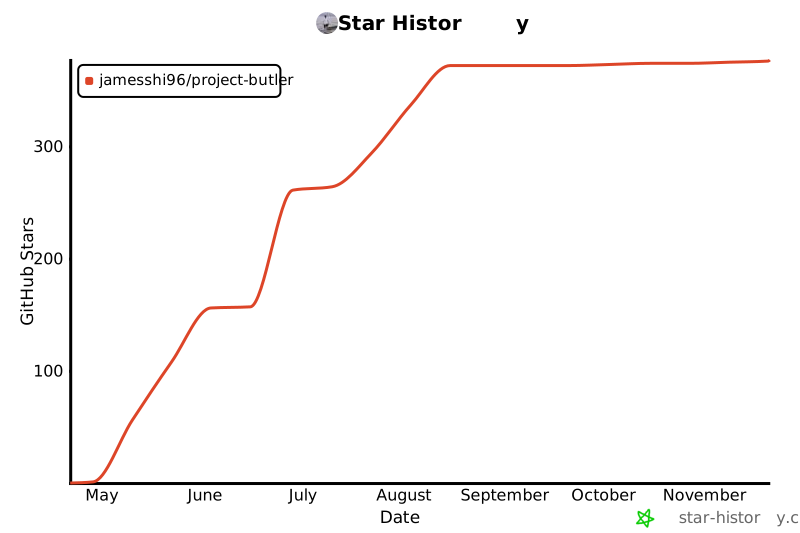](https://www.star-history.com/#JamesShi96/project-butler&Date)
- ## License
- [MIT](LICENSE)
Ratings and comments
Sign in to rate this skill.
Sign inFree to use. If it’s helped, pass it on.