gemini-notebook-mcp-cli
Programmatic access to Gemini Notebook - via command-line interface (CLI), Model Context Protocol (MCP) server, and AI agent skills.
Safety scan
A static text scan, not a guarantee. Select the badge to see what was scanned and every finding.
Check it deeper on your machine
It has changed since its scan on 11 Nov 2026.
As a Claude Code plugin, install it and then ask Claude Code:
/plugin marketplace add keithmackay/mackayi/plugin install scanskillsafety@mackayiDo a deep scan of https://github.com/jacob-bd/gemini-notebook-mcp-cli with scanskillsafety
Or from a terminal, clone it and run it:
git clone https://github.com/keithmackay/scanskillsafety-skill ~/.claude/skills/scanskillsafetynode ~/.claude/skills/scanskillsafety/cli.cjs --deep 'https://github.com/jacob-bd/gemini-notebook-mcp-cli'
It checks the exact commit: every file, its packages against OSV (api.osv.dev), how it compares with this page's scan (findsafeskills.com receives the repository's address), and, if you agree, Claude reading every file with your own Claude subscription. It never runs the code.
Badge for your README

Markdown
[](/listings/jacob-bd--gemini-notebook-mcp-cli)HTML
<a href="/listings/jacob-bd--gemini-notebook-mcp-cli"><img src="/api/listings/jacob-bd--gemini-notebook-mcp-cli/badge.svg" alt="findsafeskills safety rating" /></a>Install
Install instructions from the README
As written by the repo's author. findsafeskills has not verified these steps.
Three commands take you from nothing to a connected AI assistant:
1. Install (gives you `nlm` and the MCP server):
uv tool install notebooklm-mcp-cli
2. Sign in to your Google account:
nlm login
3. Connect your AI tools:
nlm setup
The setup wizard (`nlm setup`)
`nlm setup` finds the AI tools installed on your machine and connects them to Gemini Notebook — no config files to edit. Pick an option with the arrow keys:
| Menu option | What it does | |---|---| | **Show my tools' status** | One table for every detected tool: MCP connection (✓ set up · ✗ not yet · ⚠ old name) and skill version (⬆ when an upgrade is available). | | **Add the MCP to my tools/agents** | Tick the tools to connect (Space), then Enter. Nothing is pre-selected. Connections still using the old `notebooklm-mcp` name appear under **Needs a fix** and are renamed to `gemini-notebook-mcp`, keeping their settings. Then it offers the skill. | | **Add the skill to my tools/agents** | Installs the skill that teaches your AI how to use Gemini Notebook well — for **All my projects** (default) or **Just this folder**. Upgrades are pre-ticked; older versions are only replaced after you confirm. | | **Remove an MCP or skill** | Lists what's installed, grouped into MCP connections and skills. Nothing is pre-selected, and each group needs its own confirmation. | | **Credential protection** | Protect your saved logins in your OS keystore, or restore them to plain files. It only offers what applies: *Protect* when a login is plain, *Restore* when one is protected. With several logins you get a checkbox picker. | | **Copy MCP setup for a tool not listed** | Copies a ready-to-paste JSON snippet to your clipboard. **Advanced options** switch to uvx, the bare command, or entry-only JSON. |
- **Esc** goes back from any screen (and quits from the main menu). - Every file is **backed up** to `~/.notebooklm-mcp-cli/backups/` before it is changed. - **Connects to:** Claude Code, Claude Desktop (regular and Relay AI / 3P), Codex CLI / ChatGPT desktop app, Gemini CLI, Cursor, Windsurf, Cline, Antigravity, GitHub Copilot (VS Code), and OpenCode. The skill also installs for Hermes and OpenClaw. - **Claude Desktop Chat & Cowork, and claude.ai:** these only use skills uploaded to your Claude account. In **Add the skill**, tick **Claude Desktop / claude.ai** — the wizard saves `~/Downloads/nlm-skill.zip` and shows where to upload it (**Customize → Skills → Add**). Or run `nlm skill package`. - **Claude Desktop:** fully quit it (Cmd+Q) before connecting — it can overwrite its settings while open, so the wizard refuses to write until it's closed. - **Scripts and CI:** every option has a direct command — `nlm setup add <tool>`, `nlm setup remove <tool>`, `nlm setup list`, `nlm skill install <tool>`. See [MCP Configuration](#mcp-configuration).
What was scanned
The files the safety scan read, as written by the repository's author and shown as plain text. Lines with a finding are marked.
README.md · README · 800 lines
View this file on GitHub (read at the repository's current version: the scan did not record which commit it read)
This file has changed since it was scanned, so this is not exactly the text that was scanned, and no line is marked. The findings are listed with the safety scan above.
- # Gemini Notebook (formerly Google NotebookLM) CLI & MCP Server
- 
- [](https://pypi.org/project/notebooklm-mcp-cli/)
- [](https://pypistats.org/packages/notebooklm-mcp-cli)
- [](https://pepy.tech/projects/notebooklm-mcp-cli)
- [](https://pypi.org/project/notebooklm-mcp-cli/)
- [](https://github.com/jacob-bd/gemini-notebook-mcp-cli/blob/main/LICENSE)
- **Programmatic access to Gemini Notebook** — via command-line interface (CLI) or Model Context Protocol (MCP) server.
- > 🚨 **New: Protected login storage (recommended)**
- > Your saved Google login can now be encrypted, with its key kept in your computer's keychain instead of a plain file. We highly recommend everyone switch on a personal computer:
- >
- > nlm auth storage set protected
- >
- > 💡 You can also use the 'nlm setup' wizard and select the 'Credentials Protection' option in the wizard
- >
- > Optional: nothing changes unless you turn it on. Servers, cron, Docker and SSH setups can keep the plain file.
- > 📖 [How it works](docs/AUTHENTICATION.md#protected-storage) · 📺 [Watch this short video](https://www.youtube.com/shorts/7ZmF_lwJh3M)
- >
- > 🤖 Fun fact: this video was created by an agent using the gemini-notebook-mcp.
- > **Note:** Personal/consumer accounts are tested regularly. Gemini Notebook Enterprise support is experimental. The documented `notebook.cloud.google.com` host has been live-verified with a project-qualified `global` deployment; other Enterprise host variants may require additional validation.
- > ☕ **If you find notebooklm-mcp-cli useful, consider [buying me a coffee](https://buymeacoffee.com/jacobbd).**
- > It's free and built in my spare time — but testing every Gemini Notebook feature takes real time and resources. A coffee helps me cover it and keep shipping. Thank you! 🙏
- >
- > <a href="https://buymeacoffee.com/jacobbd"><img src="https://cdn.buymeacoffee.com/buttons/v2/default-yellow.png" alt="Buy Me A Coffee" height="42"></a>
- ## 📺 Watch the demos
- Real workflows, start to finish. The newest videos are first, then the demo that matches how you work.
- > **New here?** Start with **[Claude in 5 minutes](https://www.youtube.com/watch?v=PU8JhgLPxes)**. It is the shortest path from install to your first notebook query.
- ### Set up and connect
- | **Claude Cowork & Interactive Reports** | **Setup** | **Local AI** | **Any AI client** |
- | :---: | :---: | :---: | :---: |
- | [](https://www.youtube.com/watch?v=UXxqTpNNGt0)<br>**Watch Claude take over**<br><sub>The full build, start to finish<br>22 min</sub> | [](https://www.youtube.com/watch?v=5tOUilBTJ3Q)<br>**Set up the server**<br><sub>Wizard, doctor, and mcpb<br>16 min</sub> | [](https://www.youtube.com/watch?v=OmtvmPBQzkM)<br>**Use LM Studio locally**<br><sub>A local model, same notebook<br>8 min</sub> | [](https://www.youtube.com/watch?v=7aHDbkr-l_E)<br>**ChatGPT, Grok, Gemini and more**<br><sub>One server, many front ends<br>15 min</sub> |
- ### Create and automate
- | **Codex setup, cinematic video & slides** | **Studio video** | **Infographics** | **CLI** |
- | :---: | :---: | :---: | :---: |
- | [](https://www.youtube.com/watch?v=KrgLCrvU1dw)<br>**Turn code into a cinematic video**<br><sub>Codex and NotebookLM, end to end<br>14 min</sub> | [](https://www.youtube.com/watch?v=iu4L6H6gMD8)<br>**See the cinematic result**<br><sub>A two-minute taste of the workflow<br>2 min</sub> | [](https://www.youtube.com/watch?v=Uc6iH5NuQ9A)<br>**Try all 10 infographic styles**<br><sub>Every style, side by side<br>11 min</sub> | [](https://www.youtube.com/watch?v=XyXVuALWZkE)<br>**Automate research in your terminal**<br><sub>Create, query, and download from the CLI<br>13 min</sub> |
- ### More demos
- | **Perplexity** | **How it works** | **Overview** |
- | :---: | :---: | :---: |
- | [](https://www.youtube.com/watch?v=BCKlDNg-qxs)<br>**Connect Perplexity to NotebookLM**<br><sub>See what happens with MCP access<br>10 min</sub> | [](https://www.youtube.com/watch?v=ZQBQigFK-E8)<br>**NotebookLM has no API. So I built one.**<br><sub>The story behind the CLI and server<br>12 min</sub> | [](https://www.youtube.com/watch?v=d-PZDQlO4m4)<br>**Automate research and content creation**<br><sub>The original end-to-end overview<br>16 min</sub> |
- ## ⚡ Quick Start
- Three commands take you from nothing to a connected AI assistant:
- 1. Install (gives you `nlm` and the MCP server):
- ```bash
- uv tool install notebooklm-mcp-cli
- ```
- 2. Sign in to your Google account:
- ```bash
- nlm login
- ```
- 3. Connect your AI tools:
- ```bash
- nlm setup
- ```
- ### The setup wizard (`nlm setup`)
- `nlm setup` finds the AI tools installed on your machine and connects them to
- Gemini Notebook — no config files to edit. Pick an option with the arrow keys:
- | Menu option | What it does |
- |---|---|
- | **Show my tools' status** | One table for every detected tool: MCP connection (✓ set up · ✗ not yet · ⚠ old name) and skill version (⬆ when an upgrade is available). |
- | **Add the MCP to my tools/agents** | Tick the tools to connect (Space), then Enter. Nothing is pre-selected. Connections still using the old `notebooklm-mcp` name appear under **Needs a fix** and are renamed to `gemini-notebook-mcp`, keeping their settings. Then it offers the skill. |
- | **Add the skill to my tools/agents** | Installs the skill that teaches your AI how to use Gemini Notebook well — for **All my projects** (default) or **Just this folder**. Upgrades are pre-ticked; older versions are only replaced after you confirm. |
- | **Remove an MCP or skill** | Lists what's installed, grouped into MCP connections and skills. Nothing is pre-selected, and each group needs its own confirmation. |
- | **Credential protection** | Protect your saved logins in your OS keystore, or restore them to plain files. It only offers what applies: *Protect* when a login is plain, *Restore* when one is protected. With several logins you get a checkbox picker. |
- | **Copy MCP setup for a tool not listed** | Copies a ready-to-paste JSON snippet to your clipboard. **Advanced options** switch to uvx, the bare command, or entry-only JSON. |
- - **Esc** goes back from any screen (and quits from the main menu).
- - Every file is **backed up** to `~/.notebooklm-mcp-cli/backups/` before it is changed.
- - **Connects to:** Claude Code, Claude Desktop (regular and Relay AI / 3P), Codex CLI / ChatGPT desktop app, Gemini CLI, Cursor, Windsurf, Cline, Antigravity, GitHub Copilot (VS Code), and OpenCode. The skill also installs for Hermes and OpenClaw.
- - **Claude Desktop Chat & Cowork, and claude.ai:** these only use skills uploaded to your Claude account. In **Add the skill**, tick **Claude Desktop / claude.ai** — the wizard saves `~/Downloads/nlm-skill.zip` and shows where to upload it (**Customize → Skills → Add**). Or run `nlm skill package`.
- - **Claude Desktop:** fully quit it (Cmd+Q) before connecting — it can overwrite its settings while open, so the wizard refuses to write until it's closed.
- - **Scripts and CI:** every option has a direct command — `nlm setup add <tool>`, `nlm setup remove <tool>`, `nlm setup list`, `nlm skill install <tool>`. See [MCP Configuration](#mcp-configuration).
- ## Two Ways to Use
- ### 🖥️ Command-Line Interface (CLI)
- Use `nlm` directly in your terminal for scripting, automation, or interactive use:
- ```bash
- nlm notebook list # List all notebooks
- nlm notebook create "Research Project" # Create a notebook
- nlm source add <notebook> --url "https://..." # Add sources
- nlm audio create <notebook> --confirm # Generate podcast
- nlm download audio <notebook> --id <artifact-id> # Download audio file
- nlm download all <notebook> -d ./exports # Download every artifact
- nlm share public <notebook> # Enable public link
- ```
- Run `nlm --ai` for comprehensive AI-assistant documentation.
- ### 🤖 MCP Server (for AI Agents)
- Connect AI assistants (Claude, Gemini, Cursor, etc.) to Gemini Notebook:
- ```bash
- nlm setup # Guided wizard — see Quick Start above
- nlm setup add codex # Or connect one client directly
- ```
- Then use natural language: _"Create a notebook about quantum computing and generate a podcast"_
- ## Features
- | Capability | CLI Command | MCP Tool |
- | --------------------------------------------- | ------------------------------- | ------------------------------------ |
- | List notebooks | `nlm notebook list` | `notebook_list` |
- | Create notebook | `nlm notebook create` | `notebook_create` |
- | Add Sources (URL, Text, Drive, File) | `nlm source add` | `source_add` |
- | Query notebook (persists to web UI) | `nlm notebook query` | `notebook_query` |
- | List/view/export/delete chat sessions | `nlm chats list/get/export/delete` | `chat_list`/`chat_get`/`chat_export`/`chat_delete` |
- | Create Studio Content (Audio, Video, etc.) | `nlm studio create` | `studio_create` |
- | Interactive reports (read + embedded elements)| `nlm report get/elements/element` | `report` (action=get/elements/generate) |
- | Revise slide decks | `nlm slides revise` | `studio_revise` |
- | Download artifacts | `nlm download <type>` | `download_artifact` |
- | Download all artifacts (one or all notebooks) | `nlm download all` | `download_all_artifacts` |
- | Web/Drive research | `nlm research start` | `research_start` |
- | Share notebook | `nlm share public/invite` | `notebook_share_*` |
- | Sync Drive sources | `nlm source sync` | `source_sync_drive` |
- | Batch operations | `nlm batch query/create/delete` | `batch` |
- | Cross-notebook query | `nlm cross query` | `cross_notebook_query` |
- | Pipelines (multi-step workflows) | `nlm pipeline run/list` | `pipeline` |
- | Tag & smart select | `nlm tag add/list/select` | `tag` |
- | Manage collections (home page groups) | — | `collection_*` |
- | Configure AI tools | `nlm setup` (wizard), `nlm setup add/remove/list` | — |
- | Install AI Skills | `nlm skill install/update` | — |
- | Diagnose issues | `nlm doctor` | — |
- | Check remaining plan usage | `nlm usage [--profile <name>]` | `usage_get` |
- | Manage login encryption (Protected mode) | `nlm auth storage status/set` | — |
- 📚 **More Documentation:**
- - **[Getting Started](docs/GETTING_STARTED.md)** — Install, login, agent setup, and migration from another Gemini Notebook MCP
- - **[CLI Guide](docs/CLI_GUIDE.md)** — Complete command reference
- - **[MCP Guide](docs/MCP_GUIDE.md)** — All 55 MCP tools with examples
- - **[Authentication](docs/AUTHENTICATION.md)** — Setup and troubleshooting
- - **[Remote MCP](docs/REMOTE_MCP.md)** — Web/mobile connector feasibility, security, and authentication limitations
- - **[API Reference](docs/API_REFERENCE.md)** — Internal API docs for contributors
- ## Important Disclaimer
- This MCP and CLI use **internal APIs** that:
- - Are undocumented and may change without notice
- - Require cookie extraction from your browser (I have a tool for that!)
- - May not be aligned with Google's Terms of Service
- Use at your own risk for personal/experimental purposes.
- ## Installation
- > 🆕 **Claude Desktop users:** [Download the extension](https://github.com/jacob-bd/gemini-notebook-mcp-cli/releases/latest) (`.mcpb` file) → double-click → done! One-click install, no config needed.
- Install from PyPI. This single package includes **both the CLI and MCP server**:
- ### Using uv (Recommended)
- ```bash
- uv tool install notebooklm-mcp-cli
- ```
- ### Using uvx (Run Without Install)
- ```bash
- uvx --from notebooklm-mcp-cli nlm --help
- uvx --from notebooklm-mcp-cli notebooklm-mcp
- ```
- ### Using pip
- ```bash
- pip install notebooklm-mcp-cli
- ```
- ### Using pipx
- ```bash
- pipx install notebooklm-mcp-cli
- ```
- **After installation, you get:**
- - `nlm` — Command-line interface
- - `notebooklm-mcp` — Gemini Notebook MCP server for AI assistants
- <details>
- <summary>Alternative: Install from Source</summary>
- ```bash
- # Clone the repository
- git clone https://github.com/jacob-bd/gemini-notebook-mcp-cli.git
- cd notebooklm-mcp
- # Install with uv
- uv tool install .
- ```
- </details>
- ## Upgrading
- ```bash
- # Using uv
- uv tool upgrade notebooklm-mcp-cli
- # Using pip
- pip install --upgrade notebooklm-mcp-cli
- # Using pipx
- pipx upgrade notebooklm-mcp-cli
- ```
- After upgrading, restart your AI tool to reconnect to the updated MCP server:
- - **Claude Code:** Restart the application, or use `/mcp` to reconnect
- - **Cursor:** Restart the application
- - **Gemini CLI:** Restart the CLI session
- ## Upgrading from Legacy Versions
- If you previously installed the **separate** CLI and MCP packages, you need to migrate to the unified package.
- ### Step 1: Check What You Have Installed
- ```bash
- uv tool list | grep notebooklm
- ```
- **Legacy packages to remove:**
- | Package | What it was |
- |---------|-------------|
- | `notebooklm-cli` | Old CLI-only package |
- | `notebooklm-mcp-server` | Old MCP-only package |
- ### Step 2: Uninstall Legacy Packages
- ```bash
- # Remove old CLI package (if installed)
- uv tool uninstall notebooklm-cli
- # Remove old MCP package (if installed)
- uv tool uninstall notebooklm-mcp-server
- ```
- ### Step 3: Reinstall the Unified Package
- After removing legacy packages, reinstall to fix symlinks:
- ```bash
- uv tool install --force notebooklm-mcp-cli
- ```
- > **Why `--force`?** When multiple packages provide the same executable, `uv` can leave broken symlinks after uninstalling. The `--force` flag ensures clean symlinks.
- ### Step 4: Verify Installation
- ```bash
- uv tool list | grep notebooklm
- ```
- You should see only:
- ```
- notebooklm-mcp-cli v0.2.0
- - nlm
- - notebooklm-mcp
- ```
- ### Step 5: Re-authenticate
- Your existing cookies should still work, but if you encounter auth issues:
- ```bash
- nlm login
- ```
- > **Note:** The configured MCP server name is now `gemini-notebook-mcp`. The executable remains `notebooklm-mcp` for compatibility with existing installations.
- ## Getting Started
- If you are setting up the tool for the first time — or migrating from a
- browser-based Gemini Notebook MCP — see the
- [Getting Started Guide](docs/GETTING_STARTED.md). It covers install,
- login, agent registration, and a step-by-step migration path that avoids
- the "two Gemini Notebook servers registered" trap.
- ## Uninstalling
- To completely remove the MCP:
- ```bash
- # Using uv
- uv tool uninstall notebooklm-mcp-cli
- # Using pip
- pip uninstall notebooklm-mcp-cli
- # Using pipx
- pipx uninstall notebooklm-mcp-cli
- # Remove cached auth tokens and data (optional)
- rm -rf ~/.notebooklm-mcp-cli
- ```
- Also remove from your AI tools:
- ```bash
- nlm setup remove claude-code
- nlm setup remove cursor
- # ... or any configured tool
- ```
- ## Authentication
- Before using the CLI or MCP, you need to authenticate with Gemini Notebook:
- ### CLI Authentication (Recommended)
- ```bash
- # Auto mode: launches your browser, you log in, cookies extracted automatically
- nlm login
- # Check if already authenticated
- nlm login --check
- # Use a named profile (for multiple Google accounts)
- nlm login --profile work
- nlm login --profile personal
- # Manual mode: import cookies from a file
- nlm login --manual --file cookies.txt
- # External CDP provider (e.g., OpenClaw-managed browser)
- nlm login --provider openclaw --cdp-url http://127.0.0.1:18800
- ```
- New profiles ask where to keep the saved login **before** the browser opens: **Protected** (encrypted, key in your OS keystore, recommended) or a plain file. Scripts can skip the question with `nlm login --storage protected` (or `--storage file`). Existing profiles keep their mode; change it any time in `nlm setup` → **Credential protection**.
- **Profile management:**
- ```bash
- nlm login --check # Show current auth status
- nlm login switch <profile> # Switch the default profile
- nlm login profile list # List all profiles with email addresses
- nlm login profile delete <profile> # Delete a profile
- nlm login profile rename <old> <new> # Rename a profile
- ```
- **From an MCP-only app (for example Claude CoWork):** ask the AI to use the `profile` tool. It can list your accounts, switch for the session, and, only if you ask, make one your saved default.
- **Unattended / scheduled refresh:**
- A live session self-heals — when Google's short-lived cookies age out, the
- client automatically runs a headless refresh. For unattended machines you can
- also refresh proactively from a scheduler so a session never lapses:
- ```bash
- nlm auth refresh # Headless, no interaction; exits non-zero on failure
- nlm auth refresh --profile work # Refresh a named profile
- nlm auth refresh --http-only # Validate without opening a browser
- ```
- `--http-only` forces HTTP transport, including when CDP transport is configured.
- It cannot renew browser-dependent PSIDTS cookies or revive a fully expired login.
- Automatic recovery uses a per-process cooldown and failure budget; explicit
- refresh commands bypass these limits. See [authentication guidance](docs/AUTHENTICATION.md#automatic-recovery).
- Run browser-based refresh on a timer (cron/launchd). It needs a saved Chrome profile from a prior
- `nlm login`, and does not apply when `NOTEBOOKLM_COOKIES` is set as an
- environment variable (that value overrides saved credentials).
- ### Enterprise Authentication (Gemini Notebook Enterprise)
- For organizations using **Gemini Notebook Enterprise** via Google Cloud, ask your Enterprise administrator for the project ID or number, the deployment location/multi-region, and confirmation that your account has access. The current documented host is `notebook.cloud.google.com`; older deployments may use `notebooklm.cloud.google.com` or `vertexaisearch.cloud.google.com`.
- 1. **Set Base URL, GCP Project ID & Location:**
- ```bash
- export NOTEBOOKLM_BASE_URL="https://notebook.cloud.google.com"
- # Required: your GCP project ID or project number from your administrator
- export NOTEBOOKLM_PROJECT_ID="your-gcp-project-id-or-number"
- # Optional: GCP location/multi-region from your administrator: global (default), us, or eu
- export NOTEBOOKLM_LOCATION="global"
- ```
- 2. **Save an Enterprise Auth Profile:**
- This opens the configured Enterprise URL in an isolated browser profile. Sign in with your organization account:
- ```bash
- nlm login --profile enterprise
- nlm login switch enterprise
- ```
- You can switch back to a personal profile at any time:
- ```bash
- unset NOTEBOOKLM_BASE_URL NOTEBOOKLM_PROJECT_ID NOTEBOOKLM_LOCATION
- nlm login switch personal
- ```
- 3. **Configure MCP Server with Enterprise Environment Variables:**
- When adding the MCP server to AI assistants (Claude, Cursor, etc.), pass `NOTEBOOKLM_BASE_URL`, `NOTEBOOKLM_PROJECT_ID`, and optionally `NOTEBOOKLM_LOCATION`:
- ```json
- {
- "mcpServers": {
- "gemini-notebook-mcp": {
- "command": "notebooklm-mcp",
- "env": {
- "NOTEBOOKLM_BASE_URL": "https://notebook.cloud.google.com",
- "NOTEBOOKLM_PROJECT_ID": "your-gcp-project-id-or-number",
- "NOTEBOOKLM_LOCATION": "global"
- }
- }
- }
- }
- ```
- Each profile gets its own isolated browser session, so you can be logged into multiple Google accounts simultaneously. Enterprise environment variables apply to the current process, so keep them in an Enterprise-only shell or MCP configuration when you also use a personal account.
- ### Standalone Auth Tool
- If you only need the MCP server (not the CLI):
- ```bash
- nlm login # Auto mode (launches browser)
- nlm login --manual # Manual file mode
- ```
- **How it works:** Auto mode launches a dedicated browser profile (supports Chrome, Arc, Dia, Comet, Brave, Edge, Chromium, Firefox, and more), you log in to Google, and cookies are extracted automatically. Your login persists for future auth refreshes.
- **Prefer a specific browser?** Set it with `nlm config set auth.browser chromium` (or `comet`, `dia`, `brave`, `arc`, `edge`, `chrome`, `firefox`, etc.). Falls back to auto-detection if the preferred named browser is not found. For any other Chromium-compatible browser, set its executable with `nlm config set auth.browser_path /path/to/browser` or `NLM_BROWSER_PATH`; an invalid explicit path fails closed instead of launching a different browser. When Chromium/CDP is unavailable, `auto` can fall back to Firefox.
- For detailed instructions and troubleshooting, see **[docs/AUTHENTICATION.md](docs/AUTHENTICATION.md)**.
- ## MCP Configuration
- > **⚠️ Context Window Warning:** This MCP provides **55 tools**. Disable it when not using Gemini Notebook to preserve context. In Claude Code: `@gemini-notebook-mcp` to toggle. To keep it on but expose only a subset, see [Selective tool exposure](docs/MCP_GUIDE.md#selective-tool-exposure).
- ### Automatic Setup (Recommended)
- The setup wizard is the recommended way to connect tools — see
- [Quick Start](#-quick-start) for what each menu option does:
- ```bash
- nlm setup
- ```
- MCP configuration goes to each app's user-level settings. Codex CLI and the
- ChatGPT desktop app share one MCP configuration on the same host. GitHub
- Copilot uses the VS Code user profile in the wizard; the direct command without
- `--scope user` targets the current workspace.
- For direct setup or scripts, keep using the existing commands:
- ```bash
- nlm setup add codex # Codex CLI / ChatGPT desktop
- nlm setup add github-copilot --scope user # VS Code user profile
- nlm setup add github-copilot # Current workspace
- nlm setup add claude-desktop --profile 3p # Relay AI / Claude 3P
- nlm setup list # Show MCP configuration status
- ```
- Claude Desktop setup only writes to profiles that are detected as present. If
- both regular and Relay AI/3P profiles exist, the CLI asks whether to configure
- regular, 3P, or both. For scripts, use `--profile regular|3p|both`. If no
- Claude Desktop profile is detected, nothing is created or changed.
- Removal uses the same profile selection, for example
- `nlm setup remove claude-desktop --profile regular`.
- Removal only offers detected profiles containing this MCP or a recognized
- legacy entry; unrelated MCP servers are left untouched.
- Before adding or removing the MCP, fully quit the selected Claude Desktop
- profile. The CLI detects running regular and Relay AI/3P instances and refuses
- to write while they are open, because Claude may rewrite the config and discard
- the change. Reopen Claude Desktop after setup completes.
- ### Install AI Skills (Optional)
- The wizard can install the prompting and workflow skill after MCP setup. It
- defaults to **All projects (user level)** and can instead install into the
- current project. Existing current or newer versions are preserved; older or
- unversioned skills require confirmation before replacement, with a backup made
- first.
- You can also manage skills directly. Supported local skill targets include
- **Cline**, **Antigravity**, **OpenClaw**, **Hermes**, **Codex**, **OpenCode**,
- **Claude Code**, and **Gemini CLI**.
- ```bash
- # Install skill files
- nlm skill install cline
- nlm skill install openclaw
- nlm skill install codex
- nlm skill install antigravity
- # Update skills
- nlm skill update
- ```
- User-level skill installation requires the target tool to be detected first;
- the CLI will not create a missing tool directory or install anyway. Use
- `--level project` when you intentionally want a project-local skill.
- #### Claude Desktop (Chat and Cowork) and claude.ai
- Claude Desktop's **Code** tab is Claude Code, so it uses the skill installed in
- `~/.claude/skills/`. The **Chat** and **Cowork** tabs, and claude.ai, only use
- skills uploaded to your Claude account. Create the upload file with the wizard
- (tick **Claude Desktop / claude.ai** in **Add the skill**) or directly:
- ```bash
- nlm skill package # saves ~/Downloads/nlm-skill.zip
- nlm skill package --output ~/Desktop
- ```
- Then in Claude Desktop (or claude.ai) open **Customize → Skills → Add**, pick
- `nlm-skill.zip`, and turn the skill on. Re-upload after updating `nlm` to get
- the latest skill. The MCP for Chat and Cowork comes from the normal Claude
- Desktop connection (`nlm setup` → **Add the MCP**).
- ### Remove from a tool
- ```bash
- nlm setup remove claude-code
- ```
- ### Using uvx (No Install Required)
- If you don't want to install the package, you can use `uvx` to run on-the-fly:
- ```bash
- # Run CLI commands directly
- uvx --from notebooklm-mcp-cli nlm setup add cursor
- uvx --from notebooklm-mcp-cli nlm login
- ```
- For tools that use JSON config, point them to uvx:
- ```json
- {
- "mcpServers": {
- "gemini-notebook-mcp": {
- "command": "uvx",
- "args": ["--from", "notebooklm-mcp-cli", "notebooklm-mcp"]
- }
- }
- }
- ```
- <details>
- <summary>Manual Setup (if you prefer)</summary>
- > **Tip:** Run `nlm setup add json` for an interactive wizard that generates the right JSON snippet for your tool.
- **Claude Code / Gemini CLI** support adding MCP servers via their own CLI:
- ```bash
- claude mcp add --scope user gemini-notebook-mcp notebooklm-mcp
- gemini mcp add --scope user gemini-notebook-mcp notebooklm-mcp
- ```
- **Cursor / Windsurf** resolve commands from your `PATH`, so the command name is enough:
- ```json
- {
- "mcpServers": {
- "gemini-notebook-mcp": {
- "command": "notebooklm-mcp"
- }
- }
- }
- ```
- | Tool | Config Location |
- | -------- | ------------------------------------- |
- | Cursor | `~/.cursor/mcp.json` |
- | Windsurf | `~/.codeium/windsurf/mcp_config.json` |
- **GitHub Copilot (VS Code workspace)** uses `.vscode/mcp.json` with a top-level `servers` key:
- ```json
- {
- "servers": {
- "gemini-notebook-mcp": {
- "command": "notebooklm-mcp",
- "args": []
- }
- }
- }
- ```
- **Claude Desktop** may not resolve `PATH` — use the full path to the binary:
- ```json
- {
- "mcpServers": {
- "gemini-notebook-mcp": {
- "command": "/full/path/to/notebooklm-mcp"
- }
- }
- }
- ```
- Find your path with: `which notebooklm-mcp`
- | Tool | Config Location |
- | --------------------------------- | -------------------------------------------------------------------------------------------------- |
- | Claude Desktop (macOS current/3P) | `~/Library/Application Support/Claude-3p/claude_desktop_config.json` |
- | Claude Desktop (macOS legacy) | `~/Library/Application Support/Claude/claude_desktop_config.json` |
- | Claude Desktop (Windows) | `%APPDATA%\Claude\claude_desktop_config.json` (an unambiguous MSIX path is detected automatically) |
- | Claude Desktop (Windows 3P) | `%LOCALAPPDATA%\Claude-3p\claude_desktop_config.json` |
- | Claude Desktop (Linux) | `~/.config/Claude/claude_desktop_config.json` |
- | Claude Desktop (Linux 3P) | `${XDG_CONFIG_HOME:-~/.config}/Claude-3p/claude_desktop_config.json` |
- | GitHub Copilot | `.vscode/mcp.json` |
- </details>
- 📚 **Full configuration details:** [MCP Guide](docs/MCP_GUIDE.md) — Server options, environment variables, HTTP transport, and context window management. For Claude web/mobile and public deployment, read [Remote MCP Deployment](docs/REMOTE_MCP.md) first.
- ## What You Can Do
- Simply chat with your AI tool (Claude Code, Cursor, Gemini CLI) using natural language. Here are some examples:
- ### Research & Discovery
- - "List all my Gemini Notebook notebooks"
- - "Create a new notebook called 'AI Strategy Research'"
- - "Start web research on 'enterprise AI ROI metrics' and show me what sources it finds"
- - "Do a deep research on 'cloud marketplace trends' and import the top 10 sources"
- - "Search my Google Drive for documents about 'product roadmap' and create a notebook"
- ### Adding Content
- - "Add this URL to my notebook: https://example.com/article"
- - "Add this YouTube video about Kubernetes to the notebook"
- - "Add my meeting notes as a text source to this notebook"
- - "Import this Google Doc into my research notebook"
- ### AI-Powered Analysis
- - "What are the key findings in this notebook?"
- - "Summarize the main arguments across all these sources"
- - "What does this source say about security best practices?"
- - "Get an AI summary of what this notebook is about"
- - "Configure the chat to use a learning guide style with longer responses"
- _(All queries sent from CLI or MCP automatically persist in your Gemini Notebook web UI chat history!)_
- ### Content Generation
- - "Create an audio podcast overview of this notebook in deep dive format"
- - "Generate a video explainer with classic visual style"
- - "Make a short vertical video overview of the key idea"
- - "Make a briefing doc from these sources"
- - "Create flashcards for studying, medium difficulty"
- - "Generate an infographic in landscape orientation with professional style"
- - "Build a mind map from my research sources"
- - "Create a slide deck presentation from this notebook"
- ### Smart Management
- - "Check which Google Drive sources are out of date and sync them"
- - "Show me all the sources in this notebook with their freshness status"
- - "Delete this source from the notebook"
- - "Check the status of my audio overview generation"
- - "Check this specific artifact without listing every Studio item"
- - "List only the generated videos in this notebook"
- ### Sharing & Collaboration
- - "Show me the sharing settings for this notebook"
- - "Make this notebook public so anyone with the link can view it"
- - "Disable public access to this notebook"
- - "Invite user@example.com as an editor to this notebook"
- - "Add a viewer to my research notebook"
- **Pro tip:** After creating studio content (audio, video, reports, etc.), poll the status to get download URLs when generation completes.
- ## Authentication Lifecycle
- | Component | Duration | Refresh |
- | ---------- | --------------- | ---------------------------------------------------- |
- | Cookies | ~2-4 weeks | Auto-refresh via headless browser (if profile saved) |
- | CSRF Token | ~minutes | Auto-refreshed on every request failure |
- | Session ID | Per MCP session | Auto-extracted on MCP start |
- **v0.1.9+**: The server now automatically handles token expiration:
- 1. Refreshes CSRF tokens immediately when expired
- 2. Reloads cookies from disk if updated externally
- 3. Runs headless browser auth if profile has saved login
- You can also call `refresh_auth()` to explicitly reload and validate tokens, or
- `refresh_auth(profile="work")` to refresh a named saved account without
- switching the MCP server's active account.
- If automatic refresh fails (Google login fully expired), run `nlm login` again.
- For suspected browser-bound auth replay failures, run `nlm doctor auth-replay`.
- If the `cdp_in_page` probe succeeds while normal replay fails, see
- [Experimental browser-backed RPC transport](docs/AUTHENTICATION.md#experimental-browser-backed-rpc-transport).
- ## Troubleshooting
- ### `uv tool upgrade` Not Installing Latest Version
- **Symptoms:**
- - Running `uv tool upgrade notebooklm-mcp-cli` installs an older version (e.g., 0.1.5 instead of 0.1.9)
- - `uv cache clean` doesn't fix the issue
- **Why this happens:** `uv tool upgrade` respects version constraints from your original installation. If you initially installed an older version or with a constraint, `upgrade` stays within those bounds by design.
- **Fix — Force reinstall:**
- ```bash
- uv tool install --force notebooklm-mcp-cli
- ```
- This bypasses any cached constraints and installs the absolute latest version from PyPI.
- **Verify:**
- ```bash
- uv tool list | grep notebooklm
- # Should show: notebooklm-mcp-cli v0.1.9 (or latest)
- ```
- ## Limitations
- - **Rate limits**: Chat and Studio usage is metered as compute against a rolling (~5h) window and a weekly cap, scaled by plan tier. Run `nlm usage` to see what is left and when it resets
- - **No official support**: API may change without notice
- - **Cookie expiration**: Need to re-extract cookies every few weeks
- ## Contributing
- See [CLAUDE.md](CLAUDE.md) for detailed API documentation and how to add new features.
- ## Vibe Coding Alert
- Full transparency: this project was built by a non-developer using AI coding assistants. If you're an experienced Python developer, you might look at this codebase and wince. That's okay.
- The goal here was to scratch an itch - programmatic access to Gemini Notebook - and learn along the way. The code works, but it's likely missing patterns, optimizations, or elegance that only years of experience can provide.
- **This is where you come in.** If you see something that makes you cringe, please consider contributing rather than just closing the tab. This is open source specifically because human expertise is irreplaceable. Whether it's refactoring, better error handling, type hints, or architectural guidance - PRs and issues are welcome.
- Think of it as a chance to mentor an AI-assisted developer through code review. We all benefit when experienced developers share their knowledge.
- ## Credits
- Special thanks to:
- - **Le Anh Tuan** ([@latuannetnam](https://github.com/latuannetnam)) for contributing the HTTP transport, debug logging system, and performance optimizations.
- - **David Szabo-Pele** ([@davidszp](https://github.com/davidszp)) for the `source_get_content` tool and Linux auth fixes.
- - **saitrogen** ([@saitrogen](https://github.com/saitrogen)) for the research polling query fallback fix.
- - **devnull03** ([@devnull03](https://github.com/devnull03)) for multi-browser CDP authentication support (Arc, Brave, Edge, Chromium, Vivaldi, Opera).
- - **VooDisss** ([@VooDisss](https://github.com/VooDisss)) for multi-browser authentication improvements.
- - **codepiano** ([@codepiano](https://github.com/codepiano)) for the configurable DevTools timeout for the auth CLI.
- - **Tony Hansmann** ([@997unix](https://github.com/997unix)) for contributing the `nlm setup` and `nlm doctor` commands and CLI Guide documentation.
- - **Fabiana Furtado** ([@fabianafurtadoff](https://github.com/fabianafurtadoff)) for batch operations, cross-notebook query, pipelines, and smart select/tagging (PR #90).
- - **Amy-Ra-lph** ([@Amy-Ra-lph](https://github.com/Amy-Ra-lph)) for security hardening: TOCTOU-safe credential storage, sensitive cookie redaction from debug logs, and pinning all CI actions to full commit SHAs (PRs #205–207).
- - **Kyle Brodeur** ([@kylebrodeur](https://github.com/kylebrodeur)) for WSL2 authentication support with Windows Chrome integration (PR #138).
- - **Robiton** ([@Robiton](https://github.com/Robiton)) for enterprise Gemini Notebook support via configurable base URL (PR #114).
- - **pjeby** ([@pjeby](https://github.com/pjeby)) for connection pooling and fast startup improvements (PR #54).
- - **beausea** ([@beausea](https://github.com/beausea)) for making the interface language configurable via the `NOTEBOOKLM_HL` environment variable (PR #59).
- - **JumpLao** ([@JumpLao](https://github.com/JumpLao)) for extended audio, video, and image format support (PR #82).
- - **cbruyndoncx** ([@cbruyndoncx](https://github.com/cbruyndoncx)) for including `cited_text` passages in query output (PR #81).
- - **zxyasfas** ([@zxyasfas](https://github.com/zxyasfas)) for cited-only research import (PR #188).
- - **Serdar Akın** ([@SERDAR-AKIN](https://github.com/SERDAR-AKIN)) for the multi-probe `AuthHealthChecker` that fixes false `"stale"` reports for semi-stale cookies (PR #219).
- ## Star History
- [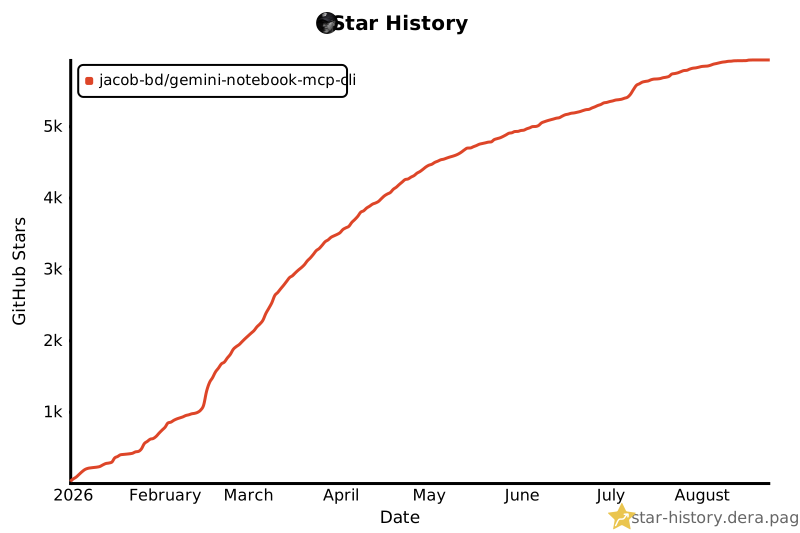](https://star-history.dera.page/#jacob-bd/gemini-notebook-mcp-cli&Date)
- ## License
- [MIT License](LICENSE)
Ratings and comments
Sign in to rate this skill.
Sign inFree to use. If it’s helped, pass it on.