instruktlabs
Instrukt Labs developer tools, including Kiln for editable 3D assets.
Safety scan
A static text scan, not a guarantee. Select the badge to see what was scanned and every finding.
Check it deeper on your machine
It has changed since its scan on 11 Nov 2026. Its scripts were only partly scanned.
As a Claude Code plugin, install it and then ask Claude Code:
/plugin marketplace add keithmackay/mackayi/plugin install scanskillsafety@mackayiDo a deep scan of https://github.com/instruktlabs/kiln with scanskillsafety
Or from a terminal, clone it and run it:
git clone https://github.com/keithmackay/scanskillsafety-skill ~/.claude/skills/scanskillsafetynode ~/.claude/skills/scanskillsafety/cli.cjs --deep 'https://github.com/instruktlabs/kiln'
It checks the exact commit: every file, its packages against OSV (api.osv.dev), how it compares with this page's scan (findsafeskills.com receives the repository's address), and, if you agree, Claude reading every file with your own Claude subscription. It never runs the code.
Badge for your README

Markdown
[](/listings/instruktlabs--kiln)HTML
<a href="/listings/instruktlabs--kiln"><img src="/api/listings/instruktlabs--kiln/badge.svg" alt="findsafeskills safety rating" /></a>Install
Install instructions from the README
As written by the repo's author. findsafeskills has not verified these steps.
Use Node.js 22 or 24 LTS and npm. See [supported versions and platforms](docs/install.md) for the complete compatibility range. Bun is only needed to work on Kiln itself.
mkdir kiln-install
cd kiln-install
npm init -y
npm install @instruktlabs/kiln
npx --offline --no -- kiln-init ../my-assets --harness codex
cd ../my-assets
Open your coding agent in `my-assets` and follow `START.md`. Choose `claude`, `codex`, `opencode`, `agy`, `hermes`, `copilot` or `cursor-agent` for `--harness`. Setup creates project-local instructions, skills, launchers and a `kiln_workspace` MCP connection. Keep this authoring workspace separate from the engine installation.
Then ask your agent for an asset:
> Create a low-poly camping lantern with a carry handle. Review it from several > angles, refine any problems, and save the editable source and a GLB.
For an **existing project**, Kiln 1.1+ supports a preview followed by adoption:
# Run from kiln-install; replace the path and harness for your project.
npx --offline --no -- kiln-init /absolute/path/to/my-project --adopt --harness codex --check
npx --offline --no -- kiln-init /absolute/path/to/my-project --adopt --harness codex
The preview writes nothing and exits 1 when changes are needed. Adoption preserves existing instructions and unrelated configuration, and reports conflicts before overwriting files. See [installation and upgrades](docs/install.md) for version availability, additional agents, repairs and plugin setup.
What was scanned
The files the safety scan read, as written by the repository's author and shown as plain text. Lines with a finding are marked.
.claude-plugin/marketplace.json · Manifest · 19 lines
View this file on GitHub (read at the repository's current version: the scan did not record which commit it read)
This file has changed since it was scanned, so this is not exactly the text that was scanned, and no line is marked. The findings are listed with the safety scan above.
- {
- "$schema": "https://anthropic.com/claude-code/marketplace.schema.json",
- "name": "instruktlabs",
- "description": "Instrukt Labs developer tools, including Kiln for editable 3D assets.",
- "owner": {
- "name": "Instrukt Labs"
- },
- "plugins": [
- {
- "name": "kiln-engine",
- "description": "Set up a pinned local Kiln engine and an asset workspace with MCP tools and authoring skills.",
- "author": {
- "name": "Instrukt Labs"
- },
- "category": "development",
- "source": "./plugins/kiln-engine"
- }
- ]
- }
README.md · README · 229 lines
View this file on GitHub (read at the repository's current version: the scan did not record which commit it read)
This file has changed since it was scanned, so this is not exactly the text that was scanned, and no line is marked. The findings are listed with the safety scan above.
- # Kiln
- [](https://github.com/instruktlabs/kiln/actions/workflows/ci.yml)
- [](https://www.npmjs.com/package/@instruktlabs/kiln)
- [](LICENSE)
- [](https://discord.gg/fSWVbMdQXK)
- **Build and revise 3D assets with your coding agent.**
- Your agent writes JavaScript using Kiln's geometry and material helpers. Kiln runs
- the program, returns rendered views and structural checks, and exports a GLB.
- Keep the editable source to refine the asset later.
- Kiln runs locally through MCP, the CLI or a JavaScript/TypeScript SDK. It is free,
- open source and account-free. Your coding agent supplies the model; Kiln's tools
- do not require a separate model API key.
- [Documentation](https://kilnstudio.tools/docs/install/) ·
- [Gallery](https://kilnstudio.tools/gallery/) ·
- [Interactive scenes](https://kilnstudio.tools/scenes/) ·
- [Changelog](CHANGELOG.md)
- ## Made with Kiln
- <table>
- <tr>
- <td width="50%" align="center">
- <a href="https://holodeck.kilnstudio.tools/worlds/meridian-sanctuary/"><img src="https://raw.githubusercontent.com/instruktlabs/kiln/main/assets/readme/meridian-sanctuary.webp" alt="A marble causeway between mirror pools leading to Meridian Sanctuary's gate tower"></a><br>
- <a href="https://holodeck.kilnstudio.tools/worlds/meridian-sanctuary/"><strong>Meridian Sanctuary</strong></a>
- </td>
- <td width="50%" align="center">
- <a href="https://holodeck.kilnstudio.tools/worlds/crescent-cove/"><img src="https://raw.githubusercontent.com/instruktlabs/kiln/main/assets/readme/crescent-cove.webp" alt="The canopied Cove seat among palms overlooking Crescent Cove's lagoon"></a><br>
- <a href="https://holodeck.kilnstudio.tools/worlds/crescent-cove/"><strong>Crescent Cove</strong></a>
- </td>
- </tr>
- <tr>
- <td width="50%" align="center">
- <a href="https://holodeck.kilnstudio.tools/worlds/winter-mountainside-cabin/"><img src="https://raw.githubusercontent.com/instruktlabs/kiln/main/assets/readme/winter-mountainside-cabin.webp" alt="The timber cabin with its glazed gable, deck and stair among snow-covered firs and spruces"></a><br>
- <a href="https://holodeck.kilnstudio.tools/worlds/winter-mountainside-cabin/"><strong>Winter Mountainside Cabin</strong></a>
- </td>
- <td width="50%" align="center">
- <a href="https://kilnstudio.tools/scenes/cathedral-square/"><img src="https://raw.githubusercontent.com/instruktlabs/kiln/main/assets/readme/cathedral-square.webp" alt="The Gothic cathedral above its town square, surrounded by rows of stone and timber houses"></a><br>
- <a href="https://kilnstudio.tools/scenes/cathedral-square/"><strong>Cathedral Square</strong></a>
- </td>
- </tr>
- </table>
- Meridian Sanctuary, Crescent Cove and Winter Mountainside Cabin are walkable
- Holodeck worlds built with editable Kiln assets. In Kiln's Cathedral Square scene,
- walk from the town square into the nave, through stained-glass light and past
- the candlelit altar to the rear chapels.
- Editable assets: [Meridian (53)](https://kilnstudio.tools/packs/holodeck/meridian-sanctuary/) ·
- [Crescent Cove (49)](https://kilnstudio.tools/packs/holodeck/crescent-cove/) ·
- [Winter Cabin (56)](https://kilnstudio.tools/packs/holodeck/winter-mountainside-cabin/) ·
- [Cathedral Square (22)](https://kilnstudio.tools/packs/cathedral-square/).
- [Explore all Kiln scenes](https://kilnstudio.tools/scenes/), including
- [Golden Gate](https://kilnstudio.tools/scenes/golden-gate/), or visit
- [the full Holodeck world list](https://holodeck.kilnstudio.tools/#scenes).
- To make your own, see
- [text to 3D with your coding agent](https://kilnstudio.tools/text-to-3d/): a walking mech and a cathedral, prompt to GLB.
- Scene code and asset content retain their own licences; each pack records its scope.
- ## From asset to scene
- Watch one editable timber wall become part of a cabin kit. The short cut follows
- the saved Kiln models through shell assembly, furnishing and the loft staircase,
- then shows the finished cabin in its snowy Holodeck world.
- [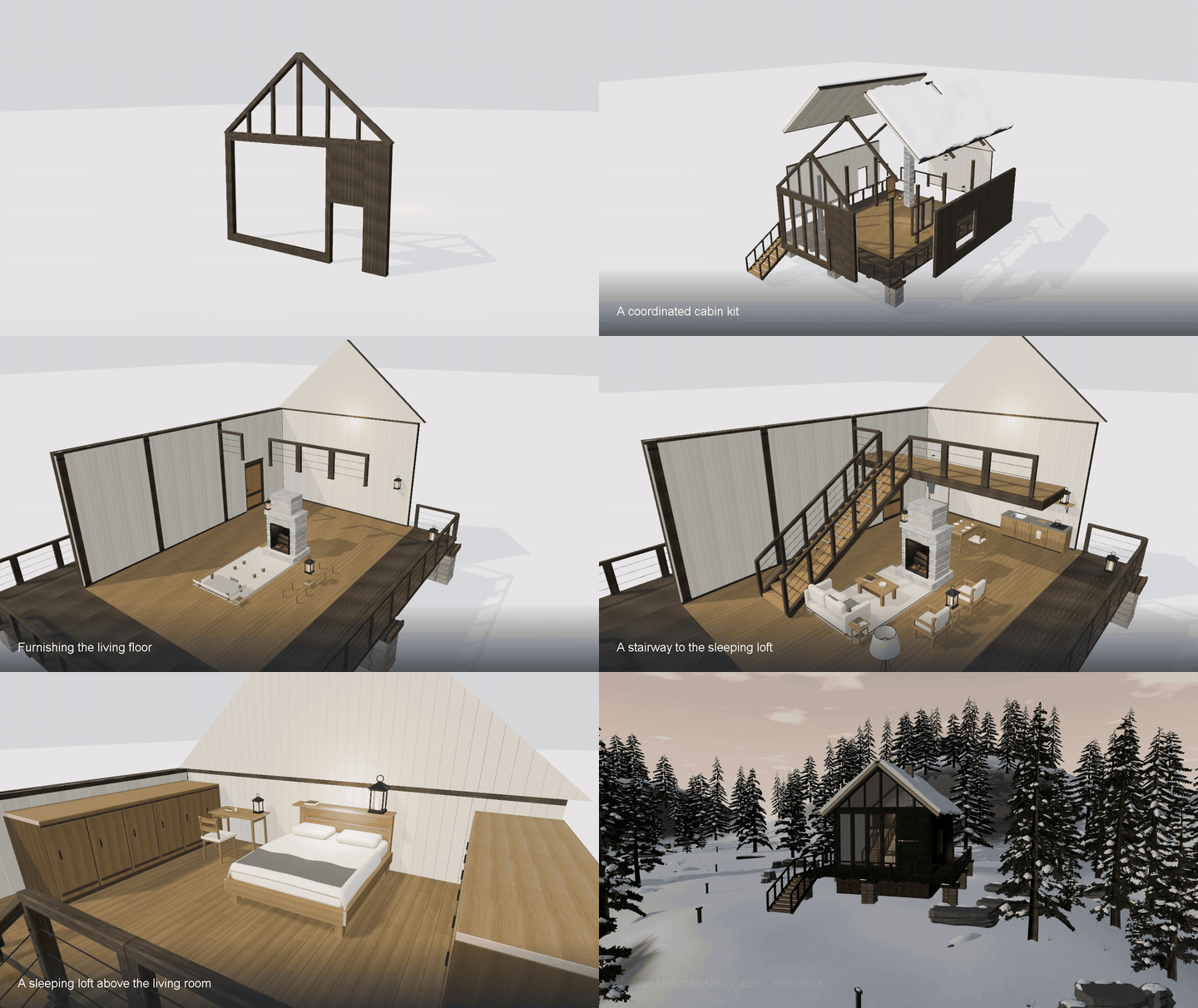](https://kilnstudio.tools/#workflow)
- The [full construction film](https://kilnstudio.tools/#workflow) shows the
- WebGPU assembly and the finished world.
- ## Used in live games
- I build Sheepdog Sim, OBJEKT 62 and ski sim alongside Kiln, and use these games
- to test Kiln-authored assets in real gameplay.
- | Sheepdog Sim | OBJEKT 62 | ski sim |
- | --- | --- | --- |
- | [](https://sheepdogsim.com/) | [](https://objekt62.com/) | [](https://skisim.app/) |
- Sheepdog Sim's [source](https://github.com/matthew-kissinger/sds) shows how its
- Kiln-authored buildings, fencing and trees fit into a working game. OBJEKT 62 uses
- Kiln for weapons, vehicles and outpost modules; ski sim uses it for skiers,
- vegetation, village buildings and park equipment.
- ## Community and hosted access
- [Join the Kiln Discord](https://discord.gg/fSWVbMdQXK) to share assets, get help,
- and request hosted access. [Hosted Kiln](https://kiln.instruktlabs.com/) is open
- as a free, invite-only introductory service, with ten accounts sharing an
- allowance of 200 native requests per month. Ask in `#request-access` or message
- `matt_941`; individual Kiln codes are sent privately as capacity allows.
- Joining Discord does not automatically grant hosted access. Local Kiln remains
- free, open source and account-free.
- ## Install
- Use Node.js 22 or 24 LTS and npm. See [supported versions and platforms](docs/install.md)
- for the complete compatibility range. Bun is only needed to work on Kiln itself.
- ```sh
- mkdir kiln-install
- cd kiln-install
- npm init -y
- npm install @instruktlabs/kiln
- npx --offline --no -- kiln-init ../my-assets --harness codex
- cd ../my-assets
- ```
- Open your coding agent in `my-assets` and follow `START.md`. Choose `claude`,
- `codex`, `opencode`, `agy`, `hermes`, `copilot` or `cursor-agent` for `--harness`.
- Setup creates project-local instructions, skills, launchers and a `kiln_workspace`
- MCP connection. Keep this authoring workspace separate from the engine installation.
- Then ask your agent for an asset:
- > Create a low-poly camping lantern with a carry handle. Review it from several
- > angles, refine any problems, and save the editable source and a GLB.
- For an **existing project**, Kiln 1.1+ supports a preview followed by adoption:
- ```sh
- # Run from kiln-install; replace the path and harness for your project.
- npx --offline --no -- kiln-init /absolute/path/to/my-project --adopt --harness codex --check
- npx --offline --no -- kiln-init /absolute/path/to/my-project --adopt --harness codex
- ```
- The preview writes nothing and exits 1 when changes are needed. Adoption preserves
- existing instructions and unrelated configuration, and reports conflicts before
- overwriting files. See [installation and upgrades](docs/install.md) for version
- availability, additional agents, repairs and plugin setup.
- ## What you can do
- | Task | Kiln provides |
- | --- | --- |
- | Author and refine | Geometry helpers, named parts, immutable source revisions and anchored edits |
- | Vary | Declared parameters: one source builds other sizes, counts, options and colours |
- | Inspect | Multi-view renders, measurements and image-independent structural QA |
- | Save and reuse | A local asset library, revision history and portable source/GLB exports |
- | Review together | A local dashboard with materials, optional projects and Live Review |
- | Integrate | Shared CLI/MCP tools and compiled ESM with TypeScript declarations |
- Projects are optional. A single asset needs no pack, project record or hosted account.
- Use [Discovery](docs/tools.md) to find helpers rather than guessing API names.
- A program can [declare parameters](docs/programs.md#declared-parameters) with
- `defineParams`. The saved GLB is the default build, and `kiln render asset.kiln.js --sweep`
- builds each parameter at its extremes and reports what an exported file can carry without
- a rebuild: a colour, an option that shows or hides parts, a preset of colours and, with
- `kiln export --profile runtime --carry-shapes`, a size that moves in straight lines.
- Every other value is another build from the same source.
- A build also warns when faces of two parts lie on one plane and would flicker
- (`FLUSH_FACES`), with the place and the direction to move one of them.
- CPU rendering works without a GPU and is useful for geometry review. Material-faithful
- views use the optional local render service; texture and metallic appearance must be
- checked against the reported fidelity. See [rendering and materials](docs/rendering.md).
- Experimental implicit modeling and the alternative Three.js exporter are opt-in;
- their [stability boundaries](docs/sdk.md#stability-in-1x) are documented separately.
- ## CLI and SDK
- The package installs three commands: `kiln`, `kiln-init` and `kiln-mcp`.
- For a command available throughout your terminal, install it globally:
- ```sh
- npm install -g @instruktlabs/kiln
- kiln discover --capabilities --json
- kiln render my-asset.kiln.js --out my-asset.glb --views sheet.png
- ```
- KTX2 texture compression for the three.js runtime export (`export --target three --ktx2`)
- uses an optional peer that Kiln does not install or bundle. Add it to the same installation
- when you need it: `npm install ktx2-encoder@0.6.0`. It is MIT-licensed and ships its own
- notice for the bundled Basis Universal encoder (Apache-2.0); see
- [KTX2 textures](docs/export-profiles.md#ktx2-textures).
- With a project-local installation, use `npx --no -- kiln discover --capabilities --json`
- from that project. The [CLI installation guide](docs/install.md#run-the-cli) covers PATH
- and the equivalent `npm exec` command.
- Inside a generated authoring workspace, use its launcher to match the MCP server's
- Kiln installation, Node version and source store:
- ```sh
- node kiln.mjs discover --capabilities --json
- node kiln.mjs render my-asset.kiln.js --out my-asset.glb --views sheet.png
- node kiln.mjs view
- ```
- The SDK is available as `@instruktlabs/kiln` and documented subpaths.
- Read the [SDK guide](docs/sdk.md) for imports and host interfaces, and the
- [tool reference](docs/tools.md) for MCP schemas. Local Claude Code and Codex
- [plugins](docs/install.md#local-claude-code-and-codex-plugins) use the same workspace
- setup. Other MCP clients can connect directly.
- [ChatGPT](docs/chatgpt.md) uses a separate remote-connection setup.
- [Hosted Kiln](https://kiln.instruktlabs.com/) is a remote MCP server at
- `https://kiln.instruktlabs.com/mcp`, open by invitation (see
- [Community and hosted access](#community-and-hosted-access)); it signs in through
- OAuth with Google or GitHub. Vendor directory listings are not available yet.
- ## Work on Kiln
- For engine development, use the [pinned toolchain](toolchain.json):
- ```sh
- git clone --filter=blob:none https://github.com/instruktlabs/kiln
- cd kiln
- bun install --frozen-lockfile
- bun run build:runtime
- node scripts/example-archive.mjs --fetch
- bun run typecheck
- bun run test
- ```
- Read [CONTRIBUTING.md](CONTRIBUTING.md) for the complete checks, package builds and
- bug-report guidance, and [AGENTS.md](AGENTS.md) when changing the engine with an agent.
- Author assets in a separate workspace. Large scene downloads are optional and are
- not fetched by cloning the repository.
- Kiln is maintained by [Instrukt Labs](https://github.com/instruktlabs) and released
- under the [MIT license](LICENSE). Downloaded asset packs carry their own licenses.
Ratings and comments
Sign in to rate this skill.
Sign inFree to use. If it’s helped, pass it on.