insforge-official-marketplace
The all-in-one, open-source backend platform for agentic coding. InsForge gives your coding agent database, auth, storage, compute, hosting, and AI gateway to ship full-stack apps end-to-end.
Safety scan
A static text scan, not a guarantee. Select the badge to see what was scanned and every finding.
Badge for your README

Markdown
[](/listings/insforge--insforge)HTML
<a href="/listings/insforge--insforge"><img src="/api/listings/insforge--insforge/badge.svg" alt="findsafeskills safety rating" /></a>Install
Install instructions from the README
As written by the repo's author. findsafeskills has not verified these steps.
These steps run a script from the network that findsafeskills does not scan.
Cloud-hosted: [insforge.dev](https://insforge.dev)
Self-hosted: Docker Compose
Prerequisites: [Docker](https://www.docker.com/) with Compose v2.
1. Setup
curl -fsSL https://raw.githubusercontent.com/InsForge/InsForge/main/deploy/setup.sh | sh -s ~/insforge
Fetches the files the stack reads and generates `JWT_SECRET`, `ENCRYPTION_KEY`, `POSTGRES_PASSWORD`, `ROOT_ADMIN_PASSWORD`, and the two access keys into `~/insforge/.env` (mode 600). Nothing is started. Re-running refreshes the files and keeps every value you have set — it only ever adds `COMPOSE_FILE`, or points it at this checkout's compose file if it still names the development one.
cd ~/insforge
$EDITOR .env          # API_BASE_URL, VITE_API_BASE_URL — the URL browsers will use
docker compose up -d
`.env` sets `COMPOSE_FILE`, so plain `docker compose` commands work from that directory — no `-f` flags to remember.
[![Deploy on Docker][docker-btn]][docker-deploy]
<details> <summary>Building from source instead</summary>
For working on InsForge itself. `docker-compose.prod.yml` reads the same variables but generates nothing, so set the secrets in `.env` yourself before starting anything you expose.
git clone https://github.com/InsForge/InsForge.git
cd InsForge
cp .env.example .env
$EDITOR .env
docker compose -f docker-compose.prod.yml up
Set `JWT_SECRET`, `ENCRYPTION_KEY`, `POSTGRES_PASSWORD`, and `ROOT_ADMIN_PASSWORD` — `.env.example` ships placeholders for them, and the compose file falls back to published defaults for any you leave unset. Set `ACCESS_API_KEY` and `ACCESS_ANON_KEY` too if you want to know your own keys; left empty, the backend generates a pair only it knows.
This path passes `-f` explicitly, which overrides `COMPOSE_FILE`. Add overlays as further `-f` flags rather than editing that variable.
</details>
2. Connect InsForge MCP
Open [http://localhost:7130](http://localhost:7130)
Follow the steps to connect InsForge MCP Server.
<div align="center"> </div>
3. Verify installation
To verify the connection, send the following prompt to your agent:
I'm using InsForge as my backend platform, call InsForge MCP's fetch-docs tool to learn about InsForge instructions.
4. Running Multiple Projects
Give each project its own directory:
curl -fsSL https://raw.githubusercontent.com/InsForge/InsForge/main/deploy/setup.sh | sh -s ~/project1
curl -fsSL https://raw.githubusercontent.com/InsForge/InsForge/main/deploy/setup.sh | sh -s ~/project2
Then give each a project name and its own ports. Both `.env` files start with `COMPOSE_PROJECT_NAME=insforge`, and **two directories sharing that name share containers** — the second `up -d` adopts the first's, rebuilt with the second's config. Set it before starting anything.
`~/project1/.env` keeps the default ports — which collide with the `~/insforge` instance from the quickstart above if it is still running. Stop that one, or give `project1` its own ports the way `project2` has:
COMPOSE_PROJECT_NAME=project1
`~/project2/.env`:
COMPOSE_PROJECT_NAME=project2
POSTGRES_PORT=5442
POSTGREST_PORT=5440
APP_PORT=7230
AUTH_PORT=7231
DENO_PORT=7233
Now each directory is a separate instance with its own containers, volumes, database, and secrets:
cd ~/project1 && docker compose up -d
cd ~/project2 && docker compose up -d
`docker compose ps`, `logs -f`, and `down` operate on whichever directory you run them from.
5. Storage Backends (Optional)
InsForge stores files on the local filesystem by default. Backing storage with an S3-compatible store also enables the S3-compatible gateway at `/storage/v1/s3` (use `aws` CLI, rclone, or any AWS SDK against your InsForge Storage).
Append one overlay to `COMPOSE_FILE` in `.env`. Bundled MinIO, whose store stays internal to the Docker network:
COMPOSE_FILE=deploy/docker-compose/docker-compose.yml:docker-compose.minio.yml
What was scanned
The files the safety scan read, as written by the repository's author and shown as plain text. Lines with a finding are marked.
.claude-plugin/marketplace.json · Manifest · 24 lines
View this file on GitHub (read at the repository's current version: the scan did not record which commit it read)
- {
- "name": "insforge-official-marketplace",
- "owner": {
- "name": "InsForge Team",
- "email": "tony.chang@insforge.dev"
- },
- "plugins": [
- {
- "name": "insforge",
- "source": {
- "source": "github",
- "repo": "InsForge/insforge-skills"
- },
- "description": "The backend platform for AI-native developers. A Postgres-based backend with auth, storage, compute, hosting, and AI gateway — built for coding agents. This plugin gives agents the full InsForge surface: database CRUD with RLS, authentication, storage, edge functions, AI, realtime, Stripe payments, and deployments. Includes CLI infrastructure management, debugging diagnostics, and integration guides for third-party auth providers (Auth0, Clerk, Kinde, Stytch, WorkOS).",
- "version": "1.2.0",
- "author": {
- "name": "InsForge",
- "url": "https://insforge.dev"
- },
- "category": "database",
- "tags": ["insforge", "ai-native", "coding-agents", "ai-agents", "backend-as-a-service", "baas", "postgres", "auth", "storage", "compute", "hosting", "ai-gateway", "edge-functions", "stripe", "rls"]
- }
- ]
- }
README.md · README · 357 lines · 3 findings marked
View this file on GitHub (read at the repository's current version: the scan did not record which commit it read)
- <div align="center">
- <a href="https://insforge.dev">
- <picture>
- <source media="(prefers-color-scheme: dark)" srcset="assets/logo-dark.svg">
- <source media="(prefers-color-scheme: light)" srcset="assets/logo-light.svg">
- <img src="assets/logo-dark.svg" alt="InsForge" width="500">
- </picture>
- </a>
- <p>
- The all-in-one, open-source backend platform for agentic coding.<br />
- </p>
- <p>
- <a href="https://opensource.org/licenses/Apache-2.0"><img src="https://img.shields.io/badge/License-Apache%202.0-orange.svg" alt="License"></a>
- <a href="https://www.npmjs.com/package/@insforge/sdk"><img src="https://img.shields.io/npm/dt/@insforge/sdk?color=blue&label=downloads" alt="Downloads"></a>
- <a href="https://github.com/InsForge/InsForge/graphs/contributors"><img src="https://img.shields.io/github/contributors/InsForge/InsForge?color=green" alt="Contributors"></a>
- <a href="https://insforge.dev"><img src="https://img.shields.io/badge/Visit-InsForge.dev-181818?logoColor=white&labelColor=555555&logo=data:image/svg%2bxml;base64,PHN2ZyB3aWR0aD0iMjQwIiBoZWlnaHQ9IjI0MCIgdmlld0JveD0iMCAwIDI0MCAyNDAiIGZpbGw9Im5vbmUiIHhtbG5zPSJodHRwOi8vd3d3LnczLm9yZy8yMDAwL3N2ZyI+PHBhdGggZD0iTTI2LjExODQgMTAxLjZDMjMuMjkzOSA5OC43ODMzIDIzLjI5MzkgOTQuMjE2NiAyNi4xMTg0IDkxLjRMOTcuNzE2NyAyMEwyMDAgMjBMNzcuMjYgMTQyLjRDNzQuNDM1NSAxNDUuMjE3IDY5Ljg1NjIgMTQ1LjIxNyA2Ny4wMzE3IDE0Mi40TDI2LjExODQgMTAxLjZaIiBmaWxsPSJ3aGl0ZSIvPjxwYXRoIGQ9Ik0xNTUuMjUxIDc3LjM3NUwyMDAgMTIyVjIyNEwxMDQuMTA5IDEyOC4zNzVMMTU1LjI1MSA3Ny4zNzVaIiBmaWxsPSJ3aGl0ZSIvPjwvc3ZnPgo=" alt="Visit InsForge.dev"></a>
- <a href="https://gitcgr.com/InsForge/InsForge">
- <img src="https://gitcgr.com/badge/InsForge/InsForge.svg" alt="gitcgr" />
- </a>
- </p>
- <p>
- <a href="https://x.com/InsForge"><img src="https://img.shields.io/badge/Follow%20on%20X-000000?logo=x&logoColor=white&style=for-the-badge" alt="Follow on X"></a>
- <a href="https://www.linkedin.com/company/insforge"><img src="https://img.shields.io/badge/Follow%20on%20LinkedIn-0A66C2?logo=linkedin&logoColor=white&style=for-the-badge" alt="Follow on LinkedIn"></a>
- <a href="https://discord.com/invite/MPxwj5xVvW"><img src="https://img.shields.io/badge/Join%20our%20Discord-5865F2?logo=discord&logoColor=white&style=for-the-badge" alt="Join our Discord"></a>
- </p>
- <a href="https://trendshift.io/repositories/19834" target="_blank">
- <img src="https://trendshift.io/api/badge/repositories/19834" alt="InsForge%2FInsForge | Trendshift" style="width: 250px; height: 55px;" width="250" height="55"/>
- </a>
- <br /><br />
- <a href="https://vercel.com/oss">
- <img alt="Vercel OSS Program" src="https://vercel.com/oss/program-badge-2026.svg" />
- </a>
- </div>
- <p align="center">
- ⭐ <em>Help us reach more developers and grow the InsForge community. Star this repo!</em>
- </p>
- ## InsForge
- The all-in-one, open-source backend platform for agentic coding. InsForge gives your coding agent database, auth, storage, compute, hosting, and AI gateway to ship full-stack apps end-to-end.
- https://github.com/user-attachments/assets/345efbc6-ca63-4189-bde0-12ef3bda561b
- ### How it works
- Coding agents interact with InsForge through one of two interfaces:
- - **MCP Server** (self-hosted and cloud): exposes InsForge's operations as tools any MCP-compatible agent can call.
- - **CLI + Skills** (cloud only): a command-line interface paired with Skills that agents invoke directly from the terminal.
- Both interfaces let coding agents operate the backend like backend engineers:
- - **Read backend context and state**: Pull documentation, schemas, metadata (deployed functions, bucket contents, auth config), and runtime logs, so the agent has what it needs to write code, verify what it built, and debug when something breaks.
- - **Configure primitives**: Deploy edge functions, run database migrations, create storage buckets, set up auth providers, and configure other backend resources directly.
- ```mermaid
- graph TB
- subgraph TOP[" "]
- AG[AI Coding Agents]
- end
- subgraph MID[" "]
- SL[InsForge]
- end
- AG --> SL
- SL --> AUTH[Authentication]
- SL --> DB[Database]
- SL --> ST[Storage]
- SL --> EF[Edge Functions]
- SL --> MG[Model Gateway]
- SL --> CP[Compute]
- SL --> DEP[Deployment]
- classDef bar fill:#0b0f14,stroke:#30363d,stroke-width:1px,color:#ffffff
- classDef card fill:#161b22,stroke:#30363d,stroke-width:1px,color:#ffffff
- class AG,SL bar
- class AUTH,DB,ST,EF,MG,CP,DEP card
- style TOP fill:transparent,stroke:transparent
- style MID fill:transparent,stroke:transparent
- linkStyle default stroke:#30363d,stroke-width:1px
- ```
- ### Core Products
- - **Authentication**: User management, authentication, and sessions
- - **Database**: Postgres relational database
- - **Storage**: S3-compatible file storage
- - **Model Gateway**: OpenAI-compatible API across multiple LLM providers
- - **Edge Functions**: Serverless code running on the edge
- - **Compute** (private preview): Long-running container services
- - **Site Deployment**: Site build and deployment
- ## ⭐️ Star the Repository
- <p align="center">
- <img src="assets/insforge-star.gif" alt="Star InsForge" width="100%">
- </p>
- If you find InsForge useful or interesting, a GitHub Star ⭐️ would be greatly appreciated.
- ## Quickstart
- ### Cloud-hosted: [insforge.dev](https://insforge.dev)
- <a href="https://insforge.dev" target="_blank" rel="noopener noreferrer"><img src="https://img.shields.io/badge/insforge.dev-181818?logo=data:image/svg%2bxml;base64,PHN2ZyB3aWR0aD0iMjQwIiBoZWlnaHQ9IjI0MCIgdmlld0JveD0iMCAwIDI0MCAyNDAiIGZpbGw9Im5vbmUiIHhtbG5zPSJodHRwOi8vd3d3LnczLm9yZy8yMDAwL3N2ZyI+PHBhdGggZD0iTTI2LjExODQgMTAxLjZDMjMuMjkzOSA5OC43ODMzIDIzLjI5MzkgOTQuMjE2NiAyNi4xMTg0IDkxLjRMOTcuNzE2NyAyMEwyMDAgMjBMNzcuMjYgMTQyLjRDNzQuNDM1NSAxNDUuMjE3IDY5Ljg1NjIgMTQ1LjIxNyA2Ny4wMzE3IDE0Mi40TDI2LjExODQgMTAxLjZaIiBmaWxsPSJ3aGl0ZSIvPjxwYXRoIGQ9Ik0xNTUuMjUxIDc3LjM3NUwyMDAgMTIyVjIyNEwxMDQuMTA5IDEyOC4zNzVMMTU1LjI1MSA3Ny4zNzVaIiBmaWxsPSJ3aGl0ZSIvPjwvc3ZnPgo=&logoColor=white" alt="InsForge.dev"></a>
- ### Self-hosted: Docker Compose
- Prerequisites: [Docker](https://www.docker.com/) with Compose v2.
- #### 1. Setup
- ```bash
- curl -fsSL https://raw.githubusercontent.com/InsForge/InsForge/main/deploy/setup.sh | sh -s ~/insforge
- Note: Pipes a downloaded script directly into a shell (curl | sh / wget | bash)
- Line 122 on GitHub
- ```
- Fetches the files the stack reads and generates `JWT_SECRET`, `ENCRYPTION_KEY`,
- `POSTGRES_PASSWORD`, `ROOT_ADMIN_PASSWORD`, and the two access keys into
- `~/insforge/.env` (mode 600). Nothing is started. Re-running refreshes the files
- and keeps every value you have set — it only ever adds `COMPOSE_FILE`, or points
- it at this checkout's compose file if it still names the development one.
- ```bash
- cd ~/insforge
- $EDITOR .env # API_BASE_URL, VITE_API_BASE_URL — the URL browsers will use
- docker compose up -d
- ```
- `.env` sets `COMPOSE_FILE`, so plain `docker compose` commands work from that
- directory — no `-f` flags to remember.
- [![Deploy on Docker][docker-btn]][docker-deploy]
- <details>
- <summary>Building from source instead</summary>
- For working on InsForge itself. `docker-compose.prod.yml` reads the same
- variables but generates nothing, so set the secrets in `.env` yourself before
- starting anything you expose.
- ```bash
- git clone https://github.com/InsForge/InsForge.git
- cd InsForge
- cp .env.example .env
- $EDITOR .env
- docker compose -f docker-compose.prod.yml up
- ```
- Set `JWT_SECRET`, `ENCRYPTION_KEY`, `POSTGRES_PASSWORD`, and
- `ROOT_ADMIN_PASSWORD` — `.env.example` ships placeholders for them, and the
- compose file falls back to published defaults for any you leave unset. Set
- `ACCESS_API_KEY` and `ACCESS_ANON_KEY` too if you want to know your own keys;
- left empty, the backend generates a pair only it knows.
- This path passes `-f` explicitly, which overrides `COMPOSE_FILE`. Add overlays as
- further `-f` flags rather than editing that variable.
- </details>
- #### 2. Connect InsForge MCP
- Open [http://localhost:7130](http://localhost:7130)
- Follow the steps to connect InsForge MCP Server.
- <div align="center">
- <img src="assets/connect.png" alt="Connect InsForge MCP" width="600">
- </div>
- #### 3. Verify installation
- To verify the connection, send the following prompt to your agent:
- ```
- I'm using InsForge as my backend platform, call InsForge MCP's fetch-docs tool to learn about InsForge instructions.
- ```
- #### 4. Running Multiple Projects
- Give each project its own directory:
- ```bash
- curl -fsSL https://raw.githubusercontent.com/InsForge/InsForge/main/deploy/setup.sh | sh -s ~/project1
- Note: Pipes a downloaded script directly into a shell (curl | sh / wget | bash)
- Line 190 on GitHub
- curl -fsSL https://raw.githubusercontent.com/InsForge/InsForge/main/deploy/setup.sh | sh -s ~/project2
- Note: Pipes a downloaded script directly into a shell (curl | sh / wget | bash)
- Line 191 on GitHub
- ```
- Then give each a project name and its own ports. Both `.env` files start with
- `COMPOSE_PROJECT_NAME=insforge`, and **two directories sharing that name share
- containers** — the second `up -d` adopts the first's, rebuilt with the second's
- config. Set it before starting anything.
- `~/project1/.env` keeps the default ports — which collide with the `~/insforge`
- instance from the quickstart above if it is still running. Stop that one, or give
- `project1` its own ports the way `project2` has:
- ```env
- COMPOSE_PROJECT_NAME=project1
- ```
- `~/project2/.env`:
- ```env
- COMPOSE_PROJECT_NAME=project2
- POSTGRES_PORT=5442
- POSTGREST_PORT=5440
- APP_PORT=7230
- AUTH_PORT=7231
- DENO_PORT=7233
- ```
- Now each directory is a separate instance with its own containers, volumes,
- database, and secrets:
- ```bash
- cd ~/project1 && docker compose up -d
- cd ~/project2 && docker compose up -d
- ```
- `docker compose ps`, `logs -f`, and `down` operate on whichever directory you
- run them from.
- #### 5. Storage Backends (Optional)
- InsForge stores files on the local filesystem by default. Backing storage with an S3-compatible store also enables the S3-compatible gateway at `/storage/v1/s3` (use `aws` CLI, rclone, or any AWS SDK against your InsForge Storage).
- Append one overlay to `COMPOSE_FILE` in `.env`. Bundled MinIO, whose store stays
- internal to the Docker network:
- ```env
- COMPOSE_FILE=deploy/docker-compose/docker-compose.yml:docker-compose.minio.yml
- ```
- Or RustFS, an Apache-2.0 licensed alternative:
- ```env
- COMPOSE_FILE=deploy/docker-compose/docker-compose.yml:docker-compose.rustfs.yml
- ```
- Keep one — the file is read as shell assignments, so a second line replaces the
- first. Then `docker compose up -d` as usual.
- The overlays ship with default store credentials — set `MINIO_ROOT_USER`/`MINIO_ROOT_PASSWORD` (or `RUSTFS_ACCESS_KEY`/`RUSTFS_SECRET_KEY`) in `.env` before production use.
- Or bring your own S3-compatible store (AWS S3, MinIO, RustFS, Wasabi, R2, Tencent COS, Aliyun OSS ...) by setting `S3_BUCKET`, `S3_REGION`, `S3_ACCESS_KEY_ID`, `S3_SECRET_ACCESS_KEY` — plus `S3_ENDPOINT_URL` for non-AWS providers — in `.env`. If the endpoint is not reachable by browsers (private network), also set `S3_USE_PRESIGNED_URLS=false` to enable proxy mode.
- See the [self-hosted storage guide](https://docs.insforge.dev/deployment/self-host-storage) for provider notes, presigned vs. proxy mode, and upgrade tips.
- ### One-click Deployment
- In addition to running InsForge locally, you can also launch InsForge using a pre-configured setup. This allows you to get up and running quickly with InsForge without installing Docker on your local machine.
- | Railway | Zeabur | Sealos | RepoCloud | ZopDay |
- | --- | --- | --- | --- | --- |
- | [](https://railway.com/deploy/insforge) | [](https://zeabur.com/templates/Q82M3Y) | [](https://sealos.io/products/app-store/insforge) | [](https://repocloud.io/details/InsForge/) | [](https://zop.dev/zopday/app/deploy?image=ghcr.io/insforge/insforge-oss:latest&port=7130) |
- ## Contributing
- **Contributing**: If you're interested in contributing, you can check our guide here [CONTRIBUTING.md](CONTRIBUTING.md). We truly appreciate pull requests, and all types of help are appreciated!
- **Support**: If you need any help or support, we're responsive on our [Discord channel](https://discord.com/invite/MPxwj5xVvW), and also feel free to email us [info@insforge.dev](mailto:info@insforge.dev) too!
- ## Documentation & Support
- ### Documentation
- - **[Official Docs](https://docs.insforge.dev/introduction)** - Comprehensive guides and API references
- ### Community
- - **[Discord](https://discord.com/invite/MPxwj5xVvW)** - Join our vibrant community
- - **[Twitter](https://x.com/InsForge)** - Follow for updates and tips
- ### Contact
- - **Email**: info@insforge.dev
- ## License
- This project is licensed under the Apache License 2.0 - see the [LICENSE](LICENSE) file for details.
- ---
- [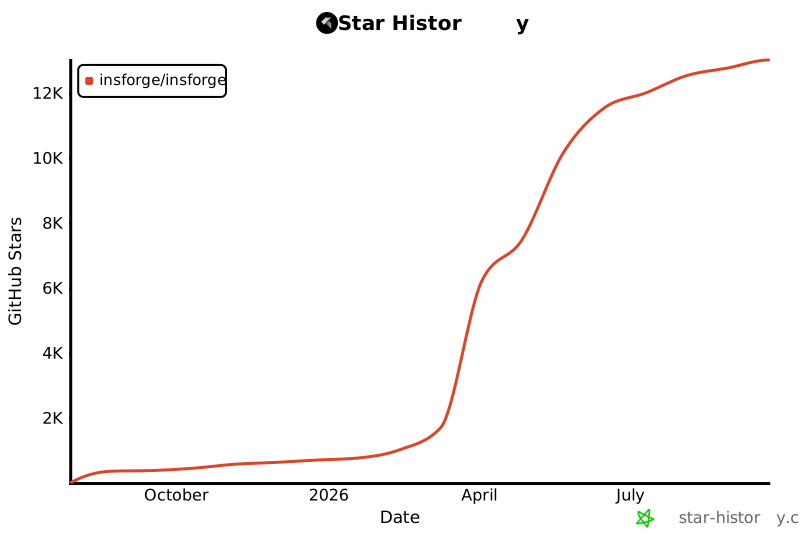](https://www.star-history.com/#InsForge/InsForge&Date)
- ## Badges
- Show your project is built with InsForge.
- ### Made with InsForge
- <a href="https://insforge.dev">
- <img
- width="168"
- height="30"
- src="https://insforge.dev/badge-made-with-insforge.svg"
- alt="Made with InsForge"
- />
- </a>
- **Markdown:**
- ```md
- [](https://insforge.dev)
- ```
- **HTML:**
- ```html
- <a href="https://insforge.dev">
- <img
- width="168"
- height="30"
- src="https://insforge.dev/badge-made-with-insforge.svg"
- alt="Made with InsForge"
- />
- </a>
- ```
- ### Made with InsForge (dark)
- <a href="https://insforge.dev">
- <img
- width="168"
- height="30"
- src="https://insforge.dev/badge-made-with-insforge-dark.svg"
- alt="Made with InsForge"
- />
- </a>
- **Markdown:**
- ```md
- [](https://insforge.dev)
- ```
- **HTML:**
- ```html
- <a href="https://insforge.dev">
- <img
- width="168"
- height="30"
- src="https://insforge.dev/badge-made-with-insforge-dark.svg"
- alt="Made with InsForge"
- />
- </a>
- ```
- <p align="center">⭐ <b>Star us on GitHub</b> to get notified about new releases!</p>
- <!-- LINK GROUPS -->
- [docker-btn]: ./deploy/buttons/docker.png
- [docker-deploy]: ./deploy/docker-deploy.md
Ratings and comments
Sign in to rate this skill.
Sign inFree to use. If it’s helped, pass it on.