pretty-mermaid
Generate and render Mermaid diagrams for architecture docs, READMEs, PRs, terminals, chats, and CI as themed SVG, PNG, or ASCII/Unicode art. Use this skill whenever the user provides Mermaid code or .mmd files; asks for a flowchart, sequence/state/class diagram, ERD, XY chart, or architecture/workflow/data-model visualization; or wants to beautify, theme, batch-convert, or make a diagram terminal-friendly. Runs locally without a browser or DOM, with 15 built-in themes and custom colors.
Safety scan
A static text scan, not a guarantee. Select the badge to see what was scanned and every finding.
Badge for your README

Markdown
[](/listings/imxv-pretty-mermaid-skills)HTML
<a href="/listings/imxv-pretty-mermaid-skills"><img src="/api/listings/imxv-pretty-mermaid-skills/badge.svg" alt="findsafeskills safety rating" /></a>Install
Install instructions from the README
As written by the repo's author. findsafeskills has not verified these steps.
npx skills add imxv/pretty-mermaid-skills@pretty-mermaid -g -y
[View the skill, install count, and security audits on skills.sh →](https://www.skills.sh/imxv/pretty-mermaid-skills/pretty-mermaid)
What was scanned
The files the safety scan read, as written by the repository's author and shown as plain text. Lines with a finding are marked.
SKILL.md · Manifest · 204 lines
View this file on GitHub (read at the repository's current version: the scan did not record which commit it read)
This file has changed since it was scanned, so this is not exactly the text that was scanned, and no line is marked. The findings are listed with the safety scan above.
- ---
- name: pretty-mermaid
- description: |
- Generate and render Mermaid diagrams for architecture docs, READMEs, PRs,
- terminals, chats, and CI as themed SVG, PNG, or ASCII/Unicode art. Use this skill whenever
- the user provides Mermaid code or .mmd files; asks for a flowchart,
- sequence/state/class diagram, ERD, XY chart, or architecture/workflow/data-model
- visualization; or wants to beautify, theme, batch-convert, or make a diagram
- terminal-friendly. Runs locally without a browser or DOM, with 15 built-in
- themes and custom colors.
- ---
- # Pretty Mermaid
- Create or render Mermaid diagrams with the bundled Node.js CLI. Use SVG for scalable documentation, PNG for sharing or raster-only consumers, and ASCII or Unicode for terminals and plain text.
- ## Working directory
- Treat the directory containing this file as `<skill-root>`. Run bundled scripts from that directory, or invoke them with absolute paths. Keep user source and rendered output in the user's requested location; do not copy the renderer into their project.
- ## Workflow
- 1. Determine whether the user supplied Mermaid source or needs a diagram authored from prose.
- 2. Choose the diagram type and output format from the tables below.
- 3. Read only the relevant reference file when syntax, theme selection, or API behavior needs more detail.
- 4. Save new source as a `.mmd` file, preserving user terminology and relationships.
- 5. Render with a named theme or explicit colors.
- 6. Inspect the result. Fix syntax, clipping, crowded layout, or unclear labels and render again.
- 7. Return the source and output paths, plus the selected format and theme.
- Do not overwrite an existing source or output file unless the user asked for replacement.
- ## Choose a diagram type
- | Need | Diagram type | Starter |
- | --- | --- | --- |
- | Process, decision tree, architecture | Flowchart | `flowchart LR` |
- | API calls, messages, interactions | Sequence | `sequenceDiagram` |
- | Lifecycle or finite-state machine | State | `stateDiagram-v2` |
- | Classes, modules, relationships | Class | `classDiagram` |
- | Database entities and cardinality | ER | `erDiagram` |
- | Bars, lines, trends, comparisons | XY chart | `xychart-beta` |
- Read `references/DIAGRAM_TYPES.md` when authoring non-trivial Mermaid syntax.
- ## Choose an output
- | Output | Best for | Notes |
- | --- | --- | --- |
- | SVG | READMEs, docs, slides, websites | Scalable, themed, supports transparency |
- | PNG | Chats, previews, raster-only tools | Set `--format png`; no external converter required |
- | Unicode | Modern terminals and readable text previews | Default ASCII renderer output |
- | Plain ASCII | Logs and restricted terminals | Add `--use-ascii` |
- | ANSI-colored text | Interactive terminals | Set `--color-mode` |
- ## Core commands
- Run these from `<skill-root>`.
- ### List themes
- ```bash
- node scripts/themes.mjs
- ```
- ### Render SVG
- ```bash
- node scripts/render.mjs \
- --input diagram.mmd \
- --output diagram.svg \
- --theme tokyo-night
- ```
- ### Render terminal text
- ```bash
- node scripts/render.mjs \
- --input diagram.mmd \
- --output diagram.txt \
- --format ascii \
- --color-mode none
- ```
- Add `--use-ascii` when Unicode box-drawing characters are not acceptable.
- ### Render PNG
- ```bash
- node scripts/render.mjs \
- --input diagram.mmd \
- --output diagram.png \
- --format png \
- --width 1200 \
- --theme tokyo-night
- ```
- ### Batch render a directory
- ```bash
- node scripts/batch.mjs \
- --input-dir ./diagrams \
- --output-dir ./rendered \
- --format svg \
- --theme github-dark \
- --workers 4
- ```
- Use batch rendering for three or more diagrams or when consistent options must be applied to a directory.
- ## Theme selection
- - General dark documentation: `tokyo-night`
- - GitHub dark or light surfaces: `github-dark`, `github-light`
- - Print and presentations: `zinc-light`
- - High-contrast color: `dracula`
- - Cool, restrained palette: `nord`, `nord-light`
- Read `references/THEMES.md` or open `docs/THEME_GALLERY.md` when visual theme choice matters. A named theme can be refined with explicit color flags.
- ## Useful options
- ### Shared styling
- | Option | Purpose |
- | --- | --- |
- | `--theme <name>` | Apply one of the 15 built-in themes |
- | `--bg`, `--fg` | Set required base colors |
- | `--line`, `--accent`, `--muted` | Refine connectors, highlights, and secondary text |
- | `--surface`, `--border` | Refine node fill and stroke |
- | `--font <name>` | Set the SVG font family |
- ### SVG
- | Option | Purpose |
- | --- | --- |
- | `--transparent` | Remove the SVG background |
- | `--padding <n>` | Set canvas padding |
- | `--node-spacing <n>` | Set horizontal node spacing |
- | `--layer-spacing <n>` | Set vertical layer spacing |
- | `--component-spacing <n>` | Separate disconnected components |
- | `--interactive` | Enable XY chart hover tooltips |
- ### PNG
- | Option | Purpose |
- | --- | --- |
- | `--width <n>` | Set output width from 100 to 10000 pixels while preserving aspect ratio |
- | `--transparent` | Preserve a transparent background |
- ### Terminal output
- | Option | Purpose |
- | --- | --- |
- | `--use-ascii` | Replace Unicode box drawing with plain ASCII |
- | `--padding-x`, `--padding-y` | Tune diagram spacing |
- | `--box-border-padding` | Tune padding inside node boxes |
- | `--color-mode <mode>` | `none`, `auto`, `ansi16`, `ansi256`, `truecolor`, or `html` |
- Run `node scripts/render.mjs --help` or `node scripts/batch.mjs --help` for the authoritative CLI list.
- ## Authoring guidance
- - Prefer short, concrete labels; preserve domain-specific terms from the user.
- - Use explicit edge labels when a branch or message is ambiguous.
- - Keep large diagrams readable by splitting unrelated concerns instead of shrinking text.
- - Use `LR` for wide flows and `TB` for narrow documents.
- - Avoid communicating meaning through color alone.
- - Use a light theme for print and confirm contrast against the final background.
- - For unfamiliar syntax, start from `assets/example_diagrams/` and consult the diagram reference.
- ## Validation
- After rendering:
- 1. Confirm the command exits successfully and the output file is non-empty.
- 2. Confirm SVG output begins with `<svg`; confirm PNG output opens as a valid image; confirm text output contains visible diagram content.
- 3. Inspect visual output when layout matters, especially long labels, CJK text, disconnected components, and XY charts.
- 4. Confirm arrows, cardinalities, states, and labels match the source request.
- 5. Report any renderer limitation instead of silently dropping unsupported syntax.
- Run both `npm test` and `npm run validate` when changing this skill, its scripts, templates, or references.
- ## Troubleshooting
- - Missing dependency: run `npm install` in `<skill-root>`; the CLI also attempts a first-run install.
- - Unknown theme: run `node scripts/themes.mjs` and use an exact listed name.
- - Parse error: consult `references/DIAGRAM_TYPES.md`, reduce to the failing statement, then restore the diagram incrementally.
- - Crowded SVG: increase `--node-spacing`, `--layer-spacing`, or `--component-spacing`.
- - PNG color error: use concrete hex values for custom colors; unresolved external CSS variables cannot be rasterized.
- - Terminal color escape codes in redirected output: use `--color-mode none`.
- ## Reference routing
- | Resource | Read or use when |
- | --- | --- |
- | `references/DIAGRAM_TYPES.md` | Authoring or debugging Mermaid syntax |
- | `references/THEMES.md` | Comparing themes or defining custom colors |
- | `references/api_reference.md` | Extending scripts or calling `beautiful-mermaid` directly |
- | `docs/THEME_GALLERY.md` | Choosing a theme visually |
- | `assets/example_diagrams/` | Starting from a supported diagram template |
- | `scripts/render.mjs` | Rendering one diagram |
- | `scripts/batch.mjs` | Rendering a directory in parallel |
- | `scripts/themes.mjs` | Listing installed themes |
README.md · README · 157 lines
View this file on GitHub (read at the repository's current version: the scan did not record which commit it read)
This file has changed since it was scanned, so this is not exactly the text that was scanned, and no line is marked. The findings are listed with the safety scan above.
- <div align="center">
- # Pretty Mermaid
- **Beautiful Mermaid diagrams for AI agents**
- Turn Mermaid source into polished SVGs, shareable PNGs, and terminal-ready ASCII—locally, without a browser.
- 
- [](https://www.skills.sh/imxv/pretty-mermaid-skills/pretty-mermaid)
- [](https://github.com/imxv/Pretty-mermaid-skills/actions/workflows/ci.yml)
- [](LICENSE)
- [](https://nodejs.org/)
- [](https://github.com/imxv/Pretty-mermaid-skills)
- **English** | [中文](README_CN.md) | [日本語](README_JA.md)
- </div>
- ## 🚀 Install
- ```bash
- npx skills add imxv/pretty-mermaid-skills@pretty-mermaid -g -y
- ```
- [View the skill, install count, and security audits on skills.sh →](https://www.skills.sh/imxv/pretty-mermaid-skills/pretty-mermaid)
- ## Why Pretty Mermaid?
- - **Made for AI agents**: works with Claude Code, Cursor, Codex, Gemini CLI, and more
- - **One source, three outputs**: polished SVG for docs, PNG for sharing, and ASCII/Unicode for terminals
- - **No browser required**: renders locally without Chromium, Puppeteer, or a DOM
- - **Flexible by default**: 15 themes, custom colors, six diagram types, and batch rendering
- ## ✨ Features
- - 📊 **Multi-format Support**: SVG, PNG, and ASCII rendering export
- - 🎨 **Rich Themes**: 15 built-in themes for different scenarios
- - 📈 **Six Diagram Types**: Flowchart, Sequence, State, Class, ER, and XY charts
- - ⚡ **High Performance**: Batch parallel rendering
- - 📚 **Ready to Use**: Complete templates and detailed documentation
- ### Supported Themes
- | Light Themes | Dark Themes | Other |
- | :--- | :--- | :--- |
- | zinc-light | zinc-dark | nord |
- | tokyo-night-light | tokyo-night | nord-light |
- | catppuccin-latte | tokyo-night-storm | dracula |
- | github-light | catppuccin-mocha | one-dark |
- | solarized-light | github-dark | |
- | | solarized-dark | |
- ## 🎨 Theme Gallery
- Compare the same flowchart across every built-in theme in the [complete 15-theme gallery](docs/THEME_GALLERY.md).
- <p align="center">
- <img src="assets/theme_gallery/tokyo-night.svg" alt="Tokyo Night theme preview" width="49%">
- <img src="assets/theme_gallery/github-light.svg" alt="GitHub Light theme preview" width="49%">
- </p>
- ## 🤖 AI Assistant Integration
- Seamlessly integrates with the following AI coding environments:
- - **Claude Code**
- - **Cursor**
- - **Gemini CLI**
- - **Antigravity**
- - **OpenCode**
- - **Codex**
- - **qoder**
- ## Installation details
- ### Install from GitHub
- ```bash
- npx skills add imxv/pretty-mermaid-skills@pretty-mermaid -g -y
- ```
- ### Verify Installation
- ```bash
- npx skills list -g
- ```
- Confirm that `pretty-mermaid` appears in the global skill list. Node.js 16 or newer is required.
- ## 📖 Quick Start
- ### List Available Themes
- ```bash
- node scripts/themes.mjs
- ```
- ### Render Single Diagram
- ```bash
- node scripts/render.mjs \
- --input diagram.mmd \
- --output output.svg \
- --theme tokyo-night
- ```
- ### Render PNG
- ```bash
- node scripts/render.mjs \
- --input diagram.mmd \
- --output output.png \
- --format png \
- --width 1200 \
- --theme tokyo-night
- ```
- ### Batch Render
- ```bash
- node scripts/batch.mjs \
- --input-dir ./diagrams \
- --output-dir ./output \
- --theme dracula
- ```
- ## 📂 Examples
- Check the 6 template files in `assets/example_diagrams/`:
- - `flowchart.mmd` - Flowchart
- - `sequence.mmd` - Sequence Diagram
- - `state.mmd` - State Diagram
- - `class.mmd` - Class Diagram
- - `er.mmd` - ER Diagram
- - `xychart.mmd` - XY Chart (bar and line)
- PNG output is rendered directly in Node.js with no external converter required. The renderer also supports CJK state names, multiline labels, `linkStyle`, configurable ELK layout spacing, interactive XY chart tooltips, and ANSI-colored terminal output.
- ## 📚 Documentation
- - [Skill usage guide](SKILL.md)
- - [Theme gallery](docs/THEME_GALLERY.md)
- - [Diagram syntax reference](references/DIAGRAM_TYPES.md)
- - [Theme and custom color reference](references/THEMES.md)
- - [beautiful-mermaid API reference](references/api_reference.md)
- - [Release process](RELEASING.md)
- ## 🤝 Community
- Read the [contribution guide](CONTRIBUTING.md), report problems with the issue templates, and review the [security policy](SECURITY.md) before sharing sensitive findings. Release history is tracked in the [changelog](CHANGELOG.md).
- ## ⚙️ Requirements
- - Node.js 16+
- ## 📄 License
- MIT License
- ## Star History
- [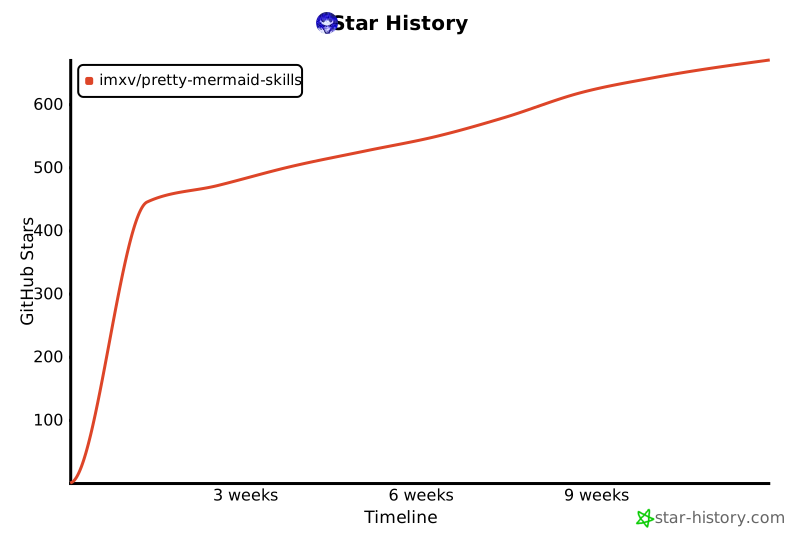](https://www.star-history.com/?repos=imxv%2FPretty-mermaid-skills&type=timeline&legend=bottom-right)
- ## 🙏 Acknowledgments
- Based on [beautiful-mermaid](https://github.com/lukilabs/beautiful-mermaid)
Ratings and comments
Sign in to rate this skill.
Sign inFree to use. If it’s helped, pass it on.