browsentic
An agentic browser extension: an AI side panel in your own logged-in Chrome, Edge, Arc, Brave or even Firefox run by the agent you already use (Claude Code, Codex, Antigravity). Free, open source, no API key. Also an MCP server.
Safety scan
A static text scan, not a guarantee. Select the badge to see what was scanned and every finding.
Badge for your README

Markdown
[](/listings/imshaikot--browsentic)HTML
<a href="/listings/imshaikot--browsentic"><img src="/api/listings/imshaikot--browsentic/badge.svg" alt="findsafeskills safety rating" /></a>Install
Install instructions from the README
As written by the repo's author. findsafeskills has not verified these steps.
These steps run a script from the network that findsafeskills does not scan.
Browsentic is your browser's superpower, free and open source. One install sets up everything, the extension included.
**macOS** — one line installs [the app](docs/guide/mac-app.md), which brings Node and everything else:
curl -fsSL https://browsentic.com/install.sh | sh
**Windows** — one line in PowerShell installs [the Windows app](docs/guide/windows-app.md) ([experimental](docs/guide/limits.md#windows-is-experimental)):
irm https://browsentic.com/install.ps1 | iex
**Any platform** — with [Node.js](https://nodejs.org) 20 or newer:
npx browsentic@latest setup
Setup asks which browser you use and opens Browsentic's store page in it. Press **Add to Chrome** (or **Add** in Firefox), then click Browsentic in the toolbar and enter the code setup shows. That's the whole install, and the extension updates itself from its store from then on. The apps do the same from their Overview tab.
The extension is on the Chrome Web Store, for Chrome, Edge, Brave, Arc, Vivaldi and Opera, and Firefox gets an add-on signed by Mozilla:
<p> </p>
Added it from the store already? Run the same line and enter the code it shows.
The side panel runs on an agent CLI you're signed in to: [Claude Code](https://claude.com/claude-code), [Codex](https://developers.openai.com/codex/cli) or [another supported one](docs/guide/agents.md). You probably have one already. No API key, no account, no subscription.
Full guide, Firefox and unpacked installs included: **[browsentic.com/docs/guide/install](https://browsentic.com/docs/guide/install/)**
What was scanned
The files the safety scan read, as written by the repository's author and shown as plain text. Lines with a finding are marked.
README.md · README · 175 lines
View this file on GitHub (read at the repository's current version: the scan did not record which commit it read)
This file has changed since it was scanned, so this is not exactly the text that was scanned, and no line is marked. The findings are listed with the safety scan above.
- https://github.com/user-attachments/assets/d5407fc3-be1f-4b1d-8f88-afb7468ec917
- <div align="center">
- # Browsentic - a completely integrated agentic browser harness
- <p>
- <a href="https://chromewebstore.google.com/detail/browsentic/npmocgldfflonjjmdadmdefpnfagnjmp"><img src="https://img.shields.io/chrome-web-store/v/npmocgldfflonjjmdadmdefpnfagnjmp?logo=googlechrome&logoColor=white&label=Chrome%20Web%20Store" alt="Chrome Web Store version"></a>
- <a href="https://www.npmjs.com/package/browsentic"><img src="https://img.shields.io/npm/v/browsentic?logo=npm" alt="npm version"></a>
- <a href="https://github.com/imshaikot/browsentic/actions/workflows/ci.yml"><img src="https://img.shields.io/github/actions/workflow/status/imshaikot/browsentic/ci.yml?branch=main&label=CI&logo=githubactions&logoColor=white" alt="CI"></a>
- </p>
- <p>
- <a href="https://github.com/imshaikot/browsentic/releases/latest"><img src="https://img.shields.io/github/actions/workflow/status/imshaikot/browsentic/release.yml?label=macOS%20build&logo=apple" alt="macOS build"></a>
- <a href="https://github.com/imshaikot/browsentic/releases/latest"><img src="https://img.shields.io/github/actions/workflow/status/imshaikot/browsentic/release.yml?label=Windows%20build&logo=data:image/svg%2Bxml;base64,PHN2ZyB4bWxucz0iaHR0cDovL3d3dy53My5vcmcvMjAwMC9zdmciIHZpZXdCb3g9IjAgMCAyNCAyNCI+PHBhdGggZmlsbD0iI2ZmZiIgZD0iTTAgMy40IDkuOCAydjkuNUgwek0xMSAxLjggMjQgMHYxMS41SDExek0wIDEyLjVoOS44VjIyTDAgMjAuNnpNMTEgMTIuNWgxM1YyNGwtMTMtMS44eiIvPjwvc3ZnPg==" alt="Windows build"></a>
- <a href="https://github.com/imshaikot/browsentic/releases/latest"><img src="https://img.shields.io/github/actions/workflow/status/imshaikot/browsentic/release.yml?label=Firefox%20build&logo=firefoxbrowser&logoColor=white" alt="Firefox build"></a>
- </p>
- **No account · No auth · No API key · No cloud · No telemetry · Local first**
- Your real, logged-in browser, driven from an AI side panel by the agent CLI you already have.<br>
- Also an optional [MCP server](docs/guide/mcp-clients.md), so any MCP client can drive the same browser.
- <p>
- <strong>Works in</strong><br>
- <a href="https://chromewebstore.google.com/detail/browsentic/npmocgldfflonjjmdadmdefpnfagnjmp"><img src="https://browsentic.com/icons/chrome.svg" width="40" height="40" alt="Chrome" title="Chrome"></a> 
- <a href="docs/guide/install.md#firefox"><img src="https://browsentic.com/icons/firefox.svg" width="40" height="40" alt="Firefox" title="Firefox"></a> 
- <a href="https://microsoftedge.microsoft.com/addons/detail/browsentic/cbkjhkgjcpihokphhdkbahilpcjojpdc"><img src="https://browsentic.com/icons/edge.svg" width="40" height="40" alt="Edge" title="Edge"></a> 
- <a href="https://chromewebstore.google.com/detail/browsentic/npmocgldfflonjjmdadmdefpnfagnjmp"><img src="https://browsentic.com/icons/brave.svg" width="40" height="40" alt="Brave" title="Brave"></a> 
- <a href="https://chromewebstore.google.com/detail/browsentic/npmocgldfflonjjmdadmdefpnfagnjmp"><img src="https://browsentic.com/icons/arc.svg" width="40" height="40" alt="Arc" title="Arc"></a>
- </p>
- <p>
- <strong>Runs on</strong><br>
- <a href="https://claude.com/claude-code"><img src="docs/assets/agents/claude.svg" width="40" height="40" alt="Claude Code" title="Claude Code"></a> 
- <a href="https://developers.openai.com/codex/cli"><img src="docs/assets/agents/codex.svg" width="40" height="40" alt="Codex" title="Codex"></a> 
- <a href="https://antigravity.google/docs/cli/install"><img src="docs/assets/agents/antigravity.svg" width="40" height="40" alt="Antigravity" title="Antigravity"></a> 
- <a href="https://github.com/mistralai/mistral-vibe"><img src="docs/assets/agents/mistral.svg" width="40" height="40" alt="Mistral Vibe (beta)" title="Mistral Vibe (beta)"></a> 
- <a href="https://docs.x.ai/build/overview"><img src="docs/assets/agents/grok.svg" width="40" height="40" alt="Grok Build (beta)" title="Grok Build (beta)"></a> 
- <a href="https://cursor.com/docs/cli/overview"><img src="docs/assets/agents/cursor.svg" width="40" height="40" alt="Cursor CLI (beta)" title="Cursor CLI (beta)"></a> 
- <a href="https://qwenlm.github.io/qwen-code-docs/en/"><img src="docs/assets/agents/qwen.svg" width="40" height="40" alt="Qwen Code (beta)" title="Qwen Code (beta)"></a> 
- <a href="https://opencode.ai/docs/"><img src="docs/assets/agents/opencode.svg" width="40" height="40" alt="OpenCode (beta)" title="OpenCode (beta)"></a> 
- <a href="https://deepseek-harness.github.io/deepseek-harness/"><img src="docs/assets/agents/deepseek.svg" width="40" height="40" alt="DeepSeek Harness (beta)" title="DeepSeek Harness (beta)"></a>
- </p>
- </div>
- ## Quick Start
- Browsentic is your browser's superpower, free and open source. One install sets up everything, the extension included.
- **macOS**: one line installs [the app](docs/guide/mac-app.md), which brings Node and everything else:
- ```sh
- curl -fsSL https://browsentic.com/install.sh | sh
- ```
- **Windows**: one line in PowerShell installs [the Windows app](docs/guide/windows-app.md) ([experimental](docs/guide/limits.md#windows-is-experimental)):
- ```powershell
- irm https://browsentic.com/install.ps1 | iex
- ```
- **Any platform**, with [Node.js](https://nodejs.org) 20 or newer:
- ```sh
- npx browsentic@latest setup
- ```
- Setup asks which browser you use and opens Browsentic's store page in it (the apps do the same from their Overview tab). Press **Add to Chrome** (**Add** in Firefox; Edge first asks you to allow extensions from other stores), and the extension connects to Browsentic Bridge by itself; if it asks for a code, enter the one setup shows. From then on it updates itself from its store.
- The extension is on the Chrome Web Store for Chrome, Brave, Arc, Vivaldi and Opera, on Edge Add-ons for Edge, and Firefox gets an add-on signed by Mozilla:
- <p>
- <a href="https://chromewebstore.google.com/detail/browsentic/npmocgldfflonjjmdadmdefpnfagnjmp"><img src="https://img.shields.io/badge/Available%20in%20the-Chrome%20Web%20Store-4285F4?style=for-the-badge&logo=googlechrome&logoColor=white" alt="Available in the Chrome Web Store"></a>
- <a href="https://microsoftedge.microsoft.com/addons/detail/browsentic/cbkjhkgjcpihokphhdkbahilpcjojpdc"><img src="https://img.shields.io/badge/Get%20it%20from-Edge%20Add--ons-0078D4?style=for-the-badge" alt="Get it from Edge Add-ons"></a>
- <a href="https://browsentic.com/download/firefox"><img src="https://img.shields.io/badge/Signed%20add--on%20for-Firefox-FF7139?style=for-the-badge&logo=firefoxbrowser&logoColor=white" alt="Signed add-on for Firefox"></a>
- </p>
- If you added the extension from a store first, run the same line, and the two connect as soon as the Bridge is in place.
- The side panel runs on an agent CLI you are signed in to: [Claude Code](https://claude.com/claude-code), [Codex](https://developers.openai.com/codex/cli) or [another supported one](docs/guide/agents.md). It uses the one you already have, so there is no API key, no account and no extra subscription.
- Full guide, Firefox and unpacked installs included: **[browsentic.com/docs/guide/install](https://browsentic.com/docs/guide/install/)**
- ## Key Capabilities
- <table>
- <tr>
- <td>🧭 <a href="docs/guide/features/conversations.md"><b>Side panel, human in the loop</b></a></td>
- <td>🤖 <a href="docs/guide/agents.md"><b>Every major agent CLI</b></a></td>
- <td>🎯 <a href="docs/guide/features/page-actions.md"><b>50+ deterministic tools</b></a></td>
- </tr>
- <tr>
- <td>🌐 <a href="docs/guide/install.md"><b>All Chromium + Firefox</b></a></td>
- <td>🗺️ <a href="docs/guide/features/page-actions.md#moving-around"><b>Full browser navigation</b></a></td>
- <td>🧩 <a href="docs/guide/features/captcha.md"><b>Solves captchas on the way</b></a></td>
- </tr>
- <tr>
- <td>📄 <a href="docs/guide/features/files.md#files-you-hand-it"><b>Reads files, acts on them</b></a></td>
- <td>↕️ <a href="docs/guide/features/files.md#download-here-upload-there"><b>Uploads & downloads</b></a></td>
- <td>🧠 <a href="docs/guide/features/site-maps.md"><b>Creates its own skills</b></a></td>
- </tr>
- <tr>
- <td>⚡ <a href="docs/guide/features/page-actions.md#repeating-a-job-and-doing-what-no-tool-covers"><b>Writes & runs live tools</b></a></td>
- <td>🎙️ <a href="docs/guide/features/recordings.md"><b>Voice, text or show it once</b></a></td>
- <td>👁️ <a href="docs/guide/features/a-eye.md"><b>Point at what you mean</b></a></td>
- </tr>
- <tr>
- <td>⏱️ <a href="docs/guide/features/scheduling.md"><b>Monitors & schedules</b></a></td>
- <td>🛡️ <a href="docs/guide/approvals.md"><b>Guardrails & approvals</b></a></td>
- <td>🔌 <a href="docs/guide/mcp-clients.md"><b>Optional MCP server</b></a></td>
- </tr>
- <tr>
- <td colspan="3">📱 <a href="docs/guide/features/android.md"><b>Drives Chrome on your Android phone</b></a> (<a href="docs/guide/limits.md#android-is-experimental">experimental</a>)</td>
- </tr>
- </table>
- ## How It Works
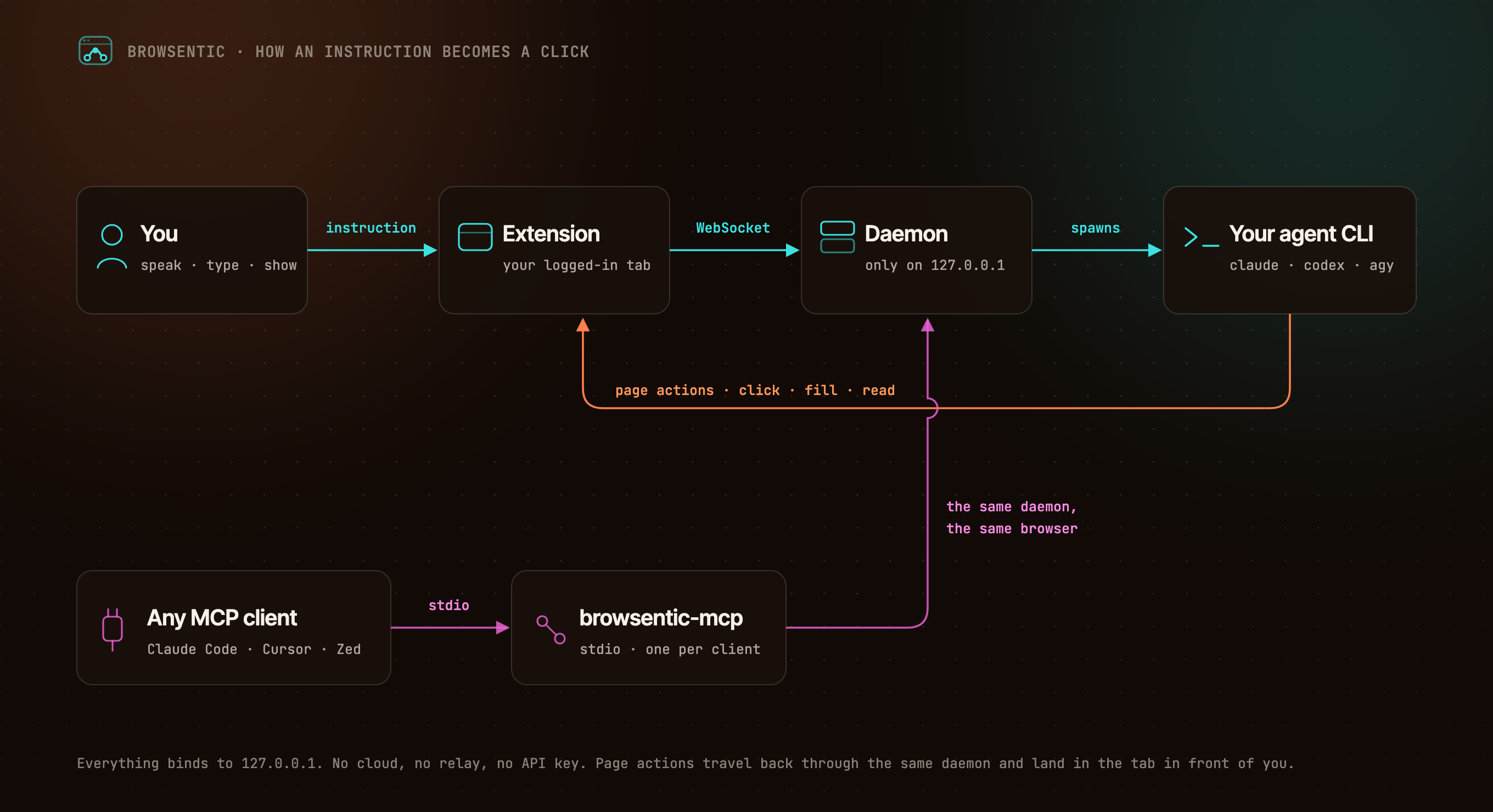
- 
- <details>
- <summary>The same flow, as text</summary>
- ```
- You ──speak or type──> Extension ──local WebSocket──> Browsentic Bridge ──spawns──> your agent CLI
- ▲ (claude │ codex │ agy │ …)
- └──────────────────── page actions ──────────────────────┘
- Any MCP client ──stdio──> browsentic mcp ──> the same Bridge ──> the same browser
- ```
- </details>
- The extension dials out to Browsentic Bridge, because a Manifest V3 service worker cannot listen for connections. One Bridge owns the browser link, so several MCP clients can share one browser. Everything binds to `127.0.0.1`.
- ## Side Panel and Desktop Apps
- 
- The [side panel](docs/guide/features/conversations.md) is where you work with the agent. Every page action shows up as a step, and consequential ones, such as submitting a form, wait for your [approval](docs/guide/approvals.md). Put several of your own tabs in one conversation and the panel stays on it as you move between them, and the agent works across them. A new tab opens [Browsentic Home](docs/guide/features/new-tab.md), a full-page composer with your frequent sites, which hands the task to the side panel as soon as you send it; you can switch it off.
- The desktop apps for [macOS](docs/guide/mac-app.md) and [Windows](docs/guide/windows-app.md) ([experimental](docs/guide/limits.md#windows-is-experimental)) install Node and Browsentic Bridge in one click, turn the Bridge on and off, add the extension to each browser, pick the [agent CLI](docs/guide/agents.md) and its model, and check an [Android phone](docs/guide/features/android.md) before the side panel drives it.
- ## Resources
- - 📚 [Documentation](docs/)
- - 🚀 [Install and Pair](docs/guide/install.md)
- - ✨ [Features](docs/guide/features/)
- - 🧰 [All 52 Page Tools](docs/reference/tools.md)
- - 🔌 [Optional: Drive It From Claude Code, Cursor or Zed Over MCP](docs/guide/mcp-clients.md)
- - 🛡️ [Approvals and Guardrails](docs/guide/approvals.md)
- - 🏗️ [Architecture](docs/internals/)
- - 🩺 [Troubleshooting](docs/guide/troubleshooting.md)
- ## Privacy and Security
- Nothing connects except Browsentic's own extension, paired by itself through the browser or with a code, and both ends prove who they are. The agent asks before any consequential action, credentials on a page are sealed before the agent sees them, and the sites you [block](docs/guide/features/blocked-sites.md) are off-limits to every agent: the browser enforces that list, where no agent can reach it. The full model is in [SECURITY.md](SECURITY.md), and what it does not cover is in [Limits](docs/guide/limits.md).
- ## Contributing
- Bugs and ideas are welcome. Start at [CONTRIBUTING.md](CONTRIBUTING.md).
- ## License
- Browsentic is licensed under the [Apache License 2.0](LICENSE). Versions up to 0.7.15 were released under the MIT License.
- - **Source Available**: Always visible source code
- - **Local First**: No cloud component, no telemetry, no account
- - **Extensible**: Add your own page capabilities, skills and agent runners
- ## What does Browsentic mean?
- **Short answer:** "Browse" + "agentic".
- **Long answer:** Most browser automation hands the work to a *different* browser: a headless one, in a container, logged in to nothing. Browsentic works the other way round. The agent acts in the browser you are already looking at, with the sessions you are already signed in to: browsing, made agentic, where you already browse.
Ratings and comments
Sign in to rate this skill.
Sign inFree to use. If it’s helped, pass it on.