himarket
HiMarket is an enterprise-level "AI Capability Marketplace and Developer Ecosystem Hub." It is not merely a simple aggregation of traditional APIs, but rather a comprehensive platform that packages, publishes, manages, and operates core AI assets such as enterprise Model APIs, MCP Servers, Agent APIs, etc., through standardized product formats.
Safety scan
A static text scan, not a guarantee. Select the badge to see what was scanned and every finding.
Badge for your README

Markdown
[](/listings/higress-group--himarket)HTML
<a href="/listings/higress-group--himarket"><img src="/api/listings/higress-group--himarket/badge.svg" alt="findsafeskills safety rating" /></a>Install
Install instructions from the README
As written by the repo's author. findsafeskills has not verified these steps.
<details open> <summary><b>Option 1: Local Setup</b></summary>
<br/>
**Requirements:** JDK 17, Node.js 18+, Maven 3.6+, MySQL 8.0+
**Start Backend:**
Configure database connection (add to `~/.env` or export directly):
export DB_HOST=localhost
export DB_PORT=3306
export DB_NAME=himarket
export DB_USERNAME=root
export DB_PASSWORD=your_password
Build and start with one command:
make run
# Or run the script directly: ./scripts/run.sh
# The script auto-loads ~/.env, compiles, stops old processes, starts in background, and waits until ready
# Backend API: http://localhost:8080
**Start Frontend:**
# Start admin portal
cd himarket-web/himarket-admin
npm install
npm run dev
# Admin portal: http://localhost:5174

# Start developer portal
cd himarket-web/himarket-frontend
npm install
npm run dev
# Developer portal: http://localhost:5173
</details>
<details> <summary><b>Option 2: Docker Compose</b></summary>
<br/>
**Requirements:** Docker, Docker Compose
**Script Deployment:** Use the interactive `install.sh` script to deploy the full stack (HiMarket, Higress, Nacos, MySQL) with guided configuration.
git clone https://github.com/higress-group/himarket.git
cd himarket/deploy/docker
./install.sh
**AI Deployment (Recommended):** If you're concerned about environment compatibility issues during deployment, we recommend using AI Coding tools such as Cursor, Qoder, or Claude Code, which can automatically detect and resolve environment problems. After cloning the project, simply enter in your AI tool:
> Read the deployment docs under deploy/docker and help me deploy HiMarket with Docker Compose
See the [Deployment Guide](https://higress.io/docs/himarket/himarket-deployment/) for details.
**Service URLs after deployment:** - Admin Portal: http://localhost:5174 - Developer Portal: http://localhost:5173 - Backend API: http://localhost:8081
**Uninstall:**
./install.sh --uninstall
</details>
<details> <summary><b>Option 3: Helm Chart</b></summary>
<br/>
**Requirements:** kubectl (connected to a K8s cluster), Helm
**Script Deployment:** Use the interactive `install.sh` script to deploy HiMarket to a Kubernetes cluster with guided configuration.
git clone https://github.com/higress-group/himarket.git
cd himarket/deploy/helm
./install.sh
**AI Deployment (Recommended):** If you're concerned about environment compatibility issues during deployment, we recommend using AI Coding tools such as Cursor, Qoder, or Claude Code, which can automatically detect and resolve environment problems. After cloning the project, simply enter in your AI tool:
> Read the deployment docs under the deploy directory and help me deploy HiMarket to my K8s cluster with Helm
See the [Deployment Guide](https://higress.io/docs/himarket/himarket-deployment/) for details.
**Uninstall:**
./install.sh --uninstall
</details>
<details> <summary><b>Option 4: Cloud Deployment (Alibaba Cloud)</b></summary>
<br/>
Alibaba Cloud ComputeNest supports out-of-the-box deployment of the community edition with one click:
</details>
What was scanned
The files the safety scan read, as written by the repository's author and shown as plain text. Lines with a finding are marked.
README.md · README · 237 lines
View this file on GitHub (read at the repository's current version: the scan did not record which commit it read)
- <a name="readme-top"></a>
- <div align="center">
- <img width="406" height="96" alt="HiMarket Logo" src="https://github.com/user-attachments/assets/e0956234-1a97-42c6-852d-411fa02c3f01" />
- <h1>HiMarket AI Open Platform</h1>
- <p align="center">
- <b>English</b> | <a href="README_zh.md">简体中文</a>
- </p>
- <p>
- <a href="https://github.com/higress-group/himarket/blob/main/LICENSE">
- <img src="https://img.shields.io/badge/license-Apache%202.0-blue.svg" alt="License" />
- </a>
- <a href="https://github.com/higress-group/himarket/releases">
- <img src="https://img.shields.io/github/v/release/higress-group/himarket" alt="Release" />
- </a>
- <a href="https://github.com/higress-group/himarket/stargazers">
- <img src="https://img.shields.io/github/stars/higress-group/himarket" alt="Stars" />
- </a>
- <a href="https://deepwiki.com/higress-group/himarket">
- <img src="https://deepwiki.com/badge.svg" alt="Ask DeepWiki" />
- </a>
- </p>
- [**Website**](https://higress.io/himarket) |
- [**Docs**](https://higress.io/docs/himarket/himarket-introduction) |
- [**Deployment**](https://higress.io/docs/himarket/himarket-deployment/) |
- [**Contributing**](./CONTRIBUTING.md)
- </div>
- ## What is HiMarket?
- HiMarket is an enterprise-grade AI open platform built on Higress AI Gateway, helping enterprises build private AI capability marketplace to uniformly manage and distribute AI resources such as LLM, MCP Server, Agent, and Agent Skill. The platform encapsulates distributed AI capabilities into standardized API products, supports multi-version management and gray-scale release, includes a built-in Skills Marketplace for developers to browse and install Agent Skills, provides HiChat AI conversation and HiCoding online programming for self-service developer experience, and features comprehensive enterprise-level operation capabilities including security control, observability analysis, metering and billing, making AI resource sharing and reuse efficient and convenient.
- As enterprises scale their AI adoption, they face common challenges: fragmented model usage across teams, security risks from uncontrolled public model access, difficulty in measuring AI costs and SLA, and complex permission management. HiMarket addresses these by providing a unified AI entry point for the entire organization — connecting AI producers and consumers through a standardized marketplace.
- <div align="center">
- <b>Capabilities</b>
- </div>
- | Category | Feature | Description |
- |----------|---------|-------------|
- | **AI Marketplace** | Model Marketplace | Integrate various models with content safety, token rate limiting, and other protection capabilities |
- | | MCP Marketplace | Integrate MCP Servers from various platforms, support converting external APIs to standard MCP Servers |
- | | Agent Marketplace | Package and publish Agent applications, integrate with AgentScope and other Agent building platforms |
- | | Skills Marketplace | Upload and distribute Agent Skills, developers can browse, subscribe, and install Skill packages |
- | | Worker Marketplace | Package, version, and distribute Agent Workers that can be loaded with Skills; supports Nacos batch import and CLI installation |
- | **AI Experience Center** | HiChat Conversation | Single-model conversation and multi-model comparison, MCP tool invocation testing, enhanced features like web-connected Q&A |
- | | HiCoding Online Programming | Integrated secure sandbox environment, supporting Vibe Coding and human-AI collaborative development with real-time file changes and code preview |
- | **Enterprise Management** | Product Management | Authentication, traffic control, call quotas, and other protection capabilities |
- | | Observability | Full-chain monitoring, call tracing, heatmaps, anomaly alerts |
- | | Metering & Billing | Token-based call counting with automatic cost statistics |
- | | Version Management | Multi-version parallel operation, gray-scale release, quick rollback |
- | **Customization** | Portal Branding | Custom domain, logo, color scheme, page layout |
- | | Identity Authentication | Support third-party OIDC integration with enterprise identity systems |
- | | Approval Workflow | Configurable auto/manual approval for subscription and product scenarios |
- | | Product Catalog | Custom category tags with browsing, filtering, and search support |
- ## System Architecture
- <div align="center">
- <img src="https://github.com/user-attachments/assets/ecbb3d2e-138b-4192-992e-9cd4a20b3fc3" alt="HiMarket System Architecture" width="700px" />
- <br/>
- <b>System Architecture</b>
- </div>
- HiMarket system architecture consists of three layers:
- 1. **Infrastructure**: Composed of AI Gateway, API Gateway, Higress and Nacos. HiMarket abstracts and encapsulates underlying AI resources based on these components to form standard API products for external use.
- 2. **AI Open Platform Admin**: Management platform for administrators to create and customize portals, manage AI resources such as MCP Server, Model, Agent, and Agent Skill, including setting authentication policies and subscription approval workflows. The admin portal also provides observability dashboard to help administrators monitor AI resource usage and operational status in real-time.
- 3. **AI Open Platform Portal**: Developer-facing portal site, also known as AI Marketplace or AI Hub, providing one-stop self-service where developers can complete identity registration, credential application, product browsing and subscription, online debugging, and more. Developers can also interact with models and MCP Servers through HiChat, or perform online AI programming in secure sandboxes through HiCoding.
- <table>
- <tr>
- <td align="center">
- <img src="https://github.com/user-attachments/assets/e7a933ea-10bb-457e-a082-550e939a1b58" width="500px" height="200px" alt="HiMarket Admin Portal"/>
- <br />
- <b>Admin Dashboard</b>
- </td>
- <td align="center">
- <img src="https://github.com/user-attachments/assets/41382502-12fe-45c4-9708-8dd7a103cb73" width="500px" height="200px" alt="HiMarket Developer Portal"/>
- <br />
- <b>Developer Portal</b>
- </td>
- </tr>
- </table>
- ## Quick Start
- <details open>
- <summary><b>Option 1: Local Setup</b></summary>
- <br/>
- **Requirements:** JDK 17, Node.js 18+, Maven 3.6+, MySQL 8.0+
- **Start Backend:**
- Configure database connection (add to `~/.env` or export directly):
- ```bash
- export DB_HOST=localhost
- export DB_PORT=3306
- export DB_NAME=himarket
- export DB_USERNAME=root
- export DB_PASSWORD=your_password
- ```
- Build and start with one command:
- ```bash
- make run
- # Or run the script directly: ./scripts/run.sh
- # The script auto-loads ~/.env, compiles, stops old processes, starts in background, and waits until ready
- # Backend API: http://localhost:8080
- ```
- **Start Frontend:**
- ```bash
- # Start admin portal
- cd himarket-web/himarket-admin
- npm install
- npm run dev
- # Admin portal: http://localhost:5174
- # Start developer portal
- cd himarket-web/himarket-frontend
- npm install
- npm run dev
- # Developer portal: http://localhost:5173
- ```
- </details>
- <details>
- <summary><b>Option 2: Docker Compose</b></summary>
- <br/>
- **Requirements:** Docker, Docker Compose
- **Script Deployment:** Use the interactive `install.sh` script to deploy the full stack (HiMarket, Higress, Nacos, MySQL) with guided configuration.
- ```bash
- git clone https://github.com/higress-group/himarket.git
- cd himarket/deploy/docker
- ./install.sh
- ```
- **AI Deployment (Recommended):** If you're concerned about environment compatibility issues during deployment, we recommend using AI Coding tools such as Cursor, Qoder, or Claude Code, which can automatically detect and resolve environment problems. After cloning the project, simply enter in your AI tool:
- > Read the deployment docs under deploy/docker and help me deploy HiMarket with Docker Compose
- See the [Deployment Guide](https://higress.io/docs/himarket/himarket-deployment/) for details.
- **Service URLs after deployment:**
- - Admin Portal: http://localhost:5174
- - Developer Portal: http://localhost:5173
- - Backend API: http://localhost:8081
- **Uninstall:**
- ```bash
- ./install.sh --uninstall
- ```
- </details>
- <details>
- <summary><b>Option 3: Helm Chart</b></summary>
- <br/>
- **Requirements:** kubectl (connected to a K8s cluster), Helm
- **Script Deployment:** Use the interactive `install.sh` script to deploy HiMarket to a Kubernetes cluster with guided configuration.
- ```bash
- git clone https://github.com/higress-group/himarket.git
- cd himarket/deploy/helm
- ./install.sh
- ```
- **AI Deployment (Recommended):** If you're concerned about environment compatibility issues during deployment, we recommend using AI Coding tools such as Cursor, Qoder, or Claude Code, which can automatically detect and resolve environment problems. After cloning the project, simply enter in your AI tool:
- > Read the deployment docs under the deploy directory and help me deploy HiMarket to my K8s cluster with Helm
- See the [Deployment Guide](https://higress.io/docs/himarket/himarket-deployment/) for details.
- **Uninstall:**
- ```bash
- ./install.sh --uninstall
- ```
- </details>
- <details>
- <summary><b>Option 4: Cloud Deployment (Alibaba Cloud)</b></summary>
- <br/>
- Alibaba Cloud ComputeNest supports out-of-the-box deployment of the community edition with one click:
- [](https://computenest.console.aliyun.com/service/instance/create/cn-hangzhou?type=user&ServiceId=service-b96fefcb748f47b7b958)
- </details>
- ## Community
- ### Join Us
- <table>
- <tr>
- <td align="center">
- <img src="https://github.com/user-attachments/assets/e74915bb-abf2-4415-99a3-dd7c61a94670" width="200px" alt="DingTalk Group"/>
- <br />
- <b>DingTalk Group</b>
- </td>
- <td align="center">
- <img src="https://img.alicdn.com/imgextra/i1/O1CN01WnQt0q1tcmqVDU73u_!!6000000005923-0-tps-258-258.jpg" width="200px" alt="WeChat Official Account"/>
- <br />
- <b>WeChat Official Account</b>
- </td>
- </tr>
- </table>
- ## Contributors
- Thanks to all the developers who have contributed to HiMarket!
- <a href="https://github.com/higress-group/himarket/graphs/contributors">
- <img alt="contributors" src="https://contrib.rocks/image?repo=higress-group/himarket"/>
- </a>
- ## Star History
- [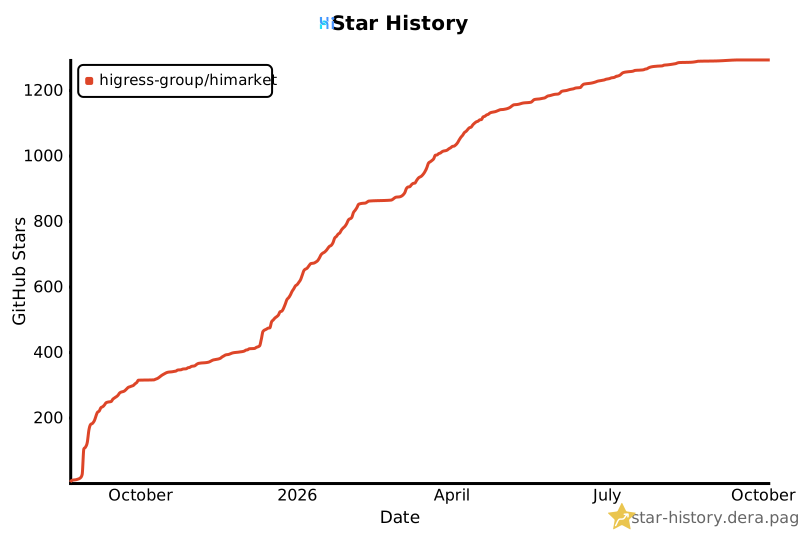](https://star-history.dera.page/#higress-group/himarket&Date)
Ratings and comments
Sign in to rate this skill.
Sign inFree to use. If it’s helped, pass it on.