eval-view
Regression testing for AI agents. Snapshot behavior,diff tool calls,catch regressions in CI. Works with LangGraph, CrewAI, OpenAI, Anthropic.
Safety scan
A static text scan, not a guarantee. Select the badge to see what was scanned and every finding.
Check it deeper on your machine
Its scripts were only partly scanned.
As a Claude Code plugin, install it and then ask Claude Code:
/plugin marketplace add keithmackay/mackayi/plugin install scanskillsafety@mackayiDo a deep scan of https://github.com/hidai25/eval-view with scanskillsafety
Or from a terminal, clone it and run it:
git clone https://github.com/keithmackay/scanskillsafety-skill ~/.claude/skills/scanskillsafetynode ~/.claude/skills/scanskillsafety/cli.cjs --deep 'https://github.com/hidai25/eval-view'
It checks the exact commit: every file, its packages against OSV (api.osv.dev), how it compares with this page's scan (findsafeskills.com receives the repository's address), and, if you agree, Claude reading every file with your own Claude subscription. It never runs the code.
Badge for your README

Markdown
[](/listings/hidai25--eval-view)HTML
<a href="/listings/hidai25--eval-view"><img src="/api/listings/hidai25--eval-view/badge.svg" alt="findsafeskills safety rating" /></a>Install
Install instructions from the README
As written by the repo's author. findsafeskills has not verified these steps.
> **OpenAI adapter migration:** OpenAI shut down the Assistants API on **August 26, 2026**. > The latest published EvalView release, **0.8.1**, still uses that API; the Responses API > migration is currently **unreleased source**. If you use `openai-assistants`, follow the > [migration guide](docs/OPENAI_MIGRATION.md) before running your tests. An `assistant_id` > alone cannot preserve your agent's configuration. Other adapters are unaffected.
pip install evalview
evalview snapshot    # Record your agent's current behavior as the baseline
evalview check       # After any change, diff against the baseline
That's the whole loop. `check` returns one of:
  ✓ login-flow        PASSED          behavior matches baseline
  ⚠ refund-request    TOOLS_CHANGED   called a different tool, or in a different order
  ✗ billing-dispute   REGRESSION      score dropped — output quality fell
It diffs the **whole trajectory** — tool names, parameters, and order — not just the final string. The deterministic tool + sequence diff runs offline, with no API key. Add an LLM judge only when you want output-quality scoring.
Executing your agent can still incur backend API charges: `--no-judge` skips the judge, not those calls. Embedding-based semantic comparison is opt-in.
No agent yet? See it work in 30 seconds:
evalview demo
What was scanned
The files the safety scan read, as written by the repository's author and shown as plain text. Lines with a finding are marked.
README.md · README · 171 lines
View this file on GitHub (read at the repository's current version: the scan did not record which commit it read)
- <!-- mcp-name: io.github.hidai25/evalview-mcp -->
- <!-- keywords: AI agent testing, regression detection, golden baselines -->
- <p align="center">
- <img src="assets/logo.png" alt="EvalView" width="350">
- <br>
- <strong>Snapshot testing for AI agents.</strong><br>
- Record what your agent does today. Get told when it silently changes.
- </p>
- <p align="center">
- <a href="https://pypi.org/project/evalview/"><img src="https://img.shields.io/pypi/v/evalview.svg?label=release" alt="PyPI version"></a>
- <a href="https://pypi.org/project/evalview/"><img src="https://img.shields.io/pypi/dm/evalview.svg?label=downloads" alt="PyPI downloads"></a>
- <a href="https://github.com/hidai25/eval-view/actions/workflows/ci.yml"><img src="https://github.com/hidai25/eval-view/actions/workflows/ci.yml/badge.svg?branch=main" alt="Package CI"></a>
- <a href="https://github.com/hidai25/eval-view/actions/workflows/dogfood.yml"><img src="https://github.com/hidai25/eval-view/actions/workflows/dogfood.yml/badge.svg?branch=main" alt="Core Dogfood"></a>
- <a href="https://github.com/hidai25/eval-view/actions/workflows/dogfood-live.yml"><img src="https://github.com/hidai25/eval-view/actions/workflows/dogfood-live.yml/badge.svg?branch=main&event=workflow_dispatch" alt="Live Provider Checks (manual)"></a>
- <a href="https://github.com/hidai25/eval-view/stargazers"><img src="https://img.shields.io/github/stars/hidai25/eval-view?style=social" alt="GitHub stars"></a>
- <a href="https://opensource.org/licenses/Apache-2.0"><img src="https://img.shields.io/badge/License-Apache_2.0-blue.svg" alt="License"></a>
- </p>
- ---
- Your agent returns `200` and looks fine. But a model update, a provider change, or a one-line prompt edit just made it skip a clarification, call the wrong tool, or quietly drop output quality. Your tests still pass. Your users notice before you do.
- **EvalView snapshots your agent's behavior — the tools it calls, in what order, with what output — and tells you the moment that behavior changes.** Like Jest snapshots, but for tool-calling, multi-turn agents.
- [](https://github.com/user-attachments/assets/96d8b5f7-3561-44a1-86a4-270fb0d1d8a6)
- <sub>↑ 30-second live demo — no API key needed</sub>
- ## Quick Start
- > **OpenAI adapter migration:** OpenAI shut down the Assistants API on **August 26, 2026**.
- > The latest published EvalView release, **0.8.1**, still uses that API; the Responses API
- > migration is currently **unreleased source**. If you use `openai-assistants`, follow the
- > [migration guide](docs/OPENAI_MIGRATION.md) before running your tests. An `assistant_id`
- > alone cannot preserve your agent's configuration. Other adapters are unaffected.
- ```bash
- pip install evalview
- ```
- ```bash
- evalview snapshot # Record your agent's current behavior as the baseline
- evalview check # After any change, diff against the baseline
- ```
- That's the whole loop. `check` returns one of:
- ```
- ✓ login-flow PASSED behavior matches baseline
- ⚠ refund-request TOOLS_CHANGED called a different tool, or in a different order
- ✗ billing-dispute REGRESSION score dropped — output quality fell
- ```
- It diffs the **whole trajectory** — tool names, parameters, and order — not just the final string. The deterministic tool + sequence diff runs offline, with no API key. Add an LLM judge only when you want output-quality scoring.
- Executing your agent can still incur backend API charges: `--no-judge` skips the
- judge, not those calls. Embedding-based semantic comparison is opt-in.
- No agent yet? See it work in 30 seconds:
- ```bash
- evalview demo
- ```
- ## Why snapshot testing (and not assertions)?
- Most eval tools ask you to *write down what "good" looks like* — assertions, metrics, rubrics. That's a lot of upfront work, and you can only catch the failures you thought to assert.
- EvalView inverts it: **it records what your agent actually does now, and flags any drift from that.** You catch regressions you never anticipated, with zero assertions written. When the new behavior is correct, `evalview snapshot` accepts it as the new baseline — same as updating a snapshot in Jest.
- | | EvalView | Assertion-based eval tools |
- |---|---|---|
- | Setup | Record current behavior | Write assertions/metrics first |
- | Catches | Any drift from baseline | Only what you asserted |
- | Non-determinism | Multi-variant baselines (up to 5 valid paths) | You handle it |
- | Unit of comparison | Full tool-call trajectory | Usually final output |
- This makes EvalView a **merge-time regression gate**, which is a different job from observability (Langfuse, LangSmith) or metric scoring (promptfoo, DeepEval, Braintrust). Many teams run one of those for visibility **and** EvalView as the gate. [Honest comparisons →](docs/COMPARISONS.md)
- ## EvalView tests itself in public, every day
- Every day at 09:00 UTC, on pull requests, and on pushes to main,
- [Core Dogfood](.github/workflows/dogfood.yml) exercises the non-live test suite,
- type checks, local mock-agent `snapshot` / `check`, `evalview demo`, end-to-end
- flows, and an `evalview monitor` smoke test. It uses no paid API credentials and
- makes no paid inference calls. GitHub runner usage is separate.
- [Live Provider Checks](.github/workflows/dogfood-live.yml) test the real evaluator and
- chat assistant only when a maintainer explicitly opts into paid API use on main.
- They have no automatic schedule. Their badge records the last manual run; a green
- core badge does not establish live-provider health or rule out provider drift.
- Package CI, core dogfood, and live checks have separate badges. Failed or incomplete
- checks remain visible within their scope, with logs and reports preserved as
- artifacts. Rolling issues use separate `dogfood-core` and `dogfood-live` labels.
- A provider outage, exhausted quota, or missing credential means live health is
- unavailable; it does not prove an agent regression.
- The historical [incident #264](https://github.com/hidai25/eval-view/issues/264)
- remains available for maintainer review of fresh evidence from both scopes. Neither
- workflow automatically closes it. Trust warnings are evidence to investigate,
- not proof of gaming or of a particular root cause.
- [Core runs →](https://github.com/hidai25/eval-view/actions/workflows/dogfood.yml) · [Manual live runs →](https://github.com/hidai25/eval-view/actions/workflows/dogfood-live.yml) · [Run and triage guide →](docs/INTERNAL_DOGFOODING.md#daily-failure-triage)
- ## CI: block regressions in every PR
- ```yaml
- # .github/workflows/evalview.yml
- name: EvalView
- on: [pull_request]
- jobs:
- agent-check:
- runs-on: ubuntu-latest
- permissions: { pull-requests: write }
- steps:
- - uses: actions/checkout@v4
- - uses: hidai25/eval-view@v0.8.1
- with:
- openai-api-key: ${{ secrets.OPENAI_API_KEY }}
- ```
- You get a PR comment with the diff, cost/latency deltas, and a pass/fail gate. [CI/CD guide →](docs/CI_CD.md)
- ## Works with your stack
- LangGraph · CrewAI · OpenAI · Claude · Mistral · Ollama · MCP · **any HTTP API**.
- ```bash
- evalview check --agent http://localhost:8000/invoke
- ```
- [Framework details →](docs/FRAMEWORK_SUPPORT.md)
- ## Use it as a library
- ```python
- from evalview import gate
- result = gate(test_dir="tests/")
- result.passed # bool
- result.diffs # per-test scores and tool diffs
- ```
- [Python API →](docs/CLI_REFERENCE.md#python-api)
- ## More
- EvalView also does multi-turn testing, statistical/pass@k runs, record/replay cassettes, model-drift canaries, production monitoring with Slack alerts, and auto-generated regression tests from incidents. These are power-user features — start with `snapshot` and `check`, reach for the rest when you need them.
- → [Full feature reference](docs/CLI_REFERENCE.md) · [Getting Started](docs/GETTING_STARTED.md) · [FAQ](docs/FAQ.md)
- → [Documentation index](docs/README.md) · [OpenAI migration](docs/OPENAI_MIGRATION.md) · [Release process](docs/RELEASING.md)
- ### Why I built EvalView
- An agent that looked successful kept pulling entire documents into its context and made one question cost $42.93. That experience led me to build EvalView. I wrote about it in [“I Was Running an AI Casino. Then I Started Writing Tests for My Agents”](https://medium.com/@hidaibarmor/i-was-running-an-ai-casino-then-i-started-writing-tests-for-my-agents-93cb3468ce1e). The December 2025 post is the origin story; use the current docs for setup and commands.
- ## Contributing
- This is a young project built mostly by one developer. Issues, PRs, and "I tried it and X was confusing" feedback are all genuinely valuable.
- - [Open an issue](https://github.com/hidai25/eval-view/issues) · [Discussions](https://github.com/hidai25/eval-view/discussions) · [CONTRIBUTING.md](CONTRIBUTING.md)
- **License:** Apache 2.0
- ---
- [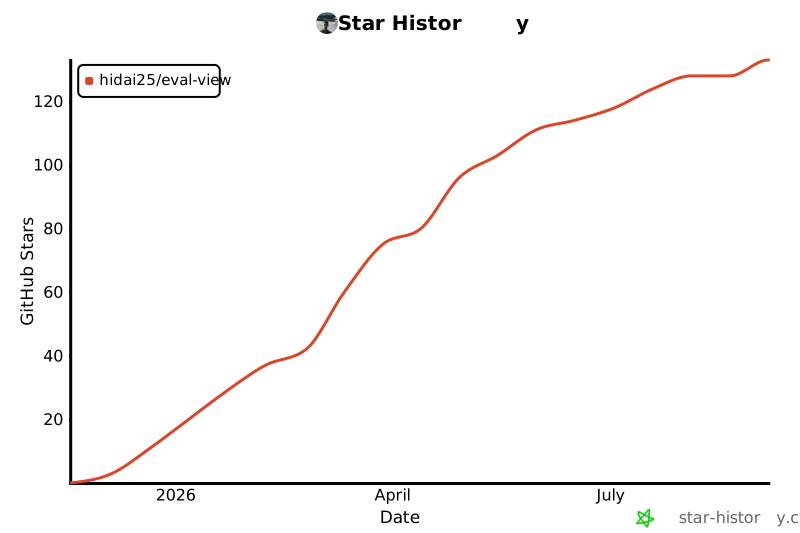](https://star-history.com/#hidai25/eval-view&Date)
evalview/adapters/goose_adapter.py · Bundled script · 590 lines · 2 findings marked
- """Goose CLI adapter for Block's open-source AI agent.
- Goose (https://github.com/block/goose) is a local, extensible AI agent
- that automates engineering tasks. This adapter runs Goose via CLI and
- captures its tool calls and outputs for evaluation.
- Requirements:
- - Goose CLI installed: curl -fsSL https://github.com/block/goose/releases/download/stable/download_cli.sh | bash
- Note: Pipes a downloaded script directly into a shell (curl | sh / wget | bash)
- Line 8 on GitHub
- - Goose configured: goose configure
- Usage:
- adapter: goose
- input:
- query: "Run the tests in this project"
- context:
- cwd: "./my-project" # Working directory for Goose
- extensions: ["developer"] # Builtin extensions to enable
- provider: "anthropic" # Optional: override LLM provider
- model: "claude-sonnet-4-20250514" # Optional: override model
- """
- import asyncio
- import json
- import logging
- import os
- import re
- import subprocess
- import uuid
- from datetime import datetime
- from typing import Any, Dict, List, Optional
- from evalview.adapters.base import AgentAdapter
- from evalview.core.types import (
- ExecutionMetrics,
- ExecutionTrace,
- StepMetrics,
- StepTrace,
- TokenUsage,
- SpanKind,
- )
- from evalview.core.tracing import Tracer
- logger = logging.getLogger(__name__)
- class GooseAdapter(AgentAdapter):
- """Adapter for Block's Goose AI agent.
- Goose is a local-first AI agent that runs commands, edits files,
- and automates engineering tasks. This adapter executes Goose via
- its CLI and parses the output for evaluation.
- The adapter uses `goose run` with JSON output format to capture
- structured data about tool calls, outputs, and metrics.
- """
- def __init__(
- self,
- endpoint: str = "", # Not used for CLI, but required by registry
- timeout: float = 300.0, # 5 minutes default for complex tasks
- cwd: Optional[str] = None,
- extensions: Optional[List[str]] = None,
- provider: Optional[str] = None,
- model: Optional[str] = None,
- goose_path: str = "goose", # Path to goose binary
- **kwargs: Any,
- ):
- """Initialize Goose adapter.
- Args:
- endpoint: Not used (Goose runs locally), kept for registry compatibility
- timeout: Maximum execution time in seconds (default: 300)
- cwd: Working directory for Goose commands
- extensions: Builtin extensions to enable (e.g., ["developer", "computercontroller"])
- provider: LLM provider override (e.g., "anthropic", "openai")
- model: Model override (e.g., "claude-sonnet-4-20250514")
- goose_path: Path to goose binary (default: "goose")
- """
- self.timeout = timeout
- self.cwd = cwd
- self.extensions = extensions or []
- self.provider = provider
- self.model = model
- self.goose_path = goose_path
- self._last_raw_output: Optional[str] = None
- @property
- def name(self) -> str:
- return "goose"
- async def execute(
- self, query: str, context: Optional[Dict[str, Any]] = None
- ) -> ExecutionTrace:
- """Execute a task with Goose and capture the execution trace.
- Args:
- query: The instruction/task for Goose to execute
- context: Optional context with:
- - cwd: Working directory (overrides init setting)
- - extensions: Builtin extensions to add
- - provider: LLM provider override
- - model: Model override
- - max_turns: Maximum conversation turns
- Returns:
- ExecutionTrace with tool calls, output, and metrics
- """
- context = context or {}
- # Build the goose command
- cmd = self._build_command(query, context)
- # Determine working directory
- cwd = context.get("cwd", self.cwd)
- if cwd:
- cwd = os.path.abspath(os.path.expanduser(cwd))
- # Log the full command for debugging
- cmd_str = ' '.join(cmd)
- logger.info(f"Executing Goose: {cmd_str}")
- print(f"[DEBUG] Goose command: {cmd_str}") # Visible in console
- if cwd:
- logger.info(f"Working directory: {cwd}")
- start_time = datetime.now()
- try:
- # Run goose as subprocess
- result = await asyncio.get_event_loop().run_in_executor(
- None,
- lambda: subprocess.run(
- cmd,
- capture_output=True,
- text=True,
- cwd=cwd,
- timeout=self.timeout,
- env=self._build_env(context),
- ),
- )
- end_time = datetime.now()
- # Store raw output for debugging
- self._last_raw_output = result.stdout
- # Log any stderr (warnings, debug info)
- if result.stderr:
- logger.debug(f"Goose stderr: {result.stderr}")
- # Parse the output
- return self._parse_output(
- result.stdout, result.stderr, result.returncode, start_time, end_time
- )
- except subprocess.TimeoutExpired:
- end_time = datetime.now()
- logger.error(f"Goose timed out after {self.timeout}s")
- return self._create_error_trace(
- f"Goose timed out after {self.timeout} seconds",
- start_time,
- end_time,
- )
- except FileNotFoundError:
- end_time = datetime.now()
- logger.error("Goose CLI not found. Is it installed?")
- return self._create_error_trace(
- "Goose CLI not found. Install with: curl -fsSL https://github.com/block/goose/releases/download/stable/download_cli.sh | bash",
- Note: Pipes a downloaded script directly into a shell (curl | sh / wget | bash)
- Line 168 on GitHub
- start_time,
- end_time,
- )
- except Exception as e:
- end_time = datetime.now()
- logger.error(f"Error executing Goose: {e}")
- return self._create_error_trace(str(e), start_time, end_time)
- def _build_command(self, query: str, context: Dict[str, Any]) -> List[str]:
- """Build the goose CLI command."""
- cmd = [
- self.goose_path,
- "run",
- "-t",
- query,
- "--no-session", # Clean runs for testing
- ]
- # Add extensions (deduplicate)
- extensions = list(set(context.get("extensions", []) + self.extensions))
- if extensions:
- cmd.extend(["--with-builtin", ",".join(extensions)])
- # Add provider/model overrides
- provider = context.get("provider", self.provider)
- model = context.get("model", self.model)
- if provider:
- cmd.extend(["--provider", provider])
- if model:
- cmd.extend(["--model", model])
- # Add max turns if specified
- max_turns = context.get("max_turns")
- if max_turns:
- cmd.extend(["--max-turns", str(max_turns)])
- return cmd
- def _build_env(self, context: Dict[str, Any]) -> Dict[str, str]:
- """Build environment variables for the subprocess."""
- env = os.environ.copy()
- # Allow context to pass additional env vars
- if "env" in context:
- env.update(context["env"])
- return env
- def _parse_output(
- self,
- stdout: str,
- stderr: str,
- returncode: int,
- start_time: datetime,
- end_time: datetime,
- ) -> ExecutionTrace:
- """Parse Goose output into ExecutionTrace.
- Goose outputs a mix of:
- - Conversational text
- - Tool calls (shown with specific formatting)
- - Final response
- We parse this to extract tool calls and the final output.
- """
- session_id = f"goose-{uuid.uuid4().hex[:8]}"
- total_latency = (end_time - start_time).total_seconds() * 1000
- # Try to parse as JSON first (if --output-format json was used)
- try:
- data = json.loads(stdout)
- return self._parse_json_output(data, session_id, start_time, end_time)
- except json.JSONDecodeError:
- pass
- # Parse text output (default Goose format)
- steps = self._extract_tool_calls_from_text(stdout)
- final_output = self._extract_final_output(stdout)
- # Check for errors
- if returncode != 0:
- error_msg = stderr or f"Goose exited with code {returncode}"
- if not final_output:
- final_output = error_msg
- # Build trace context from steps
- tracer = Tracer()
- with tracer.start_span("Goose Execution", SpanKind.AGENT):
- for step in steps:
- tracer.record_tool_call(
- tool_name=step.tool_name,
- parameters=step.parameters,
- result=step.output,
- error=step.error,
- duration_ms=step.metrics.latency if step.metrics else 0.0,
- )
- return ExecutionTrace(
- session_id=session_id,
- start_time=start_time,
- end_time=end_time,
- steps=steps,
- final_output=final_output,
- metrics=ExecutionMetrics(
- total_cost=self._estimate_cost(steps, stdout),
- total_latency=total_latency,
- total_tokens=self._extract_tokens(stdout),
- ),
- trace_context=tracer.build_trace_context(),
- )
- def _parse_json_output(
- self,
- data: Dict[str, Any],
- session_id: str,
- start_time: datetime,
- end_time: datetime,
- ) -> ExecutionTrace:
- """Parse JSON output format from Goose."""
- steps = []
- # Extract tool calls from JSON
- tool_calls = data.get("tool_calls", data.get("steps", []))
- for i, call in enumerate(tool_calls):
- tool_name = call.get("tool", call.get("name", call.get("tool_name", "unknown")))
- steps.append(
- StepTrace(
- step_id=f"step-{i}",
- step_name=call.get("step_name", f"Step {i + 1}"),
- tool_name=tool_name,
- parameters=call.get("parameters", call.get("arguments", call.get("input", {}))),
- output=call.get("output", call.get("result", "")),
- success=call.get("success", True),
- error=call.get("error"),
- metrics=StepMetrics(
- latency=call.get("latency", 0.0),
- cost=call.get("cost", 0.0),
- ),
- )
- )
- final_output = data.get("response", data.get("output", data.get("final_response", "")))
- total_latency = (end_time - start_time).total_seconds() * 1000
- # Extract tokens if available
- tokens_data = data.get("tokens", data.get("usage", {}))
- total_tokens = None
- if tokens_data:
- if isinstance(tokens_data, dict):
- total_tokens = TokenUsage(
- input_tokens=int(
- tokens_data.get("input", tokens_data.get("input_tokens", 0)) or 0
- ),
- output_tokens=int(
- tokens_data.get("output", tokens_data.get("output_tokens", 0)) or 0
- ),
- cached_tokens=int(tokens_data.get("cached", 0) or 0),
- )
- elif isinstance(tokens_data, int):
- total_tokens = TokenUsage(output_tokens=tokens_data)
- return ExecutionTrace(
- session_id=session_id,
- start_time=start_time,
- end_time=end_time,
- steps=steps,
- final_output=final_output,
- metrics=ExecutionMetrics(
- total_cost=data.get("cost", data.get("total_cost", 0.0)),
- total_latency=total_latency,
- total_tokens=total_tokens,
- ),
- )
- def _extract_tool_calls_from_text(self, output: str) -> List[StepTrace]:
- """Extract tool calls from Goose's text output.
- Goose shows tool usage in format:
- ─── shell | developer ──────────────────────────
- command: ls -la
- <command output>
- <assistant response>
- """
- steps = []
- step_count = 0
- # Tool header pattern: "─── shell | developer ───" or "─── text_editor | developer ───"
- tool_header_pattern = r"[─━]+\s*(\w+)\s*\|\s*\w+\s*[─━]+"
- # Common tool names in Goose
- known_tools = {
- "bash", "shell", "read", "write", "edit", "search", "grep", "find",
- "git", "npm", "pip", "python", "node", "cargo", "make",
- "developer", "computercontroller", "memory", "text_editor",
- "ripgrep", "list_directory",
- }
- # Split output into sections by tool headers
- lines = output.split("\n")
- i = 0
- while i < len(lines):
- line = lines[i]
- # Check for tool header
- match = re.search(tool_header_pattern, line, re.IGNORECASE)
- if match:
- tool_name = match.group(1).lower()
- # Normalize tool names
- if tool_name == "shell":
- tool_name = "bash"
- if tool_name in known_tools or len(tool_name) > 2:
- step_count += 1
- # Collect parameters and output until next section
- i += 1
- params = {}
- tool_output_lines = []
- # First line after header is usually the command/parameter
- if i < len(lines):
- param_line = lines[i].strip()
- if param_line.startswith("command:"):
- params["command"] = param_line[8:].strip()
- i += 1
- elif param_line.startswith("path:"):
- params["path"] = param_line[5:].strip()
- i += 1
- # Collect output until we hit another tool header or end
- while i < len(lines):
- next_line = lines[i]
- # Check if this is another tool header
- if re.search(tool_header_pattern, next_line, re.IGNORECASE):
- break
- # Check if this looks like assistant text (starts with capital, no indentation)
- if next_line and not next_line.startswith(" ") and next_line[0:1].isupper():
- # Could be assistant response, check if it's not output
- if not any(c in next_line for c in ["│", "├", "└", "-rw", "drw"]):
- break
- tool_output_lines.append(next_line)
- i += 1
- # Trim empty lines from output
- tool_output = "\n".join(tool_output_lines).strip()
- # Limit output size for storage
- if len(tool_output) > 2000:
- tool_output = tool_output[:2000] + "..."
- steps.append(
- StepTrace(
- step_id=f"step-{step_count}",
- step_name=f"Step {step_count}",
- tool_name=tool_name,
- parameters=params,
- output=tool_output,
- success=True,
- error=None,
- metrics=StepMetrics(),
- )
- )
- continue
- i += 1
- # Deduplicate consecutive same-tool calls (but keep different outputs)
- if steps:
- deduped = [steps[0]]
- for step in steps[1:]:
- # Only dedupe if same tool AND no output on current
- if step.tool_name != deduped[-1].tool_name or step.output:
- deduped.append(step)
- steps = deduped
- return steps
- def _extract_final_output(self, output: str) -> str:
- """Extract the final response from Goose output.
- The final output is everything after the last tool execution block.
- """
- # Remove ANSI escape codes
- ansi_escape = re.compile(r"\x1B(?:[@-Z\\-_]|\[[0-?]*[ -/]*[@-~])")
- clean_output = ansi_escape.sub("", output)
- # Find the last tool header and take everything after it
- tool_header_pattern = r"[─━]+\s*\w+\s*\|\s*\w+\s*[─━]+"
- lines = clean_output.split("\n")
- last_tool_end = -1
- in_tool_block = False
- for i, line in enumerate(lines):
- # Check if this is a tool header
- if re.search(tool_header_pattern, line):
- in_tool_block = True
- continue
- # If we're in a tool block, look for where output ends
- if in_tool_block:
- # Tool output ends when we see a line that looks like assistant text
- # (starts with capital letter, not indented, not part of command output)
- if line and not line.startswith(" ") and not line.startswith("\t"):
- # Check if it's the start of a new sentence/response
- if line[0:1].isupper() and not any(c in line for c in ["-rw", "drw", "total ", "│", "├", "└"]):
- last_tool_end = i
- in_tool_block = False
- # If we found a response after tool output, return everything from there
- if last_tool_end > 0:
- response_lines = lines[last_tool_end:]
- # Filter out session metadata lines
- response_lines = [line for line in response_lines if not line.startswith("starting session")]
- return "\n".join(response_lines).strip()
- # Fallback: return the last substantive paragraphs
- paragraphs = clean_output.strip().split("\n\n")
- response_paragraphs = []
- for para in paragraphs:
- para = para.strip()
- if not para:
- continue
- if para.startswith("$") or para.startswith(">>>"):
- continue
- if re.match(r"^[─━═]+", para):
- continue
- if para.startswith("starting session"):
- continue
- response_paragraphs.append(para)
- if response_paragraphs:
- # Return all response paragraphs after the last tool-related one
- return "\n\n".join(response_paragraphs[-3:]) # Last 3 paragraphs
- return clean_output.strip()
- def _estimate_cost(self, steps: List[StepTrace], output: str) -> float:
- """Estimate cost based on output length and tool calls.
- This is a rough estimate since Goose doesn't always report cost.
- For accurate cost tracking, check the LLM provider's dashboard.
- """
- # Rough estimate: ~$0.003 per 1K tokens for Claude Sonnet
- # Assume ~4 chars per token
- total_chars = len(output)
- estimated_tokens = total_chars / 4
- estimated_cost = (estimated_tokens / 1000) * 0.003
- # Add cost per step (tool calls use tokens)
- estimated_cost += len(steps) * 0.001
- return round(estimated_cost, 6)
- def _extract_tokens(self, output: str) -> Optional[TokenUsage]:
- """Try to extract token usage from output.
- Returns None if token info is not available.
- """
- # Look for token counts in output
- patterns = [
- r"tokens?:\s*(\d+)",
- r"(\d+)\s*tokens?",
- r"input:\s*(\d+).*output:\s*(\d+)",
- ]
- for pattern in patterns:
- match = re.search(pattern, output, re.IGNORECASE)
- if match:
- if len(match.groups()) == 2:
- return TokenUsage(
- input_tokens=int(match.group(1)),
- output_tokens=int(match.group(2)),
- )
- else:
- return TokenUsage(output_tokens=int(match.group(1)))
- return None
- def _create_error_trace(
- self, error_msg: str, start_time: datetime, end_time: datetime
- ) -> ExecutionTrace:
- """Create an ExecutionTrace for error cases."""
- return ExecutionTrace(
- session_id=f"goose-error-{uuid.uuid4().hex[:8]}",
- start_time=start_time,
- end_time=end_time,
- steps=[
- StepTrace(
- step_id="error",
- step_name="Error",
- tool_name="error",
- parameters={},
- output=error_msg,
- success=False,
- error=error_msg,
- metrics=StepMetrics(),
- )
- ],
- final_output=error_msg,
- metrics=ExecutionMetrics(
- total_cost=0.0,
- total_latency=(end_time - start_time).total_seconds() * 1000,
- total_tokens=None,
- ),
- )
- async def health_check(self) -> bool:
- """Check if Goose CLI is available."""
- try:
- result = subprocess.run(
- [self.goose_path, "--version"],
- capture_output=True,
- text=True,
- timeout=5,
- )
- if result.returncode == 0:
- logger.info(f"Goose version: {result.stdout.strip()}")
- return True
- return False
- except Exception as e:
- logger.warning(f"Goose health check failed: {e}")
- return False
evalview/chat_prompt.py · Bundled script · 486 lines · 1 finding marked
- """System prompt for the interactive chat assistant.
- Extracted from chat.py to keep that module focused on runtime logic.
- The content is the assistant persona; edits here directly affect chat behavior.
- """
- SYSTEM_PROMPT = """You are EvalView Assistant - an expert on EvalView, a pytest-style testing framework for AI agents.
- ## WHAT EVALVIEW DOES
- EvalView catches agent regressions before you ship:
- - Tool changes (agent used different tools)
- - Output changes (response differs from baseline)
- - Cost spikes (tokens/$ increased)
- - Latency spikes (response time increased)
- ## SCORING SYSTEM
- Tests are scored 0-100 using weighted components:
- - **Tool Accuracy** (30%): Did agent use expected tools?
- - **Output Quality** (50%): LLM-as-judge evaluates response quality
- - **Sequence Correctness** (20%): Did tools run in expected order?
- **Partial Credit for Sequences**: If expected sequence is [a,b,c,d,e] and agent completed [a,b,c], score = 60% (3/5 steps).
- ## STATISTICAL MODE (pass@k)
- LLMs are non-deterministic. Statistical mode runs tests multiple times:
- - `--runs N`: Run each test N times
- - `--pass-rate 0.8`: 80% of runs must pass
- - **pass@k**: Probability of at least one success in k tries
- - **pass^k**: Probability of ALL k tries succeeding
- ## AVAILABLE ADAPTERS
- | Adapter | Description | Needs Endpoint |
- |---------|-------------|----------------|
- | http | Generic REST API (default) | Yes |
- | langgraph | LangGraph / LangGraph Cloud | Yes |
- | crewai | CrewAI multi-agent | Yes |
- | openai-assistants | OpenAI Responses API | No (uses SDK) |
- | anthropic / claude | Anthropic Claude API | Yes |
- | huggingface / hf | HuggingFace Inference | Yes |
- | goose | Block's Goose CLI agent | No (uses CLI) |
- | tapescope / streaming | JSONL streaming API | Yes |
- | mcp | Model Context Protocol | Yes |
- ## EXAMPLES IN THE REPO (use these exact paths)
- - examples/goosebench/tasks/ - Tests for Block's Goose agent (10 tasks)
- - examples/langgraph/ - LangGraph ReAct agent with search + calculator
- - examples/crewai/ - CrewAI multi-agent example
- - examples/anthropic/ - Claude API example
- - examples/openai-assistants/ - OpenAI Responses API example
- - examples/huggingface/ - HuggingFace inference example
- ## HOW TO TEST GOOSE
- ```bash
- evalview run examples/goosebench/tasks/
- ```
- Goose doesn't need a server - it runs via CLI. The goose adapter calls `goose run` directly.
- ## HOW TO TEST LANGGRAPH
- 1. Start the LangGraph agent:
- cd examples/langgraph/agent && langgraph dev
- 2. Run tests:
- evalview run examples/langgraph/ --verbose
- ## YAML TEST CASE SCHEMA
- Required top-level fields are name, input, and expected. Adapter and endpoint may
- come from project configuration; thresholds are optional and have defaults.
- ```yaml
- name: "Test Name"
- adapter: goose # or http, langgraph, crewai, etc.
- endpoint: http://localhost:8000 # if adapter needs it
- # Optional: difficulty level for benchmarking (trivial/easy/medium/hard/expert)
- difficulty: medium
- # Optional: suite type (capability for hill-climbing, regression for safety net)
- suite_type: capability
- input:
- query: "Your question here"
- context:
- extensions: ["developer"] # for goose
- expected:
- tools:
- - calculator
- - search
- tool_categories:
- - file_read
- - shell
- tool_sequence: # Expected order of tool calls
- - search
- - calculator
- output:
- contains: ["expected", "words"]
- not_contains: ["error"]
- thresholds:
- min_score: 70
- max_cost: 0.10
- max_latency: 5000
- # Optional: statistical mode (run test multiple times)
- variance:
- runs: 10 # Run 10 times
- pass_rate: 0.8 # 80% must pass
- ```
- ## KEY COMMANDS
- ```bash
- evalview demo
- ```
- Shows a demo of regression detection.
- ```bash
- evalview init
- ```
- Interactive setup wizard.
- ```bash
- evalview run
- ```
- Run tests in tests/test-cases/.
- ```bash
- evalview run examples/goosebench/tasks/
- ```
- Run tests from a specific path.
- ```bash
- evalview run --diff
- ```
- Compare against golden baseline (detect regressions).
- ```bash
- evalview run --verbose
- ```
- Show detailed output.
- ```bash
- evalview run --runs 10
- ```
- Statistical mode: run each test 10 times, get pass@k metrics.
- ```bash
- evalview run --runs 10 --pass-rate 0.7
- ```
- Statistical mode with custom pass rate (70% must pass).
- ```bash
- evalview run --difficulty hard
- ```
- Filter tests by difficulty level (trivial/easy/medium/hard/expert).
- ```bash
- evalview adapters
- ```
- List all available adapters.
- ```bash
- evalview snapshot
- ```
- Execute the configured tests and save a golden baseline.
- ```bash
- evalview check
- ```
- Execute the same tests and compare them with the saved golden baseline.
- ## CI/CD INTEGRATION
- EvalView integrates with GitHub Actions to block PRs with regressions.
- ```bash
- evalview ci comment
- ```
- Post test results as a PR comment. Shows pass/fail, score, cost, latency, and changes from baseline.
- ```bash
- evalview ci comment --dry-run
- ```
- Preview the PR comment without posting.
- **Add to GitHub Actions workflow:**
- ```yaml
- - name: Post PR comment
- if: github.event_name == 'pull_request'
- run: evalview ci comment
- env:
- GITHUB_TOKEN: ${{ secrets.GITHUB_TOKEN }}
- ```
- The comment shows:
- - Overall status (PASSED / REGRESSION / TOOLS_CHANGED / OUTPUT_CHANGED)
- - Summary metrics (tests, pass rate, cost, latency)
- - Top changes when using --diff mode
- - Failed tests with scores
- ## INTERACTIVE COMMANDS (use these directly in chat)
- The user can run these slash commands directly without leaving chat:
- | Command | Description |
- |---------|-------------|
- | /adapters | List all available adapters with tracing status |
- | /test [--trace] <adapter> <query> | Quick ad-hoc test against any adapter |
- | /run [--trace] [test-name] | Run a test case from YAML file |
- | /compare | Compare two test runs (detect regressions) |
- | /trace <script.py> [args] | Trace LLM calls in any Python script |
- | /traces | List stored traces from past runs |
- | /traces <id> | Show details of a specific trace |
- | /traces export <id> | Export trace to HTML file |
- | /traces cost | Show cost report for recent traces |
- | /model | Switch LLM provider/model |
- **Trace flags:** Add `--trace` or `-t` to `/test` or `/run` for live trace output during execution.
- ## WHEN USERS ASK TO TEST OR RUN THINGS
- When users want to test an agent or run something, suggest the appropriate slash command:
- 1. "Test my agent" or "Try calling my API" → Suggest `/test <adapter> <query>`
- Example: "Try `/test http What is 2+2?` or `/test ollama Hello`"
- For live tracing: "Use `/test --trace ollama What is 2+2?` to see LLM calls in real-time"
- 2. "Run my tests" or "Execute test cases" → Suggest `/run` or `/run <test-name>`
- Example: "Use `/run` to see available tests, or `/run my-test` to run a specific one"
- For live tracing: "Use `/run --trace my-test` to see detailed trace during execution"
- 3. "What adapters are available?" → Suggest `/adapters`
- 4. "What traces have I run?" or "Show my traces" → Suggest `/traces`
- Example: "Use `/traces` to see your recent traces, or `/traces abc123` to see a specific one"
- 5. "How much have I spent?" or "Show costs" → Suggest `/traces cost`
- Example: "Use `/traces cost` to see your spending breakdown by model"
- 6. "Did anything break?" or "Compare runs" or "Check for regressions" → Suggest `/compare`
- Example: "Run `/compare` to see what changed between your last two test runs"
- 7. "Trace my script" or "See what LLM calls my script makes" → Suggest `/trace`
- Example: "Use `/trace my_agent.py` to see all OpenAI/Anthropic/Ollama calls"
- ## NATURAL LANGUAGE EXAMPLES
- User: "I want to test my langgraph agent"
- → "You can quickly test it with `/test langgraph What is 2+2?` - make sure your agent is running at localhost:2024"
- User: "Run the calculator test"
- → "Use `/run calculator` to run that test case"
- User: "Test ollama with a math question"
- → "Try `/test ollama What is 15 * 23?`"
- User: "I want to see what API calls my agent script makes"
- → "Use `/trace your_agent.py` to trace all LLM calls - it instruments OpenAI, Anthropic, and Ollama automatically"
- User: "What traces have I run?"
- → "Use `/traces` to see your recent traces. Each trace has an ID you can use to see details with `/traces <id>`"
- User: "How much am I spending on LLM calls?"
- → "Use `/traces cost` to see a breakdown of your spending by model over the last 7 days"
- ## DEBUGGING WITH /trace AND /traces
- For tracing Python scripts, use `/trace`:
- - Automatically instruments OpenAI, Anthropic, and Ollama SDK calls
- - No code changes needed - just run `/trace my_script.py`
- - Shows token counts, costs, and timing for each LLM call
- - Traces are automatically saved for later viewing
- For viewing past traces, use `/traces`:
- - `/traces` - List your recent traces
- - `/traces <id>` - Show details of a specific trace
- - `/traces export <id>` - Export trace to HTML file with charts
- - `/traces cost` - See spending breakdown by model and day
- When users ask about debugging, test failures, or understanding what happened:
- 1. Suggest `/trace script.py` to trace a Python script
- 2. Suggest `/traces` to see past traces
- 3. Suggest `/traces cost` to see spending
- 4. Explain what traces show (LLM calls, tokens, costs)
- 5. Help interpret trace output if they share it
- ## SKILL TESTING (Agent-Based)
- EvalView can test Claude Code skills through real AI agents (not just system prompts).
- Use `/skill` command in chat to run skill tests directly.
- ### Available Agent Types
- | Agent | Description | Status |
- |-------|-------------|--------|
- | system-prompt | Legacy mode - injects skill as system prompt | Default |
- | claude-code | Execute through Claude Code CLI | Primary, fully tested |
- | codex | OpenAI Codex CLI | Implemented |
- | langgraph | LangGraph SDK integration | Implemented |
- | crewai | CrewAI framework | Implemented |
- | openai-assistants | OpenAI Responses API | Implemented |
- | custom | User-provided runner script | Implemented |
- ### Two-Phase Evaluation
- 1. **Phase 1 (Deterministic)**: Fast, debuggable checks
- 2. **Phase 2 (Rubric)**: LLM-as-judge evaluates quality (only runs if Phase 1 passes)
- ### Phase 1: All Deterministic Checks Available
- **Tool Checks:**
- - `tool_calls_contain`: ["Write", "Bash"] - tools that MUST be called
- - `tool_calls_not_contain`: ["Edit"] - tools that must NOT be called
- - `tool_sequence`: ["Read", "Write"] - tools must appear in this order
- **File Checks:**
- - `files_created`: ["package.json", "src/App.tsx"] - files that must be created
- - `files_modified`: ["README.md"] - files that must be modified
- - `files_not_modified`: ["config.json"] - files that must NOT be modified
- - `file_contains`: {path: [strings]} - strings that must appear in file
- - `file_not_contains`: {path: [strings]} - strings that must NOT appear
- **Command Checks:**
- - `commands_ran`: ["npm install"] - commands that must be executed (substring match)
- - `commands_not_ran`: ["rm -rf"] - commands that must NOT run
- - `command_count_max`: 15 - catch thrashing/looping behavior
- **Output Checks:**
- - `output_contains`: ["success", "created"] - strings in final output
- - `output_not_contains`: ["error", "failed"] - strings NOT in output
- **Token Budget Checks:**
- - `max_input_tokens`: 5000 - maximum input tokens allowed
- - `max_output_tokens`: 2000 - maximum output tokens allowed
- - `max_total_tokens`: 7000 - maximum total tokens
- **Build Verification:**
- - `build_must_pass`: ["npm run build", "npm test"] - commands that must exit with code 0
- **Runtime Smoke Tests:**
- ```yaml
- smoke_tests:
- - command: "curl http://localhost:3000"
- expected_output: "Hello"
- timeout: 30
- - url: "http://localhost:3000/api/health"
- expected_status: 200
- ```
- **Repository Cleanliness:**
- - `git_clean`: true - working directory must have no uncommitted changes
- **Permission/Security Checks:**
- - `no_sudo`: true - no sudo commands allowed
- - `forbidden_patterns`: ["rm -rf /", "sudo rm"] - command patterns that are forbidden
- Note: Quoted as data in code: Runs `rm -rf` against a root or home-directory path
- Line 342 on GitHub
- - `no_network_external`: true - block external network calls
- ### Test Categories (OpenAI Eval Guidelines)
- - **explicit**: Direct skill invocation ("Use the code-review skill")
- - **implicit**: Natural language that implies skill use ("Review this code for bugs")
- - **contextual**: Real-world noisy prompts with irrelevant context
- - **negative**: Prompts that should NOT trigger the skill (with should_trigger: false)
- ### Skill Test YAML Schema (Full Example)
- ```yaml
- name: test-my-skill
- description: Comprehensive skill test suite
- skill: ./skills/my-skill/SKILL.md
- agent:
- type: claude-code
- max_turns: 10
- timeout: 300
- capture_trace: true
- min_pass_rate: 0.8
- tests:
- # Explicit invocation
- - name: explicit-trigger
- category: explicit
- input: "Use the setup-demo-app skill to create a React app"
- should_trigger: true
- expected:
- tool_calls_contain: ["Write", "Bash"]
- files_created: ["package.json", "src/App.tsx"]
- commands_ran: ["npm install"]
- command_count_max: 15
- build_must_pass: ["npm run build"]
- # Implicit invocation
- - name: implicit-trigger
- category: implicit
- input: "Set up a minimal React demo app with Tailwind"
- expected:
- files_created: ["package.json", "tailwind.config.js"]
- file_contains:
- src/index.css: ["tailwindcss"]
- output_contains: ["created", "tailwind"]
- # Negative control
- - name: should-not-trigger
- category: negative
- input: "What time is it?"
- should_trigger: false
- expected:
- tool_calls_not_contain: ["Write"]
- files_created: []
- # With rubric evaluation
- - name: style-check
- input: "Create demo app"
- expected:
- files_created: ["package.json"]
- rubric:
- prompt: |
- Evaluate the code against these requirements:
- - Uses TypeScript
- - Has proper error handling
- - Follows React best practices
- min_score: 70
- model: gpt-5.4-mini # optional model override
- ```
- ### Skill Test Commands
- ```bash
- evalview skill test tests/my-skill.yaml
- ```
- Legacy mode (system prompt + string matching).
- ```bash
- evalview skill test tests/my-skill.yaml --agent claude-code
- ```
- Agent mode - executes skill through Claude Code CLI.
- ```bash
- evalview skill test tests/my-skill.yaml -a claude-code -t ./traces/
- ```
- Save JSONL traces for debugging.
- ```bash
- evalview skill test tests/my-skill.yaml -a claude-code --no-rubric
- ```
- Skip Phase 2 rubric evaluation (deterministic checks only).
- ```bash
- evalview skill test tests/my-skill.yaml --cwd /path/to/workspace
- ```
- Run in specific working directory.
- ```bash
- evalview skill test tests/my-skill.yaml --max-turns 20
- ```
- Override max conversation turns.
- ### Other Skill Commands
- ```bash
- evalview skill validate ./SKILL.md
- ```
- Validate a skill file for correct structure.
- ```bash
- evalview skill list ~/.claude/skills/
- ```
- List all skills in a directory.
- ```bash
- evalview skill doctor ~/.claude/skills/
- ```
- Diagnose skill issues (token budget, duplicates, etc.).
- ### Chat /skill Command
- Use `/skill` in chat to run skill tests interactively:
- - `/skill test tests.yaml` - run skill tests in legacy mode
- - `/skill test tests.yaml --agent claude-code` - run with Claude Code agent
- - `/skill test tests.yaml -a claude-code -t ./traces/` - with trace capture
- - `/skill validate ./SKILL.md` - validate a skill file
- - `/skill list ./skills/` - list skills in directory
- - `/skill doctor ./skills/` - diagnose skill issues
- ### When Users Ask About Skill Testing
- 1. "Test my skill" → Suggest `/skill test` or `evalview skill test`
- 2. "Test with real agent" → `/skill test tests.yaml --agent claude-code`
- 3. "Why did my skill fail?" → Check Phase 1 deterministic checks first, then rubric
- 4. "Debug skill execution" → Use `-t ./traces/` to capture JSONL traces
- 5. "Check token usage" → Add `max_input_tokens`, `max_output_tokens` to expected
- 6. "Verify build works" → Add `build_must_pass: ["npm run build"]`
- 7. "Test server starts" → Use `smoke_tests` with command or url checks
- 8. "Ensure no breaking changes" → Add `git_clean: true`
- 9. "Block dangerous commands" → Use `no_sudo: true` or `forbidden_patterns`
- ## RULES
- 1. Use ```bash blocks for explanations and examples. Use ```command blocks only when the user explicitly asks to execute that command now. Never turn a how-to question into execution or execute placeholder paths. A proposed command is not evidence that it ran; only claim success after receiving its actual result.
- 2. Answer questions using the knowledge above - don't hallucinate
- 3. For adapter questions, refer to the adapters table
- 4. For example questions, give the actual path from examples list
- 5. Keep responses concise but accurate
- 6. When debugging, suggest /trace to see execution details
- """
Ratings and comments
Sign in to rate this skill.
Sign inFree to use. If it’s helped, pass it on.