clasp
Develop Apps Script projects locally using clasp
Safety scan
A static text scan, not a guarantee. Select the badge to see what was scanned and every finding.
Badge for your README

Markdown
[](/listings/google--clasp)HTML
<a href="/listings/google--clasp"><img src="/api/listings/google--clasp/badge.svg" alt="findsafeskills safety rating" /></a>Install
Install instructions from the README
As written by the repo's author. findsafeskills has not verified these steps.
First download `clasp`:
npm install -g @google/clasp
Then enable the Google Apps Script API: https://script.google.com/home/usersettings
Installing as a Gemini CLI Extension
You can install clasp as an Gemini CLI extensions using the following command:
gemini extensions install https://github.com/google/clasp
This makes clasp available as an MCP server in Gemini CLI.
Make sure to enable the Google Apps Script API (as explained above) and perform a `clasp login` (with your specific login parameters) before you use the extension.
Installing as a Claude Code CLI Extension
You can use clasp with Claude Code CLI in one of two ways:
1. Install as a Plugin (Recommended)
Run the following command in Claude Code to install clasp as a plugin directly from the repository:
/plugin install @google/clasp
2. Manual Installation
You can manually add clasp as an MCP server using the provided configuration file or by running:
claude mcp add clasp -- npx -y @google/clasp mcp
Or by referencing the configuration file included in the repository:
claude mcp add-json clasp "$(cat claude-mcp.json)"
What was scanned
The files the safety scan read, as written by the repository's author and shown as plain text. Lines with a finding are marked.
.claude-plugin/plugin.json · Manifest · 11 lines
View this file on GitHub (read at the repository's current version: the scan did not record which commit it read)
- {
- "name": "clasp",
- "version": "1.0.0",
- "description": "Develop Apps Script projects locally using clasp",
- "mcpServers": {
- "clasp": {
- "command": "npx",
- "args": ["-y", "@google/clasp", "mcp"]
- }
- }
- }
README.md · README · 808 lines
View this file on GitHub (read at the repository's current version: the scan did not record which commit it read)
- # Clasp
- Note: This is not an officially supported Google product.
- 
- <a href="https://coveralls.io/github/google/clasp?branch=master"><img src="https://coveralls.io/repos/github/google/clasp/badge.svg?branch=master" alt="Coverage Status"></a>
- <a href="https://www.npmjs.com/package/@google/clasp"><img src="https://img.shields.io/npm/v/@google/clasp.svg" alt="npm Version"></a>
- <a href="https://npmcharts.com/compare/@google/clasp?minimal=true"><img src="https://img.shields.io/npm/dw/@google/clasp.svg" alt="npm Downloads"></a>
- <a href="https://github.com/google/gts" title="Code Style: Google"><img src="https://img.shields.io/badge/code%20style-google-blueviolet.svg"/></a>
- > Develop [Apps Script](https://developers.google.com/apps-script/) projects locally using clasp (**C**ommand **L**ine **A**pps **S**cript **P**rojects).
- <!-- GIF bash prompt: PS1='\[\033[38;5;9m\]❤ \[$(tput sgr0)\]' -->
- <!-- Width: 888px -->
- <!-- Commands:
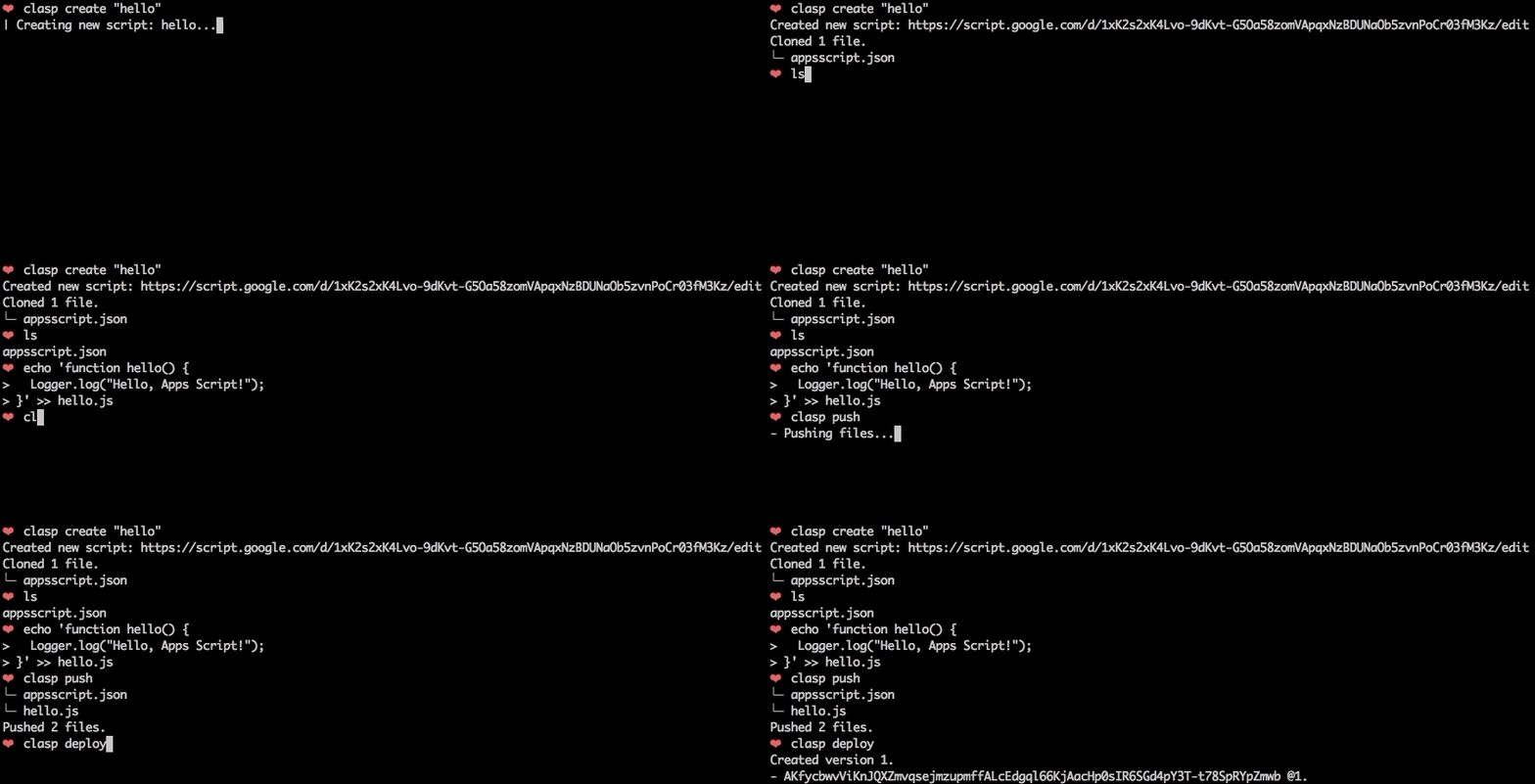
- clasp create "Hello"
- ls
- echo 'function hello() {
- Logger.log("Hello, Apps Script!");
- }' >> hello.js
- clasp push
- clasp deploy
- rm .clasp.json appsscript.json hello.js
- clear
- -->
- 
- **To get started, try out the [codelab](https://g.co/codelabs/clasp)!**
- You can also try clasp in Gitpod, a one-click online IDE for GitHub:
- [](https://gitpod.io/#https://github.com/google/clasp/blob/master/docs/Gitpod/)
- ## Features
- **🗺️ Develop Locally:** `clasp` allows you to develop your Apps Script projects locally. That means you can check-in your code into source control, collaborate with other developers, and use your favorite tools to develop Apps Script.
- **🔢 Manage Deployment Versions:** Create, update, and view your multiple deployments of your project.
- **📁 Structure Code:** `clasp` automatically converts your flat project on [script.google.com](https://script.google.com) into **folders**. For example:
- - _On script.google.com_:
- - `tests/slides.gs`
- - `tests/sheets.gs`
- - _locally_:
- - `tests/`
- - `slides.js`
- - `sheets.js`
- **➡️ Run Apps Script:** Execute your Apps Script from the command line. Features:
- - _Instant_ deployment.
- - Suggested functions Autocomplete (Fuzzy)
- - Easily add custom Google OAuth scopes
- - [And more…](docs/run.md)
- ## Install
- First download `clasp`:
- ```sh
- npm install -g @google/clasp
- ```
- Then enable the Google Apps Script API: https://script.google.com/home/usersettings
- 
- ### Installing as a Gemini CLI Extension
- You can install clasp as an Gemini CLI extensions using the following command:
- ```sh
- gemini extensions install https://github.com/google/clasp
- ```
- This makes clasp available as an MCP server in Gemini CLI.
- Make sure to enable the Google Apps Script API (as explained above) and perform a `clasp login` (with your specific login parameters) before you use the extension.
- ### Installing as a Claude Code CLI Extension
- You can use clasp with Claude Code CLI in one of two ways:
- #### 1. Install as a Plugin (Recommended)
- Run the following command in Claude Code to install clasp as a plugin directly from the repository:
- ```sh
- /plugin install @google/clasp
- ```
- #### 2. Manual Installation
- You can manually add clasp as an MCP server using the provided configuration file or by running:
- ```sh
- claude mcp add clasp -- npx -y @google/clasp mcp
- ```
- Or by referencing the configuration file included in the repository:
- ```sh
- claude mcp add-json clasp "$(cat claude-mcp.json)"
- ```
- ## Commands
- The following command provide basic Apps Script project management.
- > Note: Most of them require you to `clasp login` and `clasp create/clone` before using the rest of the commands.
- ```sh
- clasp
- ```
- - [`clasp login [--no-localhost] [--creds <file>] [--use-project-scopes] [--include-clasp-scopes] [--extra-scopes <scopes>] [--redirect-port]`](#login)
- - [`clasp logout`](#logout)
- - [`clasp show-authorized-user [--json]`](#show-authorized-user)
- - [`clasp create-script [--title <title>] [--type <type>] [--rootDir <dir>] [--parentId <id>]`](#create)
- - [`clasp clone-script <scriptId | scriptURL> [versionNumber] [--rootDir <dir>]`](#clone)
- - [`clasp delete-script [--force]`](#delete)
- - [`clasp pull [--versionNumber]`](#pull)
- - [`clasp push [--watch] [--force]`](#push)
- - [`clasp show-file-status [--json]`](#status)
- - [`clasp open-script`](#open)
- - [`clasp list-deployments`](#deployments)
- - [`clasp create-deployment [--versionNumber <version>] [--description <description>] [--deploymentId <id>]`](#deploy)
- - [`clasp delete-deployment [deploymentId] [--all]`](#undeploy)
- - [`clasp create-version [description]`](#version)
- - [`clasp list-versions`](#versions)
- - [`clasp list-scripts`](#list)
- ### Advanced Commands
- > **NOTE**: These commands require you to add your [Project ID](#projectid-optional).
- - [`clasp tail-logs [--json] [--watch] [--simplified]`](#logs)
- - [`clasp setup-logs [--json]`](#setup-logs)
- - [`clasp list-apis`](#apis)
- - [`clasp enable-api<api>`](#apis)
- - [`clasp disable-api <api>`](#apis)
- - [`clasp run-function [function]`](#clasp-run)
- ## Guides
- ### Migrating from 2.x to 3.x
- #### Drop typescript support
- Clasp no longer transpiles typescript code. For typescript projects, use typescript with a bundler like [Rollup](https://rollupjs.org/) to transform code prior to pushing with clasp. This has the advantage of offering more
- robust support for Typescript features along with ESM module and NPM package support.
- There are several template projects on GitHub that show how to transform Typescript code into Apps Script that are all excellent choices.
- * https://github.com/WildH0g/apps-script-engine-template
- * https://github.com/tomoyanakano/clasp-typescript-template
- * https://github.com/google/aside
- * https://github.com/sqrrrl/apps-script-typescript-rollup-starter
- #### Command renames
- Clasp 3.x introduces some breaking changes from 2.x. For common use cases these changes should not impact usage, but some lesser used commands have been restructured and renamed to improve consistency.
- | 2.x | 3.x |
- |----------------------------|----------------------------------------|
- |`open` | `open-script` |
- |`open --web` | `open-web-app` |
- |`open --addon` | `open-container` |
- |`open --creds` | `open-credentials-setup` |
- |`login --creds <file>` | `login -u <name> --creds <file>` |
- |`logs --open` | `open-logs` |
- |`logs --setup` | N/A |
- |`apis --open` | `open-api-console` |
- |`apis enable <api>` | `enable-api <api>` |
- |`apis disable <api>` | `disable-api <api>` |
- |`deploy -i <id>` | `update-deployment <id>` |
- |`settings` | N/A |
- Other commands have also been renamed but retain aliases for compatibility.
- ### Authorization
- Most command require user authorization. Run `clasp login` to authorize access to manage your scripts.
- #### Multiple user support
- Use the global `--user` option to switch between accounts. This supports both running clasp as different users as well as when invoking the `clasp run-function` command.
- Examples:
- ```sh
- clasp login # Saves as default credentials
- clasp clone # User not specified, runs using default credentials
- clasp login --user testaccount # Authorized new named credentials
- clasp run-function --user testaccount myFunction # Runs function as test account
- ```
- ### Bring your own project/credentials
- While clasp includes a default OAuth client, using your own project is recommend and can improve security and compliance in environments that limit which third party applications users may authorize. To set up your own project:
- 1. [Create a new project](https://cloud.google.com/resource-manager/docs/creating-managing-projects) in the Google Cloud Developer Console.
- 1. [Create an OAuth client](https://support.google.com/cloud/answer/15549257?hl=en#:~:text=To%20create%20an%20OAuth%202.0,are%20yet%20to%20do%20so.). The client type must be `Desktop Application`. Download and save the generated client secrets file. This is required when authorizing using the`clasp login --creds <filename>` command.
- 1. [Enable services](https://cloud.google.com/endpoints/docs/openapi/enable-api). For full functionality, clasp requires the following:
- * Apps Script API - `script.googleapis.com` (required)
- * Service Usage API - `serviceusage.googleapis.com` (required to list/enable/disable APIs)
- * Google Drive API - `drive.googleapis.com` (required to list scripts, create container-bound scripts)
- - Cloud Logging API - `logging.googleapis.com` (required to read logs)
- Note: If configuring the project for external use where OAuth scopes must be registered, include the following:
- ```
- https://www.googleapis.com/auth/script.deployments
- https://www.googleapis.com/auth/script.projects
- https://www.googleapis.com/auth/script.webapp.deploy
- https://www.googleapis.com/auth/drive.metadata.readonly
- https://www.googleapis.com/auth/drive.file
- https://www.googleapis.com/auth/service.management
- https://www.googleapis.com/auth/logging.read
- https://www.googleapis.com/auth/userinfo.email
- https://www.googleapis.com/auth/userinfo.profile
- https://www.googleapis.com/auth/cloud-platform
- ```
- ### Allow-list clasp
- If your organization restricts authorization for third-party apps, you may either:
- * Request your admin allow-list clasp's client id `1072944905499-vm2v2i5dvn0a0d2o4ca36i1vge8cvbn0.apps.googleusercontent.com`
- * Set up an internal-only GCP project for clasp as described in the previous section.
- ### Service accounts (EXPERIMENTAL/NOT WORKING)
- Use the `--adc` option on any command to read credentials from the environment using Google Cloud's [application default credentials](https://cloud.google.com/docs/authentication/application-default-credentials) mechanism.
- Note that if using a service account, service accounts can not own scripts. To use a service account to push or pull files from Apps Script, the scripts must be shared with the service account with the appropriate role (e.g. `Editor` in able to push.)
- ### Ignore File (`.claspignore`)
- Like `.gitignore`, `.claspignore` allows you to ignore files that you do not wish to upload on `clasp push`. Steps:
- 1. Create a file called `.claspignore` in your project's root directory.
- 1. Add patterns to be excluded from `clasp push`. _Note_: The `.claspignore` patterns are applied by [multimatch](https://github.com/sindresorhus/multimatch), which is different from `.gitignore`, especially for directories. To ignore a directory, use syntax like `**/node_modules/**`.
- A sample `.claspignore` ignoring everything except the manifest and `build/main.js`:
- ```text
- **/**
- !build/main.js
- !appsscript.json
- ```
- _Note_: The `.claspignore` patterns are applied relative from the `rootDir`.
- If no `.claspignore` is specified, a default set of patterns is applied. This default set will only consider the `appsscript.json` manifest and any JavaScript, TypeScript and `.html` source files within the `rootDir` folder. Child folders other than `.git` and `node_modules` are processed.
- ```text
- # ignore all files…
- **/**
- # except the extensions…
- !appsscript.json
- !**/*.gs
- !**/*.js
- !**/*.ts
- !**/*.html
- # ignore even valid files if in…
- .git/**
- node_modules/**
- ```
- ## Project Settings File (`.clasp.json`)
- When running `clone` or `create`, a file named `.clasp.json` is created in the current directory to describe `clasp`'s configuration for the current project. Example `.clasp.json`:
- ```json
- {
- "scriptId": "",
- "rootDir": "build/",
- "projectId": "project-id-xxxxxxxxxxxxxxxxxxx",
- "fileExtension": "ts",
- "filePushOrder": ["file1.ts", "file2.ts"]
- }
- ```
- The following configuration values can be used:
- ### `scriptId` (required)
- Specifies the id of the Google Script project that clasp will target.
- 1. Open script url.
- 1. File > Project properties > Script ID
- ### `rootDir` (optional)
- Specifies the **local** directory in which clasp will store your project files. If not specified, clasp will default to the current directory.
- ### `projectId` (optional)
- Specifies the id of the Google Cloud Platform project that clasp will target.
- You must [associate Google Script project with Google Cloud Platform](https://github.com/google/clasp/blob/master/docs/run.md#setup-instructions) beforehand.
- 1. Run `clasp open`.
- 1. Click `Resources > Cloud Platform project...`.
- 1. Specify the project ID `project-id-xxxxxxxxxxxxxxxxxxx`.
- Even if you do not set this manually, clasp will ask this via a prompt to you at the required time.
- ### `fileExtension` (deprecated, optional)
- Specifies the file extension for **local** script files in your Apps Script project.
- ### `scriptExtensions` (optional)
- Specifies the file extensions for **local** script files in your Apps Script project. May be a string or array of strings. Files matching the extension will be considered scripts files.
- When pulling files, the first extension listed is used to write files.
- Defaults to `[".js", ".gs"]`
- ### `htmlExtensions` (optional)
- Specifies the file extensions for **local** HTML files in your Apps Script project. May be a string or array of strings. Files matching the extension will be considered HTML files.
- When pulling files, the first extension listed is used to write files.
- Defaults to `[".html"]`
- ### `filePushOrder` (optional)
- Specifies the files that should be pushed first, useful for scripts that rely on order of execution. All other files are pushed after this list of files, sorted by name.
- Note that file paths are relative to directory containing .clasp.json. If `rootDir` is also set, any files listed should include that path as well.
- ### `skipSubdirectories` (optional)
- For backwards compatibility with previous behavior where subdirectories
- are ignored if a `.claspignore` file is not present. Clasp provides default
- ignore rules, making the previous warning and behavior confusing. If you
- need to force clasp to ignore subdirectories and do not want to construct
- a `.claspignore` file, set this option to true.
- ## Reference
- ### Global options
- - `--user <name>`: Uses credentials stored under the named key. When omitted, the `default` user is used.
- - `--adc`: Uses application default credentials from the environment. Intended to support service accounts in CI workflows.
- - `--project <file>`: Reads project settings from a file other than `.clasp.json`. Intended to support multiple deployment targets.
- - `--auth <file>`: (**DEPRECATED**) Reads credentials from a file other than `.clasprc.json`. Use the `--user` option to maintain multiple authorized accounts.
- - `--ignore <file>`: Reads ignore patterns from a file other than `.claspignore`.
- - `--json`: Show output in JSON format.
- ### Login
- Logs the user in. Saves the client credentials to a `.clasprc.json` file in the user's home directory
- #### Options
- - `--no-localhost`: Do not run a local server, manually enter code instead.
- - `--creds <file>`: Use custom credentials used for `clasp run`. Saves a `.clasprc.json` file to current working directory. This file should be private!
- - `--use-project-scopes`: Use scopes from `appsscript.json` instead of default clasp scopes. Useful for `clasp run` when your script requires runtime scopes.
- - `--include-clasp-scopes`: Include default clasp scopes in addition to project scopes from `appsscript.json`. Can only be used with `--use-project-scopes`.
- - `--extra-scopes <scopes>`: Include additional OAuth scopes as a comma-separated list (for example, `scopeA,scopeB`). Empty entries are rejected.
- - `--redirect-port <port>`: Specify a custom port for the local redirect server during the login process. Useful for environments where a specific port is required.
- #### Examples
- - `clasp login`
- - `clasp login --no-localhost`
- - `clasp login --user test-user --creds client_secret.json`
- - `clasp login --user test-user --use-project-scopes --creds client_secret.json`
- - `clasp login --user test-user --use-project-scopes --include-clasp-scopes --creds client_secret.json`
- - `clasp login --user test-user --extra-scopes https://www.googleapis.com/auth/spreadsheets.readonly,https://www.googleapis.com/auth/drive.readonly --creds client_secret.json`
- - `clasp login --redirect-port 37473`
- ### Logout
- Logs out the user by deleting client credentials.
- #### Examples
- - `clasp logout`
- ### Show Authorized User
- Shows the current authorization status. When logged in, the output includes
- the OAuth client ID and whether the client is `google-provided` (clasp default)
- or `user-provided` (custom credentials).
- #### Options
- - `--json`: Output authorization details as JSON, including `clientId` and `clientType`.
- #### Examples
- - `clasp show-authorized-user`
- - `clasp show-authorized-user --json`
- ### Create
- Creates a new script project. Prompts the user for the script type if not specified.
- #### Options
- - `--type [docs/sheets/slides/forms]`: If specified, creates a new add-on attached to a Document, Spreadsheet, Presentation, or Form. If `--parentId` is specified, this value is ignored.
- - `--title <title>`: A project title.
- - `--rootDir <dir>`: Local directory in which clasp will store your project files. If not specified, clasp will default to the current directory.
- - `--parentId <id>`: A project parent Id.
- - The Drive ID of a parent file that the created script project is bound to. This is usually the ID of a Google Doc, Google Sheet, Google Form, or Google Slides file. If not set, a standalone script project is created.
- - i.e. `https://docs.google.com/presentation/d/{id}/edit`
- #### Examples
- - `clasp create-script`
- - `clasp create-script --type standalone` (default)
- - `clasp create-script --type docs`
- - `clasp create-script --type sheets`
- - `clasp create-script --type slides`
- - `clasp create-script --type forms`
- - `clasp create-script --type webapp`
- - `clasp create-script --type api`
- - `clasp create-script --title "My Script"`
- - `clasp create-script --rootDir ./dist`
- - `clasp create-script --parentId "1D_Gxyv*****************************NXO7o"`
- These options can be combined like so:
- - `clasp create-script --title "My Script" --parentId "1D_Gxyv*****************************NXO7o" --rootDir ./dist`
- ### Clone
- Clones the script project from script.google.com.
- #### Options
- - `scriptId | scriptURL`: The script ID _or_ script URL to clone.
- - `--versionNumber <number>`: The version of the script to clone.
- - `--rootDir <dir>`: Local directory in which clasp will store your project files. If not specified, clasp will default to the current directory.
- #### Examples
- - `clasp clone-script "15ImUCpyi1Jsd8yF8Z6wey_7cw793CymWTLxOqwMka3P1CzE5hQun6qiC"`
- - `clasp clone-script "https://script.google.com/d/15ImUCpyi1Jsd8yF8Z6wey_7cw793CymWTLxOqwMka3P1CzE5hQun6qiC/edit"`
- - `clasp clone-script "15ImUCpyi1Jsd8yF8Z6wey_7cw793CymWTLxOqwMka3P1CzE5hQun6qiC" --rootDir ./src`
- ### Delete
- Interactively deletes a script or a project and the `.clasp.json` file. Prompt the user for confirmation if the --force option is not specified.
- #### Options
- - `-f` `--force`: Bypass any confirmation messages. It’s not a good idea to do this unless you want to run clasp from a script.
- #### Examples
- - `clasp delete-script`
- - `clasp delete-script -f`
- ### Pull
- Fetches a project from either a provided or saved script ID.
- Updates local files with Apps Script project.
- #### Options
- - `--versionNumber <number>`: The version number of the project to retrieve.
- - `--deleteUnusedFiles`: Deletes local files that would have been pushed that were not returned by the server. Prompts for confirmation
- - `--force`: Used with `--deleteUnusedFiles` to automatically confirm. Use with caution.
- #### Examples
- - `clasp pull`
- - `clasp pull --versionNumber 23`
- ### Push
- Force writes all local files to script.google.com.
- > Warning: Google `scripts` APIs do not currently support atomic nor per file operations. Thus the `push` command always **replaces** the whole content of the online project with the files being pushed.
- Ignores files:
- - That start with a `.`
- - That don't have an accepted file extension
- - That are ignored (filename matches a glob pattern in the `.claspignore` file)
- #### Options
- - `-f` `--force`: Forcibly overwrites the remote manifest.
- - `-w` `--watch`: Watches local file changes. Pushes files every few seconds.
- #### Examples
- - `clasp push`
- - `clasp push -f`
- - `clasp push --watch`
- ### Status
- Lists files that will be written to the server on `push`.
- Ignores files:
- - That start with a `.`
- - That don't have an accepted file extension
- - That are ignored (filename matches a glob pattern in the ignore file)
- #### Options
- - `--json`: Show status in JSON form.
- #### Examples
- - `clasp show-file-status`
- - `clasp show-file-status --json`
- ### Open
- Clasp offers several commands to opens the current directory's `clasp` project and related resources.
- #### Examples
- - `clasp open-script`
- - `clasp open-web-app`
- - `clasp open-container`
- - `clasp open-credentials-setup`
- ### Deployments
- List deployments of a script.
- #### Examples
- - `clasp list-deployments`: List all deployments for the current project
- - `clasp list-deployments [scriptId]`: List all deployments for a script ID
- ### Deploy
- Creates a version and deploys a script.
- The response gives the deployment ID and the version of the deployment.
- For web apps, each deployment has a unique URL.
- To update/redeploy an existing deployment, provide the deployment ID.
- #### Options
- - `-V <version>` `--versionNumber <version>`: The project version to deploy at.
- - `-d <description>` `--description <description>`: The deployment description.
- - `-i <id>` `--deploymentId <id>`: The deployment ID to redeploy.
- #### Examples
- - `clasp create-deployment` (create new deployment and new version)
- - `clasp create-deployment --versionNumber 4` (create new deployment)
- - `clasp create-deployment --description "Updates sidebar logo."` (deploy with description)
- - `clasp create-deployment --deploymentId abcd1234` (redeploy and create new version)
- - `clasp create-deployment -V 7 -d "Updates sidebar logo." -i abdc1234`
- ### Redeploy
- Updates an existing deployment. Same as `create-deployment -i id`.
- #### Options
- - `-V <version>` `--versionNumber <version>`: The project version to deploy at.
- - `-d <description>` `--description <description>`: The deployment description.
- #### Examples
- - `clasp update-deployment abcd1234` (redeploy and create new version)
- ### Undeploy
- Undeploys a deployment of a script.
- #### Options
- - `[deploymentId]`: An optional deployment ID.
- - `-a` `--all`: Undeploy all deployments.
- #### Examples
- - `clasp delete-deployment` (prompts for deployment or deletes if only one)
- - `clasp delete-deployment "123"`
- - `clasp delete-deployment --all`
- ### Version
- Creates an immutable version of the script.
- #### Options
- - `description`: description The description of the script version.
- #### Examples
- - `clasp create-version`
- - `clasp create-version "Bump the version."`
- ### Versions
- List versions of a script.
- #### Options
- #### Examples
- - `clasp list-versions`: List all versions for the current project
- - `clasp list-versions [scriptId]`: List all versions for a script ID
- ### List
- Lists your most recent Apps Script projects.
- #### Examples
- - `clasp list-scripts`: Prints `helloworld1 – xxxxxxxxxxxxxxxxxxxxxxxxxxxxxxxxxxxxxxxxxxxxxxxxxxxxxxxxx ...`
- ### MCP (EXPERIMENTAL)
- Runs clasp in MCP (model context protocol) mode for use with coding agents. Configure clasp as a local tool using STDIO transport. While running in MCP mode clasp uses the same credentials as
- normal when used as a CLI. Run `clasp login` ahead of time to authorize.
- When used in MCP mode clasp does not need to be started from the project directory. The project directoy is specified in the tool calls. Switching projects does not require a restart of the MCP server, while switching credentials does.
- This feature is experimental and currently offers a limited subset of tools for agents. Feedback is welcome.
- #### Options
- N/A
- #### Examples
- - `clasp mcp`
- ## Advanced Commands
- > **NOTE**: These commands require Project ID/credentials setup ([see below](#projectid-optional)).
- ### Setup Logs
- Ensures your script is configured with a GCP project ID, which is required to view logs in Cloud Logging with `clasp logs`.
- #### Options
- - `--json`: Output result in json format.
- #### Examples
- - `clasp setup-logs`
- - `clasp setup-logs --json`
- ### Logs
- Prints out most recent the _Cloud Logging logs_. These are logs from `console.log`, not `Logger.log`.
- #### Options
- - `--json`: Output logs in json format.
- - `--watch`: Retrieves the newest logs every 5 seconds.
- - `--simplified`: Removes timestamps from the logs.
- #### Examples
- ```text
- clasp logs
- ERROR Sat Apr 07 2019 10:58:31 GMT-0700 (PDT) myFunction my log error
- INFO Sat Apr 07 2019 10:58:31 GMT-0700 (PDT) myFunction info message
- ```
- - `clasp logs --json`
- - `clasp logs --watch`
- - `clasp logs --simplified`
- ### Run
- Remotely executes an Apps Script function.
- The complete step-by-step information on how to use `clasp run` is available here: [Run](/docs/run.md)
- Below is a short summary:
- 1. Log in with your credentials (`clasp login --creds creds.json`), see: [Run - Prerequisites](/docs/run.md#prerequisites)
- 1. Deploy the Script as an API executable (Easiest done via GUI at the moment).
- 1. Enable any APIs that are used by the script, see: [Run - Function with Scopes](/docs/run.md#run-a-function-that-requires-scopes)
- 1. Have the following in your `appsscript.json`. Be sure it's pushed:
- ```json
- "executionApi": {
- "access": "ANYONE"
- }
- ```
- #### Options
- - `<functionName>`: The name of the function in the script that you want to run.
- - `--nondev`: If true, runs the function in non-devMode.
- - `-p <paramString>` `--params <paramString>`: A JSON string array of parameters to pass to the function
- #### Examples
- - `clasp run-function 'sendEmail'`
- - `clasp run-function 'addOptions' -p '["string", 123, {"test": "for"}, true]'`
- ### List/Enable/Disable Google APIs
- List available APIs. Enables and disables Google APIs.
- #### List APIs
- Lists Google APIs that can be enabled as [Advanced Services](https://developers.google.com/apps-script/guides/services/advanced).
- - `clasp list-apis`
- - `clasp list-apis`
- #### Enable/Disable APIs
- Enables or disables APIs with the Google Cloud project. These APIs are used via services like GmailApp and Advanced Services like BigQuery.
- The API name can be found using `clasp apis list`.
- - `clasp enable-api drive`
- - `clasp disable-api drive`
- #### Open APIs Console
- Open the Google Cloud Console where you can view and manage API access.
- - `clasp open-api-console`
- ### Help
- Displays the help function.
- #### Examples
- - `clasp`
- - `clasp help`
- #### Clasp Run
- > **NOTE**: This command requires you to [bring your own Google API credentials](/docs/run.md).
- - [`clasp run-function [functionName] [--nondev] [--params <StringArray>]`](#run)
- ## Troubleshooting
- ### NodeJS Version
- The library requires **NodeJS version >= 22.0.0**.
- You can check your version of NodeJS with this command.
- ```sh
- node -v
- ```
- You can use these commands to upgrade NodeJS if necessary (**not on Windows**):
- ```sh
- npm install -g npm # Update npm and npx
- npx n latest # use the n package to update node
- ```
- ### Debugging & filing issues
- Clasp uses the [debug](https://www.npmjs.com/package/debug) library for internal logging. If you encounter an issue and want to file a bug report, please include a log with debugging enabled. Enable debugging by setting the envionment variable `DEBUG=clasp:*`
- Example:
- ```sh
- DEBUG=clasp:* clasp pull # Runs clasp with verbose debug output
- ```
- ### Using a Proxy
- Clasp supports proxies via the Google APIs Node Module.
- See ["Using a Proxy"](https://github.com/googleapis/google-api-nodejs-client#using-a-proxy) and [this discussion](https://github.com/google/clasp/issues/8#issuecomment-427560737) for details on how to use the proxy.
- This requires using the environment variables `HTTP_PROXY` / `HTTPS_PROXY`.
- ## README Badge
- Using clasp for your project? Add a README badge to show it off: [](https://github.com/google/clasp)
- ```md
- [](https://github.com/google/clasp)
- ```
- ## Develop clasp
- See [the develop guide](docs/develop.md) for instructions on how to build `clasp`. It's not that hard!
- ## Contributing
- The main purpose of this tool is to enable local Apps Script development.
- If you have a core feature or use-case you'd like to see, find a GitHub issue or
- create a detailed proposal of the use-case.
- PRs are very welcome! See the [issues](https://github.com/google/clasp/issues) (especially **good first issue** and **help wanted**).
- ⚡ Powered by the [Apps Script API](https://developers.google.com/apps-script/api/).
Version history
v1.0.010/19/2026
Ratings and comments
Sign in to rate this skill.
Sign inFree to use. If it’s helped, pass it on.