nunu
A CLI tool for building Go applications.
Safety scan
A static text scan, not a guarantee. Select the badge to see what was scanned and every finding.
Badge for your README

Markdown
[](/listings/go-nunu--nunu)HTML
<a href="/listings/go-nunu--nunu"><img src="/api/listings/go-nunu--nunu/badge.svg" alt="findsafeskills safety rating" /></a>Install
Install instructions from the README
As written by the repo's author. findsafeskills has not verified these steps.
You can install Nunu with the following command:
go install github.com/go-nunu/nunu@latest
> Tips: If `go install` succeeds but the `nunu` command is not recognized, it is because the environment variable is not configured. You can add the GOBIN directory to the environment variable.
What was scanned
The files the safety scan read, as written by the repository's author and shown as plain text. Lines with a finding are marked.
README.md · README · 226 lines
View this file on GitHub (read at the repository's current version: the scan did not record which commit it read)
- <a href="https://trendshift.io/repositories/9047" target="_blank"><img src="https://trendshift.io/api/badge/repositories/9047" alt="go-nunu%2Fnunu | Trendshift" style="width: 250px; height: 55px;" width="250" height="55"/></a>
- # Nunu — A CLI tool for building Go applications.
- Nunu is a scaffolding tool for building Go applications. Its name comes from a game character in League of Legends, a little boy riding on the shoulders of a Yeti. Just like Nunu, this project stands on the shoulders of giants, as it is built upon a combination of popular libraries from the Go ecosystem. This combination allows you to quickly build efficient and reliable applications.
- 🚀Tips: This project is very complete, so updates will not be very frequent, welcome to use.
- - [简体中文介绍](https://github.com/go-nunu/nunu/blob/main/README_zh.md)
- - [Português](https://github.com/go-nunu/nunu/blob/main/README_pt.md)
- - [日本語](https://github.com/go-nunu/nunu/blob/main/README_jp.md)
- 
- ## Documentation
- * [User Guide](https://github.com/go-nunu/nunu/blob/main/docs/en/guide.md)
- * [Architecture](https://github.com/go-nunu/nunu/blob/main/docs/en/architecture.md)
- * [Getting Started Tutorial](https://github.com/go-nunu/nunu/blob/main/docs/en/tutorial.md)
- * [Unit Testing](https://github.com/go-nunu/nunu/blob/main/docs/en/unit_testing.md)
- * [MCP Server](https://github.com/go-nunu/nunu-layout-mcp/blob/main/README.md)
- * [Monorepo Layout](https://github.com/go-nunu/nunu-layout-monorepo)
- ## AI-assisted Development
- [Nunu Skills](https://github.com/go-nunu/nunu-skills) provides `build-with-nunu`, an Agent Skill that helps coding agents such as Codex and Claude Code understand Nunu project layouts and implement complete, tested features across handlers, services, repositories, routers, Wire dependency injection, jobs, tasks, and MCP servers.
- Install it in your project with:
- ```bash
- npx skills add go-nunu/nunu-skills --skill build-with-nunu
- ```
- See the [Nunu Skills repository](https://github.com/go-nunu/nunu-skills) for supported layouts, agent-specific installation options, and example prompts.
- ## Features
- - **Gin**: https://github.com/gin-gonic/gin
- - **Gorm**: https://github.com/go-gorm/gorm
- - **Wire**: https://github.com/google/wire
- - **Viper**: https://github.com/spf13/viper
- - **Zap**: https://github.com/uber-go/zap
- - **Golang-jwt**: https://github.com/golang-jwt/jwt
- - **Go-redis**: https://github.com/go-redis/redis
- - **Testify**: https://github.com/stretchr/testify
- - **Sonyflake**: https://github.com/sony/sonyflake
- - **Gocron**: https://github.com/go-co-op/gocron
- - **Go-sqlmock**: https://github.com/DATA-DOG/go-sqlmock
- - **Gomock**: https://github.com/golang/mock
- - **Swaggo**: https://github.com/swaggo/swag
- - **Casbin**: https://github.com/casbin/casbin
- - **Pitaya**: https://github.com/topfreegames/pitaya
- - **MCP-GO**: https://github.com/mark3labs/mcp-go
- - More...
- ## Key Features
- * **Low Learning Curve and Customization**: Nunu encapsulates popular libraries that Gophers are familiar with, allowing you to easily customize the application to meet specific requirements.
- * **High Performance and Scalability**: Nunu aims to be high-performance and scalable. It uses the latest technologies and best practices to ensure that your application can handle high traffic and large amounts of data.
- * **Security and Reliability**: Nunu uses stable and reliable third-party libraries to ensure the security and reliability of your application.
- * **Modular and Extensible**: Nunu is designed to be modular and extensible. You can easily add new features and functionality by using third-party libraries or writing your own modules.
- * **Complete Documentation and Testing**: Nunu has comprehensive documentation and testing. It provides extensive documentation and examples to help you get started quickly. It also includes a test suite to ensure that your application works as expected.
- ## Concise Layered Architecture
- Nunu adopts a classic layered architecture. In order to achieve modularity and decoupling, it uses the dependency injection framework `Wire`.
- 
- ## Nunu CLI
- 
- ## Directory Structure
- ```
- .
- ├── api
- │ └── v1
- ├── cmd
- │ ├── migration
- │ ├── server
- │ │ ├── wire
- │ │ │ ├── wire.go
- │ │ │ └── wire_gen.go
- │ │ └── main.go
- │ └── task
- ├── config
- ├── deploy
- ├── docs
- ├── internal
- │ ├── handler
- │ ├── middleware
- │ ├── model
- │ ├── repository
- │ ├── server
- │ └── service
- ├── pkg
- ├── scripts
- ├── test
- │ ├── mocks
- │ └── server
- ├── web
- ├── Makefile
- ├── go.mod
- └── go.sum
- ```
- The project architecture follows a typical layered structure, consisting of the following modules:
- * `cmd`: This module contains the entry points of the application, which perform different operations based on different commands, such as starting the server or executing database migrations. Each sub-module has a `main.go` file as the entry file, as well as `wire.go` and `wire_gen.go` files for dependency injection.
- * `config`: This module contains the configuration files for the application, providing different configurations for different environments, such as development and production.
- * `deploy`: This module is used for deploying the application and includes deployment scripts and configuration files.
- * `internal`: This module is the core module of the application and contains the implementation of various business logic.
- - `handler`: This sub-module contains the handlers for handling HTTP requests, responsible for receiving requests and invoking the corresponding services for processing.
- - `job`: This sub-module contains the logic for background tasks.
- - `model`: This sub-module contains the definition of data models.
- - `repository`: This sub-module contains the implementation of the data access layer, responsible for interacting with the database.
- - `server`: This sub-module contains the implementation of the HTTP server.
- - `service`: This sub-module contains the implementation of the business logic, responsible for handling specific business operations.
- * `pkg`: This module contains some common utilities and functions.
- * `scripts`: This module contains some script files used for project build, test, and deployment operations.
- * `storage`: This module is used for storing files or other static resources.
- * `test`: This module contains the unit tests for various modules, organized into sub-directories based on modules.
- * `web`: This module contains the frontend-related files, such as HTML, CSS, and JavaScript.
- In addition, there are some other files and directories, such as license files, build files, and README. Overall, the project architecture is clear, with clear responsibilities for each module, making it easy to understand and maintain.
- ## Requirements
- To use Nunu, you need to have the following software installed on your system:
- * Go 1.25.8 or higher
- * Git
- * Docker (optional)
- * MySQL 5.7 or higher (optional)
- * Redis (optional)
- ### Installation
- You can install Nunu with the following command:
- ```bash
- go install github.com/go-nunu/nunu@latest
- ```
- > Tips: If `go install` succeeds but the `nunu` command is not recognized, it is because the environment variable is not configured. You can add the GOBIN directory to the environment variable.
- ### Create a New Project
- You can create a new Go project with the following command:
- ```bash
- nunu new projectName
- ```
- By default, it pulls from the GitHub source, but you can also use an accelerated repository in China:
- ```
- // Use the basic template
- nunu new projectName -r https://gitee.com/go-nunu/nunu-layout-basic.git
- // Use the advanced template
- nunu new projectName -r https://gitee.com/go-nunu/nunu-layout-advanced.git
- // Use the monorepo template
- nunu new projectName -r https://github.com/go-nunu/nunu-layout-monorepo.git
- ```
- This command will create a directory named `projectName` and generate an elegant Go project structure within it.
- ### Create Components
- You can create handlers, services, repositories, and models for your project using the following commands:
- ```bash
- nunu create handler user
- nunu create service user
- nunu create repository user
- nunu create model user
- ```
- or
- ```
- nunu create all user
- ```
- These commands will create components named `UserHandler`, `UserService`, `UserRepository`, and `UserModel`, respectively, and place them in the correct directories.
- ### Run the Project
- You can quickly run the project with the following command:
- ```bash
- nunu run
- ```
- This command will start your Go project and support hot-reloading when files are updated.
- ### Compile wire.go
- You can quickly compile `wire.go` with the following command:
- ```bash
- nunu wire
- ```
- This command will compile your `wire.go` file and generate the required dependencies.
- ## Contribution
- If you find any issues or have any improvement suggestions, please feel free to raise an issue or submit a pull request. Your contributions are highly appreciated!
- ## License
- Nunu is released under the MIT License. For more information, see the [LICENSE](LICENSE) file.
- ## Star History
- [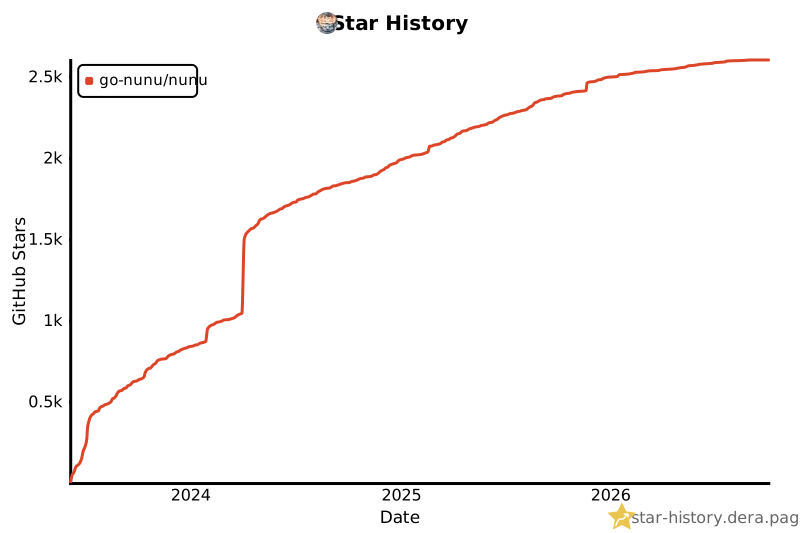](https://star-history.dera.page/#go-nunu/nunu&Date)
Ratings and comments
Sign in to rate this skill.
Sign inFree to use. If it’s helped, pass it on.