web-access
给 Claude Code 装上完整联网能力的 skill:三层通道调度 + 浏览器 CDP + 并行分治
Safety scan
A static text scan, not a guarantee. Select the badge to see what was scanned and every finding.
Badge for your README

Markdown
[](/listings/eze-is--web-access)HTML
<a href="/listings/eze-is--web-access"><img src="/api/listings/eze-is--web-access/badge.svg" alt="findsafeskills safety rating" /></a>Install
Install instructions from the README
As written by the repo's author. findsafeskills has not verified these steps.
**方式一:npx skills 一键安装(推荐)**
npx skills add eze-is/web-access
> [skills CLI](https://github.com/vercel-labs/skills) 是开源的 Agent Skill 包管理器,自动检测你的 Agent 环境并安装到正确位置。
**方式二:让 Agent 自动安装**
帮我安装这个 skill:https://github.com/eze-is/web-access
**方式三:Plugin 安装(Claude Code)**
claude plugin marketplace add https://github.com/eze-is/web-access
claude plugin install web-access@web-access --scope user
**方式四:手动**
git clone https://github.com/eze-is/web-access ~/.claude/skills/web-access
What was scanned
The files the safety scan read, as written by the repository's author and shown as plain text. Lines with a finding are marked.
.claude-plugin/marketplace.json · Manifest · 18 lines
View this file on GitHub (read at the repository's current version: the scan did not record which commit it read)
This file has changed since it was scanned, so this is not exactly the text that was scanned, and no line is marked. The findings are listed with the safety scan above.
- {
- "name": "web-access",
- "owner": {
- "name": "一泽 Eze"
- },
- "metadata": {
- "description": "Complete web browsing and automation skill for Claude Code"
- },
- "plugins": [
- {
- "name": "web-access",
- "description": "All web operations: search, fetch, CDP browser automation, site experience accumulation",
- "source": "./",
- "category": "productivity",
- "tags": ["web", "browser", "cdp", "automation", "search"]
- }
- ]
- }
README.md · README · 273 lines
View this file on GitHub (read at the repository's current version: the scan did not record which commit it read)
This file has changed since it was scanned, so this is not exactly the text that was scanned, and no line is marked. The findings are listed with the safety scan above.
- <div align="right">
- <details>
- <summary>🌐 Language</summary>
- <div>
- <div align="center">
- <a href="https://openaitx.github.io/view.html?user=eze-is&project=web-access&lang=en">English</a>
- | <a href="https://openaitx.github.io/view.html?user=eze-is&project=web-access&lang=zh-CN">简体中文</a>
- | <a href="https://openaitx.github.io/view.html?user=eze-is&project=web-access&lang=zh-TW">繁體中文</a>
- | <a href="https://openaitx.github.io/view.html?user=eze-is&project=web-access&lang=ja">日本語</a>
- | <a href="https://openaitx.github.io/view.html?user=eze-is&project=web-access&lang=ko">한국어</a>
- | <a href="https://openaitx.github.io/view.html?user=eze-is&project=web-access&lang=fr">Français</a>
- | <a href="https://openaitx.github.io/view.html?user=eze-is&project=web-access&lang=de">Deutsch</a>
- | <a href="https://openaitx.github.io/view.html?user=eze-is&project=web-access&lang=es">Español</a>
- | <a href="https://openaitx.github.io/view.html?user=eze-is&project=web-access&lang=pt">Português</a>
- | <a href="https://openaitx.github.io/view.html?user=eze-is&project=web-access&lang=ru">Русский</a>
- </div>
- </div>
- </details>
- </div>
- <img width="879" height="376" alt="image" src="https://github.com/user-attachments/assets/a87fd816-a0b5-4264-b01c-9466eae90723" />
- <p align="center">
- <b>给 AI Agent 装上完整联网能力的 Skill。</b><br/>
- <a href="https://web-access.eze.is">🌐 官网</a> · <a href="https://mp.weixin.qq.com/s/rps5YVB6TchT9npAaIWKCw">📖 设计详解</a> · <a href="#安装">⚡ 快速安装</a>
- </p>
- AI Agent 原本的联网能力(WebSearch、WebFetch)缺少调度策略和浏览器自动化能力。这个 Agent Skill 补上的是:**联网策略 + CDP 浏览器操作 + 站点经验积累**。兼容所有支持 SKILL.md 的 Agent(Claude Code、Cursor、Gemini CLI、Codex CLI 等)。
- > 推荐必读:[Web Access:一个 Skill,拉满 Agent 联网和浏览器能力](https://mp.weixin.qq.com/s/rps5YVB6TchT9npAaIWKCw) ,完整介绍了 Web-Access Skill 的开发细节与 Agent Skill 设计哲学,帮助你也能写出类似通用、高上限的 Skill
- > [!IMPORTANT]
- > **从旧版本升级到 v2.6 之前,请把下面这段话发给你的 Agent**(浏览器偏好和站点经验从 v2.6 起改放在 `~/.web-access/`,`npx skills update` 会先删除旧目录,不先搬就会丢):
- >
- > ```text
- > 我要把 web-access 升级到 v2.6。升级前请先迁移我的数据:找到当前 web-access skill 的安装目录,把其中的 config.env 复制到 ~/.web-access/config.env,把 references/site-patterns/ 整个文件夹(含子文件夹)复制到 ~/.web-access/site-patterns/(Windows 上 ~ 指 %USERPROFILE%),已存在的文件不要覆盖;确认复制成功后再按 https://github.com/eze-is/web-access 的说明升级,升级后运行一次 check-deps.mjs,确认浏览器配置和站点经验都还在。
- > ```
- >
- > 用 git 或 Claude Code 插件安装的,升级后也会自动迁移;照着这段话做一遍同样安全(只复制、不覆盖)。详见 [references/migration-2.6.md](references/migration-2.6.md)。
- ---
- ## v2.6.0 能力
- | 能力 | 说明 |
- |------|------|
- | 联网工具自动选择 | WebSearch / WebFetch / curl / Jina / CDP,按场景自主判断,可任意组合 |
- | CDP Proxy 浏览器操作 | 直连用户日常浏览器(Chrome / Edge / Brave / Arc / Dia 等任意 Chromium 内核浏览器),天然携带登录态,支持动态页面、交互操作、视频截帧 |
- | 点击与 iframe | `/click`(JS click)、`/clickAt`(CDP 真实鼠标事件)、`/clickXY`(坐标点击,可点进跨站 iframe、不激活标签页)、`/setFiles`(文件上传);`/frames` + `/eval?frame=` 读取跨站 iframe 内容 |
- | 本地浏览器书签/历史检索 | `find-url.mjs` 跨 Chrome / Edge 查询公网搜不到的目标(内部系统)或用户访问过的页面,支持关键词/时间窗/访问频度排序 |
- | 并行分治 | 多目标时分发子 Agent 并行执行,共享一个 Proxy,tab 级隔离 |
- | 站点经验积累 | 按域名存储操作经验(URL 模式、平台特征、已知陷阱),跨 session 复用 |
- | 媒体提取 | 从 DOM 直取图片/视频 URL,或对视频任意时间点截帧分析 |
- **v2.6.0 更新:**
- - **升级必读:用户数据移到 `~/.web-access/`** — 浏览器偏好和站点经验不再放在 Skill 目录里,之后任何方式升级都不会被覆盖。用 `npx skills` 从旧版本升级的,**升级前**按 [`references/migration-2.6.md`](references/migration-2.6.md) 先备份;git 与 Claude Code 插件安装会自动迁移
- - **任意 Chromium 内核浏览器可用** — `WEB_ACCESS_BROWSER` 改填浏览器的用户数据目录,Brave、Arc、Dia、Vivaldi、Opera 等都能用;旧值 `chrome` / `edge` 继续有效。首次配置时 Agent 只看应用数据目录最外层的文件夹名认出浏览器,再用 `browser-probe.mjs` 只进入认出的文件夹确认(思路来自 #173,感谢 @zhangweijian97)
- - **跨站 iframe** — `GET /frames` 列出页面 iframe,`/eval?frame=<frameId>` 在其中执行;`GET /clickXY` 按坐标真实点击,可点中跨站 iframe 且不激活标签页
- - **不再扫描 9222 等固定端口**;`/health` 的 `browser.id` 改为数据目录真实路径
- - **修复** — `proxy-maintenance.mjs stop/restart` 对真实服务报错、restart 不拉起新服务;并发维护误报;探测遇到无权限目录崩溃;迁移失败重试丢偏好
- <details><summary>v2.5.4 更新</summary>
- - **修复新标签页空白竞态** — `/new` 先创建 `about:blank` 并完成 CDP attach,再显式导航;不再把浏览器初始空白文档误判为目标页面
- - **目标内容就绪契约** — 导航成功或 `readyState` 完成不等于任务完成;遇到验证页、登录跳转和异步渲染时继续观察,直到目标内容出现或确认受阻
- - **完整 URL 安全传输** — `/new` 和 `/navigate` 从 v2.5.3 起使用 POST body 传 URL,查询参数中的 `&` 不再被错误切分
- </details>
- <details><summary>v2.5.2 更新</summary>
- - **Microsoft Edge 支持** — CDP Proxy 不再绑定 Chrome,新增 Edge 适配(及 Chromium、Chrome Canary 等 Chromium 系,通过同一套自动发现机制接入)。在 `edge://inspect/#remote-debugging` 勾选 "Allow remote debugging for this browser instance" 即可
- - **浏览器偏好持久化** — 新增 `config.env`(gitignored,首次运行从模板创建),通过 `WEB_ACCESS_BROWSER` 固定默认浏览器;多浏览器同时开启 toggle 时 Agent 会询问偏好。也支持单次覆盖 `--browser <chrome|edge>`
- - **不擅自降级** — 偏好/指定的浏览器没启动或没开 toggle 时硬错并给出明确处理步骤,不会悄悄连到别的浏览器;proxy 首次成功连接后 pin 住浏览器 id,避免运行中漂移
- - **find-url 也支持 Edge** — 本地书签/历史检索默认遍历 Chrome 与 Edge,可用 `--browser <chrome|edge>` 限定单一浏览器
- </details>
- <details><summary>v2.5.0 更新</summary>
- - **本地 Chrome 资源检索** — 新增 `scripts/find-url.mjs`,从本地 Chrome 书签/历史按关键词/时间窗/访问频度定位 URL。典型场景:用户提到组织内部系统("我们的 XX 平台"等公网搜不到的目标)、回查之前访问过但不记得地址的页面、查看最近高频访问网站等(场景感谢 @MVPGFC 在 #60 提出)
- </details>
- <details><summary>v2.4.3 更新</summary>
- - **修复 CLAUDE_SKILL_DIR 路径问题** — bash 代码块改用 `${CLAUDE_SKILL_DIR}` 字符串替换语法,修复 Windows Git Bash 路径转换错误和变量未设置问题(#47 #46)
- - **站点经验列表合并到前置检查** — 启动检查通过后自动输出已有站点经验列表,移除不可靠的 `!` 内联注入
- </details>
- <details><summary>v2.4.1 更新</summary>
- - **跨平台支持** — 脚本从 bash 迁移到 Node.js,Windows / Linux / macOS 均可使用
- - **DOM 边界穿透** — 新增技术事实:eval 递归遍历可穿透 Shadow DOM、iframe 等选择器不可跨越的边界
- </details>
- <details><summary>v2.4 更新</summary>
- - **站点内 URL 可靠性** — 新增事实说明:站点生成的链接自带完整上下文,手动构造的 URL 可能缺失隐式必要参数
- - **平台错误提示不可信** — 新增技术事实:平台返回的"内容不存在"等提示可能是访问方式问题而非内容本身问题
- - **小红书站点经验增强** — xsec_token 机制、创作者平台状态校验、暂存草稿流程
- </details>
- <details><summary>v2.3 更新</summary>
- - **浏览哲学重构** — 更清晰的「像人一样思考」框架,强调目标驱动而非步骤驱动
- - **Jina 积极推荐** — 明确鼓励在合适场景主动使用 Jina 节省 token
- - **子 Agent prompt 指引优化** — 明确加载写法,增加避免动词暗示执行方式的说明
- </details>
- ## 安装
- **方式一:npx skills 一键安装(推荐)**
- ```bash
- npx skills add eze-is/web-access
- ```
- > [skills CLI](https://github.com/vercel-labs/skills) 是开源的 Agent Skill 包管理器,自动检测你的 Agent 环境并安装到正确位置。
- **方式二:让 Agent 自动安装**
- ```
- 帮我安装这个 skill:https://github.com/eze-is/web-access
- ```
- **方式三:Plugin 安装(Claude Code)**
- ```bash
- claude plugin marketplace add https://github.com/eze-is/web-access
- claude plugin install web-access@web-access --scope user
- ```
- **方式四:手动**
- ```bash
- git clone https://github.com/eze-is/web-access ~/.claude/skills/web-access
- ```
- > [!IMPORTANT]
- > **v2.6 升级说明(给 Agent 和用户)**:完整说明与 Agent 自检步骤见 [references/migration-2.6.md](references/migration-2.6.md)。
- >
- > 1. **用户数据移出 skill 目录**:浏览器偏好 `config.env`、站点经验 `site-patterns/` 改放在用户目录下的 `~/.web-access/`(Windows 为 `%USERPROFILE%\.web-access\`),此后任何方式升级都不会再丢。
- > - **用 `npx skills` 从旧版本升级**:`npx skills update` 会先删除整个 skill 目录再重装,旧数据会随之丢失。**升级前**先运行下面的命令备份,再执行升级。
- > - **git clone 或 Claude Code 插件安装**:升级后首次运行前置检查时自动复制旧数据(只复制、不删除、不覆盖已有文件),并输出一行 `user-data:` 说明。
- > 2. **浏览器配置改为数据目录路径**:任何 Chromium 内核浏览器(Brave、Arc、Dia、Vivaldi……)都能用;旧值 `chrome` / `edge` 等继续有效,老配置不用改。
- > 3. **升级后重启一次共享服务**:`node "<skill路径>/scripts/proxy-maintenance.mjs" restart`,会保留原来的浏览器选择。
- >
- > macOS / Linux 升级前备份(`SKILL_DIR` 换成旧版本 skill 的实际目录,如 `~/.claude/skills/web-access`、`~/.agents/skills/web-access`):
- >
- > ```bash
- > SKILL_DIR=~/.claude/skills/web-access
- > mkdir -p ~/.web-access/site-patterns
- > [ -f "$SKILL_DIR/config.env" ] && cp -n "$SKILL_DIR/config.env" ~/.web-access/
- > cp -Rn "$SKILL_DIR/references/site-patterns/." ~/.web-access/site-patterns/
- > ```
- >
- > Windows(PowerShell):
- >
- > ```powershell
- > $SkillDir = "$env:USERPROFILE\.claude\skills\web-access"
- > New-Item -ItemType Directory -Force "$env:USERPROFILE\.web-access\site-patterns" | Out-Null
- > if (Test-Path "$SkillDir\config.env") { Copy-Item "$SkillDir\config.env" "$env:USERPROFILE\.web-access\" }
- > Copy-Item "$SkillDir\references\site-patterns\*" "$env:USERPROFILE\.web-access\site-patterns\" -Recurse
- > ```
- ## 前置配置(CDP 模式)
- CDP 模式需要 **Node.js 22+** 和一个开启了远程调试的 Chromium 内核浏览器(Chrome、Edge、Brave、Arc、Dia、Vivaldi 等):
- 1. 在你想用的浏览器地址栏打开 `chrome://inspect/#remote-debugging`(Edge 为 `edge://inspect/#remote-debugging`)
- 2. 勾选 **Allow remote debugging for this browser instance**(可能需要重启浏览器)
- web-access 的设计是让 Agent 与你共用日常浏览器和登录态。用 `--remote-debugging-port` 单独启动的调试浏览器不在支持范围内,脚本也不会自动扫描 9222 等固定端口。
- ### 浏览器配置(config.env)
- skill 长期偏好保存在 `~/.web-access/config.env`(Windows 为 `%USERPROFILE%\.web-access\config.env`;首次运行自动从 `templates/config.env.template` 创建)。它与站点经验 `~/.web-access/site-patterns/` 一起放在 skill 目录之外,升级 skill 不会覆盖或删除。
- `WEB_ACCESS_BROWSER` 填浏览器的**用户数据目录**,即含 `Local State` 的那一层(浏览器把调试端口文件 `DevToolsActivePort` 写在这里):
- ```bash
- WEB_ACCESS_BROWSER=~/Library/Application Support/Dia/User Data
- # Windows 例:%LOCALAPPDATA%\Google\Chrome\User Data;Linux 例:~/.config/google-chrome
- # 旧值 chrome / chrome-canary / chromium / edge 仍可用,按平台对应到标准目录
- ```
- 一般不用手填:留空、且没有可复用的共享服务时,Agent 运行前置检查会进入首次配置——列出应用数据目录(macOS `~/Library/Application Support`、Windows `%LOCALAPPDATA%` 与 `%APPDATA%`、Linux `~/.config`,以及 snap 的 `~/snap`、flatpak 的 `~/.var/app`)里的文件夹名(snap 浏览器的数据目录在带修订号的子目录里,探测时写 `brave/current/.config` 这类经 `current` 的相对路径,配置随 snap 升级仍有效),从中认出浏览器,用 `scripts/browser-probe.mjs` 只在认出的文件夹里确认数据目录和远程调试状态(探测范围由脚本限定在应用数据目录内),问你用哪个后写入。日常运行只读所配置目录里的端口文件;连不上就报错并给出处理步骤,不会换到别的浏览器,也不会扫描固定端口。
- 如果系统拒绝读取 `DevToolsActivePort`,可在同一配置中设置可选的 `WEB_ACCESS_CDP_PORT`。它必须与 `WEB_ACCESS_BROWSER` 配对,填入已核对属于该浏览器的端口;留空使用自动发现。TCP 可达只表示端口在监听,浏览器归属由这份明确配置提供。指定其他浏览器时不会借用此端口,端口失效也不自动降级。
- **临时用别的浏览器**(不修改 config.env,取值规则同上):
- ```bash
- node "${CLAUDE_SKILL_DIR}/scripts/check-deps.mjs" --browser "$HOME/Library/Application Support/Google/Chrome"
- ```
- **切换浏览器**(proxy 已连接旧的):
- ```bash
- node "${CLAUDE_SKILL_DIR}/scripts/proxy-maintenance.mjs" stop
- # 确认停止成功后,改写 config.env,或本次指定
- node "${CLAUDE_SKILL_DIR}/scripts/check-deps.mjs" --browser edge
- ```
- 环境检查(Agent 运行时会自动完成前置检查,无需手动执行):
- ```bash
- node "${CLAUDE_SKILL_DIR}/scripts/check-deps.mjs"
- # $CLAUDE_SKILL_DIR 是 skill 加载时自动设置的环境变量
- # 手动运行请替换为实际路径,如 ~/.claude/skills/web-access
- ```
- 前置检查优先复用 `/health` 确认仍已连接的 Proxy;服务还在但浏览器连接断开时,由原服务重新连接。只有服务不可用时才检查浏览器并后台启动。Proxy 没有运行时长或空闲退出计时器,检查超时也不会停止它。浏览器退出、重启或撤销调试权限后,重新连接仍可能需要浏览器授权。
- 多个 Agent 共用一条 CDP 连接;发现和握手期间的并发请求共用同一次连接尝试。旧连接的迟到事件无法清理新连接或结算新连接的命令。服务端口原子绑定保证同时启动的进程只有一个连接浏览器。
- 集中维护使用 `node "${CLAUDE_SKILL_DIR}/scripts/proxy-maintenance.mjs" status|restart|stop`,Windows、macOS、Linux 均使用同一脚本,无需系统进程查杀命令。维护以 `/health` 的 `instanceId` 识别目标服务,忙碌时拒绝停止;`restart` 保留原浏览器选择。普通任务直接复用,不自行重启。维护命令输出状态 JSON,`waitingAuthorization` 表示服务已启动但浏览器连接还未确认,不是成功就绪。详见 [API 参考](references/cdp-api.md)。
- ## CDP Proxy API
- Proxy 通过 WebSocket 直连浏览器(兼容 `chrome://inspect` / `edge://inspect` 方式,无需命令行参数启动),提供 HTTP API:
- ```bash
- # 检查并复用;没有服务时才后台启动
- node "${CLAUDE_SKILL_DIR}/scripts/check-deps.mjs"
- # 页面操作
- curl -s -X POST --data-raw 'https://example.com' http://localhost:3456/new # 新建 tab(v2.5.3 起 URL 走 POST body)
- curl -s -X POST "http://localhost:3456/eval?target=ID" -d 'document.title' # 执行 JS
- curl -s -X POST "http://localhost:3456/click?target=ID" -d 'button.submit' # JS 点击
- curl -s -X POST "http://localhost:3456/clickAt?target=ID" -d '.upload-btn' # 真实鼠标点击
- curl -s -X POST "http://localhost:3456/setFiles?target=ID" \
- -d '{"selector":"input[type=file]","files":["/path/to/file.png"]}' # 文件上传
- curl -s "http://localhost:3456/screenshot?target=ID&file=/tmp/shot.png" # 截图
- curl -s "http://localhost:3456/scroll?target=ID&direction=bottom" # 滚动
- curl -s "http://localhost:3456/close?target=ID" # 关闭 tab
- curl -s "http://localhost:3456/health" # 查看状态(含 managedTabs 数量)
- ```
- Proxy 会自动追踪通过 `/new` 创建的 tab,闲置 15 分钟后自动关闭,防止 Agent 异常退出时留下孤儿 tab。此清理只关闭标签页,不会关闭 Proxy 服务或断开浏览器连接。可通过环境变量 `CDP_TAB_IDLE_TIMEOUT`(单位毫秒)调整标签页超时时间。
- ## ⚠️ 使用前提醒
- 通过浏览器自动化操作社交平台(如小红书)存在账号被平台限流或封禁的风险。**强烈建议使用小号进行操作。**
- ## 使用
- 安装后直接让 Agent 执行联网任务,skill 自动接管:
- - "帮我搜索 xxx 最新进展"
- - "读一下这个页面:[URL]"
- - "去小红书搜索 xxx 的账号"
- - "帮我在创作者平台发一篇图文"
- - "同时调研这 5 个产品的官网,给我对比摘要"
- ## 设计哲学
- > Skill = 哲学 + 技术事实,不是操作手册。讲清 tradeoff 让 AI 自己选,不替它推理。
- 详见 [SKILL.md](./SKILL.md) 中的浏览哲学部分。
- ## License
- MIT · 作者:[一泽 Eze](https://github.com/eze-is) · [官网](https://web-access.eze.is)
- ## Star History
- [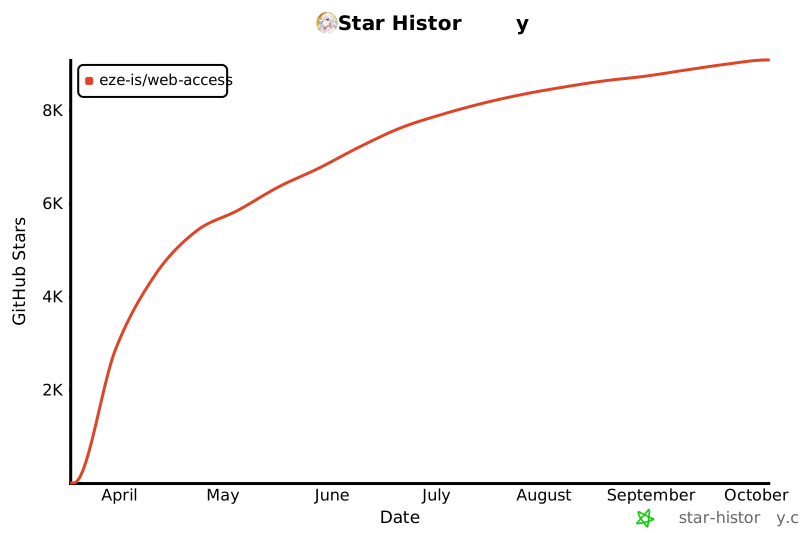](https://star-history.com/#eze-is/web-access&Date)
- ## Clawhub Download History
- [](https://skill-history.com/eze-is/web-access)
- <img width="1280" height="306" alt="image" src="https://github.com/user-attachments/assets/2afa25c2-3730-413e-b40f-94e52567249d" />
Ratings and comments
Sign in to rate this skill.
Sign inFree to use. If it’s helped, pass it on.