taskmaster
An AI-powered task-management system you can drop into Cursor, Lovable, Windsurf, Roo, and others.
Safety scan
A static text scan, not a guarantee. Select the badge to see what was scanned and every finding.
Badge for your README

Markdown
[](/listings/eyaltoledano-claude-task-master)HTML
<a href="/listings/eyaltoledano-claude-task-master"><img src="/api/listings/eyaltoledano-claude-task-master/badge.svg" alt="findsafeskills safety rating" /></a>Install
Install instructions from the README
As written by the repo's author. findsafeskills has not verified these steps.
> **Note:** After clicking the link, you'll still need to add your API keys to the configuration. The link installs the MCP server with placeholder keys that you'll need to replace with your actual API keys.
What was scanned
The files the safety scan read, as written by the repository's author and shown as plain text. Lines with a finding are marked.
.claude-plugin/marketplace.json · Manifest · 32 lines
View this file on GitHub (read at the repository's current version: the scan did not record which commit it read)
- {
- "name": "taskmaster",
- "owner": {
- "name": "Hamster",
- "email": "ralph@tryhamster.com"
- },
- "metadata": {
- "description": "Official marketplace for Taskmaster AI - AI-powered task management for ambitious development",
- "version": "1.0.0"
- },
- "plugins": [
- {
- "name": "taskmaster",
- "source": "./packages/claude-code-plugin",
- "description": "AI-powered task management system for ambitious development workflows with intelligent orchestration, complexity analysis, and automated coordination",
- "author": {
- "name": "Hamster"
- },
- "homepage": "https://github.com/eyaltoledano/claude-task-master",
- "repository": "https://github.com/eyaltoledano/claude-task-master",
- "keywords": [
- "task-management",
- "ai",
- "workflow",
- "orchestration",
- "automation",
- "mcp"
- ],
- "category": "productivity"
- }
- ]
- }
README.md · README · 428 lines
View this file on GitHub (read at the repository's current version: the scan did not record which commit it read)
- <a name="readme-top"></a>
- <div align='center'>
- <a href="https://trendshift.io/repositories/13971" target="_blank"><img src="https://trendshift.io/api/badge/repositories/13971" alt="eyaltoledano%2Fclaude-task-master | Trendshift" style="width: 250px; height: 55px;" width="250" height="55"/></a>
- </div>
- <p align="center">
- <a href="https://tryhamster.com/product/taskmaster"><img src="./images/logo.png?raw=true" alt="Taskmaster logo"></a>
- </p>
- <p align="center">
- <b>Taskmaster</b>: A task management system for AI-driven development, designed to work seamlessly with any AI chat.
- </p>
- <p align="center">
- <a href="https://discord.gg/taskmasterai" target="_blank"><img src="https://dcbadge.limes.pink/api/server/https://discord.gg/taskmasterai?style=flat" alt="Discord"></a> |
- <a href="https://tryhamster.com/docs/taskmaster" target="_blank">Docs</a>
- </p>
- <p align="center">
- <a href="https://github.com/eyaltoledano/claude-task-master/actions/workflows/ci.yml"><img src="https://github.com/eyaltoledano/claude-task-master/actions/workflows/ci.yml/badge.svg" alt="CI"></a>
- <a href="https://github.com/eyaltoledano/claude-task-master/stargazers"><img src="https://img.shields.io/github/stars/eyaltoledano/claude-task-master?style=social" alt="GitHub stars"></a>
- <a href="https://badge.fury.io/js/task-master-ai"><img src="https://badge.fury.io/js/task-master-ai.svg" alt="npm version"></a>
- <a href="LICENSE"><img src="https://img.shields.io/badge/license-MIT%20with%20Commons%20Clause-blue.svg" alt="License"></a>
- </p>
- <p align="center">
- <a href="https://www.npmjs.com/package/task-master-ai"><img src="https://img.shields.io/npm/d18m/task-master-ai?style=flat" alt="NPM Downloads"></a>
- <a href="https://www.npmjs.com/package/task-master-ai"><img src="https://img.shields.io/npm/dm/task-master-ai?style=flat" alt="NPM Downloads"></a>
- <a href="https://www.npmjs.com/package/task-master-ai"><img src="https://img.shields.io/npm/dw/task-master-ai?style=flat" alt="NPM Downloads"></a>
- </p>
- ## By [@eyaltoledano](https://x.com/eyaltoledano) & [@RalphEcom](https://x.com/RalphEcom)
- [](https://x.com/eyaltoledano)
- [](https://x.com/RalphEcom)
- A task management system for AI-driven development with Claude, designed to work seamlessly with Cursor AI.
- ## Documentation
- 📚 **[View Full Documentation](https://tryhamster.com/docs/taskmaster)**
- ### Quick Links
- - [Quick Start Guide](https://tryhamster.com/docs/taskmaster/getting-started/quick-start/quick-start)
- - [Installation](https://tryhamster.com/docs/taskmaster/getting-started/quick-start/installation)
- - [API Keys & Providers](https://tryhamster.com/docs/taskmaster/getting-started/api-keys)
- - [Supported Editors](https://tryhamster.com/docs/taskmaster/ide-setup/supported-editors)
- - [MCP Tools Reference](https://tryhamster.com/docs/taskmaster/capabilities/mcp)
- - [CLI Commands Reference](https://tryhamster.com/docs/taskmaster/capabilities/cli-root-commands)
- - [Task Structure](https://tryhamster.com/docs/taskmaster/capabilities/task-structure)
- - [Task Dependencies](https://tryhamster.com/docs/taskmaster/task-workflow/dependencies)
- - [Tags & Workstreams](https://tryhamster.com/docs/taskmaster/task-workflow/tags)
- - [Research Command](https://tryhamster.com/docs/taskmaster/task-workflow/research)
- - [Loop Command](https://tryhamster.com/docs/taskmaster/automation/loop)
- - [AI Providers Overview](https://tryhamster.com/docs/taskmaster/ai-providers/overview)
- - [Team Collaboration](https://tryhamster.com/docs/taskmaster/team/overview)
- - [Best Practices](https://tryhamster.com/docs/taskmaster/best-practices/index)
- - [FAQ](https://tryhamster.com/docs/taskmaster/getting-started/faq)
- - [Changelog](CHANGELOG.md)
- ### More from Hamster
- - [Hamster Studio](https://tryhamster.com/product/studio)
- - [Product & Engineering Methods](https://tryhamster.com/methods)
- - [Product & Engineering Skills](https://tryhamster.com/skills)
- - [Hamster Pricing](https://tryhamster.com/pricing)
- #### Quick Install for Cursor 1.0+ (One-Click)
- [](https://cursor.com/en/install-mcp?name=task-master-ai&config=eyJjb21tYW5kIjoibnB4IC15IC0tcGFja2FnZT10YXNrLW1hc3Rlci1haSB0YXNrLW1hc3Rlci1haSIsImVudiI6eyJBTlRIUk9QSUNfQVBJX0tFWSI6IllPVVJfQU5USFJPUElDX0FQSV9LRVlfSEVSRSIsIlBFUlBMRVhJVFlfQVBJX0tFWSI6IllPVVJfUEVSUExFWElUWV9BUElfS0VZX0hFUkUiLCJPUEVOQUlfQVBJX0tFWSI6IllPVVJfT1BFTkFJX0tFWV9IRVJFIiwiR09PR0xFX0FQSV9LRVkiOiJZT1VSX0dPT0dMRV9LRVlfSEVSRSIsIk1JU1RSQUxfQVBJX0tFWSI6IllPVVJfTUlTVFJBTF9LRVlfSEVSRSIsIkdST1FfQVBJX0tFWSI6IllPVVJfR1JPUV9LRVlfSEVSRSIsIk9QRU5ST1VURVJfQVBJX0tFWSI6IllPVVJfT1BFTlJPVVRFUl9LRVlfSEVSRSIsIlhBSV9BUElfS0VZIjoiWU9VUl9YQUlfS0VZX0hFUkUiLCJBWlVSRV9PUEVOQUlfQVBJX0tFWSI6IllPVVJfQVpVUkVfS0VZX0hFUkUiLCJPTExBTUFfQVBJX0tFWSI6IllPVVJfT0xMQU1BX0FQSV9LRVlfSEVSRSJ9fQ%3D%3D)
- > **Note:** After clicking the link, you'll still need to add your API keys to the configuration. The link installs the MCP server with placeholder keys that you'll need to replace with your actual API keys.
- #### Claude Code Quick Install
- For Claude Code users:
- ```bash
- claude mcp add taskmaster-ai -- npx -y task-master-ai
- ```
- Don't forget to add your API keys to the configuration:
- - in the root .env of your Project
- - in the "env" section of your mcp config for taskmaster-ai
- ## Requirements
- Taskmaster utilizes AI across several commands, and those require a separate API key. You can use a variety of models from different AI providers provided you add your API keys. For example, if you want to use Claude 3.7, you'll need an Anthropic API key.
- You can define 3 types of models to be used: the main model, the research model, and the fallback model (in case either the main or research fail). Whatever model you use, its provider API key must be present in either mcp.json or .env.
- At least one (1) of the following is required:
- - Anthropic API key (Claude API)
- - OpenAI API key
- - Google Gemini API key
- - Perplexity API key (for research model)
- - xAI API Key (for research or main model)
- - OpenRouter API Key (for research or main model)
- - Claude Code (no API key required - requires Claude Code CLI)
- - Codex CLI (OAuth via ChatGPT subscription - requires Codex CLI)
- Using the research model is optional but highly recommended. You will need at least ONE API key (unless using Claude Code or Codex CLI with OAuth). Adding all API keys enables you to seamlessly switch between model providers at will.
- ## Quick Start
- ### Option 1: MCP (Recommended)
- MCP (Model Control Protocol) lets you run Task Master directly from your editor.
- #### 1. Add your MCP config at the following path depending on your editor
- | Editor | Scope | Linux/macOS Path | Windows Path | Key |
- | ------------ | ------- | ------------------------------------- | ------------------------------------------------- | ------------ |
- | **Cursor** | Global | `~/.cursor/mcp.json` | `%USERPROFILE%\.cursor\mcp.json` | `mcpServers` |
- | | Project | `<project_folder>/.cursor/mcp.json` | `<project_folder>\.cursor\mcp.json` | `mcpServers` |
- | **Windsurf** | Global | `~/.codeium/windsurf/mcp_config.json` | `%USERPROFILE%\.codeium\windsurf\mcp_config.json` | `mcpServers` |
- | **VS Code** | Project | `<project_folder>/.vscode/mcp.json` | `<project_folder>\.vscode\mcp.json` | `servers` |
- | **Q CLI** | Global | `~/.aws/amazonq/mcp.json` | | `mcpServers` |
- ##### Manual Configuration
- ###### Cursor & Windsurf & Q Developer CLI (`mcpServers`)
- ```json
- {
- "mcpServers": {
- "task-master-ai": {
- "command": "npx",
- "args": ["-y", "task-master-ai"],
- "env": {
- // "TASK_MASTER_TOOLS": "all", // Options: "all", "standard", "core", or comma-separated list of tools
- "ANTHROPIC_API_KEY": "YOUR_ANTHROPIC_API_KEY_HERE",
- "PERPLEXITY_API_KEY": "YOUR_PERPLEXITY_API_KEY_HERE",
- "OPENAI_API_KEY": "YOUR_OPENAI_KEY_HERE",
- "GOOGLE_API_KEY": "YOUR_GOOGLE_KEY_HERE",
- "MISTRAL_API_KEY": "YOUR_MISTRAL_KEY_HERE",
- "GROQ_API_KEY": "YOUR_GROQ_KEY_HERE",
- "OPENROUTER_API_KEY": "YOUR_OPENROUTER_KEY_HERE",
- "XAI_API_KEY": "YOUR_XAI_KEY_HERE",
- "AZURE_OPENAI_API_KEY": "YOUR_AZURE_KEY_HERE",
- "OLLAMA_API_KEY": "YOUR_OLLAMA_API_KEY_HERE"
- }
- }
- }
- }
- ```
- > 🔑 Replace `YOUR_…_KEY_HERE` with your real API keys. You can remove keys you don't use.
- > **Note**: If you see `0 tools enabled` in the MCP settings, restart your editor and check that your API keys are correctly configured.
- ###### VS Code (`servers` + `type`)
- ```json
- {
- "servers": {
- "task-master-ai": {
- "command": "npx",
- "args": ["-y", "task-master-ai"],
- "env": {
- // "TASK_MASTER_TOOLS": "all", // Options: "all", "standard", "core", or comma-separated list of tools
- "ANTHROPIC_API_KEY": "YOUR_ANTHROPIC_API_KEY_HERE",
- "PERPLEXITY_API_KEY": "YOUR_PERPLEXITY_API_KEY_HERE",
- "OPENAI_API_KEY": "YOUR_OPENAI_KEY_HERE",
- "GOOGLE_API_KEY": "YOUR_GOOGLE_KEY_HERE",
- "MISTRAL_API_KEY": "YOUR_MISTRAL_KEY_HERE",
- "GROQ_API_KEY": "YOUR_GROQ_KEY_HERE",
- "OPENROUTER_API_KEY": "YOUR_OPENROUTER_KEY_HERE",
- "XAI_API_KEY": "YOUR_XAI_KEY_HERE",
- "AZURE_OPENAI_API_KEY": "YOUR_AZURE_KEY_HERE",
- "OLLAMA_API_KEY": "YOUR_OLLAMA_API_KEY_HERE"
- },
- "type": "stdio"
- }
- }
- }
- ```
- > 🔑 Replace `YOUR_…_KEY_HERE` with your real API keys. You can remove keys you don't use.
- #### 2. (Cursor-only) Enable Taskmaster MCP
- Open Cursor Settings (Ctrl+Shift+J) ➡ Click on MCP tab on the left ➡ Enable task-master-ai with the toggle
- #### 3. (Optional) Configure the models you want to use
- In your editor's AI chat pane, say:
- ```txt
- Change the main, research and fallback models to <model_name>, <model_name> and <model_name> respectively.
- ```
- For example, to use Claude Code (no API key required):
- ```txt
- Change the main model to claude-code/sonnet
- ```
- [Table of available models](docs/models.md) | [Claude Code setup](docs/examples/claude-code-usage.md)
- #### 4. Initialize Task Master
- In your editor's AI chat pane, say:
- ```txt
- Initialize taskmaster-ai in my project
- ```
- #### 5. Make sure you have a PRD (Recommended)
- For **new projects**: Create your PRD at `.taskmaster/docs/prd.txt`.
- For **existing projects**: You can use `scripts/prd.txt` or migrate with `task-master migrate`
- An example PRD template is available after initialization in `.taskmaster/templates/example_prd.txt`.
- > [!NOTE]
- > While a PRD is recommended for complex projects, you can always create individual tasks by asking "Can you help me implement [description of what you want to do]?" in chat.
- **Always start with a detailed PRD.**
- The more detailed your PRD, the better the generated tasks will be.
- #### 6. Common Commands
- Use your AI assistant to:
- - Parse requirements: `Can you parse my PRD at scripts/prd.txt?`
- - Plan next step: `What's the next task I should work on?`
- - Implement a task: `Can you help me implement task 3?`
- - View multiple tasks: `Can you show me tasks 1, 3, and 5?`
- - Expand a task: `Can you help me expand task 4?`
- - **Research fresh information**: `Research the latest best practices for implementing JWT authentication with Node.js`
- - **Research with context**: `Research React Query v5 migration strategies for our current API implementation in src/api.js`
- [More examples on how to use Task Master in chat](docs/examples.md)
- ### Option 2: Using Command Line
- #### Installation
- ```bash
- # Install globally
- npm install -g task-master-ai
- # OR install locally within your project
- npm install task-master-ai
- ```
- #### Initialize a new project
- ```bash
- # If installed globally
- task-master init
- # If installed locally
- npx task-master init
- # Initialize project with specific rules
- task-master init --rules cursor,windsurf,vscode
- ```
- This will prompt you for project details and set up a new project with the necessary files and structure.
- #### Common Commands
- ```bash
- # Initialize a new project
- task-master init
- # Parse a PRD and generate tasks
- task-master parse-prd your-prd.txt
- # List all tasks
- task-master list
- # Show the next task to work on
- task-master next
- # Show specific task(s) - supports comma-separated IDs
- task-master show 1,3,5
- # Research fresh information with project context
- task-master research "What are the latest best practices for JWT authentication?"
- # Move tasks between tags (cross-tag movement)
- task-master move --from=5 --from-tag=backlog --to-tag=in-progress
- task-master move --from=5,6,7 --from-tag=backlog --to-tag=done --with-dependencies
- task-master move --from=5 --from-tag=backlog --to-tag=in-progress --ignore-dependencies
- # Add rules after initialization
- task-master rules add windsurf,roo,vscode
- ```
- ## Tool Loading Configuration
- ### Optimizing MCP Tool Loading
- Task Master's MCP server supports selective tool loading to reduce context window usage. By default, all 36 tools are loaded (~21,000 tokens) to maintain backward compatibility with existing installations.
- You can optimize performance by configuring the `TASK_MASTER_TOOLS` environment variable:
- ### Available Modes
- | Mode | Tools | Context Usage | Use Case |
- |------|-------|--------------|----------|
- | `all` (default) | 36 | ~21,000 tokens | Complete feature set - all tools available |
- | `standard` | 15 | ~10,000 tokens | Common task management operations |
- | `core` (or `lean`) | 7 | ~5,000 tokens | Essential daily development workflow |
- | `custom` | Variable | Variable | Comma-separated list of specific tools |
- ### Configuration Methods
- #### Method 1: Environment Variable in MCP Configuration
- Add `TASK_MASTER_TOOLS` to your MCP configuration file's `env` section:
- ```jsonc
- {
- "mcpServers": { // or "servers" for VS Code
- "task-master-ai": {
- "command": "npx",
- "args": ["-y", "task-master-ai"],
- "env": {
- "TASK_MASTER_TOOLS": "standard", // Options: "all", "standard", "core", "lean", or comma-separated list
- "ANTHROPIC_API_KEY": "your-key-here",
- // ... other API keys
- }
- }
- }
- }
- ```
- #### Method 2: Claude Code CLI (One-Time Setup)
- For Claude Code users, you can set the mode during installation:
- ```bash
- # Core mode example (~70% token reduction)
- claude mcp add task-master-ai --scope user \
- --env TASK_MASTER_TOOLS="core" \
- -- npx -y task-master-ai@latest
- # Custom tools example
- claude mcp add task-master-ai --scope user \
- --env TASK_MASTER_TOOLS="get_tasks,next_task,set_task_status" \
- -- npx -y task-master-ai@latest
- ```
- ### Tool Sets Details
- **Core Tools (7):** `get_tasks`, `next_task`, `get_task`, `set_task_status`, `update_subtask`, `parse_prd`, `expand_task`
- **Standard Tools (15):** All core tools plus `initialize_project`, `analyze_project_complexity`, `expand_all`, `add_subtask`, `remove_task`, `generate`, `add_task`, `complexity_report`
- **All Tools (36):** Complete set including project setup, task management, analysis, dependencies, tags, research, and more
- ### Recommendations
- - **New users**: Start with `"standard"` mode for a good balance
- - **Large projects**: Use `"core"` mode to minimize token usage
- - **Complex workflows**: Use `"all"` mode or custom selection
- - **Backward compatibility**: If not specified, defaults to `"all"` mode
- ## Claude Code Support
- Task Master now supports Claude models through the Claude Code CLI, which requires no API key:
- - **Models**: `claude-code/opus` and `claude-code/sonnet`
- - **Requirements**: Claude Code CLI installed
- - **Benefits**: No API key needed, uses your local Claude instance
- [Learn more about Claude Code setup](docs/examples/claude-code-usage.md)
- ## Troubleshooting
- ### If `task-master init` doesn't respond
- Try running it with Node directly:
- ```bash
- node node_modules/claude-task-master/scripts/init.js
- ```
- Or clone the repository and run:
- ```bash
- git clone https://github.com/eyaltoledano/claude-task-master.git
- cd claude-task-master
- node scripts/init.js
- ```
- ## Join Our Team
- <a href="https://tryhamster.com" target="_blank">
- <img src="./images/hamster-hiring.png" alt="Join Hamster's founding team" />
- </a>
- ## Contributors
- <a href="https://github.com/eyaltoledano/claude-task-master/graphs/contributors">
- <img src="https://contrib.rocks/image?repo=eyaltoledano/claude-task-master" alt="Task Master project contributors" />
- </a>
- ## Star History
- [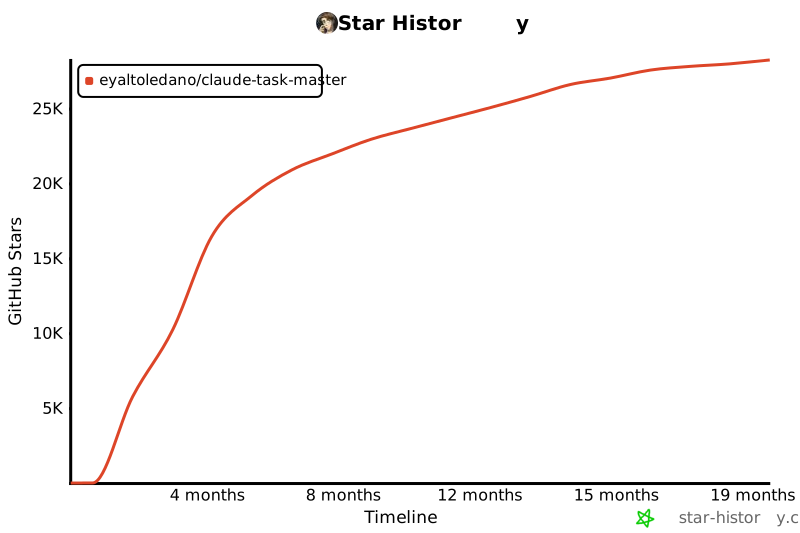](https://www.star-history.com/#eyaltoledano/claude-task-master&Timeline)
- ## Licensing
- Task Master is licensed under the MIT License with Commons Clause. This means you can:
- ✅ **Allowed**:
- - Use Task Master for any purpose (personal, commercial, academic)
- - Modify the code
- - Distribute copies
- - Create and sell products built using Task Master
- ❌ **Not Allowed**:
- - Sell Task Master itself
- - Offer Task Master as a hosted service
- - Create competing products based on Task Master
- See the [LICENSE](LICENSE) file for the complete license text and [licensing details](docs/licensing.md) for more information.
Ratings and comments
Sign in to rate this skill.
Sign inFree to use. If it’s helped, pass it on.