mcp-dbutils
数读 是一件可以让你的大模型安全连接到数据库的MCP工具。| DButils is an all-in-one MCP service that enables your AI to do data analysis by harnessing versatile types of database (sqlite, mysql, postgres, and more) within a unified configuration of multiple connections in a secured way (like SSL and controlled write access).
Safety scan
A static text scan, not a guarantee. Select the badge to see what was scanned and every finding.
Check it deeper on your machine
It has changed since its scan on 11 Nov 2026.
As a Claude Code plugin, install it and then ask Claude Code:
/plugin marketplace add keithmackay/mackayi/plugin install scanskillsafety@mackayiDo a deep scan of https://github.com/donghao1393/mcp-dbutils with scanskillsafety
Or from a terminal, clone it and run it:
git clone https://github.com/keithmackay/scanskillsafety-skill ~/.claude/skills/scanskillsafetynode ~/.claude/skills/scanskillsafety/cli.cjs --deep 'https://github.com/donghao1393/mcp-dbutils'
It checks the exact commit: every file, its packages against OSV (api.osv.dev), how it compares with this page's scan (findsafeskills.com receives the repository's address), and, if you agree, Claude reading every file with your own Claude subscription. It never runs the code.
Badge for your README

Markdown
[](/listings/donghao1393--mcp-dbutils)HTML
<a href="/listings/donghao1393--mcp-dbutils"><img src="/api/listings/donghao1393--mcp-dbutils/badge.svg" alt="findsafeskills safety rating" /></a>Install
What was scanned
The files the safety scan read, as written by the repository's author and shown as plain text. Lines with a finding are marked.
README.md · README · 124 lines
View this file on GitHub (read at the repository's current version: the scan did not record which commit it read)
This file has changed since it was scanned, so this is not exactly the text that was scanned, and no line is marked. The findings are listed with the safety scan above.
- # MCP 数据库工具
- <!-- 项目状态徽章 -->
- [](https://github.com/donghao1393/mcp-dbutils/actions)
- [](https://github.com/donghao1393/mcp-dbutils/actions)
- [](https://sonarcloud.io/dashboard?id=donghao1393_mcp-dbutils)
- <!-- 版本和安装徽章 -->
- [](https://pypi.org/project/mcp-dbutils/)
- [](https://pypi.org/project/mcp-dbutils/)
- <!-- 技术规格徽章 -->
- [](https://www.python.org/)
- [](LICENSE)
- [](https://github.com/donghao1393/mcp-dbutils/stargazers)
- [English](README_EN.md) | [Français](README_FR.md) | [Español](README_ES.md) | [العربية](README_AR.md) | [Русский](README_RU.md) | [文档导航](#文档导航)
- 
- ## 简介
- MCP Database Utilities 是一个多功能的 MCP 服务,它使您的 AI 能够通过统一的连接配置安全地访问各种类型的数据库(SQLite、MySQL、PostgreSQL 等)进行数据分析。
- 您可以将其视为 AI 系统和数据库之间的安全桥梁,允许 AI 在不直接访问数据库或冒数据修改风险的情况下读取和分析您的数据。
- **定位:SQL 优先,NoSQL 按需纳入。** 核心支持 SQLite、MySQL、PostgreSQL;其他数据库类型只在模型真正合适时考虑。
- ### 核心特性
- - **安全优先**:严格只读操作,无直接数据库访问,隔离连接,按需连接,自动超时
- - **隐私保障**:本地处理,最小数据暴露,凭证保护,敏感数据屏蔽
- - **多数据库支持**:使用相同的接口连接 SQLite、MySQL、PostgreSQL
- - **简单配置**:所有数据库连接使用单个 YAML 文件
- - **高级功能**:表格浏览、架构分析和查询执行
- > 🔒 **安全说明**:MCP 数据库工具采用安全优先的架构设计,非常适合注重数据保护的企业、初创公司和个人用户。详细了解我们的[安全架构](docs/zh/technical/security.md)。
- ## 快速入门
- 我们提供了多种安装方式,包括 uvx、Docker 和 Smithery。详细的安装和配置步骤请参阅[安装指南](docs/zh/installation.md)。
- ### 基本步骤
- 1. **安装**:选择适合您的安装方式([详细说明](docs/zh/installation.md))
- 2. **配置**:创建包含数据库连接信息的 YAML 文件([配置指南](docs/zh/configuration.md))
- 3. **连接**:将配置添加到您的 AI 客户端
- 4. **使用**:开始与您的数据库交互([使用指南](docs/zh/usage.md))
- ### 示例交互
- **您**:"能否列出我的数据库中的所有表?"
- **AI**:"以下是您的数据库中的表:
- - customers(客户)
- - products(产品)
- - orders(订单)
- - inventory(库存)"
- **您**:"customers 表的结构是什么样的?"
- **AI**:"customers 表有以下结构:
- - id(整数,主键)
- - name(文本)
- - email(文本)
- - registration_date(日期)"
- ## 文档导航
- ### 入门指南
- - [安装指南](docs/zh/installation.md) - 详细的安装步骤和配置说明
- - [平台特定安装指南](docs/zh/installation-platform-specific.md) - 针对不同操作系统的安装说明
- - [配置指南](docs/zh/configuration.md) - 数据库连接配置示例和最佳实践
- - [使用指南](docs/zh/usage.md) - 基本操作流程和常见使用场景
- ### 技术文档
- - [架构设计](docs/zh/technical/architecture.md) - 系统架构和组件说明
- - [安全架构](docs/zh/technical/security.md) - 安全特性和保护机制
- - [开发指南](docs/zh/technical/development.md) - 代码质量和开发流程
- - [测试指南](docs/zh/technical/testing.md) - 测试框架和最佳实践
- - [SonarCloud 集成](docs/zh/technical/sonarcloud-integration.md) - SonarCloud 与 AI 集成指南
- ### 示例文档
- - [SQLite 示例](docs/zh/examples/sqlite-examples.md) - SQLite 数据库操作示例
- - [PostgreSQL 示例](docs/zh/examples/postgresql-examples.md) - PostgreSQL 数据库操作示例
- - [MySQL 示例](docs/zh/examples/mysql-examples.md) - MySQL 数据库操作示例
- - [高级 LLM 交互示例](docs/zh/examples/advanced-llm-interactions.md) - 与各类 LLM 的高级交互示例
- ### 多语言文档
- - **英语** - [English Documentation](docs/en/)
- - **法语** - [Documentation Française](docs/fr/)
- - **西班牙语** - [Documentación en Español](docs/es/)
- - **阿拉伯语** - [التوثيق باللغة العربية](docs/ar/)
- - **俄语** - [Документация на русском](docs/ru/)
- ### 支持与反馈
- - [GitHub Issues](https://github.com/donghao1393/mcp-dbutils/issues) - 报告问题或请求功能
- - [Smithery](https://smithery.ai/server/@donghao1393/mcp-dbutils) - 简化安装和更新
- ## 可用工具
- MCP 数据库工具提供了多种工具,使 AI 能够与您的数据库交互:
- - **dbutils-list-connections**:列出配置中的所有可用数据库连接,包括数据库类型、主机、端口和数据库名称等详细信息,同时隐藏密码等敏感信息。
- - **dbutils-list-tables**:列出指定数据库连接中的所有表,包括表名、URI和可用的表描述,按数据库类型分组以便于识别。
- - **dbutils-run-query**:执行只读SQL查询(仅SELECT),支持包括JOIN、GROUP BY和聚合函数在内的复杂查询,返回包含列名和数据行的结构化结果。
- - **dbutils-describe-table**:提供表结构的详细信息,包括列名、数据类型、是否可为空、默认值和注释,以易于阅读的格式呈现。
- - **dbutils-get-ddl**:获取创建指定表的完整DDL(数据定义语言)语句,包括所有列定义、约束和索引。
- - **dbutils-list-indexes**:列出指定表上的所有索引,包括索引名称、类型(唯一/非唯一)、索引方法和包含的列,按索引名称分组。
- - **dbutils-get-stats**:获取表的统计信息,包括估计行数、平均行长度、数据大小和索引大小。
- - **dbutils-list-constraints**:列出表上的所有约束,包括主键、外键、唯一约束和检查约束,对于外键约束还显示引用的表和列。
- - **dbutils-explain-query**:获取SQL查询的执行计划,显示数据库引擎将如何处理查询,包括访问方法、连接类型和估计成本。
- - **dbutils-get-performance**:获取数据库连接的性能指标,包括查询计数、平均执行时间、内存使用情况和错误统计。
- - **dbutils-analyze-query**:分析SQL查询的性能特性,提供执行计划、实际执行时间和具体的优化建议。
- 有关这些工具的详细说明和使用示例,请参阅[使用指南](docs/zh/usage.md)。
- ## 星标历史
- [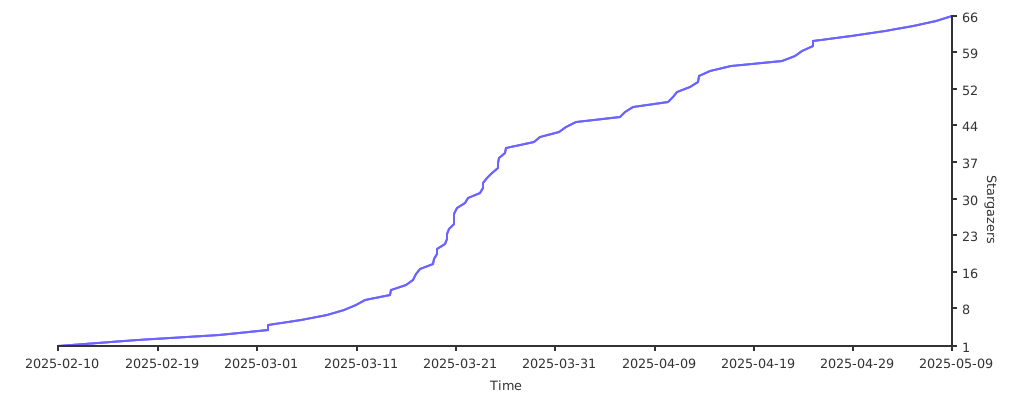](https://starchart.cc/donghao1393/mcp-dbutils)
- ## 许可证
- 本项目采用 MIT 许可证 - 有关详细信息,请参阅 [LICENSE](LICENSE) 文件。
Ratings and comments
Sign in to rate this skill.
Sign inFree to use. If it’s helped, pass it on.