mcp-code-graph
MCP Server for code graph analysis and visualization by CodeGPT
Safety scan
A static text scan, not a guarantee. Select the badge to see what was scanned and every finding.
Badge for your README

Markdown
[](/listings/diffbot--mcp-code-graph)HTML
<a href="/listings/diffbot--mcp-code-graph"><img src="/api/listings/diffbot--mcp-code-graph/badge.svg" alt="findsafeskills safety rating" /></a>Install
Install instructions from the README
As written by the repo's author. findsafeskills has not verified these steps.
Add the following configuration to your MCP client (CodeGPT Extension, Cursor, Copilot, Claude Desktop, Windsurf, etc.):
{
   "mcpServers": {
      "Deep Graph MCP": {
         "command": "npx",
         "args": ["-y" , "mcp-code-graph@latest",
         "username/repository-name",  // DeepGraph repository URL
         "username2/repository-name2" // Add more repositories if needed
        ]
      }
   }
}For Private Graphs (CodeGPT Account Required)
Before using the CodeGPT MCP Server with private graphs, ensure you have:
1. A CodeGPT account (sign up at [app.codegpt.co](https://app.codegpt.co)) 2. Uploaded a repository to [Code Graph](https://help.codegpt.co/en/articles/9912447-code-graphs) 3. Get your API Key from [CodeGPT API Keys page](https://app.codegpt.co/user/api-keys) (required). 4. Get your Organization ID (optional) and Graph ID (optional).
Installation with npx
Add the following configuration to your MCP client (CodeGPT Extension, Cursor, Copilot, Claude Desktop, Windsurf, etc.):
{
   "mcpServers": {
      "Deep Graph MCP": {
         "command": "npx",
         "args": ["-y" , "mcp-code-graph@latest",
         "CODEGPT_API_KEY",
         "CODEGPT_ORG_ID",
         "CODEGPT_GRAPH_ID"
        ]
      }
   }
}What was scanned
The files the safety scan read, as written by the repository's author and shown as plain text. Lines with a finding are marked.
README.md · README · 200 lines
View this file on GitHub (read at the repository's current version: the scan did not record which commit it read)
- [](https://deepgraph.co/JudiniLabs/mcp-code-graph)
- [](https://github.com/JudiniLabs/mcp-code-graph/stargazers)
- [](https://github.com/JudiniLabs/mcp-code-graph/pulls)
- <hr>
- # Deep Graph MCP Server by [CodeGPT](https://codegpt.co/)
- A [Model Context Protocol](https://modelcontextprotocol.io/quickstart/server) server that enables seamless interaction with Code Graphs.
- <img width="1373" alt="Screenshot 2025-06-11 at 14 01 15" src="https://github.com/user-attachments/assets/a588bafc-d5a8-4955-8d48-3addaf3ed71c" />
- ## How this works
- This MCP allows you to interact with knowledge graphs available in your CodeGPT account or with public graphs from [DeepGraph](https://deepgraph.co).
- To create a graph from any GitHub repository, simply change the URL from `github.com` to `deepgraph.co`. For example:
- - GitHub repo: `https://github.com/username/repo`
- - DeepGraph URL: `https://deepgraph.co/username/repo`
- <video src="https://github.com/user-attachments/assets/31f60fe6-6da4-4c67-a845-031908476351" controls autoplay></video>
- You'll be able to use these advanced graph-based queries across different MCP Hosts such as ChatGPT, Cursor, Windsurf, CodeGPT Extension, GitHub Copilot, Claude Desktop, Claude Code, Gemini CLI, and others.
- ## Available Tools
- - `list-graphs`: Lists available repository graphs with basic information.
- - `get-code`: Retrieves the complete source code for a specific functionality from the graph.
- - `find-direct-connections`: Explores the direct relationships of a functionality within the code graph.
- - `nodes-semantic-search`: Semantically searches for code functionalities using natural language.
- - `docs-semantic-search`: Semantically searches repository documentation.
- - `get-usage-dependency-links`: Analyzes and lists functionalities affected by changes to a code entity.
- - `folder-tree-structure`: Retrieves the tree structure of a folder in the repository.
- ## For Public Code Graphs (No Account Required)
- You can interact with public graphs from [DeepGraph](https://deepgraph.co):
- 1. Find any public repository on [deepgraph.co](https://deepgraph.co)
- 2. Use the repository reference (e.g., `username/repository-name`)
- ## Installation using npx
- Add the following configuration to your MCP client (CodeGPT Extension, Cursor, Copilot, Claude Desktop, Windsurf, etc.):
- ```json
- {
- "mcpServers": {
- "Deep Graph MCP": {
- "command": "npx",
- "args": ["-y" , "mcp-code-graph@latest",
- "username/repository-name", // DeepGraph repository URL
- "username2/repository-name2" // Add more repositories if needed
- ]
- }
- }
- }
- ```
- ### For Private Graphs (CodeGPT Account Required)
- Before using the CodeGPT MCP Server with private graphs, ensure you have:
- 1. A CodeGPT account (sign up at [app.codegpt.co](https://app.codegpt.co))
- 2. Uploaded a repository to [Code Graph](https://help.codegpt.co/en/articles/9912447-code-graphs)
- 3. Get your API Key from [CodeGPT API Keys page](https://app.codegpt.co/user/api-keys) (required).
- 4. Get your Organization ID (optional) and Graph ID (optional).
- ### Installation with npx
- Add the following configuration to your MCP client (CodeGPT Extension, Cursor, Copilot, Claude Desktop, Windsurf, etc.):
- ```json
- {
- "mcpServers": {
- "Deep Graph MCP": {
- "command": "npx",
- "args": ["-y" , "mcp-code-graph@latest",
- "CODEGPT_API_KEY",
- "CODEGPT_ORG_ID",
- "CODEGPT_GRAPH_ID"
- ]
- }
- }
- }
- ```
- # CLI Providers
- ## Adding to Gemini CLI
- Add the JSON configuration to your settings.json file:
- <video src="https://github.com/user-attachments/assets/22f601dd-0564-46ac-8973-161de3017e34" controls autoplay></video>
- Gemini CLI uses settings.json files for persistent configuration. There are two locations for these files:
- - User settings file:
- Location: ~/.gemini/settings.json (where ~ is your home directory).
- Scope: Applies to all Gemini CLI sessions for the current user.
- - Project settings file:
- Location: .gemini/settings.json within your project's root directory.
- Scope: Applies only when running Gemini CLI from that specific project. Project settings override user settings.
- ## Adding to Claude Code
- Follow these steps to integrate Deep Graph MCP Server with Claude Code.
- ## Quick Setup
- ### For Private Graphs
- ```bash
- claude mcp add "Deep Graph MCP" npx -- -y mcp-code-graph@latest CODEGPT_API_KEY CODEGPT_ORG_ID CODEGPT_GRAPH_ID
- ```
- ### For Public Graphs
- ```bash
- claude mcp add "Deep Graph MCP" npx -- -y mcp-code-graph@latest username/repository-name
- ```
- **For team sharing**, add the `-s project` flag:
- ```bash
- claude mcp add -s project "Deep Graph MCP" npx -- -y mcp-code-graph@latest CODEGPT_API_KEY CODEGPT_ORG_ID CODEGPT_GRAPH_ID
- # or for public graphs
- claude mcp add -s project "Deep Graph MCP" npx -- -y mcp-code-graph@latest username/repository-name username2/repository-name
- ```
- ## Verification
- ```bash
- # Verify installation
- claude mcp list
- # Get server details
- claude mcp get "Deep Graph MCP"
- ```
- ## Advanced Workflows with Claude Code Custom Commands
- Claude Code supports custom slash commands that combine multiple MCP Code Graph tools for comprehensive analysis workflows.
- ### Setup
- **Copy the commands directory** from this repository to your project root:
- ```bash
- cp -r .claude/ /path/to/your/project/
- ```
- Commit to your project's git:
- ```bash
- git add .claude/commands/
- git commit -m "Add custom Claude Code commands for Deep Graph MCP"
- ```
- ## Available Commands
- Repository-wide analysis commands (no parameters needed):
- ```bash
- /project:analyze-architecture # Complete architectural overview
- /project:security-audit # Comprehensive security analysis
- /project:test-coverage-analyzer # Test coverage and quality analysis
- /project:technical-debt-analyzer # Technical debt assessment
- /project:api-ecosystem-analyzer # Complete API ecosystem analysis
- /project:repository-onboarding # Full repository onboarding guide
- ```
- Component-specific commands (require parameters):
- ```bash
- /project:migration-planner [component/technology] # Smart migration planning
- /project:performance-optimizer [component/function] # Performance optimization
- /project:component-onboarding [component/feature] # Component-specific training
- ```
- ## Usage Examples
- ```bash
- /project:analyze-architecture
- /project:migration-planner React to Vue.js
- /project:performance-optimizer DatabaseService.getUserData
- /project:component-onboarding authentication system
- ```
- ## 📈 Star History
- [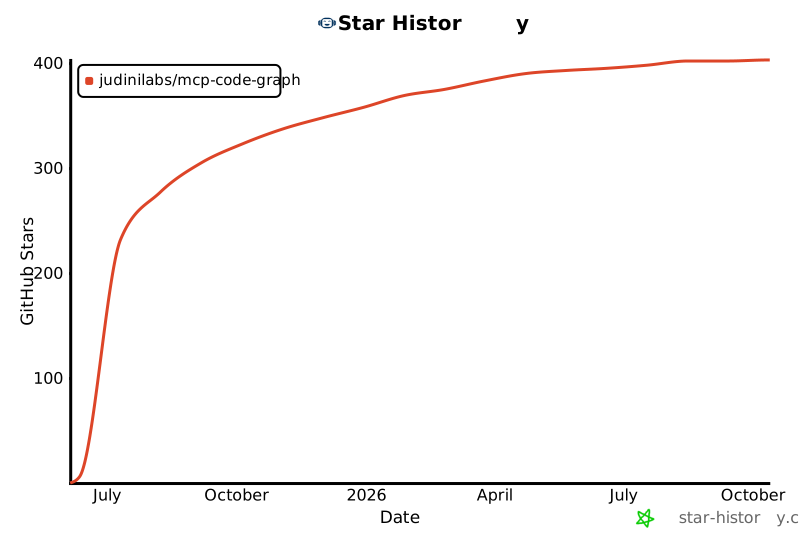](https://star-history.com/#JudiniLabs/mcp-code-graph&Date)
- ## Support
- For support and feedback:
- - Email: support@codegpt.co
- - Website: [app.codegpt.co](https://app.codegpt.co)
- ## License
- [MIT License](https://opensource.org/licenses/MIT)
Ratings and comments
Sign in to rate this skill.
Sign inFree to use. If it’s helped, pass it on.