changedetection.io
Best and simplest tool for website change detection, web page monitoring, and website change alerts. Perfect for tracking content changes, price drops, restock alerts, and website defacement monitoring— MCP included! all for free or enjoy our SaaS plan!
Safety scan
A static text scan, not a guarantee. Select the badge to see what was scanned and every finding.
Check it deeper on your machine
It has changed since its scan on 11 Nov 2026.
As a Claude Code plugin, install it and then ask Claude Code:
/plugin marketplace add keithmackay/mackayi/plugin install scanskillsafety@mackayiDo a deep scan of https://github.com/dgtlmoon/changedetection.io with scanskillsafety
Or from a terminal, clone it and run it:
git clone https://github.com/keithmackay/scanskillsafety-skill ~/.claude/skills/scanskillsafetynode ~/.claude/skills/scanskillsafety/cli.cjs --deep 'https://github.com/dgtlmoon/changedetection.io'
It checks the exact commit: every file, its packages against OSV (api.osv.dev), how it compares with this page's scan (findsafeskills.com receives the repository's address), and, if you agree, Claude reading every file with your own Claude subscription. It never runs the code.
Badge for your README

Markdown
[](/listings/dgtlmoon--changedetection-io)HTML
<a href="/listings/dgtlmoon--changedetection-io"><img src="/api/listings/dgtlmoon--changedetection-io/badge.svg" alt="findsafeskills safety rating" /></a>Install
Install instructions from the README
As written by the repo's author. findsafeskills has not verified these steps.
Docker
With Docker composer, just clone this repository and..
$ docker compose up -d
Docker standalone
$ docker run -d --restart always -p "127.0.0.1:5000:5000" -v datastore-volume:/datastore --name changedetection.io docker.io/dgtlmoon/changedetection.io
`:latest` tag is our latest stable release, `:dev` tag is our bleeding edge `master` branch.
Alternative docker repository over at ghcr - [ghcr.io/dgtlmoon/changedetection.io](https://ghcr.io/dgtlmoon/changedetection.io)
Windows
See the install instructions at the wiki https://github.com/dgtlmoon/changedetection.io/wiki/Microsoft-Windows
Python Pip
Check out our pypi page https://pypi.org/project/changedetection.io/
$ pip3 install changedetection.io
$ changedetection.io -d /path/to/empty/data/dir -p 5000
Then visit http://127.0.0.1:5000 , You should now be able to access the UI.
_Now with per-site configurable support for using a fast built in HTTP fetcher or use a Chrome based fetcher for monitoring of JavaScript websites!_
What was scanned
The files the safety scan read, as written by the repository's author and shown as plain text. Lines with a finding are marked.
README.md · README · 353 lines
View this file on GitHub (read at the repository's current version: the scan did not record which commit it read)
- [<img src="./docs/banner-wide.png" style="max-width:100%;" alt="AI LLM Web site page change monitoring" title="AI LLM Web site page change monitoring" />](https://changedetection.io?src=github)
- # Detect Website Changes Automatically — Monitor Web Page Changes in Real Time
- Monitor websites for updates — get notified via Discord, Email, Slack, Telegram, Webhook and many more — Ideal for monitoring price changes, content edits, conditional changes, LLM Change summaries and triggers just to name few features.
- [![Release Version][release-shield]][release-link] [![Docker Pulls][docker-pulls]][docker-link] [![License][license-shield]](LICENSE)
- [<img src="./docs/screenshot.png" style="max-width:100%;" alt="Web site page change monitoring" title="Web site page change monitoring" />](https://changedetection.io?src=github)
- 
- [**Get started with website page change monitoring straight away. Don't have time? Try our $8.99/month subscription, use our proxies and support!**](https://changedetection.io) , _Same open-source changedetection.io, minus the hard parts, No infrastructure to baby-sit._
- - Chrome browser included.
- - Nothing to install, access via browser login after signup.
- - Super fast, no registration needed setup.
- - Get started watching and receiving website change notifications straight away.
- - See our [tutorials and how-to page for more inspiration](https://changedetection.io/tutorials)
- ## AI-powered website change detection — smart alerts and plain-language summaries
- Stop drowning in noise. Connect any LLM (OpenAI, Gemini, Anthropic, Ollama and more) and go from _"something changed"_ to _"only the thing you care about changed"_.
- **AI change detection rules** — write a plain-English intent once: _"notify me only when the price drops below $50"_, _"alert me when the item comes back in stock"_, _"ignore navigation and footer changes"_. The AI evaluates every detected diff against your intent and silently suppresses everything irrelevant. Fewer false positives, zero noise.
- **AI change summaries** — instead of staring at a raw diff, your notification reads _"Price dropped from $89.99 to $67.00"_ or _"3 new products added to the listing"_. Works globally or per-watch, with full control over the prompt.
- Works with any model you already pay for — GPT-4o-mini and Gemini Flash handle this well at fractions of a cent per check. Or run it entirely locally with **Ollama**, **vLLM**, **LM Studio**, or any **OpenAI-compatible self-hosted endpoint** — pick the *OpenAI-compatible (vLLM, LM Studio, llama.cpp)* option in the provider dropdown and point it at your server's `/v1` URL. Powered by [LiteLLM](https://github.com/BerriAI/litellm), giving you seamless access to [100+ supported providers and models](https://docs.litellm.ai/docs/providers).
- We've got a quick tutorial here - [Bring your own LLM/AI Key to changedetection.io for change summaries and triggers.](https://changedetection.io/tutorial/ai-summary-and-change-detection-bring-your-own-key)
- [<img src="./docs/LLM-change-summary.jpeg" style="max-width:100%;" alt="AI-powered website change detection — plain language change summaries and smart alert rules" title="AI website change detection with LLM change summaries and intelligent alert filtering" />](https://changedetection.io?src=github)
- Yes - Even MCP is supported [https://changedetection.io/MCP](https://changedetection.io/MCP) - Easily connect Claude.AI / OpenAi and others to your changedetection.io dashboard - Now your web page changes become a resource for easily asking questions and building on.
- ### Target specific parts of the webpage using the Visual Selector tool.
- Available when connected to a <a href="https://github.com/dgtlmoon/changedetection.io/wiki/Playwright-content-fetcher">playwright content fetcher</a> (included as part of our subscription service)
- [<img src="https://raw.githubusercontent.com/dgtlmoon/changedetection.io/master/docs/visualselector-anim.gif" style="max-width:100%;" alt="Select parts and elements of a web page to monitor for changes" title="Select parts and elements of a web page to monitor for changes" />](https://changedetection.io?src=github)
- ### Easily see what changed, examine by word, line, or individual character.
- [<img src="https://raw.githubusercontent.com/dgtlmoon/changedetection.io/master/docs/screenshot-diff.png" style="max-width:100%;" alt="Self-hosted web page change monitoring context difference " title="Self-hosted web page change monitoring context difference " />](https://changedetection.io?src=github)
- ### Perform interactive browser steps
- Fill in text boxes, click buttons and more, setup your changedetection scenario.
- Using the **Browser Steps** configuration, add basic steps before performing change detection, such as logging into websites, adding a product to a cart, accept cookie logins, entering dates and refining searches.
- [<img src="docs/browsersteps-anim.gif" style="max-width:100%;" alt="Website change detection with interactive browser steps, detect changes behind login and password, search queries and more" title="Website change detection with interactive browser steps, detect changes behind login and password, search queries and more" />](https://changedetection.io?src=github)
- After **Browser Steps** have been run, then visit the **Visual Selector** tab to refine the content you're interested in.
- Requires Playwright to be enabled.
- ### Awesome restock and price change notifications
- Enable the _"Re-stock & Price detection for single product pages"_ option to activate the best way to monitor product pricing, this will extract any meta-data in the HTML page and give you many options to follow the pricing of the product.
- Easily organise and monitor prices for products from the dashboard, get alerts and notifications when the price of a product changes or comes back in stock again!
- [<img src="docs/restock-overview.png" style="max-width:100%;" alt="Easily keep an eye on product price changes directly from the UI" title="Easily keep an eye on product price changes directly from the UI" />](https://changedetection.io?src=github)
- #### Monitor price change and restock trends over time as a graph, identify patterns, buy at the right time!
- [<img src="docs/price-tracking.jpeg" style="max-width:100%;" />](https://changedetection.io?src=github)
- Set price change notification parameters, upper and lower price, price change percentage and more.
- Always know when a product for sale drops in price.
- [<img src="docs/restock-settings.png" style="max-width:100%;" alt="Set upper lower and percentage price change notification values" title="Set upper lower and percentage price change notification values" />](https://changedetection.io?src=github)
- ### Example use cases
- - Products and services have a change in pricing
- - _Out of stock notification_ and _Back In stock notification_
- - Monitor and track PDF file changes, know when a PDF file has text changes.
- - Governmental department updates (changes are often only on their websites)
- - New software releases, security advisories when you're not on their mailing list.
- - Festivals with changes
- - Discogs restock alerts and monitoring
- - Realestate listing changes
- - Know when your favourite whiskey is on sale, or other special deals are announced before anyone else
- - COVID related news from government websites
- - University/organisation news from their website
- - Detect and monitor changes in JSON API responses
- - JSON API monitoring and alerting
- - Changes in legal and other documents
- - Trigger API calls via notifications when text appears on a website
- - Glue together APIs using the JSON filter and JSON notifications
- - Create RSS feeds based on changes in web content
- - Monitor HTML source code for unexpected changes, strengthen your PCI compliance
- - You have a very sensitive list of URLs to watch and you do _not_ want to use the paid alternatives. (Remember, _you_ are the product)
- - Get notified when certain keywords appear in Twitter search results
- - Proactively search for jobs, get notified when companies update their careers page, search job portals for keywords.
- - Get alerts when new job positions are open on Bamboo HR and other job platforms
- - Website defacement monitoring
- - Pokémon Card Restock Tracker / Pokémon TCG Tracker
- - RegTech - stay ahead of regulatory changes, regulatory compliance
- _Need an actual Chrome runner with Javascript support? We support fetching via WebDriver and Playwright!</a>_
- #### Key Features
- - Lots of trigger filters, such as "Trigger on text", "Remove text by selector", "Ignore text", "Extract text", also using regular-expressions!
- - Target elements with xPath 1 and xPath 2, CSS Selectors, Easily monitor complex JSON with JSONPath or jq
- - Switch between fast non-JS and Chrome JS based "fetchers"
- - Track changes in PDF files (Monitor text changed in the PDF, Also monitor PDF filesize and checksums)
- - Easily specify how often a site should be checked
- - Execute JS before extracting text (Good for logging in, see examples in the UI!)
- - Override Request Headers, Specify `POST` or `GET` and other methods
- - Use the "Visual Selector" to help target specific elements
- - Configurable [proxy per watch](https://github.com/dgtlmoon/changedetection.io/wiki/Proxy-configuration)
- - Send a screenshot with the notification when a change is detected in the web page
- We [recommend and use Bright Data](https://brightdata.grsm.io/n0r16zf7eivq) global proxy services, Bright Data will match any first deposit up to $150 using our signup link.
- Please :star: star :star: this project and help it grow! https://github.com/dgtlmoon/changedetection.io/
- ### Conditional web page changes
- Easily [configure conditional actions](https://changedetection.io/tutorial/conditional-actions-web-page-changes), for example, only trigger when a price is above or below a preset amount, or [when a web page includes (or does not include) a keyword](https://changedetection.io/tutorial/how-monitor-keywords-any-website)
- <img src="./docs/web-page-change-conditions.png" style="max-width:80%;" alt="Conditional web page changes" title="Conditional web page changes" />
- ### Schedule web page watches in any timezone, limit by day of week and time.
- Easily set a re-check schedule, for example you could limit the web page change detection to only operate during business hours.
- Or perhaps based on a foreign timezone (for example, you want to check for the latest news-headlines in a foreign country at 0900 AM),
- <img src="./docs/scheduler.png" style="max-width:80%;" alt="How to monitor web page changes according to a schedule" title="How to monitor web page changes according to a schedule" />
- Includes quick short-cut buttons to setup a schedule for **business hours only**, or **weekends**.
- ### We have a Chrome extension!
- Easily add the current web page to your changedetection.io tool, simply install the extension and click "Sync" to connect it to your existing changedetection.io install.
- [<img src="./docs/chrome-extension-screenshot.png" style="max-width:80%;" alt="Chrome Extension to easily add the current web-page to detect a change." title="Chrome Extension to easily add the current web-page to detect a change." />](https://chromewebstore.google.com/detail/changedetectionio-website/kefcfmgmlhmankjmnbijimhofdjekbop)
- [Goto the Chrome Webstore to download the extension.](https://chromewebstore.google.com/detail/changedetectionio-website/kefcfmgmlhmankjmnbijimhofdjekbop) ( Or check out the [GitHub repo](https://github.com/dgtlmoon/changedetection.io-browser-extension) )
- ## Installation
- ### Docker
- With Docker composer, just clone this repository and..
- ```bash
- $ docker compose up -d
- ```
- Docker standalone
- ```bash
- $ docker run -d --restart always -p "127.0.0.1:5000:5000" -v datastore-volume:/datastore --name changedetection.io docker.io/dgtlmoon/changedetection.io
- ```
- `:latest` tag is our latest stable release, `:dev` tag is our bleeding edge `master` branch.
- Alternative docker repository over at ghcr - [ghcr.io/dgtlmoon/changedetection.io](https://ghcr.io/dgtlmoon/changedetection.io)
- ### Windows
- See the install instructions at the wiki https://github.com/dgtlmoon/changedetection.io/wiki/Microsoft-Windows
- ### Python Pip
- Check out our pypi page https://pypi.org/project/changedetection.io/
- ```bash
- $ pip3 install changedetection.io
- $ changedetection.io -d /path/to/empty/data/dir -p 5000
- ```
- Then visit http://127.0.0.1:5000 , You should now be able to access the UI.
- _Now with per-site configurable support for using a fast built in HTTP fetcher or use a Chrome based fetcher for monitoring of JavaScript websites!_
- ## Updating changedetection.io
- ### Docker
- ```
- docker pull dgtlmoon/changedetection.io
- docker kill $(docker ps -a -f name=changedetection.io -q)
- docker rm $(docker ps -a -f name=changedetection.io -q)
- docker run -d --restart always -p "127.0.0.1:5000:5000" -v datastore-volume:/datastore --name changedetection.io docker.io/dgtlmoon/changedetection.io
- ```
- ### docker compose
- ```bash
- docker compose pull && docker compose up -d
- ```
- See the wiki for more information https://github.com/dgtlmoon/changedetection.io/wiki
- ## Different browser viewport sizes (mobile, desktop etc)
- If you are using the recommended `sockpuppetbrowser` (which is in the docker-compose.yml as a setting to be uncommented) you can easily set different viewport sizes for your web page change detection, [see more information here about setting up different viewport sizes](https://github.com/dgtlmoon/sockpuppetbrowser?tab=readme-ov-file#setting-viewport-size).
- ## Filters
- XPath(1.0), JSONPath, jq, and CSS support comes baked in! You can be as specific as you need, use XPath exported from various XPath element query creation tools.
- (We support LXML `re:test`, `re:match` and `re:replace`.)
- ## Notifications
- ChangeDetection.io supports a massive amount of notifications (including email, office365, custom APIs, etc) when a web-page has a change detected thanks to the <a href="https://github.com/caronc/apprise">apprise</a> library.
- Simply set one or more notification URL's in the _[edit]_ tab of that watch.
- Just some examples
- discord://webhook_id/webhook_token
- flock://app_token/g:channel_id
- gitter://token/room
- gchat://workspace/key/token
- msteams://TokenA/TokenB/TokenC/
- o365://TenantID:AccountEmail/ClientID/ClientSecret/TargetEmail
- rocket://user:password@hostname/#Channel
- mailto://user:pass@example.com?to=receivingAddress@example.com
- json://someserver.com/custom-api
- syslog://
- <a href="https://github.com/caronc/apprise#popular-notification-services">And everything else in this list!</a>
- <img src="https://raw.githubusercontent.com/dgtlmoon/changedetection.io/master/docs/screenshot-notifications.png" style="max-width:100%;" alt="Self-hosted web page change monitoring notifications" title="Self-hosted web page change monitoring notifications" />
- Now you can also customise your notification content and use <a target="_new" href="https://jinja.palletsprojects.com/en/3.0.x/templates/">Jinja2 templating</a> for their title and body!
- ## JSON API Monitoring
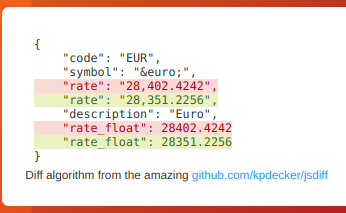
- Detect changes and monitor data in JSON API's by using either JSONPath or jq to filter, parse, and restructure JSON as needed.
- 
- This will re-parse the JSON and apply formatting to the text, making it super easy to monitor and detect changes in JSON API results
- 
- ### JSONPath or jq?
- For more complex parsing, filtering, and modifying of JSON data, jq is recommended due to the built-in operators and functions. Refer to the [documentation](https://stedolan.github.io/jq/manual/) for more specific information on jq.
- One big advantage of `jq` is that you can use logic in your JSON filter, such as filters to only show items that have a value greater than/less than etc.
- See the wiki https://github.com/dgtlmoon/changedetection.io/wiki/JSON-Selector-Filter-help for more information and examples
- ### Parse JSON embedded in HTML!
- When you enable a `json:` or `jq:` filter, you can even automatically extract and parse embedded JSON inside a HTML page! Amazingly handy for sites that build content based on JSON, such as many e-commerce websites.
- ```
- <html>
- ...
- <script type="application/ld+json">
- {
- "@context":"http://schema.org/",
- "@type":"Product",
- "offers":{
- "@type":"Offer",
- "availability":"http://schema.org/InStock",
- "price":"3949.99",
- "priceCurrency":"USD",
- "url":"https://www.newegg.com/p/3D5-000D-001T1"
- },
- "description":"Cobratype King Cobra Hero Desktop Gaming PC",
- "name":"Cobratype King Cobra Hero Desktop Gaming PC",
- "sku":"3D5-000D-001T1",
- "itemCondition":"NewCondition"
- }
- </script>
- ```
- `json:$..price` or `jq:..price` would give `3949.99`, or you can extract the whole structure (use a JSONpath test website to validate with)
- The application also supports notifying you that it can follow this information automatically
- ## Proxy Configuration
- See the wiki https://github.com/dgtlmoon/changedetection.io/wiki/Proxy-configuration , we also support using [Bright Data proxy services where possible](https://github.com/dgtlmoon/changedetection.io/wiki/Proxy-configuration#brightdata-proxy-support) and [Oxylabs](https://oxylabs.go2cloud.org/SH2d) proxy services.
- ## Raspberry Pi support?
- Raspberry Pi and linux/arm/v6 linux/arm/v7 arm64 devices are supported! See the wiki for [details](https://github.com/dgtlmoon/changedetection.io/wiki/Fetching-pages-with-WebDriver)
- ## Import support
- Easily [import your list of websites to watch for changes in Excel .xslx file format](https://changedetection.io/tutorial/how-import-your-website-change-detection-lists-excel), or paste in lists of website URLs as plaintext.
- Excel import is recommended - that way you can better organise tags/groups of websites and other features.
- ## API Support
- Full REST API for programmatic management of watches, tags, notifications and more.
- - **[Interactive API Documentation](https://changedetection.io/docs/api_v1/index.html)** - Complete API reference with live testing
- - **[OpenAPI Specification](docs/api-spec.yaml)** - Generate SDKs for any programming language
- ## Commercial Support
- I offer commercial support, this software is depended on by network security, aerospace , data-science and data-journalist professionals just to name a few, please reach out at dgtlmoon@gmail.com for any enquiries, I am more than glad to work with your organisation to further the possibilities of what can be done with changedetection.io
- [release-shield]: https://img.shields.io:/github/v/release/dgtlmoon/changedetection.io?style=for-the-badge
- [docker-pulls]: https://img.shields.io/docker/pulls/dgtlmoon/changedetection.io?style=for-the-badge
- [test-shield]: https://github.com/dgtlmoon/changedetection.io/actions/workflows/test-only.yml/badge.svg?branch=master
- [license-shield]: https://img.shields.io/github/license/dgtlmoon/changedetection.io.svg?style=for-the-badge
- [release-link]: https://github.com/dgtlmoon/changedetection.io/releases
- [docker-link]: https://hub.docker.com/r/dgtlmoon/changedetection.io
- ## Disclaimer
- **This software is provided "as-is", without warranty of any kind, express or implied, including but not limited to the warranties of merchantability, fitness for a particular purpose, and non-infringement. In no event shall the authors or copyright holders be liable for any claim, damages, or other liability, whether in an action of contract, tort, or otherwise, arising from, out of, or in connection with the software or the use or other dealings in the software.**
- ### Website content monitoring
- You are solely responsible for ensuring that your use of this software complies with the terms of service, `robots.txt` directives, access policies, and all applicable laws of any website or service you choose to monitor. The authors and contributors of this software accept no liability whatsoever for how you choose to use it or for any consequences arising from that use.
- ### AI / LLM features
- If you choose to enable AI / LLM features, content detected on monitored websites — including page diffs and extracted text — will be transmitted to a third-party AI provider of your choosing, outside of this installation. You are solely responsible for:
- - Ensuring such transmission is permitted by the terms of service of every website you monitor.
- - Compliance with all applicable data-protection and privacy laws (including but not limited to GDPR) with respect to any personal data that may appear in monitored content.
- - All API costs and charges levied by your chosen AI provider. This software has no visibility into or control over those charges.
- - Any consequences arising from acting on AI-generated output.
- **AI and LLM models are known to hallucinate** — producing plausible-sounding but factually incorrect, incomplete, or entirely fabricated output with apparent confidence. By design, LLMs may also omit or silently truncate relevant information during summarisation. **AI output must never be relied upon as complete or accurate.**
- By using this software, and in particular any AI / LLM features, you personally indemnify and hold harmless the author(s), contributor(s), and any associated parties from and against any and all claims, damages, losses, costs, and expenses (including reasonable legal fees) arising out of or in connection with your use of this software.
- ## Third-party licenses
- See [docs/THIRD-PARTY-LICENSES.md](docs/THIRD-PARTY-LICENSES.md) for every bundled package and its licence, and [NOTICE](NOTICE) for attribution and licence elections.
- ## Contributors
- <a href="https://github.com/dgtlmoon/changedetection.io/graphs/contributors">
- <img src="https://contrib.rocks/image?repo=dgtlmoon/changedetection.io&max=300&columns=20" alt="changedetection.io contributors" />
- </a>
Ratings and comments
Sign in to rate this skill.
Sign inFree to use. If it’s helped, pass it on.