adminforth
Admin panels for humans and AI agents. Let agents search, update, and act on your data through built-in chat or MCP, with the same permissions as your team. Open-source and self-hosted.
Safety scan
A static text scan, not a guarantee. Select the badge to see what was scanned and every finding.
Check it deeper on your machine
It has changed since its scan on 11 Nov 2026.
As a Claude Code plugin, install it and then ask Claude Code:
/plugin marketplace add keithmackay/mackayi/plugin install scanskillsafety@mackayiDo a deep scan of https://github.com/devforth/adminforth with scanskillsafety
Or from a terminal, clone it and run it:
git clone https://github.com/keithmackay/scanskillsafety-skill ~/.claude/skills/scanskillsafetynode ~/.claude/skills/scanskillsafety/cli.cjs --deep 'https://github.com/devforth/adminforth'
It checks the exact commit: every file, its packages against OSV (api.osv.dev), how it compares with this page's scan (findsafeskills.com receives the repository's address), and, if you agree, Claude reading every file with your own Claude subscription. It never runs the code.
Badge for your README

Markdown
[](/listings/devforth--adminforth)HTML
<a href="/listings/devforth--adminforth"><img src="/api/listings/devforth--adminforth/badge.svg" alt="findsafeskills safety rating" /></a>Install
What was scanned
The files the safety scan read, as written by the repository's author and shown as plain text. Lines with a finding are marked.
README.md · README · 270 lines
View this file on GitHub (read at the repository's current version: the scan did not record which commit it read)
This file has changed since it was scanned, so this is not exactly the text that was scanned, and no line is marked. The findings are listed with the safety scan above.
- <div align="center">
- <a href="https://adminforth.dev"><img src="https://raw.githubusercontent.com/devforth/adminforth/main/documentation/static/img/logo.svg" width="64" height="64" alt="AdminForth"></a>
- # AdminForth — agent-first business admin
- **The back office your coding agent builds and your agents run. Your data, your server, your rules. A change history that names the agent.**
- [Website](https://adminforth.dev) · [Start with your agent](#start-with-your-agent) · [Documentation](https://adminforth.dev/docs/tutorial/gettingStarted/) · [For developers](#for-developers)
- </div>
- <img width="1806" height="985" alt="adminforth-agent-demo" src="https://github.com/user-attachments/assets/acc1a1b2-52c3-408a-a71d-14b0eeb5c149" />
- You already work with AI agents. AdminForth is the admin they run your business through: customers, orders, jobs, stock and invoices in your own database, built by your coding agent, used by you and your team through Claude Code, Codex or any agent that speaks MCP. The panel is one way in; your agent is another. Screens are there when you want to look.
- <picture>
- <source media="(prefers-color-scheme: dark)" srcset="https://raw.githubusercontent.com/devforth/adminforth/main/documentation/static/img/readme/business-agent-chat-dark.png">
- <img src="https://raw.githubusercontent.com/devforth/adminforth/main/documentation/static/img/readme/business-agent-chat-light.png" width="100%" alt="An agent connected to an example business app through MCP: asked which follow-ups are overdue, it lists two requests, then updates the next action of REQ-1042 on the owner's request.">
- </picture>
- <p align="center"><sub>Maya’s agent works on her company’s app through MCP, with her permissions. Northstar Services and its data are made up.</sub></p>
- <p align="center">
- <a href="https://www.npmjs.com/package/adminforth"><img src="https://img.shields.io/npm/dw/adminforth" alt="npm downloads"></a>
- <a href="https://github.com/devforth/adminforth/blob/main/LICENSE"><img src="https://img.shields.io/badge/license-MIT-green" alt="MIT license"></a>
- <a href="https://github.com/devforth/adminforth/stargazers"><img src="https://img.shields.io/github/stars/devforth/adminforth?style=flat" alt="GitHub stars"></a>
- <a href="http://tluma.ai/ask-ai/devforth/adminforth"><img src="http://tluma.ai/badge" alt="Ask AI"></a>
- </p>
- ## What it gives you
- 1. **Your data stays yours, and stays patched.** Records live in your own database on your server. Agents get in through one locked door: sign-in, a separate revocable key per agent, two-factor and passkeys for people. The security parts come from AdminForth, one framework our team maintains; updating is a version bump your agent runs.
- 2. **Your team and their agents work inside your rules.** Each person, and each of their agents, sees and changes only what their role allows. The server checks every request. The audit log names the person and the agent for every change.
- 3. **Screens, optional.** Ask your agent for the day’s work. Open a screen or a dashboard when you want to see it all.
- <picture>
- <source media="(prefers-color-scheme: dark)" srcset="https://raw.githubusercontent.com/devforth/adminforth/main/documentation/static/img/readme/business-audit-dark.png">
- <img src="https://raw.githubusercontent.com/devforth/adminforth/main/documentation/static/img/readme/business-audit-light.png" width="100%" alt="The audit log of the example app: Maya through Codex updated REQ-1042, Tom created a follow-up in the browser, Priya through Claude Code changed a status. Each row shows the old and the new value.">
- </picture>
- <p align="center"><sub>Who changed what, when, through which agent, and what it was before.</sub></p>
- > **8 of the 10 biggest months for software vulnerabilities ever recorded happened in 2026.** [One in five of all vulnerabilities ever registered](https://cvetodo.com/cve-statistics) were published this year, and the year isn’t over ([monthly data](https://craci.com/resources/CVE-publication-trends)). Exploitation in the wild [nearly doubled](https://cloud.google.com/blog/topics/threat-intelligence/vulnerability-discovery-and-exploitation-trends-in-the-ai-era). An app your agent generated last month, with hundreds of packages nobody updates, sits right in that path. AdminForth, one framework maintained by our team, doesn’t.
- ## Start with your agent
- 1. Install [Claude Code](https://code.claude.com/docs/en/desktop-quickstart) or [Codex](https://learn.chatgpt.com/docs/quickstart) and sign in.
- 2. Create a folder for the project, for example `my-business`, and open the agent in it.
- 3. Paste the build instructions below. Change the lines under `MY BUSINESS BRIEF` to your own process first.
- The agent builds the first part with sample data, runs the app, connects itself to it through MCP and shows you one operation end to end. From then on, you talk to your business.
- <details>
- <summary><b>Build instructions for your coding agent</b></summary>
- ```text
- Help me build a small business application with AdminForth. Work with me in
- plain language. I don't have a developer: tell me exactly what to do myself,
- step by step.
- MY BUSINESS BRIEF
- BUSINESS_PROCESS: Customer requests for my maintenance business.
- CURRENT_PROBLEM: We send quotes and forget to follow up.
- TEAM_ACCESS: Me and two managers. Each manager handles their own requests.
- CURRENT_DATA: A spreadsheet. Start this example with synthetic data.
- WHAT I WANT
- A web app on AdminForth that my agent and my team's agents work with through
- MCP, with sign-in, permissions and an audit log. I will mostly talk to it
- through my agent; screens are for checking. Keep the first version small and
- ready for more parts later (orders, jobs, stock, invoices).
- START HERE
- Read https://devforth.io/admin/api/af-start/business/ first, then
- https://adminforth.dev/docs/tutorial/gettingStarted/ and
- https://adminforth.dev/llms.txt. Use AdminForth as the framework: reuse
- its screens, forms, filters and access rules, don't build a separate stack.
- Use pnpm and Node.js 24. For a new local example use SQLite, the documented
- create-app flow and Prisma migrations. Read the generated AGENTS.md, CLAUDE.md
- and skills before changing anything. If something can't run here, tell me what
- I must do instead of pretending it works.
- Show me a short plain-language outline (records, roles, the first operation)
- and ask only about decisions that change the data or the access rules.
- BUILD
- 1. Records and relationships for my process, named so my team understands
- them, with a small set of fictional sample records.
- 2. Access rules on the server: I manage everything; every other person works
- only with what their role allows, including direct record requests, lists
- and relationships. A hidden button is not an access rule.
- 3. The MCP plugin (https://adminforth.dev/docs/tutorial/Plugins/mcp/) so I can
- connect my agent, and the Audit Log plugin
- (https://adminforth.dev/docs/tutorial/Plugins/audit-log/) with its
- executed-by column, so every change names the person and the agent.
- 4. No production data, emails or payments in this first version.
- SHOW ME
- Run the app and give me the local address and sign-in. Connect my agent with
- the command from the Agents settings page, then do one operation through the
- agent: find a record that needs attention, add its next action, and show me the
- audit log entry. Show one action my agent is allowed and one a teammate's agent
- would be refused. Say which checks you actually performed.
- Write five prompts for my daily work with this app, in the words of my process.
- Explain where the code and data are, how to reopen the app tomorrow, how to
- update AdminForth and its plugins later, and what remains before my team uses
- it: hosting, real data, backups, access review.
- ```
- </details>
- Prompts for the first day, with the example above:
- - `What needs my attention today?`
- - `Which follow-ups are overdue, and whose?`
- - `Add a request from Harbor Café: office maintenance quote. Owner Maya, next action: send the quote by Friday.`
- - `Which invoices are unpaid for more than 30 days?`
- <picture>
- <source media="(prefers-color-scheme: dark)" srcset="https://raw.githubusercontent.com/devforth/adminforth/main/documentation/static/img/readme/business-overview-dark.png">
- <img src="https://raw.githubusercontent.com/devforth/adminforth/main/documentation/static/img/readme/business-overview-light.png" width="100%" alt="The Overview page of the example app: open requests, overdue follow-ups, jobs this week, unpaid invoices, today's jobs and items low in stock.">
- </picture>
- <p align="center"><sub>When you want to look: the overview of the whole business, built with the dashboard plugin.</sub></p>
- > [!NOTE]
- > The framework is free and MIT-licensed. Coding-agent access, model usage, hosting and paid services you connect have their own costs. Check each change in the app before your team relies on it.
- ⭐ **Star AdminForth** to find it again when your agents need an admin to work in.
- ## For developers
- AdminForth is a TypeScript and Vue 3 framework for back-office and business applications. Declare resources over your database and get list, show, create and edit screens with filters, validation and access control, plus the same resources as MCP tools for agents. Everything else is code you own:
- - **Data sources:** Postgres, MySQL, SQLite, MongoDB, ClickHouse.
- - **Agents:** the [MCP server plugin](https://adminforth.dev/docs/tutorial/Plugins/mcp/) with OAuth 2.1 sign-in or per-user revocable secrets, every call under the user’s permissions, validation and hooks; the [in-app agent](https://adminforth.dev/docs/tutorial/Plugins/agent/); resources and endpoints you can hide from agents; [audit log](https://adminforth.dev/docs/tutorial/Plugins/audit-log/) with agent attribution.
- - **Security plugins:** TOTP and passkeys, OAuth SSO, user sessions with revoke, login captcha, signed password-reset tokens.
- - **Extend in code:** hooks, custom actions, Express endpoints, Vue components injected into any part of the page, custom pages and the AFCL component library, styled with Tailwind.
- - **More plugins:** import and export (CSV, XLSX), uploads to S3, i18n, rich editor, background jobs, dashboards and [more](https://adminforth.dev/docs/tutorial/ListOfPlugins/).
- - **Made for coding agents:** generated apps ship `AGENTS.md`, `CLAUDE.md` and skills; the docs publish [`llms.txt`](https://adminforth.dev/llms.txt).
- [Hello world in 5 minutes](https://adminforth.dev/docs/tutorial/gettingStarted/) · [Live demo](https://demo.adminforth.dev/) · [Tutorial](https://adminforth.dev/docs/tutorial/Customization/branding/) · [YouTube: an agentic admin panel in minutes](https://www.youtube.com/watch?v=4tB8uzY__uk)
- ## Project initialisation
- AdminForth supports Node.js 22.12+, 24, and 26. Node.js 20 and 21 are no longer supported. We recommend Node.js 24 LTS for production.
- ### Path 1: Existing database
- Provide your database URL with `--db`, or enter it when the CLI asks `Please specify the database URL to use`:
- ```bash
- pnpm dlx adminforth@latest create-app --app-name myadmin --db "postgresql://user:password@localhost:5432/dbname"
- cd myadmin
- ```
- The CLI inspects the database. When it already has tables, AdminForth connects to it without generating Prisma migrations, and the generated project README includes the SQL for the required `adminuser` table, to add with your own migration tool. When the database is empty, you can let AdminForth manage its schema with Prisma migrations.
- Then generate AdminForth resource files from your existing tables:
- ```bash
- pnpm exec adminforth resource
- ```
- ### Path 2: New database
- Omit `--db`, or accept the default `sqlite://.db.sqlite` value in the interactive prompt, and choose Prisma migrations:
- ```bash
- pnpm dlx adminforth@latest create-app --app-name myadmin
- cd myadmin
- pnpm makemigration --name init && pnpm migrate:local
- pnpm dev
- ```
- Please follow [getting started](https://adminforth.dev/docs/tutorial/gettingStarted/) for the full guide.
- # For AdminForth developers
- > Follow this section only if you want to make changes to the AdminForth framework or develop a plugin.
- The most convenient way to add new features or fixes is to use `dev-demo`. It imports the repository source code and plugins, so you can edit them and see changes on the fly.
- ## Requirements
- - **Node.js 22.12+, 24, or 26** (Node.js 20 and 21 are not supported)
- - **Docker**
- - **pnpm**
- - **Taskfile**
- To run dev demo:
- ```sh
- cd dev-demo
- pnpm setup-dev-demo
- pnpm migrate:all
- pnpm start
- ```
- ## Adding columns to a database in dev-demo
- Open `./migrations` folder. There is prisma migration folder for the sqlite, postgres and mysql and `clickhouse_migrations` folder for the clickhouse:
- ### Migrations for the MySQL, SQLite and Postgres
- To make migration add to the .prisma file in folder with database you need and add new tables or columns. Then run:
- ```
- pnpm makemigration:sqlite -- --name init
- ```
- and
- ```
- pnpm migrate:sqlite
- ```
- to apply migration
- > use :sqlite, :mysql or :postgres for you case
- ### Migrations for the clickhouse
- In order to make migration for the clickhouse, go to the `./migrations/clickhouse_migrations` folder and add migration file to the folder.
- Then run
- ```
- pnpm migrate:clickhouse
- ```
- to apply the migration.
- ## Testing CLI commands during development
- Make sure you have not `adminforth` globally installed. If you have it, remove it:
- ```sh
- pnpm uninstall -g adminforth
- ```
- Then, in the root of the project, run once:
- ```
- cd adminforth/adminforth
- pnpm build
- pnpm link
- ```
- Then, go to testing app, e.g. created with CLI, and use next command:
- ```
- npx -g adminforth <your command under development>
- ```
- This will always run latest version of adminforth package.
- ## Star History
- [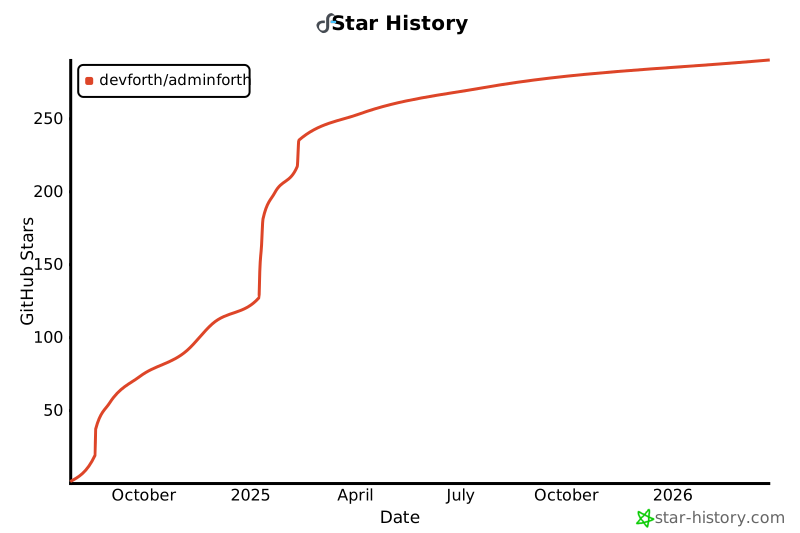](https://www.star-history.com/#devforth/adminforth&type=date&legend=top-left)
- ## Want to talk through your process?
- [Book a free 30-minute consultation](https://talk.devforth.io/book/30-minute-meeting) about whether an admin built on AdminForth is a good fit for your business and what a useful first version could look like. The consultation is free; implementation and hosting are separate.
- <a href="https://devforth.io"><img src="https://raw.githubusercontent.com/devforth/OnLogs/e97944fffc24fec0ce2347b205c9bda3be8de5c5/.assets/df_powered_by.svg" height="28" alt="Powered by Devforth"></a>
Ratings and comments
Sign in to rate this skill.
Sign inFree to use. If it’s helped, pass it on.