omnireach
Search and read the login-walled Chinese internet, parse media, and download bounded Douyin videos for AI agents.
Safety scan
A static text scan, not a guarantee. Select the badge to see what was scanned and every finding.
Badge for your README

Markdown
[](/listings/daily-ac--omnireach)HTML
<a href="/listings/daily-ac--omnireach"><img src="/api/listings/daily-ac--omnireach/badge.svg" alt="findsafeskills safety rating" /></a>Install
Install instructions from the README
As written by the repo's author. findsafeskills has not verified these steps.
These steps run a script from the network that findsafeskills does not scan.
> **"Install omnireach"**
Your agent runs one command. You copy nothing.
<sub>Manual fallback — paste into your terminal if you prefer:</sub>
curl -fsSL https://raw.githubusercontent.com/Daily-AC/omnireach/main/install.sh | sh
<sub>Also on [PyPI](https://pypi.org/project/omnireach/): `uv tool install omnireach` or `pip install omnireach` (CLI only — the one-liner above additionally registers the Claude Code skill). Try without installing: `uvx omnireach search "vibe coding"`.</sub>
This installs the CLI **and** registers the Claude Code skill (auto-discovered next session). Zero-config sources — HackerNews, RSS, 微信 (Sogou path), B站 — work immediately. Other sources open up after a one-time setup step each.
Installing the repository as a Claude Code plugin also registers the bundled MCP server. The standalone installer keeps the CLI fallback available even when the client has not loaded plugin MCP configuration.
---
What was scanned
The files the safety scan read, as written by the repository's author and shown as plain text. Lines with a finding are marked.
.claude-plugin/plugin.json · Manifest · 8 lines
- {
- "name": "omnireach",
- "version": "0.19.0-alpha",
- "description": "Search and read the login-walled Chinese internet, parse media, and download bounded Douyin videos for AI agents.",
- "author": {"name": "Daily-AC"},
- "license": "MIT",
- "homepage": "https://github.com/Daily-AC/omnireach"
- }
README.md · README · 474 lines · 1 finding marked
- <p align="center">
- <img src="https://raw.githubusercontent.com/Daily-AC/omnireach/main/docs/assets/logo-256.png" width="88" alt="">
- </p>
- # omnireach
- <sub>English · [中文](https://github.com/Daily-AC/omnireach/blob/main/README.zh.md)</sub>
- **Your agent reads Twitter. It still can't read WeChat. omnireach fixes that.**
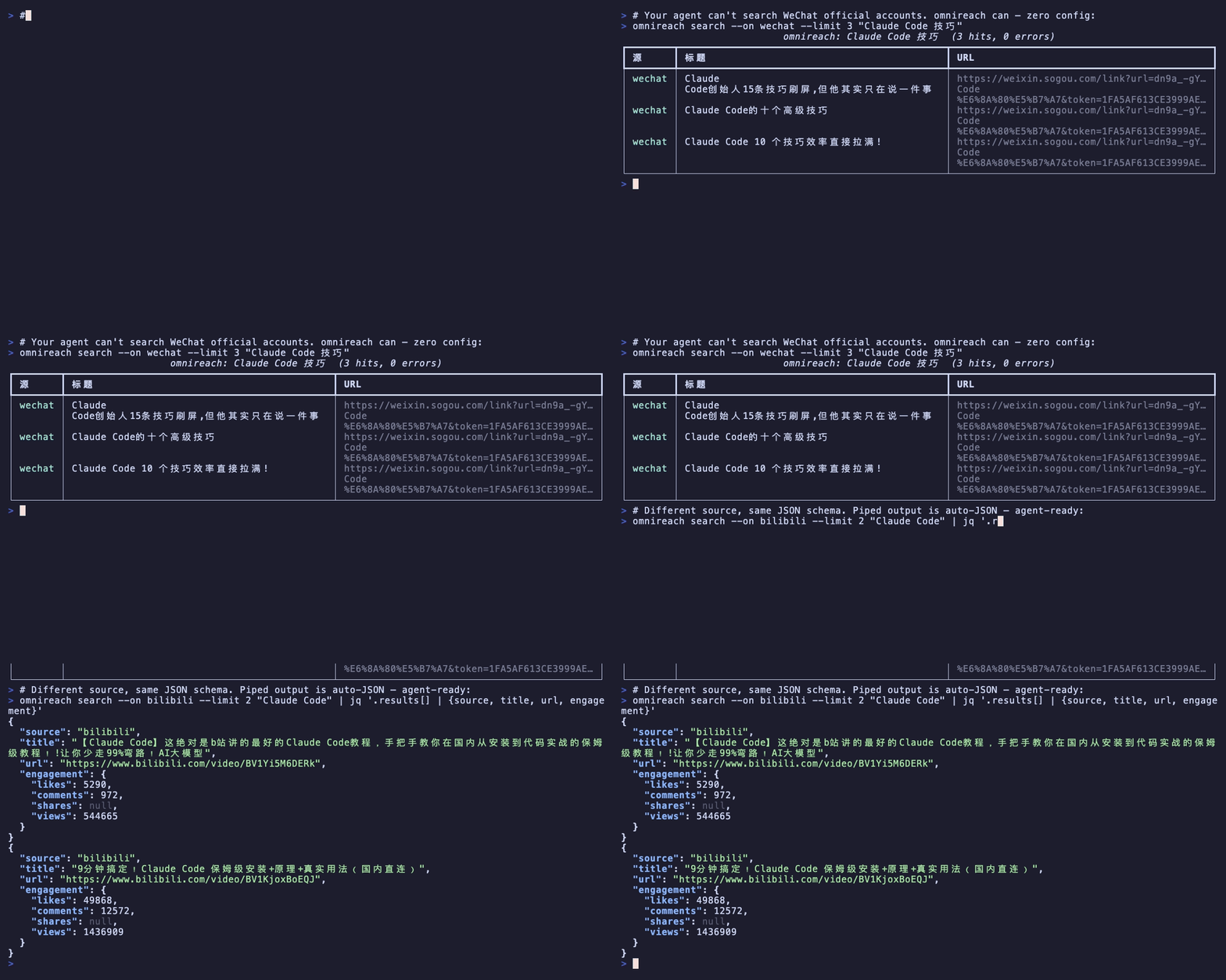
- omnireach searches Google and the login-walled Chinese internet — 微信公众号 · 小红书 · 抖音 · B站 · TikTok — plus Twitter, Reddit, HN, YouTube and more. `omnireach search` returns normalized results, `omnireach fetch` returns clean Markdown, and `omnireach media` turns videos into bounded metadata and transcript artifacts. WeChat search works with **zero config** — no key, no login:
- ```bash
- omnireach search --on wechat "Claude Code 技巧" # works 60 seconds after install
- ```
- Installed as a Claude Code skill, so your agent just knows how to use it next session. No LLM inside, no per-call scraping fees — the heavy sources reuse your own browser session.
- 
- **Watch it work:** [Overdrive](https://github.com/Daily-AC/assets/releases/download/renders-2026-07/omnireach-overdrive.mp4) (36s) · [Native bridge](https://github.com/Daily-AC/assets/releases/download/renders-2026-07/omnireach-native-bridge.mp4) (51s) · [Terminal demo](https://github.com/Daily-AC/assets/releases/download/renders-2026-07/omnireach-douyin-promo.mp4) (30s) — video sources in [Daily-AC/assets](https://github.com/Daily-AC/assets).
- ### MCP before Playwright
- For search, creator catalogs, reading, media parsing, and bounded Douyin downloads, start with the five focused MCP tools instead of browser automation.
- Ordinary page fetches never start Chrome. Google, Reddit, Twitter, Xiaohongshu, TikTok,
- and Douyin search now use Omnireach's own small, read-only Chrome bridge first, with
- OpenCLI retained as a compatibility fallback. Browser-backed calls use temporary background
- tabs that close after the call, and `quick` mode remains browser-free. Keep Playwright for
- clicks, forms, unsupported file transfer, screenshots, and visual assertions.
- | Same RFC 9110 read | omnireach MCP | Playwright + headless system Chrome |
- |---|---:|---:|
- | Cold process, median of 5 | **1383.86 ms** | 3749.26 ms |
- | Warm runtime, median of 5 | **1311.46 ms** | 1687.94 ms |
- On the recorded machine, Playwright took **2.7x** as long on the cold path and **1.3x** as
- long with both runtimes warm. See the [method and limitations](https://github.com/Daily-AC/omnireach/blob/main/docs/benchmarks/read-path-v0.12.md)
- or inspect [every raw sample](https://github.com/Daily-AC/omnireach/blob/main/docs/benchmarks/read-path-v0.12.json).
- 
- [](https://github.com/Daily-AC/omnireach/blob/main/LICENSE)
- [](https://www.python.org/)
- ---
- ## Install — just tell your agent
- > **"Install omnireach"**
- Your agent runs one command. You copy nothing.
- <sub>Manual fallback — paste into your terminal if you prefer:</sub>
- ```bash
- curl -fsSL https://raw.githubusercontent.com/Daily-AC/omnireach/main/install.sh | sh
- Note: Pipes a downloaded script directly into a shell (curl | sh / wget | bash)
- Line 57 on GitHub
- ```
- <sub>Also on [PyPI](https://pypi.org/project/omnireach/): `uv tool install omnireach` or `pip install omnireach` (CLI only — the one-liner above additionally registers the Claude Code skill). Try without installing: `uvx omnireach search "vibe coding"`.</sub>
- This installs the CLI **and** registers the Claude Code skill (auto-discovered next session). Zero-config sources — HackerNews, RSS, 微信 (Sogou path), B站 — work immediately. Other sources open up after a one-time setup step each.
- Installing the repository as a Claude Code plugin also registers the bundled MCP server.
- The standalone installer keeps the CLI fallback available even when the client has not
- loaded plugin MCP configuration.
- ---
- ## What you get
- **1. Reach the unreachable.**
- Twitter, Reddit, 小红书, 微信公众号, 抖音, B站, TikTok — login-walled vertical platforms that no agent web search reaches. omnireach reads them through your own logged-in browser session. Its native Chrome bridge handles all six browser-backed search sources, with OpenCLI retained as a compatibility fallback.
- **2. Stable agent contracts.**
- `omnireach search` returns normalized results, `omnireach fetch` returns clean Markdown, and `omnireach media` returns a `MediaEnvelope` with bounded previews plus absolute artifact paths. Long transcripts stay in local files instead of flooding model context.
- **3. Works even when WebSearch doesn't.**
- On proxy / relay-station / Bedrock / Vertex-Claude-3.x setups where the built-in WebSearch server tool isn't available, omnireach gives search back — it runs entirely on the client side, bypassing both gate layers.
- ---
- ## Agent fast path — MCP before Playwright
- The plugin exposes five model-controlled tools:
- - `omnireach_search` for web research and platform search
- - `omnireach_author` for the works one creator published, which keyword search cannot answer
- - `omnireach_fetch` for reading an HTTP or HTTPS URL as Markdown
- - `omnireach_parse_media` for YouTube, Bilibili, and direct-media metadata or transcripts
- - `omnireach_download_media` for bounded Douyin MP4 downloads with verified local artifacts
- All tools are served by the dependency-free stdio command:
- ```bash
- omnireach mcp
- ```
- For MCP clients that do not load the plugin, register it with:
- ```json
- {
- "mcpServers": {
- "omnireach": {
- "command": "omnireach",
- "args": ["mcp"]
- }
- }
- }
- ```
- Use these tools before Playwright for read-only work. Ordinary page fetches do not start
- Chrome. Login-backed adapters may use the user's existing Chrome session through a hidden,
- ephemeral tab that is released after the call. Keep Playwright for clicks, forms, uploads,
- downloads, screenshots, visual assertions, and unsupported interactive workflows.
- ---
- ## How is this different from Agent-Reach?
- [Agent-Reach](https://github.com/Panniantong/Agent-Reach) (51k★) created this category and is excellent at what it does. omnireach makes different trade-offs — these are date-stamped facts, not marketing:
- | | omnireach | Agent-Reach (v1.5.0, as of 2026-07) |
- |---|---|---|
- | 微信公众号 WeChat | ✅ zero-config search (Sogou path) + full-text fetch via your logged-in Chrome | ❌ removed 2026-06 ([PR #347](https://github.com/Panniantong/Agent-Reach/pull/347)) after anti-bot breakage |
- | 抖音 Douyin | ✅ search via logged-in Chrome + bounded MP4 download | ❌ removed 2026-06 (upstream tool archived) |
- | TikTok | ✅ search | ❌ not supported |
- | Output contract | one pydantic JSON schema across all 17 sources; auto-JSON when piped | no wrapper layer by design — each upstream tool's own format (YAML / plain text / subtitle files / raw JSON) |
- | `search` / `fetch` commands | built-in: `omnireach search`, `omnireach fetch <url>` with host-aware routing | no search/read commands — routes your agent to call upstream tools directly |
- | Facebook · Instagram · LinkedIn · 雪球 · podcast transcription | ❌ | ✅ |
- | Community | early — you found us before the crowd | 51k★, 30 contributors |
- Pick Agent-Reach if you need Facebook/LinkedIn/transcription. Pick omnireach if you need the Chinese internet — WeChat above all — a machine-stable JSON contract, or a single fetch entrypoint. Both MIT; they compose fine in one agent.
- ---
- ## Example
- ```bash
- # Search a login-walled vertical platform
- omnireach search --on xiaohongshu --json "Claude Code 使用技巧"
- # Fetch a WeChat article — login-walled, via your session
- omnireach fetch --json "https://mp.weixin.qq.com/s/<token>"
- # Parse captions without downloading the full YouTube video
- omnireach media parse --language en --json "https://www.youtube.com/watch?v=<id>"
- # Bilibili captions can require an explicitly selected logged-in Chrome profile
- omnireach media parse --cookies-from-browser "chrome:Profile 1" \
- --language zh-Hans --json "https://www.bilibili.com/video/<BV-id>"
- # Douyin currently requires fresh browser cookies; output includes path, bytes, and SHA-256
- omnireach media download --cookies-from-browser "chrome:Profile 1" \
- --max-size-mb 500 --json "https://www.douyin.com/video/<id>"
- # Full pipeline: search → fetch all results
- omnireach search --on wechat --json "claude 4.7" \
- | jq -r '.results[].url' \
- | xargs -I{} omnireach fetch --json {}
- ```
- ---
- ## Commands
- | Command | What it does |
- |---|---|
- | `omnireach search "<query>"` | Search; a connected native bridge or OpenCLI automatically adds Google + Twitter |
- | `omnireach search --on twitter,reddit "..."` | Target specific sources |
- | `omnireach search --sources twitter,reddit "..."` | Alias for `--on`, matching the MCP argument name |
- | `omnireach search --profile <name> "..."` | Select an OpenCLI Browser Bridge profile for this search |
- | `omnireach search --timeout 90 "..."` | Override every source timeout; browser-backed heavy sources default to 60 seconds |
- | `omnireach search --mode quick "..."` | Quick mode — HN only, no browser-backed sources |
- | `omnireach search --mode deep "..."` | Deep mode — all ready sources |
- | `omnireach search --json "..."` | Explicit JSON output |
- | **`omnireach fetch <url>`** | **URL → full markdown** — `mp.weixin.qq.com` uses OpenCLI logged-in Chrome; other hosts use built-in HTTP → Jina fallback |
- | `omnireach fetch <url> --backend http` | Force the built-in browserless HTTP extractor |
- | `omnireach fetch <url> --backend jina` | Force Jina Reader SaaS (zero local deps) |
- | `omnireach fetch <url> --backend crwl` | Explicitly opt into local Crawl4AI |
- | `omnireach fetch <url> --backend opencli` | Force OpenCLI wechat logged-in path (v0.10.1+) |
- | **`omnireach author "<nickname>"`** | **A creator's own works** — keyword search returns other accounts' fan edits; this returns the catalog, with exact like/comment/share/collect counts |
- | `omnireach author "https://www.douyin.com/user/<sec_uid>"` | Pin an exact account instead of resolving a nickname by follower count |
- | `omnireach author "<nickname>" --order likes --limit 30` | Rank the whole catalog by likes (pages every work before sorting, so allow a larger `--timeout`) |
- | `omnireach media inspect <url>` | Inspect normalized metadata and subtitle tracks without writing files |
- | `omnireach media parse <url> --language en` | Materialize metadata, selected captions, transcript JSON/Markdown, and a manifest |
- | `omnireach media parse <media-url> --subtitle-url <vtt>` | Parse a direct audio/video URL with a sidecar VTT/SRT/JSON3 subtitle |
- | `omnireach media parse <url> --cookies-from-browser "chrome:Profile 1"` | Explicitly reuse that browser profile when Bilibili captions require login |
- | `omnireach media parse <url> --no-cache --max-duration 3600` | Bypass verified artifact reuse and reject media longer than one hour |
- | `omnireach media download <douyin-url> --cookies-from-browser "chrome:Profile 1"` | Download a bounded H.264 MP4 by default and return a hash-verified local artifact |
- | `omnireach media download <douyin-url> --quality small --max-size-mb 100` | Prefer the smallest combined MP4 and reject formats over 100 MiB |
- | `omnireach mcp` | Serve search, creator catalogs, fetch, media parsing, and bounded Douyin download over MCP stdio |
- | `omnireach init` | Write default `~/.omnireach/preferences.toml` |
- | `omnireach sources` | List all sources + tier status |
- | `omnireach setup <source>` | Guided setup for a 🟡 / 🔴 source |
- | `omnireach bridge install` | Install/update the Omnireach native Chrome extension assets |
- | `omnireach bridge reload` | Ask the connected extension to reload itself and pick up newly installed files |
- | `omnireach bridge path` | Print the stable unpacked-extension directory |
- | `omnireach bridge status --json` | Ping the installed extension through the authenticated localhost bridge |
- | `omnireach agy configure <conversation-id>` | Configure the experimental agy grounded-search backend |
- | `omnireach agy status --json` | Check the configured agy conversation and AgentAPI endpoint |
- | `omnireach doctor` | Health check (sources / fetch / media / wechat backends) |
- See the [real Douyin download verification](docs/verification/douyin-download.md) for the
- upstream format shape, authenticated download, cache, size-limit, privacy, and MCP evidence.
- ---
- ## Sources
- | Source | Tier | Dependency | Notes |
- |---|---|---|---|
- | hackernews | ✅ ready | none | Direct Algolia, zero-config |
- | youtube | ✅ ready | `yt-dlp` (pip install) | `omnireach setup youtube` |
- | github | ✅ ready | `gh` CLI + `gh auth login` | `omnireach setup github` |
- | rss | ✅ ready | built-in feedparser | query must be a URL |
- | google | 🔴 heavy | Omnireach native Chrome bridge; OpenCLI fallback | Automatically included when either transport is available; background tab |
- | reddit | 🔴 heavy | Omnireach native Chrome bridge; OpenCLI fallback | Public search works logged out; Chrome login is inherited when present |
- | twitter | 🔴 heavy | Omnireach native Chrome bridge; OpenCLI fallback | Automatically included when either transport is available; inherits Chrome login |
- | xiaohongshu | 🔴 heavy | Omnireach native Chrome bridge; OpenCLI fallback | Inherits the current Chrome login |
- | tiktok | 🔴 heavy | Omnireach native Chrome bridge; OpenCLI fallback | TikTok international; real DOM result extraction |
- | douyin | 🔴 heavy | Omnireach native Chrome bridge; OpenCLI fallback for search only | Reuses the current Chrome login without invoking OpenCLI on the native path. `omnireach author` has no OpenCLI equivalent and needs the bridge |
- | agy | 🚧 experimental | authenticated agy CLI + dedicated conversation | Explicit `--on agy` only; reuses agy's server-side grounded WebSearch |
- | 💎 tavily | booster | env `TAVILY_API_KEY` | paid (v0.4) |
- | 💎 brave | booster | env `BRAVE_API_KEY` | paid (v0.4) |
- | 💎 perplexity | booster | env `PERPLEXITY_API_KEY` | paid (v0.4) |
- | 💎 exa | booster | env `EXA_API_KEY` | paid web search (v0.5) |
- | wechat | ✅ ready | none (optional `EXA_API_KEY` for enhancement) | WeChat Official Accounts — search via Sogou free path; `EXA_API_KEY` optionally enables semantic enhancement; v0.10.1+ `omnireach fetch <wechat-url>` auto-routes through OpenCLI logged-in Chrome |
- | bilibili | ✅ ready | none (optional `EXA_API_KEY` for enhancement) | B站 — v0.9+ defaults to B站 official search API; `EXA_API_KEY` optionally enables semantic enhancement |
- > **Native browser sources**: Run `omnireach bridge install`, load the printed directory once from `chrome://extensions` as an unpacked extension, and sign in to the sites you need in that Chrome profile. `auto` prefers this dependency-free native path for Google, Reddit, Twitter, Xiaohongshu, TikTok, and Douyin, then falls back to OpenCLI. Set `OMNIREACH_BROWSER_TRANSPORT=native` to verify that OpenCLI is not invoked.
- > **agy grounded search**: Keep an authenticated `agy` CLI process running, create a dedicated conversation, then run `omnireach agy configure <conversation-id>`. Verify it with `omnireach agy status --json` and search explicitly with `omnireach search --on agy --json "query"`.
- > **WeChat fetch**: zero-config Sogou search now resolves signed result links to direct `mp.weixin.qq.com` URLs in the same HTTP session. Fetch then uses the Daily-AC/OpenCLI fork (`weixin download --stdout`, upstream PR [jackwener/OpenCLI#1770](https://github.com/jackwener/OpenCLI/pull/1770)) in an explicit background, ephemeral tab and releases it after the command.
- ---
- ## Agent calling convention
- Prefer the MCP tools: call `omnireach_search` for research, `omnireach_fetch` for pages,
- `omnireach_parse_media` for video/audio metadata or captions, and
- `omnireach_download_media` for bounded Douyin MP4 downloads. Fall back to the CLI only when MCP is unavailable.
- When using that fallback, **always request JSON explicitly**:
- ```bash
- # Option 1: explicit flag per command
- omnireach search --json "..."
- omnireach fetch --json "<url>"
- omnireach media parse --json "<media-url>"
- # Option 2: env var (recommended for agent harnesses)
- export OMNIREACH_FORCE_JSON=1
- ```
- The `not isatty()` auto-JSON added in v0.9.2 covers most cases, but some agent terminals (e.g. Antigravity) allocate a real PTY to subprocesses making `isatty()=True`. Explicit `--json` or the env var always works. When `--json` is present, CLI usage errors are also emitted as a JSON error envelope on stdout. Fetch rejects short verification and login-wall placeholders instead of treating any non-empty body as success; Reddit failures include a logged-in OpenCLI fallback hint.
- Full skill contract: [`skills/omnireach/SKILL.md`](https://github.com/Daily-AC/omnireach/blob/main/skills/omnireach/SKILL.md)
- ---
- <details>
- <summary><b>Who specifically needs this? (The WebSearch two-layer gate)</b></summary>
- Claude Code's WebSearch is a **server-side server tool** (`web_search_20250305`). Whether it actually works depends on **two independent gates**:
- **Gate 1 — client-side (`WebSearchTool.isEnabled()` checks `getAPIProvider()`):**
- - Default `firstParty` (no `CLAUDE_CODE_USE_*` env var set, including the case where only `ANTHROPIC_BASE_URL` is changed) → tool **registered**
- - Explicit `CLAUDE_CODE_USE_BEDROCK=1` → tool **off**
- - Explicit `CLAUDE_CODE_USE_VERTEX=1` + Claude 4+ → registered; older Claude → off
- - Explicit `CLAUDE_CODE_USE_FOUNDRY=1` → registered
- **Gate 2 — upstream server tool implementation:** After the client sends the tool schema, the upstream API must have **specifically implemented** the `web_search_20250305` server tool (receive tool call → run search → return results to client):
- - Real Anthropic API (api.anthropic.com): ✓ native
- - Vertex / Foundry: ✓ (each backend implements it)
- - **Third-party providers that specifically support Claude Code** (e.g. DeepSeek's Anthropic-compat endpoint): ✓ they implemented the server tool handling, routing to their own search backend
- - **OpenAI-compatible relay stations** (cliproxy / anyrouter etc. that simply translate Claude API → OpenAI Chat Completions): ✗ don't recognize server tool semantics
- - **Self-hosted gateways / most proxies**: ✗ generally not implemented
- Gate 2 looks at **"did the upstream specifically implement Claude Code server tool support"** — not at "is this real Anthropic." Providers who specifically support Claude Code implement it; pure API translators don't. (Data point: DeepSeek is not real Anthropic but WebSearch works because they explicitly implemented it.)
- **Root causes differ by scenario:**
- - DeepSeek and other Claude-Code-specific third parties: both gates pass, WebSearch ✓ — omnireach value here is supplementing vertical sources (Twitter/小红书/微信), not patching search
- - OpenAI-compatible relay station users: client registers the tool, **upstream doesn't handle the server tool call** → failure
- - Explicit Bedrock users / Vertex Claude 3.x users: client-side `isEnabled` is off before the request even leaves
- **Even with WebSearch working**, it can't reach Twitter threads, Reddit comment sections, 小红书 posts, WeChat articles, 抖音, B站 technical videos — these login-walled vertical platforms are blind spots for every hosted web search. omnireach's three value layers:
- 1. Patch for users whose client-side gate is off
- 2. Patch for users whose upstream doesn't implement the server tool
- 3. Supplement for users whose WebSearch works fine but can't reach vertical platforms
- </details>
- <details>
- <summary><b>Naming & architecture (search / fetch / parse)</b></summary>
- **omnireach** = `omni` (all) + `reach` (reach). Full "reach the whole web" semantics require three capability layers, all living as **sibling binaries in this repo** (analogous to `cargo` / `rustc` / `rustfmt` in the Rust monorepo — **no sister repo**):
- | Layer | Implementation | Responsibility | Status |
- |---|---|---|---|
- | **search** | `omnireach search` subcommand | Locate across the web — returns metadata + URL, does not fetch content | ✅ v0.7+ in use |
- | **fetch** | `omnireach fetch` subcommand | Given a URL, fetch full-text markdown — built-in browserless HTTP → [Jina Reader](https://r.jina.ai/) for ordinary pages; background OpenCLI for login-walled WeChat | ✅ |
- | **parse** | (not yet implemented, future addition to this repo) | Video/audio content parsing (subtitles/STT/frame-by-frame) | 🔜 not started |
- v0.10+ has omnireach covering search + fetch (subcommand form). Video parsing still uses external tools (yt-dlp / whisper); parse binary will be added to this repo when there are real user requests (YAGNI — no sister repo).
- This split mirrors Anthropic's own [WebSearch](https://docs.anthropic.com/en/docs/build-with-claude/tool-use/web-search) + [WebFetch](https://docs.anthropic.com/en/docs/build-with-claude/tool-use/web-fetch) split: each layer does one thing well, search isn't slowed by parsing tasks, and agent callers can compose freely.
- > Note: renaming `omnireach` to `omnisearch` was considered, but v0.10 landing `omnireach fetch` resolved the question — `omnireach search` (reach = find) + `omnireach fetch` (reach = retrieve) are both natural sub-actions of "reach," so the umbrella name fits. **No rename** (decided 2026-05-27).
- </details>
- <details>
- <summary><b>Upgrade</b></summary>
- omnireach is in alpha with frequent releases. Check and upgrade:
- ```bash
- omnireach check-update # compare against GitHub Releases
- uv tool install --force git+https://github.com/Daily-AC/omnireach.git # pull latest
- ```
- > ⚠️ `uv tool upgrade omnireach` **will not** pull new commits (uv locks git-URL-installed tools to the commit at install time). `--force` reinstall fetches the latest.
- </details>
- <details>
- <summary><b>Platform support</b></summary>
- | Platform | Status | Notes |
- |---|---|---|
- | macOS | ✅ Primary dev platform | Real E2E verified for built-in HTTP, Jina, OpenCLI WeChat, Twitter, TikTok, Douyin, Sogou WeChat and Bilibili; Crawl4AI remains optional |
- | Linux | 🟡 best-effort | Should work; setup flow doesn't auto-detect `apt`/`pacman` |
- | WSL2 | 🟡 best-effort | Same as Linux |
- | Windows (native PowerShell) | 🟡 experimental (v0.6.3+) | macOS assumptions removed: secrets.env no longer calls POSIX chmod; preferences edit falls back to notepad; setup github prompts `winget install GitHub.cli`; OpenCLI sources (twitter/xhs) theoretically cross-platform but untested. **File an issue if you hit problems.** |
- Run `omnireach doctor` to print a platform / Python version line at the top — useful to include when filing issues.
- </details>
- <details>
- <summary><b>💎 Paid boosters (v0.4)</b></summary>
- omnireach is free by default. Configuring a paid API key improves result quality:
- ```bash
- omnireach setup tavily # guided key entry + writes to ~/.omnireach/secrets.env
- omnireach setup brave
- omnireach setup perplexity
- omnireach setup exa # added v0.5 (replaces old `web` source)
- ```
- Keys are detected automatically when set. Results carry `cost="paid"` metadata; TTY output shows a 💎 prefix for auditability.
- To disable: edit `~/.omnireach/preferences.toml` and set `[boosters] auto_enable = false`.
- </details>
- <details>
- <summary><b>⚙️ User preferences (v0.4)</b></summary>
- `~/.omnireach/preferences.toml` can configure default sources, language, output format, and `source_trust` overrides.
- `[media] cookies_from_browser` sets the default yt-dlp browser cookie source for `omnireach media inspect / parse / download`, so an authorized profile does not have to be repeated on every call. An explicit `--cookies-from-browser` always wins, and the preference never moves Bilibili off its cookie-free native backend.
- ```toml
- [media]
- cookies_from_browser = "chrome:Profile 1"
- ```
- ```bash
- omnireach preferences show # view current config
- omnireach preferences edit # open in $EDITOR
- omnireach preferences reset # reset (backs up original to .bak)
- omnireach preferences path # print file location
- ```
- </details>
- <details>
- <summary><b>How to get full text (v0.8)</b></summary>
- omnireach is the search layer — the `content` field is uniformly capped at ≤ 500 characters + `…`. This validator runs in the contract layer (`SearchResult.content` pydantic `field_validator`) for **all sources**. This is intentional — full text belongs to the `omnireach fetch` layer (see [Naming & architecture](#naming--architecture-search--fetch--parse) above).
- For sources whose upstream returns full text (wechat / exa / tavily) or long threads (twitter), the **complete raw payload is preserved in `result.raw`**, so agents that need full text can retrieve it:
- ```python
- # Python (call CLI + parse JSON envelope)
- import json
- import subprocess
- out = subprocess.run(
- ["omnireach", "search", "--json", "--on", "wechat", "claude 4.7"],
- check=True, capture_output=True, text=True,
- )
- env = json.loads(out.stdout)
- snippet = env["results"][0]["content"] # 500 chars + "…"
- full = env["results"][0]["raw"]["text"] # Exa / wechat / twitter full text
- # tavily uses raw["content"]
- ```
- ```bash
- # CLI + jq
- omnireach search --json --on tavily "claude 4.7" | \
- jq '.results[] | {title, snippet: .content, full: .raw.content}'
- ```
- Field mapping (verified by real E2E in v0.8.1 + v0.9):
- | Source | `result.adapter` | `result.content` | `result.raw[...]` for full text / raw payload |
- |---|---|---|---|
- | wechat (default Sogou) | `sogou` | snippet (Sogou SERP summary) | `raw["item_html"]` (full Sogou card HTML) — for actual full text you need mp.weixin.qq.com |
- | wechat (EXA_API_KEY enabled) | `exa-api` | snippet | `raw["text"]` (Exa full text) |
- | bilibili (default B站 API) | `bilibili-api` | video description (≤500) | `raw` entire video item dict, includes desc/cover/aid/bvid |
- | bilibili (EXA_API_KEY enabled) | `exa-api` | snippet | `raw["text"]` |
- | exa | `exa-api` | snippet | `raw["text"]` |
- | tavily | `tavily-api` | snippet | `raw["content"]` |
- | twitter | `opencli` | snippet (long threads trigger truncation) | `raw["text"]` |
- | xiaohongshu | `opencli` | empty — OpenCLI search results don't include body | n/a (no full text at search layer) |
- The specific key names in `raw[...]` match upstream API schema directly — if upstream changes schema, this table needs updating. When uncertain, inspect `result.raw.keys()` first.
- Other sources (HN / GitHub / RSS / YouTube / etc.) generally have content under 500 chars, so the validator is usually a no-op — but it's not guaranteed. For full-text fallback, check `result.raw` for a matching key.
- ### For actual full text → `omnireach fetch <url>` (v0.10+)
- `omnireach fetch <url>` is the official search → full-text pipeline, with **host-aware** backend routing:
- ```bash
- # Any webpage → built-in HTTP extractor, then Jina fallback if blocked
- omnireach fetch https://example.com/article --json
- # WeChat Official Account article → automatically uses OpenCLI logged-in Chrome (v0.10.1+), bypasses CAPTCHA
- omnireach fetch https://mp.weixin.qq.com/s/<token> --json
- # search → fetch pipeline
- omnireach search --on wechat "claude 4.7" --json \
- | jq -r '.results[].url' \
- | xargs -I{} omnireach fetch --json {}
- ```
- Backend matrix:
- | URL host | `--backend auto` routes to | Notes |
- |---|---|---|
- | `mp.weixin.qq.com` | **opencli** (logged-in cookie strategy) | Runs with `--window background --site-session ephemeral --keep-tab false`; no visible browser window is required |
- | Other hosts | **http → jina** | Built-in browserless extraction first; Jina Reader fallback when blocked or extraction fails |
- Explicit `--backend` overrides auto:
- | Flag | Behavior |
- |---|---|
- | `--backend http` | Force the built-in HTTP + HTML-to-Markdown extractor; no browser dependency |
- | `--backend jina` | Force [Jina Reader](https://r.jina.ai/) SaaS — zero local deps, large free tier |
- | `--backend crwl` | Explicitly opt into local Crawl4AI for a browser-rendered page |
- | `--backend opencli` | Force OpenCLI wechat logged-in path (only meaningful for mp.weixin.qq.com) |
- CAPTCHA-shaped responses are rejected rather than returned as successful article content. Auto mode records `captcha_suspected` in `errors[]` and tries the next backend; if all backends fail, JSON is still emitted but the process exits non-zero. `omnireach doctor` reports both the built-in HTTP backend and whether OpenCLI supports the background-tab contract.
- </details>
- <details>
- <summary><b>Design</b></summary>
- See `docs/design/2026-05-25-omnireach-design.md`.
- </details>
- <details>
- <summary><b>License</b></summary>
- MIT — see [LICENSE](https://github.com/Daily-AC/omnireach/blob/main/LICENSE).
- </details>
Version history
v0.19.0-alpha11/17/2026
Ratings and comments
Sign in to rate this skill.
Sign inFree to use. If it’s helped, pass it on.