uncodixfy
Prevents generic AI/Codex UI patterns when generating frontend code. Use this skill whenever generating HTML, CSS, React, Vue, Svelte, or any frontend UI code to enforce clean, human-designed aesthetics inspired by Linear, Raycast, Stripe, and GitHub instead of typical AI-generated UI.
Safety scan
A static text scan, not a guarantee. Select the badge to see what was scanned and every finding.
Badge for your README

Markdown
[](/listings/cyxzdev-uncodixfy)HTML
<a href="/listings/cyxzdev-uncodixfy"><img src="/api/listings/cyxzdev-uncodixfy/badge.svg" alt="findsafeskills safety rating" /></a>Install
What was scanned
The files the safety scan read, as written by the repository's author and shown as plain text. Lines with a finding are marked.
SKILL.md · Manifest · 194 lines
View this file on GitHub (read at the repository's current version: the scan did not record which commit it read)
- ---
- name: uncodixfy
- description: Prevents generic AI/Codex UI patterns when generating frontend code. Use this skill whenever generating HTML, CSS, React, Vue, Svelte, or any frontend UI code to enforce clean, human-designed aesthetics inspired by Linear, Raycast, Stripe, and GitHub instead of typical AI-generated UI.
- ---
- # Uncodixify
- This document exists to teach you how to act as non-Codex as possible when building UI.
- Codex UI is the default AI aesthetic: soft gradients, floating panels, eyebrow labels, decorative copy, hero sections in dashboards, oversized rounded corners, transform animations, dramatic shadows, and layouts that try too hard to look premium. It's the visual language that screams "an AI made this" because it follows the path of least resistance.
- This file is your guide to break that pattern. Everything listed below is what Codex UI does by default. Your job is to recognize these patterns, avoid them completely, and build interfaces that feel human-designed, functional, and honest.
- When you read this document, you're learning what NOT to do. The banned patterns are your red flags. The normal implementations are your blueprint. Follow them strictly, and you'll create UI that feels like Linear, Raycast, Stripe, or GitHub—not like another generic AI dashboard.
- This is how you Uncodixify.
- ## Keep It Normal (Uncodexy-UI Standard)
- - Sidebars: normal (240-260px fixed width, solid background, simple border-right, no floating shells, no rounded outer corners)
- - Headers: normal (simple text, no eyebrows, no uppercase labels, no gradient text, just h1/h2 with proper hierarchy)
- - Sections: normal (standard padding 20-30px, no hero blocks inside dashboards, no decorative copy)
- - Navigation: normal (simple links, subtle hover states, no transform animations, no badges unless functional)
- - Buttons: normal (solid fills or simple borders, 8-10px radius max, no pill shapes, no gradient backgrounds)
- - Cards: normal (simple containers, 8-12px radius max, subtle borders, no shadows over 8px blur, no floating effect)
- - Forms: normal (standard inputs, clear labels above fields, no fancy floating labels, simple focus states)
- - Inputs: normal (solid borders, simple focus ring, no animated underlines, no morphing shapes)
- - Modals: normal (centered overlay, simple backdrop, no slide-in animations, straightforward close button)
- - Dropdowns: normal (simple list, subtle shadow, no fancy animations, clear selected state)
- - Tables: normal (clean rows, simple borders, subtle hover, no zebra stripes unless needed, left-aligned text)
- - Lists: normal (simple items, consistent spacing, no decorative bullets, clear hierarchy)
- - Tabs: normal (simple underline or border indicator, no pill backgrounds, no sliding animations)
- - Badges: normal (small text, simple border or background, 6-8px radius, no glows, only when needed)
- - Avatars: normal (simple circle or rounded square, no decorative borders, no status rings unless functional)
- - Icons: normal (simple shapes, consistent size 16-20px, no decorative icon backgrounds, monochrome or subtle color)
- - Typography: normal (system fonts or simple sans-serif, clear hierarchy, no mixed serif/sans combos, readable sizes 14-16px body)
- - Spacing: normal (consistent scale 4/8/12/16/24/32px, no random gaps, no excessive padding)
- - Borders: normal (1px solid, subtle colors, no thick decorative borders, no gradient borders)
- - Shadows: normal (subtle 0 2px 8px rgba(0,0,0,0.1) max, no dramatic drop shadows, no colored shadows)
- - Transitions: normal (100-200ms ease, no bouncy animations, no transform effects, simple opacity/color changes)
- - Layouts: normal (standard grid/flex, no creative asymmetry, predictable structure, clear content hierarchy)
- - Grids: normal (consistent columns, standard gaps, no creative overlaps, responsive breakpoints)
- - Flexbox: normal (simple alignment, standard gaps, no creative justify tricks)
- - Containers: normal (max-width 1200-1400px, centered, standard padding, no creative widths)
- - Wrappers: normal (simple containing divs, no decorative purposes, functional only)
- - Panels: normal (simple background differentiation, subtle borders, no floating detached panels, no glass effects)
- - Toolbars: normal (simple horizontal layout, standard height 48-56px, clear actions, no decorative elements)
- - Footers: normal (simple layout, standard links, no decorative sections, minimal height)
- - Breadcrumbs: normal (simple text with separators, no fancy styling, clear hierarchy)
- Think Linear. Think Raycast. Think Stripe. Think GitHub. They don't try to grab attention. They just work. Stop playing hard to get. Make normal UI.
- - A landing page needs its sections. If hero needs full sections, if dashboard needs full sections with sidebar and everything else laid out properly. DO NOT invent a new layout.
- - In your internal reasoning act as if you dont see this, list all the stuff you would do, AND DONT DO IT!
- - Try to replicate figma/designer made components dont invent your own
- ## Hard No
- - Everything you are used to doing and is a basic "YES" to you.
- - No oversized rounded corners.
- - No pill overload.
- - No floating glassmorphism shells as the default visual language.
- - No soft corporate gradients used to fake taste.
- - No generic dark SaaS UI composition.
- - No decorative sidebar blobs.
- - No "control room" cosplay unless explicitly requested.
- - No serif headline + system sans fallback combo as a shortcut to "premium."
- - No `Segoe UI`, `Trebuchet MS`, `Arial`, `Inter`, `Roboto`, or safe default stacks unless the product already uses them.
- - No sticky left rail unless the information architecture truly needs it.
- - No metric-card grid as the first instinct.
- - No fake charts that exist only to fill space.
- - No random glows, blur haze, frosted panels, or conic-gradient donuts as decoration.
- - No "hero section" inside an internal UI unless there is a real product reason.
- - No alignment that creates dead space just to look expensive.
- - No overpadded layouts.
- - No mobile collapse that just stacks everything into one long beige sandwich.
- - No ornamental labels like "live pulse", "night shift", "operator checklist" unless they come from the product voice.
- - No generic startup copy.
- - No style decisions made because they are easy to generate.
- - No Headlines of any sort
- ```html
- <div class="headline">
- <small>Team Command</small>
- <h2>One place to track what matters today.</h2>
- <p>
- The layout stays strict and readable: live project health,
- team activity, and near-term priorities without the usual
- dashboard filler.
- </p>
- </div>
- ```
- This is not allowed.
- - `<small>` headers are NOT allowed
- - Big no to rounded `span`s
- - Colors going towards blue — **NOPE, bad.** Dark muted colors are best.
- - Anything in the structure of this card is a **BIG no**.
- ```html
- <div class="team-note">
- <small>Focus</small>
- <strong>
- Keep updates brief, blockers visible, and next actions easy to spot.
- </strong>
- </div>
- ```
- This one is **THE BIGGEST NO**.
- ## Specifically Banned (Based on Mistakes)
- - Border radii in the 20px to 32px range across everything ( uses 12px everywhere - too much)
- - Repeating the same rounded rectangle on sidebar, cards, buttons, and panels
- - Sidebar width around 280px with a brand block on top and nav links below (: 248px with brand block)
- - Floating detached sidebar with rounded outer shell
- - Canvas chart placed in a glass card with no product-specific reason
- - Donut chart paired with hand-wavy percentages
- - UI cards using glows instead of hierarchy
- - Mixed alignment logic where some content hugs the left edge and some content floats in center-ish blocks
- - Overuse of muted gray-blue text that weakens contrast and clarity
- - "Premium dark mode" that really means blue-black gradients plus cyan accents ( has radial gradients in background)
- - UI typography that feels like a template instead of a brand
- - Eyebrow labels (: "MARCH SNAPSHOT" uppercase with letter-spacing)
- - Hero sections inside dashboards ( has full hero-strip with decorative copy)
- - Decorative copy like "Operational clarity without the clutter" as page headers
- - Section notes and mini-notes everywhere explaining what the UI does
- - Transform animations on hover (: translateX(2px) on nav links)
- - Dramatic box shadows (: 0 24px 60px rgba(0,0,0,0.35))
- - Status indicators with ::before pseudo-elements creating colored dots
- - Muted labels with uppercase + letter-spacing ( overuses this pattern)
- - Pipeline bars with gradient fills (: linear-gradient(90deg, var(--primary), #4fe0c0))
- - KPI cards in a grid as the default dashboard layout ( has 3-column kpi-grid)
- - "Team focus" or "Recent activity" panels with decorative internal copy
- - Tables with tag badges for every status ( overuses .tag class)
- - Workspace blocks in sidebar with call-to-action buttons
- - Brand marks with gradient backgrounds (: linear-gradient(135deg, #2a2a2a, #171717))
- - Nav badges showing counts or "Live" status ( has nav-badge class)
- - Quota/usage panels with progress bars ( has three quota sections)
- - Footer lines with meta information (: "Northstar dashboard • dark mode • single-file HTML")
- - Trend indicators with colored text (: trend-up, trend-flat classes)
- - Rail panels on the right side with "Today" schedule ( has full right rail)
- - Multiple nested panel types (panel, panel-2, rail-panel, table-panel)
- ## Rule
- If a UI choice feels like a default AI UI move, ban it and pick the harder, cleaner option.
- - Colors should stay calm, not fight.
- - You are bad at picking colors follow this priority order when selecting colors:
- 1. **Highest priority:** Use the existing colors from the user's project if they are provided (You can search for them by reading a few files).
- 2. If the project does not provide a palette, **get inspired from one of the predefined palettes below**.
- 3. Do **not invent random color combinations** unless explicitly requested.
- You do not have to always choose the first palette. Select one randomly when drawing inspiration.
- ---
- # Dark Color Schemes
- | Palette | Background | Surface | Primary | Secondary | Accent | Text |
- |--------|-----------|--------|--------|----------|--------|------|
- | Midnight Canvas | `#0a0e27` | `#151b3d` | `#6c8eff` | `#a78bfa` | `#f472b6` | `#e2e8f0` |
- | Obsidian Depth | `#0f0f0f` | `#1a1a1a` | `#00d4aa` | `#00a3cc` | `#ff6b9d` | `#f5f5f5` |
- | Slate Noir | `#0f172a` | `#1e293b` | `#38bdf8` | `#818cf8` | `#fb923c` | `#f1f5f9` |
- | Carbon Elegance | `#121212` | `#1e1e1e` | `#bb86fc` | `#03dac6` | `#cf6679` | `#e1e1e1` |
- | Deep Ocean | `#001e3c` | `#0a2744` | `#4fc3f7` | `#29b6f6` | `#ffa726` | `#eceff1` |
- | Charcoal Studio | `#1c1c1e` | `#2c2c2e` | `#0a84ff` | `#5e5ce6` | `#ff375f` | `#f2f2f7` |
- | Graphite Pro | `#18181b` | `#27272a` | `#a855f7` | `#ec4899` | `#14b8a6` | `#fafafa` |
- | Void Space | `#0d1117` | `#161b22` | `#58a6ff` | `#79c0ff` | `#f78166` | `#c9d1d9` |
- | Twilight Mist | `#1a1625` | `#2d2438` | `#9d7cd8` | `#7aa2f7` | `#ff9e64` | `#dcd7e8` |
- | Onyx Matrix | `#0e0e10` | `#1c1c21` | `#00ff9f` | `#00e0ff` | `#ff0080` | `#f0f0f0` |
- ---
- # Light Color Schemes
- | Palette | Background | Surface | Primary | Secondary | Accent | Text |
- |--------|-----------|--------|--------|----------|--------|------|
- | Cloud Canvas | `#fafafa` | `#ffffff` | `#2563eb` | `#7c3aed` | `#dc2626` | `#0f172a` |
- | Pearl Minimal | `#f8f9fa` | `#ffffff` | `#0066cc` | `#6610f2` | `#ff6b35` | `#212529` |
- | Ivory Studio | `#f5f5f4` | `#fafaf9` | `#0891b2` | `#06b6d4` | `#f59e0b` | `#1c1917` |
- | Linen Soft | `#fef7f0` | `#fffbf5` | `#d97706` | `#ea580c` | `#0284c7` | `#292524` |
- | Porcelain Clean | `#f9fafb` | `#ffffff` | `#4f46e5` | `#8b5cf6` | `#ec4899` | `#111827` |
- | Cream Elegance | `#fefce8` | `#fefce8` | `#65a30d` | `#84cc16` | `#f97316` | `#365314` |
- | Arctic Breeze | `#f0f9ff` | `#f8fafc` | `#0284c7` | `#0ea5e9` | `#f43f5e` | `#0c4a6e` |
- | Alabaster Pure | `#fcfcfc` | `#ffffff` | `#1d4ed8` | `#2563eb` | `#dc2626` | `#1e293b` |
- | Sand Warm | `#faf8f5` | `#ffffff` | `#b45309` | `#d97706` | `#059669` | `#451a03` |
- | Frost Bright | `#f1f5f9` | `#f8fafc` | `#0f766e` | `#14b8a6` | `#e11d48` | `#0f172a` |
- ---
README.md · README · 76 lines
View this file on GitHub (read at the repository's current version: the scan did not record which commit it read)
- # Uncodixify
- <p align="center">
- <img src="images/thumb.jpg" alt="Uncodixify" width="100%">
- </p>
- GPT is surprisingly bad at UI design.
- If you ask it to generate interfaces long enough, you start noticing the same bad design-patterns repeating.
- Floating cards.
- Oversized rounded corners.
- Gradient-heavy dashboards.
- Decorative labels everywhere.
- Glass panels.
- After a while you can recognize a “GPT UI” immediately.
- This file exists to stop that.
- ---
- ## What this is
- `uncodixify.md` is a rule set that forces GPT to stop relying on its usual UI habits.
- Instead of letting it improvise design decisions, the file blocks the patterns it almost always falls back to and pushes it toward more normal interfaces.
- It doesn't try to teach GPT how to design.
- It mostly just tells it what **not** to do.
- ## Using it
- Include `uncodixify.md` in your prompt or system instructions when asking GPT to generate UI.
- Example:
- <p align="center">
- <img src="images/1.png" width="48%">
- <img src="images/2.png" width="48%">
- </p>
- Before (Typical GPT UI) | After (Uncodixified)
- <p align="center">
- <img src="images/4.png" width="48%">
- <img src="images/3.png" width="48%">
- </p>
- Before (Typical GPT UI) | After (Uncodixified)
- ---
- ## Agent Skill
- Uncodixfy is also available as an agent skill via `SKILL.md`. This works with AI coding agents that support the skill format, including Codex and Claude Code.
- #### All platforms.
- ```
- npx skills add cyxzdev/Uncodixfy
- ```
- Or bunx if you want.
- Once installed, invoke it with:
- ```text
- /uncodixfy
- ```
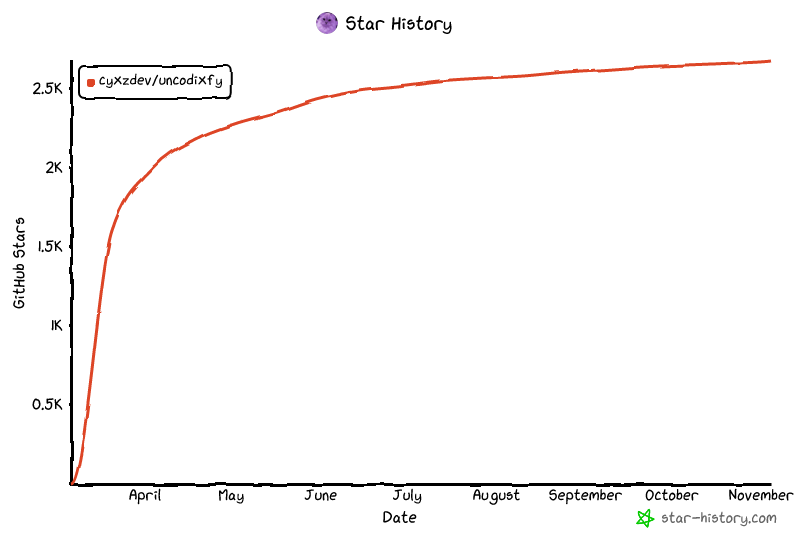
- ## Star History
- [](https://www.star-history.com/?repos=cyxzdev%2FUncodixfy&type=date&legend=top-left)
Ratings and comments
Sign in to rate this skill.
Sign inFree to use. If it’s helped, pass it on.