unity-mcp
Unity MCP acts as a bridge between AI assistants and your Unity Editor. Give your LLM tools to manage assets, control scenes, edit scripts, and automate tasks within Unity.
Safety scan
A static text scan, not a guarantee. Select the badge to see what was scanned and every finding.
Check it deeper on your machine
It has changed since its scan on 11 Nov 2026.
As a Claude Code plugin, install it and then ask Claude Code:
/plugin marketplace add keithmackay/mackayi/plugin install scanskillsafety@mackayiDo a deep scan of https://github.com/CoplayDev/unity-mcp with scanskillsafety
Or from a terminal, clone it and run it:
git clone https://github.com/keithmackay/scanskillsafety-skill ~/.claude/skills/scanskillsafetynode ~/.claude/skills/scanskillsafety/cli.cjs --deep 'https://github.com/CoplayDev/unity-mcp'
It checks the exact commit: every file, its packages against OSV (api.osv.dev), how it compares with this page's scan (findsafeskills.com receives the repository's address), and, if you agree, Claude reading every file with your own Claude subscription. It never runs the code.
Badge for your README

Markdown
[](/listings/coplaydev--unity-mcp)HTML
<a href="/listings/coplaydev--unity-mcp"><img src="/api/listings/coplaydev--unity-mcp/badge.svg" alt="findsafeskills safety rating" /></a>Install
Install instructions from the README
As written by the repo's author. findsafeskills has not verified these steps.
**Requirements:** Unity **2021.3 LTS → 6.x** · Python **3.10+** (via [`uv`](https://docs.astral.sh/uv/)). Works with **any MCP client** — Claude Desktop & Code, Cursor, VS Code, Windsurf, Cline, Gemini CLI, and more.
1. **Install** — Unity → Package Manager → Add from git URL: `https://github.com/CoplayDev/unity-mcp.git?path=/MCPForUnity#main` _(pin `#v10.0.0` for this release, or `openupm add com.coplaydev.unity-mcp`)_ 2. **Configure** — `Window → MCP for Unity → Configure All Detected Clients`. 3. **Prompt** — *"Create a cube at the origin and add a Rigidbody."* The cube appears in seconds.
---
What was scanned
The files the safety scan read, as written by the repository's author and shown as plain text. Lines with a finding are marked.
README.md · README · 114 lines
View this file on GitHub (read at the repository's current version: the scan did not record which commit it read)
This file has changed since it was scanned, so this is not exactly the text that was scanned, and no line is marked. The findings are listed with the safety scan above.
- <p align="center">
- <picture>
- <source media="(prefers-color-scheme: dark)" srcset="docs/images/logo-header-dark.png">
- <img alt="MCP for Unity" src="docs/images/logo-header-light.png" width="400">
- </picture>
- </p>
- <div align="center">
- [English](README.md) <img src="docs/images/connector.svg" alt="↔" height="14"> [简体中文](docs/i18n/README-zh.md) | [Discord](https://discord.gg/y4p8KfzrN4) <img src="docs/images/connector.svg" alt="↔" height="14"> [Wiki](https://coplaydev.github.io/unity-mcp/)
- #### Proudly sponsored and maintained by [Aura](https://www.tryaura.dev/) — the AI assistant for Unreal & Unity.
- ##### Now you can automate playtesting with [Autopilot](https://github.com/ramenvr/autopilot), the new open-source game tester.
- </div>
- <p align="center"><b>Create your Unity apps with LLMs.</b> MCP for Unity bridges AI assistants — Claude, Codex, VS Code, local LLMs, and more — with your Unity Editor via <a href="https://modelcontextprotocol.io/introduction">Model Context Protocol</a>. Give your LLM the tools to manage assets, control scenes, edit scripts, run tests, and automate your game dev workflows.</p>
- <p align="center">
- <img alt="MCP for Unity building a scene" src="docs/images/building_scene.gif">
- </p>
- ---
- <!-- recent-updates:start -->
- <details>
- <summary><strong>Recent Updates</strong></summary>
- * **[v10.3.0](https://github.com/CoplayDev/unity-mcp/releases/tag/v10.3.0)** (2026-10-04)
- * **[v10.2.0](https://github.com/CoplayDev/unity-mcp/releases/tag/v10.2.0)** (2026-09-01)
- * **[v10.1.2](https://github.com/CoplayDev/unity-mcp/releases/tag/v10.1.2)** (2026-08-02)
- * **[v10.1.0](https://github.com/CoplayDev/unity-mcp/releases/tag/v10.1.0)** (2026-07-13)
- * **[v10.0.2](https://github.com/CoplayDev/unity-mcp/releases/tag/v10.0.2)** (2026-07-13)
- Full history: [Release Notes](https://coplaydev.github.io/unity-mcp/releases).
- </details>
- <!-- recent-updates:end -->
- ---
- ## What it does
- Control the Unity Editor in natural language from any MCP client — create scenes & GameObjects, edit C# scripts, manage assets, run tests, profile, and build. 50 focused MCP tool entrypoints, any client, free & MIT.
- **[Browse the full tool catalog →](https://coplaydev.github.io/unity-mcp/reference/tools)**
- ---
- ## Quickstart
- **Requirements:** Unity **2021.3 LTS → 6.x** · Python **3.10+** (via [`uv`](https://docs.astral.sh/uv/)). Works with **any MCP client** — Claude Desktop & Code, Cursor, VS Code, Windsurf, Cline, Gemini CLI, and more.
- 1. **Install** — Unity → Package Manager → Add from git URL:
- `https://github.com/CoplayDev/unity-mcp.git?path=/MCPForUnity#main` _(pin `#v10.0.0` for this release, or `openupm add com.coplaydev.unity-mcp`)_
- 2. **Configure** — `Window → MCP for Unity → Configure All Detected Clients`.
- 3. **Prompt** — *"Create a cube at the origin and add a Rigidbody."* The cube appears in seconds.
- ---
- ## Community
- - [Discord](https://discord.gg/y4p8KfzrN4) — chat with maintainers and other contributors
- - [Issues](https://github.com/CoplayDev/unity-mcp/issues) — bugs and feature requests
- - [Discussions](https://github.com/CoplayDev/unity-mcp/discussions) — design ideas and broader questions
- - Security: see [SECURITY.md](SECURITY.md) for private reporting
- ## Contributing
- See [CONTRIBUTING.md](CONTRIBUTING.md). Branch off `beta`, not `main`. The full dev setup, testing, and release process live in the [Contributing](https://coplaydev.github.io/unity-mcp/contributing/dev-setup) docs.
- ## Advanced
- - **Multiple Unity instances** — [Multi-Instance Routing](https://coplaydev.github.io/unity-mcp/guides/multi-instance)
- - **Tool groups (vfx / animation / ui / testing / etc.)** — [Tool Groups](https://coplaydev.github.io/unity-mcp/guides/tool-groups)
- - **v10 asset generation and upgrade notes** — [v10 Migration](https://coplaydev.github.io/unity-mcp/migrations/v10)
- - **Roslyn script validation** — [Roslyn Validation](https://coplaydev.github.io/unity-mcp/guides/roslyn)
- - **Remote-hosted server with auth** — [Remote Server Auth](https://coplaydev.github.io/unity-mcp/guides/remote-server-auth)
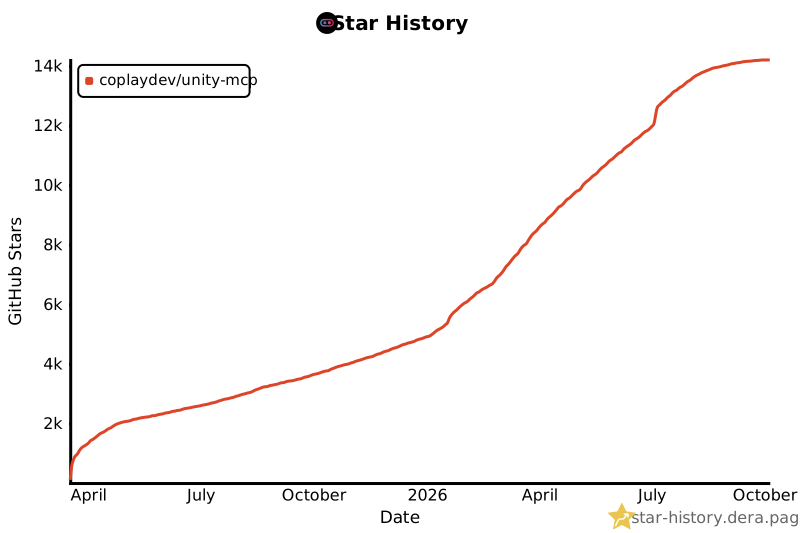
- ## Star History
- [](https://star-history.dera.page/#CoplayDev/unity-mcp&Date)
- ## Citation
- If MCP for Unity helped your research, please cite it.
- ```bibtex
- @inproceedings{wu2025mcpunity,
- author = {Wu, Shutong and Barnett, Justin P.},
- title = {{MCP-Unity}: {Protocol-Driven} Framework for Interactive {3D} Authoring},
- year = {2025},
- isbn = {9798400721366},
- publisher = {Association for Computing Machinery},
- address = {New York, NY, USA},
- url = {https://doi.org/10.1145/3757376.3771417},
- doi = {10.1145/3757376.3771417},
- series = {SA Technical Communications '25}
- }
- ```
- ## Unity AI Tools by Aura
- Aura offers 2 AI tools for Unity:
- - **MCP for Unity** is available freely under the MIT license.
- - **Aura for Unity** is a premium Unity/Unreal AI assistant built for game devs.
- ## Disclaimer
- This project is a free and open-source tool for the Unity Editor, and is not affiliated with Unity Technologies.
- ---
- **License:** MIT — see [LICENSE](LICENSE).
Ratings and comments
Sign in to rate this skill.
Sign inFree to use. If it’s helped, pass it on.