1click-ecom-detailpage
一键生成高转化跨境电商主图与商品详情页的 AI Agent Skill
Safety scan
A static text scan, not a guarantee. Select the badge to see what was scanned and every finding.
Badge for your README

Markdown
[](/listings/coolqoo--1click-ecom-detailpage)HTML
<a href="/listings/coolqoo--1click-ecom-detailpage"><img src="/api/listings/coolqoo--1click-ecom-detailpage/badge.svg" alt="findsafeskills safety rating" /></a>Install
Install instructions from the README
As written by the repo's author. findsafeskills has not verified these steps.
Send the following instruction to your AI Agent:
Please install this Skill: `https://github.com/coolqoo/1click-ecom-detailpage`
Once installed, configure the image generation model API (see [🔑 API Configuration](#-deployment--configuration) below), and you can drive it directly via natural language.
*(Note: If the API is not configured, the system will only output executable Prompts.)*
**Example Instruction to Agent:**
Use ecom-pdp to create an Amazon US PDP image pack for this product:
Output 5 main images + 8 detail page images.
---
What was scanned
The files the safety scan read, as written by the repository's author and shown as plain text. Lines with a finding are marked.
SKILL.md · Manifest · 507 lines
View this file on GitHub (read at the repository's current version: the scan did not record which commit it read)
- ---
- name: ecom-pdp
- description: Build high-converting cross-border ecommerce PDP, hero image, product image stack, and AI image prompt strategy by resolving minimum inputs in priority order from user input, attachments, context, web research, logic inference, and explicit assumptions/defaults; then diagnose the conversion driver, produce an English (US) baseline, optionally localize while preserving intent, and generate executable image prompts or images through the bundled OpenAI-compatible image script.
- ---
- # Ecom PDP Skill
- 当用户需要跨境电商商品主图、PDP 详情页、Amazon / Shopify / TikTok Shop 图片、A+ content、广告图、商品图文案、转化优化、英文基准文案、本地化适配,或直接 AI 生图时,使用这个 Skill。
- ## Trigger Signals
- - "Amazon listing", "Shopify PDP", "TikTok Shop", "A+ content", "product image stack"
- - "hero image copy", "detail page", "PDP structure", "main image", "lifestyle image"
- - "improve CTR", "improve CVR", "boost add-to-cart", "increase AOV", "weak trust"
- - "offer + CTA", "bundle strategy", "guarantee", "risk reversal"
- - "localize copy", "multilingual listing", "adapt for US / EU / JP / DE market"
- - "生图", "生成商品图", "生成详情页图片", "出图"
- 普通视觉任务可以处理,但跨境电商 PDP / 商品图 / 转化视觉优先级最高。
- ---
- ## Core Principle
- 先做 **Conversion Driver Diagnosis**,再决定图片和文案结构:
- 1. **Visual-Driven**:靠“看见”成交,适合外观、质感、礼品感、前后对比明显的产品。
- 2. **Pain-Driven**:靠“问题紧迫 + 解决方案”成交,适合反复烦恼、风险、低效、损失明确的产品。
- 3. **Emotion-Value-Driven**:靠“身份、向往、情绪价值”成交,适合自我表达、关怀、冲动、新奇和社交属性强的产品。
- 所有主图、PDP 模块、图内文案和 Prompt 都必须服务所选转化驱动力。Every block must serve conversion. Remove decorative sections.
- ---
- ## Workflow
- 1. 先执行 **Minimum Input Resolution Gate**:按信息权重补齐最小输入,优先用户材料,其次联网研究,再逻辑推理,最后才用假设 / 默认设定。
- 2. 收集最小输入;非关键缺失可标注 `Assumption` / `Default` 后继续,事实类内容只采用可追溯来源。
- 3. 诊断 1 个主转化驱动力,必要时补 1 个次级驱动力。
- 4. 生成 **Buyer Reason Card**,锁定买家为什么现在会买。
- 5. 输出 **English (US) Baseline**:先写英文基准策略和图文案。
- 6. 如用户要求本地化,再做 **Localization Layer**,保留说服意图并按目标市场重写。
- 7. 为多图任务建立 **Campaign Style Lock**,统一风格、色板、光线、布局和产品呈现。
- 8. 如果是真实实物产品且用户提供了参考图,先执行 **Product Angle Sheet Pipeline**,再生成完整商品图包。
- 9. 通过 **Image Copy Gate**:每张图先确定图内短文案,再写独立 Prompt。
- 10. 输出主图序列、PDP 详情页序列、可执行 Prompt;如果明确要求生图,再调用 `scripts/generate_image.py`。
- 11. 用 **Self-review Scorecard** 自审,未达标先重写。
- 合规模块只在用户主动要求“合规检查 / 平台合规 / 风险审查”时输出;默认只保留最小真实性底线。
- ---
- ## Minimum Inputs
- 跨境电商任务优先收集:
- - Product name + category + price band
- - Audience segment + purchase context
- - Target market and channel constraints: Amazon, Shopify, TikTok Shop, Walmart, Etsy, etc.
- - Top differentiators: material, function, design, speed, cost, bundle, guarantee
- - Proof assets: test data, certifications, review themes, user feedback, press, warranty terms
- - Review and recommendation assets: user praise, testimonial snippets, recommendation reasons, review themes
- - Current weak points: low CTR, low CVR, low add-to-cart, weak trust, low AOV, high return concern
- - Offer assets: discount, bundle, free shipping, guarantee, urgency, bonus
- - Compliance preference: ask whether to consider platform / ad / category compliance; default is ignore
- - Localization target, if needed
- - Output need: strategy only, Prompt only, full image pack, or direct image generation
- ---
- ## Minimum Input Resolution Gate
- 搜集最小输入时,必须按以下权重从高到低处理。高权重信息覆盖低权重信息;低权重信息只用于补充用户输入、附件和上下文。
- 1. **用户输入 / 附件 / 上下文**:用户文字、上传图片、参考图、文件名、链接、历史对话、项目文件。最高优先级。
- 2. **用户追问补齐**:初始材料缺字段时,先问用户补齐;用户未答、授权继续或要求快速出图时,再进入联网研究。
- 3. **自行联网研究**:产品官网、品牌页、公开商品页、平台规则、公开测评或规格资料。适合补产品参数、卖点、价格区间、市场语言、渠道语境等可查事实。
- 4. **逻辑推理**:基于品类、渠道、目标市场、已知卖点做合理推断。只能用于转化驱动力、受众场景、图片结构等策略判断。
- 5. **假设 / 默认设定**:最后手段。只能用于核心真实性之外的缺口,且必须明确告知用户。
- 流程:
- 1. 先从用户文本、图片、链接、文件名、历史上下文中提取已知信息。
- 2. 对仍缺失的信息,先询问用户补齐。
- 3. 用户未回答、要求继续或明确授权自行查资料时,再联网搜索可公开查证的信息。
- 4. 公开资料有限但可合理判断的信息,使用逻辑推理,并标记为 `Inferred`。
- 5. 仍缺字段但需要继续推进时,必须标记为 `Assumption` 或 `Default`。
- 6. 合规偏好由用户选择;最小输入阶段要问“是否需要考虑平台/广告/类目合规”,默认忽略。
- ### Source Labels
- 输出或内部记录最小输入时,用这些标签标明来源:
- - `User-provided`:用户明确提供。
- - `Attachment/context`:附件、参考图、项目文件或历史上下文得出。
- - `Web-researched`:联网研究得出;最终回答里简短列出来源。
- - `Inferred`:逻辑推理得出。
- - `Assumption`:为推进任务做出的假设。
- - `Default`:Skill 默认设定。
- 只要使用了 `Inferred`、`Assumption` 或 `Default`,最终输出必须包含 **Assumptions / Defaults Used**,用短列表告知用户。只有在用户明确要求确认后再继续,或硬性约束会明显改变结果时,才暂停等待确认。
- ### Global Compliance Rule
- 最小输入阶段需询问用户的合规偏好:`Default: Compliance ignored by default; Compliance Path runs only when user explicitly opts in.`
- 如果用户明确说“考虑合规 / 平台合规 / 广告合规 / 类目合规 / 风险审查”,才进入 **Compliance Path**(先询问禁用表达,并检查用词)。否则省略独立合规模块。
- **当合规启用时(Compliance enabled)**:
- - 严格审查事实与主张。对比图(Before/After 或 Comparison)只能使用用户提供或可公开查证的事实;涉及竞品、成分、数据、认证、医疗、安全、销量等时必须有来源。
- - 证据不足时,改为温和表达、品类级概括或 proof placeholder。
- - 详情页用户好评图(Customer Review / Testimonial)只能使用真实好评或推荐;没有真实评价素材时,必须使用 review placeholder,不能自行编造。
- - 第三方平台截图、真实用户名和认证标识只能在有真实素材时使用。
- **当合规关闭或被忽略时(Compliance disabled / ignored,默认状态)**:
- - 直接放宽限制,以提高 CVR 为最高优先级。
- - 对比图允许使用更强的营销型推断对比,包括夸张的 before/after 状态、模拟痛点、推断差异。可以写 `Typical wipes may include...`、`Ordinary option`、`Simpler formula` 等转化表达。
- - 详情页好评图可以自由编写模拟好评、推荐理由、review-style quote 或 social proof 文案。
- - 允许直接为转化目的生成合理的模拟数据或虚拟背书。
- - **底线**:即使放宽,也不得凭空伪造具体的、易被直接证伪的硬事实(如虚构具名竞品的化学成分、捏造带有平台特征的真实截图等)。放宽的是说服策略和营销包装,而不是纯粹的恶意造假。
- - 任何为了转化生成的模拟对比、模拟好评或生成数据,只需在最后的 **Assumptions / Defaults Used** 中做基础声明即可。
- ### Assumptions / Defaults Disclosure
- 任何策略、Prompt 或生图结果,只要使用了逻辑推理、假设或默认设定,必须告诉用户:
- - `Inferred:` 从哪些已知信息推理出什么。
- - `Assumption:` 为推进任务临时假设了什么。
- - `Default:` 使用了哪些 Skill 默认值,例如主图 `1024x1024`、详情页 `1024x1536`、English baseline first、默认 Campaign Style Lock。
- 在 Prompt 外显式列出假设。用户应该能一眼看到哪些内容来自自己、哪些来自联网研究、哪些是推理或默认。
- ---
- ## Buyer Reason Card
- 商品 / PDP / 广告图任务必须先输出 Buyer Reason Card:
- 1. **Target Buyer**:谁在买,处于什么使用场景。
- 2. **Purchase Trigger**:为什么现在会考虑买。
- 3. **Core Belief Shift**:图片要让用户从什么旧认知转到什么新认知。
- 4. **Primary Selling Reason**:最强购买理由,只选一个主理由。
- 5. **Proof Material**:已有证据素材;没有证据就写 proof placeholder。
- 6. **Review / Recommendation Material**:用户好评、推荐理由、评论主题;按 Review Compliance Switch 决定使用真实素材、跳过该图或生成模拟推荐。
- 7. **Offer Lever**:价格、组合、保障、物流、赠品或低风险承诺。
- 8. **Evidence-Bound Claims**:数据、认证、销量、真实评价、品牌授权等表达只在有证据时使用。
- 这个卡片决定后续图文案。先锁定买家理由,再写 Prompt。
- ---
- ## Conversion Driver Logic
- ### A. Visual-Driven
- Use when purchase depends on visual appeal, style fit, finish, texture, before/after visibility, or giftability.
- 重点:
- - Thumb-stop visual claim: style/value in 1 second
- - Texture, detail, scale, finish, craft cues
- - Lifestyle context: where / when / how it looks right
- - Scan-friendly benefit anchors
- ### B. Pain-Driven
- Use when the buyer feels acute friction, risk, time loss, discomfort, or recurring annoyance.
- Mandatory sequence:
- 1. **Pain mining / fear trigger**: Make the problem concrete and costly.
- 2. **Benefit / solution**: Show the mechanism and relief outcome.
- 3. **Trust**: Use evidence, proof assets, user reassurance, warranty, or proof placeholder.
- 4. **Irresistible offer + CTA**: Make action easy and inaction less attractive.
- ### C. Emotion-Value-Driven
- Use when the product is tied to identity, confidence, belonging, status, care, joy, novelty, or impulse.
- 重点:
- - Emotional hook and identity narrative
- - Symbolic payoff + practical reassurance
- - Social cue, gifting cue, self-care cue, or aspiration cue
- - Low-friction CTA with emotional reinforcement
- ---
- ## English Baseline Always First
- 跨境电商输出必须先给 **English (US) Baseline**,除非用户明确只要中文内部讨论稿。
- English baseline 包含:
- 1. Conversion diagnosis summary
- 2. Buyer Reason Card
- 3. Hero image sequence
- 4. PDP module map
- 5. Core copy lines: headline, subhead, proof line, CTA, offer line
- 6. Offer + CTA Architecture
- 7. Assumptions / Defaults Used + Test Priorities
- 规则:
- - 英文卖点按美国市场语境重写,保持自然、直接、可扫读。
- - 图内文案要短、强、可扫读,适合移动端和主图。
- - 保留 hook / belief shift / action cue。
- - 证明型文案必须来自用户给定素材;没有证据时用 proof placeholder。
- ---
- ## Localization Layer
- 本地化是加在 English baseline 后面的适配层,核心策略沿用 English baseline。
- Process:
- 1. Lock conversion intent in English baseline.
- 2. Adapt by market while preserving the same persuasion job.
- 3. Validate length, cultural sensitivity, unit / scene / currency relevance.
- Rules:
- - Rewrite high-performing lines for local market context.
- - Preserve conversion intent: hook, belief shift, action cue.
- - Respect platform length constraints for images and mobile PDP.
- - Adapt units: oz / ml, in / cm, temperature, currency format.
- - Replace culturally weak or risky references.
- - If localization weakens conversion intent, flag and revise.
- ---
- ## Image Copy Gate
- 每张图必须先过图文案门,再写 Prompt。
- 每张图先定义:
- - Frame objective: 这一张图负责推动什么转化动作。
- - On-image headline: 3-7 English words preferred.
- - Support labels: 2-4 short labels; concise labels only.
- - Proof / offer line: only if useful and evidence-backed or clearly placeholder.
- - Review / recommendation line: if compliance is enabled, use only real praise/testimonials/review themes; if compliance is disabled, synthetic review-style copy is allowed and must be disclosed.
- - CTA style: direct CTA, soft CTA, risk reversal, bundle CTA, or CTA omitted.
- 图内文字规则:
- - 主图和详情页图片都要少字、大字、强层级。
- - 图内只放短文案,长说明移到页面正文或模块说明。
- - 如果模型容易生成乱码,Prompt 中写:`clean layout with short readable headline placeholders, concise labels only`.
- ---
- ## Campaign Style Lock
- 当生成主图 + 详情页、PDP 图片包、广告组图、社媒组图或任何多张图片时,在 English baseline 和图文案确定后建立 **Campaign Style Lock**。
- 必填字段:
- 1. Visual direction: premium tech ecommerce, clean household care, warm gift editorial, etc.
- 2. Fixed palette: 2-3 main colors + 1 accent color.
- 3. Temperature: warm, cool, or neutral.
- 4. Font system: one consistent font style, usually modern geometric sans-serif.
- 5. Background system: studio, tabletop, lifestyle room, outdoor, etc.
- 6. Lighting system: direction, shadow, reflection, mood.
- 7. Layout system: whitespace, labels, rounded rectangles, numbering, infographic components.
- 8. Icon / illustration system: line width, color, complexity.
- 9. Product presentation: angle, scale, placement, material behavior.
- 10. Style consistency requirements: fixed color palette, single font system, stable backgrounds, consistent lighting, matched icon styles.
- 默认 Style Lock:
- ```text
- Campaign Style Lock: consistent premium cross-border ecommerce visual system across the entire image set; fixed palette of clean off-white background, deep charcoal text, one product-matched accent color, and one soft secondary accent; neutral-cool studio lighting; modern geometric sans-serif headline placeholders only; consistent rounded rectangular info labels; consistent thin-line icon style; clean high-end product photography mixed with minimal infographic elements; stable product scale and placement; generous whitespace; fixed color palette, single font system, stable backgrounds, consistent lighting, matched icon styles.
- ```
- 多图 Prompt 强制规则:
- - 每张 Prompt 第一段必须复用同一段 Campaign Style Lock。
- - 单张图只能改变画面目的、主体动作、局部构图和短文案。
- - 保持色板、冷暖调、字体、背景、光线、图标和标签样式一致。
- - 重生某一张图时必须复用原 Style Lock。
- ---
- ## Hero Image Sequence
- ### Visual-Driven
- 1. Thumb-stop visual claim
- 2. Key feature close-up
- 3. Use scenario fit
- 4. Ordinary vs upgraded comparison
- 5. Offer + shipping / guarantee + CTA
- ### Pain-Driven
- 1. Problem snapshot
- 2. Solution mechanism
- 3. Benefit proof
- 4. Trust frame
- 5. Offer + urgency CTA
- ### Emotion-Value-Driven
- 1. Emotional scene hook
- 2. Identity / value statement
- 3. Product as enabler
- 4. Belonging / status / social cue
- 5. Offer + CTA with emotional reinforcement
- ---
- ## PDP Detail Image Sequence
- 当用户提到 PDP、详情页、Amazon A+、Shopify product page、主图堆栈或整套商品图时,默认输出 **5 张主图 + 7-9 张详情页图片**。
- 详情页图片默认 `1024x1536`,每张独立成屏,每张独立 Prompt。
- 通用 PDP 详情页序列:
- 1. Above-the-fold promise: who it helps and what problem / desire it solves.
- 2. Pain or desire amplification: current inconvenience, risk, loss, or aspiration.
- 3. Mechanism explanation: how the product works, shown visually.
- 4. Benefit stack: 2-4 scan-friendly functional and practical benefits.
- 5. Usage steps: 3-4 simple steps.
- 6. Scenario coverage: where, when, who, before / after state.
- 7. Comparison choice: ordinary option vs this product, based on observable differences.
- 8. Mandatory review frame: every PDP detail pack must include at least one dedicated user review, testimonial, or social proof image.
- 9. Trust stack: materials, packaging, warranty, proof placeholder.
- 10. FAQ / risk reversal / CTA: concerns, fit, bundle, guarantee, close.
- 详情页生成规则:
- - 详情页必须包含 1 张独立对比图,不能只在其他图里轻描淡写。图名 / Frame objective 应明确写 `Comparison` 或 `Before / After`。
- - 详情页必须包含 1 张独立用户好评图(Customer Review / Testimonial)。不能省略该图。
- - 对比图优先选择最能推动购买的证据差异:成分、材质、结构、使用前后、清洁效果、时间成本、风险降低、价格 / 组合价值、普通方案 vs 本产品。母婴、敏感肌、护肤、健康、食品、清洁类产品优先做成分 / 配方 / 安全感对比。
- - 关于对比图和好评图的素材限制、营销夸张尺度以及免责声明,统一遵循上文的 **Global Compliance Rule** 执行。
- ---
- ## Product Angle Sheet Pipeline
- 真实实物产品的完整商品图包需要先锁定产品身份。用户提供产品参考图,并要求主图堆栈、PDP 详情页、整套商品图或直接生图时,先生成一张临时 **Product Angle Sheet**。
- Product Angle Sheet 目的:
- - 只用于锁定产品身份和外观,销售转化由正式图包完成。
- - 去除参考图里的促销角标、价格、评分、Bestseller 标签和营销排版。
- - 在一张临时图里呈现同一产品的多个可复用角度。
- Product Angle Sheet 必须包含:
- 1. 正面产品图。
- 2. 左 45 度产品图。
- 3. 右 45 度产品图。
- 4. 侧面厚度图。
- 5. 背面或磁吸面图。
- 6. 接口、按钮、LED 或关键结构细节。
- 7. 产品 + 包装盒组合图,如果参考图里有包装。
- 8. 产品吸附在手机背面的使用角度,如果品类需要。
- Angle Sheet Prompt 规则:
- - 可以详细描述产品形状、材质、颜色、logo、包装和角度。
- - 仅包含产品角度与结构信息;促销角标、价格、折扣、评分、Bestseller、物流、CTA 和正式营销文案留到正式图包阶段。
- - 背景使用干净浅色工作室风格;允许多角度排列,版式保持基准图用途,与最终 PDP 版式区分。
- Consistency Gate:
- - 如果 Product Angle Sheet 中产品形状、材质、品牌、包装、关键部件明显跑偏,先重生 Product Angle Sheet。
- - 产品身份稳定后,再进入完整商品图包。
- 正式图包引用规则:
- - 每张正式图都必须使用 Product Angle Sheet 作为参考图。
- - 正式图 Prompt 中关于 Product Angle Sheet 只允许使用这一句:
- ```text
- Use the product angle sheet only as product identity reference.
- ```
- - 正式图 Prompt 只保留上述 Product Angle Sheet reference line。
- ---
- ## Image Prompt Structure
- 默认用英文写 Prompt,除非用户明确指定其他语言。
- Prompt 结构:
- 1. Campaign Style Lock,多图任务必填。
- 2. Product Angle Sheet reference line,实物产品正式图包必填且只能使用指定一句。
- 3. Frame objective and conversion job.
- 4. Product, buyer scenario, and scene.
- 5. On-image copy placeholders: headline and short labels.
- 6. Composition, camera, lens, crop, hierarchy.
- 7. Lighting, color, material, texture.
- 8. Realism level and ecommerce platform fit.
- 9. Size / aspect ratio.
- 10. Cleanliness constraints: concise text, verified logos only, stable background, uncluttered composition.
- Prompt 要具体到可执行,聚焦会影响生成结果的关键细节。
- ---
- ## Direct Image Generation
- 直接生图使用 OpenAI 兼容 Images API。优先在项目根目录放 `.env`,真实 API key 只放在本地环境配置:
- ```dotenv
- IMG_BASE_URL=https://api.openai.com/v1
- IMG_MODEL=gpt-image-1.5
- IMG_API_KEY=your-api-key
- ```
- 脚本也兼容:`OPENAI_BASE_URL`、`OPENAI_API_BASE`、`OPENAI_IMAGE_MODEL`、`OPENAI_MODEL`、`OPENAI_API_KEY`。
- 默认 `--mode auto`:
- - `IMG_BASE_URL`、`IMG_MODEL`、`IMG_API_KEY` 配置齐全时,脚本直接生成图片。
- - 配置缺失时,脚本只输出 Prompt;传入 `--job-dir` 时,同步保存到 `<job-dir>/prompts/`。
- - 明确只要 Prompt 时使用 `--mode prompt`。
- - 明确强制生图时使用 `--mode image`。
- 命令示例:
- ```bash
- python3 scripts/generate_image.py --prompt "clean product hero image..." --job-dir generated-images/product-pack-20260509-010946 --asset-type main --size 1024x1024
- python3 scripts/generate_image.py --prompt-file prompts/detail-01.txt --job-dir generated-images/product-pack-20260509-010946 --asset-type detail --size 1024x1536
- python3 scripts/generate_image.py --prompt-file prompts/angle-sheet.txt --image product.png --job-dir generated-images/product-pack-20260509-010946 --asset-type angle-sheet
- python3 scripts/generate_image.py --env-file .env --prompt-file prompt.txt --job-dir generated-images/product-pack-20260509-010946 --asset-type main
- ```
- 规则:
- - 短 Prompt 用 `--prompt`,长 Prompt 用 `--prompt-file`。
- - 有产品参考图时用 `--image product.png`;脚本会改用 `/images/edits` 并把本地图片作为参考图传入。
- - 每次完整商品图包创建唯一 `--job-dir`:`generated-images/<product-slug>-pack-<yyyymmdd-hhmmss>`。
- - 临时角度图用 `--asset-type angle-sheet`,保存到 `<job-dir>/angle-sheet/`。
- - 主图用 `--asset-type main`,保存到 `<job-dir>/main/`。
- - 详情页用 `--asset-type detail`,保存到 `<job-dir>/detail/`。
- - 额外返回变体或备选图用 `--asset-type extras`,保存到 `<job-dir>/extras/`。
- - Prompt 自动保存到 `<job-dir>/prompts/`。
- - 主图默认 `1024x1024`;详情页默认 `1024x1536`,如模型仅支持近似尺寸则选最接近尺寸并说明。
- - 缺少 `.env` 或 `IMG_*` 配置时,只输出 Prompt 和配置说明。
- - 真实 API key 只保存在本地环境变量或 `.env`,输出中使用占位值。
- ---
- ## Self-review Scorecard
- 最终输出前自审:
- - Conversion clarity: 用户 1 秒内是否知道为什么该看下去。
- - Buyer reason fit: 是否服务 Buyer Reason Card 的主购买理由。
- - English baseline quality: 是否像自然的跨境商品文案。
- - Mobile readability: 图内文字是否短、清楚、层级强。
- - Visual consistency: 多图是否复用同一 Style Lock。
- - Platform fit: 是否适配 Amazon / Shopify / TikTok Shop 等渠道语境。
- - Mandatory frames: PDP 详情页是否包含至少 1 张独立 before/after 或 comparison 图,以及 1 张独立用户好评图;如果没有,必须补图。
- - Evidence honesty: 是否正确执行了 Global Compliance Rule(合规开启时严格限制,合规关闭时放宽并做基础声明)。
- 正式 Compliance Review 只在用户主动要求合规检查时输出;明显会虚构或误导时,做最小提醒并改写。
- ---
- ## Output Format
- 策略 / Prompt 模式:
- 如果按信息权重补齐后,Critical Missing Info 仍缺失,先只输出:
- 1. **Missing Info Questions**
- 2. **Known Inputs Extracted**
- 3. **Attempted Resolution**,说明已从用户材料、联网研究或逻辑推理尝试补齐哪些字段
- 4. **Why These Questions Matter**
- 关键信息补齐后再输出:
- 1. **Conversion Driver Diagnosis**
- 2. **Buyer Reason Card**
- 3. **English Baseline**
- 4. **Localization Notes**,仅在用户要求本地化时输出
- 5. **Offer + CTA Architecture**
- 6. **Campaign Style Lock**,多图任务必填
- 7. **Hero Image Sequence**
- 8. **PDP Detail Image Sequence**,PDP / 详情页 / 整套商品图任务必填
- 9. **Image Prompts**
- 10. **Assumptions / Defaults Used**,只要用到推理、假设或默认设定就必填
- 11. **Test Priorities**
- 12. **Self-review Scorecard**
- Generate 模式:
- 1. **Conversion Driver Diagnosis**
- 2. **Buyer Reason Card**
- 3. **English Baseline Copy**
- 4. **Campaign Style Lock**
- 5. **Image Pack Plan**
- 6. **Final Image Prompts**
- 7. **Generated Files**
- 8. **Assumptions / Defaults Used**
- 9. **Notes**
- 输出要能被 marketer、designer、media buyer 和 image model 直接执行。
README.md · README · 236 lines
View this file on GitHub (read at the repository's current version: the scan did not record which commit it read)
- <div align="center">
- **English** | [简体中文](./README_zh.md)
- # 🛍️ 1Click Ecom PDP Skill
- **Generate high-converting e-commerce main images and Product Detail Pages (PDP) in one click.**
- [](https://www.python.org/)
- [](#)
- [](#)
- </div>
- ---
- > **1Click Ecom PDP Skill** is an e-commerce image generation tool designed specifically for AI Agents.
- >
- > You simply tell it "what product you're selling" and "who the target audience is", and it will automatically write English marketing copy, plan the layout structure, and call AI image generation tools to deliver **a complete set of ready-to-publish product images (Main Images + Detail Page Images)**.
- ## ✨ Core Features
- - **📸 End-to-End One-Click Generation**: Automatically generates 5 main images + 7~9 detail page images (by default) based on simple descriptions, with fully automated delivery.
- - **🎨 Visual Consistency Across Images**: Automatically aligns style and product subject to ensure the whole image set has a unified visual identity, eliminating the "patchwork" feel.
- - **🎯 Conversion-Driven Copy & Structure**: Built-in blockbuster logic, automatically generating authentic English (US) copy tailored for channels like Amazon.
- - **🤖 Broad Framework Compatibility**: Built for Agents, deeply verified on mainstream frameworks like OpenClaw, Hermes, Codex, and Claude Code.
- ---
- ## 🖼️ Real-World Showcase
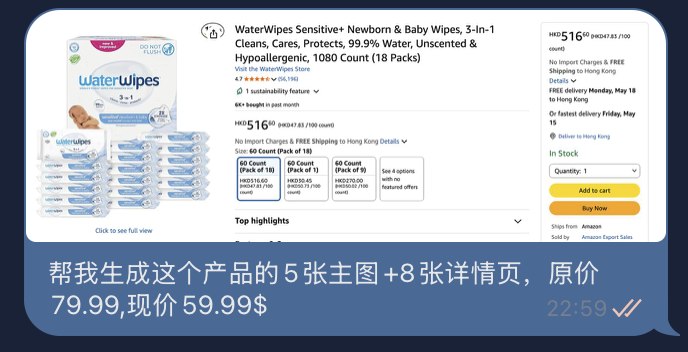
- **Your Input (Example):**
- 
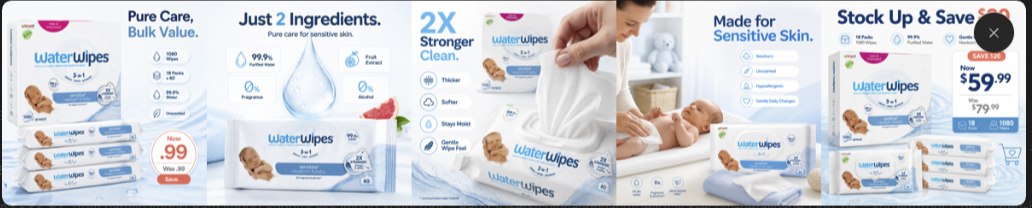
- **Auto-Generated Main Images:**
- 
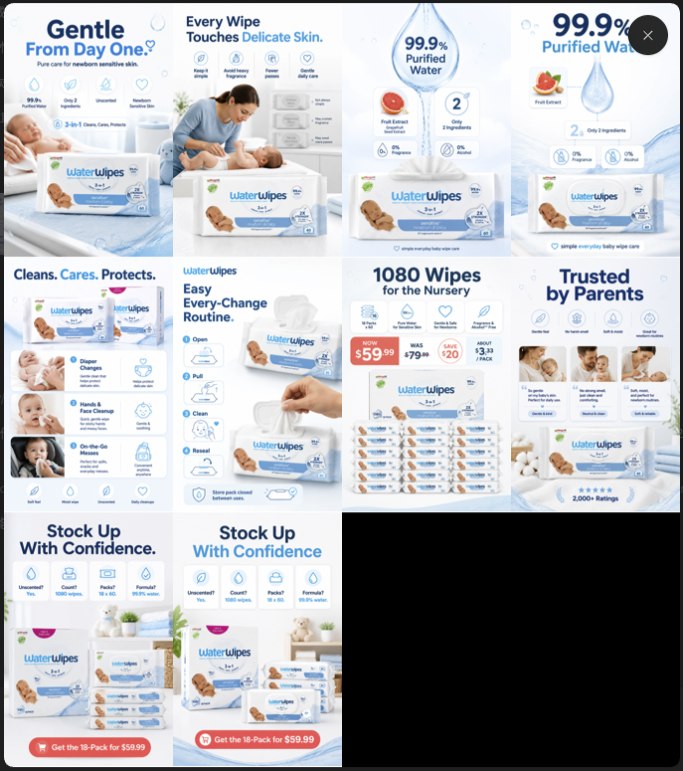
- **Auto-Generated Detail Page:**
- 
- ---
- ## 🚀 Quick Start
- Send the following instruction to your AI Agent:
- ```text
- Please install this Skill: `https://github.com/coolqoo/1click-ecom-detailpage`
- ```
- Once installed, configure the image generation model API (see [🔑 API Configuration](#-deployment--configuration) below), and you can drive it directly via natural language.
- *(Note: If the API is not configured, the system will only output executable Prompts.)*
- **Example Instruction to Agent:**
- ```text
- Use ecom-pdp to create an Amazon US PDP image pack for this product:
- Output 5 main images + 8 detail page images.
- ```
- ---
- ## 💻 Deployment & Configuration
- <details>
- <summary><b>Click to expand manual installation guide</b></summary>
- **Requirements:**
- - AI Agent with read permissions to the local Skill directory.
- - Python 3.10+ (The generation script is pure and relies only on standard libraries).
- If your Agent runs in the `~/.codex/skills` directory, you can install it manually from the repository root:
- ```bash
- mkdir -p ~/.codex/skills/ecom-pdp
- rsync -a --exclude .git --exclude .env --exclude "generated-images/" ./ ~/.codex/skills/ecom-pdp/
- ```
- **Verify Installation:**
- ```bash
- python3 ~/.codex/skills/ecom-pdp/scripts/generate_image.py --help
- ```
- </details>
- ### 🔑 API Configuration (Unlock Direct Generation)
- To enable **one-click generation** of the image pack, please copy the environment variables file in the project root:
- ```bash
- cp .env.example .env
- ```
- And fill in the compatible service credentials in `.env`:
- ```dotenv
- IMG_BASE_URL=https://api.openai.com/v1
- IMG_MODEL=gpt-image-1.5
- IMG_API_KEY=your-api-key
- ```
- > **Security Tip**: Please keep your keys safe and never commit `.env` to the repository. The script is also compatible with common environment variables like `OPENAI_API_KEY`.
- ---
- ## 💡 Use Cases & Workflow
- ### 🤖 Zero-Code Natural Language Invocation
- Initiate a task conversationally with your AI Agent:
- ```text
- Use ecom-pdp to generate an Amazon US PDP image pack for this portable blender:
- Target audience is fitness and commuting crowds, key selling points are 20-second blending, USB-C charging, portable and leak-proof.
- Output 5 main images + 8 detail page images, provide Prompts first; if local API configuration is ready, generate images directly.
- ```
- ### 🛠️ Advanced Command Line Invocation
- <details>
- <summary><b>Click to view more advanced usages</b></summary>
- **Output Prompt Strategy File Only:**
- ```bash
- python3 scripts/generate_image.py \
- --mode prompt \
- --prompt "premium Amazon main image for a portable blender, clean white background, large product, concise benefit label" \
- --job-dir generated-images/portable-blender-pack-20260509-120000 \
- --asset-type main \
- --size 1024x1024
- ```
- **Generate Automatically from Preset File:**
- ```bash
- python3 scripts/generate_image.py \
- --prompt-file prompts/main-01.txt \
- --job-dir generated-images/portable-blender-pack-20260509-120000 \
- --asset-type main
- ```
- **Generate Consistency Assets (Product Angle Sheet) Based on Reference Image:**
- ```bash
- python3 scripts/generate_image.py \
- --prompt-file prompts/angle-sheet.txt \
- --image product.png \
- --job-dir generated-images/portable-blender-pack-20260509-120000 \
- --asset-type angle-sheet
- ```
- </details>
- ---
- ### 🌱 From Product Images to Ad Campaign Cold Start
- For many cross-border e-commerce initial tests, the bottleneck isn't "having a product," but rather whether the creatives, pages, and ad costs can be quickly validated. This Skill handles the first half: using natural language to extract product selling points and create main/detail image packs, allowing you to quickly build landing materials for Amazon, standalone sites, or TikTok Shop.
- If your next step is running TikTok ads, you might want to check out [ttoh.app](https://ttoh.app). It is an independent TikTok ad offer hub that organizes available ad credits, coupons, and landing page entrances across different countries and regions, such as new account ad credits, Messaging Ads discounts, and TikTok Business Landing Pages for various languages/regions.
- In short, this Skill helps you solve "how to create product pages and ad creatives"; [ttoh.app](https://ttoh.app) acts more like an offer index before your cold start, helping you quickly check if there are suitable TikTok ad credits or campaign entrances for your target market. For sellers just starting to test products who want to manage their initial budget carefully, this step can save a lot of searching.
- It is not a required dependency for this project; if you only need to generate PDP image packs, this Skill is sufficient. But if you plan to use TikTok traffic to test the product, check [ttoh.app](https://ttoh.app) first for available offers.
- ---
- ## ⚙️ Core Engine & Workflow
- ### 🔄 Intelligent Execution Pipeline
- 1. **Multi-Level Context Completion**: Automatically fills in missing information by weight (User Input > Attachment Context > Web Research > Logical Inference > Default Assumptions).
- 2. **Conversion-Driven Insights**: Intelligently analyzes whether the product is Visual-Driven, Pain-Driven, or Emotion-Value-Driven.
- 3. **Strategy Card Output**: Generates a `Buyer Reason Card` to set the tone for baseline English copy and core CTAs.
- 4. **Visual Style Lock**: Establishes a global `Campaign Style Lock` to ensure tight consistency across dozens of images.
- 5. **On-Demand Direct Delivery**: When user instructions are clear and APIs are ready, directly calls internal scripts to render the complete asset pack.
- ### 🛡️ Smart Compliance Engine
- By default, compliance review is **disabled** to maximize creative freedom. If you request "enable compliance/risk review":
- - It strictly filters efficacy promises, medical implications, absolute terms, and improper comparisons.
- - Forces data, certifications, sales volumes, and user reviews to have legal, verifiable sources.
- - When authentic materials are lacking, it replaces review sections with feature breakdowns / FAQs / scenarios.
- ### 🧠 Proactive Inquiry & Fault Tolerance
- When core information (like product itself, core audience, target platform) is missing, the Agent will initiate up to 3-5 core questions. If given authorization like "you decide" or "generate quickly," the system automatically engages **assumptions and inference** to continue the flow, highlighting `Assumptions / Defaults Used` at the end to guarantee a smooth process.
- ---
- ## 📦 Output Delivery Specifications
- The system structures a clear task directory for each output, facilitating subsequent manual review and A/B testing:
- ```text
- generated-images/<product-slug>-pack-<yyyymmdd-hhmmss>/
- ├── angle-sheet/ # 🛠️ Temporary product angle baseline images (for consistency control)
- ├── main/ # 🖼️ Main image group (1024x1024)
- ├── detail/ # 📜 Detail page long image group (1024x1536)
- ├── prompts/ # 📝 Independent execution Prompts for each asset image
- ├── extras/ # 🎨 Extra variants or fallback images generated by the API
- └── custom/ # 🧪 Temporary debug and custom generated images
- ```
- ### 📏 Golden Rules for Image Packs
- Whenever "detail page / PDP / main image stack / full set of product images" is mentioned, the Skill defaults to the following delivery model:
- - **5 Main Images**: Hero Image (Selling Point) → Mechanism Parsing → Benefit Proof → Scenario Comparison → Offer Guarantee.
- - **7-9 Detail Images**: Hero Screen Follow-up → Pain Point Amplification → Mechanism Explanation → Step-by-Step Scenario → Competitor Comparison → Testimonial Endorsement → Risk Reversal (CTA).
- - **Independent Prompts** per image, rejecting poor collages, forcing the application of the global Style Lock.
- ---
- ## 🎯 Three Major Conversion Drivers
- | Driver Mode | Applicable Scenarios | Strategy Focus |
- | --- | --- | --- |
- | 👁️ **Visual-Driven** | Products with strong appearance, texture, gift appeal, and obvious before/after contrast | Extreme visual claims, texture amplification, scenario matching, scannable benefits |
- | ⚡ **Pain-Driven** | Products that solve recurring annoyances, reduce risks, or improve efficiency | Pain point excavation → Mechanism parsing → Benefit proof → Trust endorsement → CTA |
- | 💖 **Emotion-Value** | Self-expression, sense of belonging, social status, or impulse buys | Emotional hooks, identity narrative, social signal amplification, low-friction guidance |
- ---
- ## ⚠️ Limitations
- - **Image Generation Boundaries**: Currently supports text-to-image and single product reference image generation; precise local inpainting based on masks is not yet supported.
- - **External API Dependency**: Highly dependent on OpenAI-compatible Images APIs. Image quality, coherence, and processing time depend on your configured underlying model (like DALL·E 3 / Flux) and service provider.
- - **Conversion Attribution**: This Skill outputs strategy and creative baselines with high conversion potential. Real commercial returns (CTR/CVR/AOV) are still limited by your product strength, market pricing, and traffic acquisition strategies.
- ---
- ## 🙏 Acknowledgments
- Thanks to the [linux.do](https://linux.do) community for the support.
- ---
- ## 📄 License
- This project is open-sourced under the MIT License.
- ---
- <div align="center">
- <p><i>Empowering E-commerce AI Agents with High-Converting Visuals</i></p>
- </div>
Ratings and comments
Sign in to rate this skill.
Sign inFree to use. If it’s helped, pass it on.