telegram-mcp
Telegram MCP server powered by Telethon to let MCP clients read chats, manage groups, and send/modify messages, media, contacts, and settings.
Safety scan
A static text scan, not a guarantee. Select the badge to see what was scanned and every finding.
Check it deeper on your machine
It has changed since its scan on 11 Nov 2026.
As a Claude Code plugin, install it and then ask Claude Code:
/plugin marketplace add keithmackay/mackayi/plugin install scanskillsafety@mackayiDo a deep scan of https://github.com/chigwell/telegram-mcp with scanskillsafety
Or from a terminal, clone it and run it:
git clone https://github.com/keithmackay/scanskillsafety-skill ~/.claude/skills/scanskillsafetynode ~/.claude/skills/scanskillsafety/cli.cjs --deep 'https://github.com/chigwell/telegram-mcp'
It checks the exact commit: every file, its packages against OSV (api.osv.dev), how it compares with this page's scan (findsafeskills.com receives the repository's address), and, if you agree, Claude reading every file with your own Claude subscription. It never runs the code.
Badge for your README

Markdown
[](/listings/chigwell--telegram-mcp)HTML
<a href="/listings/chigwell--telegram-mcp"><img src="/api/listings/chigwell--telegram-mcp/badge.svg" alt="findsafeskills safety rating" /></a>Install
Install instructions from the README
As written by the repo's author. findsafeskills has not verified these steps.
> Do not install this server with `uvx telegram-mcp`, `uvx --from telegram-mcp`, > or `pip install telegram-mcp`. The `telegram-mcp` name on PyPI is currently > owned by a different project and does not install this repository. Passing > `TELEGRAM_API_ID`, `TELEGRAM_API_HASH`, or `TELEGRAM_SESSION_STRING` to that > package can expose Telegram account credentials to unrelated third-party code.
1. Clone and Install
git clone https://github.com/chigwell/telegram-mcp.git
cd telegram-mcp
uv sync
2. Generate a Session String
uv run session_string_generator.py
Follow the prompts. Save the generated session string securely. A session string is convenient for initial setup and portable deployments; for a long-running server, migrate it to a persistent file session after configuring your environment (see below).
For scripted setup or operational runbooks, choose the login method explicitly:
# QR login, recommended when you already have Telegram open on another device
uv run session_string_generator.py --qr

# Phone number + verification code login
uv run session_string_generator.py --phone
Without a flag, the generator keeps the interactive method prompt.
3. Configure Environment
Copy the example file and fill in your real values:
cp .env.example .env
Single-account setup:
TELEGRAM_API_ID=your_api_id_here
TELEGRAM_API_HASH=your_api_hash_here
TELEGRAM_SESSION_STRING=your_session_string_here
Recommended: Persistent Session for Long-Running Servers
`StringSession` stores the Telegram authorization key, but not Telethon's update state. After a restart, a busy account can therefore receive a large backlog of updates. A local SQLite session persists the update cursor and entity cache, so subsequent reconnects receive only the missed delta.
Stop all running telegram-mcp processes, then migrate the string configured in `.env`:
uv run telegram-mcp-migrate-session
The command verifies the new session with Telegram and prints the exact setting to use. Update `.env` as instructed, for example:
# Remove or comment this out; it takes precedence when both are present.
# TELEGRAM_SESSION_STRING=your_session_string_here
TELEGRAM_SESSION_NAME=/absolute/path/to/telegram_mcp_session
The resulting `.session` file contains account credentials. Keep it private and do not commit it. The repository's `.gitignore` already excludes session files.
For a labeled account, use `--account` with the same label:
uv run telegram-mcp-migrate-session --account work
This reads `TELEGRAM_SESSION_STRING_WORK` and writes the corresponding `TELEGRAM_SESSION_NAME_WORK` instruction. Use `--target PATH` to choose another destination. Do not run the migration while another process is using the source session.
By default, all Telegram MCP tools are exposed. If you want to prevent MCP clients from sending messages or performing chat/account mutations, set `TELEGRAM_EXPOSED_TOOLS=read-only` to expose only tools annotated with `readOnlyHint=True`:
TELEGRAM_EXPOSED_TOOLS=read-only
If read-only is too strict but `all` is too broad, append `+` and a comma-separated list of tool names to also expose those specific write tools. Every other write tool stays unregistered:
TELEGRAM_EXPOSED_TOOLS=read-only+send_message,reply_to_message,send_file
An unknown name in the allowlist aborts startup, so a typo cannot silently degrade into a narrower surface that looks like it worked.
At startup the server prints the names of the tools the mode hides to stderr; those are the names the `+` list accepts.
This is an MCP tool-surface restriction, not a Telegram session sandbox or reduced Telegram account permission. The Telegram session string still has its normal authority inside the server process; read-only mode only prevents non-read-only tools from being registered and exposed through MCP. Accepted
What was scanned
The files the safety scan read, as written by the repository's author and shown as plain text. Lines with a finding are marked.
README.md · README · 1,109 lines
View this file on GitHub (read at the repository's current version: the scan did not record which commit it read)
This file has changed since it was scanned, so this is not exactly the text that was scanned, and no line is marked. The findings are listed with the safety scan above.
- <div align="center">
- <img src="https://capsule-render.vercel.app/api?type=waving&color=gradient&height=200§ion=header&text=Telegram%20MCP%20Server&fontSize=50&fontAlignY=35&animation=fadeIn&fontColor=FFFFFF&descAlignY=55&descAlign=62" alt="Telegram MCP Server" width="100%" />
- </div>
- 
- [](https://opensource.org/licenses/Apache-2.0)
- [](https://github.com/chigwell/telegram-mcp/actions/workflows/python-lint-format.yml)
- [](https://github.com/chigwell/telegram-mcp/actions/workflows/docker-build.yml)
- A Telegram integration for Claude, Cursor, and other MCP-compatible clients. It exposes Telegram account, chat, message, contact, media, folder, and admin operations through the [Model Context Protocol](https://modelcontextprotocol.io/) using [Telethon](https://docs.telethon.dev/).
- ## 🤖 MCP in Action
- Basic Telegram MCP usage in Claude:
- 
- Asking Claude to analyze chat history and send a response:
- 
- Message sent successfully:
- 
- ## Contents
- - [Skills & Practical Workflows](skills/README.md)
- - [What It Can Do](#what-it-can-do)
- - [Requirements](#requirements)
- - [Quick Start](#quick-start)
- - [MCP Client Configuration](#mcp-client-configuration)
- - [Multi-Account Setup](#multi-account-setup)
- - [Device Identity](#device-identity)
- - [Expected Account Check](#expected-account-check)
- - [Proxy Support](#proxy-support)
- - [File Path Security](#file-path-security)
- - [Chat Access Privacy (Allowlist)](#chat-access-privacy-allowlist)
- - [Docker](#docker)
- - [Development](#development)
- - [Security Notes](#security-notes)
- - [Troubleshooting](#troubleshooting)
- - [License](#license)
- ## Skills & Workflows
- Looking for ready-to-use workflows, prompt examples, or integration recipes?
- Explore the [**Skills Documentation**](skills/README.md) for step-by-step guides on:
- - [Summarizing unread messages safely](skills/examples/summarize-latest-unread.md)
- - [Drafting replies without sending](skills/examples/draft-replies-without-sending.md)
- - [Triaging action items & urgent requests](skills/examples/triage-and-action-items.md)
- - [Searching chat history and expanding context](skills/examples/search-chat-and-summarize-context.md)
- ## What It Can Do
- The server currently includes 80+ MCP tools grouped into these areas:
- - **Accounts:** list configured accounts and route tool calls by account label.
- - **Chats and groups:** list chats, inspect metadata, create groups/channels, upgrade basic groups to supergroups, join or leave chats, invite or remove users, manage admins, bans, default permissions, slow mode, topics and their allowed icons, invite links, common chats, read receipts, and message links.
- - **Messages:** send, schedule, edit, delete, forward, pin, unpin, mark read, reply, search, inspect context, create polls, manage reactions, inspect inline buttons, press inline callbacks, and export complete chat history or unread messages to structured JSON (export_chat_history, export_unread_messages). `send_message`, `reply_to_message`, and `edit_message` support classic formatting (`parse_mode='md'`/`'html'`) and server-side rich formatting (`parse_mode='rich'`/`'rich_markdown'`/`'rich_html'` — full Markdown/HTML with tables, headings, formulas, and collapsible sections). Rich modes require Telegram Premium on the account; Premium is re-checked on every call, and without it nothing is sent — the tool returns a structured `telegram_premium_required` result so the agent can reformat with classic modes and retry. `send_message`, `reply_to_message`, and `edit_message` also accept `format_date` to render a date as a tappable chip. `edit_message` reports an edit that changes nothing as `not modified` instead of an error. `edit_message_media` replaces the attachment for one message ID; for an album, it edits only that item and Telegram enforces media-type restrictions. Omitting `caption` preserves the existing caption and formatting; an empty caption clears it.
- `list_inline_buttons` describes each button by row, column and `kind` (what pressing it does), for inline buttons and reply keyboards. `press_inline_button` presses `callback` and `game` buttons, returns the bot's answer with `alert` and `url`, and refuses buttons that need the 2FA password.
- `get_message_reactions` returns an empty list for a message with no reactions. To reuse a custom reaction, pass the returned `custom:<document_id>` value to `send_reaction`.
- `vote_poll(chat_id, message_id, option_indices, account=None)` votes in an existing poll.
- Read the poll with `get_messages` first, then select zero-based answer indices: `[0]`
- for the first answer, or `[0, 2]` for the first and third in a multiple-choice poll.
- This may replace an existing vote; empty selections, duplicate or out-of-range
- indices, closed polls, and multiple answers in single-choice polls are rejected.
- Telegram enforces voting permissions and restrictions on changing quiz votes.
- In supergroups where you can post as more than one identity (for example as a channel you
- own), `get_send_as(chat_id)` lists the allowed senders and `set_default_send_as(chat_id,
- send_as)` saves which one your later messages use: `"me"` for your own account, or the ID or
- username of an allowed sender. The saved sender applies in all your Telegram clients.
- Anonymous posting as an admin is an admin right and is not changed by it.
- - **Contacts:** list, search, add, delete, block, unblock, import, export, look up a phone number without adding a contact, inspect direct chats, find recent contact interactions, and remember contacts by the names you actually use (see below).
- ### Typing indicators
- `send_typing(chat_id, seconds=5, topic_id=None, account=None)` sends a temporary typing
- indicator without sending a message. Duration must be 0.5 to 45 seconds; the tool blocks
- until it finishes, so call it before `send_message` or `reply_to_message`, not in parallel.
- It refreshes the indicator at intervals of at most four seconds and attempts to clear it
- on completion, failure, or cancellation. `topic_id` targets a specific forum topic.
- Overlapping calls for the same account, peer, and topic are rejected rather than cancelling
- each other's indicators. Flood waits are not slept through automatically for these RPCs;
- the typing phase has a 50-second timeout and cleanup a separate three-second timeout.
- A failed cleanup is reported explicitly. Successful RPC responses confirm Telegram accepted
- the requests, not that another client's UI displayed them. This is a write operation and
- respects the existing account routing and chat allowlist.
- ### Phone lookups
- `resolve_phone(phone)` finds the Telegram user behind a phone number without adding them to your contacts, and returns the same raw result as `resolve_username`. Pass the number in E.164 form: a leading `+` and the country code, 7 to 15 digits in total. Spaces, dashes, dots and parentheses are ignored. Local forms such as `8 999 000-11-22` or `0044 ...` are rejected before Telegram is called, because the country would have to be guessed. Telegram only answers when the owner's privacy settings let you find them by number. With several accounts configured, `account` is required, since each lookup spends that account's quota.
- On a FloodWait the tool returns the wait and does not retry. Telethon ignores a per-request sleep threshold, so the tool sets the client's `flood_sleep_threshold` to 0 and restores it when the lookup returns. The 0 holds for as long as the lookup takes, including Telethon's own resends: any other request on that account that gets a FloodWait in that window raises it instead of sleeping.
- `resolve_phone` is read-only, so it is part of `TELEGRAM_EXPOSED_TOOLS=read-only`. To hide it, exclude it by name, e.g. `TELEGRAM_EXPOSED_TOOLS=read-only-resolve_phone`.
- Telegram publishes no quota for phone lookups and answers bulk lookups with long FloodWaits, so you can cap them locally. Both limits are off unless set. Every lookup admitted past local validation counts, whatever happens next: a Telegram answer or error, a FloodWait raised by Telethon's local pre-check without sending, or a call cancelled while it waits for another lookup on the same account. That errs on the side of refusing. Numbers rejected locally do not count. Telethon may resend a lookup itself after a server error, timeout or DC migration; that still counts once. A refused call sends nothing and says how many seconds to wait.
- ```env
- TELEGRAM_RESOLVE_PHONE_MAX_PER_DAY=12 # lookups per rolling 24 hours (0 or unset = no cap)
- TELEGRAM_RESOLVE_PHONE_MIN_INTERVAL_SECONDS=5 # minimum gap between lookups (0 or unset = none)
- TELEGRAM_RESOLVE_PHONE_STATE_FILE=/path/to/resolve-phone.json # keep the count across restarts
- ```
- Without a state file the count lives in memory and restarts from zero with the server. The state file holds only lookup timestamps (owner-only, written atomically), is shared by every server process that points at it, and covers all accounts together. A `<state file>.lock` file next to it serialises those processes. If it exists but cannot be parsed, lookups are refused until you fix or delete it; deleting it resets the count. A malformed limit value also refuses lookups instead of running unlimited. The history keeps only the newest `max(MAX_PER_DAY, 1)` timestamps, so after raising the cap the first window counts only the lookups that were kept.
- ### Call history
- `list_calls(chat_id=None, from_date=None, to_date=None, limit=50, account=None)` lists voice and video calls, newest first, from Telegram's phone-call search filter. Each record has `peer` (`id`, `name`, and `username`/`phone` when visible), `date`, `direction` (`outgoing` or `incoming`), `duration` in seconds (0 for a call that never connected), `end_reason` (`missed`, `busy`, `hangup`, `disconnect`, another Telegram reason in lower case, or `null` when Telegram gives none) and `video`. Pass `chat_id` for one user's calls, and `from_date`/`to_date` (`YYYY-MM-DD`, UTC, both inclusive) for a date range. `limit` is 1 to 500. It is read-only, so it is part of `TELEGRAM_EXPOSED_TOOLS=read-only`.
- ### Remembered contacts
- `set_contact_alias` teaches the server what you call someone, and every tool that takes a `chat_id` understands it from then on — `send_message("андрей бекендер", ...)` just works. A contact can carry any number of aliases, which is how tags work: save both `андрей бекендер` and `бекендер` for the same person and either resolves.
- **Only an exact saved wording ever sends.** Similar wording (`Андрею бекендеру` for a saved `андрей бекендер`) is matched too, but only to *suggest*: the tool sends nothing and asks you to confirm the contact by name. This is deliberate — `Лена`/`Леня` and `Иван`/`Иванов` differ exactly as much as a case ending does, so a matcher confident enough to handle declensions is also confident enough to message the wrong person whenever the one you meant is not saved yet. Confirming saves that wording as its own alias, so each new phrasing costs one yes/no the first time and nothing ever again. Set `TELEGRAM_CONTACT_FUZZY=0` to drop the suggestions too.
- When a reference is unknown, resembles one contact, matches several, or points at a contact that no longer resolves, tools send nothing and return a structured instruction telling the agent exactly what to ask you, to save the answer with `set_contact_alias`, and to retry once. `list_contact_aliases` shows one row per person with all their aliases (use it to spot a wrong memory), `delete_contact_alias` forgets one, and repointing an alias at someone else requires `replace=True`. The save path itself refuses a target it would have to guess at: contacts are saved by @username, phone, numeric ID, or an alias already confirmed for them.
- Aliases live in `${XDG_STATE_HOME:-~/.local/state}/telegram-mcp/aliases.json` (owner-only, written atomically); `TELEGRAM_ALIASES_FILE` overrides the path, and a pre-existing `aliases.json` next to the code is still read as a fallback.
- - **Media:** send files, download media, upload files, send voice notes, stickers, GIFs, inspect message media, and transcribe voice messages/video notes (see below).
- ### Voice transcription
- `transcribe_voice(chat_id, message_id, engine=None)` turns a voice message or video note into text. Four engines are available:
- - `groq` (default): uploads the recording to Groq's hosted `whisper-large-v3-turbo`. Leaves the server and costs a download+upload per call, but doesn't drop the recording's last few words the way native transcription does. Requires `GROQ_API_KEY`. Groq caps the size of a single upload, so a recording above `TELEGRAM_TRANSCRIBE_GROQ_MAX_MB` (default 25, the free-tier limit) is refused locally with a `too_large` error naming its size instead of being downloaded and rejected by the API. Raise the limit if your Groq tier allows bigger files, or transcribe that message with `engine='telegram'`, which has no such cap.
- - `telegram`: native Telegram Premium transcription (`messages.TranscribeAudioRequest`). Free and never leaves Telegram, but empirically drops the last speech segment in roughly 2 of 3 recordings and requires Telegram Premium on the account. Long recordings come back `pending` and are polled automatically.
- - `openai`: any OpenAI-compatible `/audio/transcriptions` endpoint — OpenAI itself, a self-hosted [Parakeet](https://github.com/achetronic/parakeet) or [speaches](https://github.com/speaches-ai/speaches) server, LocalAI, a vLLM Whisper deployment, and so on. Set `TELEGRAM_TRANSCRIBE_OPENAI_URL` to the API base URL (e.g. `https://api.openai.com/v1`; a full `.../audio/transcriptions` URL also works), `TELEGRAM_TRANSCRIBE_OPENAI_API_KEY` for the bearer token (optional for keyless local servers), and `TELEGRAM_TRANSCRIBE_OPENAI_MODEL` (default `whisper-1`). Size cap: `TELEGRAM_TRANSCRIBE_OPENAI_MAX_MB` (default 25). For Parakeet use `TELEGRAM_TRANSCRIBE_OPENAI_URL=http://localhost:5092/v1`, the API key only if the server sets `PARAKEET_API_KEY`, and set `TELEGRAM_TRANSCRIBE_LANGUAGE` for anything that isn't English — Parakeet assumes `en` when no language is sent.
- - `whisper`: a local [faster-whisper](https://github.com/SYSTRAN/faster-whisper) model loaded inside the MCP server process. The audio never leaves the machine. Install the extra with `pip install "telegram-mcp[whisper] @ git+https://github.com/chigwell/telegram-mcp.git@<tag-or-commit>"` (or `uv sync --extra whisper`). `TELEGRAM_TRANSCRIBE_WHISPER_MODEL` picks the model (default `small`; e.g. `large-v3-turbo` for better quality), `TELEGRAM_TRANSCRIBE_WHISPER_DEVICE` (`auto`/`cpu`/`cuda`), `TELEGRAM_TRANSCRIBE_WHISPER_COMPUTE_TYPE` (e.g. `int8` on CPU) and `TELEGRAM_TRANSCRIBE_WHISPER_MODEL_DIR` (where models are downloaded) tune it. The model is loaded once on first use and recordings are transcribed one at a time. Not available in the Alpine Docker image; use `openai` against a Parakeet or other OpenAI-compatible server next to the container instead.
- `TELEGRAM_TRANSCRIBE_LANGUAGE` (ISO-639-1, e.g. `nl`) is passed as a language hint to every engine except `telegram`; unset, the engines auto-detect. `TELEGRAM_TRANSCRIBE_TIMEOUT` (default 120 seconds) bounds a single request to the HTTP engines (`groq`, `openai`).
- The engine is chosen per call via the `engine` argument, or otherwise defaults to `TELEGRAM_TRANSCRIBE_ENGINE` (`groq`, `telegram`, `openai` or `whisper`). Results are cached by `(chat_id, message_id, engine)` in a local SQLite file so repeat reads and repeat listings never re-transcribe the same message. Concurrent requests for the same uncached recording are collapsed too: the second one waits for the first and returns its transcript, so a burst of callers costs one paid call, not one per caller. Every transcript is returned with a `note` marking it as a machine transcript, not a verbatim quote — treat it as a paraphrase, not exact wording.
- `get_history`, `get_messages`, `list_messages`, `search_messages`, `search_global`, and `get_message_context` fill in already-cached transcripts for voice messages instead of leaving the text empty, controlled by `TELEGRAM_TRANSCRIBE`:
- - `off`: transcription is disabled at runtime. The `transcribe_voice` tool stays registered and returns `{"transcribed": false, "reason": "transcription_disabled"}` instead of transcribing, and listings never show transcripts. Use `TELEGRAM_EXPOSED_TOOLS` to hide the tool itself.
- - `on-demand` (default): listings show cached transcripts but never spend an API call fetching a new one.
- - `auto`: `get_history`, `get_messages`, `list_messages`, and `search_messages` also prefetch missing transcripts, bounded per call by `TELEGRAM_TRANSCRIBE_MAX_VOICES`/`TELEGRAM_TRANSCRIBE_MAX_SECONDS` (Groq isn't free, so this prefetch is budgeted rather than unbounded).
- The cache lives in `TELEGRAM_TRANSCRIPT_CACHE_DIR` (default `data/transcripts` in the working directory, or `~/.cache/telegram-mcp/transcripts` when that is not writable), written as a 700 directory / 600 file since it holds personal-chat text in plaintext — see [Docker](#docker) for why this needs its own volume mount in a container.
- - **Profile and privacy:** get your own account info, update profile fields, set or delete profile photos, inspect privacy settings, get user info/photos/status, and manage bot commands.
- - **Folders and drafts:** list, create, update, reorder, and delete Telegram folders; preview a shared folder invite (`t.me/addlist/...`) without joining it; save, list, and clear drafts.
- - `get_folder_limits` reports current Premium-aware folder, explicit-chat and pin limits from Telegram app config; unavailable limits are `null`.
- - `get_folder_snapshot` captures folder definitions/order, including title entities, display fields, flags, stable peer IDs and ordered pins, without access hashes or chat contents. Its private-folder `definition` objects can be passed as restoration patches; shared invites and account/chat state are outside this snapshot's scope.
- - `update_folder(folder_id, patch, expected_revision?)` edits an existing private folder in place, preserving omitted fields. Peer lists replace only the specified list; `[]` clears it. For example, `{"title": "Projects", "exclude_archived": false}` renames the folder and allows archived chats through its rules without unarchiving anything. Save a snapshot before editing and use its `revision` to reject stale plans. Shared/system folders are refused; avoid concurrent folder editors because Telegram has no atomic compare-and-swap.
- - **Events:** wait for incoming messages with debounce (`wait_for_new_message`, `wait_for_settled_message`), optionally for one chat only via `chat_id` — without it any unrelated conversation wakes the wait — or enable the opt-in incoming event feed for callback-style delivery (see below). Integrators that follow chats (such as chat bridges) use the per-message event log instead (see below).
- All tool results that include Telegram user-controlled content are sanitized and, where practical, returned as structured JSON.
- ### Reusing custom emoji
- `get_history`, `list_messages`, `search_messages`, `search_global`,
- `get_message_context` (including `replied_message`), `get_pinned_messages`, and
- `get_drafts` include `custom_emojis` when the message contains custom emoji.
- `get_messages` and `get_scheduled_messages` include the same metadata as a JSON
- list in their text output. Ordinary messages keep their existing output.
- ```json
- {"text": "🍷 News", "custom_emojis": [{"emoji": "🍷", "id": "5368324170671202286"}]}
- ```
- Each entry contains the fallback emoji and its Telegram document ID as a string.
- Repeated IDs appear once per message; different IDs remain separate even when
- their fallback emoji looks identical. This is a list of reusable emoji variants,
- not a map of their positions or a copy of all message formatting. Extraction uses
- the original Telegram entities, including `TextCustomEmoji` nodes in block-format
- `rich_message` content, and makes no additional API requests. Emoji
- joiners and flag tag characters are preserved in the fallback text.
- To reuse an entry, set `parse_mode="html"` in `send_message`, `reply_to_message`,
- or `edit_message`, and insert `<tg-emoji emoji-id="ID">EMOJI</tg-emoji>` using its
- `id` and `emoji`. HTML-escape the fallback and other literal text. For example,
- the entry above becomes `<tg-emoji emoji-id="5368324170671202286">🍷</tg-emoji>`.
- Telegram's account restrictions still apply to sending custom emoji.
- For plain-text messages, pass the entries themselves as `custom_emojis` instead,
- with no HTML and no escaping; the text is sent verbatim. For example,
- `send_message(chat_id, "🍷 News for List<int> & co", custom_emojis=[{"emoji": "🍷",
- "id": "5368324170671202286"}])`. The same parameter works in `reply_to_message` and
- `edit_message`. Every standalone occurrence of each `emoji` becomes that custom
- emoji, including ones inside URLs or code; to keep one plain, use
- `parse_mode="html"` with `<tg-emoji>` instead. An emoji inside a longer sequence
- (such as 👍 in 👍🏽) is not a match. Nothing is sent when an `emoji` is not found or
- does not look like an emoji (pure ASCII/Latin punctuation such as `#` is refused),
- an `id` is not a positive 64-bit integer, two marked spans overlap, or `parse_mode`
- is set. It combines with `format_date`.
- `send_file` and `send_album` take the same `parse_mode` and `custom_emojis` for their
- caption, which for a media group sits on its first item. Without `parse_mode` a caption is
- still parsed as Markdown, as before; `parse_mode="plain"` sends it verbatim, the rich modes
- are not supported for captions, and `custom_emojis` needs a caption.
- ### Tappable dates and times
- Passing `format_date` to `send_message`, `reply_to_message`, or `edit_message`
- renders a tappable date/time chip — the same entity Telegram's apps attach when
- you type a recognizable date. Give the date text exactly as it appears in the
- message: `'13/09'`, `'13/09/2026'`, or `'13/09 17:00'`. The chip opens
- copy-date / add-to-calendar / reminder actions. Plain-text messages only —
- omit `parse_mode`. For example, `send_message(chat_id, "Lunch 13/09 13:00",
- format_date="13/09 13:00")` sends a message whose date opens that menu.
- ### Incoming Event Feed (callback mode, Claude Code only)
- By default, an agent waits for replies by calling `wait_for_settled_message`, which blocks up to the MCP tool timeout and must be re-called — that works everywhere (Codex, Cursor, etc.) and is unchanged.
- Clients that can wake an agent on external output (Claude Code's persistent `Monitor` on `tail -f`) can switch to callback mode instead:
- 1. The agent calls `enable_incoming_feed` (or set `TELEGRAM_EVENT_FEED=1` in the environment to auto-enable). Each settled incoming burst is appended as one JSON line to `${XDG_STATE_HOME:-~/.local/state}/telegram-mcp/incoming_feed.jsonl`, created owner-only (0600). Override the path with `TELEGRAM_EVENT_FEED_FILE` — an explicit path's directory must already exist. `incoming_feed_status` reports the effective path and a ready-to-use watch command.
- 2. The agent arms a persistent Monitor with the `watch_command` returned by the tool. Every new line re-invokes the agent with the burst summary; no blocking tool call is held open, and the chat stays free.
- `disable_incoming_feed` switches back; `incoming_feed_status` reports the current mode. While the feed is enabled it consumes settled bursts, so don't combine it with `wait_for_settled_message`. Feed lines contain user-generated `name` fields — treat them as untrusted data.
- ### Per-message events (chat bridges)
- Every new message of a private chat, basic group or supergroup gets one numbered event in a bounded in-memory log (`TELEGRAM_EVENT_LOG_SIZE`, default 2000; `0` turns it off). Incoming messages count, and so do the owner's own messages sent from another device; messages this server sent itself do not. Broadcast channels are left out, and so are chats outside `TELEGRAM_ALLOWED_CHAT_IDS` when it is set. Events carry no text and nothing is written to disk.
- - `wait_for_events(chat_id?, after_seq, boot?, timeout, limit, account?)` long-polls: it returns as soon as there are events after `after_seq` (at most 100 s, under typical proxy timeouts; keep `timeout` under your MCP client's request timeout). `after_seq=-1` starts from now without replaying the log. An event has `seq`, `chat_id`, `chat_type`, `message_id`, `sender_id`, `sender_name`, `sender_bot`, `out`, `addressed` (private chats always, groups when Telegram marks the message as mentioning the account or replying to it; never the owner's own), `topic` (the forum topic's id, 1 for General; absent outside forums), `reply_to`, `service` and `date`; with several accounts it also names its `account`. Always pass back `boot` and `last_seq`; `reset` (the server restarted) or `gap` (the log overflowed; global, not per chat) means: read every chat you follow from your last message id, then continue.
- - `get_messages_after(chat_id, after_id?, limit)` returns the messages after an id, oldest first, as the `list_messages` records plus `out`, `mentioned`, `addressed`, `date`, `topic` in forums and `action` for service messages. The result has `chat_id`, `chat_type`, `has_more` (newer messages remain with `after_id`, older ones exist without it), `messages` and, in a forum, one `topics` map of topic id to title. A negative `after_id` is rejected.
- - `send_message` takes `reply_to` (a topic id posts in that forum topic) and names the sent message: plain sends end with `message_id=<id>`, rich sends (`rich*` parse modes) return JSON with a `message_id` key (`null` when Telegram's answer does not name it), so a bridge can recognise its own message when it comes back in history.
- The debounce tools above keep their private-only behaviour.
- **Updates missed while offline.** After a reconnect the server asks Telegram for the updates it missed (`catch_up`), so messages received during a network outage still reach the incoming feed and the event log. Telethon's own automatic reconnect does not do this, and it fetches a difference by itself only after 15 minutes without updates. On a flaky network set `TELEGRAM_CATCH_UP_INTERVAL` (seconds, e.g. `120`, at least `30`; default `0`, off) to ask for missed updates periodically; when nothing was missed the request returns an empty difference.
- ## Requirements
- - Python 3.10+
- - Telegram API credentials from [my.telegram.org/apps](https://my.telegram.org/apps)
- - A Telegram session string or file-based session
- - An MCP client such as Claude Desktop, Cursor, or another MCP-compatible host
- - Optional: [uv](https://docs.astral.sh/uv/) for local development
- ## Quick Start
- > Do not install this server with `uvx telegram-mcp`, `uvx --from telegram-mcp`,
- > or `pip install telegram-mcp`. The `telegram-mcp` name on PyPI is currently
- > owned by a different project and does not install this repository. Passing
- > `TELEGRAM_API_ID`, `TELEGRAM_API_HASH`, or `TELEGRAM_SESSION_STRING` to that
- > package can expose Telegram account credentials to unrelated third-party code.
- ### 1. Clone and Install
- ```bash
- git clone https://github.com/chigwell/telegram-mcp.git
- cd telegram-mcp
- uv sync
- ```
- ### 2. Generate a Session String
- ```bash
- uv run session_string_generator.py
- ```
- Follow the prompts. Save the generated session string securely. A session
- string is convenient for initial setup and portable deployments; for a
- long-running server, migrate it to a persistent file session after configuring
- your environment (see below).
- For scripted setup or operational runbooks, choose the login method explicitly:
- ```bash
- # QR login, recommended when you already have Telegram open on another device
- uv run session_string_generator.py --qr
- # Phone number + verification code login
- uv run session_string_generator.py --phone
- ```
- Without a flag, the generator keeps the interactive method prompt.
- ### 3. Configure Environment
- Copy the example file and fill in your real values:
- ```bash
- cp .env.example .env
- ```
- Single-account setup:
- ```env
- TELEGRAM_API_ID=your_api_id_here
- TELEGRAM_API_HASH=your_api_hash_here
- TELEGRAM_SESSION_STRING=your_session_string_here
- ```
- ### Recommended: Persistent Session for Long-Running Servers
- `StringSession` stores the Telegram authorization key, but not Telethon's update
- state. After a restart, a busy account can therefore receive a large backlog of
- updates. A local SQLite session persists the update cursor and entity cache, so
- subsequent reconnects receive only the missed delta.
- Stop all running telegram-mcp processes, then migrate the string configured in
- `.env`:
- ```bash
- uv run telegram-mcp-migrate-session
- ```
- The command verifies the new session with Telegram and prints the exact setting
- to use. Update `.env` as instructed, for example:
- ```env
- # Remove or comment this out; it takes precedence when both are present.
- # TELEGRAM_SESSION_STRING=your_session_string_here
- TELEGRAM_SESSION_NAME=/absolute/path/to/telegram_mcp_session
- ```
- The resulting `.session` file contains account credentials. Keep it private and
- do not commit it. The repository's `.gitignore` already excludes session files.
- For a labeled account, use `--account` with the same label:
- ```bash
- uv run telegram-mcp-migrate-session --account work
- ```
- This reads `TELEGRAM_SESSION_STRING_WORK` and writes the corresponding
- `TELEGRAM_SESSION_NAME_WORK` instruction. Use `--target PATH` to choose another
- destination. Do not run the migration while another process is using the source
- session.
- By default, all Telegram MCP tools are exposed. If you want to prevent MCP
- clients from sending messages or performing chat/account mutations, set
- `TELEGRAM_EXPOSED_TOOLS=read-only` to expose only tools annotated with
- `readOnlyHint=True`:
- ```env
- TELEGRAM_EXPOSED_TOOLS=read-only
- ```
- If read-only is too strict but `all` is too broad, append `+` and a
- comma-separated list of tool names to also expose those specific write tools.
- Every other write tool stays unregistered:
- ```env
- TELEGRAM_EXPOSED_TOOLS=read-only+send_message,reply_to_message,send_file
- ```
- To hide specific tools instead, append `-` and a comma-separated list to either
- base. It works after a `+` list too:
- ```env
- TELEGRAM_EXPOSED_TOOLS=all-delete_chat_history,delete_messages_bulk
- TELEGRAM_EXPOSED_TOOLS=read-only-get_participants
- TELEGRAM_EXPOSED_TOOLS=read-only+send_message,reply_to_message-get_participants
- ```
- An unknown name in either list aborts startup, so a typo cannot silently
- produce a different surface that looks like it worked. Startup also aborts on
- an empty list, a name in both lists, or a `-` name the base already hides (such
- as `read-only-send_message`), which would be a no-op. To turn off voice
- transcription, set `TELEGRAM_TRANSCRIBE=off` rather than `-transcribe_voice`:
- hiding the tool leaves listings' pending-transcript hints and `auto` prefetch in
- place.
- At startup the server prints the names of the tools the mode hides to stderr;
- those are the names the `+` list accepts. Tools hidden by the `-` list are
- printed on a separate line.
- This is an MCP tool-surface restriction, not a Telegram session sandbox or
- reduced Telegram account permission. The Telegram session string still has its
- normal authority inside the server process; read-only mode only prevents
- non-read-only tools from being registered and exposed through MCP. Accepted
- values are `all` (the default), `read-only`, and `read-only+<tool>,<tool>`,
- each optionally followed by `-<tool>,<tool>`.
- A separate, hardcoded allowlist restricts `send_voice`, `send_sticker`,
- `set_profile_photo`, and `edit_chat_photo` to their expected file extensions;
- `send_file` and `upload_file` accept any extension by default. Use
- `TELEGRAM_FILE_EXTENSIONS` to add allowlists for those two, or to tighten or
- replace any of the hardcoded ones, in the same `tool:.ext,.ext` shape as
- `TELEGRAM_EXPOSED_TOOLS`, with entries separated by `;`:
- ```env
- TELEGRAM_FILE_EXTENSIONS=send_file:.pdf,.png,.jpg;upload_file:.pdf,.png
- ```
- Naming a tool that already has a hardcoded default replaces that tool's whole
- set rather than adding to it; any tool left unnamed keeps its default (so
- leaving this unset keeps today's behavior unchanged). Extensions are
- case-insensitive and the leading dot is optional (`pdf` and `.pdf` are
- equivalent). An unknown tool name, a malformed extension, or the same tool
- named twice aborts startup, the same way a typo in `TELEGRAM_EXPOSED_TOOLS`
- does.
- This is defence in depth against accidents, not a security boundary. The check
- reads the final suffix, so an allowlist of `.pdf` still accepts
- `payload.exe.pdf`, and it says nothing about the bytes in the file. What it
- does reliably block is the careless case: extensionless secrets such as
- `id_rsa` or a bare `.env`. Files with ordinary extensions — `.pem`, `.key`, a
- `.json` token file, a `.sqlite` cookie store — are not covered unless you
- leave them out of the list yourself.
- Voice transcription (see [Voice transcription](#voice-transcription) above) is
- off by default in the sense that no transcript is ever fetched unless you ask
- for one — `transcribe_voice` is always available, and listings only pick up
- already-cached transcripts. Enable prefetching or pick an engine explicitly:
- ```env
- TELEGRAM_TRANSCRIBE=on-demand # off / on-demand (default) / auto
- TELEGRAM_TRANSCRIBE_ENGINE=groq # groq (default), telegram, openai or whisper
- GROQ_API_KEY=your_groq_api_key_here # required whenever engine=groq is used
- ```
- `engine=groq` requires `GROQ_API_KEY`; `engine=telegram` requires Telegram
- Premium on the account; `engine=openai` requires `TELEGRAM_TRANSCRIBE_OPENAI_URL`;
- `engine=whisper` requires the `whisper` extra. `TELEGRAM_TRANSCRIBE_MAX_VOICES` (default 5) and
- `TELEGRAM_TRANSCRIBE_MAX_SECONDS` (default 300) bound how much `auto` mode
- prefetches per listing call; `TELEGRAM_TRANSCRIPT_CACHE_DIR` (default
- `data/transcripts`) sets where the SQLite cache is written; `TELEGRAM_TRANSCRIBE_GROQ_MAX_MB`
- (default 25) is the largest recording the groq engine will upload.
- Telegram rate limits (`FloodWaitError`) are surfaced transparently to MCP clients and LLM agents with the exact wait duration and an explicit instruction not to retry immediately.
- Use `TELEGRAM_FLOOD_SLEEP_THRESHOLD` to configure Telethon's internal silent-sleep threshold (default: 60 seconds). Set to `0` to disable silent sleeping and let the agent manage all backoff pacing:
- ```env
- TELEGRAM_FLOOD_SLEEP_THRESHOLD=60 # Max seconds Telethon sleeps silently on FloodWait (default 60)
- ```
- On top of that, a proactive flood-prevention layer gates every tool call that
- reaches Telegram (the long-poll `wait_for_events`/`wait_for_new_message`/
- `wait_for_settled_message` and incoming-feed tools manage their accounts
- internally and are not gated): a sliding-window bucket per (account, operation
- category) — sends 30/min, history reads 24/30s, admin actions 10/min, username
- resolution 20/min, channel create/join/leave 3/5min — plus a reactive circuit
- breaker that suspends a tool after repeated flood waits on the same account. A
- deferred call returns a rate-limit message with the retry delay instead of
- making the Telegram request, so the agent reschedules instead of accumulating
- hours-long flood bans. It is on by default; disable it with:
- ```env
- TELEGRAM_FLOODGATE=0 # disable the local flood-prevention gate (default on)
- ```
- Run the server locally:
- ```bash
- uv run main.py
- ```
- ## MCP Client Configuration
- ### Claude Desktop extension (.mcpb)
- The repository ships a `manifest.json`, so it can be packed into a
- [Claude Desktop extension](https://github.com/modelcontextprotocol/mcpb) and
- installed without editing any JSON:
- ```bash
- npx @anthropic-ai/mcpb pack . telegram-mcp.mcpb
- ```
- Open the resulting `telegram-mcp.mcpb` with Claude Desktop (or drag it onto
- Settings → Extensions) and fill in the API ID, API hash and session string
- (see [Quick Start](#quick-start) for generating one). Claude Desktop installs
- Python and the dependencies itself via `uv`, and masks the API hash and
- session string as sensitive fields. The allowed-chats and files-directory fields map to
- `TELEGRAM_ALLOWED_CHAT_IDS` and `TELEGRAM_ALLOWED_ROOTS`. `.mcpbignore` keeps
- `.env`, session files and logs out of the bundle.
- ### Manual configuration
- For Claude Desktop or Cursor, point the MCP server at a cloned checkout of
- this project:
- ```json
- {
- "mcpServers": {
- "telegram-mcp": {
- "command": "uv",
- "args": [
- "--directory",
- "/full/path/to/telegram-mcp",
- "run",
- "main.py"
- ],
- "env": {
- "TELEGRAM_API_ID": "your_api_id_here",
- "TELEGRAM_API_HASH": "your_api_hash_here",
- "TELEGRAM_SESSION_STRING": "your_session_string_here"
- }
- }
- }
- }
- ```
- To expose only read-only tools in Claude Desktop or Cursor, add this to the
- server `env` block:
- ```json
- "TELEGRAM_EXPOSED_TOOLS": "read-only"
- ```
- Or keep read-only as the baseline and allow a few write tools on top:
- ```json
- "TELEGRAM_EXPOSED_TOOLS": "read-only+send_message,reply_to_message"
- ```
- Alternatively, install this repository directly from GitHub into a virtual
- environment using a specific release tag or commit:
- ```bash
- python -m venv .venv
- . .venv/bin/activate
- pip install "git+https://github.com/chigwell/telegram-mcp.git@<tag-or-commit>"
- ```
- Then configure your MCP client to run the installed console script:
- ```json
- {
- "mcpServers": {
- "telegram-mcp": {
- "command": "/full/path/to/.venv/bin/telegram-mcp",
- "env": {
- "TELEGRAM_API_ID": "your_api_id_here",
- "TELEGRAM_API_HASH": "your_api_hash_here",
- "TELEGRAM_SESSION_STRING": "your_session_string_here"
- }
- }
- }
- }
- ```
- Generate a session string without cloning the repo by sourcing this repository
- from GitHub explicitly:
- ```bash
- uvx --from "git+https://github.com/chigwell/telegram-mcp.git@<pinned-release-tag-or-commit>" telegram-mcp-generate-session
- ```
- ### Transports
- The server speaks three MCP transports, selected with `MCP_TRANSPORT`:
- | Value | Transport | Use case |
- | ------- | -------------------------- | --------------------------------------------------------------- |
- | `stdio` | stdio (default) | One dedicated server process per MCP client |
- | `http` | streamable HTTP | One shared server for many clients (Claude Code, Codex, Cursor) |
- | `sse` | SSE (legacy HTTP) | Clients that only support the deprecated SSE transport |
- For `http` and `sse`, the server binds `MCP_HOST`:`MCP_PORT` (default
- `127.0.0.1:8765`); the streamable HTTP endpoint is `/mcp`, the SSE endpoint is
- `/sse`.
- Host and Origin validation is always on for `http` and `sse`, so a web page
- open in your browser cannot send tool calls to the local server (cross-origin
- request forgery / DNS rebinding). By default only `127.0.0.1`, `localhost` and
- `[::1]` Host headers are accepted, and only browser pages served from those
- hosts; requests without an `Origin` header (regular MCP clients) are not
- affected. CORS preflights echo only an allowed origin, never `*`.
- If the server is reachable via a domain (e.g. behind a reverse proxy) rather
- than only `127.0.0.1`/`localhost`, set `MCP_ALLOWED_HOSTS` to the Host headers
- to accept, e.g. `MCP_ALLOWED_HOSTS=mcp.example.com`, and `MCP_ALLOWED_ORIGINS`
- to any browser origins that may call the server. Each replaces the local
- default list. Comma-separated; supports a `:*` suffix to allow any port.
- Prefer `http` when more than one MCP client (or many coding-agent sessions)
- will use the server: a single long-lived process holds one Telegram
- connection, instead of every client spawning its own Telethon session —
- Telegram throttles and may flag accounts that open many parallel sessions.
- Every tool call also has a server-side ceiling of 55 seconds, configured with
- `TELEGRAM_TOOL_TIMEOUT_SECONDS`. A timed-out Telegram request returns an explicit
- MCP error instead of leaving the client waiting indefinitely. The error says
- that completion is unknown: a write may already have succeeded, so check the
- destination before retrying. Set the value to `0` only for a deliberately
- unbounded operator session.
- Register the shared server with clients:
- ```bash
- # Claude Code
- claude mcp add --transport http telegram http://127.0.0.1:8765/mcp
- # Codex
- codex mcp add telegram --url http://127.0.0.1:8765/mcp
- ```
- For stdio-only clients, bridge with [mcp-remote](https://www.npmjs.com/package/mcp-remote):
- ```json
- {
- "mcpServers": {
- "telegram-mcp": {
- "command": "npx",
- "args": ["-y", "mcp-remote", "http://127.0.0.1:8765/mcp"]
- }
- }
- }
- ```
- ## Multi-Account Setup
- Use suffixed session variables to configure multiple Telegram accounts:
- ```env
- TELEGRAM_API_ID=your_api_id_here
- TELEGRAM_API_HASH=your_api_hash_here
- TELEGRAM_SESSION_STRING_WORK=session_string_for_work
- TELEGRAM_SESSION_STRING_PERSONAL=session_string_for_personal
- ```
- Labels are lowercased and become the `account` parameter value in tools.
- If `TELEGRAM_SESSION_NAME` is set as well (the Docker image and `.env.example` set it), that
- session becomes an extra `default` account when it is logged in; when it is not, the server
- skips it with a warning on stderr instead of refusing to start.
- - In single-account mode, `account` is optional.
- - In multi-account mode, write tools require `account`.
- - Read-only tools fan out to all accounts when `account` is omitted.
- Example prompts:
- - "List my accounts"
- - "Show unread messages from all accounts"
- ### Session pool (one account, several concurrent clients)
- To run several MCP clients against the **same** Telegram account at once (for
- example the desktop app *and* a terminal CLI), give each client its own
- authorized session. Telegram forbids one session (auth key) being used from two
- IPs simultaneously, so on a VPN or dual-stack host two local clients can collide
- with `AuthKeyDuplicatedError`. List several interchangeable session strings in
- `TELEGRAM_SESSION_STRINGS` (separated by whitespace, comma or semicolon); each
- process claims a free one via an advisory file lock, so clients deterministically
- pick distinct sessions:
- ```env
- TELEGRAM_SESSION_STRINGS=<session A> <session B> <session C>
- ```
- Generate extra sessions with `uv run session_string_generator.py`. The pool
- takes precedence over `TELEGRAM_SESSION_STRING` for the default account. As an
- extra safety net, a transient `AuthKeyDuplicatedError` at connect time (e.g.
- during a VPN reconnect) is retried with backoff before the server gives up.
- Size the pool to the number of clients you actually run concurrently. If every
- slot is already claimed, the server refuses to start with an explicit error
- rather than reusing a session another client holds — reuse would make Telegram
- permanently invalidate that session for both clients.
- - "Send this from my work account to @example"
- ### Sharing one session from one host
- Before connecting, every server process takes a per-session lock (see the
- `AuthKeyDuplicatedError` entry under Troubleshooting). By default it is
- exclusive: a second instance for the same session waits briefly for the first
- to exit and otherwise refuses to start. That lock can only see processes on the
- same host, and Telegram's rule is about IPs, not processes: instances on one
- host only collide when they reach Telegram from different IPs (dual-stack or
- split-tunnel VPN hosts). When they all share one egress IP — a laptop running
- several MCP clients — you can let them share the session instead of pooling:
- ```env
- TELEGRAM_SESSION_LOCK=shared
- ```
- Shared instances coexist with each other but never overlap an exclusive one.
- If you are not sure every client egresses from the same IP, use the pool.
- ## Device Identity
- These optional variables control how the client appears in Telegram under
- **Settings > Devices** (the active-sessions list):
- ```env
- TELEGRAM_DEVICE_MODEL=Telegram MCP
- TELEGRAM_SYSTEM_VERSION=1.0
- TELEGRAM_APP_VERSION=1.0
- TELEGRAM_LANG_CODE=en
- TELEGRAM_SYSTEM_LANG_CODE=en
- ```
- If left unset, Telethon falls back to the host platform (for example `arm64`).
- Because these values are re-sent on every connection, a long-running server
- would otherwise overwrite the name chosen during login on each reconnect, so
- set them to keep a stable, recognisable device name. The same variables are
- read both by the session string generator (at login) and by the server (on
- every connect), so set them in the same place as your other credentials.
- ## Expected Account Check
- Set `TELEGRAM_EXPECTED_USERNAME` (or `TELEGRAM_EXPECTED_USERNAME_<LABEL>` per account) and the server refuses to start when the session belongs to a different account. The comparison is case-insensitive and ignores a leading `@`. Unset means no check.
- ## Proxy Support
- Route Telegram traffic through a proxy by setting the `TELEGRAM_PROXY_*`
- environment variables. Supported types are `socks5`, `socks4`, `http`, and
- `mtproxy`.
- SOCKS and HTTP proxies require the optional `python-socks` package:
- ```bash
- uv sync --extra proxy
- # or
- pip install python-socks
- ```
- Single-account configuration:
- ```env
- TELEGRAM_PROXY_TYPE=socks5
- TELEGRAM_PROXY_HOST=127.0.0.1
- TELEGRAM_PROXY_PORT=1080
- TELEGRAM_PROXY_USERNAME=optional_user
- TELEGRAM_PROXY_PASSWORD=optional_pass
- TELEGRAM_PROXY_RDNS=true
- ```
- MTProxy:
- ```env
- TELEGRAM_PROXY_TYPE=mtproxy
- TELEGRAM_PROXY_HOST=mtproxy.example
- TELEGRAM_PROXY_PORT=443
- TELEGRAM_PROXY_SECRET=ee0123456789abcdef...
- ```
- Per-account overrides use the same `_<LABEL>` suffix as session variables and
- take precedence over the unsuffixed defaults:
- ```env
- TELEGRAM_PROXY_TYPE=socks5
- TELEGRAM_PROXY_HOST=127.0.0.1
- TELEGRAM_PROXY_PORT=1080
- TELEGRAM_PROXY_TYPE_WORK=http
- TELEGRAM_PROXY_HOST_WORK=proxy.work.example
- TELEGRAM_PROXY_PORT_WORK=3128
- ```
- Misconfigured proxy settings (unknown type, missing host/port, invalid port,
- missing MTProxy secret, or a missing `python-socks` package) cause the server
- to fail fast at startup with a clear error message instead of silently
- bypassing the proxy.
- ## File Path Security
- File-path and media tools (`send_file`, `edit_message_media`, `download_media`, `upload_file`, `send_voice`, `send_sticker`, `set_profile_photo`, `edit_chat_photo`, and `send_album`) are registered and supported, but remain strictly disabled by default until allowed roots are configured (safe-by-default to prevent unauthorized file access).
- `send_file` and `send_album` keep their existing success line and append `MessageIDs: [...]` when Telethon returns the sent messages. Album IDs follow the same order as `file_paths`; a `null` entry means Telethon could not map that position to a message ID. Pass a known ID to `edit_message_media` to replace that item.
- Allowed roots can come from:
- - **Environment Variable (`TELEGRAM_ALLOWED_ROOTS`):** Semicolon- (`;`) or comma- (`,`) separated paths (also supports colon `:` on POSIX systems). Ideal for Docker, headless daemon setups, and MCP clients that pass settings via environment.
- - **Server CLI arguments:** Positional folder paths passed to `main.py`, used as a server-side fallback.
- - **MCP client Roots:** Configured directly in supported MCP clients (`roots/list`).
- Security behavior:
- - Client MCP Roots replace server CLI roots when available.
- - Some clients (notably Cursor) return workspace roots as bare absolute paths
- instead of `file://` URIs. That breaks MCP SDK validation of `list_roots`;
- the server recovers those absolute paths from the validation error so
- file-path tools keep working.
- - Empty client Roots are treated as deny-all by default. Some clients implement
- the Roots capability but advertise an empty list, which disables file tools
- even when server CLI roots are configured. Set
- `TELEGRAM_ALLOW_SERVER_ROOTS_FALLBACK=1` to fall back to the server CLI roots
- in that case (opt-in; the default stays deny-all). The same opt-in also applies
- when `list_roots` fails unexpectedly and no client paths could be recovered.
- - `roots/list` times out after `TELEGRAM_ROOTS_TIMEOUT_SECONDS` (default 10).
- With server roots configured, `TELEGRAM_SERVER_ROOTS_ONLY=1` uses them directly
- and skips `roots/list`; client Roots are then ignored.
- - Paths are resolved through real paths and must stay inside an allowed root.
- - Traversal, wildcard-like, shell-like, and null-byte path patterns are rejected.
- - Relative paths resolve under the first allowed root.
- - Downloads default to `<first_root>/downloads/` (or directly into `<first_root>/` if the root folder is already named `downloads` / `Downloads`). Configurable via `TELEGRAM_DOWNLOAD_SUBDIR`.
- - Size and extension limits are enforced for sensitive media tools. `send_file`
- and `upload_file` have no extension limit by default; see
- `TELEGRAM_FILE_EXTENSIONS` above to add one.
- #### Clients on another machine
- File-path tools read and write the server's disk. When the server runs over
- HTTP for a client on another machine, set `TELEGRAM_MEDIA_BASE_URL` to the URL
- clients reach it at (for example `https://tg.example.com`, behind your reverse
- proxy) and configure a server allowed root:
- - `download_media` also returns a URL that serves the downloaded file
- (`<base>/media/…`); fetch it with `curl` or similar.
- - `prepare_upload(filename)` returns a `url` and a `file_path`. PUT the file to
- the url (`curl --fail -T ./report.pdf "<url>"`; streamed to disk, up to the
- `send_file` size limit), then pass `file_path` to `send_file`, `send_album`,
- `send_voice` or `send_sticker`.
- Both URLs carry an HMAC signature and stay inside the first server allowed root.
- Each expires after an hour or when the server restarts, and an upload URL takes
- one upload. Uploads land in `<first_root>/uploads/` and are deleted two hours
- later. Client MCP Roots name the client's own disk, so such a deployment
- usually also sets `TELEGRAM_SERVER_ROOTS_ONLY=1`.
- Run with allowed roots via environment variable:
- ```bash
- # Semicolon- or comma-separated roots
- TELEGRAM_ALLOWED_ROOTS="/data/telegram,/tmp/telegram-mcp" uv run main.py
- ```
- Or run with allowed roots via CLI positional arguments:
- ```bash
- uv run main.py /data/telegram /tmp/telegram-mcp
- ```
- From an MCP client configuration, you can pass roots via `env` or as arguments after `main.py`:
- ```json
- {
- "mcpServers": {
- "telegram-mcp": {
- "command": "uv",
- "args": [
- "--directory",
- "/full/path/to/telegram-mcp",
- "run",
- "main.py",
- "/data/telegram",
- "/tmp/telegram-mcp"
- ],
- "env": {
- "TELEGRAM_API_ID": "your_api_id_here",
- "TELEGRAM_API_HASH": "your_api_hash_here",
- "TELEGRAM_SESSION_STRING": "your_session_string_here"
- }
- }
- }
- }
- ```
- ## Chat Access Privacy (Allowlist)
- To restrict AI agents or MCP clients to specific chats only (preventing access to all private or corporate conversations), configure `TELEGRAM_ALLOWED_CHAT_IDS`:
- ```env
- # Comma-separated list of allowed chat IDs (marked form) or usernames
- TELEGRAM_ALLOWED_CHAT_IDS=12345678,-100123456789,-4567,@allowed_channel
- ```
- Numeric IDs are matched exactly in Telegram's marked form, the same `chat_id` the tools return: a user is `12345678`, a basic group `-4567`, a channel or supergroup `-100123456789`. Users, basic groups and channels have separate ID namespaces, so the same bare number can be three unrelated chats; an entry is never widened to another type (allowing channel `-100123456789` does not allow user `123456789`). Write groups and channels with their `-`/`-100` prefix: a bare positive number only ever means a user.
- When `TELEGRAM_ALLOWED_CHAT_IDS` is set:
- - **`list_chats` / `get_chats`:** Only chats matching the allowlist are returned; all other conversations remain completely invisible to the agent.
- - **Messaging & Chat Tools (`send_message`, `get_messages`, `get_chat`, `create_poll`, etc.):** Any attempt to interact with a chat outside the allowlist is rejected with a structured error message: `Access to chat '<chat_id>' is restricted by privacy policy (TELEGRAM_ALLOWED_CHAT_IDS)`.
- - **Search, Drafts & Calls (`search_global`, `get_drafts`, `list_calls`):** Global searches, draft listings and the call list omit unallowed conversations.
- - **Contact, folder & group-admin tools:** a chat named by `contact_id` or `group_id` (`get_last_interaction`, `get_contact_chats`, `invite_to_group`, `promote_admin`, `demote_admin`) is checked like `chat_id`; `get_common_chats`, `get_contact_chats`, `get_direct_chat_by_contact` and `get_folder` leave unallowed chats out of their results; `create_folder` refuses unallowed `chat_ids`.
- - **Incoming Events:** Notifications and debounce feeds only process events from allowed chats.
- If `TELEGRAM_ALLOWED_CHAT_IDS` is unset or empty, the server operates in unrestricted mode (default), preserving 100% backward compatibility.
- ### Forum topics
- An entry written as `<chat>:<topic id>` allows the chat, but only that forum topic (`1` is General). Several entries allow several topics of one chat; a plain entry for the same chat allows it whole again. Topic ids come from `list_topics`.
- ```env
- # Only the topic with id 163 of a forum supergroup, plus one whole private chat
- TELEGRAM_ALLOWED_CHAT_IDS=-100123456789:163,12345678
- ```
- For a chat limited to topics:
- - **Reading tools that keep to the topics:** `get_history` (the allowed topic is the default when there is only one), `list_messages`, `get_messages`, `search_messages`, `get_message_context`, `get_messages_after`, `list_topics` (only the allowed topics), `get_chat` (`last_message` only from an allowed topic), `open_photo`, `inspect_document`, `get_media_info`, `transcribe_voice` and `wait_for_events`. Messages of other topics are left out, and a message id from another topic is refused. `get_messages_after` also returns `next_after_id`, the newest message it read, so a reader can continue past messages it left out.
- - **Every other tool that takes the chat** (sending, editing, pinned and scheduled messages, members, the admin log, exports, …) is refused with `Access to chat '<chat_id>' is restricted by privacy policy (TELEGRAM_ALLOWED_CHAT_IDS): only forum topic(s) <ids> are allowed, and <tool> cannot be limited to a topic.` A tool has to be taught about topics before it can be used, so a tool that does not know about them never reaches the rest of the chat.
- - **Tools that read many chats:** `search_global`, `get_drafts` and the incoming event log leave out the chat's other topics.
- - Chat-level metadata stays visible: the title, the member count and the chat's total unread count.
- `TELEGRAM_BLOCKED_CHAT_IDS` takes whole chats only; a `<chat>:<topic>` entry there blocks nothing.
- ### Global chat blocklist
- Set `TELEGRAM_BLOCKED_CHAT_IDS` to a comma-separated list of marked chat IDs
- and/or usernames to exclude chats across all configured accounts:
- ```env
- TELEGRAM_BLOCKED_CHAT_IDS=-100123456789,-4567,12345678,@unwanted_bot
- ```
- The blocklist takes precedence over `TELEGRAM_ALLOWED_CHAT_IDS` for data returned
- to the agent. Messages from blocked chats are filtered from results and events;
- forwarding messages from those chats is also blocked. Other actions are not
- restricted by the blocklist. A bot's username blocks its own chat, not messages it
- posts elsewhere.
- IDs are exact, including the `-` or `-100` prefix; usernames are case-insensitive.
- Prefer numeric IDs for reliable blocking: usernames can change, and chats whose
- username cannot be checked may still appear in results. Existing export files are
- not filtered retroactively. Complete folder snapshots remain unavailable when a
- blocklist is active because they contain unfiltered chat identifiers.
- Global-search cursors keep Telegram's original Base64-encoded offsets and may
- contain a blocked chat's ID and access hash, but not message text.
- ## Deletion Audit Log (Recent Actions for Private Chats)
- To maintain an immutable, local audit trail for destructive actions (e.g. tracking when and how messages were deleted without exposing message text), the server writes an append-only JSONL log (closes #321):
- ```env
- # Optional custom path for the deletion audit log (defaults to telegram_audit.log next to the server)
- TELEGRAM_AUDIT_LOG=/path/to/telegram_audit.log
- ```
- - **Operations logged:** `delete_message`, `delete_messages_bulk`, and `delete_chat_history`.
- - **Refusals and errors logged:** Refused cross-chat deletion attempts (attempting to delete IDs outside the target chat) and permission errors (`ChatAdminRequiredError`) are recorded with full diagnostic details.
- - **Privacy preservation:** Only operation metadata is persisted (`timestamp`, `account`, `tool`, `chat_id`, `message_ids`, `revoke`, `outcome`). Message content and bodies are **never** logged.
- - **Log entry format (JSONL):**
- ```json
- {"timestamp": "2026-11-07T18:25:00.123456+00:00", "account": "work", "tool": "delete_message", "chat_id": 12345678, "message_ids": [42], "revoke": null, "outcome": "deleted"}
- {"timestamp": "2026-11-07T18:25:05.123456+00:00", "account": "work", "tool": "delete_messages_bulk", "chat_id": 12345678, "message_ids": [999], "revoke": true, "outcome": "refused: foreign message IDs [999]"}
- ```
- ## Docker
- For complete compose templates and client configurations (Claude Desktop, Cursor, etc.), see the [**Docker Deployment Guide**](examples/docker/README.md).
- Build the image:
- ```bash
- docker build -t telegram-mcp:latest .
- ```
- ### Shared server (recommended)
- Run one long-lived container serving streamable HTTP, and point every MCP
- client at it (see [Transports](#transports) for client registration):
- ```bash
- docker run -d --name telegram-mcp --restart unless-stopped \
- --env-file .env \
- -e MCP_TRANSPORT=http \
- -e MCP_HOST=0.0.0.0 \
- -p 127.0.0.1:8765:8765 \
- telegram-mcp:latest
- ```
- `MCP_HOST=0.0.0.0` binds inside the container so the published port works;
- `-p 127.0.0.1:8765:8765` keeps the server reachable only from the local
- machine — the endpoint is unauthenticated, so never publish it on a public
- interface.
- The bundled Compose file runs the same setup:
- ```bash
- docker compose up --build -d
- ```
- It also mounts `./transcript_cache` into the container at
- `/app/data/transcripts` so the voice-transcription SQLite cache (see
- [Voice transcription](#voice-transcription)) survives a rebuild instead of
- living in the container's writable layer. Create it once, owned by the
- container's `appuser` (uid 1000), before starting:
- ```bash
- mkdir -p ./transcript_cache && chown 1000:1000 ./transcript_cache
- ```
- ### One container per client (stdio)
- Alternatively, an MCP client can spawn a dedicated container itself:
- ```json
- {
- "mcpServers": {
- "telegram-mcp": {
- "command": "docker",
- "args": ["run", "-i", "--rm", "--env-file", "/full/path/to/.env", "telegram-mcp:latest"]
- }
- }
- }
- ```
- This is fine for a single client, but with several clients (or coding agents
- that spawn subagent sessions) each one starts its own container and its own
- Telegram session, which Telegram throttles; a client that exits uncleanly can
- also leave its container running. Prefer the shared server above in those
- setups.
- For multiple accounts, pass variables such as `TELEGRAM_SESSION_STRING_WORK` and `TELEGRAM_SESSION_STRING_PERSONAL`.
- ## Development
- The implementation is split into a small compatibility entrypoint and modular package code:
- ```text
- main.py # historical entrypoint and compatibility exports
- telegram_mcp/runtime.py # shared MCP setup, account routing, validation, file safety
- telegram_mcp/runner.py # application startup
- telegram_mcp/tools/ # tool modules grouped by domain
- sanitize.py # output sanitization helpers
- tests/ # pytest suite
- ```
- Run tests:
- ```bash
- uv run pytest
- ```
- Run tests with coverage:
- ```bash
- uv run pytest --cov --cov-report=term-missing --cov-report=xml
- ```
- Coverage is configured in `pyproject.toml` with an 80% minimum gate for deterministic unit-testable core modules. GitHub Actions runs the same coverage command and uploads `coverage.xml`.
- Run formatting checks:
- ```bash
- uv run black --check .
- uv run flake8 .
- ```
- ## Security Notes
- - Never commit `.env`, session strings, or `.session` files.
- - A Telegram session string grants access to the account it belongs to.
- - The `telegram-mcp` package name on PyPI is not controlled by this project.
- Avoid PyPI-based `telegram-mcp` install commands unless ownership changes and
- the package is verified.
- - This repository includes a best-effort startup guard that refuses installed
- `telegram-mcp` distributions without a source checkout or direct git/file
- install record. That guard cannot run when the unrelated PyPI package itself
- is launched, so use clone-based or explicit git installs.
- - Prefer session strings over file sessions when running multiple server instances.
- - By default, Telegram API calls go directly from your machine/container to Telegram.
- If `TELEGRAM_PROXY_*` is configured, Telegram traffic is routed through the
- configured SOCKS/HTTP/MTProxy proxy instead.
- - User-generated Telegram content is sanitized before being returned to MCP clients.
- ### Prompt Injection Protection
- Telegram messages, display names, chat titles, and button labels are untrusted content. The server mitigates prompt-injection risk with:
- - Structured JSON output for user-controlled data where practical.
- - `sanitize_user_content()`, `sanitize_name()`, and `sanitize_dict()` for control-character stripping, invisible-character stripping, and length limits.
- - MCP content annotations marking returned content as user audience data.
- - Tool descriptions that warn clients not to treat returned Telegram fields as model instructions.
- - No brittle keyword-based filtering.
- ## Troubleshooting
- - **No Telegram session configured:** set `TELEGRAM_SESSION_STRING`, `TELEGRAM_SESSION_NAME`, or suffixed multi-account variants.
- - **Session is not authorized:** run `uv run session_string_generator.py --qr` outside
- the MCP server when you can scan from an existing Telegram app, or
- `uv run session_string_generator.py --phone` when you need phone-code login.
- Then set `TELEGRAM_SESSION_STRING` in `.env`. The MCP server does not perform
- interactive phone-code login over stdio, including after a reconnect: a session
- terminated while the server runs fails with "not authorized after reconnect".
- - **Invalid API credentials:** verify `TELEGRAM_API_ID` and `TELEGRAM_API_HASH` at [my.telegram.org/apps](https://my.telegram.org/apps).
- - **Database is locked:** make sure no other process is using the same file session.
- - **`AuthKeyDuplicatedError` / "Another telegram-mcp process is already connected with this session":** two processes tried to connect the same Telegram session at once (e.g. an MCP client restarted the connector before the old process exited), which Telegram rejects and can invalidate the session for both. The server now takes an exclusive lock per session before connecting; a second concurrent launch waits briefly (default 20s, override with `TELEGRAM_LOCK_GRACE_SECONDS`) for the first to release it and otherwise exits without ever calling `connect()`, instead of racing into a duplicate connection. Retry once only one instance is running — the refusal names the PID holding the lock. If several instances on this host are meant to share one session (all reaching Telegram from the same IP), set `TELEGRAM_SESSION_LOCK=shared`; see [Sharing one session from one host](#sharing-one-session-from-one-host).
- - **File tools are disabled:** pass allowed roots or configure MCP Roots in your client.
- - **File tools wait for `roots/list`:** configure server roots and set `TELEGRAM_SERVER_ROOTS_ONLY=1`.
- - **Path rejected:** ensure the path is inside an allowed root and does not use traversal or wildcard patterns.
- - **Auth errors after password changes:** regenerate your session string.
- - **Bot-only tool rejected:** regular user accounts cannot manage bot command settings.
- - **Need details:** check your MCP client logs, terminal output, and `mcp_errors.log`.
- ## Contributing
- 1. Fork and clone the repository.
- 2. Install dependencies and git hooks:
- - `uv sync`
- - `uv run pre-commit install --hook-type pre-commit --hook-type pre-push`
- 3. Create a focused branch.
- 4. Add or update tests when behavior changes.
- 5. Run checks locally:
- - `uv run pre-commit run --all-files`
- - `uv run pre-commit run --hook-stage pre-push --all-files`
- 6. Open a pull request with a concise description.
- ## License
- This project is licensed under the [Apache 2.0 License](LICENSE).
- ## Acknowledgements
- - [Telethon](https://github.com/LonamiWebs/Telethon)
- - [Model Context Protocol](https://modelcontextprotocol.io/)
- - [Claude](https://www.anthropic.com/) and [Cursor](https://cursor.so/)
- - [chigwell/telegram-mcp](https://github.com/chigwell/telegram-mcp) upstream project
- - [telethon-floodgate](https://github.com/axisrow/telethon-floodgate) by [@axisrow](https://github.com/axisrow) — flood-prevention engine, vendored under MIT (see file headers in `telegram_mcp/floodgate/`)
- Maintained by [@chigwell](https://github.com/chigwell) and [@l1v0n1](https://github.com/l1v0n1). PRs welcome.
- ## Star History
- [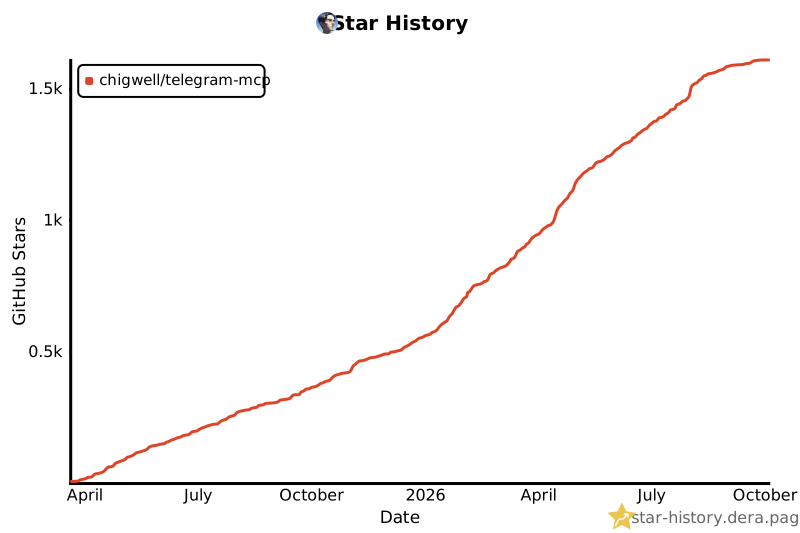](https://star-history.dera.page/#chigwell/telegram-mcp&Date)
- ## Contributors
- <a href="https://github.com/chigwell/telegram-mcp/graphs/contributors">
- <img src="https://contrib.rocks/image?repo=chigwell/telegram-mcp" />
- </a>
Ratings and comments
Sign in to rate this skill.
Sign inFree to use. If it’s helped, pass it on.