STS2-Agent
杀戮尖塔2的MOD,将杀戮尖塔2的游戏状态与操作暴露为本地 HTTP API 包装成 MCP Server,供支持 MCP 的AI客户端直接调用
Safety scan
A static text scan, not a guarantee. Select the badge to see what was scanned and every finding.
Check it deeper on your machine
It has changed since its scan on 11 Nov 2026.
As a Claude Code plugin, install it and then ask Claude Code:
/plugin marketplace add keithmackay/mackayi/plugin install scanskillsafety@mackayiDo a deep scan of https://github.com/CharTyr/STS2-Agent with scanskillsafety
Or from a terminal, clone it and run it:
git clone https://github.com/keithmackay/scanskillsafety-skill ~/.claude/skills/scanskillsafetynode ~/.claude/skills/scanskillsafety/cli.cjs --deep 'https://github.com/CharTyr/STS2-Agent'
It checks the exact commit: every file, its packages against OSV (api.osv.dev), how it compares with this page's scan (findsafeskills.com receives the repository's address), and, if you agree, Claude reading every file with your own Claude subscription. It never runs the code.
Badge for your README

Markdown
[](/listings/chartyr--sts2-agent)HTML
<a href="/listings/chartyr--sts2-agent"><img src="/api/listings/chartyr--sts2-agent/badge.svg" alt="findsafeskills safety rating" /></a>Install
Install instructions from the README
As written by the repo's author. findsafeskills has not verified these steps.
The easiest way to play is the [Steam Workshop](https://steamcommunity.com/sharedfiles/filedetails/?id=3796486050) page. Subscribe, wait for the download, then Steam → **Play with Mods**. You do not copy any files. That page is a short player guide; this README has extra detail if you need it.
This mod is still in development. Some things may be unfinished or break. Please send suggestions and issues here: [GitHub Issues](https://github.com/CharTyr/STS2-Agent/issues).
Step 1: Install The Mod
**Option A: Steam Workshop (recommended)**
1. Subscribe on the [Workshop page](https://steamcommunity.com/sharedfiles/filedetails/?id=3796486050) and wait for the download. 2. Start the game from Steam with **Play with Mods**. You do not copy any files. 3. If the game warns that the code is untrusted: accept, quit fully, enable **STS2 AI Agent** in Mods, then restart.
**Option B: GitHub zip**
1. Download `sts2-ai-agent-v*-windows.zip` from [GitHub Releases](https://github.com/CharTyr/STS2-Agent/releases) and unzip it. 2. Copy **only** these three files from the zip **`mod/`** folder into the game `mods/` folder (create it if needed):
   STS2AIAgent.dll
   STS2AIAgent.pck
   mod_id.json
3. Final layout example:
   C:\Program Files (x86)\Steam\steamapps\common\Slay the Spire 2\mods\STS2AIAgent.dll
   C:\Program Files (x86)\Steam\steamapps\common\Slay the Spire 2\mods\STS2AIAgent.pck
   C:\Program Files (x86)\Steam\steamapps\common\Slay the Spire 2\mods\mod_id.json
Do not copy the whole zip or `mcp_server/` into `mods/`. `mcp_server/` is optional for developers.
**Do not double-install:** if you already subscribed on Workshop and also copied GitHub files, delete the manual copies from `mods/` and keep the Workshop item. Two copies can load twice.
Step 2: Launch The Game & Open The Overlay
1. Start *Slay the Spire 2* from Steam with **Play with Mods**. 2. Press **`F8`** (configurable) or click the grey **`AI`** tab on the right edge of the screen to open the Agent window.
Step 3: Configure Your LLM Endpoint
1. The overlay opens automatically on first launch. Later, press **`F8`** or click **`AI`**. A default URL plus model name is **not** treated as ready. 2. Open **Settings**: 1. **Add Endpoint** (name, Base URL; API Key may be empty for Ollama / LM Studio) 2. **Add Model** and bind it to that endpoint 3. Choose **Chat Model** and **Play Model** (empty play model uses chat) 4. Click **Test Connection** (sends a request to your configured service). Chat success is not play success. 5. Click **Save Settings**. Unsaved edits are saved when you leave the tab so they are not dropped silently. 3. Thinking intensity, vision, and session budgets are under **Show advanced options**. 4. Invite a teammate only after the play model shows connectivity success. That requirement belongs to the auto-play route: a teammate invited without a verified play model still launches, it just waits to be taken over from outside. See **Option C** below.
Step 4: Play!
Option A: Auto-Play
- Start a standard single-player run. - Switch to the **Play** tab and click **Start Auto-Play** (or **Step Once**). - The model evaluates live state and dispatches cards, rewards, and route decisions autonomously.
Option B: Co-op With An AI Teammate (Recommended!)
- Go to the game's **Main Menu**. - Switch to the **AI Teammate** tab and click **Invite AI Teammate**. - A second game window will launch automatically and join the co-op lobby. You play your character; the AI controls its character! - The main window shows whether the teammate is connected, waiting on you/the game/the model, or why it stopped and what to click next. **Pause teammate** gives immediate feedback; already submitted actions still finish. - Use team chat to coordinate in plain English or Chinese.
What was scanned
The files the safety scan read, as written by the repository's author and shown as plain text. Lines with a finding are marked.
README.md · README · 308 lines
View this file on GitHub (read at the repository's current version: the scan did not record which commit it read)
This file has changed since it was scanned, so this is not exactly the text that was scanned, and no line is marked. The findings are listed with the safety scan above.
- # STS2 AI Agent
- <div align="center">
- https://github.com/user-attachments/assets/89353468-a299-4315-9516-e520bcbfbd4b
- **In-Game AI Companion & Autonomous Gameplay Mod for Slay the Spire 2**
- [中文说明 (README.zh-CN)](./README.zh-CN.md) • [Current Status](./PRODUCT_PLAN_CURRENT.md) • [API Docs](./docs/api.md) • [MCP Tools Guide](./mcp_server/README.md)
- </div>
- ---
- ### Play experience
- Auto-play uses the game's own Fast Mode and restores your setting on pause. Forced moves spend no model requests; combat can execute a checked whole-turn plan from one request. Combat math, deck statistics and route advice accompany the current state. **F7 pauses/resumes; F8 opens the panel.** The HUD shows the action and reason, and is hidden from screenshots. A finished run gets a copyable report and an optional bounded factual journal. These switches are under **Settings → Play experience**.
- **Will acceleration change my saved game speed?** The temporary speed is guarded against being written to the game's settings; pause restores the previous value. Co-op is capped at Fast. All features can be switched off. See the current status page for release and validation evidence.
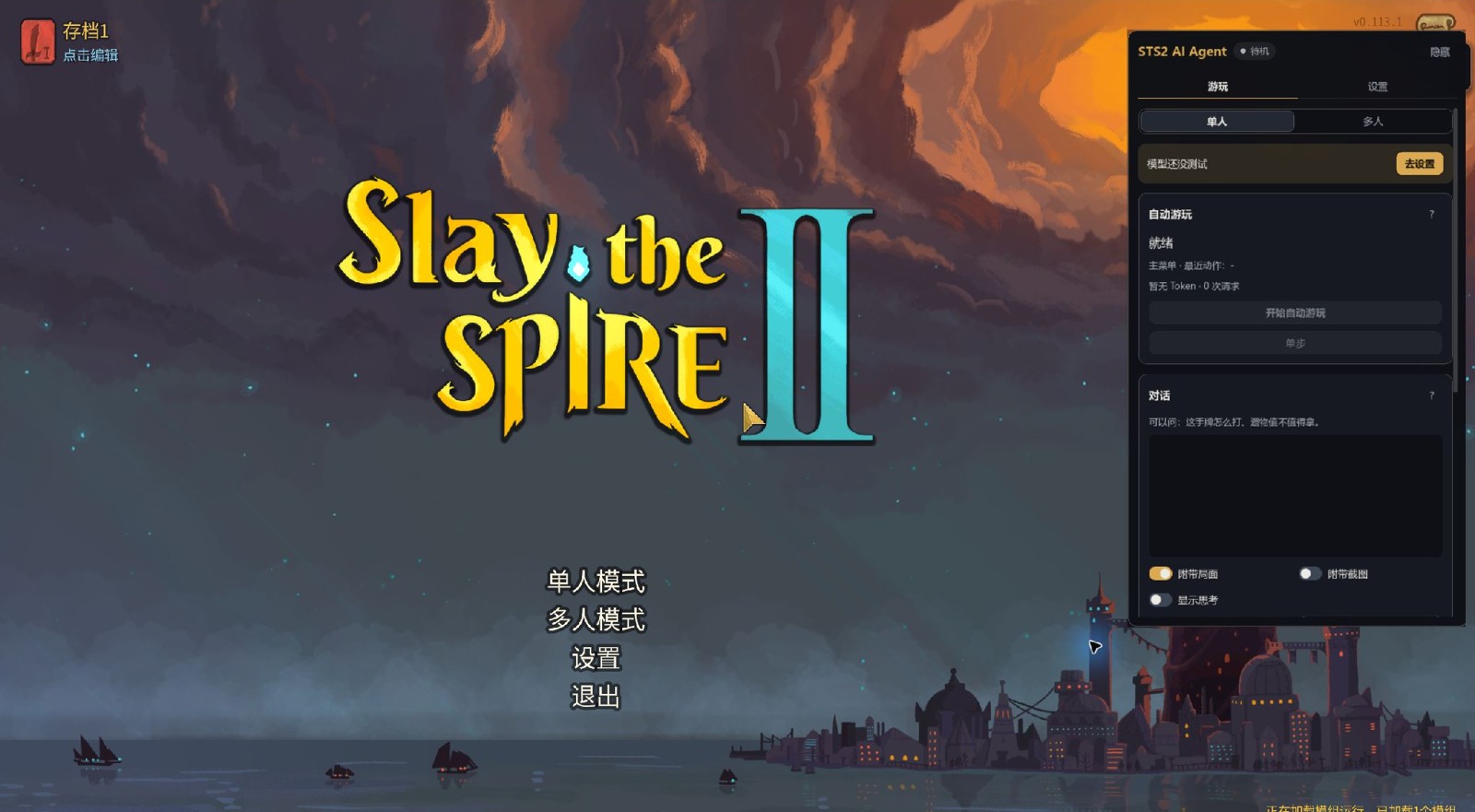
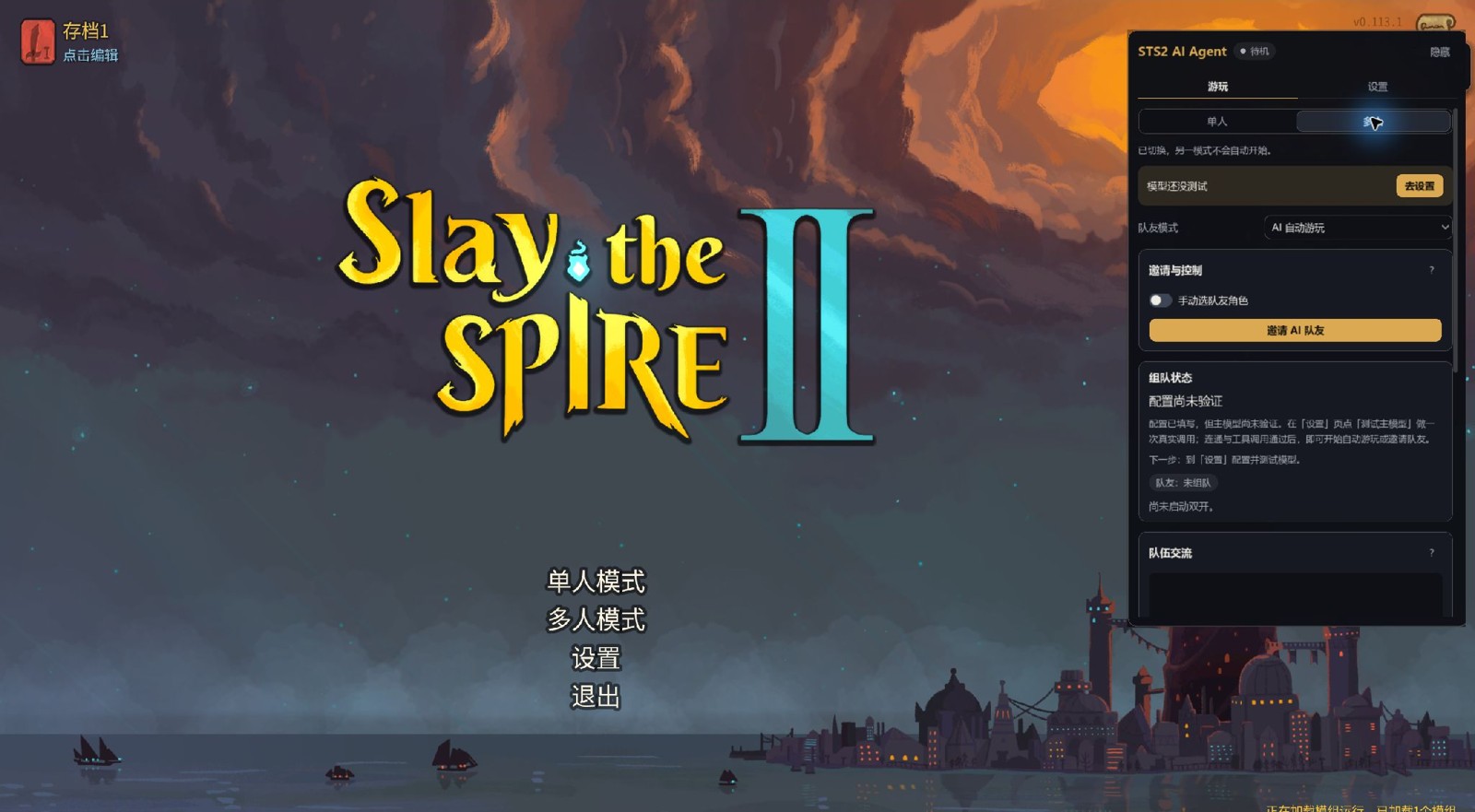
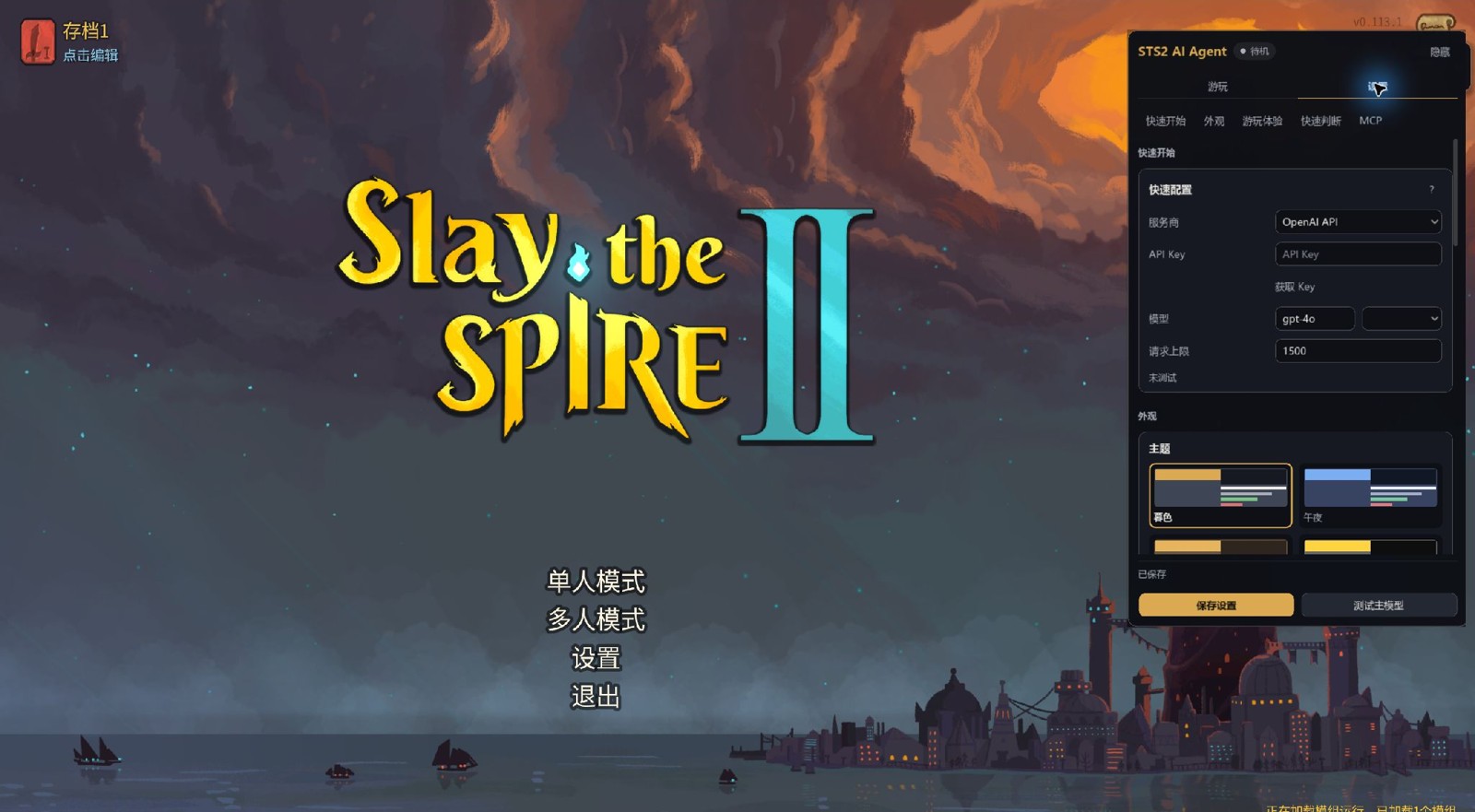
- ### In-game screenshots
- Real v0.19.2 interface captures using an isolated profile with no API key.
- 
- 
- 
- ## 🌟 Key Highlights
- - 🎮 **In-Game Overlay UI**: Press **F8** at any time to open the configuration and control window directly inside the game—no external browser required.
- - 🤖 **OpenAI-Compatible Endpoints**: Configure a compatible chat-completions endpoint, with per-model thinking settings. Tool calling, vision, streaming, and usage reporting depend on the provider and model; test chat and play separately.
- - 🃏 **Autonomous Auto-Play**: Uses text state for combat, card drafting, shops, events, pathing, and capstones, with optional screenshot context. Run completion and strategy quality depend on the model and game conditions; see the current status for validation limits.
- - 👥 **Local Co-op AI Teammate**: One-click launch from the main menu spins up an isolated second game instance. You play your character; the AI teammate plays its own character in co-op mode.
- - 💬 **Live Team Conversation**: Talk to your AI teammate in natural language from the human window (e.g., "focus the right cultist", "let's take the shop path"). The AI replies and uses recent context in subsequent decisions.
- - 🛡️ **Session Budget Guards & Fault Recovery**: Tracks reported token usage and request counts, stops new calls when session limits are reached, and bounds retries. Missing usage is shown as unknown; these guards are not a billing guarantee.
- - 🔌 **Developer-Ready**: Built-in local HTTP API (`:8080`). The Settings → MCP section can expose MCP at `/mcp` on the same port for Cursor, Claude, and Codex.
- ---
- ## 🚀 3-Minute Quick Start (Players)
- The easiest way to play is the [Steam Workshop](https://steamcommunity.com/sharedfiles/filedetails/?id=3796486050) page. Subscribe, wait for the download, then Steam → **Play with Mods**. You do not copy any files. That page is a short player guide; this README has extra detail if you need it.
- This mod is still in development. Some things may be unfinished or break. Please send suggestions and issues here: [GitHub Issues](https://github.com/CharTyr/STS2-Agent/issues).
- ### Step 1: Install The Mod
- **Option A: Steam Workshop (recommended)**
- 1. Subscribe on the [Workshop page](https://steamcommunity.com/sharedfiles/filedetails/?id=3796486050) and wait for the download.
- 2. Start the game from Steam with **Play with Mods**. You do not copy any files.
- 3. If the game warns that the code is untrusted: accept, quit fully, enable **STS2 AI Agent** in Mods, then restart.
- **Option B: GitHub zip**
- 1. Download `sts2-ai-agent-v*-windows.zip` from [GitHub Releases](https://github.com/CharTyr/STS2-Agent/releases) and unzip it.
- 2. Copy **only** these three files from the zip **`mod/`** folder into the game `mods/` folder (create it if needed):
- ```text
- STS2AIAgent.dll
- STS2AIAgent.pck
- mod_id.json
- ```
- 3. Final layout example:
- ```text
- C:\Program Files (x86)\Steam\steamapps\common\Slay the Spire 2\mods\STS2AIAgent.dll
- C:\Program Files (x86)\Steam\steamapps\common\Slay the Spire 2\mods\STS2AIAgent.pck
- C:\Program Files (x86)\Steam\steamapps\common\Slay the Spire 2\mods\mod_id.json
- ```
- Do not copy the whole zip or `mcp_server/` into `mods/`. `mcp_server/` is optional for developers.
- **Do not double-install:** if you already subscribed on Workshop and also copied GitHub files, delete the manual copies from `mods/` and keep the Workshop item. Two copies can load twice.
- ### Step 2: Launch The Game & Open The Overlay
- 1. Start *Slay the Spire 2* from Steam with **Play with Mods**.
- 2. Press **`F8`** (configurable) or click the grey **`AI`** tab on the right edge of the screen to open the Agent window.
- ### Step 3: Quick model setup
- 1. First launch opens **Settings → Quick setup**: pick a provider (DeepSeek, Zhipu GLM, Kimi, Qwen, OpenRouter, OpenAI, SiliconFlow, Ollama, LM Studio or a custom URL) and enter the API key; **Get key** opens the provider's key page. A common model is filled in for you, and the list beside it offers others (local Ollama / LM Studio can leave the key empty and take the name of a model you have downloaded).
- 2. Click **Save settings**: a changed provider, key or model is tested straight away (**Test main model** runs the same test on demand). Auto-play needs connectivity and tool calling to pass; once they do, the setup line at the top of **Play** disappears.
- 3. Click **Go play**: solo, press **Start auto-play**; co-op, switch the top of the page to **Multiplayer** and invite the AI teammate.
- Request limits, proxies, thinking protocols and the External Agent route: see [Model setup details](#model-setup-details).
- ### Step 4: Play!
- #### Option A: Auto-Play
- - Start a standard single-player run.
- - Switch to the **Play** tab and click **Start auto-play** (or **Single step**).
- - The model evaluates live state and dispatches cards, rewards, and route decisions autonomously.
- #### Option B: Co-op With An AI Teammate (Recommended!)
- - Go to the game's **Main Menu**.
- - Switch to the **Play → Multiplayer** page and click **Invite AI Teammate**.
- - A second game window will launch automatically and join the co-op lobby. You play your character; the AI controls its character!
- - The main window shows whether the teammate is connected, waiting on you/the game/the model, or why it stopped and what to click next. **Pause teammate** gives immediate feedback; already submitted actions still finish.
- - Use team chat to coordinate in plain English or Chinese.
- - By default the teammate takes the preselected character and readies up by itself. To pick its character yourself (in the teammate window, or through the companion API with `select_character` then `embark`), tick **Pick teammate character** above the invite button (it sets `companionAutoSelectCharacter` to `false` in the mod's `settings.json`); the teammate then waits on the character screen, for the AI driving it or for you, without a timeout.
- - After a run, return to the root main menu and invite again: the mod closes its previous teammate window and starts a fresh one. If that window does not close, close it normally and retry.
- - To pick up a saved co-op run, use **Continue co-op save**, the button under the invite; it is enabled on the main menu while a co-op save exists. It hosts the saved run over the local connection and brings the teammate back. Do not use the game's own Load button for that save: it opens the run over Steam networking, rejects the local-connection player ids, and renames the save as corrupt.
- #### Option C: Hand The Teammate Window To An External Agent
- - Select **External Agent** in **Play → Multiplayer** before inviting. Existing HTTP/MCP invite actions retain their verification-based route selection for compatibility.
- - You do not need to configure or verify any model to invite a teammate on this route: it never calls a model, so a missing or broken model cannot make it fail. The teammate still launches, joins the lobby, and readies up on its own.
- - When the run starts, the teammate stops where it is and plays nothing by itself: its `/health` reports `play_phase: "paused"` with `session_requests: 0`, because this route never calls a model.
- - Drive that character from outside with the teammate instance's own `GET /state` and `POST /action`. Once the teammate joins, **Play → Multiplayer** shows its address with a **Copy address** button; it is also `data.companion.api_port` on the main window's `GET /health` (that port is usually not 8080). The teammate can only act for its own character; acting outside it returns 403 `forbidden_actor`. On this route `data.companion.auto_play` is `false`.
- - Start and pause it with `POST /teammate/control` on the **main window**, body `{"running": true|false}`. This is the supported entry point and it needs no session token (the main window holds the teammate session token itself). `running: true` still requires a verified play model, exactly like the in-game **Continue Auto-Play** button; `running: false` works at any time.
- Both routes enforce the same structural conditions (you are on the main menu, this is not the teammate instance, and the character has no auto-play already running); only the model gate differs. Full contract: [docs/api.md](./docs/api.md).
- ### Model setup details
- - **Test main model** usually sends 3 requests (connectivity, tool calling and streamed arguments) with a 45-second deadline; while it runs the button reads **Cancel test**, so press it again to cancel. Auto-play requires verified tool calling; chat connectivity alone is not enough.
- - New installs stop auto-play after 1,500 requests by default. Adjust the limit, or leave it empty / enter 0 for unlimited. Existing unlimited settings are preserved. Tests also call your provider. Request and token counters are not a bill; consult your provider for charges.
- - Quick setup shares one model for conversation and play. Multiple endpoints, vision, thinking protocols and advanced budgets are under **Show advanced options**. Proxy aliases do not need to be renamed `deepseek-chat`: set the endpoint protocol explicitly.
- - In **Play → Multiplayer**, choose **AI auto-play** before inviting, or explicitly choose **External Agent** to launch a teammate that waits for Claude Code / Cursor / Codex; that route needs no model.
- - A ChatGPT subscription does not include an OpenAI API key or API credits.
- ---
- ## 🎮 Core Features
- ### 1. Autonomous Gameplay (Auto-Play)
- - **Compact State Engine**: Actionable text state covering cards, energy, intents, relics, HP, and potion slots. Vision is optional; offline state and action tests do not prove full-run completion.
- - **Optional Vision Augmentation**: When using a vision-capable model, screenshots are captured on demand to provide rich visual context.
- - **Real-Time Counters**: The overlay displays prompt, completion, total tokens, and request counts live.
- ### 2. Dual-Instance Local Co-op
- - **Two Co-op Routes**: Explicitly choose AI auto-play (verified tools required) or External Agent control (waits for outside commands; see **Option C**).
- - **Zero-Collision Isolation**: Propagates `--force-steam off` and increments `clientId` in offline mode. Automatically derives and clones `settings.companion.json` so both instances never write over each other's configurations or save slots.
- - **Team Conversation**:
- - Chat directly with the AI teammate during multiplayer runs.
- - Teammate replies using its play model, and recent discussions inform subsequent play decisions.
- - Read-only safety: The chat interface never plays cards for the human or unpauses a paused companion.
- - Conversation is player-initiated by default. An optional, off-by-default proactive chat lets the teammate speak one short line when a fight starts and ends, with a selectable tone (轻松搭档 / 沉稳参谋 / 简短简报). It never plays for you and stays under the session budget.
- ### 3. Interactive In-Game Advisor
- - Use the conversation area on **Play** to ask strategic advice.
- - Enable "Attach State" to pass full live game context (deck, relics, route) to the model for tactical guidance.
- ---
- ## 🛡️ Reliability & Safety Guards
- | Mechanism | Description | Player Benefit |
- |---|---|---|
- | **Session Budget Guard (`SessionBudgetGuard`)** | Tracks provider-reported JSON/SSE usage and requests; checks configured caps before new calls | Stops new calls at the limit and shows next steps; in-flight calls can add usage, and missing usage remains unknown |
- | **Autoplay Circuit Breaker (`AutoPlayRecovery`)** | Automatic halt after 3 consecutive failures with 2s/4s exponential backoff | Prevents spin loops on unrecognized game dialogs or invalid choices |
- | **Immediate Config Error Exit** | Halts immediately upon receiving HTTP 401, 403, or 404 responses | Stops wasted token calls when API keys expire or are mistyped |
- | **Run Boundary Protection (`CurrentRunBoundary`)** | Scoped strictly to the active run's unique `runId` | Exiting a run, surrendering, or returning to lobby immediately stops autoplay |
- | **Process & Settings Isolation (`CoopLaunchPolicy`)** | Dedicated companion settings file and safe `clientId` stepping | Complete segregation between main and companion instances |
- ---
- ## 🛠️ Advanced Users & Developers Guide
- ### System Architecture
- ```text
- ┌───────────────────────────────────────────────────────────┐
- │ Slay the Spire 2 │
- │ ┌─────────────────────────────────────────────────────┐ │
- │ │ STS2AIAgent (C# Mod) │ │
- │ │ - Godot In-Game Overlay UI (F8) │ │
- │ │ - OpenAI-compatible Client & Budget Guard │ │
- │ │ - Autoplay Decision Loop & Recovery Controller │ │
- │ │ - GameThread Action / State Synchronizer │ │
- │ │ - Local Dual-Instance Process Launcher │ │
- │ └───────────────────────┬─────────────────────────────┘ │
- └──────────────────────────┼────────────────────────────────┘
- │ Local HTTP API (:8080)
- │ Optional MCP (:8080/mcp)
- ▼
- External Agents (Cursor / Claude Desktop / Codex)
- ```
- ### Local HTTP API
- The mod runs an embedded HTTP server on `http://127.0.0.1:8080` (with dynamic fallback on port contention):
- - `GET /health`: Health check, returns `api_port`, `instance_role`, `mcp_enabled`, and process PID. On the main window, once this co-op session has connected to a teammate, it also returns a `companion` block: the teammate's `api_host`, `api_port`, and `process_id`, plus this route's `auto_play` flag.
- - `GET /state`: Full raw game state JSON.
- - `GET /actions/available`: Currently available legal actions and schema.
- - `GET /events/stream`: Real-time SSE stream for game events.
- - `POST /action`: Dispatch an action (e.g., `play_card`, `choose_map_node`, `proceed`).
- - `GET /data/{collection}`: Export a bundled game metadata collection (`cards`, `relics`, `monsters`, `potions`, `events`, `powers`, `characters`).
- - `POST /session/control`: Start or pause autoplay for this instance (`{"running": true|false}`).
- - `POST /teammate/control`: Start or pause the AI teammate from the **main window** (`{"running": true|false}`). Loopback only and main-window only; this is the supported entry point for an external agent (see **Option C** above).
- - `POST /companion/control` / `POST /companion/message`: Control or message the AI teammate instance (local dual-instance only). These are the teammate instance's own controlled endpoints, called by the main process with this session's token; external callers should use `POST /teammate/control` instead.
- - `POST /mcp`: Optional MCP (Streamable HTTP). Off by default; enable it on the Settings → MCP section.
- ### Which MCP entry to use
- | If you want to… | Use | Needs | How to confirm |
- | --- | --- | --- | --- |
- | Play with an AI teammate | In-game overlay, MCP off | Mod only | F8 / AI tab opens **Play → Multiplayer** |
- | Drive the game from Cursor / Claude / Codex | **Native MCP** under Settings → MCP | Mod only | Copy the **actual** URL shown (port may not be 8080) |
- | stdio, layered/full, or compatibility | Optional Python `mcp_server/` | Python + uv | From the release root, run `scripts/test-mcp-tool-profile.ps1` |
- External clients: F8 → **Settings → MCP** → tick **Enable MCP** → pick Claude Code / Cursor / Codex under **Client configuration** → **Copy config** (a terminal command for Claude Code, JSON for Cursor, a `~/.codex/config.toml` snippet for Codex). It shares the HTTP API port and listens on `127.0.0.1` only. Do not hard-code `8080` or `8765`.
- The Python sidecar is not required for players and is not the recommended entry.
- Default shape (replace the port with the one under Settings → MCP):
- ```json
- {
- "mcpServers": {
- "sts2-ai-agent": {
- "type": "http",
- "url": "http://127.0.0.1:8080/mcp"
- }
- }
- }
- ```
- Built-in MCP tools add `health_check` on top of the surface in-game Auto-Play uses: `get_game_state`, `get_available_actions`, `act`, `get_game_data_*`, `wait_until_actionable`. The default `guided` profile also exposes `decide` (state, available actions and scene guidance from one call), `get_scene_guidance`, `get_raw_game_state`, `get_decision_log`, `get_run_summary` and `diff_state`.
- In-game Auto-Play already follows the bundled play contract. If you drive the game from an **external** agent over MCP (Cursor, Claude, Codex, or the optional Python sidecar), also load the companion skill [`sts2-mcp-player`](./skills/sts2-mcp-player/SKILL.md). Connecting tools without that skill can click legal actions; the skill is what matches in-game play quality.
- For character selection, tell the external agent which character you want; the shared playbook requires it to honor that choice and report if the character is unavailable. Without a specified character it keeps a valid unlocked selection, or chooses an unlocked character if needed. The teammate's automatic preselection above is a separate bootstrap setting.
- The built-in play/chat tool loop estimates every request against the configured model context window (256,000 tokens when unset), including tool schemas, replies and attached images, plus the configured output cap (or an 8,192-token assumption when unset) and a safety margin. It keeps a fixed-size memory of recent decisions and removes optional history first; current game facts, legal actions, player instructions and complete tool exchanges are retained. If required content still exceeds the estimate, the request is stopped and queued play guidance remains available. Estimates are local approximations, not exact tokenizer counts or a guarantee that a provider will accept the request. Cached tokens still count against the context window. The session card's **Copy diagnostics** / **Save diagnostics** includes at most 40 recent numeric request breakdowns and the session peak, alongside provider-reported input, output and cache usage when available; it contains no prompt bodies or keys. Separate planner, vision-caption, fast-judgment and model-test requests do not use this check. An external MCP client's conversation and context are managed by that client. If compact MCP state omits unchanged data after the client loses context, request `get_game_state(full_state=true)`; the Python sidecar also offers `get_raw_game_state`. Session request limits do not guarantee a fixed run cost.
- ---
- ## 🧪 Building From Source & Automated Testing
- Standalone core and MCP contract tests run **without the game client**. Godot UI, real-game actions, multiplayer, saves, and installation channels require separate live validation:
- The GitHub zip includes only the optional sidecar launch and profile-check
- scripts under `scripts/`. The build, preflight, and live-game commands below
- require a source checkout.
- ### Build Mod
- > ⚠️ **Close the game first** so the DLL file is not locked by the OS.
- ```powershell
- # Windows
- powershell -ExecutionPolicy Bypass -File ".\scripts\build-mod.ps1" -Configuration Release
- # Linux / macOS
- ./scripts/build-mod.sh --configuration Release
- ```
- ### Run Tests
- - **C# Core Unit Tests**:
- ```powershell
- dotnet run --project STS2AIAgent.Tests/STS2AIAgent.Tests.csproj
- ```
- Covers the session budget guard, autoplay recovery backoff, run-boundary interception, offline dual-instance isolation, HTTP port fallback, and native save switching, among others.
- - **Python MCP Contract Tests**:
- ```powershell
- cd mcp_server
- uv run python -m unittest discover -s tests -v
- ```
- - **Full Release Preflight Check**:
- ```powershell
- powershell -ExecutionPolicy Bypass -File ".\scripts\preflight-release.ps1"
- ```
- ---
- ## ❓ FAQ
- ### Q1: Pressing F8 does not open the overlay.
- 1. Workshop: start with **Play with Mods**. GitHub: copy the three files from the zip `mod/` folder into the game `mods/` folder. Do not keep both Workshop and a manual copy.
- 2. Confirm files were copied into the Steam game installation directory, not the repository directory.
- 3. Look for the grey **AI** tab on the right screen edge and click it directly.
- ### Q2: Autoplay stopped unexpectedly. How do I resume?
- 1. Read the **AI Teammate** status line and the suggested next click. Config errors do not retry forever; fix settings, test, then **Resume play** without restarting the whole game.
- 2. If tokens show **unknown**, the provider omitted usage; that is not a zero spend. Request caps still work.
- 3. Use **Copy diagnostics** or **Save diagnostics** at the bottom of the **Party** card in **Play → Multiplayer**. The export excludes API keys, Authorization headers, and session tokens, and does not include chat bodies by default.
- ### Q3: Dual-instance companion window fails to start.
- 1. Local co-op runs through the internal multiplayer test lobby.
- 2. The launcher sets `--force-steam off` and steps `clientId` automatically. Check if third-party antivirus software blocked launching the child process.
- 3. If ports are in use, the mod automatically selects an available fallback port.
- ### Updates and co-op recovery
- - The second window stages files from the mod actually loaded by the host, accepting GitHub `mod_id.json` and Workshop `STS2AIAgent.json`. Unmodified managed copies upgrade automatically. Manual or edited copies are preserved and report their conflict path. Keep one installation instead of both Workshop and a manual copy.
- - Model, key, budget and non-combat-only changes are pushed to an existing teammate and shown as applied only after acknowledgement. Its current action settles first; an unverified model leaves it paused.
- - Resume local AI co-op saves with **Play → Multiplayer → Continue co-op save**. When the native load path would use the wrong player identity for an identified local save, the mod blocks it before the game can rename the save `.VAL.corrupt`. Ordinary Steam saves do not match this guard.
- - **Copy diagnostics** uses the clipboard. **Save diagnostics** writes redacted text and opens its folder. The DLL build SHA256 distinguishes builds with the same version. Keys and chat bodies are excluded.
- ---
- ## 📁 Repository Layout
- ```text
- STS2-Agent/
- ├── STS2AIAgent/ # C# In-Game Mod (Overlay UI, LLM Client, Decision Loop, Budget Guard)
- ├── STS2AIAgent.Tests/ # Standalone C# tests (no game client required)
- ├── mcp_server/ # FastMCP Server implementation
- ├── scripts/ # Build, packaging, startup, and preflight scripts
- ├── skills/ # State-first gameplay skill specifications
- ├── docs/ # Developer reference and API documentation (start at docs/README.md)
- ├── history/ # Archived snapshots, release records and live-test evidence
- └── PRODUCT_PLAN_CURRENT.md # Current product status and evidence boundary
- ```
- ---
- ## License
- This project is licensed under the [GNU Affero General Public License v3.0 (AGPL-3.0)](./LICENSE).
Ratings and comments
Sign in to rate this skill.
Sign inFree to use. If it’s helped, pass it on.