agentkey
One-stop live data marketplace for your agent: web search, web scraping, social media, finance, crypto, e-commerce, business data, weather/maps, and travel
Safety scan
A static text scan, not a guarantee. Select the badge to see what was scanned and every finding.
Check it deeper on your machine
It has changed since its scan on 11 Nov 2026.
As a Claude Code plugin, install it and then ask Claude Code:
/plugin marketplace add keithmackay/mackayi/plugin install scanskillsafety@mackayiDo a deep scan of https://github.com/chainbase-labs/agentkey with scanskillsafety
Or from a terminal, clone it and run it:
git clone https://github.com/keithmackay/scanskillsafety-skill ~/.claude/skills/scanskillsafetynode ~/.claude/skills/scanskillsafety/cli.cjs --deep 'https://github.com/chainbase-labs/agentkey'
It checks the exact commit: every file, its packages against OSV (api.osv.dev), how it compares with this page's scan (findsafeskills.com receives the repository's address), and, if you agree, Claude reading every file with your own Claude subscription. It never runs the code.
Badge for your README

Markdown
[](/listings/chainbase-labs-agentkey)HTML
<a href="/listings/chainbase-labs-agentkey"><img src="/api/listings/chainbase-labs-agentkey/badge.svg" alt="findsafeskills safety rating" /></a>Install
Install instructions from the README
As written by the repo's author. findsafeskills has not verified these steps.
These steps run a script from the network that findsafeskills does not scan.
One command. A browser tab opens for login, then you're done. The installer auto-detects every agent on your machine ([40+ supported](https://github.com/vercel-labs/skills#available-agents). Common examples include Claude Code, Codex, Gemini CLI, and Cursor CLI, etc.) and configures each one.
**macOS / Linux**
curl -fsSL https://agentkey.app/install.sh | bash
**Windows** (PowerShell)
irm https://agentkey.app/install.ps1 | iex
Restart your agent, then ask it something that needs the internet. A running DeepSeek Harness profile watches the home patch through HMR; stopped profiles load it on their next start.
> *"What has Musk been tweeting about lately?"*
That's it. No API key to copy, no JSON to edit.
<sub>Need to target specific agents or run in CI? → See the "Advanced install options" item in the [FAQ](#faq).</sub>
---
DeepSeek Harness (DSH)
The one-line installers above detect `${DSH_HOME:-~/.dsh}` or the `dsh` command automatically. They install the AgentKey skill globally at `~/.agents/skills/agentkey`, authenticate with AgentKey, and add one managed Loader block to DSH's home-level patch:
${DSH_HOME:-~/.dsh}/cordis.patch.ymlThis is a **CLI-managed DSH MCP integration**, not a native installable DSH plugin. The home layer uses Loader id `agentkey`, module `@deepseek-ai/dsh-mcp-client`, and MCP `serverName: agentkey`; it is composed over current and future profiles. Tool allow/deny policy still controls whether a preset, session, or subagent can see the tools.
DSH 0.1.0-rc.7 does not provide an OAuth `authProvider` to its MCP SDK client. A header-free server entry cannot complete 401/RFC 9728 discovery or open a browser. DSH must use the device-code command below so the CLI writes a local Bearer key.
For a DSH-only manual install, run exactly these two steps:
npx -y skills add chainbase-labs/agentkey -g -a universal -s agentkey -y
npx -y @agentkey/cli --auth-login --only dsh
The CLI stores the real API key only in the single local home patch; no key belongs in Git. Re-running the command rotates the key and replaces the managed block. No existing profile is required. During migration it removes only top-level, column-1 AgentKey managed blocks from per-profile patches and renames a legacy `.agent-presets/agentkey` directory to a timestamped backup; the CLI prints that backup path. If it structurally detects an older unmarked AgentKey Loader row, it stops without changing any patch and asks you to remove that top-level `insert` child manually. Symlinked profile patches are inspected read-only: a clean symlink profile is allowed, while either legacy AgentKey form stops installation and reports the path for manual removal.
Only currently running profile processes observe the home-file change immediately through HMR. Stopped and future profiles load it when they start. If an old preset was already active in a session, close that session or restart DSH once after migration.
How to confirm DSH installation
1. Open **DSH → Settings → Plugins → Plugin list**, search for configured id `agentkey`, and expand the `mcp-client` row. DSH 0.1 currently renders: - Loader path: `include:agentkey` (the stable configured entry id is `agentkey`) - module title: `@deepseek-ai/dsh-mcp-client` (the card shortens it to `mcp-client`) - Cordis status: `Mounted` (the underlying fiber phase is `active`)
`Mounted`/`active` proves only that Cordis loaded the row. Because `failOnStartupError: false`, it does **not** prove that MCP authenticated or connected.
2. In the intended preset/session, confirm the three core tools are visible: - `mcp__agentkey__find_tools` - `mcp__agentkey__describe_tool` - `mcp__agentkey__execute_tool`
`list_tools` is deprecated and is not a readiness requirement. If a core tool is hidden only in one context, inspect that preset/session/subagent's tool policy.
What was scanned
The files the safety scan read, as written by the repository's author and shown as plain text. Lines with a finding are marked.
.claude-plugin/marketplace.json · Manifest · 18 lines
View this file on GitHub (read at the repository's current version: the scan did not record which commit it read)
- {
- "name": "agentkey",
- "description": "One-stop live data marketplace for your agent: web search, web scraping, social media, finance, crypto, e-commerce, business data, weather/maps, and travel",
- "owner": {
- "name": "Chainbase Labs",
- "url": "https://agentkey.app"
- },
- "plugins": [
- {
- "name": "agentkey",
- "description": "AgentKey — one-stop live data marketplace for your agent: web search, web scraping, social media, finance, crypto, e-commerce, business data, weather/maps, and travel through a single MCP server. No API keys to manage, auto failover across providers, free to start.",
- "source": "./",
- "category": "data",
- "homepage": "https://github.com/chainbase-labs/agentkey",
- "tags": ["agentkey", "web-search", "scraping", "social-media", "finance", "crypto", "blockchain", "e-commerce", "business-data", "weather", "maps", "travel", "real-time-data"]
- }
- ]
- }
README.md · README · 531 lines · 11 findings marked
View this file on GitHub (read at the repository's current version: the scan did not record which commit it read)
- <p align="center">
- <img width="256" alt="AgentKey" src="https://github.com/user-attachments/assets/4c7c78a9-e5d8-45ce-9372-d5bffe8f61c5" />
- </p>
- <p align="center">
- <strong>One command. Full internet access for your AI agent.</strong>
- <br>
- Browse Twitter, search LinkedIn, scrape social media, read any webpage. Zero config. Just install and go.
- </p>
- <p align="center">
- <a href="#install">Install</a> ·
- <a href="#what-your-agent-can-now-do">Platforms</a> ·
- <a href="#faq">FAQ</a> ·
- <a href="docs/README_zh.md">中文</a>
- </p>
- <p align="center">
- <a href="https://agentkey.app"><img src="https://img.shields.io/badge/Website-agentkey.app-blue?style=for-the-badge" alt="Website" /></a>
- <a href="https://console.agentkey.app"><img src="https://img.shields.io/badge/Console-console.agentkey.app-7c3aed?style=for-the-badge" alt="Console" /></a>
- </p>
- <p align="center">
- <a href="https://www.producthunt.com/products/agentkey?embed=true&utm_source=badge-top-post-badge&utm_medium=badge&utm_campaign=badge-agentkey" target="_blank" rel="noopener noreferrer"><img alt="AgentKey - One-stop live data marketplace for your agent | Product Hunt" width="250" height="54" src="https://api.producthunt.com/widgets/embed-image/v1/top-post-badge.svg?post_id=1192591&theme=light&period=daily&t=1784013858323"></a>
- </p>
- ---
- **Install AgentKey. Give your AI superpowers.**
- AgentKey is the master key for the agent ecosystem. When using Claude, Manus, or other agents, you often need external data: social media, e-commerce, on-chain data, various APIs. That means hunting down API keys, managing subscriptions, or hitting dead ends.
- With AgentKey installed, your agent gains all these data capabilities automatically. No per-provider registrations, no juggling separate API bills. One subscription and go.
- > ⭐ Star this repo to get notified whenever we add new platform support or release updates.
- ---
- ## Use Cases
- | You ask your agent to... | Without AgentKey | With AgentKey |
- | ------------------------------------------------------ | ----------------------------- | ---------------------------------------------- |
- | 🐦 What has Musk been saying on Twitter lately? | Can't access, tweets blocked | Pulls all relevant tweets and summarizes them |
- | 📕 What do people think of this product on Instagram? | Blocked, login required | Scrapes real posts, organizes by sentiment |
- | 📺 What does this YouTube / Bilibili video cover? | Can't read, no subtitles | Reads the video/transcript, extracts key points |
- | 📖 Find Reddit threads about this pain point | 403 blocked | Finds relevant threads and extracts solutions |
- | 👔 Check this competitor / candidate's LinkedIn | 403, access issues | Opens the page, summarizes key info |
- | 🎵 What's trending on Douyin / TikTok right now? | Can't scrape the hot list | Pulls trending topics and tags |
- | 🌐 What does this webpage say? | Returns a wall of raw HTML | Extracts the content, explains it clearly |
- | 📦 What does this GitHub repo do? | Have to click through yourself | Reads README & Issues, one-line summary |
- | 🧾 What has this wallet / fund been buying lately? | Click through a block explorer | Summarizes recent transactions and positions |
- Before AgentKey: 10 tasks → 10 API keys → 10 separate bills.
- Your agent is half-capable at best, constantly needing human help to find data, juggling credentials, drowning in complexity.
- Now: one AgentKey handles everything. **AgentKey unifies all the external access your AI needs to do real work.**
- ---
- ## New here? Start on the web
- Before touching the terminal, you can get a feel for AgentKey directly in your browser — the website and console explain things more visually than this README can.
- - 🌐 **[agentkey.app](https://agentkey.app)** — Product overview, supported platforms, live demos, pricing details
- - 🎛️ **[console.agentkey.app](https://console.agentkey.app)** — Sign up, manage your subscription, manage your API key, track usage
- The one-line install below is what plugs AgentKey into your AI agent. If you only want to look around first, the two links above are the friendlier starting point.
- ---
- ## Install
- One command. A browser tab opens for login, then you're done. The installer auto-detects every agent on your machine ([40+ supported](https://github.com/vercel-labs/skills#available-agents). Common examples include Claude Code, Codex, Gemini CLI, and Cursor CLI, etc.) and configures each one.
- **macOS / Linux**
- ```bash
- curl -fsSL https://agentkey.app/install.sh | bash
- Note: Pipes a downloaded script directly into a shell (curl | sh / wget | bash)
- Line 78 on GitHub
- ```
- **Windows** (PowerShell)
- ```powershell
- irm https://agentkey.app/install.ps1 | iex
- Note: Runs a downloaded PowerShell script (iex / Invoke-Expression)
- Line 83 on GitHub
- ```
- Restart your agent, then ask it something that needs the internet. A running DeepSeek Harness profile watches the home patch through HMR; stopped profiles load it on their next start.
- > *"What has Musk been tweeting about lately?"*
- That's it. No API key to copy, no JSON to edit.
- <sub>Need to target specific agents or run in CI? → See the "Advanced install options" item in the [FAQ](#faq).</sub>
- ---
- ### DeepSeek Harness (DSH)
- The one-line installers above detect `${DSH_HOME:-~/.dsh}` or the `dsh` command automatically. They install the AgentKey skill globally at `~/.agents/skills/agentkey`, authenticate with AgentKey, and add one managed Loader block to DSH's home-level patch:
- ```text
- ${DSH_HOME:-~/.dsh}/cordis.patch.yml
- ```
- This is a **CLI-managed DSH MCP integration**, not a native installable DSH plugin. The home layer uses Loader id `agentkey`, module `@deepseek-ai/dsh-mcp-client`, and MCP `serverName: agentkey`; it is composed over current and future profiles. Tool allow/deny policy still controls whether a preset, session, or subagent can see the tools.
- DSH 0.1.0-rc.7 does not provide an OAuth `authProvider` to its MCP SDK client. A header-free server entry cannot complete 401/RFC 9728 discovery or open a browser. DSH must use the device-code command below so the CLI writes a local Bearer key.
- For a DSH-only manual install, run exactly these two steps:
- ```bash
- npx -y skills add chainbase-labs/agentkey -g -a universal -s agentkey -y
- npx -y @agentkey/cli --auth-login --only dsh
- ```
- The CLI stores the real API key only in the single local home patch; no key belongs in Git. Re-running the command rotates the key and replaces the managed block. No existing profile is required. During migration it removes only top-level, column-1 AgentKey managed blocks from per-profile patches and renames a legacy `.agent-presets/agentkey` directory to a timestamped backup; the CLI prints that backup path. If it structurally detects an older unmarked AgentKey Loader row, it stops without changing any patch and asks you to remove that top-level `insert` child manually. Symlinked profile patches are inspected read-only: a clean symlink profile is allowed, while either legacy AgentKey form stops installation and reports the path for manual removal.
- Only currently running profile processes observe the home-file change immediately through HMR. Stopped and future profiles load it when they start. If an old preset was already active in a session, close that session or restart DSH once after migration.
- #### How to confirm DSH installation
- 1. Open **DSH → Settings → Plugins → Plugin list**, search for configured id `agentkey`, and expand the `mcp-client` row. DSH 0.1 currently renders:
- - Loader path: `include:agentkey` (the stable configured entry id is `agentkey`)
- - module title: `@deepseek-ai/dsh-mcp-client` (the card shortens it to `mcp-client`)
- - Cordis status: `Mounted` (the underlying fiber phase is `active`)
- `Mounted`/`active` proves only that Cordis loaded the row. Because `failOnStartupError: false`, it does **not** prove that MCP authenticated or connected.
- 2. In the intended preset/session, confirm the three core tools are visible:
- - `mcp__agentkey__find_tools`
- - `mcp__agentkey__describe_tool`
- - `mcp__agentkey__execute_tool`
- `list_tools` is deprecated and is not a readiness requirement. If a core tool is hidden only in one context, inspect that preset/session/subagent's tool policy.
- 3. Ask: **“Please use AgentKey to search for today's latest AI news.”** Success requires an actual `find_tools` → `describe_tool` → `execute_tool` call, not merely a Mounted card.
- Troubleshooting:
- - **No `agentkey` row:** the home patch was not written or `DSH_HOME` points elsewhere. Re-run the DSH-only CLI command and inspect its reported path.
- - **Row exists but is not Mounted/active:** inspect the Loader error and verify `@deepseek-ai/dsh-mcp-client` exists in the DSH installation.
- - **Mounted but tools are missing:** inspect MCP connection logs, the local Authorization key, and the active tool policy. In `tools/list`, each tool's root `inputSchema.additionalProperties` must be absent or `true`, never `false`.
- - **401:** the local key is missing or invalid; rerun auth-login to rotate it.
- - **`serverName already in use`:** rerun the current CLI so it archives the legacy preset, then close sessions that still hold the old preset or restart DSH once.
- ---
- ## What your agent can now do
- AgentKey maintains cloud-side integrations across the open web — no extra accounts, no extra keys.
- | Capability | What it covers |
- | :--- | :--- |
- | **Web search** | Search engines, news, and real-time discovery across the open web |
- | **Web scraping** | Clean article extraction, structured data, and metadata from any URL |
- | **On-chain / Crypto** | Token prices, market data, on-chain activity, and project metadata |
- | **Social & content** | Public posts, videos, and discussions across major social and content platforms |
- | **Finance** | Stock & FX quotes, technical indicators, company financials, and earnings |
- | **E-commerce** | Product listings, prices, reviews, and best-sellers across major marketplaces |
- | **Business** | Company, funding, investor, and people data for market and competitive research |
- Underlying providers are routed automatically and grow over time — your agent can call `find_tools` to see what's currently available.
- **Planned:** Maps & Weather
- ---
- ## FAQ
- <details>
- <summary><b>Is it safe?</b></summary>
- Yes. AgentKey is a master key — one platform that unlocks external capabilities for your agent. By design, we have no access to your local files, your credentials, or your agent's conversations. The only data AgentKey collects is anonymous usage telemetry — which agent you installed into, your skill version, and upgrade outcomes — never your queries or responses. See "How do I opt out of telemetry?" below.
- </details>
- <details>
- <summary><b>How is this different from Claude / ChatGPT's built-in web access?</b></summary>
- Native web access in Claude and ChatGPT has limited platform coverage. It often can't reach Twitter, on-chain data, etc. AgentKey fills those gaps.
- </details>
- <details>
- <summary><b>How does pricing work? What if I use up my plan's credits?</b></summary>
- AgentKey is subscription-based. Each plan includes a monthly credit allowance; usage beyond that is billed pay-as-you-go as overage. You can upgrade your plan or manage billing anytime at [console.agentkey.app](https://console.agentkey.app). See [agentkey.app](https://agentkey.app) for current plans and pricing.
- </details>
- <details>
- <summary><b>How do I update?</b></summary>
- There are two pieces and they update differently:
- - **MCP server**: the real server is hosted at `https://api.agentkey.app/v1/mcp`, so it's always up to date — no local upgrade step. The `@agentkey/cli` package (run as `npx -y @agentkey/cli --auth-login`) only writes the remote-HTTP MCP config into each AI client and never has to be re-run unless you want to rotate your key.
- - **Skill files** (`SKILL.md` + helpers): how this updates depends on your client.
- ### Claude Code
- Updates are automatic. On the first call of a session the skill runs a silent version check; if a new release is available it prompts you to upgrade and (with your consent) runs `npx skills update -g agentkey`.
- ### Claude Desktop, Cursor, and other clients without an inline Bash tool
- The skill cannot run the inline check itself, but starting in v1.4.0 the **MCP server publishes the latest skill version via a dedicated metadata tool (`agentkey_skill_meta`)**. Your agent calls it once per session, compares against this skill's own version, and prompts you to upgrade with the exact command for your client. See [protocol/skill-meta-v1.md](./protocol/skill-meta-v1.md) for the protocol details.
- **One-time bootstrap on Desktop:** if you're stuck on a pre-1.4.0 skill in Claude Desktop, the metadata tool exists but your skill rule doesn't know how to read it. Bring yourself current once with:
- ```bash
- # Replace <UUID1>/<UUID2> with the actual session folder under skills-plugin
- # (usually there's just one; pick the one that contains skills/agentkey/SKILL.md)
- DESKTOP_BASE="$HOME/Library/Application Support/Claude/local-agent-mode-sessions/skills-plugin"
- LATEST_REPO_ZIP=$(mktemp -d)/agentkey.tar.gz
- curl -fsSL https://github.com/chainbase-labs/agentkey/archive/refs/heads/main.tar.gz -o "$LATEST_REPO_ZIP"
- tar -xzf "$LATEST_REPO_ZIP" -C "$(dirname "$LATEST_REPO_ZIP")"
- find "$DESKTOP_BASE" -type d -path "*/skills/agentkey" 2>/dev/null | while read -r dst; do
- cp -R "$(dirname "$LATEST_REPO_ZIP")"/agentkey-main/skills/agentkey/. "$dst/"
- done
- # Then fully quit and restart Claude Desktop.
- ```
- After this one bootstrap, future versions will be discovered automatically via the metadata tool.
- ### Force manual update (any client)
- ```bash
- # Refresh the skill content
- npx skills update agentkey
- # Pin a specific version
- npx skills add chainbase-labs/agentkey@v1.0.0
- ```
- Note: `npx skills update` writes to `~/.agents/skills/agentkey` and `~/.claude/skills/agentkey`, which is where Claude Code reads from. **Claude Desktop reads from its own sandbox path** and is not touched by `npx skills update` — use the Desktop bootstrap command above for Desktop.
- Re-run `npx -y @agentkey/cli --auth-login` only when you want to rotate your API key.
- </details>
- <details>
- <summary><b>How do I uninstall?</b></summary>
- One command, cleans every agent and config file.
- **macOS / Linux**
- ```bash
- curl -fsSL https://agentkey.app/uninstall.sh | bash
- Note: Pipes a downloaded script directly into a shell (curl | sh / wget | bash)
- Line 247 on GitHub
- ```
- **Windows** (PowerShell)
- ```powershell
- irm https://agentkey.app/uninstall.ps1 | iex
- Note: Runs a downloaded PowerShell script (iex / Invoke-Expression)
- Line 252 on GitHub
- ```
- Removes the skill from every agent, strips the `agentkey` MCP entry + API key from all MCP client configs, and clears caches/logs. Pass `--keep-marketplace` (bash) / `-KeepMarketplace` (PowerShell) to retain the Claude Code plugin marketplace entry.
- **Prefer manual two-step?**
- ```bash
- # 1. Remove the skill from every agent
- npx skills remove chainbase-labs/agentkey
- # 2. Delete the "agentkey" entry under mcpServers in each MCP client config:
- # - Claude Code: ~/.claude.json
- # - Claude Desktop: ~/Library/Application Support/Claude/claude_desktop_config.json (macOS)
- # %APPDATA%\Claude\claude_desktop_config.json (Windows)
- # - Cursor: ~/.cursor/mcp.json
- ```
- The one-command uninstaller additionally cleans npm/npx caches, legacy shell rc entries, CLAUDE.md sections, and MCP stdio logs — use that if you want a fully clean slate.
- </details>
- <details>
- <summary><b>How do I opt out of telemetry?</b></summary>
- AgentKey sends anonymous usage telemetry (which agent you use, skill version, upgrade outcomes — never queries or responses). Three ways to opt out, any of them works:
- ```bash
- # Persistent opt-out (recommended)
- touch ~/.config/agentkey/telemetry-disabled
- # One-shot env override (CI / single session)
- AGENTKEY_TELEMETRY=0 <your command>
- # At install time
- curl -fsSL https://agentkey.app/install.sh | bash -s -- --no-telemetry
- Note: Pipes a downloaded script directly into a shell (curl | sh / wget | bash)
- Line 287 on GitHub
- ```
- To re-enable, delete `~/.config/agentkey/telemetry-disabled`.
- </details>
- <details>
- <summary><b>Something's not working — how do I check?</b></summary>
- Inside your agent, try `/agentkey status` — it diagnoses your MCP config, version, and connectivity.
- Available slash commands:
- | Command | What it does |
- |---------|--------------|
- | `/agentkey` | Auto-triggered during data queries — you usually don't call it manually |
- | `/agentkey setup` | First-time setup: configure API key + verify MCP connectivity |
- | `/agentkey status` | Diagnose current config (MCP, version, connectivity test) |
- Still stuck? See the "Where do I get help" item below.
- </details>
- <details>
- <summary><b>Advanced install options (CI / specific agents / manual two-step)</b></summary>
- The installer auto-detects which AI agents you have on this machine (by probing well-known config dirs and binaries from the [vercel-labs/skills supported-agents list](https://github.com/vercel-labs/skills)) and pre-selects them — no multi-select prompt. Override with the flags below.
- **Installer flags:**
- ```bash
- # Non-interactive (CI / unattended): install to every detected agent, no prompts
- curl -fsSL https://agentkey.app/install.sh | bash -s -- --yes
- Note: Pipes a downloaded script directly into a shell (curl | sh / wget | bash)
- Line 320 on GitHub
- # See which agents the installer would auto-select on this host (and exit)
- curl -fsSL https://agentkey.app/install.sh | bash -s -- --list-agents
- Note: Pipes a downloaded script directly into a shell (curl | sh / wget | bash)
- Line 323 on GitHub
- # Only install the skill for specific agents (overrides auto-detection)
- curl -fsSL https://agentkey.app/install.sh | bash -s -- --only claude-code,cursor
- Note: Pipes a downloaded script directly into a shell (curl | sh / wget | bash)
- Line 326 on GitHub
- # Skip our agent detection; let `skills` CLI install for every agent it finds
- curl -fsSL https://agentkey.app/install.sh | bash -s -- --all-agents
- Note: Pipes a downloaded script directly into a shell (curl | sh / wget | bash)
- Line 329 on GitHub
- # Only the skill, or only the MCP auth
- curl -fsSL https://agentkey.app/install.sh | bash -s -- --skip-mcp
- Note: Pipes a downloaded script directly into a shell (curl | sh / wget | bash)
- Line 332 on GitHub
- curl -fsSL https://agentkey.app/install.sh | bash -s -- --skip-skill
- Note: Pipes a downloaded script directly into a shell (curl | sh / wget | bash)
- Line 333 on GitHub
- ```
- PowerShell equivalents: `-Yes`, `-ListAgents`, `-Only`, `-AllAgents`, `-SkipMcp`, `-SkipSkill`.
- **Manual two-step install** (if you'd rather run the two underlying commands yourself, or the one-line installer can't reach your machine):
- ```bash
- # 1. Install the skill into every detected agent
- npx skills add chainbase-labs/agentkey
- # 2. Authenticate and register the MCP server
- npx -y @agentkey/cli --auth-login
- ```
- **Headless / SSH / Docker?** The auth step always tries to open a browser **and** prints the URL — so on a machine without a usable display, just copy the printed URL to any device with a browser to finish auth. Prefer typing the key manually? `npx -y @agentkey/cli --setup` opens an interactive wizard instead.
- </details>
- <details>
- <summary><b>My agent isn't on the auto-configured list — how do I set it up manually?</b></summary>
- The CLI supports the clients shown in its current **Supported agents** list, and the one-line installer targets the supported clients it detects — including **DeepSeek Harness**. If your client is not detected or supported for automatic configuration, the skill can still be installed globally, but you must paste this MCP snippet into that client's own config (path varies per client):
- ```json
- {
- "mcpServers": {
- "agentkey": {
- "type": "http",
- "url": "https://api.agentkey.app/v1/mcp",
- "headers": { "Authorization": "Bearer ak_..." }
- }
- }
- }
- ```
- Then restart the agent. The skill's first-run activation will also walk you through this.
- </details>
- <details>
- <summary><b>Can I self-host or develop against this?</b></summary>
- **Install from a local checkout:**
- ```bash
- git clone https://github.com/chainbase-labs/agentkey.git
- cd agentkey
- # 1. Install your working tree into every detected agent
- npx skills add .
- # 2. Register the MCP server (if you haven't already)
- npx -y @agentkey/cli --auth-login
- ```
- `npx skills add .` accepts a local path (or a `file://` URL) — run it again after each edit to `skills/agentkey/SKILL.md`. The MCP step only needs to run once per machine.
- **Iterating on the MCP server itself?** The server lives at `AgentKey-Server/` (Go) and exposes the MCP endpoint at `/v1/mcp`. Run a local server (`make run`) and point your MCP config at `http://localhost:8081/v1/mcp` to test changes end-to-end.
- **Claude Code plugin mode** — install straight from the marketplace. The plugin bundles a header-free remote HTTP entry and uses Claude Code's native MCP OAuth flow, so there is **no API key to paste and no second `@agentkey/cli` step**:
- ```bash
- # Public install
- claude plugin marketplace add chainbase-labs/agentkey
- claude plugin install agentkey@agentkey
- # …or from a local checkout, for development
- claude plugin marketplace add /absolute/path/to/agentkey
- claude plugin install agentkey@agentkey
- ```
- After installation, run `/reload-plugins`, open `/mcp`, select the AgentKey entry, and choose **Authenticate** to complete browser sign-in. From a terminal, `claude mcp login plugin:agentkey:agentkey` starts the same OAuth flow. The plugin's `.mcp.json` intentionally has no `Authorization` header: adding one makes Claude Code treat the server as header-authenticated and suppresses OAuth fallback after a 401. Reload a local checkout with `claude plugin update agentkey` after edits. Day-to-day Skill iteration is still fastest via the Skills CLI path; the plugin path is the OAuth-based option for Claude Code users.
- **Codex plugin mode** — install from the marketplace bundled in this repo. Auth is OAuth (browser sign-in on install), so there's **no API key to paste and no second `@agentkey/cli` step**:
- ```bash
- # Public install
- codex plugin marketplace add chainbase-labs/agentkey
- # then run /plugins inside Codex and install AgentKey,
- # or: codex plugin install agentkey@agentkey
- ```
- The plugin manifest lives in `.codex-plugin/plugin.json`; it bundles the same skill plus a remote-HTTP MCP entry (`.codex-plugin/mcp.json`) that authenticates against `https://api.agentkey.app/v1/mcp` via MCP OAuth (RFC 9728 discovery). Sign in with your AgentKey account when Codex prompts you.
- **Kimi Code plugin mode** — install the repo directly from Kimi Code. The manifest bundles the skill and an inline remote-HTTP MCP entry at the client-attributed `https://api.agentkey.app/kimi/v1/mcp` route, so there is **no API key to paste and no second `@agentkey/cli` step**:
- ```text
- # Public install
- /plugins install https://github.com/chainbase-labs/agentkey
- # Or install a local checkout for development
- /plugins install /absolute/path/to/agentkey
- ```
- Kimi shows `Run /new or /reload to apply plugin changes.` after installation. Run `/reload`; when Kimi reports that the plugin MCP server needs OAuth, run `/mcp-config login plugin-agentkey:agentkey` and approve the browser authorization. You can then ask your original AgentKey question.
- Kimi copies local plugins into its managed plugin directory. Re-run `/plugins install /absolute/path/to/agentkey` after editing the checkout, then run `/reload` again.
- If you previously worked around an older AgentKey plugin by adding a user-global `agentkey` entry through `/mcp-config`, remove that old entry once with `/mcp-config remove agentkey` before reloading. The plugin now owns its namespaced MCP entry; keeping both would create duplicate tools and authentication attempts.
- **Cursor plugin mode** — install AgentKey from the Cursor Marketplace after the listing is published. The Cursor-native manifest at `.cursor-plugin/plugin.json` bundles the same Skill and an inline remote-HTTP MCP entry, so there is **no API key to paste and no second `@agentkey/cli` step**. When Cursor prompts for MCP authentication, approve the AgentKey browser sign-in.
- For maintainers, push the plugin to a public Git repository and submit the repository URL at [cursor.com/marketplace/publish](https://cursor.com/marketplace/publish). Before submitting, test the plugin in the current Cursor release and confirm that both the `agentkey` Skill and MCP server load successfully after OAuth. The manifest follows the [Cursor plugin reference](https://cursor.com/docs/reference/plugins); keep its component paths relative to the plugin root.
- **Gemini CLI extension mode** — install the repository as an extension. The root `gemini-extension.json` bundles the existing AgentKey skill and the remote Streamable HTTP MCP server, so there is **no API key to paste and no second `@agentkey/cli` step**:
- ```bash
- # Public install
- gemini extensions install https://github.com/chainbase-labs/agentkey
- # Or link a local checkout for development
- gemini extensions link /absolute/path/to/agentkey
- ```
- Restart Gemini CLI after installing or linking. On the first connection, the extension's `oauth.enabled` setting asks Gemini to start its native browser authorization automatically. Complete that flow, then run `/mcp reload` and `/mcp list` to confirm that `agentkey` is connected. If Gemini only reports that authentication is required, or the browser flow was closed, run `/mcp auth agentkey` to start it manually. Gemini stores and refreshes the OAuth tokens, so this is normally a one-time sign-in. Do not add a second user-level MCP entry or run `@agentkey/cli --auth-login` in extension mode.
- If Gemini reports that `~/.agents/skills/agentkey` overrides the copy bundled by the extension, that is a separate Skill-precedence warning rather than an OAuth failure. A previously installed user Skill has higher priority and can safely remain when it is the same version—especially if other agents use that shared directory. Remove it with `gemini skills uninstall agentkey --scope user` only when it is no longer needed elsewhere, then run `/skills reload`.
- **Antigravity 2.0 / Antigravity CLI plugin mode** — both runtimes use the root `plugin.json`, `mcp_config.json`, and existing `skills/` directory. The MCP entry uses Antigravity's `serverUrl` schema and automatic OAuth discovery through dynamic client registration, so there is **no API key to paste, no OAuth client secret to configure, and no second `@agentkey/cli` step**.
- For Antigravity 2.0, place the repository at workspace scope or global scope, then restart Antigravity:
- ```bash
- # Workspace scope
- git clone https://github.com/chainbase-labs/agentkey.git /path/to/workspace/.agents/plugins/agentkey
- # Or global scope
- git clone https://github.com/chainbase-labs/agentkey.git ~/.gemini/config/plugins/agentkey
- ```
- For Antigravity CLI, install a local checkout and verify it is registered:
- ```bash
- agy plugin install /absolute/path/to/agentkey
- agy plugin list
- ```
- After Antigravity discovers the plugin, authenticate its bundled MCP entry rather than adding a duplicate:
- - **Antigravity 2.0:** open **Settings → Customizations → Installed MCP Servers**, click **Authenticate** next to AgentKey, complete the browser flow, copy the authorization code back into the settings panel, and submit it. The server reconnects automatically; click **Refresh** if the status does not update.
- - **Antigravity CLI:** open `/mcp`, select `agentkey`, choose **Authenticate**, and follow the browser/code prompts. Reload the server in the same panel and confirm the AgentKey tools are listed; inspect its connection logs there if it remains disconnected.
- Keep `mcp_config.json` free of static headers, access tokens, and OAuth client credentials. AgentKey publishes protected-resource and authorization-server metadata, including a dynamic registration endpoint, for both Antigravity runtimes to discover.
- **Repo layout:**
- ```
- agentkey/
- ├── .claude-plugin/plugin.json # Claude Code plugin manifest
- ├── .codex-plugin/
- │ ├── plugin.json # Codex plugin manifest
- │ └── mcp.json # Codex MCP entry (OAuth, no user_config)
- ├── .cursor-plugin/
- │ └── plugin.json # Cursor manifest with Skill + inline MCP OAuth
- ├── .kimi-plugin/
- │ └── plugin.json # Kimi manifest with inline MCP OAuth entry
- ├── .agents/plugins/marketplace.json # Codex marketplace (this repo is its own marketplace)
- ├── .mcp.json # Claude plugin MCP entry (OAuth discovery, no headers)
- ├── gemini-extension.json # Gemini CLI extension manifest (MCP OAuth + skills)
- ├── plugin.json # Antigravity desktop/CLI plugin manifest
- ├── mcp_config.json # Antigravity remote MCP entry (serverUrl + OAuth)
- ├── skills/agentkey/
- │ ├── SKILL.md # Decision tree + routing rules
- │ ├── scripts/ # check-update helper
- │ └── version.txt # Managed by release-please
- └── scripts/
- ├── build-release-assets.sh # Build Skill + Gemini GitHub Release assets
- ├── install.sh # One-command installer (mac/linux)
- ├── install.ps1 # Windows PowerShell installer
- ├── uninstall.sh # One-command uninstaller (mac/linux)
- └── uninstall.ps1 # Windows PowerShell uninstaller
- ```
- **Release a new version (maintainers):** releases are cut automatically by [release-please](https://github.com/googleapis/release-please). Merging a PR with a `feat:` or `fix:` title opens a Release PR that bumps `skills/agentkey/version.txt`, all four versioned plugin manifests, `gemini-extension.json`, and `CHANGELOG.md`. The Antigravity schema has no `version` field, so its root `plugin.json` is not part of version syncing. Merging the Release PR creates the tag + GitHub Release, preserves the `agentkey.skill` asset, and uploads platform-named Gemini extension archives whose roots contain `gemini-extension.json`.
- </details>
- <details>
- <summary><b>What stage is the product at?</b></summary>
- Early access. There are rough edges and we appreciate your patience. Feature requests and bug reports are welcome via [GitHub Issues](https://github.com/chainbase-labs/agentkey/issues) or Telegram (see below).
- </details>
- <details>
- <summary><b>Where do I get help / report bugs / follow updates?</b></summary>
- - **Telegram:** [t.me/AgentKey_Official](https://t.me/AgentKey_Official) — general questions, support, feature requests
- - **Bug reports:** [GitHub Issues](https://github.com/chainbase-labs/agentkey/issues)
- - **Release announcements:** ⭐ star this repo to get notified
- </details>
- ---
- ## Star History
- [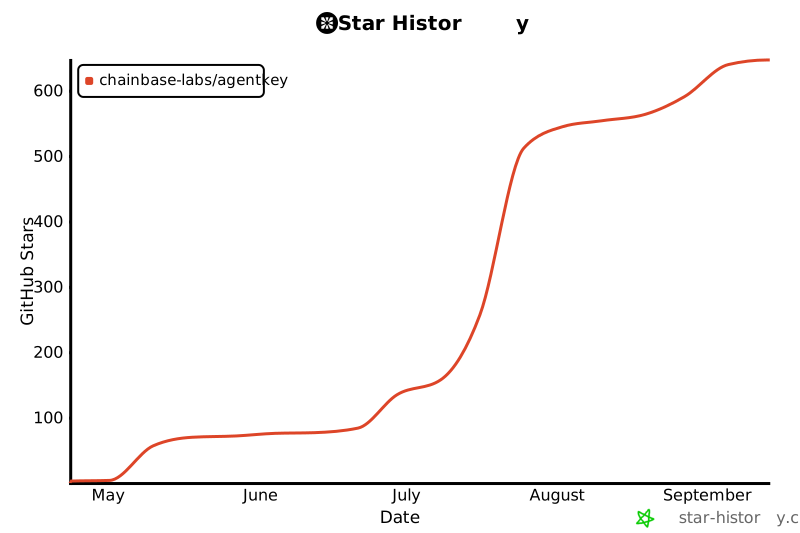](https://www.star-history.com/?repos=chainbase-labs%2Fagentkey&type=date&legend=top-left)
scripts/install.ps1 · Bundled script · 441 lines · 4 findings marked
- #Requires -Version 5.1
- <#
- .SYNOPSIS
- AgentKey installer for Windows
- .DESCRIPTION
- Usage:
- irm https://agentkey.app/install.ps1 | iex
- Note: Runs a downloaded PowerShell script (iex / Invoke-Expression)
- Line 7 on GitHub
- & ([scriptblock]::Create((irm https://agentkey.app/install.ps1))) -Yes
- & ([scriptblock]::Create((irm https://agentkey.app/install.ps1))) -Only "claude-code,cursor"
- & ([scriptblock]::Create((irm https://agentkey.app/install.ps1))) -NoTelemetry
- Behavior mirrors install.sh: checks Node >= 18 (installs via winget/scoop/choco),
- auto-detects which AI agents are installed and runs `npx skills add` for them,
- then `npx @agentkey/cli --auth-login` for device auth. The auth step always
- tries to open a local browser AND prints the URL so headless / SSH users can
- copy it elsewhere. MCP config is written automatically for Claude Code /
- Claude Desktop / Cursor.
- #>
- [CmdletBinding()]
- param(
- [switch]$Yes,
- [switch]$Interactive,
- [string]$Only,
- [switch]$AllAgents,
- [switch]$ListAgents,
- [switch]$SkipSkill,
- [switch]$SkipMcp,
- [switch]$NoTelemetry,
- [switch]$Help
- )
- $ErrorActionPreference = 'Stop'
- $SkillRepo = 'chainbase-labs/agentkey'
- $CliPackage = '@agentkey/cli'
- $NodeMinMajor = 18
- # ── Agent markers (mirror of install.sh) ──────────────────────────────────
- # Subset of vercel-labs/skills' 45 supported agent IDs that have reliable
- # Windows-side markers. Sync source:
- # https://github.com/vercel-labs/skills (Supported Agents table).
- #
- # IMPORTANT: ids here MUST match the `--only` ids accepted by both
- # `npx skills add -a` and `npx -y @agentkey/cli --auth-login --only`.
- # `claude-desktop` and `dsh` are exceptions. Neither is passed to
- # `skills add -a`; DSH reads the global skill installed for `universal`.
- $DshHome = if ([string]::IsNullOrWhiteSpace($env:DSH_HOME)) { Join-Path ([Environment]::GetFolderPath('UserProfile')) '.dsh' } else { $env:DSH_HOME }
- if ($DshHome -eq '~') {
- $DshHome = [Environment]::GetFolderPath('UserProfile')
- } elseif ($DshHome -match '^~[\\/]') {
- $DshHome = Join-Path ([Environment]::GetFolderPath('UserProfile')) $DshHome.Substring(2)
- }
- $DshHome = [System.IO.Path]::GetFullPath($DshHome)
- $AgentMarkers = @(
- @{ Id = 'claude-code'; Markers = @("path:$env:USERPROFILE\.claude.json", 'cmd:claude') }
- @{ Id = 'claude-desktop'; Markers = @("path:$env:LOCALAPPDATA\AnthropicClaude", "path:$env:APPDATA\Claude\claude_desktop_config.json", "path:$env:APPDATA\Claude") }
- @{ Id = 'cursor'; Markers = @("path:$env:USERPROFILE\.cursor", 'cmd:cursor', "path:$env:LOCALAPPDATA\Programs\cursor") }
- @{ Id = 'codex'; Markers = @("path:$env:USERPROFILE\.codex", 'cmd:codex') }
- @{ Id = 'dsh'; Markers = @("path:$DshHome", 'cmd:dsh') }
- @{ Id = 'gemini-cli'; Markers = @("path:$env:USERPROFILE\.gemini", 'cmd:gemini') }
- @{ Id = 'opencode'; Markers = @("path:$env:APPDATA\opencode", "path:$env:USERPROFILE\.opencode", 'cmd:opencode') }
- @{ Id = 'openclaw'; Markers = @("path:$env:USERPROFILE\.openclaw", 'cmd:openclaw') }
- @{ Id = 'qwen-code'; Markers = @("path:$env:USERPROFILE\.qwen", 'cmd:qwen') }
- @{ Id = 'iflow-cli'; Markers = @("path:$env:USERPROFILE\.iflow", 'cmd:iflow') }
- @{ Id = 'windsurf'; Markers = @("path:$env:USERPROFILE\.codeium\windsurf", "path:$env:USERPROFILE\.windsurf", 'cmd:windsurf') }
- @{ Id = 'warp'; Markers = @("path:$env:USERPROFILE\.warp") }
- @{ Id = 'amp'; Markers = @("path:$env:APPDATA\amp", 'cmd:amp') }
- @{ Id = 'crush'; Markers = @("path:$env:APPDATA\crush", 'cmd:crush') }
- @{ Id = 'goose'; Markers = @("path:$env:APPDATA\goose", 'cmd:goose') }
- @{ Id = 'droid'; Markers = @('cmd:droid') }
- @{ Id = 'kode'; Markers = @('cmd:kode') }
- @{ Id = 'kilo'; Markers = @('cmd:kilo') }
- @{ Id = 'kimi-cli'; Markers = @("path:$env:USERPROFILE\.kimi", 'cmd:kimi') }
- @{ Id = 'kiro-cli'; Markers = @("path:$env:USERPROFILE\.kiro", 'cmd:kiro') }
- )
- # Agent ids excluded from per-agent `skills add -a`: Claude Desktop has no
- # skill path, while DSH consumes the global `universal` copy.
- $SkillsAgentExclusions = @('claude-desktop', 'dsh')
- # Agent ids whose MCP registration the installer can drive automatically.
- # Mirror of MCP_AUTO_AGENTS in install.sh and AGENT_REGISTRY in
- # AgentKey-Server/cli/src/lib/mcp-clients.ts. Keep these three in sync.
- $McpAutoAgents = @(
- 'claude-code', 'claude-desktop', 'cursor', 'codex', 'gemini-cli',
- 'opencode', 'qwen-code', 'iflow-cli', 'kimi-cli', 'kiro-cli',
- 'windsurf', 'warp', 'amp', 'crush', 'droid', 'openclaw', 'dsh'
- )
- # ── UI helpers ────────────────────────────────────────────────────────────
- function Write-Banner {
- Write-Host ''
- Write-Host ' █████ ██████ ███████ ███ ██ ████████ ██ ██ ███████ ██ ██' -ForegroundColor Cyan
- Write-Host ' ██ ██ ██ ██ ████ ██ ██ ██ ██ ██ ██ ██ ' -ForegroundColor Cyan
- Write-Host ' ███████ ██ ███ █████ ██ ██ ██ ██ █████ █████ ████ ' -ForegroundColor Cyan
- Write-Host ' ██ ██ ██ ██ ██ ██ ██ ██ ██ ██ ██ ██ ██ ' -ForegroundColor Cyan
- Write-Host ' ██ ██ ██████ ███████ ██ ████ ██ ██ ██ ███████ ██ ' -ForegroundColor Cyan
- Write-Host ''
- Write-Host ' One command. Full internet access for your AI agent.' -ForegroundColor White
- Write-Host ' https://agentkey.app' -ForegroundColor DarkGray
- Write-Host ''
- }
- function Write-Step ($text) { Write-Host ''; Write-Host " $text" -ForegroundColor White }
- function Write-Info ($text) { Write-Host " › $text" -ForegroundColor Gray }
- function Write-Ok ($text) { Write-Host " ✓ $text" -ForegroundColor Green }
- function Write-Warn2($text) { Write-Host " ! $text" -ForegroundColor Yellow }
- function Write-Err ($text) { Write-Host " ✗ $text" -ForegroundColor Red }
- function Write-Muted($text) { Write-Host " $text" -ForegroundColor DarkGray }
- function Die ($text) { Write-Err $text; exit 1 }
- # ── Helpers: agent detection ──────────────────────────────────────────────
- function Test-AgentMarker {
- param([string]$Marker)
- if ($Marker.StartsWith('cmd:')) {
- return [bool](Get-Command $Marker.Substring(4) -ErrorAction SilentlyContinue)
- }
- if ($Marker.StartsWith('path:')) {
- return Test-Path -LiteralPath $Marker.Substring(5)
- }
- return $false
- }
- function Get-DetectedAgents {
- $hits = New-Object System.Collections.Generic.List[string]
- foreach ($entry in $AgentMarkers) {
- foreach ($m in $entry.Markers) {
- if (Test-AgentMarker $m) { $hits.Add($entry.Id) | Out-Null; break }
- }
- }
- return @($hits | Sort-Object -Unique)
- }
- # ── Help ──────────────────────────────────────────────────────────────────
- if ($Help) {
- @'
- AgentKey installer for Windows
- Usage:
- irm https://agentkey.app/install.ps1 | iex
- Note: Runs a downloaded PowerShell script (iex / Invoke-Expression)
- Line 141 on GitHub
- & ([scriptblock]::Create((irm https://agentkey.app/install.ps1))) -Yes
- Parameters:
- -Yes Non-interactive: install skill to every detected agent, no prompts
- -Interactive Force interactive mode (fails if console input is redirected)
- -Only <a,b,c> Only install skill for these agents (e.g. "claude-code,cursor")
- -AllAgents Skip auto-detection; let 'skills' CLI install for every detected agent
- -ListAgents Print the agents we'd auto-select on this machine and exit
- -SkipSkill Skip the skill install step (only run MCP auth)
- -SkipMcp Skip the MCP auth step (only install the skill)
- -NoTelemetry Disable anonymous usage telemetry (writes
- %USERPROFILE%\.config\agentkey\telemetry-disabled so
- the skill stays opted-out across runs)
- -Help Show this help
- Behavior:
- The installer auto-detects which AI agents are on this machine and
- pre-selects them for skill installation. The auth step always tries
- to open a browser and also prints the URL — so SSH / WinRM / Docker
- / OpenClaw users can copy the URL to any device with a browser.
- '@
- exit 0
- }
- if ($ListAgents) {
- $detected = Get-DetectedAgents
- if ($detected.Count -gt 0) { $detected -join "`n" | Write-Output }
- else { Write-Host 'no agents detected on this host' -ForegroundColor Yellow }
- exit 0
- }
- Write-Banner
- # ── 1. Preflight ──────────────────────────────────────────────────────────
- Write-Step '1. Preflight'
- # Platform guard
- if (-not $IsWindows -and $PSVersionTable.PSVersion.Major -ge 6) {
- Die 'This script targets Windows. On macOS/Linux use install.sh instead.'
- }
- Write-Ok 'Platform: windows'
- # Resolve interactive mode. PowerShell's `iex` runs in the current session, so
- # Read-Host works natively even under `irm | iex`. The only thing we need to
- Note: Runs a downloaded PowerShell script (iex / Invoke-Expression)
- Line 185 on GitHub
- # guard is truly redirected input (scheduled tasks, CI with redirected stdin).
- $InputRedirected = $false
- try { $InputRedirected = [Console]::IsInputRedirected } catch { $InputRedirected = $false }
- $Mode = $null
- if ($Yes) { $Mode = 'noninteractive' }
- elseif ($Interactive) {
- if ($InputRedirected) { Die '-Interactive requested but console input is redirected.' }
- $Mode = 'interactive'
- }
- elseif ($InputRedirected) {
- $Mode = 'noninteractive'
- Write-Warn2 'No interactive console detected — falling back to -Yes'
- }
- else {
- $Mode = 'interactive'
- }
- Write-Ok "Mode: $Mode"
- # Resolve telemetry intent: -NoTelemetry overrides everything; existing
- # %USERPROFILE%\.config\agentkey\telemetry-disabled file means already-opted-out.
- $TelemetryOptOutFile = Join-Path $env:USERPROFILE '.config\agentkey\telemetry-disabled'
- if ($NoTelemetry) {
- New-Item -ItemType Directory -Path (Split-Path $TelemetryOptOutFile) -Force | Out-Null
- New-Item -ItemType File -Path $TelemetryOptOutFile -Force | Out-Null
- Write-Ok 'Telemetry: disabled (-NoTelemetry)'
- } elseif (Test-Path -LiteralPath $TelemetryOptOutFile) {
- Write-Ok "Telemetry: disabled ($TelemetryOptOutFile exists)"
- } else {
- Write-Info 'Telemetry: anonymous usage stats enabled (re-run with -NoTelemetry to opt out)'
- }
- # Node check
- function Get-NodeMajor {
- try {
- $v = (& node --version) 2>$null
- if ($v -match '^v(\d+)\.') { return [int]$Matches[1] }
- } catch {}
- return 0
- }
- function Install-Node {
- Write-Info "Installing Node.js LTS ..."
- if (Get-Command winget -ErrorAction SilentlyContinue) {
- winget install -e --id OpenJS.NodeJS.LTS --silent --accept-source-agreements --accept-package-agreements | Out-Null
- } elseif (Get-Command scoop -ErrorAction SilentlyContinue) {
- scoop install nodejs-lts | Out-Null
- } elseif (Get-Command choco -ErrorAction SilentlyContinue) {
- choco install nodejs-lts -y | Out-Null
- } else {
- Die 'No package manager found (winget/scoop/choco). Install Node.js LTS manually: https://nodejs.org/'
- }
- # Refresh PATH so this session sees the newly installed node
- $env:Path = [System.Environment]::GetEnvironmentVariable('Path', 'Machine') + ';' +
- [System.Environment]::GetEnvironmentVariable('Path', 'User')
- Write-Ok 'Node.js installed'
- }
- $nodeMajor = Get-NodeMajor
- if ($nodeMajor -ge $NodeMinMajor) {
- Write-Ok "Node.js: v$nodeMajor.x"
- } else {
- if ($nodeMajor -gt 0) { Write-Warn2 "Node.js v$nodeMajor found but v$NodeMinMajor+ is required" }
- if ($Mode -eq 'interactive') {
- Write-Host ''
- Write-Host " Node.js v$NodeMinMajor+ is required but not found." -ForegroundColor White
- $reply = Read-Host ' Install it now? [Y/n]'
- if ($reply -match '^(n|no)$') { Die 'Node.js required. Aborting.' }
- }
- Install-Node
- }
- if (-not (Get-Command npx -ErrorAction SilentlyContinue)) {
- Die 'npx not found after Node install — please reopen your terminal or reinstall Node.js.'
- }
- # Resolve target agent list — shared between the skill step and the MCP step.
- # $AllTargets — every detected agent, including local exceptions
- # $SkillTargets — $AllTargets minus ids excluded from `skills add -a`
- # $McpTargets — $AllTargets filtered to ids the MCP CLI knows how to write
- $AllTargets = @()
- if ($Only) {
- $AllTargets = @($Only -split ',' | Where-Object { $_ -ne '' })
- Write-Info "Targeting agents from -Only: $($AllTargets -join ', ')"
- } elseif ($AllAgents) {
- Write-Info "Installing for every agent the 'skills' CLI detects (-AllAgents)"
- } else {
- $AllTargets = @(Get-DetectedAgents)
- if ($AllTargets.Count -gt 0) {
- Write-Ok "Detected agents on this host: $($AllTargets -join ', ')"
- Write-Muted '(override with -Only <ids>, or use -AllAgents)'
- } else {
- Write-Info "No agents auto-detected — letting 'skills' CLI scan."
- }
- }
- $SkillTargets = @($AllTargets | Where-Object { $_ -notin $SkillsAgentExclusions })
- $McpTargets = @($AllTargets | Where-Object { $_ -in $McpAutoAgents })
- $DshSelected = $AllTargets -contains 'dsh'
- $DshConfigured = $false
- # ── 2. Install the AgentKey skill ─────────────────────────────────────────
- if ($SkipSkill) {
- Write-Step '2. Install the AgentKey skill'
- Write-Muted 'Skipped (-SkipSkill)'
- } elseif ($AllTargets.Count -gt 0 -and $SkillTargets.Count -eq 0 -and -not $DshSelected) {
- # DSH never enters this branch: `-Only dsh` must still run the global
- # `skills add -g -a universal` path, without passing dsh to `-a`.
- Write-Step '2. Install the AgentKey skill'
- Write-Muted "Skipped — selected targets ($($AllTargets -join ',')) are MCP-only (no skill install path)."
- } else {
- Write-Step '2. Install the AgentKey skill'
- $skillsArgs = @('-y', 'skills', 'add', $SkillRepo, '-g')
- if ($SkillTargets.Count -gt 0) {
- $skillsArgs += '-a'
- $skillsArgs += $SkillTargets
- } elseif ($DshSelected) {
- $skillsArgs += @('-a', 'universal', '-s', 'agentkey')
- }
- # Always pass -y in noninteractive mode AND when we already resolved
- # an explicit target list — there's nothing left to ask the user.
- if ($Mode -eq 'noninteractive' -or $AllTargets.Count -gt 0) {
- $skillsArgs += '-y'
- }
- & npx @skillsArgs
- if ($LASTEXITCODE -ne 0) { Die "Failed to install skill via 'skills' CLI" }
- # The skills CLI sometimes prints "Installation failed" and still
- # exits 0 (e.g. network error during git clone). Verify the skill
- # actually landed on disk before declaring success. Paths must mirror
- # the `path:` markers in $AgentMarkers: most agents live under
- # %USERPROFILE%\.<agent>, but amp / crush / goose / opencode live
- # under %APPDATA%\<agent>.
- $userHome = [Environment]::GetFolderPath('UserProfile')
- $candidatePaths = @(
- (Join-Path $userHome '.agents\skills\agentkey'),
- (Join-Path $userHome '.claude\skills\agentkey'),
- (Join-Path $userHome '.cursor\skills\agentkey'),
- (Join-Path $userHome '.codex\skills\agentkey'),
- (Join-Path $userHome '.gemini\skills\agentkey'),
- (Join-Path $userHome '.opencode\skills\agentkey'),
- (Join-Path $userHome '.openclaw\skills\agentkey'),
- (Join-Path $userHome '.qwen\skills\agentkey'),
- (Join-Path $userHome '.iflow\skills\agentkey'),
- (Join-Path $userHome '.windsurf\skills\agentkey'),
- (Join-Path $userHome '.warp\skills\agentkey'),
- (Join-Path $userHome '.kimi\skills\agentkey'),
- (Join-Path $userHome '.kiro\skills\agentkey'),
- # APPDATA-rooted agents (parity with install.sh's $HOME/.config/<agent>)
- (Join-Path $env:APPDATA 'amp\skills\agentkey'),
- (Join-Path $env:APPDATA 'crush\skills\agentkey'),
- (Join-Path $env:APPDATA 'goose\skills\agentkey'),
- (Join-Path $env:APPDATA 'opencode\skills\agentkey')
- )
- $agentkeyFound = $false
- foreach ($abs in $candidatePaths) {
- if (Test-Path (Join-Path $abs 'SKILL.md')) {
- $agentkeyFound = $true
- break
- }
- }
- if (-not $agentkeyFound) {
- Die "Skill install reported success but no agentkey SKILL.md was created — likely a network or git clone failure. Retry: npx -y skills add $SkillRepo -g -a universal -s agentkey -y"
- }
- Write-Ok 'Skill installed'
- }
- # ── 3. MCP authentication ────────────────────────────────────────────────
- # Always run auth-login. The CLI itself decides whether the existing token
- # can be reused or a fresh device-code flow is needed — the installer no
- # longer second-guesses by sniffing config files (which produced false
- # positives across the stdio → HTTP schema change).
- if ($SkipMcp) {
- Write-Step '3. Register the MCP server'
- Write-Muted 'Skipped (-SkipMcp)'
- } elseif ($AllTargets.Count -gt 0 -and $McpTargets.Count -eq 0) {
- # User selected ONLY MCP-incompatible agents (goose / kode / kilo via
- # -Only). Running auth-login without --only would silently register MCP
- # in every detected agent, overriding the user's explicit scope. Skip
- # rather than over-register. See PR #41 B1.
- Write-Step '3. Register the MCP server'
- Write-Muted "Skipped — selected agents ($($AllTargets -join ',')) need manual MCP setup (see SKILL.md Fallback section)."
- } else {
- # Pin MCP registration to the same agent list the skill step targeted.
- # When McpTargets is empty (auto-detect found nothing), let
- # `@agentkey/cli` do its own detection — same fallback we use for skill
- # install. Older CLI versions silently ignore --only, so this is
- # forward-compatible.
- $authArgs = @('--auth-login')
- if ($McpTargets.Count -gt 0) {
- $authArgs += '--only'
- $authArgs += ($McpTargets -join ',')
- }
- Write-Step '3. Register the MCP server'
- Write-Info 'Opening your browser for AgentKey device authentication ...'
- if ($McpTargets.Count -gt 0) {
- Write-Muted "Will register MCP in: $($McpTargets -join ', ')"
- } else {
- Write-Muted "If a browser doesn't open (SSH / WinRM / Docker / headless), the auth URL is also printed below — open it on any device to finish."
- }
- Write-Host ''
- # Telemetry context for install_completed. Opt-out is honored at the
- # SOURCE: when AGENTKEY_TELEMETRY=0, no other context env vars are
- # exported — hostname-derived fingerprint, agent lists, and installer
- # flags are never computed nor passed to the child `npx @agentkey/cli`
- # process. The server treats AGENTKEY_TELEMETRY=0 as a hard skip.
- if ($NoTelemetry -or (Test-Path -LiteralPath $TelemetryOptOutFile)) {
- $env:AGENTKEY_TELEMETRY = '0'
- } else {
- $env:AGENTKEY_TELEMETRY = '1'
- $_hn = [System.Net.Dns]::GetHostName()
- $_user = $env:USERNAME
- $_input = "$_hn|windows|$_user"
- $_bytes = [System.Text.Encoding]::UTF8.GetBytes($_input)
- $_sha = [System.Security.Cryptography.SHA256]::Create()
- $_hash = ($_sha.ComputeHash($_bytes) | ForEach-Object { $_.ToString('x2') }) -join ''
- $DeviceFingerprint = $_hash.Substring(0, 16)
- $DetectedAgents = Get-DetectedAgents
- $env:AGENTKEY_INSTALL_SOURCE = 'one_liner'
- $env:AGENTKEY_DETECTED_AGENTS = ($DetectedAgents -join ',')
- $env:AGENTKEY_SELECTED_AGENTS = ($AllTargets -join ',')
- $env:AGENTKEY_INSTALLER_FLAGS = ($PSBoundParameters.Keys | ForEach-Object { "-$_" }) -join ','
- $env:AGENTKEY_DEVICE_FINGERPRINT = $DeviceFingerprint
- }
- & npx -y $CliPackage @authArgs
- if ($LASTEXITCODE -ne 0) {
- Write-Err 'MCP auth failed.'
- Write-Muted "Retry manually: npx -y $CliPackage $($authArgs -join ' ')"
- exit 1
- }
- $DshConfigured = $McpTargets -contains 'dsh'
- Write-Ok 'MCP server registered'
- }
- # ── 4. Summary ───────────────────────────────────────────────────────────
- Write-Step '✨ Installation complete'
- Write-Host ''
- Write-Host ' Next steps' -ForegroundColor White
- if ($DshConfigured) {
- Write-Muted '1. Running DSH profiles hot-apply the home patch; start stopped DSH profiles and restart other clients.'
- } else {
- Write-Muted '1. Restart your agent (Claude Code / Cursor / etc.)'
- }
- Write-Muted '2. Ask it something that needs the internet:'
- Write-Host ' "What has Musk been tweeting about lately?"' -ForegroundColor Cyan
- Write-Host ''
- Write-Host ' Docs https://agentkey.app/docs' -ForegroundColor White
- Write-Host ' Uninstall irm https://agentkey.app/uninstall.ps1 | iex' -ForegroundColor White
- Note: Runs a downloaded PowerShell script (iex / Invoke-Expression)
- Line 440 on GitHub
- Write-Host ''
scripts/install.sh · Bundled script · 496 lines · 11 findings marked
- #!/usr/bin/env bash
- # AgentKey installer for macOS and Linux
- # Usage: curl -fsSL https://agentkey.app/install.sh | bash
- Note: Pipes a downloaded script directly into a shell (curl | sh / wget | bash)
- Line 3 on GitHub
- # curl -fsSL https://agentkey.app/install.sh | bash -s -- --yes
- Note: Pipes a downloaded script directly into a shell (curl | sh / wget | bash)
- Line 4 on GitHub
- # curl -fsSL https://agentkey.app/install.sh | bash -s -- --interactive
- Note: Pipes a downloaded script directly into a shell (curl | sh / wget | bash)
- Line 5 on GitHub
- # curl -fsSL https://agentkey.app/install.sh | bash -s -- --only claude-code,cursor
- Note: Pipes a downloaded script directly into a shell (curl | sh / wget | bash)
- Line 6 on GitHub
- # curl -fsSL https://agentkey.app/install.sh | bash -s -- --skip-mcp
- Note: Pipes a downloaded script directly into a shell (curl | sh / wget | bash)
- Line 7 on GitHub
- set -euo pipefail
- # ── Constants ─────────────────────────────────────────────────────────────
- SKILL_REPO="chainbase-labs/agentkey"
- CLI_PACKAGE="@agentkey/cli"
- NODE_MIN_MAJOR=18
- DSH_DETECT_HOME="${DSH_HOME:-}"; [[ -n "$DSH_DETECT_HOME" && "$DSH_DETECT_HOME" == *[![:space:]]* ]] || DSH_DETECT_HOME="$HOME/.dsh"
- case "$DSH_DETECT_HOME" in "~"|"~/"*) DSH_DETECT_HOME="$HOME${DSH_DETECT_HOME#"~"}" ;; /*) ;; *) DSH_DETECT_HOME="$PWD/$DSH_DETECT_HOME" ;; esac
- # ── Agent markers ─────────────────────────────────────────────────────────
- # `claude-desktop` and `dsh` are exceptions. Neither may be passed to
- # `skills add -a`; DSH reads the global skill installed for `universal`.
- #
- # Format: <agent-id>|<marker>[,<marker>...]
- # marker types: cmd:foo — `command -v foo`
- # path:/abs/or/~path — file or dir exists (~ expands to $HOME)
- AGENT_MARKERS=(
- "claude-code|path:~/.claude.json,cmd:claude"
- "claude-desktop|path:/Applications/Claude.app,path:~/Applications/Claude.app,path:~/Library/Application Support/Claude/claude_desktop_config.json,path:~/Library/Application Support/Claude,path:~/.config/Claude/claude_desktop_config.json,path:~/.config/Claude"
- "cursor|path:~/.cursor,cmd:cursor"
- "codex|path:~/.codex,cmd:codex"
- "dsh|path:$DSH_DETECT_HOME,cmd:dsh"
- "gemini-cli|path:~/.gemini,cmd:gemini"
- "opencode|path:~/.config/opencode,path:~/.opencode,cmd:opencode"
- "openclaw|path:~/.openclaw,cmd:openclaw"
- "qwen-code|path:~/.qwen,cmd:qwen"
- "iflow-cli|path:~/.iflow,cmd:iflow"
- "windsurf|path:~/.codeium/windsurf,path:~/.windsurf,cmd:windsurf"
- "warp|path:~/.warp,path:~/Library/Application Support/dev.warp.Warp-Stable"
- "amp|path:~/.config/amp,cmd:amp"
- "crush|path:~/.config/crush,cmd:crush"
- "goose|path:~/.config/goose,cmd:goose"
- "droid|cmd:droid"
- "kode|cmd:kode"
- "kilo|cmd:kilo"
- "kimi-cli|path:~/.kimi,cmd:kimi"
- "kiro-cli|path:~/.kiro,cmd:kiro"
- )
- SKILLS_AGENT_EXCLUSIONS=(claude-desktop dsh)
- MCP_AUTO_AGENTS=(
- claude-code claude-desktop cursor codex gemini-cli opencode
- qwen-code iflow-cli kimi-cli kiro-cli windsurf warp
- amp crush droid openclaw dsh
- )
- # ── Colors (only if stdout is a TTY) ─────────────────────────────────────
- if [ -t 1 ] && [ -z "${NO_COLOR:-}" ]; then
- BOLD=$'\033[1m'
- ACCENT=$'\033[38;2;0;200;180m' # AgentKey teal
- INFO=$'\033[38;2;136;146;176m'
- SUCCESS=$'\033[38;2;0;220;150m'
- WARN=$'\033[38;2;255;176;32m'
- ERROR=$'\033[38;2;230;57;70m'
- MUTED=$'\033[38;2;110;118;132m'
- NC=$'\033[0m'
- else
- BOLD=''; ACCENT=''; INFO=''; SUCCESS=''; WARN=''; ERROR=''; MUTED=''; NC=''
- fi
- # ── UI helpers ────────────────────────────────────────────────────────────
- ui_banner() {
- printf "\n"
- printf "${ACCENT} █████ ██████ ███████ ███ ██ ████████ ██ ██ ███████ ██ ██${NC}\n"
- printf "${ACCENT} ██ ██ ██ ██ ████ ██ ██ ██ ██ ██ ██ ██ ${NC}\n"
- printf "${ACCENT} ███████ ██ ███ █████ ██ ██ ██ ██ █████ █████ ████ ${NC}\n"
- printf "${ACCENT} ██ ██ ██ ██ ██ ██ ██ ██ ██ ██ ██ ██ ██ ${NC}\n"
- printf "${ACCENT} ██ ██ ██████ ███████ ██ ████ ██ ██ ██ ███████ ██ ${NC}\n"
- printf "\n"
- printf " ${BOLD}One command. Full internet access for your AI agent.${NC}\n"
- printf " ${MUTED}https://agentkey.app${NC}\n\n"
- }
- ui_info() { printf " ${INFO}›${NC} %s\n" "$*"; }
- ui_ok() { printf " ${SUCCESS}✓${NC} %s\n" "$*"; }
- ui_warn() { printf " ${WARN}!${NC} %s\n" "$*"; }
- ui_error() { printf " ${ERROR}✗${NC} %s\n" "$*" >&2; }
- ui_step() { printf "\n ${BOLD}%s${NC}\n" "$*"; }
- ui_muted() { printf " ${MUTED}%s${NC}\n" "$*"; }
- die() { ui_error "$*"; exit 1; }
- print_help() {
- cat <<EOF
- AgentKey installer for macOS and Linux
- Usage:
- curl -fsSL https://agentkey.app/install.sh | bash
- Note: Pipes a downloaded script directly into a shell (curl | sh / wget | bash)
- Line 97 on GitHub
- curl -fsSL https://agentkey.app/install.sh | bash -s -- [OPTIONS]
- Note: Pipes a downloaded script directly into a shell (curl | sh / wget | bash)
- Line 98 on GitHub
- Options:
- --yes, -y Non-interactive: install skill to every detected agent, no prompts
- --interactive Force interactive mode (fails if no TTY/terminal is reachable)
- --only <a,b,c> Only install skill for these agents (comma-separated, e.g. claude-code,cursor)
- --all-agents Skip auto-detection; let 'skills' CLI install for every detected agent
- --list-agents Print the agents we'd auto-select on this machine and exit
- --skip-skill Skip the skill install step (only run MCP auth)
- --skip-mcp Skip the MCP auth step (only install the skill)
- --no-telemetry Disable anonymous usage telemetry (writes
- ~/.config/agentkey/telemetry-disabled so the skill
- stays opted-out across runs)
- -h, --help Show this help
- Behavior:
- Interactive mode is the default when a terminal is reachable; otherwise it
- falls back to --yes. The installer auto-detects which AI agents are on this
- machine and pre-selects them for skill installation. The auth step always
- attempts to open a browser and also prints the URL — so SSH / Docker /
- OpenClaw users can copy the URL to any device with a browser.
- EOF
- }
- # ── Helpers: agent detection ──────────────────────────────────────────────
- _expand_path() {
- local p="$1"
- case "$p" in
- "~"|"~/"*) printf '%s\n' "$HOME${p#"~"}" ;;
- *) printf '%s\n' "$p" ;;
- esac
- }
- _probe_marker() {
- local m="$1"
- case "$m" in
- cmd:*) command -v "${m#cmd:}" >/dev/null 2>&1 ;;
- path:*) [ -e "$(_expand_path "${m#path:}")" ] ;;
- *) return 1 ;;
- esac
- }
- detect_agents() {
- local entry id markers marker hits=()
- for entry in "${AGENT_MARKERS[@]}"; do
- id="${entry%%|*}"
- markers="${entry#*|}"
- IFS=',' read -ra marker_list <<<"$markers"
- for marker in "${marker_list[@]}"; do
- if _probe_marker "$marker"; then
- hits+=("$id")
- break
- fi
- done
- done
- if [ ${#hits[@]} -gt 0 ]; then
- printf '%s\n' "${hits[@]}" | sort -u | paste -sd, -
- fi
- }
- _in_list() {
- local needle="$1"; shift
- local item
- for item in "$@"; do
- [ "$item" = "$needle" ] && return 0
- done
- return 1
- }
- _filter_csv() {
- local csv="$1"; shift
- [ -z "$csv" ] && return 0
- local id
- local -a ids=() out=()
- IFS=',' read -ra ids <<<"$csv"
- for id in "${ids[@]}"; do
- if _in_list "$id" "$@"; then
- out+=("$id")
- fi
- done
- if [ ${#out[@]} -gt 0 ]; then
- printf '%s\n' "${out[@]}" | paste -sd, -
- fi
- }
- install_node() {
- local platform="$1"
- ui_info "Installing Node.js v$NODE_MIN_MAJOR+ ..."
- if [ "$platform" = "macos" ]; then
- if command -v brew >/dev/null 2>&1; then
- brew install node >/dev/null 2>&1 || die "brew install node failed"
- else
- die "Homebrew not found. Install Node.js v$NODE_MIN_MAJOR+ manually: https://nodejs.org/"
- fi
- else
- if command -v apt-get >/dev/null 2>&1; then
- curl -fsSL https://deb.nodesource.com/setup_lts.x | sudo -E bash - >/dev/null 2>&1 \
- Note: Pipes a downloaded script directly into a shell (curl | sh / wget | bash)
- Line 195 on GitHub
- && sudo apt-get install -y nodejs >/dev/null 2>&1 || die "apt install nodejs failed"
- elif command -v dnf >/dev/null 2>&1; then
- curl -fsSL https://rpm.nodesource.com/setup_lts.x | sudo -E bash - >/dev/null 2>&1 \
- Note: Pipes a downloaded script directly into a shell (curl | sh / wget | bash)
- Line 198 on GitHub
- && sudo dnf install -y nodejs >/dev/null 2>&1 || die "dnf install nodejs failed"
- elif command -v yum >/dev/null 2>&1; then
- curl -fsSL https://rpm.nodesource.com/setup_lts.x | sudo -E bash - >/dev/null 2>&1 \
- Note: Pipes a downloaded script directly into a shell (curl | sh / wget | bash)
- Line 201 on GitHub
- && sudo yum install -y nodejs >/dev/null 2>&1 || die "yum install nodejs failed"
- elif command -v apk >/dev/null 2>&1; then
- sudo apk add --no-cache nodejs npm >/dev/null 2>&1 || die "apk add nodejs failed"
- else
- die "No supported package manager found. Install Node.js v$NODE_MIN_MAJOR+ manually: https://nodejs.org/"
- fi
- fi
- ui_ok "Node.js installed"
- }
- compute_device_fingerprint() {
- local platform="$1"
- local hn user input hash
- hn="$(hostname 2>/dev/null || echo "")"
- user="${USER:-$(id -un 2>/dev/null || echo "")}"
- input="$hn|$platform|$user"
- if command -v sha256sum >/dev/null 2>&1; then
- hash="$(printf '%s' "$input" | sha256sum | cut -c1-16)"
- elif command -v shasum >/dev/null 2>&1; then
- hash="$(printf '%s' "$input" | shasum -a 256 | cut -c1-16)"
- else
- hash="rnd$(printf '%04x%04x%04x' "$RANDOM" "$RANDOM" "$RANDOM")"
- fi
- printf '%s' "$hash"
- }
- main() {
- local MODE=""
- local ONLY_AGENTS=""
- local SKIP_MCP=false
- local SKIP_SKILL=false
- local PRINT_HELP=false
- local LIST_AGENTS=false
- local ALL_AGENTS=false
- local NO_TELEMETRY=false
- local _orig_args=("$@")
- while [ $# -gt 0 ]; do
- case "$1" in
- -y|--yes) MODE=noninteractive; shift ;;
- --interactive) MODE=interactive; shift ;;
- --only) ONLY_AGENTS="${2:-}"; shift 2 ;;
- --only=*) ONLY_AGENTS="${1#*=}"; shift ;;
- --all-agents) ALL_AGENTS=true; shift ;;
- --list-agents) LIST_AGENTS=true; shift ;;
- --skip-skill) SKIP_SKILL=true; shift ;;
- --skip-mcp) SKIP_MCP=true; shift ;;
- --no-telemetry) NO_TELEMETRY=true; shift ;;
- -h|--help) PRINT_HELP=true; shift ;;
- *) ui_warn "Unknown argument: $1"; shift ;;
- esac
- done
- if $PRINT_HELP; then print_help; exit 0; fi
- if $LIST_AGENTS; then
- local detected
- detected="$(detect_agents)"
- if [ -n "$detected" ]; then
- printf '%s\n' "$detected" | tr ',' '\n'
- else
- printf 'no agents detected on this host\n' >&2
- fi
- exit 0
- fi
- ui_banner
- # ── 1. Preflight ──────────────────────────────────────────────────────
- ui_step "1. Preflight"
- local OS PLATFORM
- OS="$(uname -s)"
- case "$OS" in
- Darwin) PLATFORM="macos" ;;
- Linux) PLATFORM="linux" ;;
- *) die "Unsupported OS: $OS (macOS/Linux only; use install.ps1 on Windows)" ;;
- esac
- ui_ok "Platform: $PLATFORM"
- local TTY_AVAILABLE=false
- if ( : < /dev/tty ) >/dev/null 2>&1; then
- TTY_AVAILABLE=true
- fi
- if [ -z "$MODE" ]; then
- if $TTY_AVAILABLE; then
- MODE=interactive
- else
- MODE=noninteractive
- ui_warn "No terminal detected (CI/non-TTY shell) — falling back to --yes"
- fi
- elif [ "$MODE" = interactive ] && ! $TTY_AVAILABLE; then
- die "--interactive requested but no TTY is reachable"
- fi
- ui_ok "Mode: $MODE"
- local TELEMETRY_OPT_OUT_FILE="$HOME/.config/agentkey/telemetry-disabled"
- if $NO_TELEMETRY; then
- mkdir -p "$(dirname "$TELEMETRY_OPT_OUT_FILE")" 2>/dev/null || true
- touch "$TELEMETRY_OPT_OUT_FILE" 2>/dev/null || true
- ui_ok "Telemetry: disabled (--no-telemetry)"
- elif [ -f "$TELEMETRY_OPT_OUT_FILE" ]; then
- ui_ok "Telemetry: disabled (~/.config/agentkey/telemetry-disabled exists)"
- else
- ui_info "Telemetry: anonymous usage stats enabled (re-run with --no-telemetry to opt out)"
- fi
- local NODE_OK=false NODE_VERSION NODE_MAJOR
- if command -v node >/dev/null 2>&1; then
- NODE_VERSION="$(node --version 2>/dev/null | sed 's/^v//')"
- NODE_MAJOR="${NODE_VERSION%%.*}"
- if [ -n "$NODE_MAJOR" ] && [ "$NODE_MAJOR" -ge "$NODE_MIN_MAJOR" ] 2>/dev/null; then
- NODE_OK=true
- ui_ok "Node.js: v$NODE_VERSION"
- else
- ui_warn "Node.js v$NODE_VERSION found but v$NODE_MIN_MAJOR+ is required"
- fi
- fi
- if ! $NODE_OK; then
- if [ "$MODE" = interactive ]; then
- printf "\n ${BOLD}Node.js v%s+ is required but not found.${NC}\n" "$NODE_MIN_MAJOR"
- printf " Install it now? [Y/n] "
- local REPLY=""
- read -r REPLY < /dev/tty || REPLY=""
- case "$REPLY" in
- n|N|no|No) die "Node.js required. Aborting." ;;
- esac
- fi
- install_node "$PLATFORM"
- fi
- command -v npx >/dev/null 2>&1 || die "npx not found after Node install — please reinstall Node.js"
- # ── Resolve target agent list ─────────────────────────────────────────
- local ALL_TARGETS=""
- if [ -n "$ONLY_AGENTS" ]; then
- ALL_TARGETS="$ONLY_AGENTS"
- ui_info "Targeting agents from --only: $ALL_TARGETS"
- elif $ALL_AGENTS; then
- ui_info "Installing for every agent the 'skills' CLI detects (--all-agents)"
- else
- ALL_TARGETS="$(detect_agents)"
- if [ -n "$ALL_TARGETS" ]; then
- ui_ok "Detected agents on this host: $ALL_TARGETS"
- ui_muted "(override with --only <ids>, or use --all-agents)"
- else
- ui_info "No agents auto-detected — letting 'skills' CLI scan."
- fi
- fi
- local SKILL_TARGETS=""
- local MCP_TARGETS=""
- local DSH_SELECTED=false
- local DSH_MCP_CONFIGURED=false
- if [ -n "$ALL_TARGETS" ]; then
- local _id
- local -a _id_list=() _kept=()
- IFS=',' read -ra _id_list <<<"$ALL_TARGETS"
- for _id in "${_id_list[@]}"; do
- [ "$_id" = dsh ] && DSH_SELECTED=true
- if ! _in_list "$_id" "${SKILLS_AGENT_EXCLUSIONS[@]}"; then
- _kept+=("$_id")
- fi
- done
- if [ ${#_kept[@]} -gt 0 ]; then
- SKILL_TARGETS="$(printf '%s\n' "${_kept[@]}" | paste -sd, -)"
- fi
- MCP_TARGETS="$(_filter_csv "$ALL_TARGETS" "${MCP_AUTO_AGENTS[@]}")"
- fi
- # ── 2. Install the AgentKey skill ─────────────────────────────────────
- if $SKIP_SKILL; then
- ui_step "2. Install the AgentKey skill"
- ui_muted "Skipped (--skip-skill)"
- elif [ -n "$ALL_TARGETS" ] && [ -z "$SKILL_TARGETS" ] && ! $DSH_SELECTED; then
- ui_step "2. Install the AgentKey skill"
- ui_muted "Skipped — selected targets ($ALL_TARGETS) are MCP-only (no skill install path)."
- else
- ui_step "2. Install the AgentKey skill"
- local SKILLS_ARGS=(-y skills add "$SKILL_REPO" -g)
- if [ -n "$SKILL_TARGETS" ]; then
- local AGENT_LIST=()
- IFS=',' read -ra AGENT_LIST <<<"$SKILL_TARGETS"
- SKILLS_ARGS+=(-a "${AGENT_LIST[@]}")
- elif $DSH_SELECTED; then
- SKILLS_ARGS+=(-a universal -s agentkey)
- fi
- if [ "$MODE" = noninteractive ] || [ -n "$ALL_TARGETS" ]; then
- SKILLS_ARGS+=(-y)
- fi
- local npx_stdin="/dev/null"
- if [ "$MODE" = interactive ] && $TTY_AVAILABLE; then
- npx_stdin="/dev/tty"
- fi
- if ! npx "${SKILLS_ARGS[@]}" < "$npx_stdin"; then
- die "Failed to install skill via 'skills' CLI"
- fi
- local _agentkey_found=false _dir
- for _dir in \
- "$HOME/.agents/skills/agentkey" \
- "$HOME/.claude/skills/agentkey" \
- "$HOME/.cursor/skills/agentkey" \
- "$HOME/.codex/skills/agentkey" \
- "$HOME/.gemini/skills/agentkey" \
- "$HOME/.opencode/skills/agentkey" \
- "$HOME/.openclaw/skills/agentkey" \
- "$HOME/.qwen/skills/agentkey" \
- "$HOME/.iflow/skills/agentkey" \
- "$HOME/.windsurf/skills/agentkey" \
- "$HOME/.warp/skills/agentkey" \
- "$HOME/.config/amp/skills/agentkey" \
- "$HOME/.config/crush/skills/agentkey" \
- "$HOME/.config/goose/skills/agentkey" \
- "$HOME/.config/opencode/skills/agentkey" \
- "$HOME/.kimi/skills/agentkey" \
- "$HOME/.kiro/skills/agentkey"; do
- [ -f "$_dir/SKILL.md" ] && { _agentkey_found=true; break; }
- done
- if ! $_agentkey_found; then
- die "Skill install reported success but no agentkey SKILL.md was created — likely a network or git clone failure. Retry: npx -y skills add $SKILL_REPO -g -a universal -s agentkey -y"
- fi
- ui_ok "Skill installed"
- fi
- # ── 3. MCP authentication ────────────────────────────────────────────
- if $SKIP_MCP; then
- ui_step "3. Register the MCP server"
- ui_muted "Skipped (--skip-mcp)"
- elif [ -n "$ALL_TARGETS" ] && [ -z "$MCP_TARGETS" ]; then
- ui_step "3. Register the MCP server"
- ui_muted "Skipped — selected agents ($ALL_TARGETS) need manual MCP setup (see SKILL.md Fallback section)."
- else
- local AUTH_ARGS=(--auth-login)
- if [ -n "$MCP_TARGETS" ]; then
- AUTH_ARGS+=(--only "$MCP_TARGETS")
- fi
- ui_step "3. Register the MCP server"
- ui_info "Opening your browser for AgentKey device authentication ..."
- if [ -n "$MCP_TARGETS" ]; then
- ui_muted "Will register MCP in: $MCP_TARGETS"
- else
- ui_muted "If a browser doesn't open (SSH / Docker / headless), the auth URL is also printed below — open it on any device to finish."
- fi
- echo
- if $NO_TELEMETRY || [ -f "$TELEMETRY_OPT_OUT_FILE" ]; then
- export AGENTKEY_TELEMETRY=0
- else
- export AGENTKEY_TELEMETRY=1
- local _flags=""
- for _f in "${_orig_args[@]:-}"; do
- _flags="${_flags:+$_flags,}$_f"
- done
- export AGENTKEY_INSTALL_SOURCE="one_liner"
- export AGENTKEY_DETECTED_AGENTS="$(detect_agents)"
- export AGENTKEY_SELECTED_AGENTS="${ALL_TARGETS:-}"
- export AGENTKEY_INSTALLER_FLAGS="$_flags"
- export AGENTKEY_DEVICE_FINGERPRINT="$(compute_device_fingerprint "$PLATFORM")"
- fi
- if ! npx -y "$CLI_PACKAGE" "${AUTH_ARGS[@]}"; then
- ui_error "MCP auth failed."
- ui_muted "Retry manually: npx -y $CLI_PACKAGE ${AUTH_ARGS[*]}"
- exit 1
- fi
- case ",$MCP_TARGETS," in *,dsh,*) DSH_MCP_CONFIGURED=true ;; esac
- ui_ok "MCP server registered"
- fi
- # ── 4. Summary ───────────────────────────────────────────────────────
- ui_step "✨ Installation complete"
- local APPLY_HINT="Restart your agent (Claude Code / Cursor / etc.)"
- if $DSH_MCP_CONFIGURED; then
- APPLY_HINT="Running DSH profiles hot-apply the home patch; start stopped DSH profiles and restart other clients"
- fi
- cat <<EOF
- ${BOLD}Next steps${NC}
- ${MUTED}1.${NC} $APPLY_HINT
- ${MUTED}2.${NC} Ask it something that needs the internet:
- ${ACCENT}"What has Musk been tweeting about lately?"${NC}
- ${BOLD}Docs${NC} https://agentkey.app/docs
- ${BOLD}Uninstall${NC} curl -fsSL https://agentkey.app/uninstall.sh | bash
- Note: Pipes a downloaded script directly into a shell (curl | sh / wget | bash)
- Line 491 on GitHub
- EOF
- }
- main "$@"
scripts/uninstall.ps1 · Bundled script · 500 lines · 2 findings marked
- #Requires -Version 5.1
- <#
- .SYNOPSIS
- AgentKey uninstaller for Windows
- .DESCRIPTION
- Usage:
- irm https://agentkey.app/uninstall.ps1 | iex
- Note: Runs a downloaded PowerShell script (iex / Invoke-Expression)
- Line 7 on GitHub
- & ([scriptblock]::Create((irm https://agentkey.app/uninstall.ps1))) -KeepMarketplace
- & ([scriptblock]::Create((irm https://agentkey.app/uninstall.ps1))) -ForceInRepo
- Cleans up everything install.ps1 (and the legacy two-command flow) ever wrote:
- 1. Skill files in every agent (via `skills remove`)
- 2. MCP server entries (Claude Code / Claude Desktop / Cursor)
- 3. Plugin + marketplace caches
- 4. CLAUDE.md sections + npm/npx caches (legacy)
- #>
- [CmdletBinding()]
- param(
- [switch]$KeepMarketplace,
- [switch]$ForceInRepo,
- [switch]$SkipSkillRemove,
- [switch]$Help
- )
- $ErrorActionPreference = 'Continue'
- if ($Help) {
- @'
- AgentKey uninstaller (Windows)
- Usage:
- irm https://agentkey.app/uninstall.ps1 | iex
- Note: Runs a downloaded PowerShell script (iex / Invoke-Expression)
- Line 33 on GitHub
- Parameters:
- -KeepMarketplace Keep the Claude Code plugin marketplace registration
- -ForceInRepo Allow running inside the AgentKey-Skill source repo
- -SkipSkillRemove Skip 'npx skills remove' (only clean configs/caches)
- -Help Show this help
- '@
- exit 0
- }
- # ── UI helpers ────────────────────────────────────────────────────────────
- function Write-Step ($t) { Write-Host ''; Write-Host " $t" -ForegroundColor White }
- function Write-Info ($t) { Write-Host " › $t" -ForegroundColor Gray }
- function Write-Ok ($t) { Write-Host " ✓ $t" -ForegroundColor Green }
- function Write-Warn2($t) { Write-Host " ! $t" -ForegroundColor Yellow }
- function Write-Skip ($t) { Write-Host " - $t" -ForegroundColor DarkGray }
- function Write-Err ($t) { Write-Host " ✗ $t" -ForegroundColor Red }
- # ── Safety rail ──────────────────────────────────────────────────────────
- if ((Test-Path '.claude-plugin/plugin.json') -and -not $ForceInRepo) {
- $content = Get-Content '.claude-plugin/plugin.json' -Raw -ErrorAction SilentlyContinue
- if ($content -match '"name"\s*:\s*"agentkey"') {
- Write-Host ''
- Write-Host ' AgentKey — Uninstall' -ForegroundColor White
- Write-Host ''
- Write-Err 'Refusing to run inside the AgentKey-Skill source repo.'
- Write-Host " Running here would wipe this repo's own .mcp.json and CLAUDE.md." -ForegroundColor DarkGray
- Write-Host ' Re-run with -ForceInRepo if you really mean it.' -ForegroundColor DarkGray
- Write-Host ''
- exit 2
- }
- }
- Write-Host ''
- Write-Host ' AgentKey — Uninstall' -ForegroundColor White
- Write-Host ' https://agentkey.app' -ForegroundColor DarkGray
- # ── 1. Skill removal via skills CLI ──────────────────────────────────────
- Write-Step '1. Skill files'
- if ($SkipSkillRemove) {
- Write-Skip 'Skipped (-SkipSkillRemove)'
- } elseif (-not (Get-Command npx -ErrorAction SilentlyContinue)) {
- Write-Warn2 "npx not found — skipping 'skills remove'"
- Write-Host ' Manual: npx skills remove agentkey -g' -ForegroundColor DarkGray
- } else {
- # `skills remove` takes the **skill name** (`agentkey`), not the repo path.
- # The CLI also exits 0 when nothing matches, so we inspect stdout instead.
- Write-Info 'Running: npx -y skills remove agentkey -g -y'
- $removeOutput = (& npx -y skills remove agentkey -g -y 2>&1) -join "`n"
- if ($removeOutput -match 'Successfully removed') {
- Write-Ok 'Skill removed from detected agents'
- } elseif ($removeOutput -match 'No matching skills found') {
- Write-Skip "Not registered with 'skills' CLI (already removed or installed via plugin marketplace)"
- } else {
- Write-Warn2 "'skills remove' produced unexpected output — some agents may still have skill files"
- Write-Host ' Check manually: npx skills list -g' -ForegroundColor DarkGray
- }
- }
- # ── 2. MCP config cleanup ────────────────────────────────────────────────
- Write-Step '2. MCP server entries'
- $home2 = [Environment]::GetFolderPath('UserProfile')
- # All known JSON MCP config paths across the 16 auto-supported agents. The
- # scrub logic is schema-agnostic — it walks the JSON tree and drops any
- # dict key whose name exactly matches our server name (current + legacy),
- # so the same scrubber handles every dialect: mcpServers, mcp,
- # amp.mcpServers, projects.X.mcpServers, etc. Keep this list aligned with
- # AGENT_REGISTRY in AgentKey-Server/cli/src/lib/mcp-clients.ts.
- $mcpJsonConfigs = @(
- (Join-Path $home2 '.claude.json'), # Claude Code
- (Join-Path $home2 '.cursor\mcp.json'), # Cursor
- (Join-Path $env:APPDATA 'Claude\claude_desktop_config.json'), # Claude Desktop
- (Join-Path $home2 '.gemini\settings.json'), # Gemini CLI
- (Join-Path $home2 '.qwen\settings.json'), # Qwen Code
- (Join-Path $home2 '.iflow\settings.json'), # iFlow CLI
- (Join-Path $home2 '.kimi\mcp.json'), # Kimi CLI
- (Join-Path $home2 '.kiro\settings\mcp.json'), # Kiro CLI
- (Join-Path $home2 '.codeium\windsurf\mcp_config.json'), # Windsurf
- (Join-Path $home2 '.warp\.mcp.json'), # Warp
- (Join-Path $env:APPDATA 'opencode\opencode.json'), # OpenCode (mcp.<name>)
- (Join-Path $env:APPDATA 'amp\settings.json'), # Amp (amp.mcpServers.<name>)
- (Join-Path $env:APPDATA 'crush\crush.json') # Crush (mcp.<name>)
- )
- # TOML config — handled separately (no built-in TOML parser pre-PS7.4).
- $mcpTomlConfigs = @(
- (Join-Path $home2 '.codex\config.toml') # Codex CLI
- )
- $ServerNames = @('agentkey', 'agentkey.app agentkey')
- # Schema-agnostic recursive scrub: drop any dict key whose lowercased name
- # is in $ServerNames. Covers mcpServers / mcp / amp.mcpServers / projects.*
- # in one pass. Exact match (not substring) so we don't nuke unrelated user
- # keys like "my-agentkey-helper".
- function Scrub-Mcp($node) {
- $removed = 0
- if ($node -is [System.Management.Automation.PSCustomObject]) {
- $keys = @($node.PSObject.Properties.Name)
- foreach ($k in $keys) {
- if ($ServerNames -contains $k.ToLower()) {
- $node.PSObject.Properties.Remove($k)
- $removed++
- } else {
- $removed += Scrub-Mcp $node.$k
- }
- }
- } elseif ($node -is [System.Collections.IList]) {
- foreach ($item in $node) {
- $removed += Scrub-Mcp $item
- }
- }
- return $removed
- }
- function Clean-McpJsonConfig($path) {
- if (-not (Test-Path $path)) {
- Write-Skip "$([System.IO.Path]::GetFileName($path)) not found"
- return
- }
- try {
- $raw = Get-Content $path -Raw
- $obj = $raw | ConvertFrom-Json
- } catch {
- Write-Warn2 "Could not parse $path — skipping"
- return
- }
- $removed = Scrub-Mcp $obj
- if ($removed -gt 0) {
- ($obj | ConvertTo-Json -Depth 100) | Set-Content -Path $path -Encoding UTF8
- Write-Ok "Removed $removed entry/entries from $path"
- } else {
- Write-Skip "No agentkey entry in $path"
- }
- }
- foreach ($cfg in $mcpJsonConfigs) { Clean-McpJsonConfig $cfg }
- # Codex TOML — line-scan to splice out our [mcp_servers.agentkey] block
- # (bare + legacy quoted name). Done in pure PowerShell — no TOML lib needed
- # because we only ever delete, never re-emit unrelated tables.
- function Clean-McpTomlConfig($path) {
- if (-not (Test-Path $path)) {
- Write-Skip "$([System.IO.Path]::GetFileName($path)) not found"
- return
- }
- $lines = Get-Content $path
- $headerPattern = '^\s*\[\s*mcp_servers\s*\.\s*(agentkey|"agentkey\.app AgentKey")\s*\]\s*$'
- $anyHeader = '^\s*\[[^\]]+\]\s*$'
- if (-not ($lines -match $headerPattern)) {
- Write-Skip "No agentkey block in $path"
- return
- }
- $out = New-Object System.Collections.Generic.List[string]
- $skip = $false
- foreach ($line in $lines) {
- if ($line -match $headerPattern) { $skip = $true; continue }
- if ($skip -and $line -match $anyHeader) { $skip = $false }
- if (-not $skip) { $out.Add($line) }
- }
- Set-Content -Path $path -Value $out -Encoding UTF8
- Write-Ok "Removed agentkey block from $path"
- }
- foreach ($cfg in $mcpTomlConfigs) { Clean-McpTomlConfig $cfg }
- # DSH stores the MCP loader in the home patch; old installs used profiles.
- $DshHome = if ([string]::IsNullOrWhiteSpace($env:DSH_HOME)) { Join-Path $home2 '.dsh' } else { $env:DSH_HOME }
- if ($DshHome -eq '~') { $DshHome = $home2 }
- elseif ($DshHome -match '^~[\\/]') { $DshHome = Join-Path $home2 $DshHome.Substring(2) }
- $DshHome = [System.IO.Path]::GetFullPath($DshHome)
- $utf8NoBom = New-Object System.Text.UTF8Encoding($false)
- $managedPattern = '(?ms)^# agentkey:start(?:[ \t][^\r\n]*)?(?:\r?\n|$).*?^# agentkey:end(?:[ \t][^\r\n]*)?(?:\r?\n|$)'
- $profilesDir = Join-Path $DshHome 'profiles'
- $dshCleaned = $false
- $dshPatches = New-Object System.Collections.Generic.List[string]
- $homePatch = Join-Path $DshHome 'cordis.patch.yml'; if (Test-Path $homePatch) { [void]$dshPatches.Add($homePatch) }
- if (Test-Path $profilesDir) {
- foreach ($profile in Get-ChildItem $profilesDir -Directory -ErrorAction SilentlyContinue | Where-Object { $_.Name -ne 'node_modules' }) {
- $patch = Join-Path $profile.FullName 'cordis.patch.yml'
- if (Test-Path $patch) { [void]$dshPatches.Add($patch) }
- }
- }
- foreach ($patch in $dshPatches) {
- $raw = [System.IO.File]::ReadAllText($patch)
- $markerDepth = 0
- $malformedMarkers = $false
- foreach ($line in ($raw -split '\r?\n')) {
- if ($line -match '^# agentkey:start(?:[ \t]|$)') {
- if ($markerDepth -ne 0) { $malformedMarkers = $true }; $markerDepth++
- } elseif ($line -match '^# agentkey:end(?:[ \t]|$)') {
- if ($markerDepth -ne 1) { $malformedMarkers = $true }; if ($markerDepth -gt 0) { $markerDepth-- }
- }
- }
- if ($markerDepth -ne 0) { $malformedMarkers = $true }
- if ($malformedMarkers) {
- Write-Warn2 "Malformed AgentKey markers in $patch — left unchanged"
- continue
- }
- $updated = [regex]::Replace($raw, $managedPattern, '')
- if ($updated -ne $raw) {
- $meaningful = @($updated -split '\r?\n' | Where-Object { $_ -match '^\s*[^#\s]' })
- if ($meaningful.Count -eq 0) {
- $eol = if ($raw.Contains("`r`n")) { "`r`n" } else { "`n" }
- $prefix = $updated.TrimEnd()
- $updated = if ($prefix) { $prefix + $eol + $eol + '[]' + $eol } else { '[]' + $eol }
- }
- [System.IO.File]::WriteAllText($patch, $updated, $utf8NoBom)
- $dshCleaned = $true
- Write-Ok "Removed AgentKey DSH block from $patch"
- } elseif ($raw -match '(?m)^# agentkey:start(?:[ \t]|$)') {
- Write-Warn2 "Malformed AgentKey markers in $patch — left unchanged"
- } else {
- Write-Skip "No AgentKey DSH block in $patch"
- }
- }
- $legacyDshPreset = Join-Path $DshHome '.agent-presets\agentkey'
- if (Test-Path $legacyDshPreset) {
- $presetBackup = "$legacyDshPreset.backup-$([DateTime]::UtcNow.ToString('yyyyMMddTHHmmssZ'))"; while (Test-Path $presetBackup) { $presetBackup += '-1' }
- Move-Item $legacyDshPreset $presetBackup; Write-Ok "Archived legacy DSH preset at $presetBackup" }
- $dshSettings = Join-Path $DshHome 'settings.yaml'
- if (Test-Path $dshSettings) {
- $lines = [System.IO.File]::ReadAllLines($dshSettings)
- $out = New-Object System.Collections.Generic.List[string]
- $inPresets = $false
- $removedDefault = $false
- foreach ($line in $lines) {
- if ($line -match '^\s*agent-presets\.default:\s*["'']?agentkey["'']?\s*(?:#.*)?$') {
- $removedDefault = $true
- continue
- }
- if ($line -match '^[^\s#][^:]*:\s*') {
- $inPresets = $line -match '^agent-presets:\s*(?:#.*)?$'
- }
- if ($inPresets -and $line -match '^\s+default:\s*["'']?agentkey["'']?\s*(?:#.*)?$') {
- $removedDefault = $true
- continue
- }
- [void]$out.Add($line)
- }
- if ($removedDefault) {
- [System.IO.File]::WriteAllLines($dshSettings, $out, $utf8NoBom)
- Write-Ok "Removed legacy agent-presets default from $dshSettings"
- }
- }
- # ── 2b. CLI-registered agents (droid / openclaw) ─────────────────────────
- # These two have no documented file-edit path; we registered them via their
- # CLIs so we have to unregister the same way. Best-effort — silently skip
- # if the CLI isn't on PATH or the entry was never created.
- Write-Step '2b. CLI-registered agents (droid / openclaw)'
- if (Get-Command droid -ErrorAction SilentlyContinue) {
- & droid mcp remove agentkey 2>$null | Out-Null
- if ($LASTEXITCODE -eq 0) { Write-Ok 'Removed agentkey from droid (`droid mcp remove`)' }
- else { Write-Skip 'No agentkey entry in droid (or already removed)' }
- } else {
- Write-Skip 'droid CLI not on PATH'
- }
- if (Get-Command openclaw -ErrorAction SilentlyContinue) {
- & openclaw mcp unset agentkey 2>$null | Out-Null
- if ($LASTEXITCODE -eq 0) { Write-Ok 'Removed agentkey from openclaw (`openclaw mcp unset`)' }
- else { Write-Skip 'No agentkey entry in openclaw (or already removed)' }
- } else {
- Write-Skip 'openclaw CLI not on PATH'
- }
- # ── 3. Claude Code plugin registrations (legacy) ─────────────────────────
- Write-Step '3. Claude Code plugin registrations (legacy)'
- if (-not (Get-Command claude -ErrorAction SilentlyContinue)) {
- Write-Skip 'Claude Code CLI not on PATH — nothing to do here'
- } else {
- $pluginList = & claude plugin list 2>$null
- $markets = @()
- if ($pluginList) {
- $markets = $pluginList | Select-String -Pattern 'agentkey@[a-zA-Z0-9_-]+' -AllMatches |
- ForEach-Object { $_.Matches.Value } | Sort-Object -Unique
- }
- if ($markets.Count -eq 0) {
- Write-Skip 'No agentkey plugin registered'
- } else {
- foreach ($entry in $markets) {
- $name = $entry.Split('@')[0]
- Write-Info "Uninstalling $entry ..."
- & claude plugin uninstall $name --scope user 2>$null
- if ($LASTEXITCODE -eq 0) { Write-Ok "Removed $entry" }
- else { Write-Warn2 "Could not remove $entry" }
- }
- }
- $mcpList = & claude mcp list 2>$null
- if ($mcpList -and ($mcpList -match '^agentkey')) {
- Write-Info "Removing MCP server 'agentkey' via claude CLI ..."
- & claude mcp remove agentkey 2>$null
- if ($LASTEXITCODE -eq 0) { Write-Ok 'MCP server removed' }
- else { Write-Warn2 'Could not remove MCP server via claude CLI' }
- } else {
- Write-Skip "No 'agentkey' MCP via claude CLI"
- }
- if ($KeepMarketplace) {
- Write-Skip 'Marketplace removal skipped (-KeepMarketplace)'
- } else {
- $mktList = & claude plugin marketplace list 2>$null
- $agentkeyMkts = @()
- if ($mktList) {
- $joined = $mktList -join "`n"
- if ($joined -match '(AgentKey-Skill|chainbase-labs/AgentKey-Skill|agentkey-skill|chainbase-labs/agentkey)') {
- $agentkeyMkts = $mktList | Select-String -Pattern '^\s*❯\s+([a-zA-Z0-9_-]+)' |
- ForEach-Object { $_.Matches[0].Groups[1].Value }
- }
- }
- if ($agentkeyMkts.Count -eq 0) {
- Write-Skip 'No AgentKey marketplace entry'
- } else {
- foreach ($mkt in $agentkeyMkts) {
- Write-Info "Removing marketplace '$mkt' ..."
- & claude plugin marketplace remove $mkt 2>$null
- if ($LASTEXITCODE -eq 0) { Write-Ok "Removed marketplace '$mkt'" }
- else { Write-Warn2 "Could not remove marketplace '$mkt'" }
- }
- }
- }
- }
- # ── 4. Plugin + marketplace caches ────────────────────────────────────────
- Write-Step '4. Plugin / marketplace caches'
- $cacheHits = @()
- $pluginCache = Join-Path $home2 '.claude\plugins\cache'
- if (Test-Path $pluginCache) {
- $cacheHits += Get-ChildItem -Path $pluginCache -Directory -Filter 'agentkey*' -ErrorAction SilentlyContinue
- }
- $mktCache = Join-Path $home2 '.claude\plugins\marketplaces'
- if (Test-Path $mktCache) {
- $cacheHits += Get-ChildItem -Path $mktCache -Directory -Filter '*agentkey*' -ErrorAction SilentlyContinue
- }
- if ($cacheHits.Count -eq 0) {
- Write-Skip 'No cache found'
- } else {
- foreach ($d in $cacheHits) {
- Remove-Item -Recurse -Force $d.FullName -ErrorAction SilentlyContinue
- Write-Ok "Removed $($d.FullName)"
- }
- }
- # ── 5. CLAUDE.md cleanup (legacy) ─────────────────────────────────────────
- Write-Step '5. CLAUDE.md sections (legacy)'
- $mdChanged = $false
- $candidates = @(
- (Join-Path $home2 '.claude\CLAUDE.md'),
- '.claude\CLAUDE.md',
- 'CLAUDE.md'
- )
- foreach ($md in $candidates) {
- if (-not (Test-Path $md)) { continue }
- $c = Get-Content $md -Raw
- if ($c -notmatch '(AgentKey|agentkey|AGENTKEY)') { continue }
- $c2 = [regex]::Replace($c, '\n# AgentKey\n.*?(?=\n# |\z)', '', 'Singleline')
- $c2 = [regex]::Replace($c2, '\n[^\n]*(\.agentkey|agentkey.*activation\.md|agentkey.*SKILL\.md)[^\n]*', '', 'IgnoreCase')
- if ($c2 -ne $c) {
- Set-Content -Path $md -Value $c2 -Encoding UTF8
- Write-Ok "Removed AgentKey section from $md"
- $mdChanged = $true
- }
- }
- if (-not $mdChanged) { Write-Skip 'No removable AgentKey section in CLAUDE.md' }
- # ── 6. npm / npx caches ───────────────────────────────────────────────────
- Write-Step '6. npm / npx caches'
- if (Get-Command npm -ErrorAction SilentlyContinue) {
- $globalList = & npm list -g --depth=0 2>$null
- $removedAny = $false
- # Sweep both the current package name and the legacy v0.x name so users
- # who installed before the @agentkey/mcp → @agentkey/cli rename get a
- # clean uninstall.
- foreach ($pkg in @('@agentkey/cli', '@agentkey/mcp')) {
- if ($globalList -and ($globalList -match [regex]::Escape($pkg))) {
- Write-Info "Uninstalling global $pkg ..."
- & npm uninstall -g $pkg 2>$null | Out-Null
- if ($LASTEXITCODE -eq 0) { Write-Ok "Removed $pkg"; $removedAny = $true }
- else { Write-Warn2 "Could not remove $pkg" }
- }
- }
- if (-not $removedAny) {
- Write-Skip 'No global @agentkey/cli or @agentkey/mcp installed'
- }
- } else {
- Write-Skip 'npm not on PATH'
- }
- $npxCache = Join-Path $home2 '.npm\_npx'
- if (Test-Path $npxCache) {
- $hits = Get-ChildItem -Path $npxCache -Directory -Recurse -Depth 2 -ErrorAction SilentlyContinue |
- Where-Object { $_.Name -match 'agentkey' }
- if ($hits) {
- $hits | ForEach-Object { Remove-Item -Recurse -Force $_.FullName -ErrorAction SilentlyContinue }
- Write-Ok 'Cleared agentkey entries from npx cache'
- } else {
- Write-Skip 'No agentkey entries in npx cache'
- }
- } else {
- Write-Skip 'No npx cache directory'
- }
- # ── 7. Residual plugin registries ─────────────────────────────────────────
- Write-Step '7. Residual plugin registries'
- $regs = @(
- (Join-Path $home2 '.claude\plugins\installed_plugins.json'),
- (Join-Path $home2 '.claude\plugins\known_marketplaces.json'),
- (Join-Path $home2 '.claude\mcp-needs-auth-cache.json')
- )
- function Scrub-Agentkey($node) {
- $removed = 0
- if ($node -is [System.Management.Automation.PSCustomObject]) {
- $keys = @($node.PSObject.Properties.Name)
- foreach ($k in $keys) {
- if ($k -match 'agentkey') {
- $node.PSObject.Properties.Remove($k)
- $removed++
- } else {
- $removed += Scrub-Agentkey $node.$k
- }
- }
- } elseif ($node -is [System.Collections.IList]) {
- # Rebuild list without agentkey items
- $kept = New-Object System.Collections.ArrayList
- foreach ($item in $node) {
- $s = ($item | ConvertTo-Json -Depth 10 -Compress).ToLower()
- if ($s -match 'agentkey') {
- $removed++
- } else {
- $removed += Scrub-Agentkey $item
- [void]$kept.Add($item)
- }
- }
- return @{ removed = $removed; list = $kept }
- }
- return $removed
- }
- foreach ($reg in $regs) {
- if (-not (Test-Path $reg)) { continue }
- try {
- $obj = Get-Content $reg -Raw | ConvertFrom-Json
- } catch { continue }
- $res = Scrub-Agentkey $obj
- $n = if ($res -is [hashtable]) { $res.removed } else { $res }
- if ($n -gt 0) {
- ($obj | ConvertTo-Json -Depth 100) | Set-Content -Path $reg -Encoding UTF8
- Write-Ok "Cleaned $n entry/entries from $reg"
- }
- }
- # ── Done ──────────────────────────────────────────────────────────────────
- Write-Host ''
- Write-Host ' ✓ Uninstall complete.' -ForegroundColor Green -NoNewline
- if ($dshCleaned) { Write-Host ' Running DSH profiles watch removal; close legacy sessions or restart once if needed.' -ForegroundColor White }
- else { Write-Host ' Restart your agent to apply changes.' -ForegroundColor White }
- Write-Host ''
scripts/uninstall.sh · Bundled script · 500 lines · 4 findings marked
- #!/usr/bin/env bash
- #
- # AgentKey uninstaller for macOS and Linux
- # Usage: curl -fsSL https://agentkey.app/uninstall.sh | bash
- Note: Pipes a downloaded script directly into a shell (curl | sh / wget | bash)
- Line 4 on GitHub
- # curl -fsSL https://agentkey.app/uninstall.sh | bash -s -- --keep-marketplace
- Note: Pipes a downloaded script directly into a shell (curl | sh / wget | bash)
- Line 5 on GitHub
- # curl -fsSL https://agentkey.app/uninstall.sh | bash -s -- --force-in-repo
- Note: Pipes a downloaded script directly into a shell (curl | sh / wget | bash)
- Line 6 on GitHub
- #
- # Cleans up everything install.sh (and the legacy two-command flow) ever wrote:
- # 1. Skill files in every agent (via `skills remove` — fans across 40+ agents)
- # 2. MCP server entries (Claude Code / Claude Desktop / Cursor configs)
- # 3. Claude Code plugin + marketplace registrations (legacy plugin install path)
- # 4. Plugin / marketplace / npx caches
- # 5. Shell RC exports + CLAUDE.md sections (legacy)
- # 6. MCP stdio log
- set -euo pipefail
- KEEP_MARKETPLACE=false
- FORCE_IN_REPO=false
- SKIP_SKILL_REMOVE=false
- for arg in "$@"; do
- case "$arg" in
- --keep-marketplace) KEEP_MARKETPLACE=true ;;
- --force-in-repo) FORCE_IN_REPO=true ;;
- --skip-skill-remove) SKIP_SKILL_REMOVE=true ;;
- -h|--help)
- cat <<EOF
- AgentKey uninstaller (macOS / Linux)
- Usage:
- curl -fsSL https://agentkey.app/uninstall.sh | bash [-s -- OPTIONS]
- Note: Pipes a downloaded script directly into a shell (curl | sh / wget | bash)
- Line 31 on GitHub
- Options:
- --keep-marketplace Keep the Claude Code plugin marketplace registration
- --force-in-repo Allow running inside the AgentKey-Skill source repo
- --skip-skill-remove Skip 'npx skills remove' (only clean configs/caches)
- -h, --help Show this help
- EOF
- exit 0 ;;
- esac
- done
- # ── Colors ────────────────────────────────────────────────────────────────
- # Use $'...' so variables hold real ESC bytes (works in both printf and heredoc).
- if [ -t 1 ] && [ -z "${NO_COLOR:-}" ]; then
- BOLD=$'\033[1m'; SUCCESS=$'\033[38;2;0;220;150m'; INFO=$'\033[38;2;136;146;176m'
- WARN=$'\033[38;2;255;176;32m'; ERROR=$'\033[38;2;230;57;70m'
- MUTED=$'\033[38;2;110;118;132m'; NC=$'\033[0m'
- else
- BOLD=''; SUCCESS=''; INFO=''; WARN=''; ERROR=''; MUTED=''; NC=''
- fi
- info() { printf " ${INFO}›${NC} %s\n" "$*"; }
- ok() { printf " ${SUCCESS}✓${NC} %s\n" "$*"; }
- warn() { printf " ${WARN}!${NC} %s\n" "$*"; }
- skipped() { printf " ${MUTED}-${NC} %s\n" "$*"; }
- step() { printf "\n ${BOLD}%s${NC}\n" "$*"; }
- # ── Safety rail ──────────────────────────────────────────────────────────
- if [ -f ".claude-plugin/plugin.json" ] \
- && grep -q '"name"[[:space:]]*:[[:space:]]*"agentkey"' .claude-plugin/plugin.json 2>/dev/null \
- && ! $FORCE_IN_REPO; then
- printf "\n ${BOLD}AgentKey — Uninstall${NC}\n\n"
- printf " ${ERROR}Refusing to run inside the AgentKey-Skill source repo.${NC}\n"
- printf " Running here would wipe this repo's own .mcp.json and CLAUDE.md.\n"
- printf " Re-run with ${BOLD}--force-in-repo${NC} if you really mean it.\n\n"
- exit 2
- fi
- printf "\n ${BOLD}AgentKey — Uninstall${NC}\n"
- printf " ${MUTED}https://agentkey.app${NC}\n"
- # ── 1. Remove the skill via skills CLI ────────────────────────────────────
- step "1. Skill files"
- if $SKIP_SKILL_REMOVE; then
- skipped "Skipped (--skip-skill-remove)"
- elif ! command -v npx >/dev/null 2>&1; then
- warn "npx not found — skipping 'skills remove' (manual: npx skills remove agentkey -g)"
- else
- # `skills remove` takes the **skill name** (`agentkey`), not the repo path.
- # The CLI also exits 0 when nothing matches, so we inspect stdout instead.
- info "Running: npx -y skills remove agentkey -g -y"
- REMOVE_OUTPUT="$(npx -y skills remove agentkey -g -y 2>&1 || true)"
- if printf '%s\n' "$REMOVE_OUTPUT" | grep -q "Successfully removed"; then
- ok "Skill removed from detected agents"
- elif printf '%s\n' "$REMOVE_OUTPUT" | grep -q "No matching skills found"; then
- skipped "Not registered with 'skills' CLI (already removed or installed via plugin marketplace)"
- else
- warn "'skills remove' produced unexpected output — some agents may still have skill files"
- warn "Check manually: npx skills list -g"
- fi
- fi
- # ── 2. MCP config cleanup ────────────────────────────────────────────────
- step "2. MCP server entries"
- OS="$(uname -s)"
- # All known JSON MCP config paths across the 16 auto-supported agents. The
- # scrub logic is intentionally schema-agnostic — it walks the JSON tree and
- # drops any key named "agentkey" / "agentkey.app AgentKey" wherever it
- # finds it, so the same scrubber handles:
- # - mcpServers.agentkey (Claude Code, Desktop, Cursor, Gemini, Windsurf, Warp, Qwen, iFlow, Kimi, Kiro)
- # - projects.*.mcpServers (Claude Code's per-project shape)
- # - mcp.agentkey (OpenCode, Crush)
- # - amp.mcpServers.agentkey (Amp's flat dotted key)
- # Keep this list in sync with AGENT_REGISTRY in
- # AgentKey-Server/cli/src/lib/mcp-clients.ts.
- MCP_JSON_CONFIGS=(
- "$HOME/.claude.json" # Claude Code
- "$HOME/.cursor/mcp.json" # Cursor
- "$HOME/.gemini/settings.json" # Gemini CLI
- "$HOME/.qwen/settings.json" # Qwen Code
- "$HOME/.iflow/settings.json" # iFlow CLI
- "$HOME/.kimi/mcp.json" # Kimi CLI
- "$HOME/.kiro/settings/mcp.json" # Kiro CLI
- "$HOME/.codeium/windsurf/mcp_config.json" # Windsurf
- "$HOME/.warp/.mcp.json" # Warp
- "$HOME/.config/opencode/opencode.json" # OpenCode (mcp.<name>)
- "$HOME/.config/amp/settings.json" # Amp (amp.mcpServers.<name>)
- "$HOME/.config/crush/crush.json" # Crush (mcp.<name>)
- )
- if [ "$OS" = "Darwin" ]; then
- MCP_JSON_CONFIGS+=("$HOME/Library/Application Support/Claude/claude_desktop_config.json")
- else
- MCP_JSON_CONFIGS+=("$HOME/.config/Claude/claude_desktop_config.json")
- fi
- # TOML configs — handled separately because we can't parse TOML without a
- # library. We splice out `[mcp_servers.agentkey]` blocks via line-scan.
- MCP_TOML_CONFIGS=(
- "$HOME/.codex/config.toml" # Codex CLI
- )
- have_python() { command -v python3 >/dev/null 2>&1 || command -v python >/dev/null 2>&1; }
- py() { if command -v python3 >/dev/null 2>&1; then python3 "$@"; else python "$@"; fi; }
- if ! have_python; then
- warn "python not found — skipping JSON cleanup; edit these files manually:"
- for f in "${MCP_JSON_CONFIGS[@]}"; do [ -f "$f" ] && echo " $f"; done
- else
- for cfg in "${MCP_JSON_CONFIGS[@]}"; do
- if [ ! -f "$cfg" ]; then
- skipped "$(basename "$cfg") not found"
- continue
- fi
- RESULT=$(py - "$cfg" <<'EOF'
- import json, sys
- path = sys.argv[1]
- try:
- with open(path) as f: d = json.load(f)
- except Exception as e:
- print(f"ERROR: {e}"); sys.exit(0)
- # Schema-agnostic recursive scrub: drop any dict key whose name exactly
- # matches one of our known MCP server names (current + legacy). Covers every
- # dialect we write: mcpServers.agentkey, mcp.agentkey,
- # amp.mcpServers.agentkey, projects.X.mcpServers.agentkey, etc.
- # Exact-match (not substring) so we don't nuke unrelated user keys like
- # "agentkey-helper" or "my-agentkey-config".
- NAMES = {'agentkey', 'agentkey.app agentkey'}
- def scrub(obj):
- removed = 0
- if isinstance(obj, dict):
- for k in list(obj.keys()):
- if k.lower() in NAMES:
- del obj[k]; removed += 1
- else:
- removed += scrub(obj[k])
- elif isinstance(obj, list):
- for item in obj:
- removed += scrub(item)
- return removed
- removed = scrub(d)
- if removed:
- with open(path, 'w') as f:
- json.dump(d, f, indent=2)
- print(removed)
- EOF
- )
- if [ "$RESULT" = "0" ]; then
- skipped "No agentkey entry in $cfg"
- elif [[ "$RESULT" =~ ^[0-9]+$ ]]; then
- ok "Removed $RESULT entry/entries from $cfg"
- else
- warn "Failed to update $cfg: $RESULT"
- fi
- done
- fi
- # Codex TOML: splice out [mcp_servers.agentkey] blocks (bare + legacy quoted).
- # Bash-only — no Python dependency — because we never parse, only line-edit.
- for cfg in "${MCP_TOML_CONFIGS[@]}"; do
- if [ ! -f "$cfg" ]; then
- skipped "$(basename "$cfg") not found"
- continue
- fi
- if ! grep -qE '^\s*\[\s*mcp_servers\s*\.\s*(agentkey|"agentkey\.app AgentKey")\s*\]' "$cfg" 2>/dev/null; then
- skipped "No agentkey block in $cfg"
- continue
- fi
- # Line-scan: drop from our header line to the next [section] header or EOF.
- awk '
- BEGIN { skip = 0 }
- /^[[:space:]]*\[[[:space:]]*mcp_servers[[:space:]]*\.[[:space:]]*(agentkey|"agentkey\.app AgentKey")[[:space:]]*\][[:space:]]*$/ { skip = 1; next }
- /^[[:space:]]*\[[^]]+\][[:space:]]*$/ { skip = 0 }
- !skip { print }
- ' "$cfg" > "$cfg.tmp" && mv "$cfg.tmp" "$cfg"
- ok "Removed agentkey block from $cfg"
- done
- # DSH cleanup is marker-scoped so unrelated home/profile patches survive.
- DSH_ROOT="${DSH_HOME:-}"; [[ -n "$DSH_ROOT" && "$DSH_ROOT" == *[![:space:]]* ]] || DSH_ROOT="$HOME/.dsh"
- case "$DSH_ROOT" in "~"|"~/"*) DSH_ROOT="$HOME${DSH_ROOT#"~"}" ;; /*) ;; *) DSH_ROOT="$PWD/$DSH_ROOT" ;; esac
- DSH_CLEANED=false
- for cfg in "$DSH_ROOT/cordis.patch.yml" "$DSH_ROOT"/profiles/*/cordis.patch.yml; do
- [ -f "$cfg" ] || continue; grep -qE '^# agentkey:start([[:space:]]|$)' "$cfg" 2>/dev/null || { skipped "No AgentKey DSH block in $cfg"; continue; }; tmp="${cfg}.agentkey-uninstall.$$"
- if awk 'BEGIN{s=0;i=0} /^# agentkey:start([[:space:]]|$)/{if(s)i=1;s=1;next} /^# agentkey:end([[:space:]]|$)/{if(!s)i=1;else{s=0;next}} !s{print} END{if(s||i)exit 42}' "$cfg" > "$tmp"; then
- grep -q '^[[:space:]]*[^#[:space:]]' "$tmp" || printf '\n[]\n' >> "$tmp"
- chmod 600 "$tmp"; mv "$tmp" "$cfg"; DSH_CLEANED=true; ok "Removed AgentKey DSH block from $cfg"
- else
- rm -f "$tmp"; warn "Malformed AgentKey markers in $cfg — left unchanged"
- fi
- done
- LEGACY_DSH_PRESET="$DSH_ROOT/.agent-presets/agentkey"
- if [ -e "$LEGACY_DSH_PRESET" ] || [ -L "$LEGACY_DSH_PRESET" ]; then
- DSH_PRESET_BACKUP="${LEGACY_DSH_PRESET}.backup-$(date -u +%Y%m%dT%H%M%SZ)"; while [ -e "$DSH_PRESET_BACKUP" ]; do DSH_PRESET_BACKUP="${DSH_PRESET_BACKUP}-1"; done; mv "$LEGACY_DSH_PRESET" "$DSH_PRESET_BACKUP"; ok "Archived legacy DSH preset at $DSH_PRESET_BACKUP"; fi
- DSH_SETTINGS="$DSH_ROOT/settings.yaml"
- if [ -f "$DSH_SETTINGS" ]; then
- tmp="${DSH_SETTINGS}.agentkey-uninstall.$$"
- if awk 'BEGIN{p=0;r=0} /^[[:space:]]*agent-presets\.default:[[:space:]]*["\047]?agentkey["\047]?[[:space:]]*(#.*)?$/{r=1;next} /^[^[:space:]#][^:]*:[[:space:]]*/{p=($0~/^agent-presets:[[:space:]]*(#.*)?$/);print;next} p&&/^[[:space:]]+default:[[:space:]]*["\047]?agentkey["\047]?[[:space:]]*(#.*)?$/{r=1;next} {print} END{if(r)exit 10}' "$DSH_SETTINGS" > "$tmp"; then status=0; else status=$?; fi
- case "$status" in 0) rm -f "$tmp" ;; 10) mv "$tmp" "$DSH_SETTINGS"; ok "Removed legacy agent-presets default from $DSH_SETTINGS" ;; *) rm -f "$tmp"; warn "Could not clean legacy DSH settings in $DSH_SETTINGS" ;; esac
- fi
- # ── 2b. CLI-registered agents (droid / openclaw) ─────────────────────────
- # These two agents have no documented file-edit path; we registered them via
- # their own CLIs (`droid mcp add`, `openclaw mcp set`), so we have to use the
- # CLI to unregister. Best-effort — silently skip if the CLI isn't on PATH or
- # the entry was never created.
- step "2b. CLI-registered agents (droid / openclaw)"
- if command -v droid >/dev/null 2>&1; then
- if droid mcp remove agentkey >/dev/null 2>&1; then
- ok "Removed agentkey from droid (\`droid mcp remove\`)"
- else
- skipped "No agentkey entry in droid (or already removed)"
- fi
- else
- skipped "droid CLI not on PATH"
- fi
- if command -v openclaw >/dev/null 2>&1; then
- if openclaw mcp unset agentkey >/dev/null 2>&1; then
- ok "Removed agentkey from openclaw (\`openclaw mcp unset\`)"
- else
- skipped "No agentkey entry in openclaw (or already removed)"
- fi
- else
- skipped "openclaw CLI not on PATH"
- fi
- # ── 3. Claude Code plugin registrations (legacy) ─────────────────────────
- step "3. Claude Code plugin registrations (legacy)"
- if ! command -v claude >/dev/null 2>&1; then
- skipped "Claude Code CLI not on PATH — nothing to do here"
- else
- PLUGIN_LIST=$(claude plugin list 2>/dev/null || true)
- MARKETS=$(echo "$PLUGIN_LIST" | grep -oE 'agentkey@[a-zA-Z0-9_-]+' || true)
- if [ -z "$MARKETS" ]; then
- skipped "No agentkey plugin registered"
- else
- while IFS= read -r entry; do
- name="${entry%%@*}"
- info "Uninstalling $entry ..."
- if claude plugin uninstall "$name" --scope user 2>/dev/null; then
- ok "Removed $entry"
- else
- warn "Could not remove $entry — try: claude plugin uninstall $name --scope user"
- fi
- done <<< "$MARKETS"
- fi
- # Legacy MCP registration via `claude mcp`
- if claude mcp list 2>/dev/null | grep -q "^agentkey"; then
- info "Removing MCP server 'agentkey' via claude CLI ..."
- if claude mcp remove agentkey 2>/dev/null; then
- ok "MCP server removed"
- else
- warn "Could not remove MCP server via claude CLI"
- fi
- else
- skipped "No 'agentkey' MCP via claude CLI"
- fi
- # Marketplace entry
- if $KEEP_MARKETPLACE; then
- skipped "Marketplace removal skipped (--keep-marketplace)"
- else
- AGENTKEY_MARKETS=$(claude plugin marketplace list 2>/dev/null \
- | grep -B1 -A1 -E "(AgentKey-Skill|chainbase-labs/AgentKey-Skill|agentkey-skill|chainbase-labs/agentkey)" \
- | grep -oE '^ ❯ [a-zA-Z0-9_-]+' | awk '{print $2}' || true)
- if [ -z "$AGENTKEY_MARKETS" ]; then
- skipped "No AgentKey marketplace entry"
- else
- while IFS= read -r mkt; do
- info "Removing marketplace '$mkt' ..."
- if claude plugin marketplace remove "$mkt" 2>/dev/null; then
- ok "Removed marketplace '$mkt'"
- else
- warn "Could not remove marketplace '$mkt'"
- fi
- done <<< "$AGENTKEY_MARKETS"
- fi
- fi
- fi
- # ── 4. Plugin + marketplace caches ────────────────────────────────────────
- step "4. Plugin / marketplace caches"
- CACHE_HITS=()
- for d in "$HOME/.claude/plugins/cache"/agentkey \
- "$HOME/.claude/plugins/cache"/agentkey-skill \
- "$HOME/.claude/plugins/cache"/agentkey-*; do
- [ -d "$d" ] && CACHE_HITS+=("$d")
- done
- if [ -d "$HOME/.claude/plugins/marketplaces" ]; then
- for d in "$HOME/.claude/plugins/marketplaces"/*agentkey*; do
- [ -d "$d" ] && CACHE_HITS+=("$d")
- done
- fi
- if [ ${#CACHE_HITS[@]} -eq 0 ]; then
- skipped "No cache found"
- else
- for d in "${CACHE_HITS[@]}"; do
- rm -rf "$d" && ok "Removed $d"
- done
- fi
- # ── 5. Shell RC environment exports (legacy) ──────────────────────────────
- step "5. Shell environment exports (legacy)"
- changed=false
- for RC in "$HOME/.zshrc" "$HOME/.bashrc" "$HOME/.bash_profile" "$HOME/.profile"; do
- [ -f "$RC" ] || continue
- if grep -q "agentkey-env-start" "$RC" 2>/dev/null; then
- if have_python; then
- py - "$RC" <<'EOF'
- import re, sys
- p = sys.argv[1]
- c = open(p).read()
- n = re.sub(r'\n# agentkey-env-start.*?# agentkey-env-end', '', c, flags=re.DOTALL)
- if n != c: open(p, 'w').write(n)
- EOF
- ok "Cleaned agentkey env block from $RC"
- changed=true
- else
- warn "python not found — edit $RC manually (look for 'agentkey-env-start')"
- fi
- fi
- done
- $changed || skipped "No agentkey env block in any shell RC"
- # ── 6. CLAUDE.md cleanup (legacy) ─────────────────────────────────────────
- step "6. CLAUDE.md sections (legacy)"
- md_changed=false
- for CLAUDE_MD in "$HOME/.claude/CLAUDE.md" ".claude/CLAUDE.md" "CLAUDE.md"; do
- [ -f "$CLAUDE_MD" ] || continue
- grep -q "AgentKey\|agentkey\|AGENTKEY" "$CLAUDE_MD" 2>/dev/null || continue
- if have_python; then
- OUT=$(py - "$CLAUDE_MD" <<'EOF'
- import re, sys
- p = sys.argv[1]
- c = open(p).read()
- c2 = re.sub(r'\n# AgentKey\n.*?(?=\n# |\Z)', '', c, flags=re.DOTALL)
- c2 = re.sub(r'\n[^\n]*(\.agentkey|agentkey.*activation\.md|agentkey.*SKILL\.md)[^\n]*', '', c2, flags=re.IGNORECASE)
- if c2 != c:
- open(p, 'w').write(c2)
- print("CHANGED")
- else:
- print("NO_MATCH")
- EOF
- )
- if [ "$OUT" = "CHANGED" ]; then
- ok "Removed AgentKey section from $CLAUDE_MD"
- md_changed=true
- fi
- else
- warn "python not found — edit $CLAUDE_MD manually"
- fi
- done
- $md_changed || skipped "No removable AgentKey section in CLAUDE.md"
- # ── 7. npm / npx caches ───────────────────────────────────────────────────
- step "7. npm / npx caches"
- if command -v npm >/dev/null 2>&1; then
- _global_list="$(npm list -g --depth=0 2>/dev/null || true)"
- _removed_any=false
- # Sweep both the current package name and the legacy v0.x name so
- # users who installed before the @agentkey/mcp → @agentkey/cli rename
- # get a clean uninstall.
- for _pkg in "@agentkey/cli" "@agentkey/mcp"; do
- if echo "$_global_list" | grep -q "$_pkg"; then
- info "Uninstalling global $_pkg ..."
- if npm uninstall -g "$_pkg" >/dev/null 2>&1; then
- ok "Removed $_pkg"
- _removed_any=true
- else
- warn "Could not remove $_pkg — try: npm uninstall -g $_pkg"
- fi
- fi
- done
- if ! $_removed_any; then
- skipped "No global @agentkey/cli or @agentkey/mcp installed"
- fi
- else
- skipped "npm not on PATH"
- fi
- if [ -d "$HOME/.npm/_npx" ]; then
- NPX_HITS=$(find "$HOME/.npm/_npx" -maxdepth 3 -type d -iname "*agentkey*" 2>/dev/null || true)
- if [ -n "$NPX_HITS" ]; then
- echo "$NPX_HITS" | xargs rm -rf
- ok "Cleared agentkey entries from npx cache"
- else
- skipped "No agentkey entries in npx cache"
- fi
- else
- skipped "No ~/.npm/_npx directory"
- fi
- # ── 7b. AgentKey config dir (snooze/disable/telemetry state) ─────────────
- step "7b. AgentKey config directory"
- AGENTKEY_CFG="$HOME/.config/agentkey"
- if [ -d "$AGENTKEY_CFG" ]; then
- rm -rf "$AGENTKEY_CFG" && ok "Removed $AGENTKEY_CFG"
- else
- skipped "No $AGENTKEY_CFG directory"
- fi
- # ── 8. Residual artifacts ─────────────────────────────────────────────────
- step "8. Residual artifacts"
- # 8a. MCP stdio log (macOS only; Claude Desktop path)
- MCP_LOG_MAC="$HOME/Library/Logs/Claude/mcp-server-agentkey.log"
- if [ -f "$MCP_LOG_MAC" ]; then
- rm -f "$MCP_LOG_MAC" && ok "Removed $MCP_LOG_MAC"
- fi
- # 8b. Plugin registry JSONs — strip any agentkey-keyed entries
- if have_python; then
- for REG in "$HOME/.claude/plugins/installed_plugins.json" \
- "$HOME/.claude/plugins/known_marketplaces.json" \
- "$HOME/.claude/mcp-needs-auth-cache.json"; do
- [ -f "$REG" ] || continue
- RESULT=$(py - "$REG" <<'EOF'
- import json, sys
- p = sys.argv[1]
- try:
- with open(p) as f: d = json.load(f)
- except Exception: sys.exit(0)
- def scrub(obj):
- removed = 0
- if isinstance(obj, dict):
- for k in list(obj.keys()):
- if 'agentkey' in k.lower(): del obj[k]; removed += 1
- else: removed += scrub(obj[k])
- elif isinstance(obj, list):
- kept = []
- for item in obj:
- s = json.dumps(item).lower() if not isinstance(item, str) else item.lower()
- if 'agentkey' in s: removed += 1
- else: removed += scrub(item); kept.append(item)
- obj[:] = kept
- return removed
- n = scrub(d)
- if n:
- with open(p, 'w') as f: json.dump(d, f, indent=2)
- print(n)
- EOF
- )
- if [[ "$RESULT" =~ ^[0-9]+$ ]] && [ "$RESULT" -gt 0 ]; then
- ok "Cleaned $RESULT entry/entries from $REG"
- fi
- done
- fi
- # ── Done ──────────────────────────────────────────────────────────────────
- if $DSH_CLEANED; then
- printf "\n ${BOLD}✓ Uninstall complete.${NC} Running DSH profiles watch removal; close legacy sessions or restart once if needed.\n\n"
- else
- printf "\n ${BOLD}✓ Uninstall complete.${NC} Restart your agent to apply changes.\n\n"
- fi
Ratings and comments
Sign in to rate this skill.
Sign inFree to use. If it’s helped, pass it on.