nightingale
Open-source, self-hosted alerting for metrics, logs, and databases. Includes a built-in AI agent and MCP server.
Safety scan
A static text scan, not a guarantee. Select the badge to see what was scanned and every finding.
Check it deeper on your machine
It has changed since its scan on 11 Nov 2026.
As a Claude Code plugin, install it and then ask Claude Code:
/plugin marketplace add keithmackay/mackayi/plugin install scanskillsafety@mackayiDo a deep scan of https://github.com/ccfos/nightingale with scanskillsafety
Or from a terminal, clone it and run it:
git clone https://github.com/keithmackay/scanskillsafety-skill ~/.claude/skills/scanskillsafetynode ~/.claude/skills/scanskillsafety/cli.cjs --deep 'https://github.com/ccfos/nightingale'
It checks the exact commit: every file, its packages against OSV (api.osv.dev), how it compares with this page's scan (findsafeskills.com receives the repository's address), and, if you agree, Claude reading every file with your own Claude subscription. It never runs the code.
Badge for your README

Markdown
[](/listings/ccfos--nightingale)HTML
<a href="/listings/ccfos--nightingale"><img src="/api/listings/ccfos--nightingale/badge.svg" alt="findsafeskills safety rating" /></a>Install
Install instructions from the README
As written by the repo's author. findsafeskills has not verified these steps.
With Git and Docker Compose installed, start the included evaluation stack:
git clone https://github.com/ccfos/nightingale.git
cd nightingale/docker/compose-bridge
docker compose up -d
This starts Nightingale, MySQL, Redis, VictoriaMetrics, and Categraf. Open [http://localhost:17000](http://localhost:17000) and sign in with **`root` / `root.2020`**.
To get your first alert:
1. **Connect a data source.** Add your existing Prometheus-compatible endpoint, or use `http://victoriametrics:8428` for the VictoriaMetrics instance in this Compose stack. 2. **Create an alert rule.** Choose a business group and data source, then enter a PromQL expression. For an always-firing test, use `vector(1) > 0` and set the duration to `0`. 3. **Configure delivery.** Set up a notification channel, create a notification rule, and attach it to the alert rule. Check that the test notification arrives, then disable the test alert.
The Compose stack uses example credentials and exposes service ports for local evaluation. Change credentials and review network access before deploying on a shared or public host. See [deployment options](#deployment) for other ways to run Nightingale.
What was scanned
The files the safety scan read, as written by the repository's author and shown as plain text. Lines with a finding are marked.
README.md · README · 251 lines
View this file on GitHub (read at the repository's current version: the scan did not record which commit it read)
This file has changed since it was scanned, so this is not exactly the text that was scanned, and no line is marked. The findings are listed with the safety scan above.
- <p align="center">
- <a href="https://github.com/ccfos/nightingale">
- <img src="doc/img/Nightingale_L_V.png" alt="Nightingale" width="100" />
- </a>
- </p>
- <p align="center">
- <b>Open-source alerting for your existing stack</b>
- </p>
- <p align="center">
- <a href="https://github.com/ccfos/nightingale/releases"><img alt="Latest release" src="https://img.shields.io/github/v/release/ccfos/nightingale" /></a>
- <a href="https://pkg.go.dev/github.com/ccfos/nightingale/v6"><img alt="Go Reference" src="https://pkg.go.dev/badge/github.com/ccfos/nightingale/v6.svg" /></a>
- <a href="https://coveralls.io/github/ccfos/nightingale?branch=main"><img alt="Coverage status" src="https://coveralls.io/repos/github/ccfos/nightingale/badge.svg?branch=main" /></a>
- <a href="LICENSE"><img alt="Apache-2.0 license" src="https://img.shields.io/badge/license-Apache--2.0-blue" /></a>
- <a href="https://github.com/ccfos/nightingale/stargazers"><img alt="GitHub stars" src="https://img.shields.io/github/stars/ccfos/nightingale" /></a>
- <a href="https://hub.docker.com/r/flashcatcloud/nightingale"><img alt="Docker pulls" src="https://img.shields.io/docker/pulls/flashcatcloud/nightingale" /></a>
- <a href="https://n9e.slack.com/join/shared_invite/zt-4ejx42fd0-S9aVULH4FTdH~jEAz80U7g"><img alt="Join the Nightingale Slack community" src="https://img.shields.io/badge/Slack-join%20the%20community-brightgreen" /></a>
- </p>
- <p align="center">
- <a href="#quick-start">Quick start</a> ·
- <a href="https://n9e.github.io/docs">Documentation</a> ·
- <a href="https://n9e.github.io/download">Download</a> ·
- <a href="https://github.com/ccfos/nightingale/releases">Releases</a> ·
- <a href="#community">Community</a>
- </p>
- [English](README.md) | [中文](README_zh.md) | [日本語](README_ja.md)
- Nightingale brings alert rules, event processing, and notification routing into one place. Connect Prometheus, VictoriaMetrics, Elasticsearch, Loki, ClickHouse, and other data sources you already run, then deliver alerts to Slack, PagerDuty, and your team's existing tools.
- **Self-hosted · Apache-2.0 · Built-in AI agent · MCP server**
- 
- ## Why Nightingale?
- - **Give teams ownership of their alerts.** Organize rules into business groups, assign team permissions, and manage rules and notification settings through the UI and API.
- - **Bring scattered alerting into one place.** Evaluate rules against metrics, logs, and SQL data sources while keeping your existing collectors, storage, and Grafana dashboards.
- - **Understand what happened to an alert.** Inspect rule evaluation records, historical events, and notification results to trace a query through to delivery.
- ## Quick start
- With Git and Docker Compose installed, start the included evaluation stack:
- ```bash
- git clone https://github.com/ccfos/nightingale.git
- cd nightingale/docker/compose-bridge
- docker compose up -d
- ```
- This starts Nightingale, MySQL, Redis, VictoriaMetrics, and Categraf. Open [http://localhost:17000](http://localhost:17000) and sign in with **`root` / `root.2020`**.
- To get your first alert:
- 1. **Connect a data source.** Add your existing Prometheus-compatible endpoint, or use `http://victoriametrics:8428` for the VictoriaMetrics instance in this Compose stack.
- 2. **Create an alert rule.** Choose a business group and data source, then enter a PromQL expression. For an always-firing test, use `vector(1) > 0` and set the duration to `0`.
- 3. **Configure delivery.** Set up a notification channel, create a notification rule, and attach it to the alert rule. Check that the test notification arrives, then disable the test alert.
- The Compose stack uses example credentials and exposes service ports for local evaluation. Change credentials and review network access before deploying on a shared or public host. See [deployment options](#deployment) for other ways to run Nightingale.
- ## How it fits into your stack
- Nightingale queries your data sources, evaluates alert conditions, processes events, and routes notifications. Your existing data stays in its current stores.
- Keep Grafana for visualization and your on-call platform for scheduling, escalation, and incident response. Nightingale also includes dashboards for teams that want to explore data alongside their alerts.
- Starting without a monitoring stack? The standalone configuration includes an optional embedded TSDB for small, single-instance deployments. [Categraf](https://github.com/flashcatcloud/categraf) is an optional collector for hosts, middleware, databases, and network devices.
- ## Key capabilities
- | Capability | What you can do |
- | --- | --- |
- | Alerting across data sources | Use PromQL, log queries, or SQL to define conditions. Apply a rule to multiple instances of the same data source type. |
- | Team ownership | Group rules and dashboards by business group, assign team permissions, and connect OIDC, OAuth2, LDAP, or CAS for sign-in. |
- | Event processing and routing | Mute notifications, subscribe to alerts, enrich or rewrite labels, and route events through conditional pipelines. |
- | Alert execution records | Review evaluation queries and results, active and historical events, and notification delivery records. |
- | Reusable integrations | Start with bundled collector configurations, alert rules, and dashboards. Review queries and thresholds for your environment before enabling them. |
- | Distributed evaluation | Distribute rules across alerting engines and use `n9e-edge` to evaluate alerts close to remote data sources. |
- Notification integrations include **Slack, PagerDuty, Discord, Email, Telegram, Mattermost, Jira, and Jira Service Management**, with HTTP webhooks and scripts for custom destinations. See the [native notification channel reference](doc/api/notify-channel-native.md) for configuration details.
- For automated responses, connect [ibex](https://github.com/flashcatcloud/ibex) to run predefined remediation scripts when an alert fires.
- <a id="-mcp-server"></a>
- <a id="ai-assistant-and-mcp"></a>
- ## Built-in AI agent
- Nightingale includes an AI agent you can use directly in the web UI. The agent runs inside Nightingale, calls tools to inspect your monitoring data and configuration, and works through tasks over multiple steps.
- - **Investigate alerts.** Query related metrics and logs, inspect affected hosts, and explain findings using the data it retrieves.
- - **Troubleshoot the alerting process.** Inspect rules, evaluation logs, mute settings, event processing, and notification results to find why an alert did not fire or reach its destination.
- - **Create and update configuration.** Build alert rules and dashboards, generate PromQL and SQL, and configure notification rules, mutes, and subscriptions through conversation. The built-in tools for updating existing alert rules and dashboards present proposed changes for confirmation.
- - **Extend it with Skills.** Bundled Skills cover common monitoring workflows. Add your team's procedures, reference material, and scripts as custom Skills, including Skills imported from Git.
- For example:
- > Why did this alert fire? Check the affected host's metrics and logs around the trigger time.
- > Create a memory-usage alert for the production hosts and notify our team in Slack.
- Configure a model endpoint to get started. The agent supports OpenAI-compatible APIs, Claude, Gemini, and compatible self-hosted models. You choose the model service and credentials; core alerting works independently of the agent.
- [Model provider configuration](doc/api/ai-llm-config.md) · [Skill management](doc/api/ai-skill.md) · [Bundled Skills](aiagent/skill/embedded/builtin)
- ### Connect external agents
- - **MCP** lets external assistants call Nightingale's tools. The server runs inside Nightingale at `/mcp`, exposes read tools by default, and applies the caller's existing API permissions. Write tools require explicit configuration. See [MCP setup](doc/api/mcp-server.md).
- - **A2A** lets another agent delegate a task to Nightingale's built-in agent. See [A2A integration](doc/api/a2a-integration.md).
- ### Cursor plugin
- This repository also contains a Cursor plugin that connects to the built-in MCP
- server of your own Nightingale deployment. The plugin uses Streamable HTTP and
- the same permissions as your Nightingale account.
- **Prepare Nightingale.** Enable `[HTTP.TokenAuth].Enable`, leave
- `[HTTP.A2A].Disable` and `DisableMCP` unset or `false`, and create a personal token
- under **Profile → Token management**. Some Docker Compose examples disable token
- authentication; check the configuration you actually deploy. See
- [MCP setup](doc/api/mcp-server.md) for the server configuration.
- **Install from a repository.** In Cursor, open **Customize → Plugins → Add →
- From Local Repository** and select a checkout containing these plugin files.
- The `n9e` marketplace exposes one plugin, `nightingale`; choose **Add** to install
- it. `.cursor-plugin/marketplace.json` provides the repository installation entry.
- Repository imports use a Git revision, so commit the plugin files in the checkout
- before importing it. This also works before a public Marketplace listing exists.
- To test uncommitted changes, copy the plugin configuration under Cursor's local
- plugin directory instead. On macOS or Linux, run these commands from the
- repository root:
- ```bash
- mkdir -p ~/.cursor/plugins/local/nightingale/.cursor-plugin
- cp .cursor-plugin/plugin.json ~/.cursor/plugins/local/nightingale/.cursor-plugin/
- cp mcp.json ~/.cursor/plugins/local/nightingale/
- ```
- Use a different folder name if another local plugin already uses that path.
- Cursor skips local-plugin symlinks pointing outside `~/.cursor/plugins/local`.
- Restart Cursor or run **Developer: Reload Window**, then open
- **Customize** and check that the Nightingale plugin and its MCP server appear.
- This local installation does not depend on a Marketplace listing.
- **Configure your instance.** Open **Customize → Plugins → nightingale →
- Configure** and set the variables below. For a team-distributed plugin, an
- administrator sets them under **Dashboard → Plugins → Configure**:
- | Variable | Value |
- | --- | --- |
- | `N9E_MCP_URL` | The full endpoint, such as `https://n9e.example.com/mcp`. Include `/mcp`; use the instance address reachable from the client. |
- | `N9E_TOKEN` | Your Nightingale personal token, sent as `X-User-Token`. |
- For a local Nightingale process, the endpoint is normally
- `http://127.0.0.1:17000/mcp`. Use HTTPS for remote connections. The manifest
- declares only the configuration fields; `mcp.json` contains placeholders. Keep
- the actual token in your own Cursor configuration, not in this repository.
- Team-distributed plugin variables are shared by the team; choose the
- Nightingale account and permissions for that shared connection accordingly.
- **Verify the connection.** In **Customize**, enable the plugin's MCP server and
- check that it connects. Cursor prefixes plugin MCP names, so it may appear as
- `plugin-nightingale-nightingale`. If it stays at **Connecting** after you save
- the variables, open the MCP entry and choose **Reload**. List its tools, then ask:
- > List the business groups I can access in Nightingale.
- > Which alerts are firing right now? Group them by severity.
- The results should match what the same user can see in Nightingale. Read tools
- are enabled by default; server-side write-tool configuration is described in
- [MCP setup](doc/api/mcp-server.md#tools-and-permissions). A `401` response means
- the token is missing, invalid, or token authentication is disabled. A `404`
- usually means the endpoint or reverse-proxy route is wrong; it must be `/mcp`,
- not `/api/n9e/mcp`.
- For direct client configuration or OAuth, see
- [MCP setup](doc/api/mcp-server.md). Plugin structure, configuration variables and
- local installation follow the [Cursor plugin reference](https://cursor.com/docs/reference/plugins)
- and [local development guide](https://cursor.com/docs/plugins#test-plugins-locally).
- ## Product screenshots
- Manage alert rules by data source and business group:
- 
- ## Deployment
- | Option | Start here |
- | --- | --- |
- | Local evaluation with Docker Compose | [Included Compose stack](docker/compose-bridge/docker-compose.yaml) |
- | Linux binaries for amd64 and arm64 | [Release downloads](https://github.com/ccfos/nightingale/releases) and [configuration reference](etc/config.toml) |
- | Kubernetes | [Helm chart and installation instructions](https://github.com/flashcatcloud/n9e-helm) |
- For production, pin a release, configure credentials and TLS, back up the metadata database, and monitor rule evaluation and notification failures. Multiple Nightingale instances share a metadata database and Redis; use external time-series storage for a multi-instance deployment. The embedded TSDB stores data on one instance's local disk.
- See the [documentation](https://n9e.github.io/docs), the [installation guide](https://n9e.github.io/docs/install/overview), [release notes](https://github.com/ccfos/nightingale/releases), and [security policy](SECURITY.md) for further guidance and supported versions.
- ## FAQ
- **Do I need to replace my collectors or move my monitoring data?**
- No. Nightingale can query your existing data sources directly. Keep your exporters and collectors. Categraf and the embedded TSDB are available when you need collection or local storage.
- **Can I import existing Prometheus alert rules?**
- Yes. The rule import supports Prometheus YAML, including expressions, durations, labels, and annotations. Review the converted rules and rebuild notification routing in Nightingale. Import is not a complete conversion of `alertmanager.yml`; run both systems during evaluation before switching notifications over.
- **Can I manage rules through Git and CI?**
- Rules can be exported as JSON and created or updated through the HTTP API, so you can build a workflow around version-controlled configuration. Nightingale does not currently provide built-in rule revision history or rollback to earlier revisions.
- **Is AI required, and where do model requests go?**
- Alerting works without AI. The built-in assistant sends prompts and the data it uses to your configured model endpoint; you can use a model hosted in your own network. External MCP clients use their own model settings. Model service credentials and usage costs are managed by you.
- **Does Nightingale provide on-call scheduling and escalation?**
- Connect an on-call platform such as PagerDuty for schedules, escalation policies, and incident response. Nightingale handles rule evaluation, event processing, and notification routing.
- ## Community
- Questions, bug reports, documentation improvements, and contributions are welcome in English.
- - [GitHub Discussions](https://github.com/ccfos/nightingale/discussions) — ask questions and share ideas.
- - [GitHub Issues](https://github.com/ccfos/nightingale/issues) — report bugs and request features. Include the version, deployment method, and steps to reproduce.
- - [Slack](https://n9e.slack.com/join/shared_invite/zt-4ejx42fd0-S9aVULH4FTdH~jEAz80U7g) — join the community.
- - [Adopter reports](https://github.com/ccfos/nightingale/issues/897) — see how others use Nightingale and share your own experience.
- - [Security policy](SECURITY.md) — report vulnerabilities privately and check version support.
- Before submitting a pull request, read the [contributing guide](CONTRIBUTING.md): code changes are discussed in an issue first and must be verified on a running instance. Please follow the [Code of Conduct](CODE_OF_CONDUCT.md).
- Nightingale was originally developed at DiDi and donated to CCF ODC in 2022. Learn about [project governance](doc/community-governance.md), [committers](doc/committers.md), and [contributors](https://github.com/ccfos/nightingale/graphs/contributors).
- <a href="https://github.com/ccfos/nightingale/graphs/contributors">
- <img alt="Nightingale contributors" src="https://contrib.rocks/image?repo=ccfos/nightingale" />
- </a>
- ## Stargazers over time
- [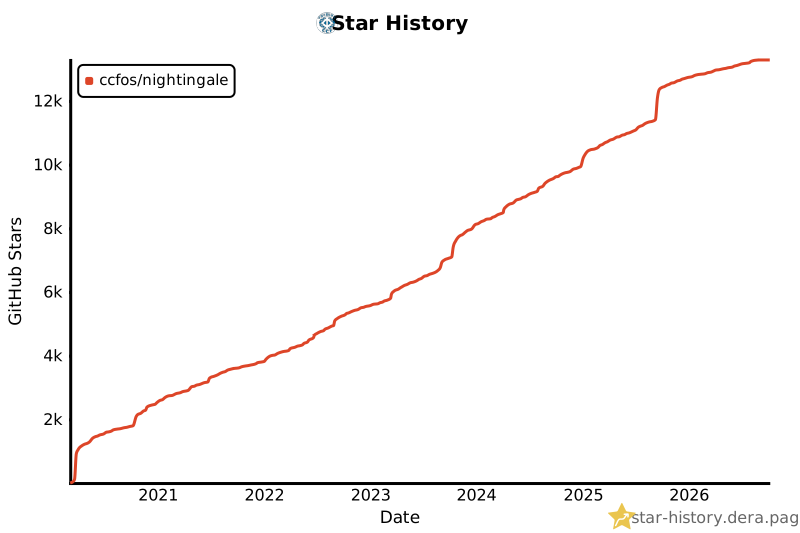](https://star-history.dera.page/#ccfos/nightingale&Date)
- ## License
- Nightingale is available under the [Apache License 2.0](LICENSE).
- <img referrerpolicy="no-referrer-when-downgrade" src="https://play.n9e.io/stats/p/qD3jn0con" alt="" />
Ratings and comments
Sign in to rate this skill.
Sign inFree to use. If it’s helped, pass it on.