dsh-TUI
DSH's officially top-recommended TUI plugin — high performance, low overhead, cute pixel whale, smooth mouse interaction. One-command install via npm. / DSH 官方首推的 TUI 插件,高性能低占用,可爱像素鲸鱼,流畅鼠标交互,npm 一键安装
Safety scan
A static text scan, not a guarantee. Select the badge to see what was scanned and every finding.
Check it deeper on your machine
It has changed since its scan on 11 Nov 2026.
As a Claude Code plugin, install it and then ask Claude Code:
/plugin marketplace add keithmackay/mackayi/plugin install scanskillsafety@mackayiDo a deep scan of https://github.com/ccch1mneyyy/dsh-TUI with scanskillsafety
Or from a terminal, clone it and run it:
git clone https://github.com/keithmackay/scanskillsafety-skill ~/.claude/skills/scanskillsafetynode ~/.claude/skills/scanskillsafety/cli.cjs --deep 'https://github.com/ccch1mneyyy/dsh-TUI'
It checks the exact commit: every file, its packages against OSV (api.osv.dev), how it compares with this page's scan (findsafeskills.com receives the repository's address), and, if you agree, Claude reading every file with your own Claude subscription. It never runs the code.
Badge for your README

Markdown
[](/listings/ccch1mneyyy--dsh-tui)HTML
<a href="/listings/ccch1mneyyy--dsh-tui"><img src="/api/listings/ccch1mneyyy--dsh-tui/badge.svg" alt="findsafeskills safety rating" /></a>Install
Install instructions from the README
As written by the repo's author. findsafeskills has not verified these steps.
Prerequisites: [Node.js](https://nodejs.org/en) and [deepseek-harness](https://github.com/deepseek-ai/deepseek-harness). The `deepseek-official` API-key route needs `DEEPSEEK_API_KEY`. On DSH 0.2.0-rc.1+, the standard profile can instead use `/auth login deepseek-account` and select the separate account route through `/model`. Other supported accounts can sign in through `/provider` or `/auth` after startup.
The primary compatibility target is DSH `0.2.0-rc.2`. This adapter supports its Shell API, V4 session messages, declarative presets, and profile-backed settings; older supported hosts retain their compatibility paths. See [configuration](docs/configuration.en.md).
On DSH 0.1.7, `/settings` uses the TUI's actual Loader entry ID, including custom IDs. It requires matching profile dependencies with `@deepseek-ai/schemastery` 3.18.3 or newer; an incompatible schema stops TUI startup with repair guidance instead of showing an uneditable settings page. Older hosts keep their legacy settings scope.
# Install the CLI and this plugin globally (ships the dsh-tui command)
npm install -g @deepseek-ai/dsh @deepseek-harness-tui/dsh-tui

# Start (first run auto-initializes the profile; needs pnpm)
dsh-tui
# Both `dsh-tui` and the short `dst` alias start the same TUI.
dst
Manual alternative: `dsh plugin --profile dsh-tui add @deepseek-harness-tui/dsh-tui`. The repo's `sh install.sh` runs that step and checks the required commands. Afterwards `dsh-tui` and `dsh --profile dsh-tui` are equivalent.
> **New-user note**: pnpm ≥11 blocks dependencies with install scripts by > default and reports `ERR_PNPM_IGNORED_BUILDS`. Updates skip foreign-platform > `@img/sharp-*` native packages, saving about 200MB of downloads. `/update` > and `dsh-tui update` write both settings automatically. No manual step > needed. Details: > [Getting started](docs/getting-started.en.md#pnpm-install-script-blocks-and-foreign-platform-natives).
After startup the TUI checks for newer versions in the background. It never blocks the first frame. Type `/update` for a one-shot upgrade. It restarts automatically and resumes the current session. See [Getting started](docs/getting-started.en.md) for the profile lifecycle, source builds, and troubleshooting, including migration from the former `dsh-cc-tui` package.
CLI
| Command | Purpose | | --- | --- | | `dsh-tui` / `dst` | Start the TUI; `dst` is a short alias for the same program | | `dsh-tui --resume [id]` · `dsh-tui update` · `dsh-tui doctor` | Resume a session · update the profile and align the launcher · pre-flight environment checks | | `dsh-tui safe` | Read-only diagnostics, plugin inventory and repair guidance; `safe --rescue` builds a clean rescue profile | | `dsh-tui version` · `dsh-tui help` | Launcher and profile versions and usage; both work even without a `dsh` install |
Leading DSH options such as `--dump-config` and `--patch <path>` are forwarded unchanged; other arguments go to the app in `dsh --profile dsh-tui`. Use `dsh-tui -- --resume=sid-1 ./notes` to send `--resume=sid-1 ./notes` as literal prompt text, without selecting a session or workspace. When invoking DSH directly, use `dsh --profile dsh-tui -- -- --resume=sid-1 ./notes`: the first `--` belongs to DSH, the second to the app. Host options can precede a literal prompt: `dsh-tui --patch ./overlay.yml -- --resume=sid-1` applies the overlay and sends `--resume=sid-1` as prompt text without resuming that session. Safe mode: [Getting started](docs/getting-started.en.md).
Importing conversations from other agents (`dsh-tui migrate`)
Bring Claude Code, Codex, OMP, zcode, or Grok Build conversation histories into the DSH session store, then browse and resume them by their original working directory via `/resume`:
dsh-tui migrate                # list importable counts per agent (writes nothing)
dsh-tui migrate claude-code    # import every Claude Code conversation (likewise codex / omp / zcode / grok-build)
What was scanned
The files the safety scan read, as written by the repository's author and shown as plain text. Lines with a finding are marked.
README.md · README · 805 lines
View this file on GitHub (read at the repository's current version: the scan did not record which commit it read)
This file has changed since it was scanned, so this is not exactly the text that was scanned, and no line is marked. The findings are listed with the safety scan above.
- <p align="center">
- <img src="docs/assets/readme/logo-en.svg" alt="dsh-TUI animated whale logo" width="560">
- </p>
- <p align="center">
- <strong>English</strong> | <a href="README_ZH.md">简体中文</a>
- </p>
- <p align="center">
- <a href="https://www.npmjs.com/package/@deepseek-harness-tui/dsh-tui"><img alt="npm" src="https://img.shields.io/npm/v/@deepseek-harness-tui/dsh-tui?style=flat-square&color=4b6fff"></a>
- <a href="https://github.com/ccch1mneyyy/dsh-TUI/actions/workflows/ci.yml"><img alt="CI" src="https://github.com/ccch1mneyyy/dsh-TUI/actions/workflows/ci.yml/badge.svg"></a>
- <a href="LICENSE"><img alt="MIT License" src="https://img.shields.io/badge/license-MIT-263146?style=flat-square"></a>
- <img alt="Public beta" src="https://img.shields.io/badge/status-public%20beta-7da1de?style=flat-square">
- <a href="https://github.com/ccch1mneyyy/dsh-TUI/stargazers"><img alt="GitHub stars" src="https://img.shields.io/github/stars/ccch1mneyyy/dsh-TUI?style=flat-square&color=4b6fff"></a>
- <a href="https://www.npmjs.com/package/@deepseek-harness-tui/dsh-tui"><img alt="npm downloads" src="https://img.shields.io/npm/dm/@deepseek-harness-tui/dsh-tui?style=flat-square&color=4b6fff"></a>
- </p>
- # dsh-TUI
- > An interactive terminal UI for DeepSeek Harness. It ships a pixel-whale
- > header, live work status, streaming thinking, double-Esc time rewind, a
- > context progress bar, and a TPS gauge. Zero core changes: it consumes only
- > DSH's public exports, and is moving from a mounted plugin to an app with its
- > own entry and composition root, where DSH loads in process as the first-party
- > backend. Install to enable; uninstall leaves no patches behind.
- The prompt footer hides completed goals once the turn is idle; the Todo side panel retains their history. `Ctrl+Q` folds todos while working and hides/restores the idle goal/todo footer. Clicking its todo header also hides it while idle. Hiding changes only this display: a new goal/todo snapshot or session reveals it again, and `/goal clear` does not clear todos.
- Split diff cards give one-sided additions and deletions the full body width, without an empty opposite pane. Ordinary edits remain side by side, and mixed files choose their layout separately before folding or streaming reveal.
- Compaction status stays on one line in narrow panes: phase and cancellation hints yield first, then the label is shortened; elapsed time is shown only as a complete field.
- Image files referenced with `@path` use the same admission and resize/conversion policy as pasted images. Adjustment notices report the stored dimensions and format; required animation conversion is refused instead of dropping frames. Mention images and staged images still share count and stored-byte limits in source order.
- ## Highlights
- Panels without a verified Component identity are temporary: settings show their title and a distinct number for this run. Their toggles take effect immediately without being saved, and unrelated settings changes preserve that choice. Old `actN:panel` entries cannot be mapped safely: remove the placeholder and select the current panel again. Verified Components named `actN` keep their public runtime address; an explicit selection uses `component:actN:panel` in saved preferences to avoid claiming an old anonymous entry.
- The default reasoning-effort setting offers the current backend/model’s declared tiers, including custom IDs. Saved values absent from that catalog stay visible and stored; while loading or unavailable, only Auto is selectable. On DSH, Auto follows the saved `/effort` choice, then the configured effort, then the model default. Claude/Codex retain backend preferences for Auto at startup and for resumed sessions; explicitly choosing Auto resets the model default. Explicit settings changes affect the next request; unsupported preferences fall back with a notice and are never forced onto a route.
- Resuming a DSH session preserves its recorded reasoning effort (or its live selection when reattaching). The saved default seeds new sessions; explicit `/effort` and effort-default settings changes still apply to the current session’s next request.
- - **Pixel whale pet** — three startup intros, click to wake; freezes after the first task.
- - **Launchpad and first-run guide** — every ordinary launch lands on a landing page with a **real input box** (big text + whale + quick actions, dropping whole blocks on short/narrow terminals; whale-girl images use a compact native-canvas footprint instead of leaving a large gap before the title; on by default — /settings `launchpad` off boots straight into chat); command completion matches chat: `Tab` fills the input, `Enter` runs the command and clears it. The first run walks a four-step wizard (accounts & models / language+theme / model+workspace / shortcuts), re-runnable with `/setup`; its first step signs in to a subscription and catches the models it brings in (none → no question, one → that one, several → you choose), or adds an API key through the `/provider` wizard, which asks which of the enabled models to switch to or keeps the current one.
- - **Terminal-native UI** — streaming Markdown, tool cards, `/` and `@` completion, `#L12-14` ranges, history search, zh/en UI.
- - **Notifications** — one switch covers four system notifications: task completion, a tool approval waiting for your decision, a question waiting for your answer, and a plan review waiting for your decision. Completion on DSH, Claude and Codex fires once live work settles, with no queued follow-up or active goal; its title is “dsh-TUI · Task complete” and the body previews the latest reply as one plain-text line (up to 200 characters). Approvals are titled “dsh-TUI · Approval needed” (session name, tool name, reason — never the command); questions “dsh-TUI · Waiting for your answer” (the first question's header and question); plan reviews “dsh-TUI · Plan review” (the question header and question, never the plan). `/settings` → Conversation: `taskNotifications` = `unfocused` (default), `always` or `off`; `notificationMethod` = `auto` (default), `osc9`, `bel` or `windows`. `auto` follows your terminal — OSC 777 on Ghostty/WezTerm, OSC 99 on Kitty, a title prefix on iTerm2/Warp, a bell elsewhere — and resolves to the native system toast on local Windows. On local Windows, an enabled, active external DSH notification plugin makes dsh-TUI yield completions, approvals and questions; a plan review is always sent by dsh-TUI itself. `off` silences all four; only the current session's approvals notify (background sessions and subagents stay quiet); replay, cancellation and failures do not notify. Delivery details, terminal requirements (tmux and the like) and jump-back (`jumpBack`): see the [User guide](docs/user-guide.en.md#53-the-settings-editor) and [terminal requirements](docs/user-guide.en.md#54-terminal-requirements).
- - **Native cursor** — focused text inputs inherit your terminal's cursor shape, color, blinking, and enabled animation or trail effects in both inline and fullscreen modes. The `/model` picker shows the same cursor during movement between provider tabs, model rows, and effort levels, then hides it after **0.5 seconds at rest**; clipped regions fall back to the model row. The session manager also moves this cursor between the workspace rail, session rows, and search box; typing claims the search caret, and navigation returns it to the focused row. Configure animation and trail effects in your terminal.
- - **Images** — Kitty/Sixel thumbnails, centered preview with zoom and pan, paste-time fitting, text fallback. Kitty images scale to the reserved cells' physical pixels, including on HiDPI terminals.
- - **Mermaid diagrams** — ````mermaid ```` fences drawn as Unicode diagrams.
- - **LaTeX math** — `$…$` and `$$…$$` formulas as Unicode text, fractions and limits stacked in display blocks; `mathRendering: image` typesets block and one-row inline formulas as terminal images on graphics terminals.
- - **Timeline rail** — every turn clickable; timeline / scrollbar / hidden gutter.
- - **Side panel** — `Ctrl+B` splits the chat with a panel column once the terminal is wide enough; drag the divider to resize it. All eight built-in panels are enabled by default, and so are plugin panels registered later (`sidePanel.panels: '*'`; untick a row in `/settings` to switch to an explicit list). The header shows each inactive panel's symbol; hover to see its name. Narrow terminals and inline mode keep full-screen panels. In the `todo` panel a long goal wraps to the panel width with its phase on a separate row; when the content exceeds the viewport, focus the panel and scroll with `↑`/`↓` or the wheel (every todo is reachable too) (the compact goal row above the chat input stays a single truncated line with a hover tooltip).
- - **Live state** — activity animation, context bar, TPS, cache hit rate, effort, tokens, session cost estimate (main + subagents), Git and session metadata. Title, trajectory-strip and session-state animations update independently of the transcript and pause when idle or unfocused.
- Context-bar fill follows backend occupancy; colors estimate content composition. Compaction clears obsolete estimates, and missing composition displays a single used block with a measured used count in both hover details.
- - **One session manager** — `/resume` `/home` `/agentview` `/bg` `⌸`.
- - Live Compact partial checkpoints appear as folded summaries in chat and summary entries in `/tree`; they do not reset the whole context composition. Occupancy follows the host token meter. Folded previews use the durable summary with the same compactionId; expansion retains the complete text, which is also the fallback when the summary event is missing.
- - **Session workflow** — `/new` `/compact` `/export` `/btw`, model hot-switch, fork, rewind, vim, fullscreen draft editor.
- `/btw` uses an overlay when its sidebar cannot render. Main-task questionnaires and the fullscreen draft editor take priority while preserving the side question and draft.
- - **IDE selection channel** — a VS Code selection lands in the prompt.
- - **DSH integrations** — presets, skills, MCP, goals, todos, subagents, questionnaires.
- - **Account sign-in** — the standard profile offers pi-ai OAuth for ChatGPT/Codex, Claude, and Grok (plus OpenAI direct and Meta Muse when available), and Host-owned DeepSeek browser sign-in as `deepseek-account` on DSH 0.2.0-rc.1+. Use `/provider` or `/auth` without another plugin.
- A profile-only update from a global TUI patch that already mounts `dsh-tui-auth` can still start the official loopback callback listener on demand; fixed-port SSH forwarding still requires the global package to be aligned.
- - **Extensions** — browser interaction, computer use and more.
- - **Built for long sessions** — event-driven projection, virtualization, bounded caches.
- Keys and commands: [Interaction and commands](docs/interaction.en.md). Everything else: [documentation index](docs/README.md).
- Plugin side panels stay enabled when unrelated settings change. Editing the enabled panel list still applies your explicit selection.
- Workspace side-panel counts match the session manager: the current conversation counts; empty logs, subagents, fork ancestors and archived sessions do not. Registered workspaces with no visible conversations remain at zero. Loading and read errors are shown separately; press `r` to refresh.
- When a DSH 0.2.1+ Agent moves its session to another directory (the `working_directory` tool or a Git worktree), the status line, Git branch, `@` completion, `!` commands, clicked paths, skill commands and loaded context follow it, including after `/resume`. The session stays registered under the project it started in. Relative paths in cards rendered before a move resolve against the session's current directory when clicked; absolute paths keep their target.
- Fullscreen mouse selection stays in the pane where the gesture starts, including chat, sidebar and either diff column. Diagonal, word and line selection copy that pane’s text; soft wraps join independently, source newlines remain, and divider drags only resize.
- ## Preview
- <div align="center">
- <picture>
- <source media="(max-width: 640px)" srcset="docs/assets/readme/preview-en-mobile.svg">
- <img src="docs/assets/readme/preview-en.svg" alt="Recorded dsh-TUI session: welcome, completion, help and typing, with animated pixel whale." width="78%">
- </picture>
- </div>
- ## Featured & Listed
- Among the community plugins recommended by the **official lead of DeepSeek
- Harness**, dsh-TUI is the first.
- Featured by the **DeepSeek Harness official WeChat account**, listed in the
- [dshfind](https://dshfind.com/en/plugins/ccch1mneyyy/dsh-TUI) plugin
- directory, and ranked **#7 on [GitHub Trending](https://trendshift.io/repositories/146168)
- daily** (TypeScript).
- <div align="center">
- <table>
- <tr>
- <td align="center" valign="middle" width="50%">
- <img src="screenshots/wechat-official.png" alt="dsh-TUI featured by the DeepSeek Harness official WeChat account" width="480">
- <br>
- <strong>Featured by the official WeChat account</strong>
- </td>
- <td align="center" valign="middle" width="50%">
- <a href="https://dshfind.com/en/plugins/ccch1mneyyy/dsh-TUI"><img src="https://dshfind.com/api/card/ccch1mneyyy/dsh-TUI?lang=en" alt="dsh-TUI on dshfind" width="420"></a>
- <br>
- <strong>Listed in the dshfind directory</strong>
- <br><br>
- <a href="https://trendshift.io/repositories/146168" title="GitHub Trending Daily #7 · TypeScript"><img alt="Trendshift" src="https://trendshift.io/api/badge/trendshift/repositories/146168/daily?language=TypeScript"></a>
- <br>
- <strong>GitHub Trending Daily #7</strong>
- </td>
- </tr>
- </table>
- </div>
- ## Quick Start
- ### Windows one-click installer (x64)
- Download `dsh-tui-setup-win-x64.exe` from [Releases](https://github.com/ccch1mneyyy/dsh-TUI/releases) and run it. Per-user, no administrator, fully offline, and no preinstalled Node or DSH.
- ### Command-line installation
- Prerequisites: [Node.js](https://nodejs.org/en) and
- [deepseek-harness](https://github.com/deepseek-ai/deepseek-harness).
- The `deepseek-official` API-key route needs `DEEPSEEK_API_KEY`. On DSH
- 0.2.0-rc.1+, the standard profile can instead use `/auth login deepseek-account`
- and select the separate account route through `/model`. Other supported
- accounts can sign in through `/provider` or `/auth` after startup.
- The primary compatibility target is DSH `0.2.2-rc.3`. This adapter supports its
- Shell API, V4 session messages, declarative presets, and profile-backed settings;
- older supported hosts retain their compatibility paths. See [configuration](docs/configuration.en.md).
- DSH account notices use the existing account card. A notification with complete
- coupon metadata keeps the coupon presentation; otherwise the card shows the
- server's title and message without inventing an amount. The card refreshes its
- language and follows the server's display deadline. Enter or Esc dismisses it;
- account-page actions point to the official DSH account page and are not executed
- inside this TUI. Older hosts keep their original bonus API.
- On DSH 0.2.1-rc.2 and later, `/settings` also selects DeepSeek Search / Fetch APIs and edits their
- endpoint and result limits, supporting custom Loader entry IDs and a masked API
- key input saved through DSH's credential store. Official Flash model labels show the `1017` release
- marker while retaining the `deepseek-flash` model ID.
- `/settings` groups its sections into pages: the TUI's own settings sit under
- **General**, and plugins that declare a page get their own tab (`Tab` / `Shift+Tab`, or a click on the strip in fullscreen, switches pages; the strip is hidden when only one page exists).
- On DSH 0.1.7, `/settings` uses the TUI's actual Loader entry ID, including custom
- IDs. It requires matching profile dependencies with `@deepseek-ai/schemastery`
- 3.18.3 or newer; an incompatible schema stops TUI startup with repair guidance
- instead of showing an uneditable settings page. Older hosts keep their legacy settings scope.
- The `dsh-tui` section of `/settings` is saved in `~/.dsh-tui/settings.json`, shared by
- every kernel; the first launch imports it once from the profile's `cordis.patch.yml` (and an older host's `~/.dsh/settings.yaml`)
- (see [configuration](docs/configuration.en.md#tui-configuration)).
- ```sh
- # Install the CLI and this plugin globally (ships the dsh-tui command)
- npm install -g @deepseek-ai/dsh @deepseek-harness-tui/dsh-tui
- # Start (first run auto-initializes the profile; needs pnpm)
- dsh-tui
- # Both `dsh-tui` and the short `dst` alias start the same TUI.
- dst
- ```
- Manual alternative: `dsh plugin --profile dsh-tui add @deepseek-harness-tui/dsh-tui`.
- The repo's `sh install.sh` runs that step and checks the required commands.
- Afterwards `dsh-tui` and `dsh --profile dsh-tui` are equivalent.
- > **New-user note**: pnpm ≥11 blocks dependencies with install scripts by
- > default and reports `ERR_PNPM_IGNORED_BUILDS`. Updates skip foreign-platform
- > natives — the `@img/sharp-*` packages and the Claude SDK's per-platform
- > bundles — so only this machine's binaries are fetched. `/update` and
- > `dsh-tui update` write both settings automatically. An update never installs
- > the Claude SDK on its own: it enters a profile only when you pick that
- > backend in the kernel picker, which then installs the pinned SDK for the
- > running platform. No manual step needed. Details:
- > [Getting started](docs/getting-started.en.md#pnpm-install-script-blocks-and-foreign-platform-natives).
- After startup the TUI checks for newer versions in the background. It never
- blocks the first frame. Type `/update` for a one-shot upgrade of the whole set
- — TUI, dsh engine and global launcher. It restarts automatically and resumes
- the current session, and refuses instead of leaving an incompatible or
- unbootable TUI/engine combination. Launcher alignment is normally best effort,
- but a failure after the engine advances blocks the restart and prints a repair
- command. If the registry has a newer dsh release outside the TUI's
- validated line, it says so and waits for a TUI update rather than installing an
- unvalidated engine. Launcher alignment only touches proven global installs;
- local npm/npx packages, ambiguous aliases and multi-member pnpm groups stay
- unchanged. See
- [Getting started](docs/getting-started.en.md) for the profile lifecycle,
- source builds, and troubleshooting, including migration from the former
- `dsh-cc-tui` package.
- `/restart` resumes the current session without installing anything. On
- non-Windows runtimes with `process.execve`, it and `/update` replace the
- current process, so repeated restarts do not accumulate waiting TUI processes.
- Other runtimes and kernel switches retain the supervised child-process handoff.
- A launch delegated to `dsh --profile` stays on that path until the next cold
- launch or kernel switch.
- ### CLI
- Automation: `dst -p "task"`, `dst run --json`, `dst session list --json`.
- The independent engine does not load the TUI or inherit its profile/preferences;
- it uses official DSH headless/services (validated on 0.2.0-rc.2, 0.2.1-rc.2, 0.2.1-rc.3, 0.2.1-rc.4 and 0.2.1-rc.5).
- `dst cli --help` lists its commands; `dst dsh <argv...>` forwards native DSH.
- See [Automation CLI](docs/cli.en.md) for protocol, limits, resume restrictions,
- and Node/Python/PowerShell integration examples.
- | Command | Purpose |
- | --- | --- |
- | `dsh-tui` / `dst` | Start the TUI; `dst` is a short alias for the same program |
- | `dsh-tui --resume [id]` · `dsh-tui update` · `dsh-tui doctor` | Resume a session · align the TUI, dsh engine and global launcher as one set · pre-flight environment checks |
- | `dsh-tui safe` | Read-only diagnostics, plugin inventory and repair guidance; `safe --rescue` builds a clean rescue profile |
- | `dsh-tui version` · `dsh-tui help` | Launcher and profile versions and usage; both work even without a `dsh` install |
- Leading DSH options such as `--dump-config` and `--patch <path>` are forwarded
- unchanged; other arguments go to the app in `dsh --profile dsh-tui`. Use
- `dsh-tui -- --resume=sid-1 ./notes` to send `--resume=sid-1 ./notes` as literal
- prompt text, without selecting a session or workspace. When invoking DSH
- directly, use `dsh --profile dsh-tui -- -- --resume=sid-1 ./notes`: the first
- `--` belongs to DSH, the second to the app. Host options can precede a literal
- prompt: `dsh-tui --patch ./overlay.yml -- --resume=sid-1` applies the overlay
- and sends `--resume=sid-1` as prompt text without resuming that session.
- Safe mode: [Getting started](docs/getting-started.en.md).
- ### Importing conversations from other agents (`dsh-tui migrate`)
- Bring Claude Code, Codex, OMP, zcode, or Grok Build conversation histories into the DSH session store, then browse and resume them by their original working directory via `/resume`:
- ```sh
- dsh-tui migrate # list importable counts per agent (writes nothing)
- dsh-tui migrate claude-code # import every Claude Code conversation (likewise codex / omp / zcode / grok-build)
- dsh-tui migrate codex --dry-run # preview what would land, write nothing
- ```
- - **Read-only source**: migration only reads the foreign agent's local store; artifacts are written through the official `JsonlSessionPersistence` backend, so imported sessions are first-class (openable, continuable).
- - **Idempotent**: one deterministic UUID per source conversation — re-importing skips what is already present instead of stacking duplicates.
- - **Structure preserved**: user/assistant messages, reasoning traces, tool calls with their results, and the source's context compactions (as native compaction checkpoints) are rebuilt turn by turn; harness-injected machine text opens no turn. An imported session can pick the work straight up.
- In-TUI browsing: the session screen (`/resume`) shows a tab per agent that has conversations; picking one imports just that conversation and opens it.
- In-TUI: `/migrate` (optionally `/migrate <agent> [--dry-run]`) runs the same import in a child process and reports through the notification flow.
- CLI alternative: `dsh-tui migrate ...` from any shell runs the same import.
- With an installed `dsh` that supports host module resolution, both entries use its framework packages; a fresh profile does not need a separate copy. Dependency failures report their cause instead of asking for an update.
- Full guide: [Session migration](docs/migrate.en.md).
- - More agents (pi, opencode, …) extend the adapter registry as adapters land; grok-build reads `GROK_HOME` when set.
- **VS Code**: use the integrated terminal or the `dsh-tui-vscode` extension. See [VS Code guide](docs/vscode.en.md). **Herdr**: run `dsh-tui` in a [Herdr](https://herdr.dev) pane; `idle` / `working` / `blocked` are reported through its local integration API. **Any terminal**: dsh-tui reports `idle` / `working` / `blocked` / `done` / `error` over the pty with [OSC 7501 (Program Status Protocol)](https://www.superlogical.com/rex/docs/build/program-status), so terminals and agentic inboxes that implement it can show what the session is doing; terminals that do not implement it ignore the sequence. Set `DSH_TUI_PROGRAM_STATUS=0` to turn it off.
- Bare `--resume` (`-c`, `--continue`) reopens the last session of the backend this
- launch selected. Startup recovery only ever targets that backend: a backend with no
- last session, or a derived target that belongs to a different backend than the one
- that actually booted (an unknown backend id falling back to DSH, `--backend` naming
- a backend that is not installed, a remembered kernel that is not the marker's
- source), refuses with a clear error and exit code 1 — never a silent cold start,
- never another backend's session, never a new session. An explicit `--resume <id>`
- passes that id to the selected backend as-is. The one exception is safe mode's
- "retry normal startup": it retries the kernel and session recorded in
- `last-run.json`, so a record whose backend is gone degrades to a warning plus a cold
- start — that retry is the last way back.
- ### Experimental: Claude backend
- dsh-TUI can also run its session on Claude: the same interface, driving the
- Claude Code CLI through the Claude Agent SDK. Your project's `CLAUDE.md`,
- settings, hooks, MCP servers and plugins load as the CLI loads them.
- ```sh
- # once, in the dsh-tui profile directory (the SDK is an optional dependency)
- cd ~/.dsh/profiles/dsh-tui && pnpm add @anthropic-ai/claude-agent-sdk@0.3.287
- dsh-tui --backend claude # or pick Claude in /kernel; that choice is remembered
- ```
- The easiest install: open the kernel picker (the launchpad "Kernel" entry or
- `/kernel`) and press Enter on the dim Claude row — the wizard locates the
- profile directory and installs the pinned SDK for you; the command above is
- its manual equivalent.
- An existing Claude Code CLI, including a Homebrew installation, still needs
- this SDK. If the SDK is unavailable, the row retains the detected CLI version
- and says "SDK unavailable"; press Enter to install the SDK in the profile.
- The confirmation shows the exact package and version. Closing the wizard,
- including clicking outside it on the launchpad, cancels a pending installation.
- - **Sign-in**: a `/channel` relay profile, your dsh-auth `anthropic` sign-in
- (`/login`), `ANTHROPIC_API_KEY` or cloud-provider variables, or an existing
- `claude login`, in that order. A `claude` on `PATH` is used when present, then
- one in the native install directory under your home (`~/.local/bin`, or
- `%USERPROFILE%\.local\bin` on Windows); every candidate has to launch and
- report a version, and the SDK's bundled binary is used only when none does.
- - **Works**: streaming, tool cards, approvals and questions, `/model`,
- `/effort`, Claude's permission modes (`/permission`, `Shift+Tab`),
- `/compact`, `/context`, `/mcp`, `/resume`, `/fork`, double-`Esc` rewind,
- subagents, background jobs, images, `/btw`, and the USD cost Claude reports.
- - **Not available**: DSH-only commands such as `/tree`, `/preset`,
- `/provider`, `/workspace`, `/agentview` and `/bg`. One process runs one
- backend; `/kernel` switches by restarting into a new session.
- - **Startup**: the screen appears before the session opens, with only a light
- profile composed (this package plus the profile's third-party plugins); see
- [Claude backend](docs/claude-backend.en.md#known-limitations). The DSH kernel
- starts from the same entry and loads DSH in the same process behind its first
- screen; `DSH_TUI_HOST_ENTRY=0` restores the old launch path for every kernel.
- Details and known limitations: [Claude backend](docs/claude-backend.en.md).
- ### Experimental: native Codex backend
- Run your own Codex through `codex app-server`, sharing its configuration,
- login, instructions, skills, hooks, MCP and native threads:
- ```sh
- npm install -g @openai/codex@0.160.1
- dsh-tui --backend codex
- dsh-tui --backend codex --resume <thread-id>
- ```
- Protocol baseline **0.160.1**, minimum **0.144.0**; other versions may show
- drift. `CODEX_EXECUTABLE` selects a binary; `/kernel` remembers the backend.
- `codex resume <id>` can open the same thread after the other writer exits.
- This is not `migrate codex`, which imports history into DSH.
- With native credentials, a writer conflict for an idle thread retained by the
- official background server triggers a reconnection to that server. Managed
- subscription credentials and `/channel` connections use private app-server processes.
- Streaming/tool cards, approvals, questions, steer/queue/interrupt, model and
- effort controls, Plan, `/review`, `/diff`, `/usage`, `/init`, skills and MCP
- share the existing UI. Async questions open the questionnaire while Codex
- continues working; answers steer the turn (or queue if unavailable), and
- dismissing the question leaves work running. **Shift+Tab only toggles Plan**, keeping its underlying
- permission preset; Full Access requires an explicit choice. Existing Codex
- settings are respected, not overwritten with defaults. `/login` offers
- ChatGPT OAuth, a device code or an API key (the last writes to Codex’s own
- credential store). Relay `/channel` connections take precedence; managed
- subscription tokens are only injected on first-party routes. dsh-TUI does
- not write `~/.codex/config.toml` or log out your native Codex account. A
- provider `env_key` from your own config (e.g. `DEEPSEEK_API_KEY`) that the
- shell did not export is injected from the DSH credential store when the ref
- is stored there — the active store first, then the default `~/.dsh` one — so
- keep the key in the store, no per-shell export needed. When nothing can
- supply it, the session still starts and the reason is reported once as a
- start notice: Codex itself rejects every turn of that provider.
- For Claude and Codex, `/channel` tokens (`CHANNEL_*` refs) belong to the
- active `DSH_HOME` only. Disconnecting a channel cannot revive a token from
- the default home; reconnect it in the active home if needed. Provider
- `env_key` credentials retain the fallback described above.
- TPS includes hidden reasoning time and excludes tool execution time. Live
- text estimates are corrected when Codex reports output token usage. Decode
- spans of 500ms or less are excluded from TPS samples; token and cost totals
- still include all reported usage.
- Native browsing/archive, fork/conversation rewind (the first message requires
- Codex app-server 0.160.1+), paged history, images,
- subagents, polled background terminals, goals and `/btw`/`/recap` use the
- existing surfaces. `/logout` removes only the matching dsh-auth credential;
- already-loaded managed tokens require a normal restart, not native logout.
- The real 0.160.1 app-server passed nine credential-free offline checks and eight
- daemon-resume checks, with no model turn or charge; real subscription login, credentialed model calls
- and real-TTY interaction were not run. Only Codex identification/title
- changes automatically, not palette or companion.
- Using ChatGPT subscription tokens in third-party clients is subject to
- OpenAI’s terms. Full instructions and current boundaries:
- [Codex backend](docs/codex-backend.en.md).
- ### DSH Agent Teams
- DSH Agent Teams lets the session's agent (the Lead) delegate to named
- subagents that share the working directory, message each other and coordinate
- on a shared task board. Since DSH `0.2.2-rc.2` it ships inside `dsh-base`:
- there is no plugin to install and no bundle to enable. It is off by default
- per root session — `/team on` enables it for this session and its whole
- subagent tree (the choice survives restarts), and `/team off` switches it off
- while keeping the subagents and the task board. `/team` (or `/team status`)
- reports the saved selection, the service and this session's subagents. When
- subagents are still running, `/team off` asks first (`/team off force`): they
- keep running — only the task tools and the Team guidance stop.
- Members are the root session's named subagents: `subagent` / `subagent_fork`
- take an optional `name` (the root is `lead`, descendants are paths such as
- `reviewer/checker`) and are the delegation tools — there is no
- `spawn_teammate` any more. The four `team_task_*` tools are the shared task
- board. Control tools address agents by name: `send_message({agent, message})`,
- `interrupt_agent({agent})`, `list_agents` rows `{name, status, description?}`,
- and `wait_agent` reports `{timedOut}`. Their calls and results render as
- one-line cards (`send_message` with its target and `sent`, `list_agents` with
- named rows), and a message between agents as a `✉ <sender>` bubble in the
- receiving session. The agents dashboard (Ctrl+A) and the agents side panel
- show a team view: the Lead line, members under their catalog name with
- `running` / `idle` status, the remaining subagents, a read-only task board
- (status, owner, `blocked`, write-scope warnings) and a banner when the team
- record was rejected. A root with Team off still shows its read-only board with
- a note, and an empty one falls back to the plain subagent view.
- An older DSH line (`0.2.2-rc.1` and earlier) mounts the retired experimental
- bundle instead, and TUI keeps that behavior there: the switch stays
- `/plugin enable|disable @deepseek-ai/dsh-experimental-agent-team-profile`
- (`/team` points at it; a launch without the profile plugin service gets the
- `dsh plugin --profile dsh-tui add <bundle>@<dsh-version>` CLI route), the
- durable roster comes from the projection, `spawn_teammate` is the delegation
- tool (with `subagent` / `subagent_fork` removed while it is present), and
- disabling the bundle while teammates run asks first. Those packages ship in
- lockstep with DSH and pin their peers exactly, so the version must match.
- Limits: on `0.2.2-rc.1` and earlier the switch covers the whole profile, not
- one session; there is no "enter teammate session" yet, and `/export` leaves
- team messages out. Upstream limits apply: teammates share one working
- directory, a team lives in one process, and a task owner is never released
- automatically. Upgrade every process that opens the same session store
- together: catalogs written by `0.2.2-rc.2` subagents cannot be opened by older
- DSH.
- A delegation provider whose settled runs fail at least twice and at least half
- the time gets one degraded-channel line above the agents list; the built-in
- `subagent` route, workflow members and per-type Claude children are excluded
- because there is no provider to switch to.
- Subagent failure badges and the Companion error state share session-scoped unread
- status. Opening that child’s detail or main view acknowledges only that failure;
- a new run or failure alerts again. Acknowledgements survive panel remounts and
- session switches during this process, but a cold restart starts unread. Opening
- the dashboard alone does not acknowledge every child. Task status stays failed.
- ## Keybindings & Mouse
- `Enter` send · `Tab` complete · `Ctrl+Enter` interrupt and send · `Alt+Up` recall the last message · `Esc` closes local layers before interrupting a running turn, double-`Esc` rewinds on empty idle input · `Ctrl+B` side panel · `Ctrl+O` details · `Ctrl+R` history (`↑`/`↓` and `Ctrl+R` are scoped to the current project) · `Ctrl+V` paste · `Ctrl+Shift+E` fullscreen draft editor · `?` shortcuts · `←` open the session manager (DSH backgrounds the current session first).
- In both the launchpad and chat, `Ctrl+U` deletes from the caret to the current line start, preserving text to the right and whole image chips. It edits only the focused input.
- In the launchpad input, `Shift+Enter` (or `Option+Enter`) opens chat and inserts a newline at the caret, keeping the draft and staged images unsent. Continue typing there, then press `Enter` to send.
- In both the launchpad and chat, `Alt/Option+←/→` moves by whitespace-delimited words and `Alt/Option+Backspace` deletes the previous word, like `Ctrl+W`. On macOS, configure your terminal to send Option as Meta.
- Use `Alt+Up` / `Alt+Down` to page through question text and details, or approval previews on very short terminals, without moving the choice focus; these keys are remappable in `/settings` → `Shortcuts`. Fullscreen also supports the wheel over the preview. Complete OAuth links remain readable when browser and clipboard helpers are unavailable. Fixed-action permission questions offer only the caller's choices; ordinary questionnaires still accept free text.
- Text, cursor position and staged image attachments on the launchpad or in chat while the backend starts are preserved when the session becomes ready. Press `Enter` after it is ready to send; an earlier `Enter` preserves the draft without queuing it. Opening a new session while startup is pending clears the previous draft and its images.
- The goal bar stays on one summary line: hovering truncated goal text in fullscreen or split shows the whole objective, and a bare `/goal` prints the full status — objective, phase, rounds or budget, available commands — as a transcript block in the `/plugins` shape. Inline mode sees no pointer events, so that block is how its users read a long objective.
- While the model is working: `Enter` steers, `Tab` queues a follow-up, `Ctrl+Enter` interrupts and sends. Input that names a command is still a command — with or without arguments — so `/model` or `/new` reach their own gate (and the `/` overlay sinks the commands that affect the running conversation) instead of silently becoming an interruption; only text that is not a command — and a direct skill gesture such as `/skill-name …` — steers.
- When DSH ends a turn because its session was disposed, the transcript shows “Session stopped”; user interruption keeps its existing prompt for what to do next. This describes the reported stop reason and does not recover a stuck session or its queued inputs.
- Windows Neovim/Vim terminals identified by `NVIM` or `VIM_TERMINAL` retain VT input instead of enabling ConPTY mode 9001. For another incompatible embedded host, set `DSH_TUI_DISABLE_WIN32_INPUT_MODE=1` before launch (PowerShell: `$env:DSH_TUI_DISABLE_WIN32_INPUT_MODE="1"`). The same gate applies at startup and after resume. Native Windows Terminal, conhost and VS Code keep their existing mode unless disabled; the opt-out can remove modified-Enter reporting.
- Extended key reporting (Kitty keyboard protocol and xterm `modifyOtherKeys`) is enabled for a fixed terminal list: iTerm2, kitty, WezTerm, Ghostty, rio, Orca, tmux, Warp and Windows Terminal. A terminal missing from that list can opt in with `DSH_TUI_FORCE_EXTENDED_KEYS=1`, and `DSH_TUI_DISABLE_EXTENDED_KEYS=1` opts an allowlisted terminal back out for SSH or nested xterm.js hosts (it wins when both are set). Outside native Windows, where win32-input-mode reports Enter's modifiers instead and is not touched by this switch, a terminal without extended keys cannot tell `Shift+Enter` from `Enter`, and `Ctrl+J` is the newline fallback.
- On native Windows, fragmented Win32 input records are reassembled across short input delays instead of appearing as numeric protocol text. The platform check only reports that this machine might run the private mode (win32-input-mode); a bare `ESC[` fragment is held only after one record has actually been decoded, while a fragment whose own shape is already record-specific holds on its own (which is how even the first record can survive a split). Windows terminals that never enter the mode (mintty, GitBash) therefore keep the classic VT path: a lone `Esc` keeps its normal response time, and a letter typed after a timed-out `ESC[` is not swallowed.
- Incomplete records are held for a bounded recovery window (1 second from first capture, never extended by later input; 64 bytes max); past either bound the hold ends and input is handled as before. Unrecognized complete CSI sequences are not inserted as text; after a damaged CSI prefix, a bare ASCII letter can be consumed as its terminator, while normal Win32 key records and bracketed-paste text retain their own boundaries.
- A session's very first record can still leave residue if it is split before its record-specific shape forms; once any record has been decoded, every split position is covered. Inside the recovery window, literal input starting with `[digit;…` cannot be told apart from a protocol prefix — it may be held, or re-joined to a preceding `Esc`. To type it, wait for the window to close, or avoid that shape right after `Esc`.
- Terminal replies that arrive split are reassembled the same way (native Windows ConPTY is the common source): while the app still has a query awaiting its answer, an unfinished DA1 / DA2 / DSR / DECRPM / XTVERSION tail — even one split again after the introducer `Esc` was flushed — is held across input delays, but only while its shape can still complete into the response type that query expects. It is then consumed as the reply it completes instead of entering the prompt as protocol text.
- That claim is evidence-gated, and this is the difference from earlier builds: no query awaiting an answer means nothing is claimed, so a literal `[?61;4c` typed right after `Esc` still enters the prompt exactly as before.
- The window is bounded like the record hold (about a second, never extended by later input; 64 bytes max); past either bound it ends, and bytes still shaped like an unfinished reply prefix are dropped rather than shown.
- Inside that window, with a query of the matching response type outstanding, same-shaped literal input can still be claimed as a reply; to type it, wait for the window to close (about a second), or avoid that shape while a query is outstanding.
- Fragmented SGR mouse reports no longer land in the prompt as text: an incomplete report header is held until the rest arrives, and a report that completes is handled as a mouse event. The hold is armed only while mouse reporting is actually active (fullscreen, with mouse tracking enabled); inline sessions and terminals that never enable tracking keep the existing behavior. The claim window is bounded from first capture (at most 1 second; 64 bytes max), and a continuation arriving inside it is still claimed rather than replayed. Release has no timer: once a parse call sees either bound exceeded, it replays the held bytes as ordinary keys in arrival order — literal input can be delayed, but is never dropped.
- A completed text-only assistant reply containing only a leading `⏵` status line remains visible in the conversation and can be selected for copying. Live status lines and status lines followed by a real answer stay out of the transcript body.
- Plugin slash-command results, including errors, remain as local transcript blocks for scrolling and copying during the current session. Indentation and line breaks are preserved. Each report retains at most 200 lines, 65,536 UTF-16 code units and 4,000 terminal cells per line, plus a visible truncation marker. The local display rows are not sent as model input or replayed as conversation history. The backend may separately persist command audit events and their results. Older local report blocks are evicted within the shared 600-row budget. Explicit built-in report layouts (such as `/goal`) keep their existing formatting.
- Mouse (fullscreen): drag to select and copy, double/triple click to select a word or line, click tool cards, timeline ticks and `[Image #N]` previews.
- Automatic copies keep the text selected; press `Esc` to clear it or start a new selection to replace it. Selection highlighting skips trailing padding and blank rows while preserving spaces within text and code indentation. Inline mode uses the terminal's native selection.
- While holding a fullscreen text drag, use `PgUp` / `PgDn` or the wheel to extend the selection across pages: its origin follows the text while the other endpoint stays at the pointer. After release, both endpoints follow scrolling. Fully off-screen selections keep their captured text without highlighting unrelated edge cells; scrolling back restores their position and column range.
- When a fullscreen selection starts in a code block's body, soft-wrapped rows join without adding frame padding or newlines, in both light and full frames. Hard line breaks and the existing hard-line inset remain part of screen copying.
- During a fullscreen text drag, the native cursor follows the selected text's edge using your terminal's enabled cursor animation or trail effects. Moving into trailing padding or blank rows keeps it at the nearest selected text edge. Releasing or cancelling the drag restores the focused input's caret.
- File paths in prose can open the file-action menu; automatic detection does not extract a path from inside a slash-delimited token such as `working/idle/needs-input` or a date such as `2024/01/15`. On Linux a handler marked `Terminal=true` (for example `vim.desktop`) opens inside a terminal (for example `kitty -1 vim <file>`); other targets still go to the system default handler. This wrapper does not support non-empty `Path=`: those entries stay with `xdg-open`. Its generic path can still lack a TTY and ignore the working directory, so such terminal handlers may still fail to open.
- **Pasting**: the launchpad accepts clipboard images and pasted image paths as `[Image #N]` attachments; `Enter` sends them with the first message. Commands that do not accept images preserve the draft and its attachments. Image chips behave like chat: arrows step across them, Backspace at the end or Delete at the start removes the whole image, and Ctrl+W never splits a chip. Text pasted on the launchpad is folded to one line. In chat, native and bracketed paste keeps ordinary text and newlines, and never submits itself on arrival. On Windows terminals that deliver a paste as win32-input-mode key records, a record stream leaked into the payload is decoded back into the characters its `Uc` field encodes — newlines included — so the composer's line count matches what was pasted; only records with no character meaning are stripped (a multi-line paste no longer leaves stray `_`), and a complete record is always consumed before an ESC-less tail, so no payload character is deleted along with an orphan escape. Pasted CRLF collapses to a single newline; genuine underscores and bracketed-paste text are untouched.
- **Dropped files**: a native Windows desktop drop (Windows Terminal / OpenConsole) arrives as an OSC 8 hyperlink; the parser restores its `file://` URI to a decoded local path before paste hygiene runs, so the `]8;id=…;` parameter bytes never reach the draft. Image paths enter the existing image staging pipeline; other files are inserted as a referenceable path (a path containing whitespace arrives in the composer's quoted `"…"` single-token form). Only `file://` URIs are restored, and it is fail-closed: a remote authority/UNC, a payload carrying several distinct URIs, or a URI that carries several tokens is refused and stays literal text rather than guessed.
- Fullscreen drag-copy uses the final highlight. If a live row changed during a drag,
- move the selection back to stable text to establish a new baseline. A stationary
- selection whose copied text changes is still refused; automatic scroll/resize
- does not clear that protection.
- The pixel whale, large title and context/TPS colors follow the same terminal color depth as other text: monochrome, 16-color, 256-color or truecolor. Apple Terminal and tmux use the shared fallback; `NO_COLOR` and `FORCE_COLOR` retain the existing shared color policy.
- If resume reports that another DSH process owns the writer, release the session in that process (for example, dsh web) and retry in the same TUI. The foreground session stays intact; do not delete session or lock files to bypass single-writer protection.
- Full reference: [Interaction and commands](docs/interaction.en.md).
- ## Built-in Commands
- `/resume` · `/home` · `/agentview` · `/bg` · `⌸` open the same session manager: workspace rail, live state, filter, ★ pins. Also `/model` `/new` `/compact` `/export` `/btw` `/tree` `/fork` `/rewind` `/settings` `/setup` `/status` `/cost` `/jobs` `/skills` `/mcp` `/provider` `/auth` `/login` `/update`.
- On DSH, `/fork` keeps the current session open and creates a resumable copy; a copy with history records its parent and appears in the same session family.
- `/dsh`, `/codex`, and `/claude` switch directly to the named kernel, just like choosing it in `/kernel`: the choice is remembered and the process restarts into a new session. A running turn blocks switching; choosing the current kernel keeps the session. Availability checks and the Claude install wizard follow the same picker flow.
- `/model` shows models and reasoning effort on one page. DSH has provider tabs with **Recently used** first, moving the current model to the top; `Tab` / `Shift+Tab` select the next / previous provider. Codex and Claude open their model catalogs directly, without provider or recents tabs. `↑/↓` select a model, `←/→` adjust its effort, `Enter` applies the model and any explicit effort draft, and `Esc` cancels. Changing only the model preserves the backend's preference handling. Mouse users can click the available tabs, models, effort levels, and select/cancel hints; clicking an effort level immediately applies the focused model and that effort and closes the picker. The wheel moves through models.
- Short terminals keep the focused model and select/cancel actions visible, hiding descriptions and neighboring models first, then the effort row when only two rows remain.
- Shortcuts sit below the title and effort levels have their own section; DSH, Claude, and Codex use the terminal background while covering the text underneath.
- In `/provider`'s model list, focus a model and press `Tab` to edit its context window, max output tokens, reasoning efforts, and image input capability.
- The session manager focuses the most recently used session in the current workspace; if there is no history, it focuses the new-session card. Moving between the workspace rail and session list preserves the selected session, including when the mouse enters the list. Switching to another workspace selects its latest session; switching back also starts from its latest session instead of restoring an earlier selection. Press `←` to move to the workspace rail. DST preloads the session list in the background after startup and updates the cache on success. The manager paints the last successful list immediately. Opening `/resume` while that read is pending shares the request and receives results that have already arrived. This first-paint snapshot survives restarts on DSH, Claude and Codex and is isolated by backend and storage directory. With or without a snapshot, all three backends prioritize the current workspace before filling in other workspaces. Fresh sessions and titles merge into the list immediately; cached rows from other workspaces remain until the full read finishes. Background updates preserve a session the user has selected manually. Claude and Codex first request up to 32 recent sessions within their native cwd scope: Claude's SDK includes Git worktrees in the same repository, while Codex matches the session cwd exactly. Codex listings reuse the running connection and read the first 32 regular results alongside the state DB shortcut, then fill in later pages. The browser groups sessions by their own cwd. DSH resolves the current workspace's metadata first and publishes it before reading other workspaces' logs, even when it has fewer than 32 sessions. Titles that require a deeper DSH log scan appear first with a fallback name and update in place when recovery finishes.
- The session manager shows the selected workspace's absolute path once, beneath the source tabs (wrapping when needed; hover reveals exceptionally long paths). Session rows show their title and essential status/time instead of repeating the directory; DSH size and model remain in the title tooltip.
- With DSH's current JSONL backend, startup and `/new` keep initial permission events in memory until further session activity saves the complete log. Flushing a session that holds only initialization leaves it unstored. Restarting an unstored empty session starts fresh.
- The project rail uses one line per directory on every backend and source tab; the selected project’s path appears once above the panes.
- Removing a workspace registration keeps its sessions accessible under a "History only" directory in the rail.
- History-only directories offer edit and new-session actions; rename and remove are available for registered workspaces.
- If a `/resume` attempt fails or is cancelled before switching, it releases any session occupancy acquired by that attempt so the session can be retried.
- On Linux, stale TUI occupancy and mount locks can be reclaimed when the old PID
- has been reused by a non-leader thread. This requires readable `/proc` identity
- data in the same PID namespace; uncertain identities remain occupied. Reuse by
- another process can still retain a stale claim, so this is not a general fix for
- PID reuse across platforms.
- **Background jobs**: card headers open the focused task panel. Click the card body or use `Ctrl+O` to toggle the command between its first statement and full script. Commands and output use separate colored edges with `❯` (`>` on Windows) and `≡` on their first rows; output always stays at the latest two visible rows. `/jobs` and the side panel keep the full output scrollable, while `e` toggles the focused command. Consecutive blank script lines collapse to one.
- **Background sessions**: On the DSH backend, `/bg` or `←` on an empty prompt backgrounds the current session and opens the session manager; `Esc` returns to it. Background sessions run in this process and stop when the TUI exits. Logs survive. On Claude/Codex, those entries open the session manager without backgrounding the session.
- Full commands: [Interaction and commands](docs/interaction.en.md).
- ## Configuration & Extensions
- Agent presets, themes, MCP servers, environment variables: [Configuration](docs/configuration.en.md) · [Themes](docs/themes.en.md).
- With the DeepSeek brand, Companion skins `deepy` and `whaleGirl` replace the maid portrait; choose `whale` and enable Maid portrait to use it. Claude uses its own artwork; Codex uses its own raster portrait or the maid character-art fallback. Both brands ignore these settings for splash artwork. See [Configuration](docs/configuration.en.md).
- DSH profiles inherit official reporting defaults: DeepSeek API requests carry plugin package identities and incremental Session logs to the configured `baseURL`, including third-party gateways, while OpenTelemetry uploads a Session-log prefix only after explicit feedback. User overrides remain supported; see [reporting settings](docs/configuration.en.md#official-request-metadata-and-feedback-reporting).
- ## How It Works
- ```text
- dsh profile → dsh-base → dsh-TUI Cordis patch → agent preset + DSH services
- → session/event → Channel projection → React components → Ink/Yoga renderer → terminal
- ```
- The TUI handles interaction and presentation. The session log is the source of truth. DSH services own models, tools, and persistence. Long sessions render in O(visible window).
- Runtime path, module boundaries, performance notes and persistence locations: [Architecture and limitations](docs/architecture.en.md).
- ## Known Limitations
- - Fuzzy `@` completion refreshes on the next query after its 2-second cache expires; a menu left idle does not poll for changes. Path-shaped queries such as `@src/` read that directory directly. The existing 100-file/100-directory scan budgets still apply.
- - Injected plugin context has no standalone display; it counts into the context segments.
- - `/model` changes the next request’s route in the same session; history and session ID are preserved. The last used route is recorded when the next request starts. On DSH 0.2.2, API/plugin selections also update the next-model readout; late events from a previously fixed step do not overwrite the selected model's capacity metadata. DSH versions before `0.1.2-alpha.3` refuse switching and prompt an upgrade because their subagents inherit the original route.
- - `Ctrl+V` needs platform clipboard tools; unsupported bitmap formats are rejected.
- - Windows Terminal/ConPTY sixel frames check the last transmitted raster’s cursor position before parking, using measured cell geometry and encoded band controls. Detected drift uses the same physical clear and redraw as `Ctrl+L`. Probes allow one pending reply (500 ms), skip resize/handoff, and pause for 60 seconds after an unanswered query or three repairs within 10 seconds. Set `DSH_TUI_SIXEL_CURSOR_HEAL=0` to disable; `DSH_TUI_DEBUG` records probe/recovery decisions. This bounded mitigation cannot detect every kind of pixel corruption or repair ConPTY itself.
- - Shutdown drains only the actual renderer-owned input after terminal cleanup and a 150-ms settle window. Embedders retaining only `unmount` keep that input lease; wrappers replacing the method must pass the renderer’s `shutdownInput` lease to `finishExit`. Custom input drains its own buffered bytes; a device-specific kernel drain can be supplied as the bounded synchronous `render({ drainStdin })` callback. Revoked/replaced owners and non-TTY input are not drained. The window does not guarantee arbitrary SSH latency.
- - Local Windows copying uses PowerShell with UTF-8 stdin. Copies run in order; each PowerShell attempt has a two-second timeout (Windows PowerShell, then PowerShell 7). If both fail, OSC 52 remains the fallback and requires terminal support. SSH never writes the remote native clipboard.
- - Catchable exits explicitly end synchronized output (DEC 2026) as part of terminal cleanup, even without a final frame. SIGKILL, native aborts and a fully blocked JavaScript event loop cannot guarantee in-process cleanup; recovery then requires the terminal or an external supervisor.
- - While the TUI owns an active raw input, it reasserts OS raw mode on input-gap/focus recovery and every five seconds without waiting for a key. This repairs externally reset cooked/ECHO state even when Node still reports `isRaw=true`; recovery may take one interval while the event loop runs. The periodic check stops during editor pauses and shutdown/handoff and does not resend display protocols.
- - A dropped file is restored from its OSC 8 `file://` URI alone: multi-file drops, non-Windows terminal drop encodings and terminator-less truncated frames are not covered, and the hyperlink's own display name is never used.
- - A background session lives inside this process and stops when the TUI exits.
- - `/thinking` is not persisted; the kernel `minimal` agent preset (极简模式, one persistent-shell tool) mounts no compaction and does not prune tool results — a long session can hit the context limit, oversized tool output stays in the context in full, and `/compact` plus the questionnaire are unavailable under it (Help and `/` completion mark the entry, and entering the preset says so once); that is a different thing from the `/settings → Minimal UI` (极简界面) display switch; `/update` needs a `dsh --profile` launch and is refused while a turn is running.
- - The status-bar `≈¥` and `/cost` are session estimates that include subagent usage (priced per each agent's model × peak/idle × cache components); unofficial or unlisted models show tokens only and are marked unpriced. **The platform bill is authoritative.**
- - Fragmented SGR mouse reports are covered at the mechanism level with controlled fixture comparisons; the reporter environments (macOS → SSH, WSL2 with `dsh web`) have not been re-tested.
- Full list: [Architecture and limitations → Known limitations](docs/architecture.en.md#known-limitations).
- ## Development
- `pnpm dev` keeps the full install/build/pack checks by default. For explicit local
- iteration, set `DSH_TUI_DEV_FAST=1` (for example,
- `DSH_TUI_DEV_FAST=1 pnpm dev -- --no-launch`). A miss runs frozen install,
- `compile`, pack without repeating `prepare`, and isolated profile installation.
- An unchanged hit skips all four stages only while source/config and compiler-loader contents,
- Node/pnpm/npm/dsh versions, compiled and vendor output, the tarball, and the installed
- package/profile match. Replacing pnpm/npm/dsh without changing its reported version
- requires one normal (non-fast) development run.
- Internal document links such as `CLAUDE.md -> AGENTS.md` are fingerprinted;
- external, excluded, dangling or cyclic links and unreadable inputs disable reuse
- with a diagnostic. Failures invalidate the success stamp before work begins.
- The script prints stage durations and cache hits. Run normal `pnpm build` and
- focused regressions before publishing; fast mode does not change release gates.
- The monorepo development host (`pnpm tui`, `scripts/run.ts`) enables heap
- forensics only with `DSH_TUI_HEAP_WATCH=1`; unset it or use `0` to disable it.
- It samples every 15 seconds and takes one snapshot at each heap threshold of
- 1024, 1536, 2048, 2560 and 3072 MiB. Its own completed files in `$DSH_HOME`
- retain at most four 64-KiB logs and two snapshots totaling at most 1024 MiB.
- `DSH_TUI_HEAP_MAX_MB` changes the snapshot budget (integer 1–16384; invalid
- values use 1024). A single oversized snapshot is removed too; the latest
- diagnostic may therefore be a log only. Snapshot creation still blocks and
- uses extra memory and temporary disk space; this does not fix memory leaks.
- Files use a process-unique `dsh-tui-heap-watch-` prefix. Manual/legacy files
- are untouched; incomplete `.writing` files are removed only after their
- owner PID is confirmed absent. Live or uncheckable owners are preserved,
- and cleanup failures are nonfatal, so quotas apply to successful cleanup of
- completed files, not peak usage or uncertain crash leftovers.
- CI uses Node 24 and pnpm 11. The package supports Node `^22.19 || >=24`.
- The launcher checks the manifest’s Node range before loading the application. Known unsupported versions (including Node 23 and prereleases) stop with Node upgrade instructions. Missing or unrecognized ranges allow startup for compatibility with migrated launchers; `doctor` reports that compatibility cannot be determined. `help` and `version` remain available.
- TUI entry points use production React even when the workspace sets
- `NODE_ENV=development`. For renderer debugging, explicitly set
- `DSH_TUI_REACT_DEV=1` (for example, `DSH_TUI_REACT_DEV=1 pnpm dev` or
- `DSH_TUI_REACT_DEV=1 pnpm tui`). This selects development React before it
- loads; its render instrumentation can accumulate memory in long sessions.
- ```sh
- pnpm install --frozen-lockfile
- pnpm build
- pnpm smoke
- ```
- `lib/types/` is ignored generated output. `pnpm build` recompiles it from a
- clean output directory and runs the build gates. **Git URL installs are not
- supported.** The source manifest keeps `@dsh-std/*` as workspace deps and
- `vendor/dsh-std` as a submodule. pnpm ≥11 also refuses git-hosted `prepare`
- scripts by default. Install the registry package instead:
- `dsh plugin --profile dsh-tui add @deepseek-harness-tui/dsh-tui`. Rendering,
- questionnaire, or tool-card changes also need the matching regression scripts.
- ## Plugin Ecosystem
- Plugin development: [admission & development guide](tui-profile/docs/plugin-admission-and-development.md) · [plugin-template](https://github.com/dsh-tui-ecosystem/plugin-template) · [dsh-tui-ecosystem](https://github.com/dsh-tui-ecosystem). Reference implementation: `dsh-working-activity`.
- Exported plugin subcomponents are admitted using the nearest package manifest of their ESM entry, including import-only and conditional exports; they do not inherit an outer package's identity.
- A backend plugin (the `tui.dsh/v1alpha1` `Backend` contribution family) is in the kernel picker after a restart: the boot scans the bundles the profile declares, admits and registers each package-root `dsh-plugin.json` declaration, and reads the implementation from the package's `backend` export — importing that module only when the backend is actually selected.
- Each bundle may declare one backend, and its handler id must match the declaration. Entries awaiting authorization are neither probed nor loaded, including when explicitly requested at startup.
- Seam grading and API notes: [Plugin development](docs/plugins.en.md). The organization maintains the listing only; it does not endorse community plugins.
- Installing a plugin from inside the TUI: `/plugin install <package | path | git url>`. It goes through the host's profile plugin manager — a pre-install notice, a trust confirmation, cancellable progress, build-script approval and exact-version exemptions. Packages on the first-party feed this package ships (`tui-profile/feed/first-party.json`, pinned per release and decided offline) skip the trust confirmation, and only a spec that names that exact version qualifies: a bare name, a tag or a range is resolved again at install time, so it is confirmed with the person instead. What was confirmed is what gets installed — the run pins the exact `name@version` the inspection read — and a turn that is still running refuses the install (finish it, or `/new`, first). The same actions remain available from the CLI (`dsh plugin --profile dsh-tui …`). The confirmation lists the permissions the package declares; `Enter` installs **and grants** — the grant is written to `~/.dsh-tui/extension-grants.json` before the install starts, and a failed install rolls that write back. A registry package's declaration cannot be read before it lands, so a `grant` step follows a successful install: `Enter` grants, `Esc` skips (the install stays). Declared permissions this host does not know are skipped and named. On a terminal too short for a permission row, the list folds to a count or the key hint carries the count; the package identity, the notice and the keys stay visible.
- A spec names one of three things:
- ```sh
- /plugin install /path/to/repo
- /plugin install https://github.com/exam/ple.git
- /plugin install @scope/package@1.2.3
- ```
- Typing `/plugin install ` lists these three shapes in the completion popup, and the same shapes follow the installed names on `/plugin info `. They are examples, never candidates: `Tab` leaves the draft exactly as it is, and `Enter` runs the line you typed — the subcommand's usage line while the spec is still empty, your own spec once it is not. No example can therefore be inserted or installed by accident, and a real path that merely starts like one is never swallowed.
- During installation, `esc` attempts cancellation and keeps the pane open until the write settles; if cancellation is too late, it waits for the installation to finish. During exemption registration, it waits for the current write and stops subsequent grants and the retry. Exemptions already written remain.
- Failed installs show up to six redacted log lines; lines larger than 16 KiB are omitted with a notice.
- Managing what is installed: `/plugin remove <bundle>`, `/plugin enable <name | row id>` and `/plugin disable <name | row id>`. A bundle is a composition layer and a row is one patch entry, so the two are separate actions, and a bundle name is matched before any row identity. A module name shared by multiple rows requires a specific row ID. **Gate 2 refuses the three ways this app could switch itself off** — removing or disabling the bundle that provides it, the host layer `dsh-base`, or one of its own rows — and says which rule it broke, without calling the service at all; that holds whether or not hot reload is live, which is the path the host's own guard misses. `enable` is never refused by gate 2 (it is the repair action). Every enable and removal asks first; `disable` asks only about a host-layer row. The host does not attest installed package sources, so even an exact feed match requires confirmation before enabling.
- These three actions have no cancellation — the service offers none — so `esc` only closes the pane while the write finishes and reports itself into the transcript. Enable and disable have no CLI verb either (the service writes them into the profile's own files). **Grants follow the lifecycle**: `enable` enables and grants the declared permissions, `disable` disables and revokes the permissions that component declared, and `remove` **deletes the component's `grants`/`denies` entries** after the removal — grants are keyed by component id, so leaving them behind lets any later package reusing that id inherit them silently; a reinstall asks again. Backend data directories, storage namespaces and the effect ledger stay, and the residue report names each source by its path. A failed grant write never blocks an install or enable — it is reported instead. Grants are behavioural constraints, not a security boundary.
- `/plugin list` also advertises the experimental features DSH ships, leaves off by default, and this app knows how to drive (currently Auto review, Session search and Git worktrees), each with its switch and usage line. A DSH installation that does not ship one shows no such section. Agent Teams is no longer one of them: `0.2.2-rc.2` builds it into `dsh-base`, so it is switched per session with `/team on|off` instead of a bundle.
- ## Documentation
- - **Start** — [Getting started](docs/getting-started.en.md) · [VS Code](docs/vscode.en.md)
- - **Use** — [Keys and commands](docs/interaction.en.md) · [User guide](docs/user-guide.en.md) · [Themes](docs/themes.en.md)
- - **Configure** — [Configuration](docs/configuration.en.md)
- - **Internals** — [Architecture and limitations](docs/architecture.en.md) · [Session mounting](docs/session-mount-runtime.en.md)
- - **Plugins** — [Admission and development](tui-profile/docs/plugin-admission-and-development.md) · [Seams](docs/plugins.en.md)
- - **Contribute** — [Contributing](docs/contributing.en.md) · [Roadmap](docs/roadmap.en.md) · [Community](docs/community-management.en.md)
- Everything, bilingual: [docs/README.md](docs/README.md).
- ## Community
- - **Ecosystem organization**: [dsh-tui-ecosystem](https://github.com/dsh-tui-ecosystem)
- hosts community plugins, templates, and the curated list. Come ship a
- plugin, pitch an idea, or just hang out 🐋
- - **Chat groups** (Chinese-language): usage questions, plugin ideas, and
- feature wishes are all welcome.
- - **Code of conduct**: please read the
- [Contributor Covenant Code of Conduct](CODE_OF_CONDUCT.en.md) before taking
- part.
- | WeChat group (dsh-TUI community 4) | QQ group (ID 572549239) |
- | :---: | :---: |
- | <img src="screenshots/wechat-group.jpg" alt="dsh-TUI community WeChat group 4 QR code" width="200"> | <img src="screenshots/qq-group.png" alt="dsh-TUI community QQ group QR code" width="200"> |
- > The WeChat QR code expires roughly every 7 days; if it stops working, use
- > the QQ group (572549239) or open an issue to nudge us for a refresh.
- ## Permissions and Security Boundary
- > **Windows security warning:** the Windows profile defaults to `danger-full-access` with approval set to `never`, so tools have unrestricted access. Inspect and tighten the profile before starting next to sensitive credentials or in an untrusted repository.
- No sandbox of its own: dsh-TUI uses the active DSH profile's filesystem, shell, sandbox and approval policies. Permission presets come from the DSH `permissionPresets` registry.
- **Permission persistence** (all three backends): the Claude and Codex backends keep their `/permission` picks in `~/.dsh-tui/backends/<id>/prefs.json`; the DSH pick is kept at `~/.dsh-tui/permission.json`. Every durable preset switch teaches it (picker, typed `/permission`, Shift+Tab static modes, or a switch the official command performed on its own), and a session that never customized its permission planes starts on the remembered preset — applied through the same official switch path. "Never customized" is about the user: the composition writes its own default preset into every fresh session at creation, and those events do not count. Plan-mode transients and the experimental Auto review preset (see below) are excluded, a `DSH_PERMISSION_MODE` launch pin (this run's initial permission plane) outranks the file, and an identity the mounted roster no longer offers is skipped.
- **Auto review** (DSH, experimental): `/plugin list` advertises it; after `/plugin enable @deepseek-ai/dsh-experimental-auto-review`, the `auto` preset (shown as "Auto review", tagged `EXP`) appears in `/permission` and its completions live, and disappears when the plugin is removed. It is session-only: the model reviews every tool call before it runs, there is no file sandbox, and each call costs one extra model request; its approval prompts show the localized reason, and a subagent denial reads "Auto review denied; not executed". Picking it in the picker first shows a risk confirmation (`Enter` enables, `Esc` goes back; in fullscreen its Enable / Go back rows are clickable); a typed `/permission auto` switches directly. Once the current session has selected it, the picker skips the confirmation and Shift+Tab stops skipping it.
- **Session search** (DSH, experimental): `/plugin list` advertises it; after `/plugin enable @deepseek-ai/dsh-experimental-session-search`, an agent gains five read-only tools (`session_search`, `session_event_search`, `session_trace`, `session_event_trace`, `session_event_read`) over earlier sessions in the same workspace — cross-session access requires an identical `cwd`. The index is in memory and is built on the first search; nothing is written to disk. This app keeps the kernel Minimal preset at its single persistent-shell tool, so Minimal never shows these five tools or their usage guidance.
- **Git worktrees** (DSH, experimental): `/plugin list` advertises it; after `/plugin enable @deepseek-ai/dsh-experimental-tool-worktree`, an agent gains `create_worktree`, which creates a new Git branch and a checkout under `.agents/worktrees/<name>` of the current repository (from `HEAD` or a local revision; uncommitted files stay in the source checkout) and moves the session into it — the status line, Git branch and `@` completion follow, while the session stays registered under its project. Its card reads `Worktree("<branch>")` with the checkout path and base revision. Nothing is cleaned up: remove the checkout with `git worktree remove <path>` and the branch separately with `git branch -D <branch>` (the agent leaves with `working_directory`; once the checkout is gone, the next request returns the session to the project). A leftover branch makes a later `create_worktree` with the same name fail. Calling it from inside a worktree nests the new checkout under that worktree. Moving does not change file permissions or already-open terminals. This app hides `create_worktree` from the kernel Minimal preset and the bundled liangshen preset: their persistent shell (liangshen's on macOS and Linux) keeps the directory it started in, so after a move it would still edit the source checkout.
- **Upstream auto-retry** (DSH): whenever a session binds (boot, `/model` switch, resume), the TUI seeds a retry policy — 5 attempts, transport-drop-aware failure codes including `STREAM_CLOSED` (a dropped upstream stream) — on **the provider route that session actually uses**, through the official `llm-pi-ai` settings section (the policy the kernel's `llm-retry` plugin executes). Only routes without an explicit `retryPolicy` are seeded — dormant channels are never written — and `upstreamRetry: false` in cordis.yml opts out.
- Details: [Permissions and security boundary](docs/architecture.en.md#permissions-and-security-boundary).
- ## Acknowledgments
- - The pixel whale's 22 hand-drawn frames and its idle behaviors are ported
- from **[dsh-ui-whale](https://github.com/lhh010/dsh-ui-whale)**. The frames
- were drawn cell by cell in Excel. The idle behaviors are fin flutters, tail
- thumps, sleep Z's, and click hearts. dsh-ui-whale is the DeepSeek Harness
- web whale-pet plugin by [@lhh010](https://github.com/lhh010), BSD-3-Clause.
- Thank you for the art and the inspiration 🐋💜
- ## Friends' Links
- Community, related projects, and companion tools built by friends:
- [see the links page](docs/links.md)
- ## Stars
- [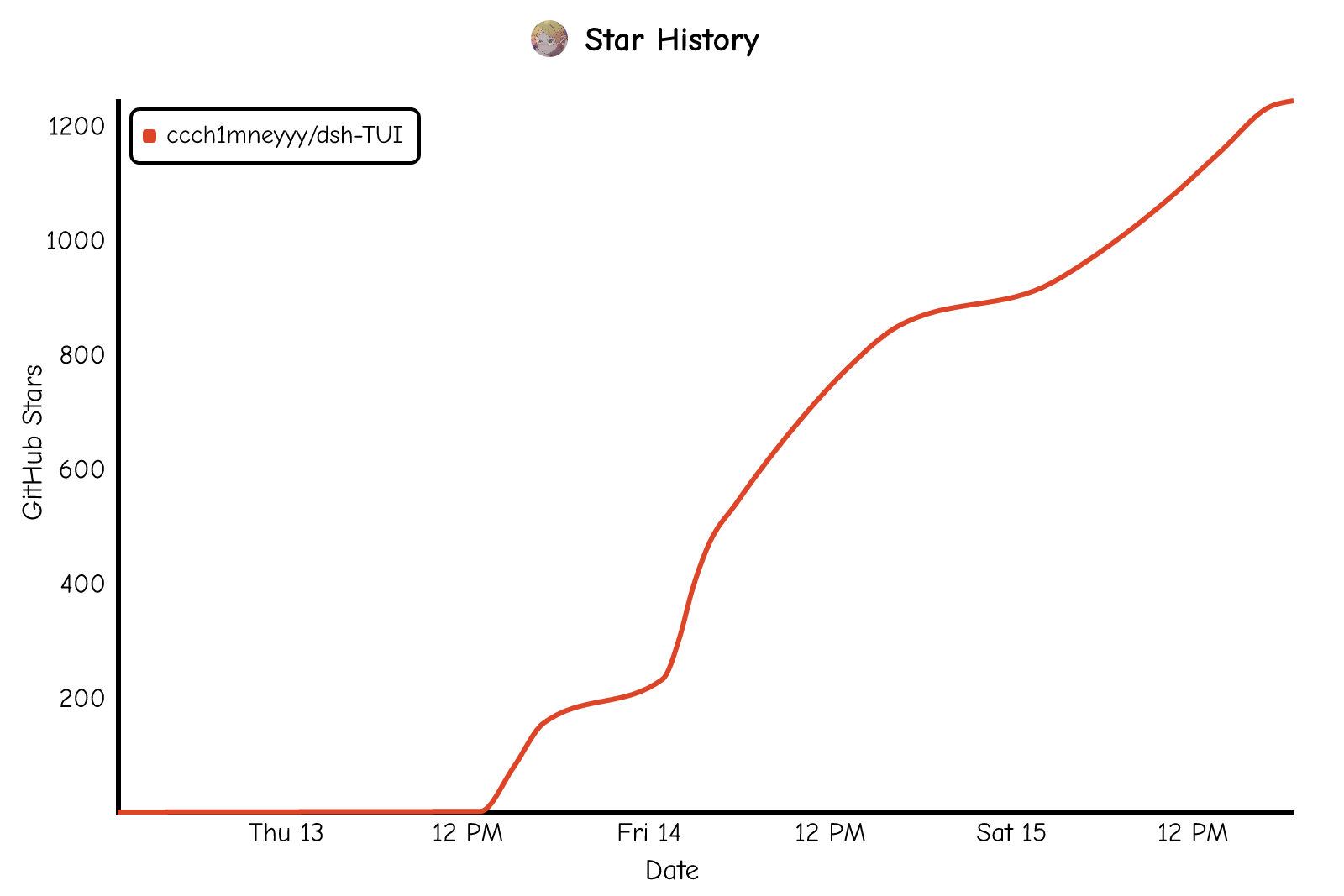](https://star-history.com/#ccch1mneyyy/dsh-TUI&Date)
- ---
- ## Maintainers
- <table>
- <tbody>
- <tr>
- <td align="center" width="150"><a href="https://github.com/ccch1mneyyy"><img src="https://github.com/ccch1mneyyy.png?size=160" width="96" height="96" alt="ccch1mneyyy"></a><br><a href="https://github.com/ccch1mneyyy"><b>ccch1mneyyy</b></a><br><sub>Core development & maintenance</sub></td>
- <td align="center" width="150"><a href="https://github.com/CikeSeven"><img src="https://github.com/CikeSeven.png?size=160" width="96" height="96" alt="CikeSeven"></a><br><a href="https://github.com/CikeSeven"><b>CikeSeven</b></a><br><sub>Performance & stability</sub></td>
- <td align="center" width="150"><a href="https://github.com/T-Auto"><img src="https://github.com/T-Auto.png?size=160" width="96" height="96" alt="T-Auto"></a><br><a href="https://github.com/T-Auto"><b>T-Auto</b></a><br><sub>Architecture & ecosystem adaptation</sub></td>
- <td align="center" width="150"><a href="https://github.com/AdamPlatin123"><img src="https://github.com/AdamPlatin123.png?size=160" width="96" height="96" alt="AdamPlatin123"></a><br><a href="https://github.com/AdamPlatin123"><b>AdamPlatin123</b></a><br><sub>Security & interaction</sub></td>
- <td align="center" width="150"><a href="https://github.com/Nagi-ovo"><img src="https://github.com/Nagi-ovo.png?size=160" width="96" height="96" alt="Nagi-ovo"></a><br><a href="https://github.com/Nagi-ovo"><b>Nagi-ovo</b></a><br><sub>Test infrastructure & terminal rendering</sub></td>
- </tr>
- </tbody>
- </table>
- ※ In no particular order
- ---
- ## Contributors
- [](https://github.com/ccch1mneyyy/dsh-TUI)
- ## License
- [MIT](LICENSE)
- ### Storage migration and read budgets
- The SQLite migration script uses the official `node:sqlite.backup()` API on
- supported Node 22.19+ and Node 24+ builds. It probes that capability before
- opening the source read-only and includes committed WAL data in a consistent
- snapshot; it never copies a live database/WAL pair by hand. A build missing the
- API reports a migration-specific prerequisite. Session-tree reads validate packed
- rows and check their entire member count against the remaining scan budget before
- expanding events. Oversized rows report truncation; malformed rows report failure.
- The logical budget does not eliminate physical JSON/frame parsing or validation.
- Development `@deepseek-ai/*` release-age exceptions list only exact package versions in the current
- lockfile (including the legacy SQLite island); all other versions retain the
- 24-hour delay. Regenerate with `node scripts/verify-release-age-cohort.mjs --write`
- after an intentional lockfile update, then review the cohort diff.
- ### Bounded update installation
- `/update` and `dsh-tui update` give each installer invocation (profile and engine) a **30-minute
- wall-clock limit**. Set `DSH_TUI_UPDATE_TIMEOUT_MS` to a positive integer in
- milliseconds to change it (invalid values use the default). Output activity does
- not reset this deadline; a quiet but healthy installation can use the full limit.
- Only the final process exit code establishes success: a printed `Done` does not.
- Ctrl+C cancels the owned installer. On POSIX, cancellation terminates its own
- process group, then force-kills remaining descendants after two seconds. Windows
- uses a dedicated PowerShell/native supervisor with a private Job Object. The
- installer joins that job atomically while suspended; verified membership is required
- before it runs. The supervisor retains the job handle after the root exits, so
- cancellation and timeout also terminate orphaned descendants holding output pipes.
- It does not enable job breakaway or kill processes by name or an exited root PID.
- Windows requires Windows 10 / Server 2016 or later and Windows PowerShell with
- `Add-Type`/native interop available. Startup or job-membership failures stop the
- installation before running an unowned installer. A cleanup failure is reported as
- unconfirmed, never as proof that all writes stopped. Timeout, cancellation, or
- unconfirmed cleanup returns nonzero and prevents retries, stale-file removal,
- repair, and TUI replacement. A partial installation may remain: check/repair that
- profile before using the recovery command printed at update start and on failure.
- `~/.dsh-tui/restart.log` records installer category, PID, termination reason and last
- output timestamp before any restart.
- The focused **Windows installer process ownership** workflow runs the real native
- regression on `windows-latest`, with Node 24 and no dependency installation. To run
- it locally on Windows: `node scripts/verify-update-process-windows.mjs`. It checks
- orphan descendants, timeout/cancellation, nested jobs, failure diagnostics, streams,
- arguments and an unrelated process; a Linux run explicitly skips native acceptance.
Ratings and comments
Sign in to rate this skill.
Sign inFree to use. If it’s helped, pass it on.