nextcloud-mcp-server
Nextcloud MCP Server
Safety scan
A static text scan, not a guarantee. Select the badge to see what was scanned and every finding.
Check it deeper on your machine
It has changed since its scan on 11 Nov 2026.
As a Claude Code plugin, install it and then ask Claude Code:
/plugin marketplace add keithmackay/mackayi/plugin install scanskillsafety@mackayiDo a deep scan of https://github.com/cbcoutinho/nextcloud-mcp-server with scanskillsafety
Or from a terminal, clone it and run it:
git clone https://github.com/keithmackay/scanskillsafety-skill ~/.claude/skills/scanskillsafetynode ~/.claude/skills/scanskillsafety/cli.cjs --deep 'https://github.com/cbcoutinho/nextcloud-mcp-server'
It checks the exact commit: every file, its packages against OSV (api.osv.dev), how it compares with this page's scan (findsafeskills.com receives the repository's address), and, if you agree, Claude reading every file with your own Claude subscription. It never runs the code.
Badge for your README

Markdown
[](/listings/cbcoutinho--nextcloud-mcp-server)HTML
<a href="/listings/cbcoutinho--nextcloud-mcp-server"><img src="/api/listings/cbcoutinho--nextcloud-mcp-server/badge.svg" alt="findsafeskills safety rating" /></a>Install
Install instructions from the README
As written by the repo's author. findsafeskills has not verified these steps.
Run the server locally with [uvx](https://docs.astral.sh/uv/) (no installation required):
NEXTCLOUD_HOST=https://your.nextcloud.instance.com \
NEXTCLOUD_USERNAME=your_username \
NEXTCLOUD_PASSWORD=your_app_password \
  uvx nextcloud-mcp-server run --transport stdio
Or add it directly to your MCP client configuration (e.g. `claude_desktop_config.json` or `.claude/settings.json`):
{
  "mcpServers": {
    "nextcloud": {
      "command": "uvx",
      "args": ["nextcloud-mcp-server", "run", "--transport", "stdio"],
      "env": {
        "NEXTCLOUD_HOST": "https://your.nextcloud.instance.com",
        "NEXTCLOUD_USERNAME": "your_username",
        "NEXTCLOUD_PASSWORD": "your_app_password"
      }
    }
  }
}> [!TIP] > Generate an [app password](https://docs.nextcloud.com/server/latest/user_manual/en/session_management.html#managing-devices) in Nextcloud under **Settings > Security > Devices & sessions** instead of using your login password.
Docker
For full features including semantic search, run with Docker:
docker run -p 127.0.0.1:8000:8000 --rm \
  -e NEXTCLOUD_HOST=https://your.nextcloud.instance.com \
  -e NEXTCLOUD_USERNAME=your_username \
  -e NEXTCLOUD_PASSWORD=your_app_password \
  ghcr.io/cbcoutinho/nextcloud-mcp-server:latest
Then connect your MCP client (Claude Desktop, IDEs, `mcp dev`, etc.) to `http://127.0.0.1:8000/mcp`.
For Kubernetes, see [cbcoutinho/helm-charts](https://github.com/cbcoutinho/helm-charts). For other deployment options and Compose profiles, see [docs/installation.md](docs/installation.md).
What was scanned
The files the safety scan read, as written by the repository's author and shown as plain text. Lines with a finding are marked.
README.md · README · 177 lines
View this file on GitHub (read at the repository's current version: the scan did not record which commit it read)
This file has changed since it was scanned, so this is not exactly the text that was scanned, and no line is marked. The findings are listed with the safety scan above.
- <p align="center">
- <img src="astrolabe.svg" alt="Nextcloud MCP Server" width="128" height="128">
- </p>
- # Nextcloud MCP Server
- [](https://github.com/cbcoutinho/nextcloud-mcp-server/pkgs/container/nextcloud-mcp-server)
- **A production-ready MCP server that connects AI assistants to your Nextcloud instance.**
- Enable Large Language Models like Claude, GPT, and Gemini to interact with your Nextcloud data through a secure API. Create notes, manage calendars, organize contacts, work with files, and more - all through natural language conversations.
- This is a **dedicated standalone MCP server** designed for external MCP clients like Claude Code and IDEs. It runs independently of Nextcloud (Docker, VM, Kubernetes, or local) and provides deep CRUD operations across Nextcloud apps.
- > [!NOTE]
- > **Want AI features inside Nextcloud instead?** You can point Nextcloud's own Assistant at this server — see [AI inside Nextcloud](#ai-inside-nextcloud) below.
- > [!TIP]
- > **Don't want to self-host?** [Astrolabe Cloud](https://astrolabecloud.com) is a managed hosting service for this MCP server, aimed at users and teams who want advanced features like background sync and semantic search without operating the infrastructure themselves. The service is currently under development — sign up on the landing page to join the early-adopter list.
- ## Quick Start
- Run the server locally with [uvx](https://docs.astral.sh/uv/) (no installation required):
- ```bash
- NEXTCLOUD_HOST=https://your.nextcloud.instance.com \
- NEXTCLOUD_USERNAME=your_username \
- NEXTCLOUD_PASSWORD=your_app_password \
- uvx nextcloud-mcp-server run --transport stdio
- ```
- Or add it directly to your MCP client configuration (e.g. `claude_desktop_config.json` or `.claude/settings.json`):
- ```json
- {
- "mcpServers": {
- "nextcloud": {
- "command": "uvx",
- "args": ["nextcloud-mcp-server", "run", "--transport", "stdio"],
- "env": {
- "NEXTCLOUD_HOST": "https://your.nextcloud.instance.com",
- "NEXTCLOUD_USERNAME": "your_username",
- "NEXTCLOUD_PASSWORD": "your_app_password"
- }
- }
- }
- }
- ```
- > [!TIP]
- > Generate an [app password](https://docs.nextcloud.com/server/latest/user_manual/en/session_management.html#managing-devices) in Nextcloud under **Settings > Security > Devices & sessions** instead of using your login password.
- ### Docker
- For full features including semantic search, run with Docker:
- ```bash
- docker run -p 127.0.0.1:8000:8000 --rm \
- -e NEXTCLOUD_HOST=https://your.nextcloud.instance.com \
- -e NEXTCLOUD_USERNAME=your_username \
- -e NEXTCLOUD_PASSWORD=your_app_password \
- ghcr.io/cbcoutinho/nextcloud-mcp-server:latest
- ```
- Then connect your MCP client (Claude Desktop, IDEs, `mcp dev`, etc.) to `http://127.0.0.1:8000/mcp`.
- For Kubernetes, see [cbcoutinho/helm-charts](https://github.com/cbcoutinho/helm-charts). For other deployment options and Compose profiles, see [docs/installation.md](docs/installation.md).
- ## Key Features
- - **110+ MCP Tools** - Comprehensive API coverage across 10 Nextcloud apps
- - **MCP Resources** - Structured data URIs for browsing Nextcloud data
- - **Semantic Search (Experimental)** - Optional vector-powered search for Notes, Files, News items, Deck cards, and Mail messages (requires Qdrant + Ollama)
- - **Document Processing** - OCR and text extraction from PDFs, DOCX, images with progress notifications
- - **Flexible Deployment** - Docker, Kubernetes ([Helm chart](https://github.com/cbcoutinho/helm-charts)), VM, or local installation
- - **Production-Ready Auth** - Basic Auth with app passwords; multi-user via Login Flow v2 — MCP clients authenticate via OAuth, the server handles Nextcloud app passwords transparently
- - **Tag-Based File Exclusion** - Hide sensitive files/folders from MCP file tools by tagging them with a configured Nextcloud system tag (`EXCLUDED_TAGS`). See [docs/configuration.md](docs/configuration.md#tag-based-file-exclusion-optional)
- - **Multiple Transports** - streamable-http (default) and stdio
- ## Supported Apps
- | App | Tools | Capabilities |
- |-----|-------|--------------|
- | **Notes** | 7 | Full CRUD, keyword search, semantic search |
- | **Calendar** | 20+ | Events, todos (tasks), recurring events, attendees, availability |
- | **Contacts** | 8 | Full CardDAV support, address books |
- | **Files (WebDAV)** | 23 | Filesystem access, in-place text edits, OCR/document processing, file comments |
- | **Deck** | 15 | Boards, stacks, cards, labels, assignments |
- | **Cookbook** | 13 | Recipe management, URL import (schema.org) |
- | **Tables** | 5 | Row operations on Nextcloud Tables |
- | **Sharing** | 10+ | Create and manage shares |
- | **News** | 8 | Feeds, folders, items, feed health monitoring |
- | **Mail** | 14 | Accounts, mailboxes, messages, attachments, send, drafts (saved without sending); flags (read/unread, star), tags, move, delete |
- | **Collectives** | 16 | Full CRUD on collectives, pages, and tags |
- | **Talk (spreed)** | 6 | List conversations, read/post messages, mark as read, list participants |
- | **Shopping List** | 12 | Lists and items — add a whole recipe's ingredients in one call, tick items off, clear checked |
- | **Semantic Search** | 2+ | Vector search for Notes, Files, News items, Deck cards, and Mail messages (experimental, opt-in, requires infrastructure) |
- Want to see another Nextcloud app supported? [Open an issue](https://github.com/cbcoutinho/nextcloud-mcp-server/issues) or contribute a pull request!
- ## Authentication
- The MCP server authenticates to Nextcloud using **app-specific passwords** (Basic Auth). Three deployment modes are supported:
- | Mode | Best for |
- |------|----------|
- | Single-User (BasicAuth) | Personal use, development, single-user deployments |
- | Multi-User (BasicAuth pass-through) | Multi-user setups where clients send credentials via Authorization header |
- | Multi-User (Login Flow v2) | Multi-user / hosted deployments — clients authenticate to the MCP server via OAuth, and the server obtains a per-user app password from Nextcloud and uses it transparently |
- OAuth-direct-to-Nextcloud is no longer supported (it required upstream patches to `user_oidc` that were never merged). Login Flow v2 replaces it for multi-user deployments and works with stock Nextcloud.
- See [docs/authentication.md](docs/authentication.md) for setup instructions.
- ## AI inside Nextcloud
- This server was built for AI assistants that live *outside* Nextcloud — Claude Code, an IDE, a desktop client. But Nextcloud has its own chat, the **Assistant** app, and there are two ways to give it access to your content.
- | Answering the Assistant's "Chat with AI" | What it needs | What it does |
- |---|---|---|
- | **[Context Agent](https://github.com/nextcloud/context_agent)** (by Nextcloud) | AppAPI and a separate container to run the ExApp | Acts on your Nextcloud — sends Talk messages, creates events, and other write actions, with a confirmation step |
- | **[Astrolabe](https://github.com/cbcoutinho/astrolabe)** + this server | The Astrolabe app, and this server reachable from it | Answers *from your own documents* and cites them: every claim links to the file, note or card it came from. Read-only |
- Astrolabe is a Nextcloud app that registers itself as the Assistant's agent provider, so no AppAPI and no extra container are involved — the Assistant talks to it, and it searches your content through this server. Each user's questions run under their own identity, so nobody sees anything they couldn't already open.
- You can install both and pick per instance, or neither: none of this is required to use this server from an external MCP client.
- To set it up, see the [Astrolabe setup guide](https://docs.astrolabecloud.com/using/assistant). For the architectural detail behind the comparison, see [docs/comparison-context-agent.md](docs/comparison-context-agent.md).
- ## Semantic Search
- An experimental RAG pipeline that lets MCP clients find Nextcloud content by **meaning** rather than keywords — a query for "car" also surfaces notes about "vehicle" or "transportation". Disabled by default (`ENABLE_SEMANTIC_SEARCH=false`); requires the `semantic` extra (`pip install 'nextcloud-mcp-server[semantic]'`, included in the Docker image), a vector database and an embedding service. See [docs/semantic-search-architecture.md](docs/semantic-search-architecture.md) and [docs/configuration.md](docs/configuration.md).
- For result *ordering* — turning the fused rank score into a calibrated relevance score with a cross-encoder, self-hosted via Infinity/vLLM or hosted via Cohere, with or without an embedding gateway — see [docs/reranking.md](docs/reranking.md).
- > [!TIP]
- > **Don't want to run Qdrant and an embedding service?** [Astrolabe Cloud](https://astrolabecloud.com) (under development) provides semantic search and background sync as a managed service.
- ## Documentation
- - **[Installation](docs/installation.md)** — Docker, Compose profiles, local, VM
- - **[Configuration](docs/configuration.md)** — Environment variables, document processing, semantic search setup
- - **[Authentication](docs/authentication.md)** — Basic Auth, Login Flow v2
- - **[Running the Server](docs/running.md)** — Start, manage, troubleshoot
- - **[App Documentation](docs/)** — Per-app guides (Notes, Calendar, Contacts, WebDAV, Deck, Cookbook, Tables)
- - **[Semantic Search Architecture](docs/semantic-search-architecture.md)** + **[Vector Sync UI](docs/user-guide/vector-sync-ui.md)**
- - **[Reranking](docs/reranking.md)** — cross-encoder relevance scoring (Infinity, vLLM, Cohere); no embedding gateway required
- - **[Login Flow v2](docs/login-flow-v2.md)** — recommended multi-user setup (architecture, env vars, scope reference, troubleshooting)
- - **[Troubleshooting](docs/troubleshooting.md)** · **[Comparison with Context Agent](docs/comparison-context-agent.md)**
- ## Contributing
- Contributions are welcome!
- - Report bugs or request features: [GitHub Issues](https://github.com/cbcoutinho/nextcloud-mcp-server/issues)
- - Submit improvements: [Pull Requests](https://github.com/cbcoutinho/nextcloud-mcp-server/pulls)
- - Development guidelines: [CLAUDE.md](CLAUDE.md)
- ## Security
- [](https://mseep.ai/app/cbcoutinho-nextcloud-mcp-server)
- Found a security issue? **Do not open a public GitHub issue.** Use GitHub's [private vulnerability reporting](https://github.com/cbcoutinho/nextcloud-mcp-server/security/advisories/new), or email **security@astrolabecloud.com** if you can't use GitHub. See [SECURITY.md](./SECURITY.md) for details.
- ## License
- This project is licensed under the AGPL-3.0 License. See [LICENSE](./LICENSE) for details.
- ## Star History
- [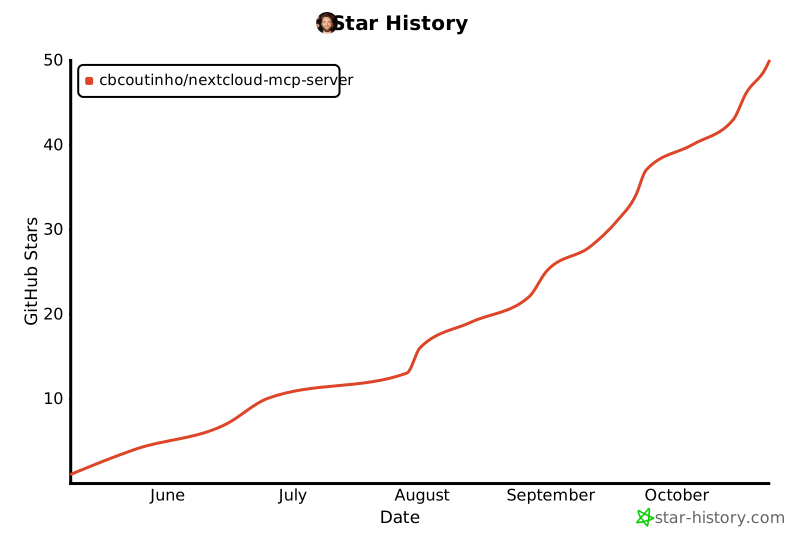](https://www.star-history.com/#cbcoutinho/nextcloud-mcp-server&Date)
- ## References
- - [Model Context Protocol](https://github.com/modelcontextprotocol)
- - [MCP Python SDK](https://github.com/modelcontextprotocol/python-sdk)
- - [Nextcloud](https://nextcloud.com/)
Ratings and comments
Sign in to rate this skill.
Sign inFree to use. If it’s helped, pass it on.