Back to search
cc-wf-studio
SkillGitHub
CC Workflow Studio
Safety scan
A static text scan, not a guarantee. Select the badge to see what was scanned and every finding.
Checked today
Badge for your README
Markdown
[](/listings/breaking-brake-cc-wf-studio)HTML
<a href="/listings/breaking-brake-cc-wf-studio"><img src="/api/listings/breaking-brake-cc-wf-studio/badge.svg" alt="findsafeskills safety rating" /></a>Install
i
What was scanned
The files the safety scan read, as written by the repository's author and shown as plain text. Lines with a finding are marked.
README.md · README · 195 lines
View this file on GitHub (read at the repository's current version: the scan did not record which commit it read)
- <p align="center">
- <img src="./packages/vscode/resources/icon-large.png" alt="CC Workflow Studio Icon" width="128">
- </p>
- # CC Workflow Studio
- <p align="center">
- <a href="https://github.com/breaking-brake/cc-wf-studio/stargazers"><img src="https://img.shields.io/github/stars/breaking-brake/cc-wf-studio" alt="GitHub Stars" /></a>
- <a href="https://marketplace.visualstudio.com/items?itemName=breaking-brake.cc-wf-studio"><img src="https://vsmarketplacebadges.dev/version-short/breaking-brake.cc-wf-studio.svg?label=VS%20Marketplace" alt="VS Code Marketplace" /></a>
- <a href="https://open-vsx.org/extension/breaking-brake/cc-wf-studio"><img src="https://img.shields.io/open-vsx/v/breaking-brake/cc-wf-studio?label=OpenVSX" alt="OpenVSX" /></a>
- <a href="https://www.npmjs.com/package/@cc-wf-studio/cli"><img src="https://img.shields.io/npm/v/@cc-wf-studio/cli?label=npm%20%2F%20cli" alt="npm @cc-wf-studio/cli" /></a>
- <a href="https://www.npmjs.com/package/@cc-wf-studio/mcp"><img src="https://img.shields.io/npm/v/@cc-wf-studio/mcp?label=npm%20%2F%20mcp" alt="npm @cc-wf-studio/mcp" /></a>
- <a href="https://deepwiki.com/breaking-brake/cc-wf-studio"><img src="https://img.shields.io/badge/Ask-DeepWiki-009485" alt="Ask DeepWiki" /></a>
- </p>
- <p align="center">
- <img src="./packages/vscode/resources/hero.png" alt="CC Workflow Studio" width="800">
- </p>
- **You think visually. AI thinks in `.md`. CC Workflow Studio speaks both.**
- Design workflows on a canvas. Export as Markdown your AI agent already understands. No more prompt-guessing.
- <p align="center">
- <a href="https://speakerdeck.com/seiyakobayashi/cc-workflow-studio">
- <img src="./packages/vscode/resources/deck-preview.png" alt="Learn more: Why CC Workflow Studio?" width="600">
- </a>
- <br>
- <em>Why CC Workflow Studio? - Speaker Deck Link</em>
- </p>
- ---
- ## Supported Agents
- | Agent | Export Format | Requires |
- |-------|--------------|----------|
- | Claude Code | `.claude/agents/` `.claude/commands/` | [Claude Code](https://github.com/anthropics/claude-code) |
- | GitHub Copilot Chat | `.github/prompts/` | [Copilot Chat](https://marketplace.visualstudio.com/items?itemName=GitHub.copilot-chat) |
- | GitHub Copilot CLI | `.github/skills/` | [Copilot CLI](https://github.com/github/copilot-cli) |
- | OpenAI Codex CLI | `.codex/skills/` | [Codex CLI](https://github.com/openai/codex) |
- | Zoo Code (formerly Roo Code) | `.roo/skills/` | [Zoo Code](https://marketplace.visualstudio.com/items?itemName=ZooCodeOrganization.zoo-code) |
- | Gemini CLI | `.gemini/skills/` | [Gemini CLI](https://github.com/google-gemini/gemini-cli) |
- | Antigravity | `.agent/skills/` | [Antigravity](https://antigravity.google/) |
- | Cursor | `.cursor/agents/` `.cursor/skills/` | [Cursor](https://github.com/cursor/cursor) |
- > **Note:** Agents other than Claude Code require activation from Toolbar's **More** menu.
- ---
- ## Use it without VSCode, too
- The VSCode extension is the most ergonomic editor, but it isn't the only entry point. The same `workflow.json` drives a CLI and an MCP server — pick whichever interface fits the situation.
- ```mermaid
- flowchart LR
- Wf(["workflow.json"])
- subgraph IDE["🪟 VSCode Extension"]
- Canvas["React Flow canvas<br/>+ editor + Slack share"]
- end
- subgraph Mcp["🔌 MCP Server"]
- AIClient["Claude Code,<br/>MCP Inspector, ..."]
- McpServer["@cc-wf-studio/mcp<br/>(stdio: <code>ccwf-mcp</code>)"]
- AIClient --> McpServer
- end
- subgraph Cli["💻 CLI"]
- CliBin["@cc-wf-studio/cli<br/>(<code>ccwf render | validate | export | run | preview | canvas | mcp</code>)"]
- end
- Wf <-->|edit| Canvas
- Wf <-->|read / write| McpServer
- Wf <-->|read / write| CliBin
- Canvas -.->|writes skills + agents| Output["Agent skills on disk<br/>(.claude/, .codex/, .cursor/, ...)"]
- McpServer -.-> Output
- CliBin -.-> Output
- ```
- | Interface | Try it | Best for | Docs |
- |---|---|---|---|
- | **VSCode extension** | `code --install-extension breaking-brake.cc-wf-studio` | Designing workflows visually | [`packages/vscode`](./packages/vscode/README.md) |
- | **CLI (`ccwf`)** | `npx @cc-wf-studio/cli --help` | Terminal / CI / SSH / Codespaces — render, validate, preview, export, run a workflow without VSCode | [`packages/cli`](./packages/cli/README.md) |
- | **MCP server (`ccwf-mcp`)** | Add to your MCP client's `.mcp.json` so Claude Code (or any MCP client) can read and edit workflows over stdio | Letting an external AI client read and edit your workflows through MCP tools | [`packages/mcp`](./packages/mcp/README.md) |
- There is no "VSCode-only" path: a workflow you draw in the canvas is the same file `ccwf preview` will render in a browser, and the same file an external Claude Code can edit through MCP.
- ---
- <!-- AI Edit Demo GIF: MCP Server-based Workflow Editing -->
- <p align="center">
- <img src="./packages/vscode/resources/demo_edit_with_ai.gif" alt="AI-Assisted Workflow Creation Demo - MCP Server-based Editing" width="800">
- </p>
- <p align="center">
- <em>✨ Edit with AI: AI agents (Claude Code, GitHub Copilot, etc.) create workflows through natural language via MCP Server</em>
- </p>
- ---
- <!-- Run Workflow Demo GIF -->
- <p align="center">
- <img src="./packages/vscode/resources/demo_run_workflow.gif" alt="Run Workflow Demo - Execute workflows directly from the editor" width="800">
- </p>
- <p align="center">
- <em>▶️ Run workflows directly from the editor – See your AI automation in action instantly</em>
- </p>
- ---
- ## Key Features
- 🔀 **Visual Workflow Editor** - Intuitive drag-and-drop canvas for designing AI agent orchestrations without code
- 🤖 **Agentic Engineering** - Design multi-agent workflows with Sub-Agent orchestration, Agent Skills, and MCP tool integration — the building blocks of agentic engineering
- ✨ **Edit with AI** - Iteratively improve workflows through conversational AI - ask for changes, add features, or refine logic with natural language feedback
- ⚡ **One-Click Export & Run** - Export workflows to ready-to-use formats and run directly from the editor
- ## How to Use
- ### Launch the Extension
- - Click the <img src="./packages/vscode/resources/icon.png" alt="icon" height="16" style="vertical-align: middle"> icon in the top-right corner of the editor
- - Or: Command Palette (`Cmd+Shift+P`) → **"CC Workflow Studio: Open Editor"**
- ### Create a Workflow
- - Add nodes from the palette and configure their settings, or use [Edit with AI](#edit-with-ai).
- ### Save & Load
- - Click Save <img src="./packages/vscode/resources/icon-save.png" alt="save" height="16" style="vertical-align: middle"> button in the toolbar to store your workflow as `.vscode/workflows/*.json`
- - Click Load <img src="./packages/vscode/resources/icon-file-down.png" alt="load" height="16" style="vertical-align: middle"> button in the toolbar to open a saved `.json` workflow
- ### Export & Run
- - Click Export <img src="./packages/vscode/resources/icon-export.png" alt="export" height="16" style="vertical-align: middle"> button in the toolbar to create a `.md` slash command or agent skill (use `/workflow-name` in AI coding agents)
- - Click Run <img src="./packages/vscode/resources/icon-play.png" alt="run" height="16" style="vertical-align: middle"> button in the toolbar to run your workflow directly in AI coding agents
- ### Edit with AI
- - Click Edit with AI <img src="./packages/vscode/resources/icon-sparkles.png" alt="sparkles" height="16" style="vertical-align: middle"> button in the toolbar to generate or refine workflows with natural language
- - **Native with MCP Server**: Click an AI agent button in the Edit with AI panel to launch native AI editing. The MCP server starts automatically behind the scenes.
- ```mermaid
- sequenceDiagram
- actor User
- box VS Code (CC Workflow Studio)
- participant UI as Editor UI
- participant MCP as MCP Server
- end
- participant Agent as AI Agent
- User->>UI: Click agent button
- UI->>MCP: Auto start server
- UI->>Agent: Launch with editing skill
- loop AI edits workflow
- Agent->>MCP: get_workflow
- MCP-->>Agent: workflow JSON
- Agent->>MCP: apply_workflow
- MCP->>UI: Update canvas
- end
- ```
- ## Usage Examples
- Coming soon - Sample workflows and tutorials are under development.
- ## License
- The VSCode extension (`cc-wf-studio`) is licensed under the **GNU Affero General Public License v3.0** (AGPL-3.0-or-later).
- See the [LICENSE](./LICENSE) file for the full license text.
- The reusable libraries published to npm — [`@cc-wf-studio/core`](./packages/core/LICENSE), [`@cc-wf-studio/mcp`](./packages/mcp/LICENSE), and [`@cc-wf-studio/cli`](./packages/cli/LICENSE) — are released under the more permissive **MIT** license. Each package ships its own LICENSE file, which takes precedence for that package.
- Copyright (c) 2025 breaking-brake
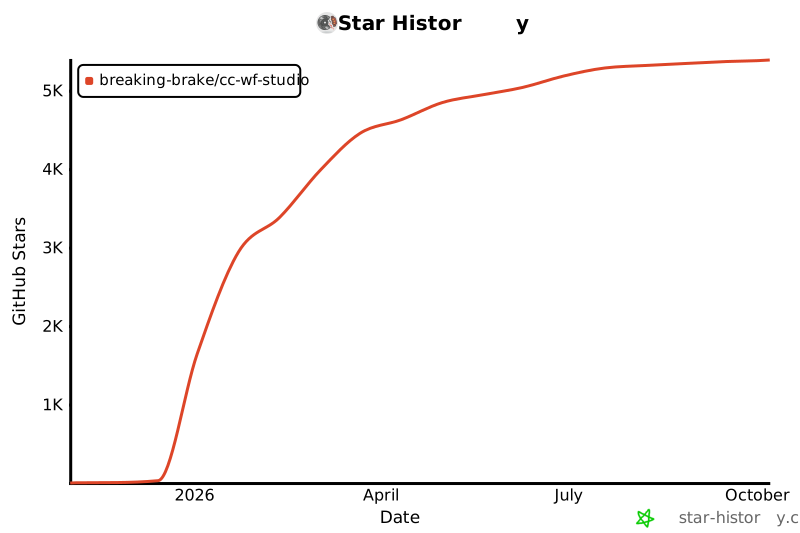
- ## Star History
- [](https://star-history.com/#breaking-brake/cc-wf-studio&Date)
- ## Acknowledgments
- Built with [React Flow](https://reactflow.dev/) • Powered by [Claude Code](https://claude.com/claude-code) • Inspired by [Dify](https://dify.ai/)
- ---
- **Made with CC Workflow Studio**
Ratings and comments
Sign in to rate this skill.
Sign inFree to use. If it’s helped, pass it on.