javis-os
Your self-hosted AI agent with a swappable brain, and a Second Brain that gets smarter every day.
Safety scan
A static text scan, not a guarantee. Select the badge to see what was scanned and every finding.
Check it deeper on your machine
It has changed since its scan on 11 Nov 2026.
As a Claude Code plugin, install it and then ask Claude Code:
/plugin marketplace add keithmackay/mackayi/plugin install scanskillsafety@mackayiDo a deep scan of https://github.com/blogminhquy/javis-os with scanskillsafety
Or from a terminal, clone it and run it:
git clone https://github.com/keithmackay/scanskillsafety-skill ~/.claude/skills/scanskillsafetynode ~/.claude/skills/scanskillsafety/cli.cjs --deep 'https://github.com/blogminhquy/javis-os'
It checks the exact commit: every file, its packages against OSV (api.osv.dev), how it compares with this page's scan (findsafeskills.com receives the repository's address), and, if you agree, Claude reading every file with your own Claude subscription. It never runs the code.
Badge for your README

Markdown
[](/listings/blogminhquy--javis-os)HTML
<a href="/listings/blogminhquy--javis-os"><img src="/api/listings/blogminhquy--javis-os/badge.svg" alt="findsafeskills safety rating" /></a>Install
Install instructions from the README
As written by the repo's author. findsafeskills has not verified these steps.
**The easy way: let your own AI install it.** Give this repo link to Claude Code or Codex on your machine and say *"install Javis OS for me"*. It only needs to run one command:
| Machine | One command installs everything | |---|---| | **Linux / macOS** | `git clone https://github.com/blogminhquy/javis-os.git javis && cd javis && chmod +x install.sh && ./install.sh` | | **Windows** | `git clone https://github.com/blogminhquy/javis-os.git javis; cd javis; powershell -ExecutionPolicy Bypass -File install.ps1` | | **Docker** | `curl -fsSLO https://raw.githubusercontent.com/blogminhquy/javis-os/main/docker-compose.yml && docker compose up -d` |
Then open **http://localhost:7777**. The installer sets up Python, the four subscription CLI brains (`claude`, `codex`, `agy`, `grok`) and a `.env`, then starts the server. You sign in to each brain **on the Models page of the dashboard**, no more typing commands.
> [!NOTE] > Installed an extra CLI **after** Javis was already running? **Restart Javis.** A running process keeps the PATH it started with, so it cannot see a CLI installed later.
<p align="center"> </p>
---
What was scanned
The files the safety scan read, as written by the repository's author and shown as plain text. Lines with a finding are marked.
README.md · README · 516 lines
View this file on GitHub (read at the repository's current version: the scan did not record which commit it read)
This file has changed since it was scanned, so this is not exactly the text that was scanned, and no line is marked. The findings are listed with the safety scan above.
- <div align="center">
- <a href="https://javisos.com"><img src="docs/assets/social-preview.png" width="100%" alt="Javis OS: Your AI Workforce. Never miss the best AI. Open source, self-hosted, javisos.com"></a>
- # Javis OS
- ### Your AI workforce. Never miss the best AI.
- Javis OS turns **Claude, ChatGPT, Gemini, Grok** and the models you choose into one 24/7 workforce on your own machine or server. Each coworker has a role, shares the same memory and tools, and keeps working in the background. When a better model ships, switch and keep everything they learned.
- **🌐 Website: [javisos.com](https://javisos.com)** · Open source · Self-hosted · 14 AI providers
- [](https://github.com/blogminhquy/javis-os/stargazers)
- [](LICENSE)
- [](https://github.com/blogminhquy/javis-os/commits/main)
- [](requirements.txt)
- [](https://github.com/blogminhquy/javis-os/pkgs/container/javis-os)
- [](https://modelcontextprotocol.io)
- <!-- flags:start -->
- <p align="center">
- <b>🌐 Available in 12 languages</b><br><br>
- <img src="docs/assets/flags/gb.svg" width="30" alt="English" title="English">
- <a href="docs/i18n/vi/README.md"><img src="docs/assets/flags/vn.svg" width="30" alt="Tiếng Việt" title="Tiếng Việt"></a>
- <a href="docs/i18n/zh/README.md"><img src="docs/assets/flags/cn.svg" width="30" alt="简体中文" title="简体中文"></a>
- <a href="docs/i18n/es/README.md"><img src="docs/assets/flags/es.svg" width="30" alt="Español" title="Español"></a>
- <a href="docs/i18n/ja/README.md"><img src="docs/assets/flags/jp.svg" width="30" alt="日本語" title="日本語"></a>
- <a href="docs/i18n/hi/README.md"><img src="docs/assets/flags/in.svg" width="30" alt="हिन्दी" title="हिन्दी"></a>
- <a href="docs/i18n/pt-BR/README.md"><img src="docs/assets/flags/br.svg" width="30" alt="Português" title="Português"></a>
- <a href="docs/i18n/ko/README.md"><img src="docs/assets/flags/kr.svg" width="30" alt="한국어" title="한국어"></a>
- <a href="docs/i18n/ru/README.md"><img src="docs/assets/flags/ru.svg" width="30" alt="Русский" title="Русский"></a>
- <a href="docs/i18n/de/README.md"><img src="docs/assets/flags/de.svg" width="30" alt="Deutsch" title="Deutsch"></a>
- <a href="docs/i18n/fr/README.md"><img src="docs/assets/flags/fr.svg" width="30" alt="Français" title="Français"></a>
- <a href="docs/i18n/id/README.md"><img src="docs/assets/flags/id.svg" width="30" alt="Bahasa Indonesia" title="Bahasa Indonesia"></a>
- </p>
- <!-- flags:end -->
- 🇬🇧 **English** · [🇻🇳 Tiếng Việt](docs/i18n/vi/README.md) · [🇨🇳 简体中文](docs/i18n/zh/README.md) · [🇪🇸 Español](docs/i18n/es/README.md) · [🇯🇵 日本語](docs/i18n/ja/README.md) · [🇮🇳 हिन्दी](docs/i18n/hi/README.md) · [🇧🇷 Português](docs/i18n/pt-BR/README.md) · [🇰🇷 한국어](docs/i18n/ko/README.md) · [🇷🇺 Русский](docs/i18n/ru/README.md) · [🇩🇪 Deutsch](docs/i18n/de/README.md) · [🇫🇷 Français](docs/i18n/fr/README.md) · [🇮🇩 Bahasa Indonesia](docs/i18n/id/README.md) · [🌍 Help translate](CONTRIBUTING.md#translations)
- [Website](https://javisos.com) · [Quick start](#-quick-start) · [Why Javis](#-why-javis) · [Brains](#-14-brains-one-toolkit) · [Features](#-features) · [Install](#-installation) · [Docs](docs/en/README.md) · [Support](#-support-javis-os)
- <br>
- <img src="docs/assets/screenshots/graph.jpg" alt="The Javis OS dashboard on a real brain of 1,633 notes and 2,413 links: the file tree on the left, the knowledge graph in the middle and the chat bar at the bottom" width="100%">
- </div>
- ---
- ## ⚡ Quick start
- **The easy way: let your own AI install it.** Give this repo link to Claude Code or Codex on your machine and say *"install Javis OS for me"*. It only needs to run one command:
- | Machine | One command installs everything |
- |---|---|
- | **Linux / macOS** | `git clone https://github.com/blogminhquy/javis-os.git javis && cd javis && chmod +x install.sh && ./install.sh` |
- | **Windows** | `git clone https://github.com/blogminhquy/javis-os.git javis; cd javis; powershell -ExecutionPolicy Bypass -File install.ps1` |
- | **Docker** | `curl -fsSLO https://raw.githubusercontent.com/blogminhquy/javis-os/main/docker-compose.yml && docker compose up -d` |
- Then open **http://localhost:7777**. The installer sets up Python, the four subscription CLI brains (`claude`, `codex`, `agy`, `grok`) and a `.env`, then starts the server. You sign in to each brain **on the Models page of the dashboard**, no more typing commands.
- > [!NOTE]
- > Installed an extra CLI **after** Javis was already running? **Restart Javis.** A running process keeps the PATH it started with, so it cannot see a CLI installed later.
- <p align="center">
- <img src="docs/assets/diagrams/install-terminal.svg" width="100%" alt="Animated terminal: the one-line installer sets up Python, the four subscription CLI brains and a .env, then reports that Javis is running at http://localhost:7777">
- </p>
- ---
- ## 🤔 Why Javis?
- Javis OS is **not** a chatbot. It is a **self-hosted agentic AI** that runs on your own machine or VPS: it reads and writes files, calls tools over MCP, runs skills, queues background work and schedules itself. All of that sits behind a **voice-controlled dashboard** with a **Second Brain** (memory + wiki) that accumulates knowledge over time.
- ### The lock-in nobody warns you about
- Pick one AI app and use it every day for a year. Then look at what has piled up inside it:
- - **Hundreds of conversations**, holding the decisions and context you worked out along the way.
- - **Memory** of who you are, how you work and what your business sells.
- - **Custom instructions, assistants and projects**: know-how you spent hours tuning.
- - **Automations and agents** that only run on that one platform.
- All of it sits on the vendor's servers, in the vendor's format. Then a better model ships somewhere else. You can try it, but you cannot bring your work along: the new app knows nothing about you, your instructions do not carry over, and your history stays behind. Exports, where they exist, are usually a dump of chat logs, not memory another tool can use.
- So you stay. Not because the old model is still the best, but because leaving means starting from zero. And when the vendor raises prices, tightens limits, retires a model or locks your account, there is no plan B.
- ### Javis turns it around: rent the model, own the brain
- In Javis the model is a part you can swap. Everything you build up lives with you, as files you can open:
- | What you build up | Where it lives | Format |
- |---|---|---|
- | **Conversations** | `conversations.db` on your own machine or VPS, one store whichever brain answered | SQLite, full-text searchable |
- | **Memory about you** | `memory/` in your brain: `MEMORY.md` plus one file per fact | Markdown |
- | **Knowledge** | the Wiki and Sources folders of your brain | Markdown, Obsidian-compatible |
- | **Skills** | `skills/<name>/SKILL.md` | Markdown |
- | **Agents and workflows** | `agents/*.md`, `workflows/*.md` | Markdown with front matter |
- | **Loops and reminders** | `Javis/loops/*.md`, `Javis/reminders.json` | Markdown, JSON |
- What that buys you:
- - **A new model comes out? Switch on the Models page and keep going.** It reads the same memory, runs the same skills, agents and workflows, and calls the same connections through the MCP Hub. Nothing to migrate, nothing to rebuild.
- - **Use several brains at once.** A strong model for the conversation, a cheaper one for background work, a local Ollama model for private notes, all working on the same brain.
- - **Readable without Javis.** Your brain is a folder of markdown. Open it in Obsidian or any editor. If Javis disappeared tomorrow, your knowledge would still be there, in plain text.
- - **Versioned and portable.** Every learning pass is a git commit you can undo in one tap, and the whole brain can sync to your own private GitHub repo, shared between your laptop and your VPS.
- - **Your data stays on your hardware.** There is no Javis cloud in between. A request goes only to the model provider you picked for it, and with a local Ollama model it never leaves your machine.
- ### Javis next to an ordinary chatbot
- | | An ordinary chatbot | **Javis OS** |
- |---|---|---|
- | **Brain** | Locked to one model, one stateless API call per message | **Swappable**: 14 providers, each with the full set of tools, MCP, skills and sessions, including models running on your own machine through Ollama |
- | **Memory** | Forgets after every session | **A living Second Brain** that remembers you and thickens with every conversation |
- | **Data** | Made up, or absent | **Real numbers** from the connections you wire in (sales, ads, calendar, email, messaging) |
- | **Work** | Answers, then waits | **Background loops, reminders and an AI-run task queue** that report back to you |
- | **Interface** | A chat box | Dashboard + knowledge graph + **hands-free voice** + Telegram, Slack, WhatsApp, Zalo + a CLI |
- | **Your work** | Stays on the vendor's servers, in the vendor's format | **Plain files on your machine**: history, memory, skills, agents and workflows carry over to any new model |
- | **Deployment** | Someone else's cloud | **Self-hosted**: one-click [Hostinger](https://www.hostinger.com?REFERRALCODE=JAVISOS), Docker, or any VPS |
- > 💡 **The philosophy: capability lives in Javis, not in the model.** Every brain gets the same toolbox through one shared connection hub (the MCP Hub). Switching from Claude to Gemini costs you nothing except shell access, which only the CLI engines have.
- <p align="center">
- <img src="docs/assets/diagrams/chat-to-action.svg" width="100%" alt="Animated diagram: a chat message goes into Javis, which picks the smallest tool that finishes the job, from answering directly to queuing a task, creating an agent, a workflow, a reminder or a loop">
- </p>
- ---
- ## 🧠 14 brains, one toolkit
- Pick the brain on the **Models** page and change it whenever you like. Javis supports **14 providers** today.
- <p align="center">
- <img src="docs/assets/diagrams/swappable-brain.svg" width="100%" alt="Animated diagram: the Javis core in the middle with its toolkit (MCP Hub, Skills, Second Brain, Tasks, Schedules, Plugins) around it, while the brains take turns plugging in and every tool stays lit">
- </p>
- | Brain | How you pay | Shell, web, sub-agents |
- |---|---|---|
- | **Claude Code** | Your Claude plan, or an Anthropic API key | ✅ |
- | **ChatGPT** (via Codex) | Your ChatGPT plan | ✅ |
- | **Grok Build** | Your SuperGrok or X Premium+ plan | ✅ |
- | **Antigravity CLI** | Your Google plan (same lineup as the Antigravity IDE, Claude included) | Shell ✅ |
- | **OpenRouter** | API key (hundreds of models behind one key) | via Javis tools |
- | **OpenAI API** · **Anthropic API** · **Google Gemini** · **Groq** · **DeepSeek** | API key | via Javis tools |
- | **Ollama Cloud** · **Ollama on this machine** | API key, or free on your own hardware | via Javis tools |
- | **Any OpenAI-compatible or Anthropic-compatible endpoint** | Whatever that endpoint or reseller needs | via Javis tools |
- Every brain can call your connected MCP servers, read and write the brain, run skills, queue Kanban work, and create agents, workflows, loops and reminders. The CLI engines additionally run **shell commands**, **fetch and search the web**, and **spawn parallel sub-agents**.
- > [!WARNING]
- > **A note before letting a subscription run background work.** Anthropic scopes Claude Pro/Ultra to **ordinary personal use** of Claude Code. Continuous background execution (loops, reminders, Kanban jobs, chatbots), running on a VPS, or several people sharing one account fall outside that scope, so there is a risk of the account **being locked**, although Javis has no reported case so far. If it happens to you, please tell the developer through [Issues](https://github.com/blogminhquy/javis-os/issues/new/choose). Javis never reads your login token: it runs the real `claude` binary, but that does not make round-the-clock background use legitimate. To be safe, set Claude Code to run on an **API key** on the Models page, or point the **background-work model** at another provider. The same caution applies to the xAI plan. See `server/claude_auth.py`.
- ---
- ## ✨ Features
- <p align="center">
- <img src="docs/assets/diagrams/second-brain-grows.svg" width="100%" alt="Animated knowledge graph: notes and links appear one by one as the Second Brain grows from a handful of notes to more than a thousand">
- </p>
- <table>
- <tr>
- <td width="50%" valign="top">
- ### 🗣️ Talk to it
- - **Hands-free voice**: speak, Javis listens and answers out loud (Edge TTS free by default, or OpenAI and ElevenLabs).
- - **Chat sessions** you can save, reopen and full-text search. Long sessions are compacted into summaries instead of being cut off.
- - **Telegram, Slack, WhatsApp, Zalo, a CLI and a web dashboard**, all talking to the same Javis ([setup for Slack and WhatsApp](docs/en/29-slack-whatsapp.md)).
- - **Any language**: Javis replies in the language you write in. The interface ships in English and Vietnamese.
- ### 🧠 Remember everything
- - **Second Brain**: a markdown vault (Obsidian-compatible) with long-term memory, a Wiki and raw Sources.
- - **Knowledge graph** of your notes joined by `[[wikilink]]`, on a light canvas that works offline.
- - **Self-learning**: after each conversation Javis distils memories, wiki knowledge and skills. Every learning pass is a git commit, so it is **one-tap undoable**.
- - **Back up to GitHub**: two-way sync of every brain to a private repo, shared between your laptop and your VPS.
- </td>
- <td width="50%" valign="top">
- ### ⚙️ Work while you sleep
- - **Tasks (Kanban)**: hand over a goal in plain words. The AI writes the spec, picks a worker, runs it in the background and only calls you on exceptions.
- - **Loops and reminders**: background jobs on an interval, a clock time or a cron expression, each checking its own work.
- - **Coworkers** (the Partners page): give each AI coworker a role, its own model, prompt and skills, and switch on **Auto** so it keeps working without you.
- - **Teams**: put several coworkers in one team chat. A leader hands out the work, members answer each other, and you can share a whole team as one file.
- - **Agents and workflows**: specialist assistants with their own memory, chained into multi-step workflows with verification.
- - **Multi-channel chatbots**: put a coworker in front of your customers on WhatsApp, Messenger, Instagram, Telegram, Slack, Lark, Threads, WeChat, Zalo and Zalo OA, with one shared inbox you can take over.
- ### 🔌 Connect anything
- - **MCP connection store** with several accounts per service and three permission levels that Javis **hard-enforces**.
- - **Skills and plugins**: drop in a folder to add know-how (skill) or a native Python tool (plugin) for every engine.
- - **Image generation** on the ChatGPT plan you are already signed in to.
- - **Usage tracking**: tokens and cost per day, per provider, split between what you typed and what ran on its own.
- </td>
- </tr>
- </table>
- <p align="center">
- <img src="docs/assets/diagrams/background-work.svg" width="100%" alt="Animated Kanban board at night: tasks move from Queued to Running to Review to Done on their own, and a report lands on Telegram in the morning">
- </p>
- <div align="center">
- <img src="docs/assets/screenshots/tasks.jpg" alt="The Tasks page: dispatcher status, worker counts, dispatcher mode and the task queue" width="49%">
- <img src="docs/assets/screenshots/skills.jpg" alt="The Skills page: skills grouped by topic, each with a toggle, a description and its folder" width="49%">
- </div>
- ---
- ## 🏗️ How it works
- ```mermaid
- flowchart LR
- subgraph You
- W[Web dashboard<br>voice + graph]
- T[Telegram]
- C[Javis CLI]
- Z[Zalo / bot channels]
- end
- subgraph Javis["Javis OS (FastAPI, self-hosted)"]
- R[Engine router]
- H[MCP Hub<br>shared toolbox]
- B[(Second Brain<br>Memory + Wiki + Sources)]
- Q[Background work<br>Tasks, loops, reminders]
- end
- subgraph Brains
- S[Subscription CLIs<br>Claude Code, Codex, Grok, Antigravity]
- A[API engines<br>OpenRouter, OpenAI, Anthropic, Gemini, Groq, DeepSeek, Ollama]
- end
- W & T & C & Z --> R
- R --> S & A
- S & A --> H
- H --> B
- H --> M[Your MCP servers<br>sales, ads, calendar, email...]
- Q --> R
- ```
- - **Backend:** Python FastAPI in `server/`: engines (`claude_sdk_engine.py`, `claude_cli.py`, `antigravity_cli.py`, `engine.py`, `aux_engine.py`), tools (`mcp_hub.py`, `mcp_store.py`, `plugins_host.py`), background work (`tasks.py`, `self_improve.py`, `reminders.py`, `learn.py`), language and locale (`lang.py`, `lang_registry.py`, `localefmt.py`).
- - **Frontend:** plain HTML/CSS/JS in `dashboard/`. No framework and no build step, so it stays light on a small VPS. Interface strings live in `dashboard/i18n/`.
- - **Second Brain:** a markdown vault in `brains/<brain name>/`.
- ---
- ## 🚀 Installation
- > [!IMPORTANT]
- > Javis runs an AI brain with **full rights** on the machine. When it runs publicly (Docker, VPS, Hostinger), Javis **forces login by itself**: opening the app shows a create-account or sign-in screen, and nobody can drive it without a password.
- > 💻 **On your own Windows or Mac computer?** Download the installer and open it like any app: [JavisOS-Setup.exe](https://github.com/blogminhquy/javis-os/releases/download/desktop/JavisOS-Setup.exe) (Windows 10/11) or [JavisOS-macOS.dmg](https://github.com/blogminhquy/javis-os/releases/download/desktop/JavisOS-macOS.dmg) (macOS 11+). It checks what is missing (Git, Python, Node, AI brains), installs it, and leaves a JAVIS OS icon to click. Steps: [QUICKSTART.en.md](QUICKSTART.en.md).
- <details open>
- <summary><b>Option 1: Hostinger Docker Manager (domain + HTTPS, one click)</b></summary>
- > 🛒 **No VPS yet?** [Get a Hostinger VPS here](https://www.hostinger.com?REFERRALCODE=JAVISOS). Docker Manager comes built in, so Javis installs in one click. Once it is ready, come back to the steps below.
- Hostinger VPS → **Docker Manager → Compose → URL** → paste the Hostinger file and press **Deploy**:
- ```
- https://raw.githubusercontent.com/blogminhquy/javis-os/main/docker-compose.hostinger.yml
- ```
- The **Environment** box needs only three fields: `DOMAIN_NAME`, `JAVIS_ADMIN_USER`, `JAVIS_ADMIN_PASSWORD`, plus an optional `JAVIS_AUTO_UPDATE` (set it to `true` and Javis updates itself daily).
- Set `DOMAIN_NAME` so Hostinger's Traefik issues HTTPS:
- - **Free link** (no domain purchase): `DOMAIN_NAME=javis.<vps-hostname>.hstgr.cloud` (hostname under hPanel → VPS, e.g. `javis.srv1562015.hstgr.cloud`).
- - **Your own domain:** `DOMAIN_NAME=example.com` and point an A record at the VPS IP.
- Wait 1-3 minutes for the certificate, then open `https://<DOMAIN_NAME>`. No Traefik on the VPS (a plain Ubuntu 26 image)? Use the same link: the bundled `javis-gateway` (Caddy) issues the certificate itself when ports 80/443 are free.
- **Three one-time steps:**
- 1. **Make the GHCR image Public:** GitHub → repo → **Packages** → `javis-os` → *Package settings* → Visibility = **Public**.
- 2. **Create the admin account:** fill in `JAVIS_ADMIN_USER` + `JAVIS_ADMIN_PASSWORD` (recommended), or open the app right after deploying and set one yourself. While no admin exists, whoever opens the link first can create it. Then **turn on 2FA** ([Security and accounts](docs/en/14-security-and-accounts.md)).
- 3. **Sign in to a brain** on the **Models** page.
- Details and troubleshooting: [DEPLOY.en.md](DEPLOY.en.md).
- </details>
- <details>
- <summary><b>Option 2: Docker on any VPS (no clone needed)</b></summary>
- > 🛒 **Need a VPS?** A [Hostinger VPS](https://www.hostinger.com?REFERRALCODE=JAVISOS) runs this option too.
- ```bash
- # Docker required (don't have it? curl -fsSL https://get.docker.com | sh)
- mkdir javis && cd javis
- curl -fsSLO https://raw.githubusercontent.com/blogminhquy/javis-os/main/docker-compose.yml
- docker compose run --rm javis claude auth login --claudeai # sign in to Claude once (optional)
- docker compose up -d # pull the image and run
- ```
- Open `http://<vps-ip>:7777` and set the admin username and password right away (at least 8 characters), or preset `JAVIS_ADMIN_USER` + `JAVIS_ADMIN_PASSWORD` in the environment. Then turn on 2FA.
- Remote access without a domain: `docker compose --profile tunnel up -d`, then `docker compose logs tunnel | grep trycloudflare` prints an HTTPS link.
- </details>
- <details>
- <summary><b>Option 3: Linux or macOS, no Docker</b></summary>
- ```bash
- git clone https://github.com/blogminhquy/javis-os.git javis && cd javis
- chmod +x install.sh && ./install.sh
- ```
- The script installs Python, Node and the CLI brains, creates a venv, registers a service that starts at boot, and prints the address.
- 🍎 **macOS, open it like an app:** double-click `JAVIS OS.app` (or `Start JAVIS OS.command`). Since 0.306.0 `./install.sh` makes Javis start at login and open the dashboard (turn off: `./bin/javis-autostart.sh uninstall`). Details: [bin/README.md](bin/README.md).
- </details>
- <details>
- <summary><b>Option 4: Windows (personal machine)</b></summary>
- ```powershell
- git clone https://github.com/blogminhquy/javis-os.git javis; cd javis
- powershell -ExecutionPolicy Bypass -File install.ps1
- ```
- `install.ps1` does it all in one pass: Python, venv and libraries, the four subscription CLI brains (`claude`, `codex`, `agy`, `grok`), the `.env`, freeing port 7777 and starting the server. It ends with a table of which brains are ready. Without `winget`, install Python 3.12 (tick "Add python.exe to PATH") and Node.js LTS by hand first, then run it again.
- ```
- Run with a visible window (live log): setup.bat
- Run silently from then on: start-javis.vbs (log at server\javis.log)
- Stop: stop-javis.bat
- Dashboard: http://localhost:7777
- ```
- 🪟 **Open it like an app:** after the first run, double-click **`JAVIS OS.bat`**. The server starts in the background and the dashboard opens in **its own window** with its own taskbar entry. Since 0.306.0 the installer makes Javis start at login and open the dashboard (turn off: `javis-autostart.bat uninstall` or the button in Settings).
- </details>
- <details>
- <summary><b>Several Javis instances on one VPS</b></summary>
- Brains, settings and accounts stay fully separate per instance. Only three values differ between them: `JAVIS_NAME`, `JAVIS_HOST_PORT`, `DOMAIN_NAME`.
- - **Hostinger:** deploy `docker-compose.hostinger.yml` again as a second stack and fill in those three fields.
- - **Self-managed VPS:** run the shared proxy `docker-compose.proxy.yml` once for the whole machine, then give each instance its own folder with `docker-compose.multi.yml`. The proxy discovers new instances and requests SSL by itself.
- - **Native:** `JAVIS_NAME=javis-shop JAVIS_PORT=7778 ./install.sh`.
- Step by step: [DEPLOY.en.md](DEPLOY.en.md).
- </details>
- ### 🎬 First run
- Open Javis and the setup wizard walks you through it, in your browser's language:
- 1. **Admin account**: required when running publicly, to keep strangers out.
- 2. **Pick a brain**: sign in once with a subscription, or paste an API key. The Claude Code card has a **"Runs on"** switch between your signed-in plan and an Anthropic API key.
- 3. **Pick a model**: switching providers later loses no features (except shell commands, which only the CLI engines have).
- 4. **Wire up connections** (optional): open **Connections**, pick a service and paste a key or scan a QR code. Javis then reports on real numbers from it.
- ---
- ## 📖 Using Javis
- The left rail groups the pages into **5 groups**. Every page has a guide in [docs/en/](docs/en/README.md).
- | Group | Pages | Guides |
- |---|---|---|
- | **Brain** | Graph, Chat, Files, Self-learning | [Chat and voice](docs/en/02-chat-and-voice.md) · [Knowledge graph](docs/en/03-knowledge-graph.md) · [Sessions](docs/en/04-sessions.md) · [File manager](docs/en/05-file-manager.md) · [Self-learning](docs/en/22-self-learning.md) |
- | **Capabilities** | Partners (agents and workflows), Chatbot, Skills, Plugins, Terminal | [Agents and workflows](docs/en/07-agents-and-workflows.md) · [Chatbots](docs/en/25-chatbots.md) · [Customer conversations](docs/en/28-customer-conversations.md) · [Skills](docs/en/06-skills.md) · [Plugins](docs/en/20-plugins.md) · [Terminal](docs/en/27-code-terminal.md) |
- | **Work** | Tasks, Scheduled | [Tasks (Kanban)](docs/en/21-kanban-work.md) · [Recurring jobs and reminders](docs/en/08-recurring-jobs.md) |
- | **Connections** | Connections, Javis Store, Channels, Models | [Connections and business data](docs/en/09-connections-and-business-data.md) · [Telegram](docs/en/11-telegram.md) · [Zalo](docs/en/12-zalo-agent-mcp.md) · [Models and engines](docs/en/10-models-and-engines.md) |
- | **System** | Settings, Share links, Account | [Getting started](docs/en/01-getting-started.md) · [Security and accounts](docs/en/14-security-and-accounts.md) · [Usage and cost](docs/en/23-usage-and-cost.md) · [Javis CLI](docs/en/24-cli.md) |
- More: [Second Brain: memory, Wiki and INGEST](docs/en/13-second-brain.md) · [GitHub backup](docs/en/18-github-backup.md) · [Tasks and Dataview in notes](docs/en/19-tasks-and-dataview.md) · [Branding and custom domains](docs/en/15-branding-and-domains.md) · [Troubleshooting](docs/en/17-troubleshooting.md)
- ### A few things to try
- - **Ask for numbers:** *"How is revenue today compared with yesterday?"* Javis calls the right connection and answers with real figures plus suggestions.
- - **Digest knowledge:** drop in a file or a note. Javis summarises it, extracts insight, writes it into the Wiki and proposes tasks.
- - **Hand over background work:** **Tasks** → **+ Assign goal** → *"summarise this week's sales, find slow-moving stock, draft three captions to push it"*. The AI specs it, runs it and reports back.
- - **Schedule something:** *"remind me every weekday at 8:30 to check the ads budget"*, in chat or on the **Scheduled** page.
- - **Use your voice:** press the mic (or turn on hands-free), speak, and Javis answers out loud.
- <div align="center">
- <img src="docs/assets/screenshots/mobile.jpg" alt="Javis OS on a phone: the knowledge graph on top, the conversation below and the chat bar at the bottom" width="300">
- <br><sub>Works on your phone too: add it to the home screen and it opens like an app.</sub>
- </div>
- ---
- ## ⚙️ Configuration (`.env`)
- Every line can stay empty and Javis still runs. Copy `env.example` → `.env` and add what you need. The full list with an explanation per variable is in [docs/en/16-env-configuration.md](docs/en/16-env-configuration.md).
- | Variable | Meaning | Default |
- |---|---|---|
- | `JAVIS_HOST` | Listen address. `127.0.0.1` = this machine only, `0.0.0.0` = public | `127.0.0.1` |
- | `JAVIS_PORT` | Port | `7777` |
- | `JAVIS_REQUIRE_LOGIN` | `1`/`0` to force login on or off (default: on when bound publicly) | *(auto)* |
- | `JAVIS_ADMIN_USER` / `JAVIS_ADMIN_PASSWORD` | Create the admin at deploy time | - |
- | `JAVIS_ALLOWED_HOSTS` | Extra hostnames on the allow-list (CSRF and DNS-rebinding protection) | localhost + your domain |
- | `JAVIS_STATE_DIR` | Where settings, sessions and the encryption key live | `server/` (Docker: `/data/state`) |
- | `BRAINS_DIR` | Parent folder holding every brain | `brains/` (Docker: `/brains`) |
- | `JAVIS_ENABLE_USER_PLUGINS` | `false` turns your own plugins off (they run real Python inside the server) | *(on)* |
- | `TTS_VOICE` / `TTS_RATE` | Voice and speed for Edge TTS | `en-US-EmmaMultilingualNeural` / `+5%` |
- ---
- ## 🔐 Security
- - **Login is required** on a public server before any feature works, because the brain runs with full rights on the machine.
- - **2FA (TOTP)**, login rate limiting, passwords of at least 8 characters, `Secure` cookies under HTTPS, sessions that expire after 30 days.
- - **CSRF and DNS-rebinding protection**: any write request from an unknown origin is rejected.
- - **Secrets are encrypted** in `settings.json` (API keys, OAuth tokens, bot tokens) with a per-machine key.
- - **Your own plugins load by default, but each one stays off until you enable it** in the app; set `JAVIS_ENABLE_USER_PLUGINS=false` to turn them all off.
- - **Connection permissions are enforced** by the hub, not by the model: a read-only account cannot be used to send, pay or publish.
- Found a vulnerability? Please follow [SECURITY.md](SECURITY.md) instead of opening a public issue.
- [Code signing policy](docs/code-signing-policy.md) · [Privacy policy](PRIVACY.md)
- ---
- ## 🔄 Updating
- In the app: **Settings → Updates → Update now**, with a progress bar and a rollback button if the new build breaks. On a VPS: `cd javis && ./update.sh` (pulls the new image and restarts; your data in the volumes is kept).
- ---
- ## 🩺 Troubleshooting
- | Symptom | What to do |
- |---|---|
- | The Models page says a CLI is not installed, but it is | **Restart Javis**: the running process keeps the PATH from when it started. |
- | Port 7777 is taken and the new build will not start | Stop the old process first (`stop-javis.bat`, or kill the PID), then start again. |
- | Hostinger cannot pull the image | Set the GHCR package to **Public** and wait for the GitHub Action build to finish. |
- | A brain says it is not signed in | **Models** → that provider's card → sign in. |
- More in [docs/en/17-troubleshooting.md](docs/en/17-troubleshooting.md).
- ---
- ## 📂 Repository layout
- ```
- javis-os/
- ├── server/ # FastAPI backend: engines, connections, background work, channels, memory
- ├── dashboard/ # Frontend (plain JS, no build step)
- │ └── i18n/ # Interface strings, one JSON file per language
- ├── brains/ # Every Second Brain (default: brains/Brain Default)
- ├── system/ # Ships with the app: bundled plugins, system skills, connection catalogue
- ├── docs/ # User guides (docs/en/ in English) and translations (docs/i18n/)
- ├── tests/ # Python + JS test suite (python tests/run.py)
- ├── install.sh · install.ps1 · update.sh
- ├── Dockerfile · docker-compose*.yml
- └── CLAUDE.md # The system prompt Javis runs on
- ```
- ---
- ## 🌍 Languages
- | What | Languages today |
- |---|---|
- | **Javis's replies** | Any language: it answers in the language you write in, like Claude or ChatGPT. Tell it once to always use one and it remembers |
- | **Dashboard and server messages** | 🇬🇧 English · 🇻🇳 Tiếng Việt, per device: each browser gets its own language until you pick one |
- | **Connection store, plugins, a new brain's starter files** | 🇬🇧 English · 🇻🇳 Tiếng Việt |
- | **README and quick start** | 🇬🇧 English · 🇻🇳 Tiếng Việt · 🇨🇳 简体中文 · 🇪🇸 Español · 🇯🇵 日本語 · 🇮🇳 हिन्दी · 🇧🇷 Português · 🇰🇷 한국어 · 🇷🇺 Русский · 🇩🇪 Deutsch · 🇫🇷 Français · 🇮🇩 Bahasa Indonesia |
- | **Full documentation** | 🇬🇧 English · 🇻🇳 Tiếng Việt |
- Adding a language is a data change, not a code change: one entry in `server/lang_registry.py` plus one `dashboard/i18n/<code>.json`, and optionally `system/mcp-catalog.<code>.json`. Anything not translated yet shows in English. See [CONTRIBUTING.md](CONTRIBUTING.md#translations) if you would like to help.
- ---
- ## 🤝 Contributing
- Bug reports, ideas, translations and pull requests are all welcome, in English or Vietnamese.
- | Start here | What it gives you |
- |---|---|
- | [CONTRIBUTING.md](CONTRIBUTING.md) | Setting up, running the tests (`python tests/run.py`), the code conventions |
- | [ARCHITECTURE.md](ARCHITECTURE.md) | How the pieces fit together, and a map of the server modules |
- | [docs/dev/GLOSSARY.md](docs/dev/GLOSSARY.md) | The code base was written in Vietnamese: this decodes names like `nhac_hen` (reminder) |
- | [docs/dev/adding-a-language.md](docs/dev/adding-a-language.md) | Translating Javis into your language, step by step |
- | [Issue templates](https://github.com/blogminhquy/javis-os/issues/new/choose) | Bug report, feature request, translation offer |
- Please follow the [Code of Conduct](CODE_OF_CONDUCT.md), and report security problems privately as described in [SECURITY.md](SECURITY.md).
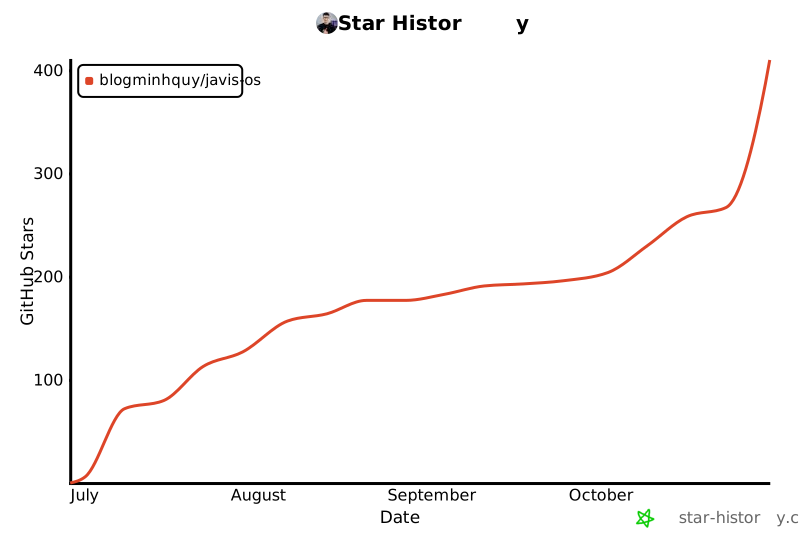
- If Javis is useful to you, a ⭐ on the repo helps other people find it.
- [](https://star-history.com/#blogminhquy/javis-os&Date)
- ---
- ## 🙏 Credits
- - **Brains:** [Claude Code](https://claude.com/claude-code) and the [Claude Agent SDK](https://docs.claude.com/en/api/agent-sdk/overview) (Anthropic), [Codex CLI](https://developers.openai.com/codex/cli) (OpenAI), [Grok Build](https://x.ai) (xAI), [Antigravity](https://antigravity.google) (Google), plus the APIs of [OpenRouter](https://openrouter.ai), OpenAI, [Google Gemini](https://ai.google.dev), Anthropic, [Groq](https://groq.com) and [Ollama](https://ollama.com).
- - **Tool standard:** [Model Context Protocol](https://modelcontextprotocol.io). The whole Javis connection store runs on it.
- - The Second Brain and digital Bullet Journal patterns.
- ## 📄 License
- Open source under the **MIT License**: use, modify and distribute freely, just keep the copyright notice. See [LICENSE](LICENSE).
- ---
- ## ☕ Support Javis OS
- Javis OS is free and open source, and it is still one person writing the code and paying for the test servers. If Javis helps your work or your life, a small donation buys more time for bug fixes and new features.
- - 🌍 **PayPal**: [paypal.me/quy01](https://paypal.me/quy01)
- - 🏦 **MB Bank** (Vietnam): `6636966369`
- - 📱 **MoMo wallet** (Vietnam): `0372752740`
- Can't donate? Using Javis, sending feedback or opening a pull request counts as support too.
- <div align="center">
- <br>
- <b><a href="https://javisos.com">javisos.com</a></b><br>
- Made with ☕ in Vietnam by <b><a href="https://minhquy.vn">Minh Quý</a></b>
- </div>
Ratings and comments
Sign in to rate this skill.
Sign inFree to use. If it’s helped, pass it on.