bklit-ui
Open-source UI & Charts library
Safety scan
A static text scan, not a guarantee. Select the badge to see what was scanned and every finding.
Check it deeper on your machine
It has changed since its scan on 11 Nov 2026.
As a Claude Code plugin, install it and then ask Claude Code:
/plugin marketplace add keithmackay/mackayi/plugin install scanskillsafety@mackayiDo a deep scan of https://github.com/bklit/bklit-ui with scanskillsafety
Or from a terminal, clone it and run it:
git clone https://github.com/keithmackay/scanskillsafety-skill ~/.claude/skills/scanskillsafetynode ~/.claude/skills/scanskillsafety/cli.cjs --deep 'https://github.com/bklit/bklit-ui'
It checks the exact commit: every file, its packages against OSV (api.osv.dev), how it compares with this page's scan (findsafeskills.com receives the repository's address), and, if you agree, Claude reading every file with your own Claude subscription. It never runs the code.
Badge for your README

Markdown
[](/listings/bklit-bklit-ui)HTML
<a href="/listings/bklit-bklit-ui"><img src="/api/listings/bklit-bklit-ui/badge.svg" alt="findsafeskills safety rating" /></a>Install
Install instructions from the README
As written by the repo's author. findsafeskills has not verified these steps.
Bklit UI is a shadcn registry. Initialize shadcn in your project, then add a chart:
npx shadcn@latest init
npx shadcn@latest add @bklit/line-chart
See [Installation](https://ui.bklit.com/docs/installation) for registry setup and all components.
What was scanned
The files the safety scan read, as written by the repository's author and shown as plain text. Lines with a finding are marked.
README.md · README · 323 lines
View this file on GitHub (read at the repository's current version: the scan did not record which commit it read)
This file has changed since it was scanned, so this is not exactly the text that was scanned, and no line is marked. The findings are listed with the safety scan above.
- 
- <br />
- <p align="center">
- <img alt="vercel-oss 2" src="https://github.com/user-attachments/assets/e6cd5d4c-7707-4271-96cb-10122d193048" />
- </p>
- </br>
- <p align="center">
- A collection of Open Source charts and utility components that you can customize and extend.
- <br />
- <br />
- <a href="https://github.com/bklit/bklit-ui"><img src="https://www.shieldcn.dev/github/stars/bklit/bklit-ui.svg?variant=secondary&size=xs&theme=zinc" alt="GitHub Stars" /></a>
- <a href="https://github.com/bklit/bklit-ui/actions"><img src="https://www.shieldcn.dev/github/ci/bklit/bklit-ui.svg?variant=secondary&size=xs&theme=zinc" alt="CI" /></a>
- <a href="https://discord.gg/75s4frfE8X"><img src="https://www.shieldcn.dev/discord/members/75s4frfE8X.svg?variant=secondary&size=xs&theme=zinc" alt="Discord Members" /></a>
- <a href="https://x.com/uixmat"><img src="https://www.shieldcn.dev/x/follow/uixmat.svg?variant=branded&size=xs&theme=zinc" alt="X Follow" /></a>
- <a href="https://vercel.com/oss"><img src="https://shieldcn.dev/badge/Vercel_OSS_Program_Member.svg?variant=branded&size=xs&theme=zinc&logo=vercel" alt="Vercel OSS Program Member" /></a>
- </p>
- </p>
- ## Sponsors
- Bklit UI is supported by our sponsors. [Become a sponsor](https://github.com/sponsors/uixmat).
- **Premium sponsors:** [OpenPanel](https://openpanel.dev)
- <a href="https://openpanel.dev">
- <img alt="OpenPanel" src="https://github.com/user-attachments/assets/279ef3ca-ed28-4a75-bac7-3fb90db4954d" />
- </a>
- **[OpenPanel](https://openpanel.dev)** — OpenPanel is an open source analytics platform that combines web analytics and product analytics in one privacy-first tool. Track pageviews, events, funnels, retention, and user journeys — all without cookies.
- **Silver sponsors:** [UI Rules](https://uirules.com), [shadcn studio](https://shadcnstudio.com), [pug](https://pug.sh)
- ## Charts
- <table>
- <tr>
- <td align="center" valign="top" width="33%">
- <a href="https://ui.bklit.com/docs/components/area-chart">
- <picture>
- <source media="(prefers-color-scheme: dark)" srcset="apps/web/public/readme/area-chart-dark.svg" />
- <img src="apps/web/public/readme/area-chart-light.svg" alt="Area Chart" width="280" />
- </picture>
- </a>
- <br />
- <strong>Area Chart</strong><br />
- <a href="https://ui.bklit.com/docs/components/area-chart">Docs</a> · <a href="https://ui.bklit.com/studio?chart=area-chart">Studio</a>
- </td>
- <td align="center" valign="top" width="33%">
- <a href="https://ui.bklit.com/docs/components/bar-chart">
- <picture>
- <source media="(prefers-color-scheme: dark)" srcset="apps/web/public/readme/bar-chart-dark.svg" />
- <img src="apps/web/public/readme/bar-chart-light.svg" alt="Bar Chart" width="280" />
- </picture>
- </a>
- <br />
- <strong>Bar Chart</strong><br />
- <a href="https://ui.bklit.com/docs/components/bar-chart">Docs</a> · <a href="https://ui.bklit.com/studio?chart=bar-chart">Studio</a>
- </td>
- <td align="center" valign="top" width="33%">
- <a href="https://ui.bklit.com/docs/components/candlestick-chart">
- <picture>
- <source media="(prefers-color-scheme: dark)" srcset="apps/web/public/readme/candlestick-chart-dark.svg" />
- <img src="apps/web/public/readme/candlestick-chart-light.svg" alt="Candlestick Chart" width="280" />
- </picture>
- </a>
- <br />
- <strong>Candlestick Chart</strong><br />
- <a href="https://ui.bklit.com/docs/components/candlestick-chart">Docs</a> · <a href="https://ui.bklit.com/studio?chart=candlestick-chart">Studio</a>
- </td>
- </tr>
- <tr>
- <td align="center" valign="top" width="33%">
- <a href="https://ui.bklit.com/docs/components/choropleth-chart">
- <picture>
- <source media="(prefers-color-scheme: dark)" srcset="apps/web/public/readme/choropleth-chart-dark.svg" />
- <img src="apps/web/public/readme/choropleth-chart-light.svg" alt="Choropleth Chart" width="280" />
- </picture>
- </a>
- <br />
- <strong>Choropleth Chart</strong><br />
- <a href="https://ui.bklit.com/docs/components/choropleth-chart">Docs</a> · <a href="https://ui.bklit.com/studio?chart=choropleth-chart">Studio</a>
- </td>
- <td align="center" valign="top" width="33%">
- <a href="https://ui.bklit.com/docs/components/composed-chart">
- <picture>
- <source media="(prefers-color-scheme: dark)" srcset="apps/web/public/readme/composed-chart-dark.svg" />
- <img src="apps/web/public/readme/composed-chart-light.svg" alt="Composed Chart" width="280" />
- </picture>
- </a>
- <br />
- <strong>Composed Chart</strong><br />
- <a href="https://ui.bklit.com/docs/components/composed-chart">Docs</a> · <a href="https://ui.bklit.com/studio?chart=composed-chart">Studio</a>
- </td>
- <td align="center" valign="top" width="33%">
- <a href="https://ui.bklit.com/docs/components/funnel-chart">
- <picture>
- <source media="(prefers-color-scheme: dark)" srcset="apps/web/public/readme/funnel-chart-dark.svg" />
- <img src="apps/web/public/readme/funnel-chart-light.svg" alt="Funnel Chart" width="280" />
- </picture>
- </a>
- <br />
- <strong>Funnel Chart</strong><br />
- <a href="https://ui.bklit.com/docs/components/funnel-chart">Docs</a> · <a href="https://ui.bklit.com/studio?chart=funnel-chart">Studio</a>
- </td>
- </tr>
- <tr>
- <td align="center" valign="top" width="33%">
- <a href="https://ui.bklit.com/docs/components/gauge-chart">
- <picture>
- <source media="(prefers-color-scheme: dark)" srcset="apps/web/public/readme/gauge-chart-dark.svg" />
- <img src="apps/web/public/readme/gauge-chart-light.svg" alt="Gauge" width="280" />
- </picture>
- </a>
- <br />
- <strong>Gauge</strong><br />
- <a href="https://ui.bklit.com/docs/components/gauge-chart">Docs</a> · <a href="https://ui.bklit.com/studio?chart=gauge-chart">Studio</a>
- </td>
- <td align="center" valign="top" width="33%">
- <a href="https://ui.bklit.com/docs/components/heatmap-chart">
- <picture>
- <source media="(prefers-color-scheme: dark)" srcset="apps/web/public/readme/heatmap-chart-dark.svg" />
- <img src="apps/web/public/readme/heatmap-chart-light.svg" alt="Heatmap Chart" width="280" />
- </picture>
- </a>
- <br />
- <strong>Heatmap Chart</strong><br />
- <a href="https://ui.bklit.com/docs/components/heatmap-chart">Docs</a> · <a href="https://ui.bklit.com/studio?chart=heatmap-chart">Studio</a>
- </td>
- <td align="center" valign="top" width="33%">
- <a href="https://ui.bklit.com/docs/components/line-chart">
- <picture>
- <source media="(prefers-color-scheme: dark)" srcset="apps/web/public/readme/line-chart-dark.svg" />
- <img src="apps/web/public/readme/line-chart-light.svg" alt="Line Chart" width="280" />
- </picture>
- </a>
- <br />
- <strong>Line Chart</strong><br />
- <a href="https://ui.bklit.com/docs/components/line-chart">Docs</a> · <a href="https://ui.bklit.com/studio?chart=line-chart">Studio</a>
- </td>
- </tr>
- <tr>
- <td align="center" valign="top" width="33%">
- <a href="https://ui.bklit.com/docs/components/live-line-chart">
- <picture>
- <source media="(prefers-color-scheme: dark)" srcset="apps/web/public/readme/live-line-chart-dark.svg" />
- <img src="apps/web/public/readme/live-line-chart-light.svg" alt="Live Line Chart" width="280" />
- </picture>
- </a>
- <br />
- <strong>Live Line Chart</strong><br />
- <a href="https://ui.bklit.com/docs/components/live-line-chart">Docs</a> · <a href="https://ui.bklit.com/studio?chart=live-line-chart">Studio</a>
- </td>
- <td align="center" valign="top" width="33%">
- <a href="https://ui.bklit.com/docs/components/pie-chart">
- <picture>
- <source media="(prefers-color-scheme: dark)" srcset="apps/web/public/readme/pie-chart-dark.svg" />
- <img src="apps/web/public/readme/pie-chart-light.svg" alt="Pie Chart" width="280" />
- </picture>
- </a>
- <br />
- <strong>Pie Chart</strong><br />
- <a href="https://ui.bklit.com/docs/components/pie-chart">Docs</a> · <a href="https://ui.bklit.com/studio?chart=pie-chart">Studio</a>
- </td>
- <td align="center" valign="top" width="33%">
- <a href="https://ui.bklit.com/docs/components/profit-loss-line">
- <picture>
- <source media="(prefers-color-scheme: dark)" srcset="apps/web/public/readme/profit-loss-line-dark.svg" />
- <img src="apps/web/public/readme/profit-loss-line-light.svg" alt="Profit/Loss Line" width="280" />
- </picture>
- </a>
- <br />
- <strong>Profit/Loss Line</strong><br />
- <a href="https://ui.bklit.com/docs/components/profit-loss-line">Docs</a> · <a href="https://ui.bklit.com/studio?chart=profit-loss-line">Studio</a>
- </td>
- </tr>
- <tr>
- <td align="center" valign="top" width="33%">
- <a href="https://ui.bklit.com/docs/components/radar-chart">
- <picture>
- <source media="(prefers-color-scheme: dark)" srcset="apps/web/public/readme/radar-chart-dark.svg" />
- <img src="apps/web/public/readme/radar-chart-light.svg" alt="Radar Chart" width="280" />
- </picture>
- </a>
- <br />
- <strong>Radar Chart</strong><br />
- <a href="https://ui.bklit.com/docs/components/radar-chart">Docs</a> · <a href="https://ui.bklit.com/studio?chart=radar-chart">Studio</a>
- </td>
- <td align="center" valign="top" width="33%">
- <a href="https://ui.bklit.com/docs/components/radial-chart">
- <picture>
- <source media="(prefers-color-scheme: dark)" srcset="apps/web/public/readme/radial-chart-dark.svg" />
- <img src="apps/web/public/readme/radial-chart-light.svg" alt="Radial Chart" width="280" />
- </picture>
- </a>
- <br />
- <strong>Radial Chart</strong><br />
- <a href="https://ui.bklit.com/docs/components/radial-chart">Docs</a> · <a href="https://ui.bklit.com/studio?chart=radial-chart">Studio</a>
- </td>
- <td align="center" valign="top" width="33%">
- <a href="https://ui.bklit.com/docs/components/ring-chart">
- <picture>
- <source media="(prefers-color-scheme: dark)" srcset="apps/web/public/readme/ring-chart-dark.svg" />
- <img src="apps/web/public/readme/ring-chart-light.svg" alt="Ring Chart" width="280" />
- </picture>
- </a>
- <br />
- <strong>Ring Chart</strong><br />
- <a href="https://ui.bklit.com/docs/components/ring-chart">Docs</a> · <a href="https://ui.bklit.com/studio?chart=ring-chart">Studio</a>
- </td>
- </tr>
- <tr>
- <td align="center" valign="top" width="33%">
- <a href="https://ui.bklit.com/docs/components/sankey-chart">
- <picture>
- <source media="(prefers-color-scheme: dark)" srcset="apps/web/public/readme/sankey-chart-dark.svg" />
- <img src="apps/web/public/readme/sankey-chart-light.svg" alt="Sankey Chart" width="280" />
- </picture>
- </a>
- <br />
- <strong>Sankey Chart</strong><br />
- <a href="https://ui.bklit.com/docs/components/sankey-chart">Docs</a> · <a href="https://ui.bklit.com/studio?chart=sankey-chart">Studio</a>
- </td>
- <td align="center" valign="top" width="33%">
- <a href="https://ui.bklit.com/docs/components/scatter-chart">
- <picture>
- <source media="(prefers-color-scheme: dark)" srcset="apps/web/public/readme/scatter-chart-dark.svg" />
- <img src="apps/web/public/readme/scatter-chart-light.svg" alt="Scatter Chart" width="280" />
- </picture>
- </a>
- <br />
- <strong>Scatter Chart</strong><br />
- <a href="https://ui.bklit.com/docs/components/scatter-chart">Docs</a> · <a href="https://ui.bklit.com/studio?chart=scatter-chart">Studio</a>
- </td>
- <td align="center" valign="top" width="33%">
- <a href="https://ui.bklit.com/docs/components/sparkline">
- <picture>
- <source media="(prefers-color-scheme: dark)" srcset="apps/web/public/readme/sparkline-dark.svg" />
- <img src="apps/web/public/readme/sparkline-light.svg" alt="Sparkline" width="280" />
- </picture>
- </a>
- <br />
- <strong>Sparkline</strong><br />
- <a href="https://ui.bklit.com/docs/components/sparkline">Docs</a> · <a href="https://ui.bklit.com/studio?chart=sparkline">Studio</a>
- </td>
- </tr>
- <tr>
- <td align="center" valign="top" width="33%">
- <a href="https://ui.bklit.com/docs/components/sunburst-chart">
- <picture>
- <source media="(prefers-color-scheme: dark)" srcset="apps/web/public/readme/sunburst-chart-dark.svg" />
- <img src="apps/web/public/readme/sunburst-chart-light.svg" alt="Sunburst Chart" width="280" />
- </picture>
- </a>
- <br />
- <strong>Sunburst Chart</strong><br />
- <a href="https://ui.bklit.com/docs/components/sunburst-chart">Docs</a> · <a href="https://ui.bklit.com/studio?chart=sunburst-chart">Studio</a>
- </td>
- <td width="33%"></td>
- <td width="33%"></td>
- </tr>
- </table>
- ## Studio
- Studio is Bklit's interactive chart playground. Pick a chart, tweak styling and animation controls in real time, then copy the generated React code or export a registry JSON for your project.
- <p align="center">
- <a href="https://www.youtube.com/watch?v=I3PLqHImYbE"><img src="https://img.youtube.com/vi/I3PLqHImYbE/maxresdefault.jpg" alt="Bklit Studio" width="720" /></a>
- </p>
- [Open Studio →](https://ui.bklit.com/studio)
- ## Getting Started
- Bklit UI is a shadcn registry. Initialize shadcn in your project, then add a chart:
- ```bash
- npx shadcn@latest init
- npx shadcn@latest add @bklit/line-chart
- ```
- See [Installation](https://ui.bklit.com/docs/installation) for registry setup and all components.
- ## React Native (beta)
- The line and area charts also run in **React Native and Expo**. They use the same components and props as the web charts, drawn with [React Native Skia](https://shopify.github.io/react-native-skia/) and animated on the UI thread with Reanimated: one-finger scrubbing, two-finger range selection, springs, morphs and the rolling date pill.
- <table>
- <tr>
- <td valign="middle" width="240">
- <a href="https://expo.dev/accounts/uixmat/projects/bklit-charts/builds/08a55ace-c04d-4501-80c1-8cb4d934fc7c"><img src="apps/web/public/readme/react-native-demo-qr.svg" alt="QR code that opens the install page for the Bklit React Native demo on Android" width="220" /></a>
- </td>
- <td valign="middle">
- <strong>Try it on your phone</strong><br />
- On Android, scan the code with your camera or <a href="https://expo.dev/accounts/uixmat/projects/bklit-charts/builds/08a55ace-c04d-4501-80c1-8cb4d934fc7c">open the install page</a>, then tap Install. iPhone: coming soon on TestFlight.
- </td>
- </tr>
- </table>
- Add the charts to an Expo app (with a `components.json` in the project root):
- ```bash
- npx shadcn@latest add @bklit/native-charts
- ```
- In an Expo project the CLI installs Skia, Reanimated and Gesture Handler with `npx expo install`, so you get versions that match your SDK. See the [React Native guide](https://ui.bklit.com/docs/react-native) for step-by-step setup.
- Contributors can run the demo app (`apps/mobile`, Node 22+) with `pnpm dev:mobile` and open it in Expo Go. See [`apps/mobile/README.md`](apps/mobile/README.md) for publishing the demo builds.
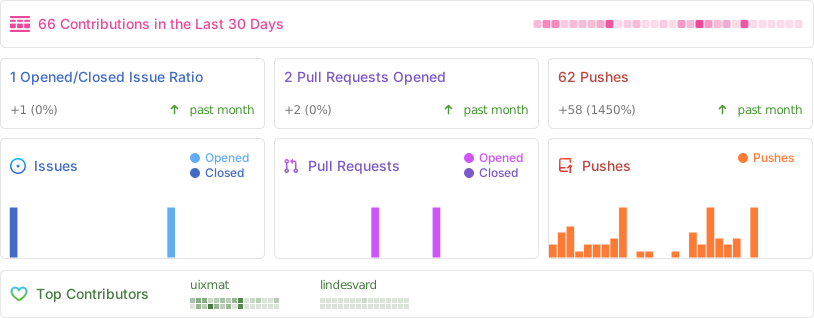
- ## Repo activity
- 
- ## License
- **Chart components** (`packages/ui`, `packages/native`, shadcn registry) are [MIT licensed](./LICENSE).
- **Bklit Studio** (`packages/studio`, hosted at [ui.bklit.com/studio](https://ui.bklit.com/studio))
- is proprietary. See [LICENSE-STUDIO.md](./LICENSE-STUDIO.md). You may not reuse,
- resell, or redistribute Studio without written permission.
Ratings and comments
Sign in to rate this skill.
Sign inFree to use. If it’s helped, pass it on.