biliup
Use the biliup command-line tool to start the WebUI server, run recording tasks from config files, inspect help, and operate common upload/download commands.
Safety scan
A static text scan, not a guarantee. Select the badge to see what was scanned and every finding.
Check it deeper on your machine
Its scripts were only partly scanned.
As a Claude Code plugin, install it and then ask Claude Code:
/plugin marketplace add keithmackay/mackayi/plugin install scanskillsafety@mackayiDo a deep scan of https://github.com/biliup/biliup with scanskillsafety
Or from a terminal, clone it and run it:
git clone https://github.com/keithmackay/scanskillsafety-skill ~/.claude/skills/scanskillsafetynode ~/.claude/skills/scanskillsafety/cli.cjs --deep 'https://github.com/biliup/biliup'
It checks the exact commit: every file, its packages against OSV (api.osv.dev), how it compares with this page's scan (findsafeskills.com receives the repository's address), and, if you agree, Claude reading every file with your own Claude subscription. It never runs the code.
Badge for your README

Markdown
[](/listings/biliup--biliup)HTML
<a href="/listings/biliup--biliup"><img src="/api/listings/biliup--biliup/badge.svg" alt="findsafeskills safety rating" /></a>Install
What was scanned
The files the safety scan read, as written by the repository's author and shown as plain text. Lines with a finding are marked.
SKILL.md · Manifest · 189 lines
View this file on GitHub (read at the repository's current version: the scan did not record which commit it read)
This file has changed since it was scanned, so this is not exactly the text that was scanned, and no line is marked. The findings are listed with the safety scan above.
- ---
- name: biliup
- description: Use the biliup command-line tool to start the WebUI server, run recording tasks from config files, inspect help, and operate common upload/download commands.
- ---
- # biliup
- Use this skill when the user wants to install or operate the `biliup` command-line tool.
- `biliup` can start the WebUI server, run recording tasks from config files, log in, upload videos, append videos, inspect video information, download videos, list uploaded videos, and manage the user's collections (合集).
- ## Install flow
- When the user needs to install `biliup`, choose one installation path based on the user's operating system and preference.
- ### GitHub Releases prebuilt package
- Use this path when the user wants to install a prebuilt binary from GitHub Releases.
- For Linux or macOS, generate and run this script. Set `INSTALL_DIR` to the user's target directory when needed.
- ```bash
- set -euo pipefail
- REPO="biliup/biliup"
- INSTALL_DIR="${INSTALL_DIR:-$HOME/.local/bin}"
- OS="$(uname -s)"
- ARCH="$(uname -m)"
- case "$OS" in
- Linux) os="linux" ;;
- Darwin) os="macos" ;;
- *) echo "Unsupported OS: $OS" >&2; exit 1 ;;
- esac
- case "$ARCH" in
- x86_64|amd64) arch="x86_64" ;;
- aarch64|arm64) arch="aarch64" ;;
- armv7l|armv7*) arch="arm" ;;
- *) echo "Unsupported architecture: $ARCH" >&2; exit 1 ;;
- esac
- asset="$(curl -fsSL "https://api.github.com/repos/${REPO}/releases/latest" \
- | python3 -c 'import json,sys; data=json.load(sys.stdin); os=sys.argv[1]; arch=sys.argv[2]; assets=[a["name"] for a in data["assets"]]; matches=[n for n in assets if n.endswith(".tar.xz") and f"-{arch}-{os}.tar.xz" in n]; print(matches[0] if matches else "")' "$os" "$arch")"
- if [ -z "$asset" ]; then
- echo "No matching biliup release asset for ${arch}-${os}" >&2
- exit 1
- fi
- url="https://github.com/${REPO}/releases/latest/download/${asset}"
- tmp="$(mktemp -d)"
- trap 'rm -rf "$tmp"' EXIT
- curl -fL "$url" -o "$tmp/$asset"
- tar -xJf "$tmp/$asset" -C "$tmp"
- mkdir -p "$INSTALL_DIR"
- install -m 755 "$(find "$tmp" -type f -name biliup | head -n 1)" "$INSTALL_DIR/biliup"
- "$INSTALL_DIR/biliup" --help
- ```
- For Windows PowerShell, generate and run this script. Set `$InstallDir` to the user's target directory when needed.
- ```powershell
- $ErrorActionPreference = "Stop"
- $Repo = "biliup/biliup"
- $InstallDir = if ($env:INSTALL_DIR) { $env:INSTALL_DIR } else { Join-Path $env:USERPROFILE "bin" }
- $Arch = if ([Environment]::Is64BitOperatingSystem) { "x86_64" } else { throw "Unsupported Windows architecture" }
- $Release = Invoke-RestMethod "https://api.github.com/repos/$Repo/releases/latest"
- $Asset = $Release.assets | Where-Object { $_.name -like "biliupR-v*-$Arch-windows.zip" } | Select-Object -First 1
- if (-not $Asset) { throw "No matching biliup release asset for $Arch-windows" }
- $Tmp = New-Item -ItemType Directory -Force (Join-Path ([IO.Path]::GetTempPath()) ([Guid]::NewGuid().ToString()))
- try {
- $Zip = Join-Path $Tmp.FullName $Asset.name
- Invoke-WebRequest $Asset.browser_download_url -OutFile $Zip
- Expand-Archive $Zip -DestinationPath $Tmp.FullName -Force
- New-Item -ItemType Directory -Force $InstallDir | Out-Null
- $Exe = Get-ChildItem $Tmp.FullName -Recurse -Filter biliup.exe | Select-Object -First 1
- if (-not $Exe) { throw "biliup.exe not found in release archive" }
- Copy-Item $Exe.FullName (Join-Path $InstallDir "biliup.exe") -Force
- & (Join-Path $InstallDir "biliup.exe") --help
- } finally {
- Remove-Item $Tmp.FullName -Recurse -Force
- }
- ```
- If the target directory is not on `PATH`, tell the user to run `biliup` by its full path or add the target directory to `PATH`.
- ### npm
- Use this path when the user has Node.js (npm) available:
- ```bash
- npm i -g @biliup/cli
- ```
- Then verify:
- ```bash
- biliup --help
- ```
- ## Operation flow
- When the user asks to start the WebUI server with authentication, use:
- ```bash
- biliup server --auth
- ```
- When the user provides an address or port, include them explicitly:
- ```bash
- biliup server --bind 0.0.0.0 --port 19159 --auth
- ```
- When the user asks to run from a biliup 1.0.7 style config file, use:
- ```bash
- biliup server --config config.toml
- ```
- Replace `config.toml` with the user's config file path.
- When the user wants to run the server in the background on Linux or macOS, use:
- ```bash
- nohup biliup server --auth &
- ```
- When the user asks to manage their collections (合集), use the `season` subcommands. They read the login from the cookie file (`-u/--user-cookie`, default `cookies.json`), so run `biliup login` first if it does not exist. Add `--json` for machine-readable output.
- ```bash
- biliup season list
- biliup season sections <season_id>
- biliup season add <section_id> --vid <BV or av>
- biliup season remove <episode_id>
- biliup season sort <section_id> <episode_id>...
- ```
- `list` shows season and section IDs; `sections` shows each episode's `episode_id` (not the aid), which `remove` and `sort` take. `add` looks up the cid and title automatically and accepts `--vid` more than once. `sort` moves the listed episodes to the front in the given order and keeps the rest in their current order; `--reverse` reverses the whole section instead.
- ## Help flow
- When the user asks what commands are available, show:
- ```bash
- biliup --help
- ```
- When the user asks about server options, show:
- ```bash
- biliup server --help
- ```
- When the user asks about a specific command, use:
- ```bash
- biliup <command> --help
- ```
- Replace `<command>` with the requested subcommand.
- ## Commands
- The CLI includes these subcommands:
- ```text
- login
- renew
- upload
- append
- show
- comments
- reply
- dump-flv
- download
- server
- season
- user
- list
- ```
- When generating a command, include the concrete paths required by that command, such as cookie files, config files, and video file paths.
README.md · README · 434 lines
View this file on GitHub (read at the repository's current version: the scan did not record which commit it read)
This file has changed since it was scanned, so this is not exactly the text that was scanned, and no line is marked. The findings are listed with the safety scan above.
- <div align="center">
- <img src="https://raw.githubusercontent.com/biliup/biliup/master/public/logo.png" alt="biliup" width="300" height="300"/>
- </div>
- <div align="center">
- [](https://www.python.org/downloads/)
- [](https://pypi.org/project/biliup)
- [](https://pypi.org/project/biliup)
- [](https://github.com/biliup/biliup/blob/master/LICENSE)
- [](https://t.me/+IkpIABHqy6U0ZTQ5)
- [](https://github.com/biliup/biliup/issues)
- [](https://github.com/biliup/biliup/stargazers)
- [](https://github.com/biliup/biliup/network)
- </div>
- ## 🛠️ 功能
- - **全天候录制与实时监控**:多主播 24×7 无人值守录制,同步保存 XML 弹幕;复用录制流实时预览,展示封面、弹幕与写盘码率,支持多路同屏监视。
- - **一体化剪辑台**:按场次回看、选段或导入本地素材,在同一工程中完成多轨剪辑、字幕、打码、弹幕叠加、转场与特效,支持工程管理、撤销重做和中英文切换。
- - **压制、导出与投稿**:集中查看自动转封装(remux)、压制和工程导出的任务进度,成片可直接投稿;支持自定义投稿元信息及边录边传、0 落盘。
- - **AI 与流程自动化**:大模型推荐高光片段,人工确认后切片;支持剪辑助手、命令行和 Agent skill,让你的 Agent 成为 up 主:`npx skills add biliup/biliup`。
- - **灵活部署与多机协作**:提供多种安装方式和可视化 WebUI;Fleet 控制面统一分派录制房间,节点凭票据加入,并支持多用户、三种角色分级权限。
- 论坛:[BBS](https://bbs.biliup.rs)
- ## 🖥️ UI 展示
- <table>
- <tr>
- <td width="50%"><img src=".github/resource/webui-overview.webp" alt="biliup WebUI 概览:系统状态、直播录制与最近事件" /></td>
- <td width="50%"><img src=".github/resource/webui-editor.webp" alt="biliup 剪辑台:素材、画面预览、字幕、多轨时间轴和助手" /></td>
- </tr>
- </table>
- ## 📺 支持平台
- 内置 19 个直播平台解析,未匹配的地址会交给通用适配器(依赖本机的 yt-dlp / Streamlink)尝试处理。
- | 平台 | 站点 | 弹幕 |
- | --- | --- | :-: |
- | 哔哩哔哩 | `live.bilibili.com`、`b23.tv` | ✅ |
- | 抖音 | `douyin.com` | ✅ |
- | 斗鱼 | `douyu.com` | ✅ |
- | 虎牙 | `huya.com` | ✅ |
- | 快手 | `kuaishou.com`、`chenzhongtech.com` | |
- | AcFun | `acfun.cn` | |
- | 网易 CC | `cc.163.com` | |
- | 映客 | `inke.cn` | |
- | 猫耳 FM | `missevan.com` | |
- | KilaKila / 红豆 FM | `live.kilakila.cn`、`hongdoufm.com` | |
- | YY | `yy.com` | |
- | TTingLive | `ttinglive.com` | |
- | Twitch | `twitch.tv`(直播与录像) | ✅ |
- | YouTube | `youtube.com`、`youtu.be` | ✅ |
- | TwitCasting | `twitcasting.tv` | ✅ |
- | niconico | `nicovideo.jp` | |
- | AfreecaTV | `afreecatv.com` | |
- | Bigo Live | `bigo.tv` | |
- | Picarto | `picarto.tv` | |
- | 通用适配器 | 其他 `http(s)` 地址 | |
- ## ⚠️ 免责声明
- > [!IMPORTANT]
- > **Disclaimer / 免责声明**
- > - 本项目仅供个人学习研究,不保证稳定性,不提供技术支持
- > - 使用本项目产生的一切后果由用户自行承担
- > - 禁止商业用途,请遵守版权及平台规定
- > - This project is for **personal learning and research purposes only**
- > - No stability guarantee or technical support provided
- > - Users are solely responsible for any consequences of using this project
- > - Commercial use is strictly prohibited
- > - Please respect copyright and platform ToS
- ## 🚀 快速开始
- ### Windows
- - 下载 Release 中的桌面版安装包 [biliup_*_x64-setup.exe](https://github.com/biliup/biliup/releases/latest),内置 FFmpeg
- - 或用 Release 中的二进制 `biliupR-*-x86_64-windows.zip`,或下方 npm 方式
- ### Linux 或 macOS
- 1. 安装:下载 Release 中对应平台的 [biliupR](https://github.com/biliup/biliup/releases/latest) 二进制,解压后把 `biliup` 放进 PATH;或用下方 npm 方式
- 2. 启动:`biliup server --auth`
- 3. 访问 WebUI:`http://127.0.0.1:19159`(默认只监听本机,远程访问见下方说明)
- * 后台运行
- 1. `nohup biliup server --auth &`
- 2. [请查看参考](https://biliup.github.io/biliup/docs/guide/introduction/#linuxxia-pei-zhi-kai-ji-zi-qi)
- ### npm
- - 直接运行:`npx @biliup/cli server --auth`;或全局安装 `npm i -g @biliup/cli`,之后用 `biliup server --auth`
- ### Termux
- - 详见[Wiki](https://github.com/biliup/biliup/wiki/Termux-%E4%B8%AD%E4%BD%BF%E7%94%A8-biliup)
- > [!NOTE]
- > 默认下载器 `mesio`(rust-srec 引擎)和可选的 `stream-gears` 都由 Rust 实现、编进 biliup,无需外部依赖。若配置 `ffmpeg` 下载器或使用后处理,需要本机安装 `ffmpeg`;YouTube、niconico 等平台与通用适配器则依赖 `yt-dlp` 或 `streamlink`。Docker 镜像已内置 `ffmpeg`。
- ### 第一次使用
- 1. 「投稿管理」→「新增账号」扫码登录 B 站,再新建投稿模板
- 2. 「直播管理」→ 新增直播间,填地址、选模板
- 3. 等开播;录像在剪辑台「录制文件」里
- 录像写在工作目录下。**请备份 `data/`**:配置在 `data/data.sqlite3`,网页登录的 B 站凭据在 `data/<mid>.json`(命令行 `biliup login` 默认写 `cookies.json`)。
- ### 🔓 远程访问(监听 0.0.0.0)
- 默认的 `127.0.0.1` 只允许本机访问。需要从其他设备访问时,显式指定 `--bind 0.0.0.0` 并开启 `--auth`:
- ```shell
- biliup server --bind 0.0.0.0 --auth
- ```
- 首次打开 `http://your-ip:19159` 会引导设置管理员密码(用户名固定为 `biliup`),之后即可正常登录使用。
- > [!NOTE]
- > 绑定非回环地址时必须同时开启 `--auth`,否则会拒绝启动,避免无认证的 Web API 被暴露:
- >
- > ```
- > refusing to expose the unauthenticated Web API on 0.0.0.0:19159; use a loopback bind address or enable --auth
- > ```
- > [!WARNING]
- > 将 Web UI 暴露到公网存在风险,建议仅在可信局域网内使用,或置于反向代理之后。
- > 首次访问即可设置管理员密码,请在启动后立即完成初始化,避免被他人抢先占用。
- > 若通过 **HTTPS** 反向代理访问,请加上 `--secure-session-cookie`;直接以 HTTP 远程访问时**不要**加,否则浏览器会丢弃登录态(见 [#1669](https://github.com/biliup/biliup/pull/1669))。
- #### Docker
- 镜像已内置 `--bind 0.0.0.0 --auth`,开箱即用,无需额外配置:
- ```shell
- docker compose up -d
- ```
- 打开 `http://your-ip:19159` 设置管理员密码即可。录播与配置默认持久化在容器的 `/opt` 卷中(`docker-compose.yml` 默认把当前目录下的 `data/` 挂进去)。
- > [!IMPORTANT]
- > 若要自定义 `command`,必须带上 `--bind 0.0.0.0`。容器内若监听 `127.0.0.1`,宿主机的端口映射无法转发进容器,Web UI 将完全无法访问。
- ## 🎬 预览、回看与切片
- 一场直播记为一个「场次」,断流重连、分段都在同一条时间轴上。
- - **预览**:主播卡片进预览页(`/live`),可打标记或「剪下刚才 30 秒 / 1 分钟 / 2 分钟」;多路同屏在剪辑台「实时监视」。
- - **回看**:「剪辑台」(`/workbench`)→「直播场次」→ 回看页(`/replay`),直播中也能回看已落盘部分。
- - **剪**:快速剪按关键帧切、不转码,入点取不晚于它的最近关键帧,保持源格式(FLV / TS / fMP4);精确剪由 FFmpeg 重新编码为 MP4。**没装 FFmpeg 时只能快速剪、不能下载 MP4。**
- - **发布**:切片按投稿模板投稿,可多选集中发布,一律按转载。队列单并发,B 站返回 601(上传太频繁)时暂停,等手动「继续」。
- - **录后合成**:使用保留在本地的录像和弹幕 XML,在回看工作台拖拽缩放图片遮挡、调整弹幕并一次导出合成 MP4。详见[录后弹幕合成](https://biliup.github.io/biliup/docs/tutorials/post-recording-render/)。
- - **保留**:被标记、被切片引用的分段推迟到引用释放后再删。「空间配置」可设 `retention_hours`(投稿后保留小时数,默认 0)与 `min_free_space`(磁盘水位,默认关;低于阈值时先删未引用的最旧分段,不够再删被引用的,正在录的不删)。
- ## 🖧 多机录制 Fleet
- `biliup server` 默认开启控制面。没有其他节点加入时,已有直播间、投稿模板与配置仍按单机方式使用,不会自动迁移或接管;其他节点加入后,任务平台显示多机分派、配置与告警功能,各节点仍各自录制、投稿。
- 1. **控制面**:直接运行 `biliup server`,原来的 `--controller` 参数仍可使用。需要接入其他节点时,开放节点能连到的 **TCP 端口,默认 19160**(`--relay-listen` 可改);默认端口被占用时自动选择空闲端口,加入票据包含实际端口。显式指定 `--controller` 或 relay 参数时,监听失败会报错。网卡上没有公网地址时用 `--relay-url` 声明外部地址。UDP 非必需。
- 2. **节点**:在控制面「任务平台 › 节点管理」→「添加节点」生成票据,节点机执行 `biliup node join <票据>` 后重启 `biliup server`;Docker 用环境变量 `BILIUP_JOIN_TICKET`。已有节点身份或加入票据时优先作为节点运行。票据带控制面的 relay 地址,节点只需出站连接,加密内建,无需证书。
- 3. **分派**:「任务平台 › 节点管理 › 房间」手动指定或按负载自动选;改派时等原节点释放再接手(「强制迁移」除外)。已支持节点标签、统一下发配置(Cookie、密码留在节点本地)、告警(离线 / 磁盘 / 投稿失败),也可将控制面「本机」启用为录制节点。
- 4. **备份**:控制面的 `data/fleet.sqlite3` **含控制面私钥,务必备份**,丢失需全部节点重新加入。节点凭据在 `data/node.json`(0600);已加入的节点不能用 `--config` 启动,回到单机先 `biliup node leave`。
- ## 🤖 自动切片
- 下播后按场次:FFmpeg 抽音、跳过静音 → 语音转写 → 连同弹幕密度(模型支持看图时加关键帧缩图)交大模型挑候选 → 候选进回看页,**人工接受才建切片,不自动导出或投稿**。
- - **配置**:「空间配置 › 自动切片(实验)」,即全局 `[auto_clip]`,仅支持 OpenAI 兼容接口(`/chat/completions`、`/audio/transcriptions`)。chat 填 `base_url` / `api_key` / `chat_model`(key 也可用环境变量 `BILIUP_AUTO_CLIP_API_KEY`);转写填 `asr_model`,`asr_base_url` / `asr_api_key` 留空沿用 chat 的。先「测试连接」,再开 `enabled`。
- - **触发**:主播编辑里的「下播后自动生成候选」(`auto_clip_after_live`,默认关,仅超级管理员可改),或剪辑台「直播场次」手动「生成候选」(先给用量预估,费用以服务商账单为准)。
- - **上限**:每场默认转写 300 分钟(`max_asr_minutes`)、chat 30 万 token(`max_chat_tokens`);候选 72 小时未处理即过期。
- - **不配置不运行**:没有 `[auto_clip]` 或 `enabled = false` 时不调用任何 API。
- ## 📤 边录边传(sync-downloader)
- 把 `downloader` 设为 `sync-downloader` 后,ffmpeg 会把直播流 remux 成 Matroska 写到 stdout,按 UPOS 分片一边录一边上传,每录满 `file_size`(默认 2.5 GB,向上对齐到 10 MiB)就作为一 P 追加到同一稿件。前提:
- - 本机 `PATH` 中有 `ffmpeg`;HLS 流(B 站 `bili_protocol = "hls_fmp4"`)若装有 `streamlink` 会用它拉流再交给 ffmpeg,没有则由 ffmpeg 直拉。
- - 主播必须绑定上传模板,且模板对应的 cookies 文件可用;`uploader = "Noop"` 或没有模板时不会录制,日志会给出 `边录边传需要先为主播设定上传模板`。
- - 上传并发固定 3 线程,不受 `threads`、`segment_time` 控制。
- ```toml
- downloader = "sync-downloader"
- uploader = "bili_web"
- file_size = 2621440000 # 每 P 大小,可按上传带宽调小
- # sync_save_dir = "/data/sync" # 可选:额外保留每 P 的本地副本
- [streamers."某主播"]
- url = ["https://live.bilibili.com/1234"]
- title = "{streamer}%Y-%m-%d 直播录像"
- tid = 171
- user_cookie = "cookies.json"
- ```
- 行为说明:
- - 录制期间每 P 会同时写入系统临时目录(`$TMPDIR/biliup-sync/worker-<id>/`)作为兜底;预传完整且校验一致时直接 complete,否则(直播提前结束、上传落后)按实际长度从临时文件重传。投稿确认后临时文件删除,设置了 `sync_save_dir` 的副本保留并交给 `postprocessor`。
- - 停止/暂停/编辑主播只会结束当前分段,已录内容仍会上传并投稿;上传或投稿失败时保留有内容的分段文件并在日志中打印路径,可手动补传。
- - B 站直链约 1 小时过期。分段结束后拉不到数据时会立刻交回监控循环重新解析直链,并在同一稿件上继续追加分 P。
- - 排查问题时留意 `ERROR ... 下载流程出错` 日志:会带上具体原因(cookies 文件路径、preupload 拒绝等),而不是静默退回落盘录制。
- ## 🔐 用户与权限
- `--auth` 下首次访问设置的 `biliup` 账号是超级管理员,其他用户在「用户管理」添加:
- - **超级管理员**:全部 15 个权限点
- - **操作员**:录制控制、增删改直播间、投稿模板、投稿与切片、看日志和文件;不能改空间配置、处理器钩子、B 站账号、用户与节点
- - **只读观察者**:只看直播间、预览、配置(脱敏)、日志和文件
- 忘记密码:在服务工作目录执行 `biliup user reset-password <用户名>`(`biliup user list` 列出用户),直接改 `data/data.sqlite3`。
- ## 📜 命令行
- B 站命令行投稿工具,支持**短信登录**、**账号密码登录**、**扫码登录**、**浏览器登录**以及**网页Cookie登录**,并将登录后返回的 cookie 和 token 保存在 `cookies.json` 中,可用于其他项目。
- - 下载 Release: [biliupR](https://github.com/biliup/biliup/releases/latest)
- - 获取命令帮助 `biliup --help`
- - 登录信息文件可用 `-u/--user-cookie` 指定,便于多账号切换
- ```shell
- Upload video to bilibili.
- Usage: biliup [OPTIONS] <COMMAND>
- Commands:
- login 登录B站并保存登录信息
- renew 手动验证并刷新登录信息
- upload 上传视频
- append 是否要对某稿件追加视频
- show 打印视频详情
- comments 查看视频评论
- reply 回复视频评论,默认只打印将要回复的内容
- dump-flv 输出flv元数据
- download 下载视频
- server 启动web服务,默认端口19159
- season 管理自己的合集:列合集、查小节、加入 / 移出稿件、排序
- user 管理 Web 界面的登录用户(在 biliup 服务的工作目录下执行,直接读写 data/data.sqlite3)
- node 把这台机器加入 Fleet 控制面或退出(在 biliup 服务的工作目录下执行,读写 data/node.json)
- list 列出所有已上传的视频
- help Print this message or the help of the given subcommand(s)
- Options:
- -p, --proxy <PROXY> 配置代理
- -u, --user-cookie <USER_COOKIE> 登录信息文件 [default: cookies.json]
- --rust-log <RUST_LOG> 日志过滤规则,如 debug;不指定时读取环境变量 RUST_LOG,都没有则为 tower_http=debug,info
- -h, --help Print help
- -V, --version Print version
- ```
- 启动录制服务
- ```shell
- 启动web服务,默认端口19159
- Usage: biliup server [OPTIONS]
- Options:
- -b, --bind <BIND> Specify bind address [default: 127.0.0.1]
- -p, --port <PORT> Port to use [default: 19159]
- --auth 开启登录密码认证
- --secure-session-cookie 为会话 Cookie 附加 Secure 属性。仅当通过 HTTPS 反向代理访问 Web UI 时开启; 直接通过 HTTP 远程访问时开启会导致浏览器丢弃登录态
- -c, --config <FILE> 使用 biliup 1.0.7 风格配置文件启动录制
- --controller 显式以 Fleet 控制面运行(默认自动开启;已有节点身份时作为节点运行)
- --relay-listen <ADDR|off> 控制面内嵌 relay 的 TCP 监听地址(默认 0.0.0.0:19160),节点必须能连到它; off 表示不起内嵌 relay,此时必须用 --relay-url 指定外部 relay。作为节点运行时忽略
- --relay-url <URL> 写进加入票据的 relay 地址,可重复;不给时自动列出本机网卡地址。用于域名、端口转发、反向代理或外部 relay。作为节点运行时忽略
- -h, --help Print help
- ```
- > [!IMPORTANT]
- > 自 [#1660](https://github.com/biliup/biliup/pull/1660) 起,`--bind` 的默认值由 `0.0.0.0` 改为 `127.0.0.1`,即**默认只监听本机**,局域网/公网无法直接访问。
- > 如需从其他设备访问,请加上 `--bind 0.0.0.0 --auth`,详见上方「🔓 远程访问」一节。Docker 镜像已内置该参数,不受影响。
- Fleet 节点管理
- ```shell
- 把这台机器加入 Fleet 控制面或退出(在 biliup 服务的工作目录下执行,读写 data/node.json)
- Usage: biliup node <COMMAND>
- Commands:
- join 用控制面「添加节点」给出的票据加入;成功后重启 biliup server 生效
- leave 通知控制面移除本节点,并删除本地凭据 data/node.json
- status 查看本机的节点凭据(不连控制面)
- help Print this message or the help of the given subcommand(s)
- Options:
- -h, --help Print help
- ```
- 单独下载一场直播/视频,无需启动服务:
- ```shell
- biliup download <URL> -o "./video/%Y-%m-%dT%H_%M_%S{title}" --split-time 1h
- ```
- 管理自己的合集(需要先 `biliup login`,所有子命令都支持 `--json`):
- ```shell
- biliup season list # 列出合集和小节 ID
- biliup season sections <合集ID> # 查看各小节里的稿件及其 episode ID
- biliup season add <小节ID> --vid BV1xx411c7mD # 加入稿件,cid 和标题自动获取;--vid 可重复
- biliup season remove <episode ID> # 移出稿件
- biliup season sort <小节ID> <episode ID>... # 列出的稿件按顺序排到最前,其余保持原顺序;或用 --reverse 整体倒序
- ```
- `--split-size` 与 `--split-time` 可按体积或时长自动分段,`-o` 支持 `{title}` 占位符与 strftime 时间格式。
- ## 📚 文档与更新日志
- - [使用文档 »](https://biliup.github.io/biliup/docs/guide/introduction/)
- - [命令行文档 »](https://biliup.github.io/biliup-rs)
- - [更新日志 »](https://biliup.github.io/biliup/docs/guide/changelog)
- ---
- ## 🧑💻开发
- <details>
- ### 架构概览
- Rust后端 + 精简 Python 包 + Next.js前端的混合架构。
- ```mermaid
- graph TB
- subgraph "🌐 前端层"
- UI[Next.js Web界面<br/>React + TypeScript<br/>Semi UI组件库]
- end
- subgraph "⚡ Rust后端服务"
- CLI[命令行与 Web API<br/>biliup-cli<br/>REST API / WebUI / 录制调度 / 切片]
- FLEET[多机 Fleet<br/>biliup-cli fleet<br/>控制面 / 节点 / iroh QUIC + 内嵌 relay]
- AUTOCLIP[自动切片<br/>biliup-cli auto_clip<br/>OpenAI 兼容客户端]
- CORE[核心库<br/>biliup<br/>直播解析 / 下载 / 上传]
- DANMAKU[弹幕库<br/>danmaku<br/>多平台协议 / XML输出]
- GEARS[Python绑定<br/>stream-gears<br/>上传 / 下载 / 登录 API]
- end
- subgraph "🐍 Python包"
- PYAPI[stream_gears<br/>上传 / 直链下载 / 登录]
- end
- subgraph "🗄️ 数据层"
- DB[(主库 data.sqlite3<br/>配置 / 主播 / 场次与切片<br/>任务状态 & 日志)]
- FLEETDB[(fleet.sqlite3<br/>控制面:节点 / 房间 / 私钥)]
- FILES[文件系统<br/>视频分段 / 弹幕XML<br/>关键帧索引 / 切片]
- end
- subgraph "🌍 外部服务"
- BILI[Bilibili API<br/>视频上传服务]
- STREAMS[直播平台<br/>B站/斗鱼/虎牙/抖音/Twitch等]
- LLM[OpenAI 兼容 API<br/>可选]
- end
- UI --> CLI
- CLI --> CORE & DANMAKU & FLEET & AUTOCLIP
- CLI --> DB & FILES
- FLEET --> FLEETDB
- AUTOCLIP --> LLM
- CORE --> STREAMS & BILI
- DANMAKU --> STREAMS & FILES
- GEARS --> CORE
- PYAPI --> GEARS
- classDef ui fill:#e1f5fe
- classDef rust fill:#f3e5f5
- classDef py fill:#e8f5e8
- classDef data fill:#fff3e0
- classDef ext fill:#ffebee
- class UI ui
- class CLI,FLEET,AUTOCLIP,CORE,DANMAKU,GEARS rust
- class PYAPI py
- class DB,FLEETDB,FILES data
- class BILI,STREAMS,LLM ext
- ```
- ### 目录结构
- | 路径 | 说明 |
- | --- | --- |
- | `crates/biliup` | 核心库:直播解析、下载器、B 站投稿与凭据管理 |
- | `crates/biliup-cli` | 命令行与 Web 服务:REST API、WebUI 托管、录制调度 |
- | `crates/biliup-cli/src/server/{api,fleet,auto_clip}` | 分别是 Web API 路由、Fleet 控制面与节点、自动切片 |
- | `crates/biliup-cli/migrations` | 主库 `data.sqlite3` 迁移(1–15) |
- | `crates/biliup-cli/fleet_migrations` | Fleet 库 `fleet.sqlite3` 迁移(1–7) |
- | `crates/danmaku` | 弹幕客户端:多平台协议解析与 XML 输出 |
- | `crates/stream-gears` | PyO3 基础 API 绑定,不依赖服务端 |
- | `app`、`public` | Next.js WebUI 源码;`npm run build` 产物输出到 `out/` 并由后端内嵌 |
- | `tauri-app` | Windows 桌面端(Tauri,进程内运行 biliup 服务) |
- </details>
- ### frontend
- 1. 确保 Node.js 版本 ≥ 20.9(Next.js 16 要求);前端为 Next.js 16 / React 19 / TypeScript 6 / Semi UI
- 2. 安装依赖:`npm i`
- 3. 启动开发服务器:`npm run dev`
- 4. 访问:`http://localhost:3000`
- ### Python
- 安装绑定:`maturin develop -m crates/stream-gears/Cargo.toml`,然后 `import stream_gears` 使用上传、直链下载和登录 API。Python 包不含录制服务、前端、字体或命令行入口;运行完整应用请使用原生 CLI、桌面版或 Docker。构建 Python 包无需构建前端。
- ### Rust-cli
- 1. 准备 Rust ≥ 1.95(依赖 `mesio-engine` 的要求,CI 使用 stable),然后 `npm run build`
- 2. 构建 `cargo build --release --bin biliup`
- 3. 开发启动 BiliupR:`cargo run`
- > [!NOTE]
- > `biliup-cli` 通过 `rust-embed` 内嵌前端产物目录 `out/`,因此在 `cargo build` / `cargo test` 之前必须先执行 `npm run build`,否则编译会因 `out/` 不存在而失败。
- >
- > 字体位于 `crates/biliup-cli/assets/render-tools/fonts/`,作为独立文件随 CLI 发布包、桌面版和 Docker 镜像分发,不内嵌进二进制。字体文件一律不进仓库:CI 与各发布流程按固定 commit 与 SHA-256 取回(两个文件的命令见 `crates/biliup-cli/assets/render-tools/README.txt`),本地跑依赖字体的测试前也执行同一组命令。自行部署时,将 `render-tools/` 放在可执行文件旁,或把配置里的 `render_fonts_dir` 指向该目录。
- ### 测试
- ```shell
- cargo test -p biliup -p biliup-cli -p danmaku
- ```
- - 自动切片抽音频、取帧等用例会真的调用 `ffmpeg`,本机没装时这些用例会跳过;CI 的 Rust tests 已安装 ffmpeg。
- - clippy 只对改动的 crate 跑:`cargo clippy -p <crate> --all-targets -- --no-deps`。用 `--workspace` 可能长时间不结束。
- - 桌面端 `tauri-app/src-tauri` 是独立的 Cargo workspace,有自己的 `Cargo.lock`。改了 `biliup-cli` 的依赖(或根 `Cargo.lock` 变了)必须同步它,并用 `cargo metadata --locked --manifest-path tauri-app/src-tauri/Cargo.toml` 验证,CI 有同样的检查。
- ### 数据库迁移
- 主库 `data/data.sqlite3` 与 Fleet 库 `data/fleet.sqlite3` 各有一套迁移、独立编号,启动时自动执行(默认控制面会打开 Fleet 库,已加入其他控制面的节点不会)。迁移不能回滚,升级前请备份 `data/`。
- ## 🤝Credits
- * Thanks `ykdl, youtube-dl, streamlink` provides downloader.
- * Thanks `THMonster/danmaku`.
- ## 💴捐赠
- <img src=".github/resource/Image.webp" width="200" />
- [爱发电 »](https://afdian.com/a/biliup)
- ## ⭐Stars
- [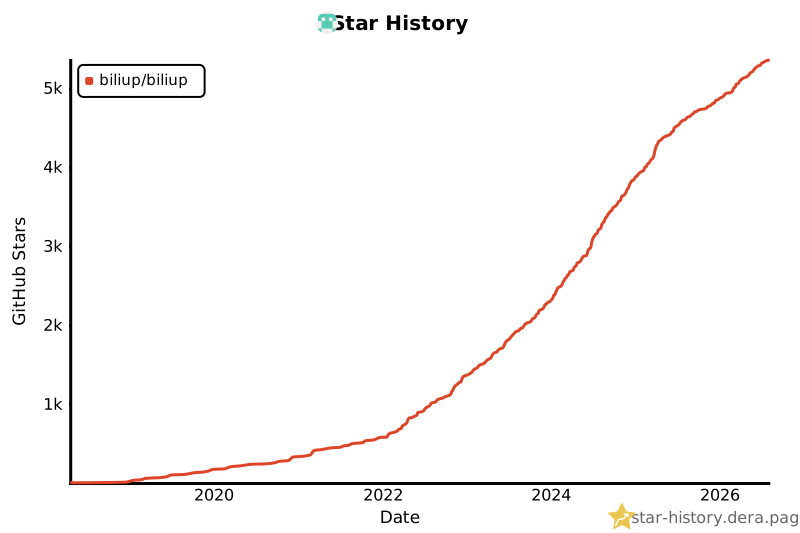](https://star-history.dera.page/#biliup/biliup&Date)
Ratings and comments
Sign in to rate this skill.
Sign inFree to use. If it’s helped, pass it on.