mcp
Baidu Map MCP Server
Safety scan
A static text scan, not a guarantee. Select the badge to see what was scanned and every finding.
Badge for your README

Markdown
[](/listings/baidu-maps--mcp)HTML
<a href="/listings/baidu-maps--mcp"><img src="/api/listings/baidu-maps--mcp/badge.svg" alt="findsafeskills safety rating" /></a>Install
Install instructions from the README
As written by the repo's author. findsafeskills has not verified these steps.
1. Get Your API Key
Register and create a server-side API Key (AK) at [Baidu Maps Open Platform](https://lbsyun.baidu.com/apiconsole/key). **Be sure to enable “MCP (SSE)” service for best performance.**
2. Python Integration
Install the SDK:
pip install mcp-server-baidu-maps
**Run as a script:**
python -m mcp_server_baidu_maps
**Configure in your MCP client (e.g., Claude, Cursor):**
{
  "mcpServers": {
    "baidu-maps": {
      "command": "python",
      "args": ["-m", "mcp_server_baidu_maps"],
      "env": {
        "BAIDU_MAPS_API_KEY": "<YOUR_API_KEY>"
      }
    }
  }
}3. Node.js/TypeScript Integration
Install:
npm install @baidumap/mcp-server-baidu-map
**Configure in your MCP client:**
{
  "mcpServers": {
    "baidu-map": {
      "command": "npx",
      "args": [
        "-y",
        "@baidumap/mcp-server-baidu-map"
      ],
      "env": {
        "BAIDU_MAP_API_KEY": "<YOUR_API_KEY>"
      }
    }
  }
}4. Recommended: Use SSE for low-latency, stable access
See [SSE Quickstart](https://lbsyun.baidu.com/faq/api?title=mcpserver/quickstart).
5. More Platforms
- **Claude/Agent/千帆AppBuilder**: See [README_zh.md](./README_zh.md) for detailed integration guides and advanced configuration.
---
What was scanned
The files the safety scan read, as written by the repository's author and shown as plain text. Lines with a finding are marked.
README.md · README · 177 lines
View this file on GitHub (read at the repository's current version: the scan did not record which commit it read)
- <div align="center">
- <p>
- <img align="center" src="img/logo.png", width=700></a>
- </p>
- <!-- language -->
- [中文](./README_zh.md)| English
- <!-- icon -->
- <br>
- [](https://github.com/baidu-maps/mcp)
- 
- [](LICENSE)
- [](https://pypi.org/project/mcp-server-baidu-maps/)
- [](https://www.npmjs.com/package/@baidumap/mcp-server-baidu-map)
- </div>
- <br>
- ## 🚀 Introduction
- **Baidu Map MCP Server** is a fully MCP-compliant, open-source Location-Based Service (LBS) solution, providing a comprehensive suite of geospatial APIs and tools for developers and AI agents. As the first map service provider in China to support the [Model Context Protocol (MCP)](https://modelcontextprotocol.io/introduction), Baidu Map MCP Server bridges the gap between large language models (LLMs), AI agents, and real-world location data and services.
- With Baidu Map MCP Server, you can easily empower your applications, LLMs, and agents with advanced mapping, geocoding, POI search, route planning, weather, traffic, and more — all via standardized, developer-friendly MCP interfaces.
- **Key Features:**
- - **Full MCP Protocol Support:** Seamless integration with any MCP-compliant agent, LLM, or platform.
- - **Rich LBS Capabilities:** Geocoding, reverse geocoding, POI search, route planning (driving, walking, cycling, transit), weather, IP location, real-time traffic, and more.
- - **Cross-Platform SDKs:** Official Python and TypeScript SDKs, easy CLI and cloud deployment.
- - **Enterprise-Grade Data:** Powered by Baidu Maps' authoritative, up-to-date geospatial data.
- - **High Performance & Stability:** Recommended SSE (Server-Sent Events) access for low latency and high reliability.
- - **Open Source & Extensible:** MIT licensed, easy to customize and extend.
- Whether you are building a travel assistant, logistics platform, smart city solution, or an LLM-powered agent, Baidu Map MCP Server provides the essential geospatial intelligence and tools you need.
- The MCP Server architecture enables:
- - **Seamless AI Integration**: Allows LLMs and agents to understand and process location data naturally
- - **Contextual Understanding**: Provides rich geospatial context for more intelligent decision-making
- - **Standardized Interfaces**: Consistent API design following MCP principles for easy integration
- - **Scalable Implementation**: Suitable for projects of any size, from small applications to enterprise solutions
- Whether you're building a navigation app, delivery service, smart city solution, or enhancing an AI agent with location awareness, Baidu Map MCP Server provides the tools and infrastructure you need to succeed.
- ## 🛠️ Supported Tools & APIs
- Baidu Map MCP Server provides the following MCP-compliant APIs (tools):
- | Tool Name | Description |
- |--------------------------|----------------------------------------------------------------------------------------------|
- | `map_geocode` | Convert address to geographic coordinates. |
- | `map_reverse_geocode` | Get address, region, and POI info from coordinates. |
- | `map_search_places` | Search for global POIs by keyword, type, region, or within a radius. |
- | `map_place_details` | Get detailed info for a POI by its unique ID. |
- | `map_directions_matrix` | Batch route planning for multiple origins/destinations (driving, walking, cycling). |
- | `map_directions` | Plan routes between two points (driving, walking, cycling, transit). |
- | `map_weather` | Query real-time and forecast weather by region or coordinates. |
- | `map_ip_location` | Locate city and coordinates by IP address. |
- | `map_road_traffic` | Query real-time traffic conditions for roads or regions. |
- | `map_poi_extract`* | Extract POI info from free text (requires advanced permission). |
- > *Some advanced features require additional permissions. See [Authorization](#authorization) for details.
- All APIs follow the MCP protocol and can be called from any MCP-compliant client, LLM, or agent platform.
- ## ⚡ Quick Start
- ### 1. Get Your API Key
- Register and create a server-side API Key (AK) at [Baidu Maps Open Platform](https://lbsyun.baidu.com/apiconsole/key).
- **Be sure to enable “MCP (SSE)” service for best performance.**
- ### 2. Python Integration
- Install the SDK:
- ```bash
- pip install mcp-server-baidu-maps
- ```
- **Run as a script:**
- ```bash
- python -m mcp_server_baidu_maps
- ```
- **Configure in your MCP client (e.g., Claude, Cursor):**
- ```json
- {
- "mcpServers": {
- "baidu-maps": {
- "command": "python",
- "args": ["-m", "mcp_server_baidu_maps"],
- "env": {
- "BAIDU_MAPS_API_KEY": "<YOUR_API_KEY>"
- }
- }
- }
- }
- ```
- ### 3. Node.js/TypeScript Integration
- Install:
- ```bash
- npm install @baidumap/mcp-server-baidu-map
- ```
- **Configure in your MCP client:**
- ```json
- {
- "mcpServers": {
- "baidu-map": {
- "command": "npx",
- "args": [
- "-y",
- "@baidumap/mcp-server-baidu-map"
- ],
- "env": {
- "BAIDU_MAP_API_KEY": "<YOUR_API_KEY>"
- }
- }
- }
- }
- ```
- ### 4. Recommended: Use SSE for low-latency, stable access
- See [SSE Quickstart](https://lbsyun.baidu.com/faq/api?title=mcpserver/quickstart).
- ### 5. More Platforms
- - **Claude/Agent/千帆AppBuilder**: See [README_zh.md](./README_zh.md) for detailed integration guides and advanced configuration.
- ---
- ## 🚀 Advanced Use Cases
- - **Travel Planning Assistant:**
- Use `map_search_places`, `map_directions`, and `map_weather` to build an agent that plans optimal sightseeing routes, checks weather, and recommends POIs.
- - **Batch Route Matrix:**
- Use `map_directions_matrix` to calculate multiple routes and durations for logistics or delivery optimization.
- - **Text-to-POI Extraction:**
- Use `map_poi_extract` to extract POIs from user input or travel notes (requires advanced permission).
- - **Real-time Traffic & Weather-aware Navigation:**
- Combine `map_road_traffic` and `map_weather` for dynamic, context-aware travel suggestions.
- - **Integration with Claude, Qianfan, AppBuilder:**
- Seamlessly connect Baidu Map MCP Server to LLMs and agent frameworks for natural language geospatial reasoning.
- **See [README_zh.md](./README_zh.md) for more detailed Chinese documentation, configuration, and examples.**
- ---
- ## ⛰️ Advanced Tutorials
- - [Geocoding API Guide](https://lbsyun.baidu.com/index.php?title=webapi/guide/webservice-geocoding)
- - [POI Search API Guide](https://lbsyun.baidu.com/index.php?title=webapi/guide/webservice-placeapi)
- - [Route Planning API Guide](https://lbsyun.baidu.com/index.php?title=webapi/direction-api)
- - [MCP Integration Guide](https://lbsyun.baidu.com/index.php?title=mcp/guide)
- - [SDK Development Guide](https://lbsyun.baidu.com/index.php?title=mcp/sdk)
- ## 👩👩👧👦 Contributors
- <a href="https://github.com/baidu-maps/mcp/graphs/contributors">
- <img src="https://contrib.rocks/image?repo=baidu-maps/mcp&max=400&columns=20" width="200"/>
- </a>
- ## 🌟 Star History
- [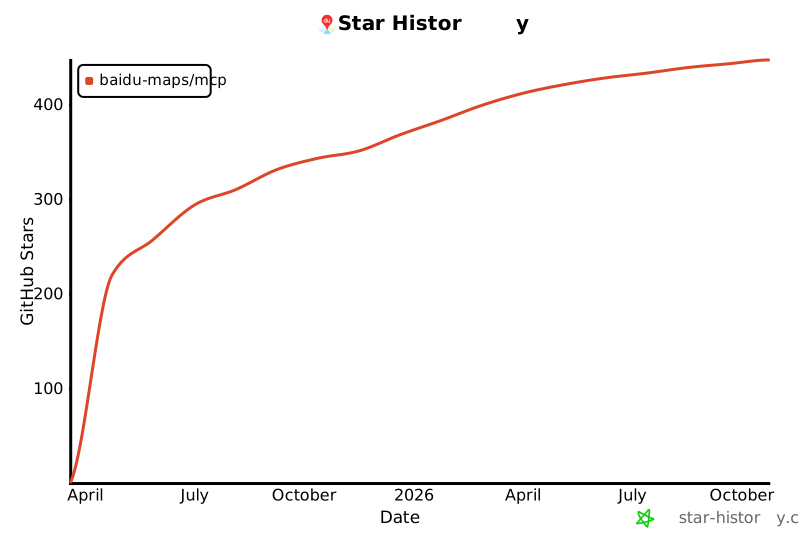](https://star-history.com/#baidu-maps/mcp&Date)
- ## 📄 License
- [MIT](./LICENSE) © baidu-maps
Ratings and comments
Sign in to rate this skill.
Sign inFree to use. If it’s helped, pass it on.