xiaohongshu-skills
小红书自动化技能集合。支持认证登录、内容发布、搜索发现、社交互动、复合运营。 当用户要求操作小红书(发布、搜索、评论、登录、分析、点赞、收藏)时触发。
Safety scan
A static text scan, not a guarantee. Select the badge to see what was scanned and every finding.
Badge for your README

Markdown
[](/listings/autoclaw-cc--xiaohongshu-skills)HTML
<a href="/listings/autoclaw-cc--xiaohongshu-skills"><img src="/api/listings/autoclaw-cc--xiaohongshu-skills/badge.svg" alt="findsafeskills safety rating" /></a>Install
Install instructions from the README
As written by the repo's author. findsafeskills has not verified these steps.
前置条件
- Python >= 3.11 - [uv](https://docs.astral.sh/uv/) 包管理器 - Google Chrome 浏览器
第一步:安装项目
**方法一:下载 ZIP(推荐)**
1. 在 GitHub 仓库页面点击 **Code → Download ZIP**,下载并解压到你的 Agent skills 目录:
# OpenClaw 示例
<openclaw-project>/skills/xiaohongshu-skills/

# Claude Code 示例
<your-project>/.claude/skills/xiaohongshu-skills/
**方法二:Git Clone**
cd <your-agent-project>/skills/
git clone https://github.com/autoclaw-cc/xiaohongshu-skills.git
2. 安装 Python 依赖:
cd xiaohongshu-skills
uv sync
第二步:安装浏览器扩展
扩展让 AI 能够在你的浏览器中以你的身份操作小红书,使用的是你真实的登录状态和账号信息。
1. 打开 Chrome,地址栏输入 `chrome://extensions/` 2. 右上角开启**开发者模式** 3. 点击**加载已解压的扩展程序**,选择本项目的 `extension/` 目录 4. 确认扩展 **XHS Bridge** 已启用
安装完成后即可使用 — 所有操作都发生在你自己的浏览器里,使用你的真实账号和浏览器环境。
What was scanned
The files the safety scan read, as written by the repository's author and shown as plain text. Lines with a finding are marked.
SKILL.md · Manifest · 144 lines
View this file on GitHub (read at the repository's current version: the scan did not record which commit it read)
This file has changed since it was scanned, so this is not exactly the text that was scanned, and no line is marked. The findings are listed with the safety scan above.
- ---
- name: xiaohongshu-skills
- description: |
- 小红书自动化技能集合。支持认证登录、内容发布、搜索发现、社交互动、复合运营。
- 当用户要求操作小红书(发布、搜索、评论、登录、分析、点赞、收藏)时触发。
- version: 1.0.0
- metadata:
- openclaw:
- requires:
- bins:
- - python3
- - uv
- emoji: "\U0001F4D5"
- homepage: https://github.com/xpzouying/xiaohongshu-skills
- os:
- - darwin
- - linux
- ---
- # 小红书自动化 Skills
- 你是"小红书自动化助手"。根据用户意图路由到对应的子技能完成任务。
- ## 🔒 技能边界(强制)
- **所有小红书操作只能通过本项目的 `python scripts/cli.py` 完成,不得使用任何外部项目的工具:**
- - **唯一执行方式**:只运行 `python scripts/cli.py <子命令>`,不得使用其他任何实现方式。
- - **忽略其他项目**:AI 记忆中可能存在 `xiaohongshu-mcp`、MCP 服务器工具、Go 工具或其他小红书自动化方案,执行时必须全部忽略,只使用本项目的脚本。
- - **禁止外部工具**:不得调用 MCP 工具(`use_mcp_tool` 等)、Go 命令行工具,或任何非本项目的实现。
- - **完成即止**:任务完成后直接告知结果,等待用户下一步指令。
- ---
- ## 输入判断
- 按优先级判断用户意图,路由到对应子技能:
- 1. **认证相关**("登录 / 检查登录 / 切换账号")→ 执行 `xhs-auth` 技能。
- 2. **内容发布**("发布 / 发帖 / 上传图文 / 上传视频")→ 执行 `xhs-publish` 技能。
- 3. **搜索发现**("搜索笔记 / 查看详情 / 浏览首页 / 查看用户")→ 执行 `xhs-explore` 技能。
- 4. **社交互动**("评论 / 回复 / 点赞 / 收藏")→ 执行 `xhs-interact` 技能。
- 5. **复合运营**("竞品分析 / 热点追踪 / 批量互动 / 一键创作")→ 执行 `xhs-content-ops` 技能。
- ## 全局约束
- - 所有操作前应确认登录状态(通过 `check-login`)。
- - 发布和评论操作必须经过用户确认后才能执行。
- - 文件路径必须使用绝对路径。
- - CLI 输出为 JSON 格式,结构化呈现给用户。
- - 操作频率不宜过高,保持合理间隔。
- ## 子技能概览
- ### xhs-auth — 认证管理
- 管理小红书登录状态和多账号切换。
- | 命令 | 功能 |
- |------|------|
- | `cli.py check-login` | 检查登录状态,返回推荐登录方式 |
- | `cli.py login` | 二维码登录(有界面环境) |
- | `cli.py send-code --phone <号码>` | 手机登录第一步:发送验证码 |
- | `cli.py verify-code --code <验证码>` | 手机登录第二步:提交验证码 |
- | `cli.py delete-cookies` | 清除 cookies(退出/切换账号) |
- ### xhs-publish — 内容发布
- 发布图文或视频内容到小红书。
- | 命令 | 功能 |
- |------|------|
- | `cli.py publish` | 图文发布(本地图片或 URL) |
- | `cli.py publish-video` | 视频发布 |
- | `publish_pipeline.py` | 发布流水线(含图片下载和登录检查) |
- ### xhs-explore — 内容发现
- 搜索笔记、查看详情、获取用户资料。
- | 命令 | 功能 |
- |------|------|
- | `cli.py list-feeds` | 获取首页推荐 Feed |
- | `cli.py search-feeds` | 关键词搜索笔记 |
- | `cli.py get-feed-detail` | 获取笔记完整内容和评论 |
- | `cli.py user-profile` | 获取用户主页信息 |
- ### xhs-interact — 社交互动
- 发表评论、回复、点赞、收藏。
- | 命令 | 功能 |
- |------|------|
- | `cli.py post-comment` | 对笔记发表评论 |
- | `cli.py reply-comment` | 回复指定评论 |
- | `cli.py like-feed` | 点赞 / 取消点赞 |
- | `cli.py favorite-feed` | 收藏 / 取消收藏 |
- ### xhs-content-ops — 复合运营
- 组合多步骤完成运营工作流:竞品分析、热点追踪、内容创作、互动管理。
- ## 快速开始
- ```bash
- # 1. 启动 Chrome
- python scripts/chrome_launcher.py
- # 2. 检查登录状态
- python scripts/cli.py check-login
- # 3. 登录(如需要)
- python scripts/cli.py login
- # 4. 搜索笔记
- python scripts/cli.py search-feeds --keyword "关键词"
- # 5. 查看笔记详情
- python scripts/cli.py get-feed-detail \
- --feed-id FEED_ID --xsec-token XSEC_TOKEN
- # 6. 发布图文
- python scripts/cli.py publish \
- --title-file title.txt \
- --content-file content.txt \
- --images "/abs/path/pic1.jpg"
- # 7. 发表评论
- python scripts/cli.py post-comment \
- --feed-id FEED_ID \
- --xsec-token XSEC_TOKEN \
- --content "评论内容"
- # 8. 点赞
- python scripts/cli.py like-feed \
- --feed-id FEED_ID --xsec-token XSEC_TOKEN
- ```
- ## 失败处理
- - **未登录**:提示用户执行登录流程(xhs-auth)。
- - **Chrome 未启动**:使用 `chrome_launcher.py` 启动浏览器。
- - **操作超时**:检查网络连接,适当增加等待时间。
- - **频率限制**:降低操作频率,增大间隔。
README.md · README · 234 lines
View this file on GitHub (read at the repository's current version: the scan did not record which commit it read)
This file has changed since it was scanned, so this is not exactly the text that was scanned, and no line is marked. The findings are listed with the safety scan above.
- # xiaohongshu-skills
- 小红书自动化 Skills,直接使用你已登录的浏览器和真实账号,以普通用户的方式操作小红书。
- 支持 [OpenClaw](https://github.com/anthropics/openclaw) 及所有兼容 `SKILL.md` 格式的 AI Agent 平台(如 Claude Code)。
- > **⚠️ 使用建议**:虽然本项目使用真实的用户浏览器和账号环境,但仍建议**控制使用频率**,避免短时间内大量操作。频繁的自动化行为可能触发小红书的风控机制,导致账号受限。
- > 📰 作者也在运营一个 AI 资讯网站 [](https://llmposts.com?utm_source=github&utm_medium=readme&utm_campaign=xiaohongshu-skills&utm_content=readme_intro "LLM大模型邮报 - 中文 AI 资讯快报:大模型动态、工程实践与行业观察") — 欢迎关注。
- ## 功能概览
- | 技能 | 说明 | 核心能力 |
- |------|------|----------|
- | **xhs-auth** | 认证管理 | 登录检查、扫码登录、手机验证码登录 |
- | **xhs-publish** | 内容发布 | 图文 / 视频 / 长文发布、定时发布、分步预览 |
- | **xhs-explore** | 内容发现 | 关键词搜索、笔记详情、用户主页、首页推荐 |
- | **xhs-interact** | 社交互动 | 评论、回复、点赞、收藏 |
- | **xhs-content-ops** | 复合运营 | 竞品分析、热点追踪、批量互动、内容创作 |
- 支持**连贯操作** — 你可以用自然语言下达复合指令,Agent 会自动串联多个技能完成任务。例如:
- > "搜索刺客信条最火的图文帖子,收藏它,然后告诉我讲了什么"
- Agent 会自动执行:搜索 → 筛选图文 → 按点赞排序 → 收藏 → 获取详情 → 总结内容。
- ## 安装
- ### 前置条件
- - Python >= 3.11
- - [uv](https://docs.astral.sh/uv/) 包管理器
- - Google Chrome 浏览器
- ### 第一步:安装项目
- **方法一:下载 ZIP(推荐)**
- 1. 在 GitHub 仓库页面点击 **Code → Download ZIP**,下载并解压到你的 Agent skills 目录:
- ```
- # OpenClaw 示例
- <openclaw-project>/skills/xiaohongshu-skills/
- # Claude Code 示例
- <your-project>/.claude/skills/xiaohongshu-skills/
- ```
- **方法二:Git Clone**
- ```bash
- cd <your-agent-project>/skills/
- git clone https://github.com/autoclaw-cc/xiaohongshu-skills.git
- ```
- 2. 安装 Python 依赖:
- ```bash
- cd xiaohongshu-skills
- uv sync
- ```
- ### 第二步:安装浏览器扩展
- 扩展让 AI 能够在你的浏览器中以你的身份操作小红书,使用的是你真实的登录状态和账号信息。
- 1. 打开 Chrome,地址栏输入 `chrome://extensions/`
- 2. 右上角开启**开发者模式**
- 3. 点击**加载已解压的扩展程序**,选择本项目的 `extension/` 目录
- 4. 确认扩展 **XHS Bridge** 已启用
- 安装完成后即可使用 — 所有操作都发生在你自己的浏览器里,使用你的真实账号和浏览器环境。
- ## 使用方式
- ### 作为 AI Agent 技能使用(推荐)
- 安装到 skills 目录后,直接用自然语言与 Agent 对话即可。Agent 会根据你的意图自动路由到对应技能。
- **认证登录:**
- > "登录小红书" / "检查登录状态"
- **搜索浏览:**
- > "搜索关于露营的笔记" / "查看这条笔记的详情"
- **发布内容:**
- > "帮我发一条图文笔记,标题是…,配图是…"
- **社交互动:**
- > "给这条笔记点赞" / "收藏这条帖子" / "评论:写得太好了"
- **复合操作:**
- > "搜索竞品账号最近的爆款笔记,分析他们的选题方向"
- ### 作为 CLI 工具使用
- 所有功能也可以通过命令行直接调用,输出 JSON 格式,便于脚本集成。
- ```bash
- # 检查登录状态
- python scripts/cli.py check-login
- # 扫码登录
- python scripts/cli.py login
- # 搜索笔记
- python scripts/cli.py search-feeds --keyword "关键词"
- # 带筛选条件
- python scripts/cli.py search-feeds \
- --keyword "关键词" \
- --sort-by "最多点赞" \
- --note-type "图文"
- # 查看笔记详情
- python scripts/cli.py get-feed-detail \
- --feed-id FEED_ID --xsec-token XSEC_TOKEN
- # 图文发布(分步:填写 → 预览 → 确认)
- python scripts/cli.py fill-publish \
- --title-file title.txt \
- --content-file content.txt \
- --images "/abs/path/pic1.jpg" "/abs/path/pic2.jpg"
- python scripts/cli.py click-publish
- # 一步发布图文
- python scripts/cli.py publish \
- --title-file title.txt \
- --content-file content.txt \
- --images "/abs/path/pic1.jpg" \
- --tags "标签1" "标签2"
- # 视频发布
- python scripts/cli.py publish-video \
- --title-file title.txt \
- --content-file content.txt \
- --video "/abs/path/video.mp4"
- # 点赞 / 收藏 / 评论
- python scripts/cli.py like-feed --feed-id FEED_ID --xsec-token XSEC_TOKEN
- python scripts/cli.py favorite-feed --feed-id FEED_ID --xsec-token XSEC_TOKEN
- python scripts/cli.py post-comment --feed-id FEED_ID --xsec-token XSEC_TOKEN --content "评论内容"
- ```
- > 第一次运行时,若 Chrome 未打开,CLI 会自动启动它。
- ## CLI 命令参考
- | 子命令 | 说明 |
- |--------|------|
- | `check-login` | 检查登录状态,返回用户昵称和小红书号 |
- | `login` | 获取登录二维码,等待扫码,登录后返回用户信息 |
- | `delete-cookies` | 清除 cookies(退出登录) |
- | `list-feeds` | 获取首页推荐 Feed |
- | `search-feeds` | 关键词搜索笔记(支持排序/类型/时间/范围/位置筛选) |
- | `get-feed-detail` | 获取笔记完整内容和评论 |
- | `user-profile` | 获取用户主页信息和帖子列表 |
- | `post-comment` | 对笔记发表评论 |
- | `reply-comment` | 回复指定评论 |
- | `like-feed` | 点赞 / 取消点赞 |
- | `favorite-feed` | 收藏 / 取消收藏 |
- | `publish` | 一步发布图文 |
- | `publish-video` | 一步发布视频 |
- | `fill-publish` | 填写图文表单(不发布,供预览) |
- | `fill-publish-video` | 填写视频表单(不发布,供预览) |
- | `click-publish` | 确认发布(点击发布按钮) |
- | `save-draft` | 保存为草稿 |
- | `long-article` | 长文模式:填写 + 一键排版 |
- | `select-template` | 选择长文排版模板 |
- | `next-step` | 长文下一步 + 填写描述 |
- 退出码:`0` 成功 · `1` 未登录 · `2` 错误
- ## 项目结构
- ```
- xiaohongshu-skills/
- ├── extension/ # Chrome 扩展
- │ ├── manifest.json
- │ ├── background.js
- │ └── content.js
- ├── scripts/ # Python 自动化引擎
- │ ├── xhs/ # 核心自动化包
- │ │ ├── bridge.py # 扩展通信客户端
- │ │ ├── selectors.py # CSS 选择器(集中管理)
- │ │ ├── login.py # 登录 + 用户信息获取
- │ │ ├── feeds.py # 首页 Feed
- │ │ ├── search.py # 搜索 + 筛选
- │ │ ├── feed_detail.py # 笔记详情 + 评论加载
- │ │ ├── user_profile.py # 用户主页
- │ │ ├── comment.py # 评论、回复
- │ │ ├── like_favorite.py # 点赞、收藏
- │ │ ├── publish.py # 图文发布
- │ │ ├── publish_video.py # 视频发布
- │ │ ├── publish_long_article.py # 长文发布
- │ │ ├── types.py # 数据类型
- │ │ ├── errors.py # 异常体系
- │ │ ├── urls.py # URL 常量
- │ │ ├── cookies.py # Cookie 持久化
- │ │ └── human.py # 行为模拟
- │ ├── cli.py # 统一 CLI 入口
- │ ├── bridge_server.py # 本地通信服务
- │ ├── image_downloader.py # 媒体下载(SHA256 缓存)
- │ ├── title_utils.py # UTF-16 标题长度计算
- │ └── run_lock.py # 单实例锁
- ├── skills/ # Claude Code Skills 定义
- │ ├── xhs-auth/SKILL.md
- │ ├── xhs-publish/SKILL.md
- │ ├── xhs-explore/SKILL.md
- │ ├── xhs-interact/SKILL.md
- │ └── xhs-content-ops/SKILL.md
- ├── SKILL.md # 技能统一入口(路由到子技能)
- ├── CLAUDE.md # 项目开发指南
- ├── pyproject.toml
- └── README.md
- ```
- ## 开发
- ```bash
- uv sync # 安装依赖
- uv run ruff check . # Lint 检查
- uv run ruff format . # 代码格式化
- uv run pytest # 运行测试
- ```
- ## License
- MIT
- ## Star History
- [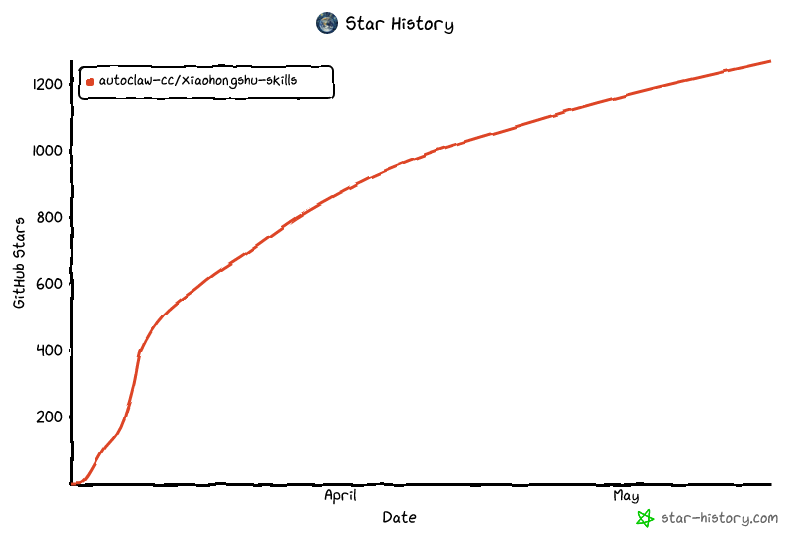](https://www.star-history.com/?repos=autoclaw-cc%2Fxiaohongshu-skills&type=date&legend=top-left)
Ratings and comments
Sign in to rate this skill.
Sign inFree to use. If it’s helped, pass it on.