FreeCAD-MCP
FreeCAD plugin for automating model creation and control via Model Contro Protocol (MCP). Provides a MCP server,GUl panel, and client for running macros,managing documents, and adjusting views.
Safety scan
A static text scan, not a guarantee. Select the badge to see what was scanned and every finding.
Badge for your README

Markdown
[](/listings/atoi-ming--freecad-mcp)HTML
<a href="/listings/atoi-ming--freecad-mcp"><img src="/api/listings/atoi-ming--freecad-mcp/badge.svg" alt="findsafeskills safety rating" /></a>Install
Install instructions from the README
As written by the repo's author. findsafeskills has not verified these steps.
1. Install the plugin (see [Installation](#installation)). 2. Launch FreeCAD and switch to the `FreeCAD MCP` workbench. 3. Open the control panel (`FreeCAD_MCP_Show`) and click "Start Server." 4. Run an example macro:
python D:\FreeCAD\Mod\FreeCAD-MCP-main\src\freecad_mcp_client.py --run-macro gear.FCMacro --params '{"radius": 15}'5. View the result: A gear model is generated and displayed in axonometric view.
What was scanned
The files the safety scan read, as written by the repository's author and shown as plain text. Lines with a finding are marked.
README.md · README · 329 lines
View this file on GitHub (read at the repository's current version: the scan did not record which commit it read)
- # FreeCAD MCP Plugin
- The **FreeCAD MCP** plugin integrates the **Model Control Protocol (MCP)** into FreeCAD, enabling automation of model creation, macro execution, and view management through a server-client architecture. It provides a GUI control panel and a command-line client to streamline FreeCAD workflows, supporting tasks like creating/running macros, adjusting views, and integrating with external tools (e.g., Claude, Cursor, Trace, CodeBuddy).
- 
- ## Table of Contents
- - [Features](#features)
- - [Quick Start](#quick-start)
- - [Installation](#installation)
- - [MCP Configuration](#mcp-configuration)
- - [Usage](#usage)
- - [Tool Functions](#tool-functions)
- - [Use Cases](#use-cases)
- - [External Tool Integration](#external-tool-integration)
- - [Assets](#assets)
- - [Troubleshooting](#troubleshooting)
- - [Contributing](#contributing)
- - [License](#license)
- ## Features
- The FreeCAD MCP plugin (v0.1.0) offers the following features:
- - **MCP Server**: Provides a GUI control panel (`FreeCADMCPPanel`) and processes commands like `create_macro`, `update_macro`, `run_macro`, `set_view`, and `get_report` (implemented in `freecad_mcp_server.py`).
- - **MCP Client**: Command-line tool to send commands via `stdio` or TCP, manage `.FCMacro` files (create, update, run, validate), and control FreeCAD remotely (implemented in `freecad_mcp_client.py`).
- - **Macro Normalization**: Automatically adds imports (`FreeCAD`, `FreeCADGui`, `Part`, `math`) and post-execution steps (recompute, view adjustment) for macros.
- - **GUI Control Panel**: Includes buttons to start/stop the server, clear logs, and switch views (front, top, right, axonometric).
- - **Logging System**: Records messages and errors to `freecad_mcp_log.txt` in the temporary directory (e.g., `%TEMP%\freecad_mcp_log.txt`) and a GUI report browser (100-line limit).
- - **Workbench Integration**: Adds a `FreeCADMCPWorkbench` with toolbar and menu commands (implemented in `InitGui.py`).
- - **Visual Assets**: Includes workbench icon (`icon.svg`), example models (`gear.png`, `flange.png`, `boat.png`, `table.png`), and demo animation (`freecad.gif`, `freecad.mp4`).
- Watch the demo animation:
- <img src="https://raw.githubusercontent.com/ATOI-Ming/FreeCAD-MCP/main/assets/freecad.gif" width="900">
- Download the demo video: [FreeCAD MCP Demo MP4](assets/freecad.mp4)
- ## Quick Start
- 1. Install the plugin (see [Installation](#installation)).
- 2. Launch FreeCAD and switch to the `FreeCAD MCP` workbench.
- 3. Open the control panel (`FreeCAD_MCP_Show`) and click "Start Server."
- 4. Run an example macro:
- ```bash
- python D:\FreeCAD\Mod\FreeCAD-MCP-main\src\freecad_mcp_client.py --run-macro gear.FCMacro --params '{"radius": 15}'
- ```
- 5. View the result: A gear model is generated and displayed in axonometric view.
- ## Installation
- ### Prerequisites
- - **FreeCAD**: Version 0.21 or higher, [Download FreeCAD](https://www.freecad.org/downloads.php?lang=zh_CN). Select the version for your operating system.
- - **Python**: Version 3.12+ (included with FreeCAD or installed via Anaconda).
- - **Anaconda** (recommended for dependency management): [Download Anaconda](https://www.anaconda.com/download). Select the version for your operating system.
- - **Python Dependencies**:
- - Required packages: `mcp-server` (specified in `pyproject.toml`).
- - Installation commands:
- ```bash
- # use system Python
- pip install mcp-server
- ```
- - Verify installation:
- ```bash
- pip show mcp-server
- ```
- Ensure `mcp-server` version .
- ### Installation Steps
- 1. **Clone the Repository**:
- ```bash
- git clone https://github.com/ATOI-Ming/FreeCAD-MCP.git
- ```
- 2. **Copy to FreeCAD Mod Directory**:
- Copy the `FreeCAD-MCP` folder to:
- - Windows: `D:\FreeCAD\Mod\FreeCAD-MCP`
- - Linux: `~/.local/share/FreeCAD/Mod/FreeCAD-MCP`
- - macOS: `~/Library/Application Support/FreeCAD/Mod/FreeCAD-MCP`
- ```bash
- # Windows example
- xcopy FreeCAD-MCP D:\FreeCAD\Mod\FreeCAD-MCP /E /H /C /I
- ```
- **Note**: Adjust `D:\FreeCAD\Mod` based on your FreeCAD installation path.
- 3. **Launch FreeCAD**:
- - Open FreeCAD and switch to the `FreeCAD MCP` workbench (icon: `assets/icon.svg`).
- - Verify that `FreeCAD-MCP` is loaded in **Edit > Preferences > Add-ons**.
- 4. **Verify Installation**:
- - Click `FreeCAD_MCP_Show` to open the control panel.
- - Check the temporary directory (e.g., `%TEMP%\freecad_mcp_log.txt`) for startup messages.
- ## MCP Configuration
- Configure the MCP client to communicate with FreeCAD via `stdio` or TCP.
- 1. **Create Configuration File**:
- Create `mcp_config.json` in `D:\FreeCAD\Mod\FreeCAD-MCP-main\src\`:
- ```json
- {
- "mcpServers": {
- "freecad": {
- "disabled": false,
- "timeout": 60,
- "type": "stdio",
- "command": "D:\\Anaconda3\\python.exe",
- "args": ["D:\\FreeCAD\\Mod\\FreeCAD-MCP-main\\src\\freecad_mcp_client.py"]
- }
- }
- }
- ```
- **Note**:
- - Adjust paths based on your system:
- - **Anaconda Path**: e.g., `C:\Anaconda3\python.exe` (Windows), `/home/<user>/anaconda3/bin/python` (Linux), `/Users/<user>/anaconda3/bin/python` (macOS).
- - **FreeCAD Mod Path**: e.g., `C:\Users\<YourUser>\AppData\Roaming\FreeCAD\Mod\FreeCAD-MCP` (Windows), `/home/<user>/.local/share/FreeCAD/Mod/FreeCAD-MCP` (Linux), `/Users/<user>/Library/Application Support/FreeCAD/Mod/FreeCAD-MCP` (macOS).
- - For TCP communication, set `"type": "tcp"`, add `"host": "localhost"`, and `"port": 9876`.
- 2. **Run the Server**:
- - **GUI Method**: In the `FreeCAD MCP` workbench, click `FreeCAD_MCP_Show` and then "Start Server."
- - **Command-Line Method**:
- ```bash
- conda activate freecad_mcp
- python D:\FreeCAD\Mod\FreeCAD-MCP-main\src\freecad_mcp_server.py
- ```
- 3. **Verify Server**:
- - Check `%TEMP%\freecad_mcp_log.txt` for a "Server started" message.
- - Test a client command:
- ```bash
- python D:\FreeCAD\Mod\FreeCAD-MCP-main\src\freecad_mcp_client.py --get-report
- ```
- ## Usage
- ### GUI Usage
- 1. In FreeCAD, switch to the `FreeCAD MCP` workbench (icon: `assets/icon.svg`).
- 2. Click `FreeCAD_MCP_Show` to open the control panel (`FreeCADMCPPanel`).
- 3. Use the control panel:
- - **Start/Stop Server**: Control the MCP server.
- - **Clear Logs**: Clear the report browser and `%TEMP%\freecad_mcp_log.txt`.
- - **View Switching**: Select front, top, right, or axonometric views.
- 4. Run a macro:
- - Click `FreeCAD_MCP_RunMacro`, select an `.FCMacro` file, and execute it with automatic normalization.
- ### Command-Line Usage
- 1. Activate the Anaconda environment:
- ```bash
- conda activate freecad_mcp
- ```
- 2. Run client commands:
- ```bash
- python D:\FreeCAD\Mod\FreeCAD-MCP-main\src\freecad_mcp_client.py <command>
- ```
- Examples:
- - Create macro: `--create-macro my_macro --template-type part`
- - Run macro: `--run-macro my_macro.FCMacro --params '{"radius": 10}'`
- - Set view: `--set-view '{"view_type": "7"}'`
- - Get report: `--get-report`
- ## Tool Functions
- The following tool functions are provided by `freecad_mcp_client.py`, sending commands via `stdio` or TCP (`localhost:9876`), processed by `freecad_mcp_server.py`.
- | Function | Parameters | Description |
- |-----------------------|-----------------------------------------|----------------------------------------------------------------------|
- | `create_macro` | `macro_name`, `template_type` | Creates an `.FCMacro` file, validates name (letters, numbers, underscores, hyphens), supports templates (`default`, `basic`, `part`, `sketch`). |
- | `update_macro` | `macro_name`, `code` | Updates macro content, auto-adds `FreeCAD`, `FreeCADGui`, `Part`, `math` imports. |
- | `run_macro` | `macro_path`, `params` (optional) | Runs a macro, normalizes code, recomputes document, adjusts to axonometric view. |
- | `validate_macro_code` | `macro_name` (optional), `code` (optional) | Validates macro code syntax, returns success or error (with traceback). |
- | `set_view` | `params` (e.g., `{"view_type": "7"}`) | Sets view: `1` (front), `2` (top), `3` (right), `7` (axonometric). |
- | `get_report` | None | Retrieves server logs (from `%TEMP%\freecad_mcp_log.txt` and report browser). |
- ### Examples
- - **Create Macro**:
- ```bash
- python D:\FreeCAD\Mod\FreeCAD-MCP-main\src\freecad_mcp_client.py --create-macro gear --template-type part
- ```
- Output: `{"status": "success", "result": "Macro created"}`
- - **Update Macro**:
- ```bash
- python D:\FreeCAD\Mod\FreeCAD-MCP-main\src\freecad_mcp_client.py --update-macro gear --code "import FreeCAD, Part\nradius = 10\ngear = Part.makeCylinder(radius, 5)\nPart.show(gear)"
- ```
- Output: `{"status": "success", "result": "Macro updated"}`
- - **Run Macro**:
- ```bash
- python D:\FreeCAD\Mod\FreeCAD-MCP-main\src\freecad_mcp_client.py --run-macro gear.FCMacro --params '{"radius": 15}'
- ```
- Output: `{"status": "success", "result": {...}}`
- - **Validate Code**:
- ```bash
- python D:\FreeCAD\Mod\FreeCAD-MCP-main\src\freecad_mcp_client.py --validate-macro-code gear --code "import FreeCAD\nApp.newDocument()"
- ```
- Output: `{"status": "success"}`
- - **Set View**:
- ```bash
- python D:\FreeCAD\Mod\FreeCAD-MCP-main\src\freecad_mcp_client.py --set-view '{"view_type": "7"}'
- ```
- Output: `{"status": "success", "result": "view set to axonometric"}`
- - **Get Report**:
- ```bash
- python D:\FreeCAD\Mod\FreeCAD-MCP-main\src\freecad_mcp_client.py --get-report
- ```
- Output: `{"status": "success", "result": {...}}`
- ## Use Cases
- 1. **Automated Gear Model Creation**:
- - **Scenario**: Generate a parametric gear model for engineering design.
- - **Steps**:
- 1. Create macro: `--create-macro gear --template-type part`
- 2. Update macro: `--update-macro gear --code "import FreeCAD, Part\nradius = 15\ngear = Part.makeCylinder(radius, 5)\nPart.show(gear)"`
- 3. Run macro: `--run-macro gear.FCMacro --params '{"radius": 15}'`
- - **Result**: Gear model generated, displayed in axonometric view.
- - **Output**:
- 
- 2. **Generating a Flange Model**:
- - **Scenario**: Automate creation of a flange with holes for mechanical design.
- - **Steps**: Run macro: `--run-macro flange.FCMacro`
- - **Result**: Flange model generated with automatic normalization.
- - **Output**:
- 
- 3. **Text-Based Model Generation**:
- - **Scenario**: Generate a boat model from a text description (e.g., "create a boat with a curved hull").
- - **Steps**:
- 1. Use Claude to generate `boat.FCMacro`.
- 2. Run macro: `--run-macro boat.FCMacro`
- - **Result**: Boat model generated with automatic view adjustment.
- - **Output**:
- 
- 4. **CAD Drawing Recognition**:
- - **Scenario**: Recreate a table model from a CAD drawing.
- - **Steps**:
- 1. Use Trace to convert drawing to `table.FCMacro`.
- 2. Run macro: `--run-macro table.FCMacro`
- - **Result**: Table model generated.
- - **Output**:
- 
- 5. **Batch Processing Models**:
- - **Scenario**: Automate creation of multiple models (e.g., gear and flange).
- - **Steps**:
- ```bash
- for macro in gear.FCMacro flange.FCMacro; do
- python D:\FreeCAD\Mod\FreeCAD-MCP-main\src\freecad_mcp_client.py --run-macro $macro
- done
- ```
- - **Result**: Models generated sequentially, logged to `%TEMP%\freecad_mcp_log.txt`.
- - **Output**: See `gear.png` and `flange.png`.
- ## External Tool Integration
- FreeCAD MCP supports integration with external tools to enhance model generation:
- - **Claude**: AI model for generating `.FCMacro` files from text descriptions.
- - **Example**: Input "create a gear with 10mm radius," generates:
- ```python
- import FreeCAD, Part
- radius = 10
- gear = Part.makeCylinder(radius, 5)
- Part.show(gear)
- ```
- Save as `gear.FCMacro`, run: `--run-macro gear.FCMacro`.
- - **Trace**: CAD drawing processing tool to convert drawings to `.FCMacro` files.
- - **Example**: Convert a table drawing to `table.FCMacro`, run: `--run-macro table.FCMacro`.
- - **Cursor/CodeBuddy**: Code editing tools for writing and debugging macro code.
- - **Example**: Edit `flange.FCMacro` in Cursor, update: `--update-macro flange.FCMacro --code "<code>"`.
- ## Assets
- The `assets/` directory contains the following resources:
- - **icon.svg**: Icon for `FreeCADMCPWorkbench`, used in `InitGui.py` and `package.xml`.
- 
- - **gear.png**: Example gear model.
- 
- - **flange.png**: Example flange model.
- 
- - **boat.png**: Example boat model.
- 
- - **table.png**: Example table model.
- 
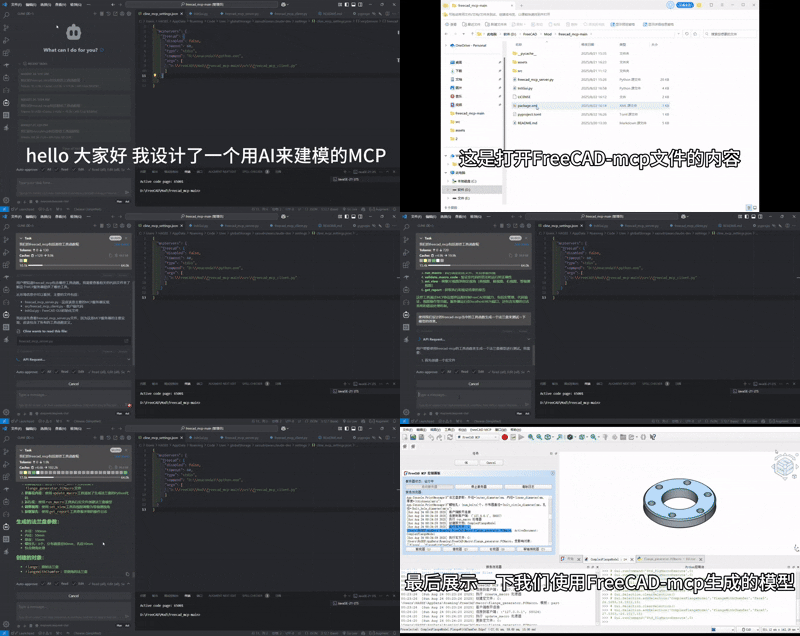
- - **freecad.gif**: Demo animation showing GUI panel, macro execution, and view switching.
- 
- - **freecad.mp4**: Demo video, available for download.
- Download: [FreeCAD MCP Demo MP4](assets/freecad.mp4)
- ## Troubleshooting
- - **Server Fails to Start**:
- - **Issue**: Port 9876 is in use.
- - **Solution**: Check port (`netstat -ano | findstr 9876`), change port, or terminate conflicting process.
- - **Client Connection Failure**:
- - **Issue**: Incorrect paths in `mcp_config.json`.
- - **Solution**: Verify `command` and `args` paths, e.g., `D:\Anaconda3\python.exe` and `D:\FreeCAD\Mod\FreeCAD-MCP-main\src\freecad_mcp_client.py`.
- - **Macro Execution Errors**:
- - **Issue**: Syntax errors or missing imports in macro code.
- - **Solution**: Use `--validate-macro-code` to check code, review traceback in `%TEMP%\freecad_mcp_log.txt`.
- - **Log File Not Generated**:
- - **Issue**: No write permission in temporary directory.
- - **Solution**: Check permissions for `%TEMP%\freecad_mcp_log.txt`, or specify another path in `freecad_mcp_server.py`.
- - **More Help**: Submit issues on GitHub ([Bug Tracker](https://github.com/ATOI-Ming/FreeCAD-MCP/issues)).
- ## Contributing
- Contributions are welcome! Follow these steps:
- 1. Fork the repository: `https://github.com/ATOI-Ming/FreeCAD-MCP`.
- 2. Create a branch: `git checkout -b feature/your-feature`.
- 3. Commit changes: `git commit -m "Add your feature"`.
- 4. Push and create a Pull Request.
- For questions or collaborations, please open an issue or contact [1757772673@qq.com,抖音:huhushuxue95]
- ## License
- This project is licensed under the MIT License. See [LICENSE](LICENSE) for details.
Ratings and comments
Sign in to rate this skill.
Sign inFree to use. If it’s helped, pass it on.