Back to search
armor-crypto-mcp
MCP serverGitHub
The MCP server for interacting with Blockchain, Swaps, Strategic Planning and more.
Safety scan
A static text scan, not a guarantee. Select the badge to see what was scanned and every finding.
Checked today
Badge for your README
Markdown
[](/listings/armorwallet--armor-crypto-mcp)HTML
<a href="/listings/armorwallet--armor-crypto-mcp"><img src="/api/listings/armorwallet--armor-crypto-mcp/badge.svg" alt="findsafeskills safety rating" /></a>Install
i
Install instructions from the README
As written by the repo's author. findsafeskills has not verified these steps.
*Linux / Windows*
pip install uv
*Mac*
brew install uv
<br />
What was scanned
The files the safety scan read, as written by the repository's author and shown as plain text. Lines with a finding are marked.
README.md · README · 159 lines
View this file on GitHub (read at the repository's current version: the scan did not record which commit it read)
- # Armor Crypto MCP
- *Alpha Test version 0.1.24*
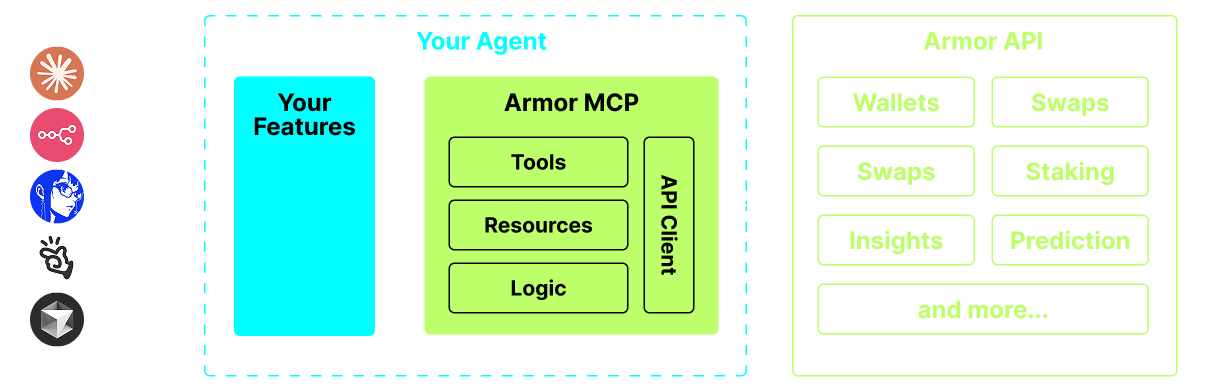
- A single source for integrating AI Agents with the Crypto ecosystem. This includes Wallet creation and management, swaps, transfers, event-based trades like DCA, stop loss and take profit, and much more. The Armor MCP supports Solana in Alpha and, when in beta, will support more than a dozen blockchains, including Ethereum. Base, Avalanche, Bitcoin, Sui, Berachain, megaETH, Optimism, Ton, BNB, and Arbitrum, among others. Using Armor's MCP you can bring all of crypto into your AI Agent with unified logic and a complete set of tools.
- 
- <br />
- <br />
- <br />
- <br />
- <br />
- <br />
- # Features
- 🧠 AI Native
- 📙 Wallet Management
- 🔃 Swaps
- 🌈 Specialized trades (DCA, Stop Loss etc.)
- ⛓️ Multi-chain
- ↔️ Cross-chain transations
- 🥩 Staking
- 🤖 Fast intergration to Agentic frameworks
- 👫 Social Sentiment
- 🔮 Prediction
- <br />
- <br />
- 
- <br />
- <br />
- <br />
- <br />
- <br />
- <br />
- # Requirements
- ### 1. Make sure you have python installed
- <br />
- ### 2. Install `uv`
- *Linux / Windows*
- ```sh
- pip install uv
- ```
- *Mac*
- ```sh
- brew install uv
- ```
- <br />
- ### 3. Claude Desktop or your AI Agent will run the MCP
- See [Usage & Configuration](#usage--configuration) for details.
- <br />
- <br />
- <br />
- <br />
- <br />
- # Alpha Testing
- We are currently in pre-alpha, and we are testing the capabilities of various agents and agentic frameworks like Claude Desktop, Cline, Cursor, n8n, etc.
- ## Current Features & Tools
- - Wallet Management
- - Grouping & Organization
- - Archiving
- - Swap & Trades
- - Normal swap
- - DCA (place / list / cancel)
- - Scheduled Orders
- - Limit Orders (place / list / cancel)
- - Staking and Unstaking
- - Token Search and Trending Tokens
- - Statistical Calculator for accurate Analysis
- - Supports Solana blockchain
- ## Coming Soon
- - More Blockchain Support
- - Minting
- - Armor Agents as a Tool (or A2A)
- ## MCP Setup
- Currently you need to have the Armor NFT to get an API Key.
- Get it [here](https://codex.armorwallet.ai/)
- ## Usage & Configuration
- To use the Armor MCP with your agent, you need the following configuration, replace `<PUT-YOUR-KEY-HERE>` with your API key:
- ```json
- {
- "mcpServers": {
- "armor-crypto-mcp": {
- "command": "uvx",
- "args": ["armor-crypto-mcp@latest", "--version"],
- "env": {
- "ARMOR_API_KEY": "<PUT-YOUR-KEY-HERE>"
- }
- }
- }
- }
- ```
- <br />
- <br />
- <br />
- <br />
- <br />
- <br />
- # Use in Claude Desktop
- 1. Must have Developer Mode enabled
- 2. Open Claude Desktop's File Menu top left of the window.
- 3. Go to File > Settings
- 4. Under Developer, click Edit Configuration
- 5. In the config file, insert the `armor-wallet-mcp` section from above
- 6. Make sure to replace the placeholder with your API key
- 7. Save the file and start a new Chat in Claude Desktop
- ## Use in Cline
- 1. Click on the `MCP Servers` button in the Cline tab in VSCode on the left panel
- 2. Scroll to the bottom of the left panel and click on `Configure MCP Servers`
- 3. In the config file, insert `armor-wallet-mcp` section from above
- 4. Make sure to replace the placeholder with your API key
- 5. Save the file, click `Done` under the `MCP Servers` tab and start chatting with Cline
- ## Use in n8n
- 1. Open the n8n app
- 2. Bottom-left of screen click `...` next to your username and click `Settings`
- 3. On the left panel, click `Community nodes` and then `Install a Community Node` button
- 4. In the search field for `npm Package Name` type in *mcp*
- 5. Install `MCP Nodes`
- 6. Add any MCP node, for example: `List Tools`
- 7. In the MCP Client `Parameters` tab, click `Select Credential` and click `Create new credential`
- 8. Under `Command` enter `uvx`
- 9. Under `Arguments` enter `armor-crypto-mcp`
- 10. Under `Environments` enter `ARMOR_API_KEY=eyJhbGciOiJIUzI1NiIsIn...` paste the full API Key value after the `=`
- 11. Back in the `Parameters` tab you can choose the MCP `Operation` for that Node
- <br />
- <br />
- <br />
- <br />
- <br />
- <br />
- # Using Armor MCP
- Once you have setup the Armor MCP [here are some prompts you can use to get started](https://github.com/armorwallet/armor-crypto-mcp/blob/main/README_prompts.md)
- <br />
- <br />
- <br />
Ratings and comments
Sign in to rate this skill.
Sign inFree to use. If it’s helped, pass it on.