mcp-documentation-server
MCP Documentation Server - Bridge the AI Knowledge Gap. ✨ Features: Document management • Gemini integration • AI-powered semantic search • File uploads • Smart chunking • Multilingual support • Zero-setup 🎯 Perfect for: New frameworks • API docs • Internal guides
Safety scan
A static text scan, not a guarantee. Select the badge to see what was scanned and every finding.
Badge for your README

Markdown
[](/listings/andrea9293--mcp-documentation-server)HTML
<a href="/listings/andrea9293--mcp-documentation-server"><img src="/api/listings/andrea9293--mcp-documentation-server/badge.svg" alt="findsafeskills safety rating" /></a>Install
Install instructions from the README
As written by the repo's author. findsafeskills has not verified these steps.
{
  "mcpServers": {
    "documentation": {
      "command": "npx",
      "args": ["-y", "@andrea9293/mcp-documentation-server"]
    }
  }
}Open your browser at `http://localhost:3080` — the web UI starts automatically.
🤖 Agent Skill (REST API) — recommended for AI agents
Every MCP tool is also accessible via the **REST API** on `http://127.0.0.1:3080/api/`. This is the recommended way to interact from AI agents (Claude Code, OpenCode, Gemini CLI, Cursor) because it avoids loading MCP tool schemas into the conversation context — only the response JSON enters.
curl -s http://127.0.0.1:3080/api/config
curl -s http://127.0.0.1:3080/api/documents
curl -s -X POST http://127.0.0.1:3080/api/search-all \
  -H "Content-Type: application/json" \
-d '{"query": "your search", "limit": 5}'A ready-to-use skill is included at `skills/documentation-server/SKILL.md` — it teaches your agent every endpoint with examples. Install it:
npx skills add https://github.com/andrea9293/mcp-documentation-server --skill documentation-server
Basic workflow
1. Add documents using `add_document` or place `.txt` / `.md` / `.pdf` files in the uploads folder and call `process_uploads`. 2. Search across everything with `search_all_documents`, or within a single document with `search_documents`. 3. Use `get_context_window` to fetch neighboring chunks and give the LLM broader context.
What was scanned
The files the safety scan read, as written by the repository's author and shown as plain text. Lines with a finding are marked.
README.md · README · 244 lines
View this file on GitHub (read at the repository's current version: the scan did not record which commit it read)
- [](https://registry.modelcontextprotocol.io/servers/io.github.andrea9293/mcp-documentation-server)
- [](https://badge.fury.io/js/@andrea9293%2Fmcp-documentation-server)
- [](https://github.com/andrea9293/mcp-documentation-server)
- [](https://opensource.org/licenses/MIT)
- [](https://deepwiki.com/andrea9293/mcp-documentation-server)
- [](https://www.paypal.com/donate/?hosted_button_id=HXATGECV8HUJN)
- [](https://buymeacoffee.com/andrea.bravaccino)
- # MCP Documentation Server
- **Local-first document management and semantic search for AI coding agents.** No external databases, no cloud APIs, no vendor lock-in.
- Unlike other MCP servers that are CLI-only, this one ships with a **full web dashboard** — browse, search, upload, and manage your knowledge base from your browser. Every MCP tool is also exposed as a REST API, giving AI agents a lean, schema-free interface.
- - **🏠 Runs fully offline** — Orama vector DB with local AI embeddings (Transformers.js)
- - **🌐 Built-in Web UI** — starts automatically on port 3080 alongside the MCP server
- - **🔍 Hybrid search** — full-text + vector similarity with parent-child chunking
- - **🤖 Optional AI search** — Google Gemini for advanced document analysis (bring your own key)
- - **📁 Drag & drop uploads** — `.txt`, `.md`, `.pdf` support
- - **📦 Published on the [MCP Registry](https://registry.modelcontextprotocol.io/servers/io.github.andrea9293/mcp-documentation-server)** — installable via npx, no clone needed
- ## Quick Start
- ```json
- {
- "mcpServers": {
- "documentation": {
- "command": "npx",
- "args": ["-y", "@andrea9293/mcp-documentation-server"]
- }
- }
- }
- ```
- Open your browser at `http://localhost:3080` — the web UI starts automatically.
- ### 🤖 Agent Skill (REST API) — recommended for AI agents
- Every MCP tool is also accessible via the **REST API** on `http://127.0.0.1:3080/api/`. This is the recommended way to interact from AI agents (Claude Code, OpenCode, Gemini CLI, Cursor) because it avoids loading MCP tool schemas into the conversation context — only the response JSON enters.
- ```bash
- curl -s http://127.0.0.1:3080/api/config
- curl -s http://127.0.0.1:3080/api/documents
- curl -s -X POST http://127.0.0.1:3080/api/search-all \
- -H "Content-Type: application/json" \
- -d '{"query": "your search", "limit": 5}'
- ```
- A ready-to-use skill is included at `skills/documentation-server/SKILL.md` — it teaches your agent every endpoint with examples. Install it:
- ```bash
- npx skills add https://github.com/andrea9293/mcp-documentation-server --skill documentation-server
- ```
- ### Basic workflow
- 1. Add documents using `add_document` or place `.txt` / `.md` / `.pdf` files in the uploads folder and call `process_uploads`.
- 2. Search across everything with `search_all_documents`, or within a single document with `search_documents`.
- 3. Use `get_context_window` to fetch neighboring chunks and give the LLM broader context.
- ## Web UI
- The web interface starts automatically on port **3080** when the MCP server launches. From the web UI you can:
- - 📊 **Dashboard** — overview of all documents and stats
- - 📄 **Documents** — browse, view, and delete documents
- - ➕ **Add Document** — create documents with title, content, and metadata
- - 🔍 **Search All** — semantic search across all documents
- - 🎯 **Search in Doc** — search within a specific document
- - 🤖 **AI Search** — Gemini-powered analysis (if `GEMINI_API_KEY` is set)
- - 📁 **Upload Files** — drag & drop files and process them into the knowledge base
- - 🪟 **Context Window** — explore chunks around a specific index
- ## Configure an MCP client
- #### Minimal
- ```json
- {
- "mcpServers": {
- "documentation": {
- "command": "npx",
- "args": ["-y", "@andrea9293/mcp-documentation-server"]
- }
- }
- }
- ```
- #### With environment variables (all optional)
- ```json
- {
- "mcpServers": {
- "documentation": {
- "command": "npx",
- "args": ["-y", "@andrea9293/mcp-documentation-server"],
- "env": {
- "MCP_BASE_DIR": "/path/to/workspace",
- "GEMINI_API_KEY": "your-api-key-here",
- "MCP_EMBEDDING_MODEL": "Xenova/all-MiniLM-L6-v2",
- "START_WEB_UI": "true",
- "WEB_HOST": "127.0.0.1",
- "WEB_PORT": "3080"
- }
- }
- }
- }
- ```
- All environment variables are optional. Without `GEMINI_API_KEY`, only the local embedding-based search tools are available.
- ## MCP Tools
- The server registers the following tools (all validated with Zod schemas):
- ### 📄 Document Management
- | Tool | Description |
- | --- | --- |
- | `add_document` | Add a document (title, content, optional metadata) |
- | `list_documents` | List all documents with metadata and content preview |
- | `get_document` | Retrieve the full content of a document by ID |
- | `delete_document` | Remove a document, its chunks, database entries, and associated files |
- ### 📁 File Processing
- | Tool | Description |
- | --- | --- |
- | `process_uploads` | Process all files in the uploads folder (chunking + embeddings) |
- | `get_uploads_path` | Returns the absolute path to the uploads folder |
- | `list_uploads_files` | Lists files in the uploads folder with size and format info |
- | `get_ui_url` | Returns the Web UI URL (e.g. http://localhost:3080) — useful to open the dashboard or to locate the uploads folder from the browser |
- ### 🔍 Search
- | Tool | Description |
- | --- | --- |
- | `search_documents` | Semantic vector search within a specific document |
- | `search_all_documents` | Hybrid (full-text + vector) cross-document search |
- | `get_context_window` | Returns a window of chunks around a given chunk index |
- | `search_documents_with_ai` | 🤖 AI-powered search using Gemini (requires `GEMINI_API_KEY`) |
- ## Configuration
- Configure via environment variables or a `.env` file in the project root:
- | Variable | Default | Description |
- | --- | --- | --- |
- | `MCP_BASE_DIR` | `~/.mcp-documentation-server` | Base directory for data storage |
- | `MCP_EMBEDDING_MODEL` | `Xenova/all-MiniLM-L6-v2` | Embedding model name |
- | `GEMINI_API_KEY` | — | Google Gemini API key (enables `search_documents_with_ai`) |
- | `MCP_CACHE_ENABLED` | `true` | Enable/disable LRU embedding cache |
- | `START_WEB_UI` | `true` | Set to `false` to disable the built-in web interface |
- | `WEB_HOST` | `127.0.0.1` | Bind address for the web UI (use `0.0.0.0` to expose on all interfaces) |
- | `WEB_PORT` | `3080` | Port for the web UI |
- | `MCP_STREAMING_ENABLED` | `true` | Enable streaming reads for large files |
- | `MCP_STREAM_CHUNK_SIZE` | `65536` | Streaming buffer size in bytes (64KB) |
- | `MCP_STREAM_FILE_SIZE_LIMIT` | `10485760` | Threshold to switch to streaming (10MB) |
- ### Storage layout
- ```
- ~/.mcp-documentation-server/ # Or custom path via MCP_BASE_DIR
- ├── data/
- │ ├── orama-chunks.msp # Orama vector DB (child chunks + embeddings)
- │ ├── orama-docs.msp # Orama document DB (full content + metadata)
- │ ├── orama-parents.msp # Orama parent chunks DB (context sections)
- │ ├── migration-complete.flag # Written after legacy JSON migration
- │ └── *.md # Markdown copies of documents
- └── uploads/ # Drop .txt, .md, .pdf files here
- ```
- ### Embedding Models
- Set via `MCP_EMBEDDING_MODEL`:
- | Model | Dimensions | Notes |
- | --- | --- | --- |
- | `Xenova/all-MiniLM-L6-v2` | 384 | Default — fast, good quality |
- | `Xenova/paraphrase-multilingual-mpnet-base-v2` | 768 | Recommended — best quality, multilingual |
- Models are downloaded on first use (~80–420 MB). The vector dimension is determined automatically from the provider.
- ⚠️ **Important**: Changing the embedding model requires re-adding all documents — embeddings from different models are incompatible. The Orama database is recreated automatically when the dimension changes.
- ## Architecture
- ```
- Server (FastMCP, stdio)
- ├─ Web UI (Express, port 3080)
- │ └─ REST API → DocumentManager
- └─ MCP Tools
- └─ DocumentManager
- ├─ OramaStore — Orama vector DB (chunks DB + docs DB + parents DB), persistence, migration
- ├─ IntelligentChunker — Parent-child chunking (code, markdown, text, PDF)
- ├─ EmbeddingProvider — Local embeddings via @xenova/transformers
- │ └─ EmbeddingCache — LRU in-memory cache
- └─ GeminiSearchService — Optional AI search via Google Gemini
- ```
- - **OramaStore** manages three Orama instances: one for document metadata/content, one for child chunks with vector embeddings, and one for parent chunks (context sections). All are persisted to binary files on disk and restored on startup.
- - **IntelligentChunker** implements the Parent-Child Chunking pattern: documents are first split into large parent chunks that preserve full context (sections, paragraphs), then each parent is further split into small child chunks for precise vector search. At query time, results are deduplicated by parent so that the LLM receives both the matched fragment and the broader context.
- - **EmbeddingProvider** lazily loads a Transformers.js model for local inference — no API calls needed.
- ## Development
- ```bash
- git clone https://github.com/andrea9293/mcp-documentation-server.git
- cd mcp-documentation-server
- npm install
- ```
- ```bash
- npm run dev # FastMCP dev mode with hot reload
- npm run build # TypeScript compilation
- npm run inspect # FastMCP web UI for interactive tool testing
- npm start # Direct tsx execution (MCP server + web UI)
- npm run web # Run only the web UI (development)
- npm run web:build # Run only the web UI (compiled)
- ```
- ## Contributing
- 1. Fork the repository
- 2. Create a feature branch: `git checkout -b feature/name`
- 3. Follow [Conventional Commits](https://conventionalcommits.org/) for messages
- 4. Open a pull request
- ## License
- MIT — see [LICENSE](LICENSE)
- ## Support
- - 📖 [Documentation](https://github.com/andrea9293/mcp-documentation-server)
- - 🐛 [Report Issues](https://github.com/andrea9293/mcp-documentation-server/issues)
- - 💬 [MCP Community](https://modelcontextprotocol.io/)
- - 🤖 [Google AI Studio](https://aistudio.google.com/app/apikey) — get a Gemini API key
- ---
- ## Star History
- [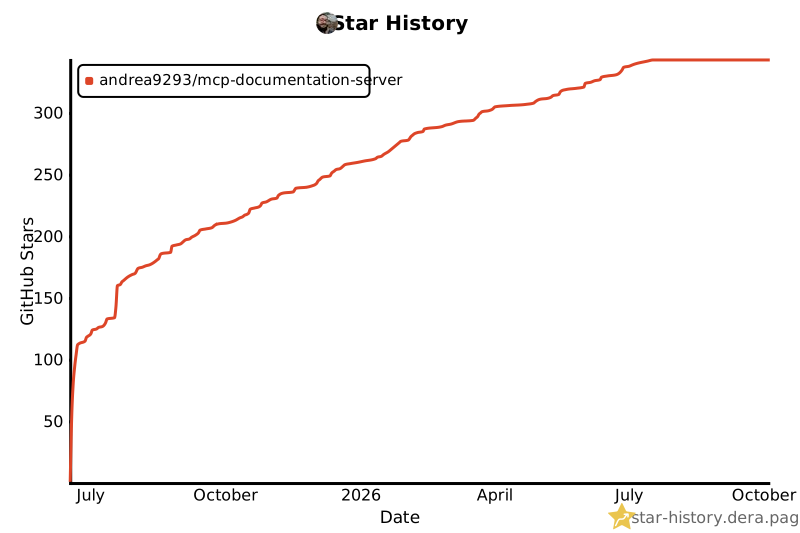](https://star-history.dera.page/#andrea9293/mcp-documentation-server&Date)
- **Built with [FastMCP](https://github.com/punkpeye/fastmcp), [Orama](https://orama.com/), and TypeScript**
Ratings and comments
Sign in to rate this skill.
Sign inFree to use. If it’s helped, pass it on.