Unla
🧩 MCP Gateway - A lightweight gateway service that instantly transforms existing MCP Servers and APIs into MCP servers with zero code changes. Features Docker deployment and management UI, requiring no infrastructure modifications.
Safety scan
A static text scan, not a guarantee. Select the badge to see what was scanned and every finding.
Badge for your README

Markdown
[](/listings/amoylab--unla)HTML
<a href="/listings/amoylab--unla"><img src="/api/listings/amoylab--unla/badge.svg" alt="findsafeskills safety rating" /></a>Install
Install instructions from the README
As written by the repo's author. findsafeskills has not verified these steps.
Unla supports a ready-to-run Docker deployment. Full deployment and configuration instructions are available in the [docs](https://docs.unla.amoylab.com/getting-started/quick-start).
Quick Launch with Docker
Configure environment variables:
export APISERVER_JWT_SECRET_KEY="changeme-please-generate-a-random-secret"
export SUPER_ADMIN_USERNAME="admin"
export SUPER_ADMIN_PASSWORD="changeme-please-use-a-secure-password"
Launch the container:
docker run -d \
  --name unla \
  -p 8080:80 \
  -p 5234:5234 \
  -p 5235:5235 \
  -p 5335:5335 \
  -p 5236:5236 \
  -e ENV=production \
  -e TZ=Asia/Shanghai \
  -e APISERVER_JWT_SECRET_KEY=${APISERVER_JWT_SECRET_KEY} \
  -e SUPER_ADMIN_USERNAME=${SUPER_ADMIN_USERNAME} \
  -e SUPER_ADMIN_PASSWORD=${SUPER_ADMIN_PASSWORD} \
  --restart unless-stopped \
ghcr.io/amoylab/unla/allinone:latestAccess and Configuration
1. Access the Web Interface: - Open http://localhost:8080/ in your browser - Login with the administrator credentials you configured
2. Add an MCP Server: - Copy the config from: https://github.com/amoylab/unla/blob/main/configs/proxy-mock-server.yaml - Click "Add MCP Server" in the web interface - Paste the configuration and save
Available Endpoints
After configuration, the service will be available at these endpoints:
- MCP SSE: http://localhost:5235/mcp/user/sse - MCP SSE Message: http://localhost:5235/mcp/user/message - MCP Streamable HTTP: http://localhost:5235/mcp/user/mcp
Configure your MCP Client with the `/sse` or `/mcp` suffix URLs to start using it.
Testing
You can test the service using:
1. The MCP Chat page in the web interface 2. Your own MCP Client (**recommended**)
📖 Read the full guide → [Quick Start »](https://docs.unla.amoylab.com/getting-started/quick-start)
---
What was scanned
The files the safety scan read, as written by the repository's author and shown as plain text. Lines with a finding are marked.
README.md · README · 157 lines
View this file on GitHub (read at the repository's current version: the scan did not record which commit it read)
- # Unla - MCP Gateway
- > 🚀 Instantly transform your existing MCP Servers and APIs into [MCP](https://modelcontextprotocol.io/) endpoints — without changing a line of code.
- [](./README.md)
- [](docs/README.zh-CN.md)
- [](docs/README.zh-TW.md)
- [](https://github.com/amoylab/unla/releases)
- [](https://docs.unla.amoylab.com)
- [](https://deepwiki.com/mcp-ecosystem/mcp-gateway)
- [](https://discord.gg/udf69cT9TY)
- [](https://goreportcard.com/report/github.com/amoylab/unla)
- [](https://snyk.io/test/github/mcp-ecosystem/mcp-gateway)
- <a href="https://llmapis.com?source=https%3A%2F%2Fgithub.com%2FAmoyLab%2FUnla" target="_blank"><img src="https://llmapis.com/api/badge/AmoyLab/Unla" alt="LLMAPIS" width="20" /></a>
- ---
- > ⚡ **Note**: Unla is under rapid development! We strive to maintain backward compatibility, but it cannot be 100% guaranteed. Please make sure to check version changes carefully when upgrading. Due to the fast iteration, documentation updates may sometimes lag behind. If you encounter any issues, feel free to search or ask for help via [Discord](https://discord.gg/udf69cT9TY) or [Issues](https://github.com/amoylab/unla/issues) ❤️
- ---
- ## ✨ What is Unla?
- **Unla** is a lightweight and highly available gateway service written in Go. It enables individuals and organizations to convert their existing MCP Servers and APIs into services compliant with the [MCP Protocol](https://modelcontextprotocol.io/) — all through configuration, with **zero code changes**.
- https://github.com/user-attachments/assets/69480eda-7aa7-4be7-9bc7-cae57fe16c54
- ### 🔧 Core Design Principles
- - ✅ Zero Intrusion: Platform-agnostic, supports deployment on bare metal, VMs, ECS, Kubernetes, etc., without modifying existing infrastructure
- - 🔄 Configuration-Driven: Convert legacy APIs to MCP Servers using YAML configuration — no code required
- - 🪶 Lightweight & Efficient: Designed for minimal resource usage without compromising on performance or availability
- - 🧭 Built-in Management UI: Ready-to-use web interface to simplify setup and reduce operational overhead
- ---
- ## 🚀 Getting Started
- Unla supports a ready-to-run Docker deployment. Full deployment and configuration instructions are available in the [docs](https://docs.unla.amoylab.com/getting-started/quick-start).
- ### Quick Launch with Docker
- Configure environment variables:
- ```bash
- export APISERVER_JWT_SECRET_KEY="changeme-please-generate-a-random-secret"
- export SUPER_ADMIN_USERNAME="admin"
- export SUPER_ADMIN_PASSWORD="changeme-please-use-a-secure-password"
- ```
- Launch the container:
- ```bash
- docker run -d \
- --name unla \
- -p 8080:80 \
- -p 5234:5234 \
- -p 5235:5235 \
- -p 5335:5335 \
- -p 5236:5236 \
- -e ENV=production \
- -e TZ=Asia/Shanghai \
- -e APISERVER_JWT_SECRET_KEY=${APISERVER_JWT_SECRET_KEY} \
- -e SUPER_ADMIN_USERNAME=${SUPER_ADMIN_USERNAME} \
- -e SUPER_ADMIN_PASSWORD=${SUPER_ADMIN_PASSWORD} \
- --restart unless-stopped \
- ghcr.io/amoylab/unla/allinone:latest
- ```
- ### Access and Configuration
- 1. Access the Web Interface:
- - Open http://localhost:8080/ in your browser
- - Login with the administrator credentials you configured
- 2. Add an MCP Server:
- - Copy the config from: https://github.com/amoylab/unla/blob/main/configs/proxy-mock-server.yaml
- - Click "Add MCP Server" in the web interface
- - Paste the configuration and save
- ### Available Endpoints
- After configuration, the service will be available at these endpoints:
- - MCP SSE: http://localhost:5235/mcp/user/sse
- - MCP SSE Message: http://localhost:5235/mcp/user/message
- - MCP Streamable HTTP: http://localhost:5235/mcp/user/mcp
- Configure your MCP Client with the `/sse` or `/mcp` suffix URLs to start using it.
- ### Testing
- You can test the service using:
- 1. The MCP Chat page in the web interface
- 2. Your own MCP Client (**recommended**)
- 📖 Read the full guide → [Quick Start »](https://docs.unla.amoylab.com/getting-started/quick-start)
- ---
- ## 🚀 Core Features
- ### 🔌 Protocol & Proxy Capabilities
- - [x] Support for converting RESTful APIs to MCP Server — Client → MCP Gateway → APIs
- - [x] Support proxying MCP services — Client → MCP Gateway → MCP Servers
- - [ ] Support for converting gRPC to MCP Server — Client → MCP Gateway → gRPC
- - [ ] Support for converting WebSocket to MCP Server — Client → MCP Gateway → WebSocket
- - [x] Support for MCP SSE
- - [x] Support for MCP Streamable HTTP
- - [x] Support for MCP responses including text, images, and audio
- ### 🧠 Session & Multi-Tenant Support
- - [x] Persistent and recoverable session support
- - [x] Multi-tenant support
- - [ ] Support for grouping and aggregating MCP servers
- ### 🛠 Configuration & Management
- - [x] Automatic configuration fetching and seamless hot-reloading
- - [x] Configuration persistence (Disk/SQLite/PostgreSQL/MySQL)
- - [x] Configuration sync via OS Signals, HTTP, or Redis PubSub
- - [x] Version control for configuration
- ### 🔐 Security & Authentication
- - [x] OAuth-based pre-authentication support for MCP Servers
- ### 🖥 User Interface
- - [x] Intuitive and lightweight management UI
- ### 📦 Deployment & Operations
- - [x] Multi-replica service support
- - [x] Docker support
- - [x] Kubernetes and Helm deployment support
- ---
- ## 📚 Documentation
- For more usage patterns, configuration examples, and integration guides, please visit:
- 👉 **https://docs.unla.amoylab.com**
- ---
- ## 📄 License
- This project is licensed under the [MIT License](LICENSE).
- ## 💬 Join Our WeChat Community
- Scan the QR code below to add us on WeChat. Please include a note: `mcp-gateway`, `mcpgw` or `unla`.
- <img src="web/public/wechat-qrcode.png" alt="WeChat QR Code" width="350" height="350" />
- ## 📈 Star History
- [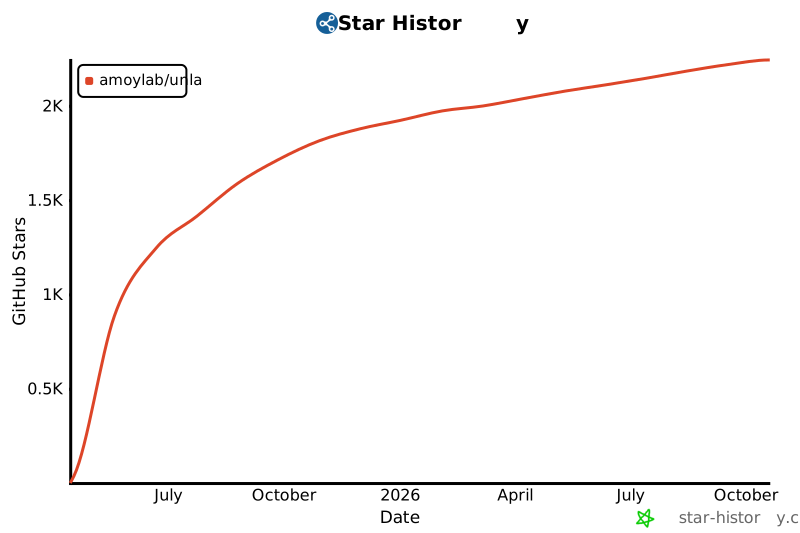](https://star-history.com/#AmoyLab/Unla&Date)
Ratings and comments
Sign in to rate this skill.
Sign inFree to use. If it’s helped, pass it on.