supabase-mcp-server
Query MCP enables end-to-end management of Supabase via chat interface: read & write query executions, management API support, automatic migration versioning, access to logs and much more.
Safety scan
A static text scan, not a guarantee. Select the badge to see what was scanned and every finding.
Badge for your README

Markdown
[](/listings/alexander-zuev--supabase-mcp-server)HTML
<a href="/listings/alexander-zuev--supabase-mcp-server"><img src="/api/listings/alexander-zuev--supabase-mcp-server/badge.svg" alt="findsafeskills safety rating" /></a>Install
Install instructions from the README
As written by the repo's author. findsafeskills has not verified these steps.
Prerequisites
Installing the server requires the following on your system: - Python 3.12+
If you plan to install via `uv`, ensure it's [installed](https://docs.astral.sh/uv/getting-started/installation/#__tabbed_1_1).
PostgreSQL Installation
PostgreSQL installation is no longer required for the MCP server itself, as it now uses asyncpg which doesn't depend on PostgreSQL development libraries.
However, you'll still need PostgreSQL if you're running a local Supabase instance:
**MacOS**
brew install postgresql@16
**Windows** - Download and install PostgreSQL 16+ from https://www.postgresql.org/download/windows/ - Ensure "PostgreSQL Server" and "Command Line Tools" are selected during installation
Step 1. Installation
Since v0.2.0 I introduced support for package installation. You can use your favorite Python package manager to install the server via:
# if pipx is installed (recommended)
pipx install supabase-mcp-server

# if uv is installed
uv pip install supabase-mcp-server
`pipx` is recommended because it creates isolated environments for each package.
You can also install the server manually by cloning the repository and running `pipx install -e .` from the root directory.
Installing from source
If you would like to install from source, for example for local development:
uv venv
# On Mac
source .venv/bin/activate
# On Windows
.venv\Scripts\activate
# Install package in editable mode
uv pip install -e .
Installing via Smithery.ai
You can find the full instructions on how to use Smithery.ai to connect to this MCP server [here](https://smithery.ai/server/@alexander-zuev/supabase-mcp-server).
Step 2. Configuration
The Supabase MCP server requires configuration to connect to your Supabase database, access the Management API, and use the Auth Admin SDK. This section explains all available configuration options and how to set them up.
> 🔑 **Important**: Since v0.4 MCP server requires an API key which you can get for free at [thequery.dev](https://thequery.dev) to use this MCP server.
Environment Variables
The server uses the following environment variables:
| Variable | Required | Default | Description | |----------|----------|---------|-------------| | `SUPABASE_PROJECT_REF` | Yes | `127.0.0.1:54322` | Your Supabase project reference ID (or local host:port) | | `SUPABASE_DB_PASSWORD` | Yes | `postgres` | Your database password | | `SUPABASE_REGION` | Yes* | `us-east-1` | AWS region where your Supabase project is hosted | | `SUPABASE_ACCESS_TOKEN` | No | None | Personal access token for Supabase Management API | | `SUPABASE_SERVICE_ROLE_KEY` | No | None | Service role key for Auth Admin SDK | | `QUERY_API_KEY` | Yes | None | API key from thequery.dev (required for all operations) |
> **Note**: The default values are configured for local Supabase development. For remote Supabase projects, you must provide your own values for `SUPABASE_PROJECT_REF` and `SUPABASE_DB_PASSWORD`.
> 🚨 **CRITICAL CONFIGURATION NOTE**: For remote Supabase projects, you MUST specify the correct region where your project is hosted using `SUPABASE_REGION`. If you encounter a "Tenant or user not found" error, this is almost certainly because your region setting doesn't match your project's actual region. You can find your project's region in the Supabase dashboard under Project Settings.
Connection Types
Database Connection
- The server connects to your Supabase PostgreSQL database using the transaction pooler endpoint - Local development uses a direct connection to `127.0.0.1:54322` - Remote projects use the format: `postgresql://postgres.[project_ref]:[password]@aws-0-[region].pooler.supabase.com:6543/postgres`
> ⚠️ **Important**: Session pooling connections are not supported. The server exclusively uses transaction pooling for better compatibility with the MCP server architecture.
Management API Connection
What was scanned
The files the safety scan read, as written by the repository's author and shown as plain text. Lines with a finding are marked.
README.md · README · 573 lines
View this file on GitHub (read at the repository's current version: the scan did not record which commit it read)
- # Query | MCP server for Supabase
- > 🌅 More than 17k installs via pypi and close to 30k downloads on Smithery.ai — in short, this was fun! 🥳
- > Thanks to everyone who has been using this server for the past few months, and I hope it was useful for you.
- > Since Supabase has released their own [official MCP server](https://github.com/supabase-community/supabase-mcp),
- > I've decided to no longer actively maintain this one. The official MCP server is as feature-rich, and many more
- > features will be added in the future. Check it out!
- <p class="center-text">
- <strong>Query MCP is an open-source MCP server that lets your IDE safely run SQL, manage schema changes, call the Supabase Management API, and use Auth Admin SDK — all with built-in safety controls.</strong>
- </p>
- <p class="center-text">
- <a href="https://pypi.org/project/supabase-mcp-server/"><img src="https://img.shields.io/pypi/v/supabase-mcp-server.svg" alt="PyPI version" /></a>
- <a href="https://github.com/alexander-zuev/supabase-mcp-server/actions"><img src="https://github.com/alexander-zuev/supabase-mcp-server/workflows/CI/badge.svg" alt="CI Status" /></a>
- <a href="https://codecov.io/gh/alexander-zuev/supabase-mcp-server"><img src="https://codecov.io/gh/alexander-zuev/supabase-mcp-server/branch/main/graph/badge.svg" alt="Code Coverage" /></a>
- <a href="https://www.python.org/downloads/"><img src="https://img.shields.io/badge/python-3.12%2B-blue.svg" alt="Python 3.12+" /></a>
- <a href="https://github.com/astral-sh/uv"><img src="https://img.shields.io/badge/uv-package%20manager-blueviolet" alt="uv package manager" /></a>
- <a href="https://pepy.tech/project/supabase-mcp-server"><img src="https://static.pepy.tech/badge/supabase-mcp-server" alt="PyPI Downloads" /></a>
- <a href="https://smithery.ai/server/@alexander-zuev/supabase-mcp-server"><img src="https://smithery.ai/badge/@alexander-zuev/supabase-mcp-server" alt="Smithery.ai Downloads" /></a>
- <a href="https://modelcontextprotocol.io/introduction"><img src="https://img.shields.io/badge/MCP-Server-orange" alt="MCP Server" /></a>
- <a href="LICENSE"><img src="https://img.shields.io/badge/license-Apache%202.0-blue.svg" alt="License" /></a>
- </p>
- ## Table of contents
- <p class="center-text">
- <a href="#getting-started">Getting started</a> •
- <a href="#feature-overview">Feature overview</a> •
- <a href="#troubleshooting">Troubleshooting</a> •
- <a href="#changelog">Changelog</a>
- </p>
- ## ✨ Key features
- - 💻 Compatible with Cursor, Windsurf, Cline and other MCP clients supporting `stdio` protocol
- - 🔐 Control read-only and read-write modes of SQL query execution
- - 🔍 Runtime SQL query validation with risk level assessment
- - 🛡️ Three-tier safety system for SQL operations: safe, write, and destructive
- - 🔄 Robust transaction handling for both direct and pooled database connections
- - 📝 Automatic versioning of database schema changes
- - 💻 Manage your Supabase projects with Supabase Management API
- - 🧑💻 Manage users with Supabase Auth Admin methods via Python SDK
- - 🔨 Pre-built tools to help Cursor & Windsurf work with MCP more effectively
- - 📦 Dead-simple install & setup via package manager (uv, pipx, etc.)
- ## Getting Started
- ### Prerequisites
- Installing the server requires the following on your system:
- - Python 3.12+
- If you plan to install via `uv`, ensure it's [installed](https://docs.astral.sh/uv/getting-started/installation/#__tabbed_1_1).
- ### PostgreSQL Installation
- PostgreSQL installation is no longer required for the MCP server itself, as it now uses asyncpg which doesn't depend on PostgreSQL development libraries.
- However, you'll still need PostgreSQL if you're running a local Supabase instance:
- **MacOS**
- ```bash
- brew install postgresql@16
- ```
- **Windows**
- - Download and install PostgreSQL 16+ from https://www.postgresql.org/download/windows/
- - Ensure "PostgreSQL Server" and "Command Line Tools" are selected during installation
- ### Step 1. Installation
- Since v0.2.0 I introduced support for package installation. You can use your favorite Python package manager to install the server via:
- ```bash
- # if pipx is installed (recommended)
- pipx install supabase-mcp-server
- # if uv is installed
- uv pip install supabase-mcp-server
- ```
- `pipx` is recommended because it creates isolated environments for each package.
- You can also install the server manually by cloning the repository and running `pipx install -e .` from the root directory.
- #### Installing from source
- If you would like to install from source, for example for local development:
- ```bash
- uv venv
- # On Mac
- source .venv/bin/activate
- # On Windows
- .venv\Scripts\activate
- # Install package in editable mode
- uv pip install -e .
- ```
- #### Installing via Smithery.ai
- You can find the full instructions on how to use Smithery.ai to connect to this MCP server [here](https://smithery.ai/server/@alexander-zuev/supabase-mcp-server).
- ### Step 2. Configuration
- The Supabase MCP server requires configuration to connect to your Supabase database, access the Management API, and use the Auth Admin SDK. This section explains all available configuration options and how to set them up.
- > 🔑 **Important**: Since v0.4 MCP server requires an API key which you can get for free at [thequery.dev](https://thequery.dev) to use this MCP server.
- #### Environment Variables
- The server uses the following environment variables:
- | Variable | Required | Default | Description |
- |----------|----------|---------|-------------|
- | `SUPABASE_PROJECT_REF` | Yes | `127.0.0.1:54322` | Your Supabase project reference ID (or local host:port) |
- | `SUPABASE_DB_PASSWORD` | Yes | `postgres` | Your database password |
- | `SUPABASE_REGION` | Yes* | `us-east-1` | AWS region where your Supabase project is hosted |
- | `SUPABASE_ACCESS_TOKEN` | No | None | Personal access token for Supabase Management API |
- | `SUPABASE_SERVICE_ROLE_KEY` | No | None | Service role key for Auth Admin SDK |
- | `QUERY_API_KEY` | Yes | None | API key from thequery.dev (required for all operations) |
- > **Note**: The default values are configured for local Supabase development. For remote Supabase projects, you must provide your own values for `SUPABASE_PROJECT_REF` and `SUPABASE_DB_PASSWORD`.
- > 🚨 **CRITICAL CONFIGURATION NOTE**: For remote Supabase projects, you MUST specify the correct region where your project is hosted using `SUPABASE_REGION`. If you encounter a "Tenant or user not found" error, this is almost certainly because your region setting doesn't match your project's actual region. You can find your project's region in the Supabase dashboard under Project Settings.
- #### Connection Types
- ##### Database Connection
- - The server connects to your Supabase PostgreSQL database using the transaction pooler endpoint
- - Local development uses a direct connection to `127.0.0.1:54322`
- - Remote projects use the format: `postgresql://postgres.[project_ref]:[password]@aws-0-[region].pooler.supabase.com:6543/postgres`
- > ⚠️ **Important**: Session pooling connections are not supported. The server exclusively uses transaction pooling for better compatibility with the MCP server architecture.
- ##### Management API Connection
- - Requires `SUPABASE_ACCESS_TOKEN` to be set
- - Connects to the Supabase Management API at `https://api.supabase.com`
- - Only works with remote Supabase projects (not local development)
- ##### Auth Admin SDK Connection
- - Requires `SUPABASE_SERVICE_ROLE_KEY` to be set
- - For local development, connects to `http://127.0.0.1:54321`
- - For remote projects, connects to `https://[project_ref].supabase.co`
- #### Configuration Methods
- The server looks for configuration in this order (highest to lowest priority):
- 1. **Environment Variables**: Values set directly in your environment
- 2. **Local `.env` File**: A `.env` file in your current working directory (only works when running from source)
- 3. **Global Config File**:
- - Windows: `%APPDATA%\supabase-mcp\.env`
- - macOS/Linux: `~/.config/supabase-mcp/.env`
- 4. **Default Settings**: Local development defaults (if no other config is found)
- > ⚠️ **Important**: When using the package installed via pipx or uv, local `.env` files in your project directory are **not** detected. You must use either environment variables or the global config file.
- #### Setting Up Configuration
- ##### Option 1: Client-Specific Configuration (Recommended)
- Set environment variables directly in your MCP client configuration (see client-specific setup instructions in Step 3). Most MCP clients support this approach, which keeps your configuration with your client settings.
- ##### Option 2: Global Configuration
- Create a global `.env` configuration file that will be used for all MCP server instances:
- ```bash
- # Create config directory
- # On macOS/Linux
- mkdir -p ~/.config/supabase-mcp
- # On Windows (PowerShell)
- mkdir -Force "$env:APPDATA\supabase-mcp"
- # Create and edit .env file
- # On macOS/Linux
- nano ~/.config/supabase-mcp/.env
- # On Windows (PowerShell)
- notepad "$env:APPDATA\supabase-mcp\.env"
- ```
- Add your configuration values to the file:
- ```
- QUERY_API_KEY=your-api-key
- SUPABASE_PROJECT_REF=your-project-ref
- SUPABASE_DB_PASSWORD=your-db-password
- SUPABASE_REGION=us-east-1
- SUPABASE_ACCESS_TOKEN=your-access-token
- SUPABASE_SERVICE_ROLE_KEY=your-service-role-key
- ```
- ##### Option 3: Project-Specific Configuration (Source Installation Only)
- If you're running the server from source (not via package), you can create a `.env` file in your project directory with the same format as above.
- #### Finding Your Supabase Project Information
- - **Project Reference**: Found in your Supabase project URL: `https://supabase.com/dashboard/project/<project-ref>`
- - **Database Password**: Set during project creation or found in Project Settings → Database
- - **Access Token**: Generate at https://supabase.com/dashboard/account/tokens
- - **Service Role Key**: Found in Project Settings → API → Project API keys
- #### Supported Regions
- The server supports all Supabase regions:
- - `us-west-1` - West US (North California)
- - `us-east-1` - East US (North Virginia) - default
- - `us-east-2` - East US (Ohio)
- - `ca-central-1` - Canada (Central)
- - `eu-west-1` - West EU (Ireland)
- - `eu-west-2` - West Europe (London)
- - `eu-west-3` - West EU (Paris)
- - `eu-central-1` - Central EU (Frankfurt)
- - `eu-central-2` - Central Europe (Zurich)
- - `eu-north-1` - North EU (Stockholm)
- - `ap-south-1` - South Asia (Mumbai)
- - `ap-southeast-1` - Southeast Asia (Singapore)
- - `ap-northeast-1` - Northeast Asia (Tokyo)
- - `ap-northeast-2` - Northeast Asia (Seoul)
- - `ap-southeast-2` - Oceania (Sydney)
- - `sa-east-1` - South America (São Paulo)
- #### Limitations
- - **No Self-Hosted Support**: The server only supports official Supabase.com hosted projects and local development
- - **No Connection String Support**: Custom connection strings are not supported
- - **No Session Pooling**: Only transaction pooling is supported for database connections
- - **API and SDK Features**: Management API and Auth Admin SDK features only work with remote Supabase projects, not local development
- ### Step 3. Usage
- In general, any MCP client that supports `stdio` protocol should work with this MCP server. This server was explicitly tested to work with:
- - Cursor
- - Windsurf
- - Cline
- - Claude Desktop
- Additionally, you can also use smithery.ai to install this server a number of clients, including the ones above.
- Follow the guides below to install this MCP server in your client.
- #### Cursor
- Go to Settings -> Features -> MCP Servers and add a new server with this configuration:
- ```bash
- # can be set to any name
- name: supabase
- type: command
- # if you installed with pipx
- command: supabase-mcp-server
- # if you installed with uv
- command: uv run supabase-mcp-server
- # if the above doesn't work, use the full path (recommended)
- command: /full/path/to/supabase-mcp-server # Find with 'which supabase-mcp-server' (macOS/Linux) or 'where supabase-mcp-server' (Windows)
- ```
- If configuration is correct, you should see a green dot indicator and the number of tools exposed by the server.
- 
- #### Windsurf
- Go to Cascade -> Click on the hammer icon -> Configure -> Fill in the configuration:
- ```json
- {
- "mcpServers": {
- "supabase": {
- "command": "/Users/username/.local/bin/supabase-mcp-server", // update path
- "env": {
- "QUERY_API_KEY": "your-api-key", // Required - get your API key at thequery.dev
- "SUPABASE_PROJECT_REF": "your-project-ref",
- "SUPABASE_DB_PASSWORD": "your-db-password",
- "SUPABASE_REGION": "us-east-1", // optional, defaults to us-east-1
- "SUPABASE_ACCESS_TOKEN": "your-access-token", // optional, for management API
- "SUPABASE_SERVICE_ROLE_KEY": "your-service-role-key" // optional, for Auth Admin SDK
- }
- }
- }
- }
- ```
- If configuration is correct, you should see green dot indicator and clickable supabase server in the list of available servers.
- 
- #### Claude Desktop
- Claude Desktop also supports MCP servers through a JSON configuration. Follow these steps to set up the Supabase MCP server:
- 1. **Find the full path to the executable** (this step is critical):
- ```bash
- # On macOS/Linux
- which supabase-mcp-server
- # On Windows
- where supabase-mcp-server
- ```
- Copy the full path that is returned (e.g., `/Users/username/.local/bin/supabase-mcp-server`).
- 2. **Configure the MCP server** in Claude Desktop:
- - Open Claude Desktop
- - Go to Settings → Developer -> Edit Config MCP Servers
- - Add a new configuration with the following JSON:
- ```json
- {
- "mcpServers": {
- "supabase": {
- "command": "/full/path/to/supabase-mcp-server", // Replace with the actual path from step 1
- "env": {
- "QUERY_API_KEY": "your-api-key", // Required - get your API key at thequery.dev
- "SUPABASE_PROJECT_REF": "your-project-ref",
- "SUPABASE_DB_PASSWORD": "your-db-password",
- "SUPABASE_REGION": "us-east-1", // optional, defaults to us-east-1
- "SUPABASE_ACCESS_TOKEN": "your-access-token", // optional, for management API
- "SUPABASE_SERVICE_ROLE_KEY": "your-service-role-key" // optional, for Auth Admin SDK
- }
- }
- }
- }
- ```
- > ⚠️ **Important**: Unlike Windsurf and Cursor, Claude Desktop requires the **full absolute path** to the executable. Using just the command name (`supabase-mcp-server`) will result in a "spawn ENOENT" error.
- If configuration is correct, you should see the Supabase MCP server listed as available in Claude Desktop.
- 
- #### Cline
- Cline also supports MCP servers through a similar JSON configuration. Follow these steps to set up the Supabase MCP server:
- 1. **Find the full path to the executable** (this step is critical):
- ```bash
- # On macOS/Linux
- which supabase-mcp-server
- # On Windows
- where supabase-mcp-server
- ```
- Copy the full path that is returned (e.g., `/Users/username/.local/bin/supabase-mcp-server`).
- 2. **Configure the MCP server** in Cline:
- - Open Cline in VS Code
- - Click on the "MCP Servers" tab in the Cline sidebar
- - Click "Configure MCP Servers"
- - This will open the `cline_mcp_settings.json` file
- - Add the following configuration:
- ```json
- {
- "mcpServers": {
- "supabase": {
- "command": "/full/path/to/supabase-mcp-server", // Replace with the actual path from step 1
- "env": {
- "QUERY_API_KEY": "your-api-key", // Required - get your API key at thequery.dev
- "SUPABASE_PROJECT_REF": "your-project-ref",
- "SUPABASE_DB_PASSWORD": "your-db-password",
- "SUPABASE_REGION": "us-east-1", // optional, defaults to us-east-1
- "SUPABASE_ACCESS_TOKEN": "your-access-token", // optional, for management API
- "SUPABASE_SERVICE_ROLE_KEY": "your-service-role-key" // optional, for Auth Admin SDK
- }
- }
- }
- }
- ```
- If configuration is correct, you should see a green indicator next to the Supabase MCP server in the Cline MCP Servers list, and a message confirming "supabase MCP server connected" at the bottom of the panel.
- 
- ### Troubleshooting
- Here are some tips & tricks that might help you:
- - **Debug installation** - run `supabase-mcp-server` directly from the terminal to see if it works. If it doesn't, there might be an issue with the installation.
- - **MCP Server configuration** - if the above step works, it means the server is installed and configured correctly. As long as you provided the right command, IDE should be able to connect. Make sure to provide the right path to the server executable.
- - **"No tools found" error** - If you see "Client closed - no tools available" in Cursor despite the package being installed:
- - Find the full path to the executable by running `which supabase-mcp-server` (macOS/Linux) or `where supabase-mcp-server` (Windows)
- - Use the full path in your MCP server configuration instead of just `supabase-mcp-server`
- - For example: `/Users/username/.local/bin/supabase-mcp-server` or `C:\Users\username\.local\bin\supabase-mcp-server.exe`
- - **Environment variables** - to connect to the right database, make sure you either set env variables in `mcp_config.json` or in `.env` file placed in a global config directory (`~/.config/supabase-mcp/.env` on macOS/Linux or `%APPDATA%\supabase-mcp\.env` on Windows).
- - **Accessing logs** - The MCP server writes detailed logs to a file:
- - Log file location:
- - macOS/Linux: `~/.local/share/supabase-mcp/mcp_server.log`
- - Windows: `%USERPROFILE%\.local\share\supabase-mcp\mcp_server.log`
- - Logs include connection status, configuration details, and operation results
- - View logs using any text editor or terminal commands:
- ```bash
- # On macOS/Linux
- cat ~/.local/share/supabase-mcp/mcp_server.log
- # On Windows (PowerShell)
- Get-Content "$env:USERPROFILE\.local\share\supabase-mcp\mcp_server.log"
- ```
- If you are stuck or any of the instructions above are incorrect, please raise an issue.
- ### MCP Inspector
- A super useful tool to help debug MCP server issues is MCP Inspector. If you installed from source, you can run `supabase-mcp-inspector` from the project repo and it will run the inspector instance. Coupled with logs this will give you complete overview over what's happening in the server.
- > 📝 Running `supabase-mcp-inspector`, if installed from package, doesn't work properly - I will validate and fix in the coming release.
- ## Feature Overview
- ### Database query tools
- Since v0.3+ server provides comprehensive database management capabilities with built-in safety controls:
- - **SQL Query Execution**: Execute PostgreSQL queries with risk assessment
- - **Three-tier safety system**:
- - `safe`: Read-only operations (SELECT) - always allowed
- - `write`: Data modifications (INSERT, UPDATE, DELETE) - require unsafe mode
- - `destructive`: Schema changes (DROP, CREATE) - require unsafe mode + confirmation
- - **SQL Parsing and Validation**:
- - Uses PostgreSQL's parser (pglast) for accurate analysis and provides clear feedback on safety requirements
- - **Automatic Migration Versioning**:
- - Database-altering operations operations are automatically versioned
- - Generates descriptive names based on operation type and target
- - **Safety Controls**:
- - Default SAFE mode allows only read-only operations
- - All statements run in transaction mode via `asyncpg`
- - 2-step confirmation for high-risk operations
- - **Available Tools**:
- - `get_schemas`: Lists schemas with sizes and table counts
- - `get_tables`: Lists tables, foreign tables, and views with metadata
- - `get_table_schema`: Gets detailed table structure (columns, keys, relationships)
- - `execute_postgresql`: Executes SQL statements against your database
- - `confirm_destructive_operation`: Executes high-risk operations after confirmation
- - `retrieve_migrations`: Gets migrations with filtering and pagination options
- - `live_dangerously`: Toggles between safe and unsafe modes
- ### Management API tools
- Since v0.3.0 server provides secure access to the Supabase Management API with built-in safety controls:
- - **Available Tools**:
- - `send_management_api_request`: Sends arbitrary requests to Supabase Management API with auto-injection of project ref
- - `get_management_api_spec`: Gets the enriched API specification with safety information
- - Supports multiple query modes: by domain, by specific path/method, or all paths
- - Includes risk assessment information for each endpoint
- - Provides detailed parameter requirements and response formats
- - Helps LLMs understand the full capabilities of the Supabase Management API
- - `get_management_api_safety_rules`: Gets all safety rules with human-readable explanations
- - `live_dangerously`: Toggles between safe and unsafe operation modes
- - **Safety Controls**:
- - Uses the same safety manager as database operations for consistent risk management
- - Operations categorized by risk level:
- - `safe`: Read-only operations (GET) - always allowed
- - `unsafe`: State-changing operations (POST, PUT, PATCH, DELETE) - require unsafe mode
- - `blocked`: Destructive operations (delete project, etc.) - never allowed
- - Default safe mode prevents accidental state changes
- - Path-based pattern matching for precise safety rules
- **Note**: Management API tools only work with remote Supabase instances and are not compatible with local Supabase development setups.
- ### Auth Admin tools
- I was planning to add support for Python SDK methods to the MCP server. Upon consideration I decided to only add support for Auth admin methods as I often found myself manually creating test users which was prone to errors and time consuming. Now I can just ask Cursor to create a test user and it will be done seamlessly. Check out the full Auth Admin SDK method docs to know what it can do.
- Since v0.3.6 server supports direct access to Supabase Auth Admin methods via Python SDK:
- - Includes the following tools:
- - `get_auth_admin_methods_spec` to retrieve documentation for all available Auth Admin methods
- - `call_auth_admin_method` to directly invoke Auth Admin methods with proper parameter handling
- - Supported methods:
- - `get_user_by_id`: Retrieve a user by their ID
- - `list_users`: List all users with pagination
- - `create_user`: Create a new user
- - `delete_user`: Delete a user by their ID
- - `invite_user_by_email`: Send an invite link to a user's email
- - `generate_link`: Generate an email link for various authentication purposes
- - `update_user_by_id`: Update user attributes by ID
- - `delete_factor`: Delete a factor on a user (currently not implemented in SDK)
- #### Why use Auth Admin SDK instead of raw SQL queries?
- The Auth Admin SDK provides several key advantages over direct SQL manipulation:
- - **Functionality**: Enables operations not possible with SQL alone (invites, magic links, MFA)
- - **Accuracy**: More reliable then creating and executing raw SQL queries on auth schemas
- - **Simplicity**: Offers clear methods with proper validation and error handling
- - Response format:
- - All methods return structured Python objects instead of raw dictionaries
- - Object attributes can be accessed using dot notation (e.g., `user.id` instead of `user["id"]`)
- - Edge cases and limitations:
- - UUID validation: Many methods require valid UUID format for user IDs and will return specific validation errors
- - Email configuration: Methods like `invite_user_by_email` and `generate_link` require email sending to be configured in your Supabase project
- - Link types: When generating links, different link types have different requirements:
- - `signup` links don't require the user to exist
- - `magiclink` and `recovery` links require the user to already exist in the system
- - Error handling: The server provides detailed error messages from the Supabase API, which may differ from the dashboard interface
- - Method availability: Some methods like `delete_factor` are exposed in the API but not fully implemented in the SDK
- ### Logs & Analytics
- The server provides access to Supabase logs and analytics data, making it easier to monitor and troubleshoot your applications:
- - **Available Tool**: `retrieve_logs` - Access logs from any Supabase service
- - **Log Collections**:
- - `postgres`: Database server logs
- - `api_gateway`: API gateway requests
- - `auth`: Authentication events
- - `postgrest`: RESTful API service logs
- - `pooler`: Connection pooling logs
- - `storage`: Object storage operations
- - `realtime`: WebSocket subscription logs
- - `edge_functions`: Serverless function executions
- - `cron`: Scheduled job logs
- - `pgbouncer`: Connection pooler logs
- - **Features**: Filter by time, search text, apply field filters, or use custom SQL queries
- Simplifies debugging across your Supabase stack without switching between interfaces or writing complex queries.
- ### Automatic Versioning of Database Changes
- "With great power comes great responsibility." While `execute_postgresql` tool coupled with aptly named `live_dangerously` tool provide a powerful and simple way to manage your Supabase database, it also means that dropping a table or modifying one is one chat message away. In order to reduce the risk of irreversible changes, since v0.3.8 the server supports:
- - automatic creation of migration scripts for all write & destructive sql operations executed on the database
- - improved safety mode of query execution, in which all queries are categorized in:
- - `safe` type: always allowed. Includes all read-only ops.
- - `write`type: requires `write` mode to be enabled by the user.
- - `destructive` type: requires `write` mode to be enabled by the user AND a 2-step confirmation of query execution for clients that do not execute tools automatically.
- ### Universal Safety Mode
- Since v0.3.8 Safety Mode has been standardized across all services (database, API, SDK) using a universal safety manager. This provides consistent risk management and a unified interface for controlling safety settings across the entire MCP server.
- All operations (SQL queries, API requests, SDK methods) are categorized into risk levels:
- - `Low` risk: Read-only operations that don't modify data or structure (SELECT queries, GET API requests)
- - `Medium` risk: Write operations that modify data but not structure (INSERT/UPDATE/DELETE, most POST/PUT API requests)
- - `High` risk: Destructive operations that modify database structure or could cause data loss (DROP/TRUNCATE, DELETE API endpoints)
- - `Extreme` risk: Operations with severe consequences that are blocked entirely (deleting projects)
- Safety controls are applied based on risk level:
- - Low risk operations are always allowed
- - Medium risk operations require unsafe mode to be enabled
- - High risk operations require unsafe mode AND explicit confirmation
- - Extreme risk operations are never allowed
- #### How confirmation flow works
- Any high-risk operations (be it a postgresql or api request) will be blocked even in `unsafe` mode.
- 
- You will have to confirm and approve every high-risk operation explicitly in order for it to be executed.
- 
- ## Changelog
- - 📦 Simplified installation via package manager - ✅ (v0.2.0)
- - 🌎 Support for different Supabase regions - ✅ (v0.2.2)
- - 🎮 Programmatic access to Supabase management API with safety controls - ✅ (v0.3.0)
- - 👷♂️ Read and read-write database SQL queries with safety controls - ✅ (v0.3.0)
- - 🔄 Robust transaction handling for both direct and pooled connections - ✅ (v0.3.2)
- - 🐍 Support methods and objects available in native Python SDK - ✅ (v0.3.6)
- - 🔍 Stronger SQL query validation ✅ (v0.3.8)
- - 📝 Automatic versioning of database changes ✅ (v0.3.8)
- - 📖 Radically improved knowledge and tools of api spec ✅ (v0.3.8)
- - ✍️ Improved consistency of migration-related tools for a more organized database vcs ✅ (v0.3.10)
- - 🥳 Query MCP is released (v0.4.0)
- For a more detailed roadmap, please see this [discussion](https://github.com/alexander-zuev/supabase-mcp-server/discussions/46) on GitHub.
- ## Star History
- [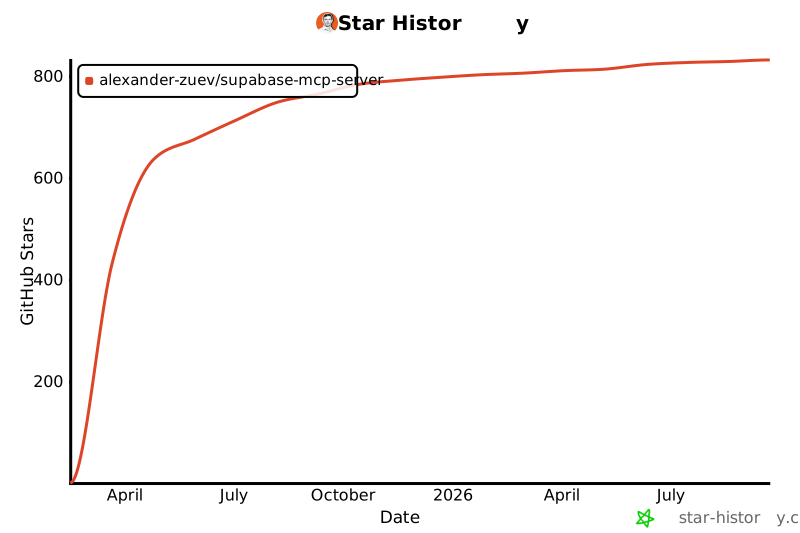](https://star-history.com/#alexander-zuev/supabase-mcp-server&Date)
- ---
- Enjoy! ☺️
Ratings and comments
Sign in to rate this skill.
Sign inFree to use. If it’s helped, pass it on.